


דוגמאות לתוספי ניתוח
במסמך הזה מופיעות דוגמאות ליצירת תוספי ניתוח בתרחישים שונים. מידע נוסף על תוספי ניתוח זמין במאמר יצירת תוספי ניתוח.
דוגמאות לתוספי ניתוח
כדי למצוא במהירות את קוד הדוגמה שאתם צריכים, תוכלו להשתמש בטבלאות המאפיינים הבאות.
דוגמאות ללא קוד
| הפורמט של מקור היומן | כותרת לדוגמה | תיאור | מושגים שקשורים לניתוח בדוגמה הזו |
|---|---|---|---|
| JSON (סוג היומן: GCP_IDS) |
שדות לחילוץ | חילוץ שדות מיומן בפורמט JSON. | בלי צורך בתכנות |
| JSON (סוג היומן: WORKSPACE_ALERTS) |
שליפת שדות עם ערך של תנאי מוקדם | שולפים שדות מיומן בפורמט JSON ומנרמלים אותם לשדה UDM חוזר, עם תנאי מוקדם. |
|
דוגמאות לקטעי קוד
| הפורמט של מקור היומן | כותרת לדוגמה | תיאור | מושגים של מנתח התוכן בדוגמה הזו |
|---|---|---|---|
| JSON (סוג היומן: `GCP_IDS`) |
הוספת סוכן משתמש של HTTP |
|
|
| CSV (סוג היומן: MISP_IOC) |
חילוץ שדות שרירותיים לאובייקט additional UDM |
חילוץ שדות ל-UDM > Entity > additional UDM Object > key-value pair |
additional אובייקט UDM |
| Syslog (סוג היומן: POWERSHELL) |
שליפת העדיפות ורמת החומרה מ-Syslog | מחולצים את הערכים של Syslog Facility ו-Severity לשדות UDM Security Result Priority ו-Severity. | מבוסס על Grok |
| JSON עם כותרת Syslog (סוג היומן: WINDOWS_SYSMON) |
עיצוב על סמך משפט מותנה |
|
|
| JSON עם כותרת Syslog (סוג היומן: WINDOWS_SYSMON) |
המרת סוגי נתונים |
|
|
| JSON עם כותרת Syslog (סוג היומן: WINDOWS_SYSMON) |
שמות משתנים זמניים לצורך קריאות | אפשר להשתמש בשמות משתנים זמניים בקטעי קוד, ואחר כך לשנות את השמות כך שיתאימו לשם של אובייקט האירוע הסופי של UDM. השימוש בטכניקה הזו יכול לשפר את הקריאות הכוללת. |
|
| JSON עם כותרת Syslog (סוג היומן: WINDOWS_SYSMON) |
שדות חוזרים | חשוב לנקוט משנה זהירות כשעובדים עם שדות חוזרים בקטעי קוד, למשל השדה security_result. |
|
| XML (סוג היומן: WINDOWS_DEFENDER_AV) |
שליפת שדה שרירותי לאובייקט additional |
|
האובייקט additional משמש לאחסון המידע כצמד מפתח/ערך מותאם אישית. |
| XML (סוג היומן: WINDOWS_DEFENDER_AV) |
שליפת שדה שרירותי אל שם המארח הראשי |
overwriteGrok
|
|
| JSON, CSV, XML, Syslog ו-KV | הסרה של מיפויים קיימים | כדי להסיר מיפויים קיימים, מסירים את הערכים של שדות UDM. |
דוגמאות נוספות לתחביר של כלי הניתוח זמינות במאמר דוגמאות לתוספים של כלי הניתוח.
דוגמאות ל-JSON
בדוגמאות הבאות מוסבר איך ליצור תוסף לניתוח שבו מקור היומן הוא בפורמט JSON.
No-code - Extract fields
מאפיינים לדוגמה:
- פורמט מקור היומן: JSON
- גישה למיפוי נתונים: ללא צורך בתכנות
- סוג היומן: GCP_IDS
- מטרת תוסף הניתוח: חילוץ שדות.
תיאור:
לא מתבצעת חילוץ של כמה שדות שקשורים לרשת. מכיוון שדוגמת היומן הזו היא יומן מובנה בפורמט JSON, אפשר להשתמש בגישה ללא קוד (מיפוי שדות נתונים) כדי ליצור את תוסף מנתח הנתונים.
השדות המקוריים שאנחנו רוצים לחלץ הם:
total_packets(מחרוזת)elapsed_time(מחרוזת)total_bytes(מחרוזת)
זוהי דוגמה לרשומה ביומן הגולמי:
{
"insertId": "625a41542d64c124e7db097ae0906ccb-1@a3",
"jsonPayload": {
  "destination_port": "80",
  "application": "incomplete",
  "ip_protocol": "tcp",
  "network": "projects/prj-p-shared-base/global/networks/shared-vpc-production",
  "start_time": "2024-10-29T21:14:59Z",
  "source_port": "41936",
  "source_ip_address": "35.191.200.157",
  "total_packets": "6",
  "elapsed_time": "0",
  "destination_ip_address": "192.168.0.11",
  "total_bytes": "412",
  "repeat_count": "1",
  "session_id": "1289742"
},
"resource": {
  "type": "ids.googleapis.com/Endpoint",
  "labels": {
    "resource_container": "projects/12345678910",
    "location": "europe-west4-a",
    "id": "p-europe-west4"
  }
},
"timestamp": "2024-10-29T21:15:21Z",
"logName": "projects/prj-p-shared-base/logs/ids.googleapis.com%2Ftraffic",
"receiveTimestamp": "2024-10-29T21:15:24.051990717Z"
}
בדוגמה הזו נעשה שימוש בגישת no-code כדי ליצור תוסף ניתוח באמצעות מיפוי שדות הנתונים הבא:
Precondition Path Precondition Operator Precondition Value נתיב של נתונים גולמיים שדה היעד* jsonPayload.total_bytesNOT_EQUALS "" jsonPayload.total_bytesudm.principal.network.received_bytesjsonPayload.elapsed_timeNOT_EQUALS "" jsonPayload.elapsed_timeudm.principal.network.session_duration.secondsjsonPayload.total_packetsNOT_EQUALS "" jsonPayload.total_packetsudm.principal.network.received_packetsהפעלת תוסף הניתוח מוסיפה בהצלחה את שלושת השדות שחולצו לאובייקט
principal.network.metadata.product_log_id = "625a41542d64c124e7db097ae0906ccb-1@a3" metadata.event_timestamp = "2024-10-29T21:14:59Z" metadata.event_type = "NETWORK_CONNECTION" metadata.vendor_name = "Google Cloud" metadata.product_name = "IDS" metadata.ingestion_labels[0].key = "label" metadata.ingestion_labels[0].value = "GCP_IDS" metadata.log_type = "GCP_IDS" principal.ip[0] = "35.191.200.157" principal.port = 41936 principal.network.received_bytes = 412 principal.network.session_duration.seconds = "0s" principal.network.received_packets = 6 target.ip[0] = "192.168.0.11" target.port = 80 target.application = "incomplete" observer.location.country_or_region = "EUROPE" observer.location.name = "europe-west4-a" observer.resource.name = "projects/12345678910" observer.resource.resource_type = "CLOUD_PROJECT" observer.resource.attribute.cloud.environment = "GOOGLE_CLOUD_PLATFORM" observer.resource.product_object_id = "p-europe-west4" network.ip_protocol = "TCP" network.session_id = "1289742"
No-code - Extract fields with Precondition Value
מאפיינים לדוגמה:
- פורמט מקור היומן: JSON
- גישה למיפוי נתונים: ללא צורך בתכנות
- סוג היומן: WORKSPACE_ALERTS
- מטרת תוסף הניתוח: חילוץ שדות עם ערך של תנאי מוקדם.
תיאור:
הכלי המקורי לניתוח לא מחלץ את
email addressשל המשתמש הראשי שהושפע מהתראה על DLP (מניעת אובדן נתונים).בדוגמה הזו נעשה שימוש בתוסף מנתח ללא קוד כדי לחלץ את
email addressולנרמל אותו לשדה UDM חוזר, עם תנאי מוקדם.כשעובדים עם שדות חוזרים בתוסף של כלי ניתוח ללא קוד, צריך לציין אם רוצים:
- replace (החלפה – החלפת כל הערכים של שדות חוזרים באובייקט UDM הקיים), או
- append (הוספת הערכים שחולצו לשדות חוזרים).
פרטים נוספים מופיעים בקטע שדות חוזרים.
בדוגמה הזו מוחלפות כתובות אימייל קיימות בשדה
principal.user.email_addressהמנורמל.תנאים מוקדמים מאפשרים לבצע בדיקות מותנות לפני שמבצעים פעולת חילוץ. ברוב המקרים, שדה התנאי המוקדם יהיה זהה לשדה נתוני המקור שרוצים לחלץ, עם אופרטור של תנאי מוקדם מסוג
not Null, לדוגמה,foo != "".עם זאת, לפעמים, כמו בדוגמה שלנו, הערך של שדה הנתונים הגולמיים שרוצים לחלץ לא מופיע בכל רשומות היומן. במקרה כזה, אפשר להשתמש בשדה תנאי מוקדם אחר כדי לסנן את פעולת החילוץ. בדוגמה שלנו, השדה
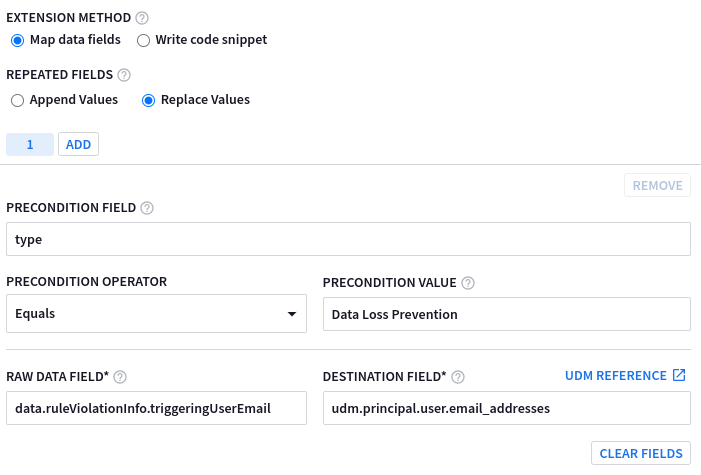
triggeringUserEmailשל הנתונים הגולמיים שרוצים לחלץ מופיע רק ביומנים שבהםtype = Data Loss Prevention.אלה ערכי הדוגמה שצריך להזין בשדות של תוסף מנתח התוכן ללא קוד:
Precondition Path Precondition Operator Precondition Value נתיב של נתונים גולמיים שדה היעד* typeשווה ל- מניעת אובדן נתונים data.ruleViolationInfo.triggeringUserEmailudm.principal.user.email_addressesבדוגמה הבאה מוצגים השדות של תוסף מנתח התוכן ללא קוד שאוכלסו בערכים לדוגמה:
הפעלת תוסף הניתוח מוסיפה את
email_addressלאובייקטprincipal.user.metadata.product_log_id = "Ug71LGqBr6Q=" metadata.event_timestamp = "2022-12-18T12:17:35.154368Z" metadata.event_type = "USER_UNCATEGORIZED" metadata.vendor_name = "Google Workspace" metadata.product_name = "Google Workspace Alerts" metadata.product_event_type = "DlpRuleViolation" metadata.log_type = "WORKSPACE_ALERTS" additional.fields["resource_title"] = "bq-results-20221215-112933-1671103787123.csv" principal.user.email_addresses[0] = "foo.bar@altostrat.com" target.resource.name = "DRIVE" target.resource.resource_type = "STORAGE_OBJECT" target.resource.product_object_id = "1wLteoF3VHljS_8_ABCD_VVbhFTfcTQplJ5k1k7cL4r8" target.labels[0].key = "resource_title" target.labels[0].value = "bq-results-20221321-112933-1671103787697.csv" about[0].resource.resource_type = "CLOUD_ORGANIZATION" about[0].resource.product_object_id = "C01abcde2" security_result[0].about.object_reference.id = "ODU2NjEwZTItMWE2YS0xMjM0LWJjYzAtZTJlMWU2YWQzNzE3" security_result[0].category_details[0] = "Data Loss Prevention" security_result[0].rule_name = "Sensitive Projects Match" security_result[0].summary = "Data Loss Prevention" security_result[0].action[0] = "ALLOW" security_result[0].severity = "MEDIUM" security_result[0].rule_id = "rules/00abcdxs183abcd" security_result[0].action_details = "ALERT, DRIVE_WARN_ON_EXTERNAL_SHARING" security_result[0].alert_state = "ALERTING" security_result[0].detection_fields[0].key = "start_time" security_result[0].detection_fields[0].value = "2022-12-18T12:17:35.154368Z" security_result[0].detection_fields[1].key = "status" security_result[0].detection_fields[1].value = "NOT_STARTED" security_result[0].detection_fields[2].key = "trigger" security_result[0].detection_fields[2].value = "DRIVE_SHARE" security_result[0].rule_labels[0].key = "detector_name" security_result[0].rule_labels[0].value = "EMAIL_ADDRESS" network.email.to[0] = "foo.bar@altostrat.com"
קטע קוד – הוספת סוכן משתמש HTTP
מאפיינים לדוגמה:
- פורמט מקור היומן: JSON
- גישת מיפוי הנתונים: קטע קוד
- סוג היומן: GCP_IDS
- מטרת תוסף הניתוח: הוספת סוכן משתמש של HTTP.
תיאור:
זו דוגמה לסוג אובייקט UDM לא סטנדרטי שלא נתמך בגישת השימוש בכלי ללא צורך בתכנות, ולכן נדרש שימוש בקטע קוד. ניתוח
Network HTTP Parser User
Agent
לא מופק על ידי מנתח ברירת המחדל. בנוסף, כדי לשמור על עקביות:- מערכת תייצר
Target HostnameמתוךrequestUrl. - יוקצה
Namespaceכדי להבטיח שיתבצע כינוי והעשרה מבוססי-נכסים.
# GCP_LOADBALANCING # owner: @owner # updated: 2022-12-23 # Custom parser extension that: # 1) adds consistent Namespace # 2) adds Parsed User Agent Object filter { # Initialize placeholder mutate { replace => { "httpRequest.userAgent" => "" "httpRequest.requestUrl" => "" } } json { on_error => "not_json" source => "message" array_function => "split_columns" } if ![not_json] { #1 - Override Namespaces mutate { replace => { "event1.idm.read_only_udm.principal.namespace" => "TMO" } } mutate { replace => { "event1.idm.read_only_udm.target.namespace" => "TMO" } } mutate { replace => { "event1.idm.read_only_udm.src.namespace" => "TMO" } } #2 - Parsed User Agent if [httpRequest][requestUrl]!= "" { grok { match => { "httpRequest.requestUrl" => ["\/\/(?P<_hostname>.*?)\/"] } on_error => "_grok_hostname_failed" } if ![_grok_hostname_failed] { mutate { replace => { "event1.idm.read_only_udm.target.hostname" => "%{_hostname}" } } } } if [httpRequest][userAgent] != "" { mutate { convert => { "httpRequest.userAgent" => "parseduseragent" } } #Map the converted "user_agent" to the new UDM field "http.parsed_user_agent". mutate { rename => { "httpRequest.userAgent" => "event1.idm.read_only_udm.network.http.parsed_user_agent" } } } mutate { merge => { "@output" => "event1" } } } }- מערכת תייצר
דוגמה לקובץ CSV
בדוגמה הבאה מוצג אופן היצירה של תוסף לניתוח נתונים שבו מקור היומן הוא בפורמט CSV.
קטע קוד – חילוץ שדות שרירותיים לאובייקט additional
מאפיינים לדוגמה:
- פורמט מקור היומן: CSV
- גישה למיפוי נתונים: קטע קוד
- סוג היומן: MISP_IOC
- מטרת תוסף הניתוח: חילוץ שדות שרירותיים אל
additionalהאובייקט. תיאור:
בדוגמה הזו נעשה שימוש בשילוב של הקשר של ישות UDM עם MISP_IOC. אובייקט UDM של זוג מפתח-ערך
additionalישמש לתיעוד מידע הקשרי שלא חולץ על ידי מנתח ברירת המחדל, ולהוספת שדות ספציפיים לכל ארגון. לדוגמה, כתובת URL שמובילה בחזרה למופע MISP הספציפי שלהם.זהו מקור היומן שמבוסס על CSV בדוגמה הזו:
19d66d38a-14e1-407f-a4d1-90b82aa1d59f239083Network activity4ip-dst5117.253.154.123678168789456491011121314DigitalSide Malware report\: MD5\: 59ce0baba11893f90527fc951ac6991215ORGNAME16DIGITALSIDE.IT17018Medium190202023-06-2321tlp:white,type:OSINT,source:DigitalSide.IT,source:urlhaus.abuse.ch221698036218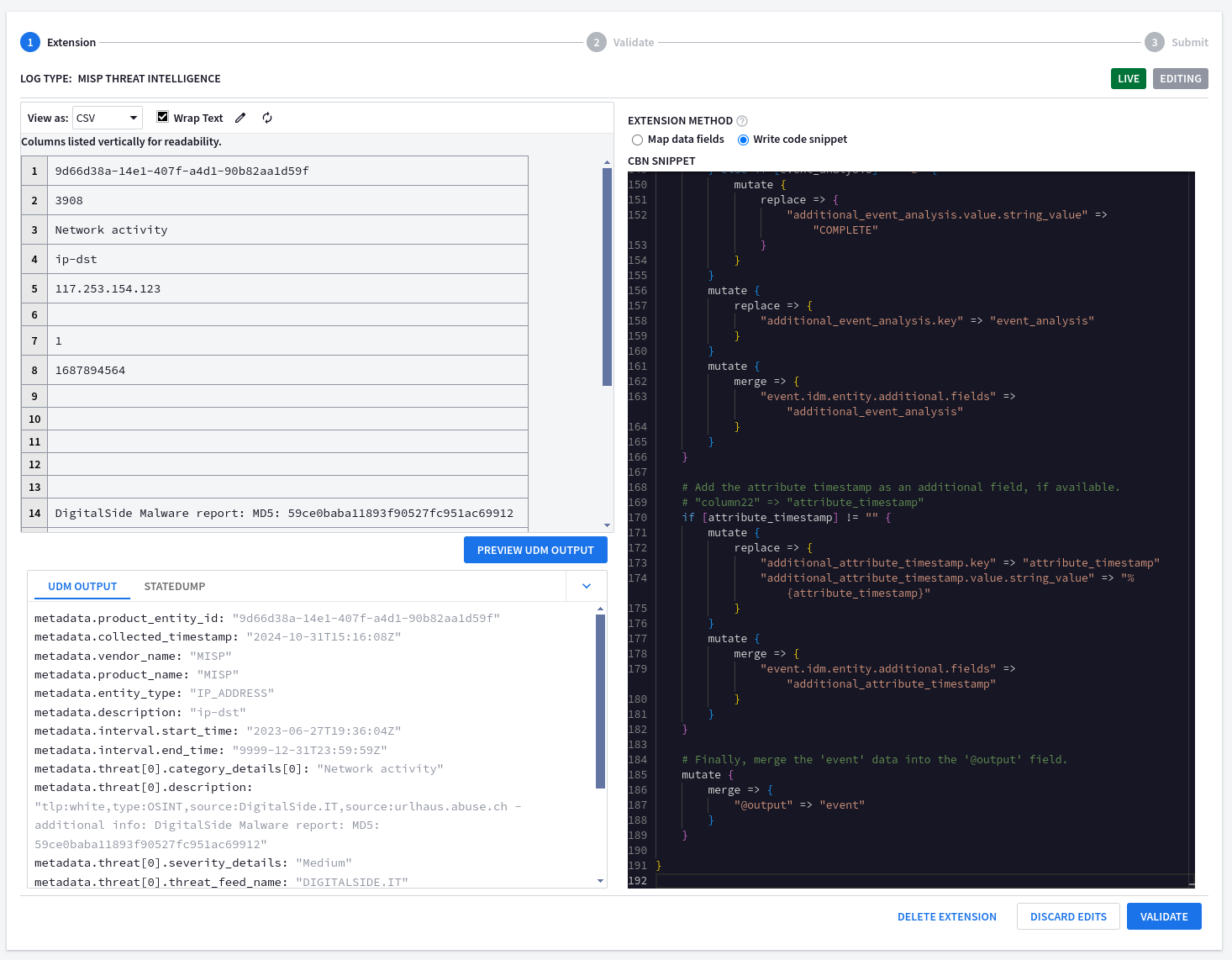
# MISP_IOC
# owner: @owner
# updated: 2024-06-21
# Custom parser extension that:
# 1) adds a link back to internal MISP tenant
# 2) extracts missing fields into UDM > Entity > Additional fields
filter {
    # Set the base URL for MISP. Remember to replace this placeholder!
    mutate {
        replace => {
            "misp_base_url" => "https://<YOUR_MISP_URL>"
        }
    }
    # Parse the CSV data from the 'message' field. Uses a comma as the separator.
    # The 'on_error' option handles lines that are not properly formatted CSV.
    csv {
        source => "message"
        separator => ","
        on_error => "broken_csv"
    }
    # If the CSV parsing was successful...
    if ![broken_csv] {
        # Rename the CSV columns to more descriptive names.
        mutate {
            rename => {
                "column2" => "event_id"
                "column8" => "object_timestamp"
                "column16" => "event_source_org"
                "column17" => "event_distribution"
                "column19" => "event_analysis"
                "column22" => "attribute_timestamp"
            }
        }
    }
    # Add a link to view the event in MISP, if an event ID is available.
    # "column2" => "event_id"
    if [event_id] != "" {
        mutate {
            replace => {
                "additional_url.key" => "view_in_misp"
                "additional_url.value.string_value" => "%{misp_base_url}/events/view/%{event_id}"
            }
        }
        mutate {
            merge => {
                "event.idm.entity.additional.fields" => "additional_url"
            }
        }
    }
    # Add the object timestamp as an additional field, if available.
    # "column8" => "object_timestamp"
    if [object_timestamp] != "" {
        mutate {
            replace => {
                "additional_object_timestamp.key" => "object_timestamp"
                "additional_object_timestamp.value.string_value" => "%{object_timestamp}"
            }
        }
        mutate {
            merge => {
                "event.idm.entity.additional.fields" => "additional_object_timestamp"
            }
        }
    }
    # Add the event source organization as an additional field, if available.
    # "column16" => "event_source_org"
    if [event_source_org] != "" {
        mutate {
            replace => {
                "additional_event_source_org.key" => "event_source_org"
                "additional_event_source_org.value.string_value" => "%{event_source_org}"
            }
        }
        mutate {
            merge => {
                "event.idm.entity.additional.fields" => "additional_event_source_org"
            }
        }
    }
    # Add the event distribution level as an additional field, if available.
    # Maps numerical values to descriptive strings.
    # "column17" => "event_distribution"
    if [event_distribution] != "" {
        if [event_distribution] == "0" {
            mutate {
                replace => {
                    "additional_event_distribution.value.string_value" => "YOUR_ORGANIZATION_ONLY"
                }
            }
        } else if [event_distribution] == "1" {
            mutate {
                replace => {
                    "additional_event_distribution.value.string_value" => "THIS_COMMUNITY_ONLY"
                }
            }
        } else if [event_distribution] == "2" {
            mutate {
                replace => {
                    "additional_event_distribution.value.string_value" => "CONNECTED_COMMUNITIES"
                }
            }
        } else if [event_distribution] == "3" {
            mutate {
                replace => {
                    "additional_event_distribution.value.string_value" => "ALL_COMMUNITIES"
                }
            }
        } else if [event_distribution] == "4" {
            mutate {
                replace => {
                    "additional_event_distribution.value.string_value" => "SHARING_GROUP"
                }
            }
        } else if [event_distribution] == "5" {
            mutate {
                replace => {
                    "additional_event_distribution.value.string_value" => "INHERIT_EVENT"
                }
            }
        }
        mutate {
            replace => {
                "additional_event_distribution.key" => "event_distribution"
            }
        }
        mutate {
            merge => {
                "event.idm.entity.additional.fields" => "additional_event_distribution"
            }
        }
    }
    # Add the event analysis level as an additional field, if available.
    # Maps numerical values to descriptive strings.
    # "column19" => "event_analysis"
    if [event_analysis] != "" {
        if [event_analysis] == "0" {
            mutate {
                replace => {
                    "additional_event_analysis.value.string_value" => "INITIAL"
                }
            }
        } else if [event_analysis] == "1" {
            mutate {
                replace => {
                    "additional_event_analysis.value.string_value" => "ONGOING"
                }
            }
        } else if [event_analysis] == "2" {
            mutate {
                replace => {
                    "additional_event_analysis.value.string_value" => "COMPLETE"
                }
            }
        }
        mutate {
            replace => {
                "additional_event_analysis.key" => "event_analysis"
            }
        }
        mutate {
            merge => {
                "event.idm.entity.additional.fields" => "additional_event_analysis"
            }
        }
    }
    # Add the attribute timestamp as an additional field, if available.
    # "column22" => "attribute_timestamp"
    if [attribute_timestamp] != "" {
        mutate {
            replace => {
                "additional_attribute_timestamp.key" => "attribute_timestamp"
                "additional_attribute_timestamp.value.string_value" => "%{attribute_timestamp}"
            }
        }
        mutate {
            merge => {
                "event.idm.entity.additional.fields" => "additional_attribute_timestamp"
            }
        }
    }
    # Finally, merge the 'event' data into the '@output' field.
    mutate {
        merge => {
            "@output" => "event"
        }
    }
}
הפעלת תוסף הניתוח מוסיפה בהצלחה את השדות המותאמים אישית מקובץ ה-CSV לאובייקט
additional.metadata.product_entity_id = "9d66d38a-14e1-407f-a4d1-90b82aa1d59f" metadata.collected_timestamp = "2024-10-31T15:16:08Z" metadata.vendor_name = "MISP" metadata.product_name = "MISP" metadata.entity_type = "IP_ADDRESS" metadata.description = "ip-dst" metadata.interval.start_time = "2023-06-27T19:36:04Z" metadata.interval.end_time = "9999-12-31T23:59:59Z" metadata.threat[0].category_details[0] = "Network activity" metadata.threat[0].description = "tlp:white,type:OSINT,source:DigitalSide.IT,source:urlhaus.abuse.ch - additional info: DigitalSide Malware report: MD5: 59ce0baba11893f90527fc951ac69912" metadata.threat[0].severity_details = "Medium" metadata.threat[0].threat_feed_name = "DIGITALSIDE.IT" entity.ip[0] = "117.253.154.123" additional.fields["view_in_misp"] = "https://
/events/view/3908" additional.fields["object_timestamp"] = "1687894564" additional.fields["event_source_org"] = "DIGITALSIDE.IT" additional.fields["event_distribution"] = "YOUR_ORGANIZATION_ONLY" additional.fields["event_analysis"] = "INITIAL" additional.fields["attribute_timestamp"] = "1698036218"
דוגמאות לשימוש ב-Grok
בדוגמאות הבאות מוסבר איך ליצור תוספים של מנתח מבוסס Grok.
Code Snippet (and Grok) - Extracting Priority and Severity
מאפיינים לדוגמה:
- פורמט מקור היומן: Syslog
- גישה למיפוי נתונים: קטע קוד באמצעות Grok
- סוג היומן: POWERSHELL
- מטרת התוסף Parser: חילוץ של Priority (עדיפות) ו-Severity (חומרה).
תיאור:
בדוגמה הזו נוצר תוסף מנתח מבוסס-Grok כדי לחלץ את הערכים של Syslog Facility and Severity לשדות
Priorityו-Severityשל UDM Security Result.filter { # Use grok to parse syslog messages. The on_error clause handles messages that don't match the pattern. grok { match => { "message" => [ # Extract message with syslog headers. "(<%{POSINT:_syslog_priority}>)%{SYSLOGTIMESTAMP:datetime} %{DATA:logginghost}: %{GREEDYDATA:log_data}" ] } on_error => "not_supported_format" } # If the grok parsing failed, tag the event as unsupported and drop it. if ![not_supported_format] { if [_syslog_priority] != "" { if [_syslog_priority] =~ /0|8|16|24|32|40|48|56|64|72|80|88|96|104|112|120|128|136|144|152|160|168|176|184/ { mutate { replace => { "_security_result.severity_details" => "EMERGENCY" } } } if [_syslog_priority] =~ /1|9|17|25|33|41|49|57|65|73|81|89|97|105|113|121|129|137|145|153|161|169|177|185/ { mutate { replace => { "_security_result.severity_details" => "ALERT" } } } if [_syslog_priority] =~ /2|10|18|26|34|42|50|58|66|74|82|90|98|106|114|122|130|138|146|154|162|170|178|186/ { mutate { replace => { "_security_result.severity_details" => "CRITICAL" } } } if [_syslog_priority] =~ /3|11|19|27|35|43|51|59|67|75|83|91|99|107|115|123|131|139|147|155|163|171|179|187/ { mutate { replace => { "_security_result.severity_details" => "ERROR" } } } if [_syslog_priority] =~ /4|12|20|28|36|44|52|60|68|76|84|92|100|108|116|124|132|140|148|156|164|172|180|188/ { mutate { replace => { "_security_result.severity_details" => "WARNING" } } } if [_syslog_priority] =~ /5|13|21|29|37|45|53|61|69|77|85|93|101|109|117|125|133|141|149|157|165|173|181|189/ { mutate { replace => { "_security_result.severity_details" => "NOTICE" } } } if [_syslog_priority] =~ /6|14|22|30|38|46|54|62|70|78|86|94|102|110|118|126|134|142|150|158|166|174|182|190/ { mutate { replace => { "_security_result.severity_details" => "INFORMATIONAL" } } } if [_syslog_priority] =~ /7|15|23|31|39|47|55|63|71|79|87|95|103|111|119|127|135|143|151|159|167|175|183|191/ { mutate { replace => { "_security_result.severity_details" => "DEBUG" } } } # Facilities (mapped to priority) if [_syslog_priority] =~ /0|1|2|3|4|5|6|7/ { mutate { replace => { "_security_result.priority_details" => "KERNEL" } } } if [_syslog_priority] =~ /8|9|10|11|12|13|14|15/ { mutate { replace => { "_security_result.priority_details" => "USER" } } } if [_syslog_priority] =~ /16|17|18|19|20|21|22|23/ { mutate { replace => { "_security_result.priority_details" => "MAIL" } } } if [_syslog_priority] =~ /24|25|26|27|28|29|30|31/ { mutate { replace => { "_security_result.priority_details" => "SYSTEM" } } } if [_syslog_priority] =~ /32|33|34|35|36|37|38|39/ { mutate { replace => { "_security_result.priority_details" => "SECURITY" } } } if [_syslog_priority] =~ /40|41|42|43|44|45|46|47/ { mutate { replace => { "_security_result.priority_details" => "SYSLOG" } } } if [_syslog_priority] =~ /48|49|50|51|52|53|54|55/ { mutate { replace => { "_security_result.priority_details" => "LPD" } } } if [_syslog_priority] =~ /56|57|58|59|60|61|62|63/ { mutate { replace => { "_security_result.priority_details" => "NNTP" } } } if [_syslog_priority] =~ /64|65|66|67|68|69|70|71/ { mutate { replace => { "_security_result.priority_details" => "UUCP" } } } if [_syslog_priority] =~ /72|73|74|75|76|77|78|79/ { mutate { replace => { "_security_result.priority_details" => "TIME" } } } if [_syslog_priority] =~ /80|81|82|83|84|85|86|87/ { mutate { replace => { "_security_result.priority_details" => "SECURITY" } } } if [_syslog_priority] =~ /88|89|90|91|92|93|94|95/ { mutate { replace => { "_security_result.priority_details" => "FTPD" } } } if [_syslog_priority] =~ /96|97|98|99|100|101|102|103/ { mutate { replace => { "_security_result.priority_details" => "NTPD" } } } if [_syslog_priority] =~ /104|105|106|107|108|109|110|111/ { mutate { replace => { "_security_result.priority_details" => "LOGAUDIT" } } } if [_syslog_priority] =~ /112|113|114|115|116|117|118|119/ { mutate { replace => { "_security_result.priority_details" => "LOGALERT" } } } if [_syslog_priority] =~ /120|121|122|123|124|125|126|127/ { mutate { replace => { "_security_result.priority_details" => "CLOCK" } } } if [_syslog_priority] =~ /128|129|130|131|132|133|134|135/ { mutate { replace => { "_security_result.priority_details" => "LOCAL0" } } } if [_syslog_priority] =~ /136|137|138|139|140|141|142|143/ { mutate { replace => { "_security_result.priority_details" => "LOCAL1" } } } if [_syslog_priority] =~ /144|145|146|147|148|149|150|151/ { mutate { replace => { "_security_result.priority_details" => "LOCAL2" } } } if [_syslog_priority] =~ /152|153|154|155|156|157|158|159/ { mutate { replace => { "_security_result.priority_details" => "LOCAL3" } } } if [_syslog_priority] =~ /160|161|162|163|164|165|166|167/ { mutate { replace => { "_security_result.priority_details" => "LOCAL4" } } } if [_syslog_priority] =~ /168|169|170|171|172|173|174|175/ { mutate { replace => { "_security_result.priority_details" => "LOCAL5" } } } if [_syslog_priority] =~ /176|177|178|179|180|181|182|183/ { mutate { replace => { "_security_result.priority_details" => "LOCAL6" } } } if [_syslog_priority] =~ /184|185|186|187|188|189|190|191/ { mutate { replace => { "_security_result.priority_details" => "LOCAL7" } } } mutate { merge => { "event.idm.read_only_udm.security_result" => "_security_result" } } } mutate { merge => { "@output" => "event" } } } }כשמציגים את התוצאות מהרחבת הניתוח, רואים את הפורמט שקריא לבני אדם.
metadata.product_log_id = "6161053"
metadata.event_timestamp = "2024-10-31T15:10:10Z"
metadata.event_type = "PROCESS_LAUNCH"
metadata.vendor_name = "Microsoft"
metadata.product_name = "PowerShell"
metadata.product_event_type = "600"
metadata.description = "Info"
metadata.log_type = "POWERSHELL"
principal.hostname = "win-adfs.lunarstiiiness.com"
principal.resource.name = "in_powershell"
principal.resource.resource_subtype = "im_msvistalog"
principal.asset.hostname = "win-adfs.lunarstiiiness.com"
target.hostname = "Default Host"
target.process.command_line = "C:\Program Files\Microsoft Azure AD Sync\Bin\miiserver.exe"
target.asset.hostname = "Default Host"
target.asset.asset_id = "Host ID:bf203e94-72cf-4649-84a5-fc02baedb75f"
security_result[0].severity_details = "INFORMATIONAL"
security_result[0].priority_details = "USER"
קטע קוד (ו-Grok) – קישוט אירועים, שמות משתנים זמניים והמרת סוגי נתונים
מאפיינים לדוגמה:
- פורמט מקור היומן: JSON עם כותרת Syslog
- גישה למיפוי נתונים: קטע קוד באמצעות Grok
- סוג היומן: WINDOWS_SYSMON
- המטרה של תוסף הניתוח: הוספת פרטים לאירועים, שמות משתנים זמניים וסוגי נתונים.
תיאור:
בדוגמה הזו מוסבר איך לבצע את הפעולות הבאות כשיוצרים תוסף לניתוח:
- קישוט שמבוסס על משפט מותנה ועל הבנת סוגי הנתונים בקטע קוד.
- המרת סוגי נתונים
- שמות משתנים זמניים לצורך קריאות
- שדות חוזרים
עיצוב על סמך משפט תנאי
בדוגמה הזו נוספים הסברים (מידע הקשרי) על המשמעות של כל סוג אירוע ב-WINDOWS_SYSMON. הוא משתמש במשפט מותנה כדי לבדוק את EventID, ואז הוא מוסיף
Description, לדוגמה,EventID1 הוא אירועProcess Creation.כשמשתמשים במסנן חילוץ, למשל JSON, יכול להיות שסוג הנתונים המקורי יישמר.
בדוגמה הבאה, הערך
EventIDמחולץ כמספר שלם כברירת מחדל. המשפט המותנה מעריך את הערךEventIDכמספר שלם ולא כמחרוזת.if [EventID] == 1 { mutate { replace => { "_description" => "[1] Process creation" } } }המרת סוגי נתונים
אפשר להמיר סוגי נתונים בתוסף של מנתח באמצעות הפונקציה convert.
mutate {
  convert => {
    "EventID" => "string"
  }
  on_error => "_convert_EventID_already_string"
}
שמות משתנים זמניים לשיפור הקריאוּת
אפשר להשתמש בשמות משתנים זמניים בקטעי קוד, ואחר כך לשנות את השמות כך שיתאימו לשם של אובייקט האירוע הסופי של UDM. כך אפשר לשפר את הקריאות הכוללת.
בדוגמה הבאה, המשתנה
descriptionמקבל את השם החדשevent.idm.read_only_udm.metadata.description:mutate { rename => { "_description" => "event.idm.read_only_udm.metadata.description" } }שדות חוזרים
התוסף המלא של כלי הניתוח מוצג כאן:
filter {
# initialize variable
mutate {
  replace => {
    "EventID" => ""
  }
}
# Use grok to parse syslog messages.
# The on_error clause handles messages that don't match the pattern.
grok {
  match => {
    "message" => [
      "(<%{POSINT:_syslog_priority}>)%{SYSLOGTIMESTAMP:datetime} %{DATA:logginghost}: %{GREEDYDATA:log_data}"
    ]
  }
  on_error => "not_supported_format"
}
if ![not_supported_format] {
  json {
    source => "log_data"
    on_error => "not_json"
  }
  if ![not_json] {
    if [EventID] == 1 {
      mutate {
        replace => {
          "_description" => "[1] Process creation"
        }
      }
    }
    if [EventID] == 2 {
      mutate {
        replace => {
          "_description" => "[2] A process changed a file creation time"
        }
      }
    }
    if [EventID] == 3 {
      mutate {
        replace => {
          "_description" => "[3] Network connection"
        }
      }
    }
    if [EventID] == 4 {
      mutate {
        replace => {
          "_description" => "[4] Sysmon service state changed"
        }
      }
    }
    if [EventID] == 5 {
      mutate {
        replace => {
          "_description" => "[5] Process terminated"
        }
      }
    }
    if [EventID] == 6 {
      mutate {
        replace => {
          "_description" => "[6] Driver loaded"
        }
      }
    }
    if [EventID] == 7 {
      mutate {
        replace => {
          "_description" => "[7] Image loaded"
        }
      }
    }
    if [EventID] == 8 {
      mutate {
        replace => {
          "_description" => "[8] CreateRemoteThread"
        }
      }
    }
    if [EventID] == 9 {
      mutate {
        replace => {
          "_description" => "[9] RawAccessRead"
        }
      }
    }
    if [EventID] == 10 {
      mutate {
        replace => {
          "_description" => "[10] ProcessAccess"
        }
      }
    }
    if [EventID] == 11 {
      mutate {
        replace => {
          "_description" => "[11] FileCreate"
        }
      }
    }
    if [EventID] == 12 {
      mutate {
        replace => {
          "_description" => "[12] RegistryEvent (Object create and delete)"
        }
      }
    }
    if [EventID] == 13 {
      mutate {
        replace => {
          "_description" => "[13] RegistryEvent (Value Set)"
        }
      }
    }
    if [EventID] == 14 {
      mutate {
        replace => {
          "_description" => "[14] RegistryEvent (Key and Value Rename)"
        }
      }
    }
    if [EventID] == 15 {
      mutate {
        replace => {
          "_description" => "[15] FileCreateStreamHash"
        }
      }
    }
    if [EventID] == 16 {
      mutate {
        replace => {
          "_description" => "[16] ServiceConfigurationChange"
        }
      }
    }
    if [EventID] == 17 {
      mutate {
        replace => {
          "_description" => "[17] PipeEvent (Pipe Created)"
        }
      }
    }
    if [EventID] == 18 {
      mutate {
        replace => {
          "_description" => "[18] PipeEvent (Pipe Connected)"
        }
      }
    }
    if [EventID] == 19 {
      mutate {
        replace => {
          "_description" => "[19] WmiEvent (WmiEventFilter activity detected)"
        }
      }
    }
    if [EventID] == 20 {
      mutate {
        replace => {
          "_description" => "[20] WmiEvent (WmiEventConsumer activity detected)"
        }
      }
    }
    if [EventID] == 21 {
      mutate {
        replace => {
          "_description" => "[21] WmiEvent (WmiEventConsumerToFilter activity detected)"
        }
      }
    }
    if [EventID] == 22 {
      mutate {
        replace => {
          "_description" => "[22] DNSEvent (DNS query)"
        }
      }
    }
    if [EventID] == 23 {
      mutate {
        replace => {
          "_description" => "[23] FileDelete (File Delete archived)"
        }
      }
    }
    if [EventID] == 24 {
      mutate {
        replace => {
          "_description" => "[24] ClipboardChange (New content in the clipboard)"
        }
      }
    }
    if [EventID] == 25 {
      mutate {
        replace => {
          "_description" => "[25] ProcessTampering (Process image change)"
        }
      }
    }
    if [EventID] == 26 {
      mutate {
        replace => {
          "_description" => "[26] FileDeleteDetected (File Delete logged)"
        }
      }
    }
    if [EventID] == 255 {
      mutate {
        replace => {
          "_description" => "[255] Error"
        }
      }
    }
    mutate {
      rename => {
        "_description" => "event.idm.read_only_udm.metadata.description"
      }
    }
    statedump{}
    mutate {
      merge => {
        "@output" => "event"
      }
    }
  }
}
}
הפעלת תוסף הניתוח מוסיפה את העיטור לשדה
metadata.description.metadata.product_log_id = "6008459" metadata.event_timestamp = "2024-10-31T14:41:53.442Z" metadata.event_type = "REGISTRY_CREATION" metadata.vendor_name = "Microsoft" metadata.product_name = "Microsoft-Windows-Sysmon" metadata.product_event_type = "12" metadata.description = "[12] RegistryEvent (Object create and delete)" metadata.log_type = "WINDOWS_SYSMON" additional.fields["thread_id"] = "3972" additional.fields["channel"] = "Microsoft-Windows-Sysmon/Operational" additional.fields["Keywords"] = "-9223372036854776000" additional.fields["Opcode"] = "Info" additional.fields["ThreadID"] = "3972" principal.hostname = "win-adfs.lunarstiiiness.com" principal.user.userid = "tim.smith_admin" principal.user.windows_sid = "S-1-5-18" principal.process.pid = "6856" principal.process.file.full_path = "C:\Windows\system32\wsmprovhost.exe" principal.process.product_specific_process_id = "SYSMON:{927d35bf-a374-6495-f348-000000002900}" principal.administrative_domain = "LUNARSTIIINESS" principal.asset.hostname = "win-adfs.lunarstiiiness.com" target.registry.registry_key = "HKU\S-1-5-21-3263964631-4121654051-1417071188-1116\Software\Policies\Microsoft\SystemCertificates\CA\Certificates" observer.asset_id = "5770385F:C22A:43E0:BF4C:06F5698FFBD9" observer.process.pid = "2556" about[0].labels[0].key = "Category ID" about[0].labels[0].value = "RegistryEvent" security_result[0].rule_name = "technique_id=T1553.004,technique_name=Install Root Certificate" security_result[0].summary = "Registry object added or deleted" security_result[0].severity = "INFORMATIONAL" security_result[1].rule_name = "EventID: 12" security_result[2].summary = "12"
דוגמאות בפורמט XML
בדוגמאות הבאות מוסבר איך ליצור תוסף לניתוח שבו מקור היומן הוא בפורמט XML.
קטע קוד – חילוץ שרירותי של שדה לאובייקט additional
מאפיינים לדוגמה:
- פורמט מקור היומן: XML
- גישת מיפוי הנתונים: קטע קוד
- סוג היומן: WINDOWS_DEFENDER_AV
- מטרת תוסף הניתוח: שליפת שדה שרירותי לאובייקט
additional תיאור:
המטרה של הדוגמה הזו היא לחלץ ולאחסן את הערך
Platform Version, למשל כדי שיהיה אפשר לדווח עלoutdated platform versionsולחפש אותו.אחרי עיון במסמך שדות חשובים ב-UDM, לא זוהה שדה מתאים ב-UDM. לכן, בדוגמה הזו נעשה שימוש באובייקט
additionalכדי לאחסן את המידע הזה כצמד מפתח/ערך מותאם אישית.# Parser Extension for WINDOWS_DEFENDER_AV # 2024-10-29: Extracting 'Platform Version' into Additional filter { # Uses XPath to target the specific element(s) xml { source => "message" xpath => { "/Event/EventData/Data[@Name='Platform version']" => "platform_version" } on_error => "_xml_error" } # Conditional processing: Only proceed if XML parsing was successful if ![_xml_error] { # Prepare the additional field structure using a temporary variable mutate{ replace => { "additional_platform_version.key" => "Platform Version" "additional_platform_version.value.string_value" => "%{platform_version}" } on_error => "no_platform_version" } # Merge the additional field into the event1 structure. if ![no_platform_version] { mutate { merge => { "event1.idm.read_only_udm.additional.fields" => "additional_platform_version" } } } mutate { merge => { "@output" => "event1" } } } }אם מריצים את הפלט של התצוגה המקדימה של UDM, רואים שהשדה החדש נוסף בהצלחה.
metadata.event_timestamp = "2024-10-29T14:08:52Z"
metadata.event_type = "STATUS_HEARTBEAT"
metadata.vendor_name = "Microsoft"
metadata.product_name = "Windows Defender AV"
metadata.product_event_type = "MALWAREPROTECTION_SERVICE_HEALTH_REPORT"
metadata.description = "Endpoint Protection client health report (time in UTC)."
metadata.log_type = "WINDOWS_DEFENDER_AV"
additional.fields["Platform Version"] = "4.18.24080.9"
principal.hostname = "win-dc-01.ad.1823127835827.altostrat.com"
security_result[0].description = "EventID: 1151"
security_result[0].action[0] = "ALLOW"
security_result[0].severity = "LOW"
קטע קוד (ו-Grok) – חילוץ שרירותי של שדה אל שם המארח הראשי
מאפיינים לדוגמה:
- פורמט מקור היומן: XML
- גישה למיפוי נתונים: קטע קוד באמצעות Grok
- סוג היומן: WINDOWS_DEFENDER_AV
- מטרת תוסף מנתח הנתונים: חילוץ שדה שרירותי אל שם המארח הראשי
תיאור:
המטרה של הדוגמה הזו היא לחלץ את
HostnameמתוךFQDNולשכתב את השדהprincipal.hostname.בדוגמה הזו נבדק אם השדה
Computer nameביומן הגולמי כולל את הערךFQDN. אם כן, המערכת מחלצת רק את החלקHostnameומחליפה את השדהPrincipal Hostnameשל UDM.אחרי שבודקים את ה-Parser ואת המסמך important UDM Fields, ברור שצריך להשתמש בשדה
principal.hostname.# Parser Extension for WINDOWS_DEFENDER_AV # 2024-10-29: Extract Hostname from FQDN and overwrite principal.hostname filter { # Uses XPath to target the specific element(s) xml { source => "message" xpath => { "/Event/System/Computer" => "hostname" } on_error => "_xml_error" } # Conditional processing: Only proceed if XML parsing was successful if ![_xml_error] { # Extract all characters before the first dot in the hostname variable grok { match => { "hostname" => "(?<hostname>[^.]+)" } } mutate { replace => { "event1.idm.read_only_udm.principal.hostname" => "%{hostname}" } } mutate { merge => { "@output" => "event1" } } } }תוסף המנתח הזה משתמש בהצהרת Grok כדי להפעיל ביטוי רגולרי (regex) לחילוץ השדה
hostname. הביטוי הרגולרי עצמו משתמש בקבוצת לכידה עם שם, כלומר, כל מה שמוצא התאמה בתוך הסוגריים יאוחסן בשדה שנקראhostname, בהתאמה לתו אחד או יותר עד שיימצא תו נקודה. המערכת תקלוט רק אתhostnameבתוךFQDN.עם זאת, כשמריצים את הפקודה PREVIEW UDM OUTPUT, מוחזרת שגיאה. למה זה קורה?
generic::unknown: pipeline.ParseLogEntry failed:
 LOG_PARSING_CBN_ERROR: "generic::internal: pipeline failed: filter grok (2) failed:
field\ "hostname\" already exists in data and is not overwritable"
הצהרה בנושא Grok
overwriteבתוך הצהרת Grok, קבוצת לכידה עם שם לא יכולה להחליף משתנה קיים, אלא אם מציינים זאת במפורש באמצעות הצהרת
overwrite. בתרחיש הזה, אפשר להשתמש בשם משתנה אחר לקבוצת הלכידה עם השם בהצהרת Grok, או להשתמש בהצהרתoverwriteכדי להחליף באופן מפורש את המשתנהhostnameהקיים, כמו שמוצג בדוגמה הבאה של קטע הקוד.# Parser Extension for WINDOWS_DEFENDER_AV # 2024-10-29: Overwriting principal Hostname filter { xml { source => "message" xpath => { "/Event/System/Computer" => "hostname" } on_error => "_xml_error" } if ![_xml_error] { grok { match => { "hostname" => "(?<hostname>[^.]+)" } overwrite => ["hostname"] on_error => "_grok_hostname_error" } mutate { replace => { "event1.idm.read_only_udm.principal.hostname" => "%{hostname}" } } mutate { merge => { "@output" => "event1" } } } }אם מריצים שוב את הפקודה PREVIEW UDM OUTPUT, רואים שהשדה החדש נוסף אחרי החילוץ של
hostnameמ-FQDN.metadata.event_timestamp"2024-10-29T14:08:52Z" metadata.event_type"STATUS_HEARTBEAT" metadata.vendor_name"Microsoft" metadata.product_name"Windows Defender AV" metadata.product_event_type"MALWAREPROTECTION_SERVICE_HEALTH_REPORT" metadata.description"Endpoint Protection client health report (time in UTC)." metadata.log_type"WINDOWS_DEFENDER_AV" principal.hostname"win-dc-01" security_result[0].description"EventID: 1151" security_result[0].action[0]"ALLOW" security_result[0].severity"LOW"
דוגמאות ל-JSON, CSV, XML, Syslog ו-KV
בדוגמאות הבאות אפשר לראות איך ליצור תוסף לניתוח שבו מקור היומן הוא בפורמט JSON, CSV, XML, Syslog או KV.
קטע קוד – הסרת מיפויים קיימים
מאפיינים לדוגמה:
- פורמט מקור היומן: JSON, CSV, Syslog, XML ו-KV
- גישת מיפוי הנתונים: קטע קוד
- מטרת תוסף הניתוח: הסרת ערכים בשדות של UDM
תיאור:
המטרה של הדוגמאות האלה היא להסיר מיפויים קיימים על ידי הסרת הערכים בשדות UDM.
בדוגמה הבאה, הערך בשדה
stringמוסר:filter { mutate{ replace => { "event.idm.read_only_udm.metadata.vendor_name" => "" } } mutate { merge => { "@output" => "event" } } }בדוגמה הבאה, הערך בשדה
integerמוסר:filter { mutate { replace => { "principal_port" => "0" } } mutate { convert => { "principal_port" => "integer" } } mutate { rename => { "principal_port" => "event.idm.read_only_udm.principal.port" } } mutate { merge => { "@output" => "event" } } }בדוגמה הבאה, הערך בשדה
floatמוסר:filter { mutate { replace => { "security_result_object.risk_score" => "0.0" } convert => { "security_result_object.risk_score" => "float" } on_error => "default_risk_score_conversion_failed" } mutate { merge => { "event.idm.read_only_udm.security_result" => "security_result_object" } on_error => "security_result_merge_failed" } mutate { merge => { "@output" => "event" } } }בדוגמה הבאה, הערך בשדה
booleanמוסר:filter { mutate{ replace => { "tls_established" => "false" } } mutate { convert => { "tls_established" => "boolean" } } mutate { rename => { "tls_established" => "event.idm.read_only_udm.network.tls.established" } } mutate { merge => { "@output" => "event" } } }בדוגמה הבאה, הערך בשדה
extensionמוסר:filter { mutate { replace => { "event.idm.read_only_udm.extensions.auth.auth_details" => "" } on_error => "logon_type_not_set" } mutate { merge => { "@output" => "event" } } }הבעיה עדיין לא נפתרה? קבלת תשובות מחברי הקהילה וממומחי Google SecOps.