


איסוף יומני Sysmon של Microsoft Windows
במסמך הזה:
- מתאר את ארכיטקטורת הפריסה ואת שלבי ההתקנה, וגם את ההגדרות הנדרשות ליצירת יומנים שנתמכים על ידי כלי הניתוח של Google SecOps לאירועי Microsoft Windows Sysmon. במאמר הזה יש סקירה כללית על הכנסת נתונים ל-Google SecOps.
- כולל מידע על האופן שבו כלי הניתוח ממפה שדות ביומן המקורי לשדות במודל הנתונים המאוחד של Google SecOps.
המידע במסמך הזה רלוונטי למנתח התחביר עם תווית ההטמעה WINDOWS_SYSMON. תווית ההטמעה מזהה איזה מנתח מבצע נורמליזציה של נתוני יומן גולמיים לפורמט UDM מובנה.
לפני שמתחילים
בדיקת אפשרויות ארכיטקטורת הפריסה
אתם יכולים לאסוף ולשלוח נתוני Microsoft Windows Sysmon ל-Google SecOps באחת מהשיטות הבאות. בקטעים הבאים מפורטים קובצי ההגדרות לכל שיטה.
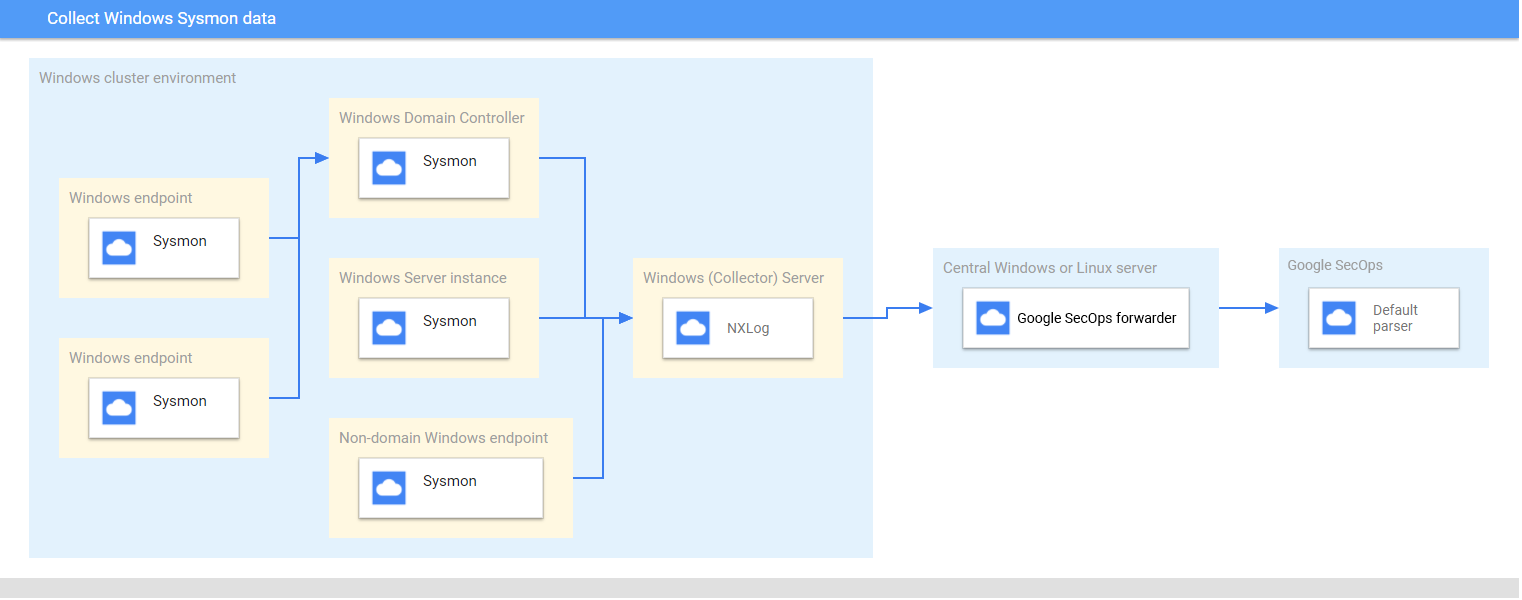
NXLog עם Google SecOps Forwarder: בשיטה הזו נעשה שימוש ב-NXLog בשרת איסוף של Windows כדי לאסוף יומני Sysmon, וב-Google SecOps Forwarder, בדרך כלל בשרת מרכזי, כדי לשלוח את היומנים אל Google SecOps. האיור הבא מציג את הארכיטקטורה של NXLog ושל Google SecOps Forwarder.
BindPlane Agent: בשיטה הזו נעשה שימוש ב-BindPlane Agent בשרת איסוף של Windows כדי לאסוף יומני Sysmon ולשלוח אותם ישירות אל Google SecOps API.
בדיקת המכשירים והגרסאות הנתמכים
מנתח הנתונים של Google SecOps תומך ביומנים שנוצרו על ידי הגרסאות הבאות של Microsoft Windows Server. Microsoft Windows Server מופץ במהדורות הבאות: Foundation, Essentials, Standard ו-Datacenter. סכימת האירועים של היומנים שנוצרים בכל מהדורה זהה.
- Microsoft Windows Server 2019
- Microsoft Windows Server 2016
- Microsoft Windows Server 2012
כלי הניתוח של Google SecOps תומך ביומנים שנוצרו על ידי:
- מערכות לקוח של Microsoft Windows 7 ואילך
- גרסה 13.24 של Sysmon.
מנתח הנתונים של Google SecOps תומך ביומנים שנאספים על ידי NXLog Community או Enterprise Edition.
בדיקת סוגי היומנים הנתמכים
מנתח הנתונים של Google SecOps תומך בסוגי היומנים הבאים שנוצרים על ידי Microsoft Windows Sysmon. מידע נוסף על סוגי היומנים האלה זמין במאמרי העזרה של Microsoft Windows Sysmon. הוא תומך ביומנים שנוצרו עם טקסט בשפה האנגלית, ולא אפשרי עם יומנים שנוצרו בשפות אחרות.
| סוג היומן | תיאור |
|---|---|
| יומני Sysmon | הערוץ Sysmon מכיל 27 מזהי אירועים. (מזהה האירוע: 1 עד 26, ו-255). תיאור של סוג היומן הזה מופיע במסמכי העזרה של Microsoft Windows בנושא אירועי Sysmon |
הגדרת שרתי Microsoft Windows, נקודות קצה ובקרי דומיין
- מתקינים ומגדירים את השרתים, נקודות הקצה ובקרי הדומיין. מידע נוסף זמין במסמכי התיעוד של Microsoft Windows Sysmon Configuration.
- מגדירים שרת Microsoft Windows לאיסוף ולניתוח של יומנים ממערכות שונות.
- הגדרה של שרת מרכזי של Microsoft Windows או Linux
- מגדירים את כל המערכות עם אזור הזמן UTC.
- מגדירים את המכשירים להעברת יומנים לשרת Microsoft Windows של המאסף.
- הגדרה של מינויים שנוצרו על ידי המקור במערכות Microsoft Windows. מידע נוסף זמין במאמר בנושא הגדרת מינוי שנוצר על ידי מקור.
- מפעילים את WinRM בשרתים ובמחשבים של Microsoft Windows. מידע נוסף זמין במאמר בנושא התקנה והגדרה של Microsoft Windows Remote Management.
שיטה 1 – הגדרה של NXLog ושל Google SecOps Forwarder
- מתקינים את NXLog במאסף שפועל בשרת Windows. פועלים לפי המסמכים של NXLog, כולל מידע על הגדרת NXLog לאיסוף יומנים מ-Sysmon.
יוצרים קובץ תצורה עבור NXLog. משתמשים במודול הקלט im_msvistalog. הנה דוגמה להגדרת NXLog. מחליפים את הערכים
HOSTNAMEו-PORTבמידע על שרת היעד המרכזי של Microsoft Windows או Linux. מידע נוסף זמין במסמכי העזרה של NXLog בנושא מודול om_tcp.define ROOT C:\Program Files\nxlog define SYSMON_OUTPUT_DESTINATION_ADDRESS HOSTNAME define SYSMON_OUTPUT_DESTINATION_PORT PORT define CERTDIR %ROOT%\cert define CONFDIR %ROOT%\conf define LOGDIR %ROOT%\data define LOGFILE %LOGDIR%\nxlog.log LogFile %LOGFILE% Moduledir %ROOT%\modules CacheDir %ROOT%\data Pidfile %ROOT%\data\nxlog.pid SpoolDir %ROOT%\data <Extension _json> Module xm_json </Extension> <Input windows_sysmon_eventlog> Module im_msvistalog <QueryXML> <QueryList> <Query Id="0"> <Select Path="Microsoft-Windows-Sysmon/Operational">*</Select> </Query> </QueryList> </QueryXML> ReadFromLast False SavePos False </Input> <Output out_chronicle_sysmon> Module om_tcp Host %SYSMON_OUTPUT_DESTINATION_ADDRESS% Port %SYSMON_OUTPUT_DESTINATION_PORT% Exec $EventTime = integer($EventTime) / 1000; Exec $EventReceivedTime = integer($EventReceivedTime) / 1000; Exec to_json(); </Output> <Route r2> Path windows_sysmon_eventlog => out_chronicle_sysmon </Route>מתקינים את כלי ההעברה של Google SecOps בשרת המרכזי של Microsoft Windows או Linux. מידע על התקנה והגדרה של המעביר זמין במאמרים בנושא התקנה והגדרה של המעביר ב-Linux או התקנה והגדרה של המעביר ב-Microsoft Windows.
מגדירים את מעביר היומנים של Google SecOps כך שישלח יומנים אל Google SecOps. זוהי דוגמה להגדרת מעביר.
  - syslog:
      common:
        enabled: true
        data_type: WINDOWS_SYSMON
        Data_hint:
        batch_n_seconds: 10
        batch_n_bytes: 1048576
      tcp_address: 0.0.0.0:10518
      connection_timeout_sec: 60
מפעילים את שירות NXLog.
שיטה 2 – הגדרת Bindplane Agent
אוספים את יומני הרישום של Windows Sysmon באמצעות Bindplane Agent.
אחרי ההתקנה, שירות Bindplane Agent מופיע כשירות observerIQ ברשימת השירותים של Windows.
- מתקינים את Bindplane Agent כסוכן נפרד בכל נקודת קצה או שרת של Windows שבהם Sysmon פועל: מידע נוסף על התקנת Bindplane Agent זמין בהוראות להתקנת Bindplane Agent.
יוצרים קובץ תצורה לסוכן Bindplane עם התוכן הבא.
receivers:
  windowseventlog/sysmon:
    channel: Microsoft-Windows-Sysmon/Operational
    raw: true
processors:
  batch:

exporters:
  chronicle/winsysmon:
    endpoint: https://malachiteingestion-pa.googleapis.com
    creds: '{
    "type": "service_account",
    "project_id": "malachite-projectname",
    "private_key_id": `PRIVATE_KEY_ID`,
    "private_key": `PRIVATE_KEY`,
    "client_email":"`SERVICE_ACCOUNT_NAME`@malachite-`PROJECT_ID`.iam.gserviceaccount.com",
    "client_id": `CLIENT_ID`,
    "auth_uri": "https://accounts.google.com/o/oauth2/auth",
    "token_uri": "https://oauth2.googleapis.com/token",
    "auth_provider_x509_cert_url":"https://www.googleapis.com/oauth2/v1/certs",
    "client_x509_cert_url": "https://www.googleapis.com/robot/v1/metadata/x509/`SERVICSERVICE_ACCOUNT_NAME`%40malachite-`PROJECT_ID`.iam.gserviceaccount.com",
    "universe_domain": "googleapis.com"
    }'
  log_type: 'WINDOWS_SYSMON'
  override_log_type: false
  raw_log_field: body
  customer_id: `CUSTOMER_ID`

service:
  pipelines:
    logs/winsysmon:
      receivers:
        - windowseventlog/sysmon
      processors: [batch]
      exporters: [chronicle/winsysmon]
מחליפים את הערכים
PRIVATE_KEY_ID,PRIVATE_KEY,SERVICSERVICE_ACCOUNT_NAME,PROJECT_ID,CLIENT_IDו-CUSTOMER_IDבערכים המתאימים מקובץ ה-JSON של חשבון השירות שאפשר להוריד מ Google Cloud Platform. מידע נוסף על מפתחות של חשבונות שירות זמין במאמר יצירה ומחיקה של מפתחות של חשבונות שירות.כדי להפעיל את שירות observerIQ agent, בוחרים באפשרות Services > Extended > observerIQ Service > start.
פורמטים נתמכים של יומני Sysmon ב-Windows
מנתח ה-Sysmon של Windows תומך ביומנים בפורמטים JSON ו-XML.
יומני דוגמה נתמכים של Windows Sysmon
JSON:
{ "EventTime": 1611175283, "Hostname": "dummy10-1.user12.local", "Keywords": -9223372036854775808, "EventType": "INFO", "SeverityValue": 2, "Severity": "INFO", "EventID": 1, "SourceName": "Microsoft-Windows-Sysmon", "ProviderGuid": "{5770385F-C22A-43E0-BF4C-06F5698FFBD9}", "Version": 5, "Task": 1, "OpcodeValue": 0, "RecordNumber": 8846, "ProcessID": 1184, "ThreadID": 2568, "Channel": "Microsoft-Windows-Sysmon/Operational", "Domain": "NT AUTHORITY", "AccountName": "SYSTEM", "UserID": "S-1-2-3", "AccountType": "User", "Message": "Process Create:\\r\\nRuleName: -\\r\\nUtcTime: 2021-09-13 06:34:03.015\\r\\nProcessGuid: {de2dee9a-f0db-613e-7017-000000001100}\\r\\nProcessId: 5440\\r\\nImage: C:\\\\Program Files\\\\WindowsApps\\\\Microsoft.WindowsCalculator_10.2103.8.0_x64__8wekyb3d8bbwe\\\\Calculator.exe\\r\\nFileVersion: -\\r\\nDescription: -\\r\\nProduct: -\\r\\nCompany: -\\r\\nOriginalFileName: -\\r\\nCommandLine: \\"C:\\\\Program Files\\\\WindowsApps\\\\Microsoft.WindowsCalculator_10.2103.8.0_x64__8wekyb3d8bbwe\\\\Calculator.exe\\" -ServerName:App.AppXsm3pg4n7er43kdh1qp4e79f1j7am68r8.mca\\r\\nCurrentDirectory: C:\\\\Program Files\\\\WindowsApps\\\\Microsoft.WindowsCalculator_10.2103.8.0_x64__8wekyb3d8bbwe\\\\\\r\\nUser: DUMMY10-1\\\\admin\\r\\nLogonGuid: {de2dee9a-8d8d-6138-3c16-120000000000}\\r\\nLogonId: 0x12163C\\r\\nTerminalSessionId: 1\\r\\nIntegrityLevel: AppContainer\\r\\nHashes: SHA256=1BE51B1664853ACCA05B402FBB441456D0A6FA57D70BAED476434CF8F686E15F\\r\\nParentProcessGuid: {de2dee9a-8a98-6138-0d00-000000001100}\\r\\nParentProcessId: 924\\r\\nParentImage: C:\\\\Windows\\\\System32\\\\svchost.exe\\r\\nParentCommandLine: C:\\\\Windows\\\\system32\\\\svchost.exe -k DcomLaunch -p", "Category": "Process Create (rule: ProcessCreate)", "Opcode": "Info", "RuleName": "-", "UtcTime": "2021-09-13 06:34:03.015", "ProcessGuid": "{de2dee9a-f0db-613e-7017-000000001100}", "Image": "C:\\\\Program Files\\\\WindowsApps\\\\Microsoft.WindowsCalculator_10.2103.8.0_x64__8wekyb3d8bbwe\\\\Calculator.exe", "FileVersion": "-", "Description": "-", "Product": "-", "Company": "-", "OriginalFileName": "-", "CommandLine": "\\"C:\\\\Program Files\\\\WindowsApps\\\\Microsoft.WindowsCalculator_10.2103.8.0_x64__8wekyb3d8bbwe\\\\Calculator.exe\\" -ServerName:App.AppXsm3pg4n7er43kdh1qp4e79f1j7am68r8.mca", "CurrentDirectory": "C:\\\\Program Files\\\\WindowsApps\\\\Microsoft.WindowsCalculator_10.2103.8.0_x64__8wekyb3d8bbwe\\\\", "User": "DUMMY10-1\\\\admin", "LogonGuid": "{de2dee9a-8d8d-6138-3c16-120000000000}", "LogonId": "0x12163c", "TerminalSessionId": "1", "IntegrityLevel": "AppContainer", "Hashes": "SHA256=1BE51B1664853ACCA05B402FBB441456D0A6FA57D70BAED476434CF8F686E15F", "ParentProcessGuid": "{de2dee9a-8a98-6138-0d00-000000001100}", "ParentProcessId": "924", "ParentImage": "C:\\\\Windows\\\\System32\\\\svchost.exe", "ParentCommandLine": "C:\\\\Windows\\\\system32\\\\svchost.exe -k DcomLaunch -p", "EventReceivedTime": 1611175286, "SourceModuleName": "windows_sysmon_eventlog", "SourceModuleType": "im_msvistalog" }XML:
<Event xmlns='http://schemas.microsoft.com/win/2004/08/events/event'>
  <System>
    <Provider Name='Microsoft-Windows-Sysmon' Guid='{5770385f-c22a-43e0-bf4c-06f5698ffbd9}'/>
    <EventID>7</EventID>
    <Version>3</Version>
    <Level>4</Level>
    <Task>7</Task>
    <Opcode>0</Opcode>
    <Keywords>0x8000000000000000</Keywords>
    <TimeCreated SystemTime='2024-11-14T15:41:55.9275040Z'/>
    <EventRecordID>15560430</EventRecordID>
    <Correlation/>
    <Execution ProcessID='2124' ThreadID='6004'/>
    <Channel>Microsoft-Windows-Sysmon/Operational</Channel>
    <Computer>testcomputer.example.org</Computer>
    <Security UserID='S-1-5-18'/>
  </System>
  <EventData>
    <Data Name='RuleName'>technique_id=T1047,technique_name=Windows Management Instrumentation</Data>
    <Data Name='UtcTime'>2024-11-14 15:41:55.918</Data>
    <Data Name='ProcessGuid'>{de61df1c-1a43-6736-a863-00000000ad00}</Data>
    <Data Name='ProcessId'>20728</Data>
    <Data Name='Image'>C:\\Program Files\\SourceFile\\SourceFile.exe</Data>
    <Data Name='ImageLoaded'>C:\\Windows\\System32\\wbem\\imagename.dll</Data>
    <Data Name='FileVersion'>10.0.22621.3672 (WinBuild.160101.0800)</Data>
    <Data Name='Description'>WMI</Data>
    <Data Name='Product'>Microsoft® Windows® Operating System</Data>
    <Data Name='Company'>Microsoft Corporation</Data>
    <Data Name='OriginalFileName'>originalimagename.dll</Data>
    <Data Name='Hashes'>SHA1=AB20D0B71E38A3BF130100BE2F85D32F29D04697,MD5=2C6D07DCF4CDD6177B67F210019D5C61,SHA256=413CDAACD75C19725591059F70CB7F1C0C1AEAA6E1D43C70A687310859C1813F,IMPHASH=472A202488B9A8A8072E75ADE4EC1496</Data>
    <Data Name='Signed'>true</Data>
    <Data Name='Signature'>Microsoft Windows</Data>
    <Data Name='SignatureStatus'>Valid</Data>
    <Data Name='User'>Test\\TestUser</Data>
  </EventData>
</Event>
הפניה למיפוי שדות: שדות של אירועים במכשיר לשדות UDM
בקטע הזה מוסבר איך מנתח התוכן ממפה שדות מקוריים ב קובץ יומן במכשיר לשדות של Unified Data Model (UDM). מיפוי השדות עשוי להיות שונה בהתאם למזהה האירוע.
הפניה למיפוי שדות: מזהה אירוע לסוג אירוע
בטבלה הבאה מפורטים סוגי היומנים שלWINDOWS_SYSMON וסוגי האירועים התואמים ב-UDM.
| Event Identifier | Event Type | Security Category |
|---|---|---|
1 |
PROCESS_LAUNCH |
|
2 |
FILE_MODIFICATION |
|
3 |
NETWORK_CONNECTION |
|
4 |
SETTING_MODIFICATION |
|
5 |
PROCESS_TERMINATION |
|
6 |
PROCESS_MODULE_LOAD |
|
7 |
PROCESS_MODULE_LOAD |
|
8 |
PROCESS_MODULE_LOAD |
|
9 |
FILE_READ |
|
10 |
PROCESS_OPEN |
|
11 |
FILE_CREATION |
|
12 |
If the Message log field value matches the regular expression pattern CreateKey|CreateValue then, the metadata.event_type UDM field is set to REGISTRY_CREATION. Else if the Message log field value matches the regular expression pattern DeleteKey|DeleteValue then, the target.resource.name UDM field is set to REGISTRY_DELETION.Else, the target.resource.name UDM field is set to REGISTRY_MODIFICATION. |
|
13 |
REGISTRY_MODIFICATION |
|
14 |
REGISTRY_MODIFICATION |
|
15 |
FILE_CREATION |
|
16 |
SETTING_MODIFICATION |
|
17 |
PROCESS_UNCATEGORIZED |
|
18 |
PROCESS_UNCATEGORIZED |
|
19 |
USER_RESOURCE_ACCESS |
|
20 |
USER_RESOURCE_ACCESS |
|
21 |
USER_RESOURCE_ACCESS |
|
22 |
NETWORK_DNS |
|
23 |
FILE_DELETION |
|
24 |
RESOURCE_READ |
|
25 |
PROCESS_LAUNCH |
|
26 |
FILE_DELETION |
|
255 |
SERVICE_UNSPECIFIED |
|
הפניה למיפוי שדות: WINDOWS_SYSMON
בטבלה הבאה מפורטים שדות היומן של סוג היומן WINDOWS_SYSMON והשדות התואמים ב-UDM.
| Log field | UDM mapping | Logic |
|---|---|---|
SourceName |
|
|
|
metadata.vendor_name |
The metadata.vendor_name UDM field is set to Microsoft. |
|
metadata.product_name |
The metadata.product_name UDM field is set to Microsoft-Windows-Sysmon. |
UtcTime |
metadata.event_timestamp |
|
EventID |
metadata.product_event_type |
If the EventID log field value is equal to 255 then, the metadata.product_event_type UDM field is set to Error - [255]. Else EventID log field is mapped to the metadata.product_event_type UDM field. |
RecordNumber |
metadata.product_log_id |
|
EventRecordID |
metadata.product_log_id |
|
Version |
metadata.product_version |
If the EventID log field value is equal to 4 then, Version log field is mapped to the metadata.product_version UDM field. |
QueryResults |
network.dns.answers.data |
The type_value and data_value fields are extracted from QueryResults log field using the Grok pattern. If the EventID log field value is equal to 22 then, the data_value log field is mapped to the network.dns.answers.data UDM field. |
QueryResults |
network.dns.answers.type |
The type_value and data_value fields are extracted from QueryResults log field using the Grok pattern. If the EventID log field value is equal to 22 then, the type_value log field is mapped to the network.dns.answers.type UDM field. |
QueryName |
network.dns.questions.name |
If the EventID log field value is equal to 22 then, QueryName log field is mapped to the network.dns.questions.name UDM field. |
Protocol |
network.ip_protocol |
If the EventID log field value is equal to 3 then, Protocol log field is mapped to the network.ip_protocol UDM field. |
ParentCommandLine |
principal.process.command_line |
If the EventID log field value is equal to 1 then, ParentCommandLine log field is mapped to the principal.process.command_line UDM field. |
User |
principal.administrative_domain |
The principal_user_userid and principal_administrative_domain fields are extracted from User log field using the Grok pattern. If the principal_administrative_domain log field value is not empty and the User log field value is not empty then, principal_administrative_domain extracted field is mapped to the principal.administrative_domain UDM field. Else Domain log field is mapped to the principal.administrative_domain UDM field. |
Domain |
principal.administrative_domain |
The principal_user_userid and principal_administrative_domain fields are extracted from User log field using the Grok pattern. If the principal_administrative_domain log field value is not empty and the User log field value is not empty then, principal_administrative_domain extracted field is mapped to the principal.administrative_domain UDM field. Else Domain log field is mapped to the principal.administrative_domain UDM field. |
HostName |
principal.hostname |
If the Hostname log field value is empty then, Computer log field is mapped to the principal.hostname UDM field. Else HostName log field is mapped to the principal.hostname UDM field and Hostname log field is mapped to the principal.hostname UDM field. |
Computer |
principal.hostname |
If the Hostname log field value is empty then, Computer log field is mapped to the principal.hostname UDM field. Else HostName log field is mapped to the principal.hostname UDM field and Hostname log field is mapped to the principal.hostname UDM field. |
HostName |
principal.asset.hostname |
If the Hostname log field value is empty then, Computer log field is mapped to the principal.asset.hostname UDM field. Else HostName log field is mapped to the principal.asset.hostname UDM field and Hostname log field is mapped to the principal.asset.hostname UDM field. |
Computer |
principal.asset.hostname |
If the Hostname log field value is empty then, Computer log field is mapped to the principal.asset.hostname UDM field. Else HostName log field is mapped to the principal.asset.hostname UDM field and Hostname log field is mapped to the principal.asset.hostname UDM field. |
SourceIp |
principal.ip |
If the EventID log field value is equal to 3 then, SourceIp log field is mapped to the principal.ip UDM field. |
SourcePort |
principal.port |
If the EventID log field value is equal to 3 then, SourcePort log field is mapped to the principal.port UDM field. |
ImageLoaded |
principal.process.file.full_path |
If the EventID log field value is equal to 6 then, ImageLoaded log field is mapped to the principal.process.file.full_path UDM field. |
Image |
principal.process.file.full_path |
If the EventID log field value contain one of the following values:
Image log field is mapped to the principal.process.file.full_path UDM field. |
SourceImage |
principal.process.file.full_path |
If the EventID log field value contain one of the following values:
SourceImage log field is mapped to the principal.process.file.full_path UDM field. |
ParentImage |
principal.process.file.full_path |
If the EventID log field value is equal to 1 then, ParentImage log field is mapped to the principal.process.file.full_path UDM field. |
ProcessId |
principal.process.pid |
If the EventID log field value contain one of the following values:
ExecutionProcessID log field value is not empty then, ExecutionProcessID log field is mapped to the principal.process.pid UDM field. Else ProcessId log field is mapped to the principal.process.pid UDM field. |
SourceProcessId |
principal.process.pid |
If the EventID log field value is equal to 8 then, SourceProcessId log field is mapped to the principal.process.pid UDM field. |
ParentProcessId |
principal.process.pid |
If the EventID log field value is equal to 1 then, ParentProcessId log field is mapped to the principal.process.pid UDM field. |
ProcessID |
observer.process.pid |
|
ProcessGuid |
principal.process.product_specific_process_id |
If the EventID log field value contain one of the following values:
principal.process.product_specific_process_id UDM field is set to SYSMON:%{ProcessGuid}. |
ParentProcessGuid |
principal.process.product_specific_process_id |
If the EventID log field value is equal to 1 then, principal.process.product_specific_process_id UDM field is set to SYSMON:%{ParentProcessGuid}. |
SourceProcessGuid |
principal.process.product_specific_process_id |
If the EventID log field value is equal to 8 then, principal.process.product_specific_process_id UDM field is set to SYSMON:%{SourceProcessGuid}. |
SourceProcessGUID |
principal.process.product_specific_process_id |
If the EventID log field value is equal to 10 then, principal.process.product_specific_process_id UDM field is set to SYSMON:%{SourceProcessGUID}. |
User |
principal.user.userid |
The principal_user_userid and principal_administrative_domain fields are extracted from User log field using the Grok pattern. If the EventID log field value is not equal to 24 and if the principal_user_userid log field value is not empty and the User log field value is not empty then, principal_user_userid extracted field is mapped to the principal.user.userid UDM field. |
ClientInfo |
principal.user.userid |
The host and user_id fields are extracted from ClientInfo log field using the Grok pattern. If the EventID log field value is equal to 24 and if the user_id log field value is not empty and the ClientInfo log field value is not empty then, user_id extracted field is mapped to the principal.user.userid UDM field. Else ClientInfo log field is mapped to the principal.user.userid UDM field. |
AccountName |
principal.user.userid |
The principal_user_userid and principal_administrative_domain fields are extracted from User log field using the Grok pattern. If the EventID log field value is not equal to 24 and if the principal_user_userid log field value is not empty and the User log field value is not empty then, principal_user_userid extracted field is mapped to the principal.user.userid UDM field. Else AccountName log field is mapped to the principal.user.userid UDM field. |
SourceUser |
principal.user.userid |
|
UserID |
principal.user.windows_sid |
If the UserID log field value matches the regular expression pattern S-\d-(\d+-){1,14}\d+, then the UserID log field is mapped to the principal.user.windows_sid UDM field.Else, if the UserID log field value not equal to the User log field value, then the UserID log field is mapped to the principal.user.attribute.labels[user_id] UDM field. |
Description |
security_result.description |
If the EventID log field value is equal to 255 and if the Description log field value is not equal to - then, Description log field is mapped to the security_result.description UDM field. |
RuleName |
security_result.rule_name |
|
EventID |
security_result.rule_name |
The security_result.rule_name UDM field is set to EventID: %{EventID}. |
|
security_result.severity |
If the Level log field value contain one of the following values:
Level log field value is equal to Information then, the security_result.severity UDM field is set to INFORMATIONAL. Else, If Level log field value is equal to 2 or the Level log field value is equal to Error then, the security_result.severity UDM field is set to ERROR. If the SeverityValue log field value does not contain one of the following values:
SeverityValue log field value contain one of the following values:
security_result.severity UDM field is set to INFORMATIONAL. Else, if SeverityValue log field value is equal to 4 then, the security_result.severity UDM field is set to ERROR. Else, if SeverityValue log field value is equal to 5 then, the security_result.severity UDM field is set to CRITICAL. |
Category |
about.labels[Category ID] |
The category_id and category_tag fields are extracted from Category log field using the Grok pattern. category_id extracted field is mapped to the about.labels.Category ID UDM field. |
QueryStatus |
security_result.summary |
If the EventID log field value is equal to 22 then, the security_result.summary UDM field is set to QueryStatus: %{QueryStatus}. |
ID |
security_result.summary |
If the EventID log field value is equal to 255 then, ID log field is mapped to the security_result.summary UDM field. |
Category |
security_result.summary |
The category_id and category_tag fields are extracted from Category log field using the Grok pattern. If the category_id log field value is not empty then, category_tag extracted field is mapped to the security_result.summary UDM field. Else Category log field is mapped to the security_result.summary UDM field. |
CurrentDirectory |
additional.fields[current_directory] |
If the EventID log field value is equal to 1 then, CurrentDirectory log field is mapped to the additional.fields.current_directory UDM field. |
OriginalFileName |
src.file.full_path |
If the EventID log field value is equal to 1 then, OriginalFileName log field is mapped to the src.file.full_path UDM field. |
TargetObject |
src.registry.registry_key |
If the EventID log field value is equal to 14 then, TargetObject log field is mapped to the src.registry.registry_key UDM field. |
Name |
target.application |
If the EventID log field value is equal to 19 then, Name log field is mapped to the target.application UDM field. If the EventID log field value is equal to 255 then, the target.application UDM field is set to Microsoft Sysmon. |
Description |
target.asset.software.description |
If the EventID log field value contain one of the following values:
Description log field value is not equal to - then, Description log field is mapped to the target.asset.software.description UDM field. |
Product |
target.asset.software.name |
If the EventID log field value contain one of the following values:
Product log field value is not equal to - then, Product log field is mapped to the target.asset.software.name UDM field. |
Company |
target.asset.software.vendor_name |
If the EventID log field value contain one of the following values:
Company log field value is not equal to - then, Company log field is mapped to the target.asset.software.vendor_name UDM field. |
FileVersion |
target.asset.software.version |
If the EventID log field value contain one of the following values:
FileVersion log field value is not equal to - then, FileVersion log field is mapped to the target.asset.software.version UDM field. |
EventNamespace |
target.file.full_path |
If the EventID log field value is equal to 19 then, EventNamespace log field is mapped to the target.file.full_path UDM field. |
Device |
target.file.full_path |
If the EventID log field value is equal to 9 then, Device log field is mapped to the target.file.full_path UDM field. |
TargetFilename |
target.file.full_path |
If the EventID log field value contain one of the following values:
TargetFilename log field is mapped to the target.file.full_path UDM field. |
DestinationHostname |
target.asset.hostname |
If the EventID log field value is equal to 3 then, DestinationHostname log field is mapped to the target.asset.hostname UDM field. |
ClientInfo |
target.asset.hostname |
The host and user_id fields are extracted from ClientInfo log field using the Grok pattern. The target_ip and host fields are extracted from ClientInfo log field using the Grok pattern. If the EventID log field value is equal to 24 then, host extracted field is mapped to the target.asset.hostname UDM field. |
DestinationHostname |
target.hostname |
If the EventID log field value is equal to 3 then, DestinationHostname log field is mapped to the target.hostname UDM field. |
ClientInfo |
target.hostname |
The host and user_id fields are extracted from ClientInfo log field using the Grok pattern. The target_ip and host fields are extracted from ClientInfo log field using the Grok pattern. If the EventID log field value is equal to 24 then, host extracted field is mapped to the target.hostname UDM field. |
ClientInfo |
target.ip |
The target_ip and host fields are extracted from ClientInfo log field using the Grok pattern. If the EventID log field value is equal to 24 then, target_ip extracted field is mapped to the target.ip UDM field. |
DestinationIp |
target.ip |
If the EventID log field value is equal to 3 then, DestinationIp log field is mapped to the target.ip UDM field. |
DestinationPort |
target.port |
If the EventID log field value is equal to 3 then, DestinationPort log field is mapped to the target.port UDM field. |
CommandLine |
target.process.command_line |
If the EventID log field value is equal to 1 then, CommandLine log field is mapped to the target.process.command_line UDM field. |
Configuration |
target.process.command_line |
If the EventID log field value is equal to 16 and if the ConfigurationFileHash log field value contain one of the following values:
Configuration log field is mapped to the target.process.command_line UDM field. |
ImageLoaded |
target.process.file.full_path |
If the EventID log field value is equal to 7 then, ImageLoaded log field is mapped to the target.process.file.full_path UDM field. |
TargetImage |
target.process.file.full_path |
If the EventID log field value contain one of the following values:
TargetImage log field is mapped to the target.process.file.full_path UDM field. |
Image |
target.process.file.full_path |
If the EventID log field value contain one of the following values:
Image log field is mapped to the target.process.file.full_path UDM field. |
Configuration |
target.process.file.full_path |
If the EventID log field value is equal to 16 and if the ConfigurationFileHash log field value does not contain one of the following values:
Configuration log field is mapped to the target.process.file.full_path UDM field. |
Hashes |
target.process.file.md5 |
The KV filter is used to extract the MD5 from the Hashes log field.If the EventID log field value contain one of the following values:
MD5 extracted field is mapped to the target.process.file.md5 UDM field. |
Hash |
target.process.file.md5 |
The KV filter is used to extract the MD5 from the Hashe log field.If the EventID log field value contain one of the following values:
MD5 extracted field is mapped to the target.process.file.md5 UDM field. |
ConfigurationFileHash |
target.process.file.md5 |
The KV filter is used to extract the MD5 from the ConfigurationFileHash log field.If the EventID log field value contain one of the following values:
MD5 extracted field is mapped to the target.process.file.md5 UDM field. |
Hashes |
target.process.file.sha1 |
The KV filter is used to extract the SHA1 from the Hashes log field.If the EventID log field value contain one of the following values:
SHA1 extracted field is mapped to the target.process.file.sha1 UDM field. |
Hash |
target.process.file.sha1 |
The KV filter is used to extract the SHA1 from the Hash log field.If the EventID log field value contain one of the following values:
SHA1 extracted field is mapped to the target.process.file.sha1 UDM field. |
ConfigurationFileHash |
target.process.file.sha1 |
The KV filter is used to extract the SHA1 from the ConfigurationFileHash log field.If the EventID log field value contain one of the following values:
SHA1 extracted field is mapped to the target.process.file.sha1 UDM field. |
Hashes |
target.process.file.sha256 |
The KV filter is used to extract the SHA256 from the Hashes log field.If the EventID log field value contain one of the following values:
SHA256 extracted field is mapped to the target.process.file.sha256 UDM field. |
Hash |
target.process.file.sha256 |
The KV filter is used to extract the SHA256 from the Hash log field.If the EventID log field value contain one of the following values:
SHA256 extracted field is mapped to the target.process.file.sha256 UDM field. |
ConfigurationFileHash |
target.process.file.sha256 |
The KV filter is used to extract the SHA256 from the ConfigurationFileHash log field.If the EventID log field value contain one of the following values:
SHA256 extracted field is mapped to the target.process.file.sha256 UDM field. |
Hashes |
target.process.file.file_metadata.pe.import_hash |
The KV filter is used to extract the IMPHASH from the Hashes log field.IMPHASH extracted field is mapped to the target.process.file.file_metadata.pe.import_hash UDM field. |
Hash |
target.process.file.file_metadata.pe.import_hash |
The KV filter is used to extract the IMPHASH from the Hash log field.IMPHASH extracted field is mapped to the target.process.file.file_metadata.pe.import_hash UDM field. |
ConfigurationFileHash |
target.process.file.file_metadata.pe.import_hash |
The KV filter is used to extract the IMPHASH from the ConfigurationFileHash log field.IMPHASH extracted field is mapped to the target.process.file.file_metadata.pe.import_hash UDM field. |
Hashes |
target.process.file.pe_file.imphash |
The KV filter is used to extract the IMPHASH from the Hashes log field.IMPHASH extracted field is mapped to the target.process.file.pe_file.imphash UDM field. |
Hash |
target.process.file.pe_file.imphash |
The KV filter is used to extract the IMPHASH from the Hash log field.IMPHASH extracted field is mapped to the target.process.file.pe_file.imphash UDM field. |
ConfigurationFileHash |
target.process.file.pe_file.imphash |
The KV filter is used to extract the IMPHASH from the ConfigurationFileHash log field.IMPHASH extracted field is mapped to the target.process.file.pe_file.imphash UDM field. |
TargetProcessId |
target.process.pid |
If the EventID log field value contain one of the following values:
TargetProcessId log field is mapped to the target.process.pid UDM field. |
ProcessId |
target.process.pid |
If the EventID log field value contain one of the following values:
ExecutionProcessID log field value is not empty then, ExecutionProcessID log field is mapped to the target.process.pid UDM field. Else ProcessId log field is mapped to the target.process.pid UDM field. |
ProcessID |
target.process.pid |
If the EventID log field value contain one of the following values:
ExecutionProcessID log field value is not empty then, ExecutionProcessID log field is mapped to the target.process.pid UDM field. Else ProcessID log field is mapped to the target.process.pid UDM field. |
TargetProcessGuid |
target.process.product_specific_process_id |
If the EventID log field value is equal to 8 then, the target.process.product_specific_process_id UDM field is set to SYSMON:%{TargetProcessGuid}. |
TargetProcessGUID |
target.process.product_specific_process_id |
If the EventID log field value is equal to 10 then, the target.process.product_specific_process_id UDM field is set to SYSMON:%{TargetProcessGUID}. |
ProcessGuid |
target.process.product_specific_process_id |
If the EventID log field value contain one of the following values:
target.process.product_specific_process_id UDM field is set to SYSMON:%{ProcessGuid}. |
NewName |
target.registry.registry_key |
If the EventID log field value is equal to 14 then, NewName log field is mapped to the target.registry.registry_key UDM field. |
TargetObject |
target.registry.registry_key |
If the EventID log field value contain one of the following values:
TargetObject log field is mapped to the target.registry.registry_key UDM field. |
Details |
target.registry.registry_value_data |
If the EventID log field value is equal to 13 then, Details log field is mapped to the target.registry.registry_value_data UDM field. |
PreviousCreationUtcTime |
target.resource.attribute.labels.key[PreviousCreationUtcTime] |
If the EventID log field value is equal to 2 then, PreviousCreationUtcTime log field is mapped to the target.resource.attribute.labels UDM field. |
Archived |
target.resource.attribute.labels[Archived] |
If the EventID log field value contain one of the following values:
Archived log field is mapped to the target.resource.attribute.labels UDM field. |
Consumer |
target.resource.attribute.labels[Consumer] |
If the EventID log field value is equal to 21 then, Consumer log field is mapped to the target.resource.attribute.labels UDM field. |
CreationUtcTime |
target.resource.attribute.labels[CreationUtcTime] |
If the EventID log field value contain one of the following values:
CreationUtcTime log field is mapped to the target.resource.attribute.labels UDM field. |
IsExecutable |
target.resource.attribute.labels[IsExecutable] |
If the EventID log field value contain one of the following values:
IsExecutable log field is mapped to the target.resource.attribute.labels UDM field. |
Name |
target.resource.attribute.labels[Name] |
If the EventID log field value is equal to 20 then, Name log field is mapped to the target.resource.attribute.labels UDM field. |
Operation |
target.resource.attribute.labels[Operation] |
If the EventID log field value contain one of the following values:
Operation log field is mapped to the target.resource.attribute.labels UDM field. |
Signature |
target.resource.attribute.labels[Signature] |
If the EventID log field value contain one of the following values:
Signature log field is mapped to the target.resource.attribute.labels UDM field. |
SignatureStatus |
target.resource.attribute.labels[SignatureStatus] |
If the EventID log field value contain one of the following values:
SignatureStatus log field is mapped to the target.resource.attribute.labels UDM field. |
Signed |
target.resource.attribute.labels[Signed] |
If the EventID log field value contain one of the following values:
Signed log field is mapped to the target.resource.attribute.labels UDM field. |
Type |
target.resource.attribute.labels[Type] |
If the EventID log field value is equal to 20 then, Type log field is mapped to the target.resource.attribute.labels UDM field. |
Type |
additional.fields[Type] |
If the EventID log field value is equal to 25 then, Type log field is mapped to the additional.fields UDM field. |
State |
target.resource.name |
If the EventID log field value is equal to 4 then, State log field is mapped to the target.resource.name UDM field. |
CreationUtcTime |
target.resource.name |
If the EventID log field value is equal to 11 then, CreationUtcTime log field is mapped to the target.resource.name UDM field. |
PipeName |
target.resource.name |
If the EventID log field value contain one of the following values:
PipeName log field is mapped to the target.resource.name UDM field. |
Filter |
target.resource.name |
If the EventID log field value is equal to 21 then, Filter log field is mapped to the target.resource.name UDM field. |
Destination |
target.resource.name |
If the EventID log field value is equal to 20 then, Destination log field is mapped to the target.resource.name UDM field. |
Query |
target.resource.name |
If the EventID log field value is equal to 19 then, Query log field is mapped to the target.resource.name UDM field. |
GrantedAccess |
target.resource.name |
If the EventID log field value is equal to 10 and if the GrantedAccess log field value matches the regular expression pattern ^0x0080$ then, the target.resource.name UDM field is set to PROCESS_CREATE_PROCESS. Else, If the GrantedAccess log field value matches the regular expression pattern ^0x0002$ then, the target.resource.name UDM field is set to PROCESS_CREATE_THREAD. Else, If the GrantedAccess log field value matches the regular expression pattern ^0x0040$ then, the target.resource.name UDM field is set to PROCESS_DUP_HANDLE. Else, If the GrantedAccess log field value matches the regular expression pattern ^0x0400$ then, the target.resource.name UDM field is set to PROCESS_QUERY_INFORMATION. Else, If the GrantedAccess log field value matches the regular expression pattern ^0x1000$ then, the target.resource.name UDM field is set to PROCESS_QUERY_LIMITED_INFORMATION. Else, If the GrantedAccess log field value matches the regular expression pattern ^0x0200$ then, the target.resource.name UDM field is set to PROCESS_SET_INFORMATION. Else, If the GrantedAccess log field value matches the regular expression pattern ^0x0100$ then, the target.resource.name UDM field is set to PROCESS_SET_QUOTA. Else, If the GrantedAccess log field value matches the regular expression pattern ^0x0800$ and if the GrantedAccess log field value matches the regular expression pattern ^0x0001$ then, the target.resource.name UDM field is set to PROCESS_TERMINATE. Else, If the GrantedAccess log field value matches the regular expression pattern ^0x0008$ then, the target.resource.name UDM field is set to PROCESS_VM_OPERATION. Else, If the GrantedAccess log field value matches the regular expression pattern ^0x0010$ then, the target.resource.name UDM field is set to PROCESS_VM_READ. Else, If the GrantedAccess log field value matches the regular expression pattern ^0x0020$ then, the target.resource.name UDM field is set to PROCESS_VM_WRITE. Else, If the GrantedAccess log field value matches the regular expression pattern ^0x00100000L$ then, the target.resource.name UDM field is set to SYNCHRONIZE. |
|
target.resource.resource_type |
If the EventID log field value contain one of the following values:
target.resource.resource_type UDM field is set to SETTING. Else, If EventID log field value contain one of the following values:
target.resource.resource_type UDM field is set to PIPE. |
|
target.resource.resource_subtype |
If the EventID log field value is equal to 11 then, the target.resource.resource_subtype UDM field is set to CreationUtcTime. Else, If EventID log field value is equal to 10 then, the target.resource.resource_subtype UDM field is set to GrantedAccess. Else, If EventID log field value is equal to 4 then, the target.resource.resource_subtype UDM field is set to State. |
TargetUser |
target.user.userid |
|
|
network.direction |
If the EventID log field value is equal to 3 then, the network.direction UDM field is set to OUTBOUND. |
|
security_result.action |
If the EventID log field value is equal to 3 then, the security_result.action UDM field is set to ALLOW. |
ProviderGuid |
observer.asset_id |
ProviderGuid log field is mapped to the observer.asset_id UDM field. |
Keywords |
additional.fields[Keywords] |
|
ThreadID |
additional.fields[thread_id] |
|
ThreadID |
additional.fields[ThreadID] |
|
Channel |
additional.fields[channel] |
|
Opcode |
additional.fields[Opcode] |
|
LogonId |
principal.network.session_id |
|
LogonGuid |
additional.fields[LogonGuid] |
|
TerminalSessionId |
additional.fields[TerminalSessionId] |
|
SourcePortName |
additional.fields[SourcePortName] |
|
SourceIsIpv6 |
additional.fields[SourceIsIpv6] |
|
DestinationPortName |
additional.fields[DestinationPortName] |
|
DestinationIsIpv6 |
additional.fields[DestinationIsIpv6] |
|
Initiated |
additional.fields[Initiated] |
|
SchemaVersion |
additional.fields[SchemaVersion] |
|
CallTrace |
additional.fields[CallTrace] |
|
|
network.application_protocol |
If the EventID log field value is equal to 22 then, the network.application_protocol UDM field is set to DNS. |
NewThreadId |
additional.fields[NewThreadId] |
|
StartAddress |
additional.fields[StartAddress] |
|
StartFunction |
additional.fields[StartFunction] |
|
StartModule |
additional.fields[StartModule] |
|
ParentUser |
additional.fields[ParentUser] |
|
IntegrityLevel |
target.process.integrity_level_rid |
If the EventID log field value contain one of the following values:
IntegrityLevel log field value matches the regular expression pattern (?i)(Untrusted) then, the target.process.integrity_level_rid UDM field is set to 0. Else, if IntegrityLevel log field value matches the regular expression pattern (?i)(Low) then, the target.process.integrity_level_rid UDM field is set to 4096. Else, if IntegrityLevel log field value matches the regular expression pattern (?i)(Medium) then, the target.process.integrity_level_rid UDM field is set to 8192. Else, if IntegrityLevel log field value matches the regular expression pattern (?i)(High) then, the target.process.integrity_level_rid UDM field is set to 12288. Else, if IntegrityLevel log field value matches the regular expression pattern (?i)(System) then, the target.process.integrity_level_rid UDM field is set to 16384. Else, if IntegrityLevel log field value matches the regular expression pattern (?i)(Protected) then, the target.process.integrity_level_rid UDM field is set to 20480. |
IntegrityLevel |
principal.process.integrity_level_rid |
If the EventID log field value does not contain one of the following values:
IntegrityLevel log field value matches the regular expression pattern (?i)(Untrusted) then, the principal.process.integrity_level_rid UDM field is set to 0. Else, if IntegrityLevel log field value matches the regular expression pattern (?i)(Low) then, the principal.process.integrity_level_rid UDM field is set to 4096. Else, if IntegrityLevel log field value matches the regular expression pattern (?i)(Medium) then, the principal.process.integrity_level_rid UDM field is set to 8192. Else, if IntegrityLevel log field value matches the regular expression pattern (?i)(High) then, the principal.process.integrity_level_rid UDM field is set to 12288. Else, if IntegrityLevel log field value matches the regular expression pattern (?i)(System) then, the principal.process.integrity_level_rid UDM field is set to 16384. Else, if IntegrityLevel log field value matches the regular expression pattern (?i)(Protected) then, the principal.process.integrity_level_rid UDM field is set to 20480. |
Computer |
additional.fields[Computer] |
If the HostName log field value is not empty or the Hostname log field value is not empty then, Computer log field is mapped to the additional.fields.Computer UDM field. |
Task |
security_result.summary |
יומן שינויים
צפייה ביומן השינויים של מנתח התוכן הזה
הבעיה עדיין לא נפתרה? קבלת תשובות מחברי הקהילה וממומחי Google SecOps.