


איסוף יומני OSSEC
במאמר הזה מוסבר איך מגדירים את OSSEC ואת הכלי להעברת נתונים של Google Security Operations כדי לאסוף יומני OSSEC. במסמך הזה מפורטים גם סוגי היומנים הנתמכים וגרסת OSSEC הנתמכת.
מידע נוסף זמין במאמר בנושא העברת נתונים אל Google Security Operations.
סקירה כללית
בתרשים ארכיטקטורת הפריסה הבא מוצגת דיאגרמת ארכיטקטורה שמראה איך סוכני OSSEC ושרתים מוגדרים לשליחת יומנים ל-Google Security Operations. הפריסה של כל לקוח עשויה להיות שונה מהייצוג הזה, ועשויה להיות מורכבת יותר.
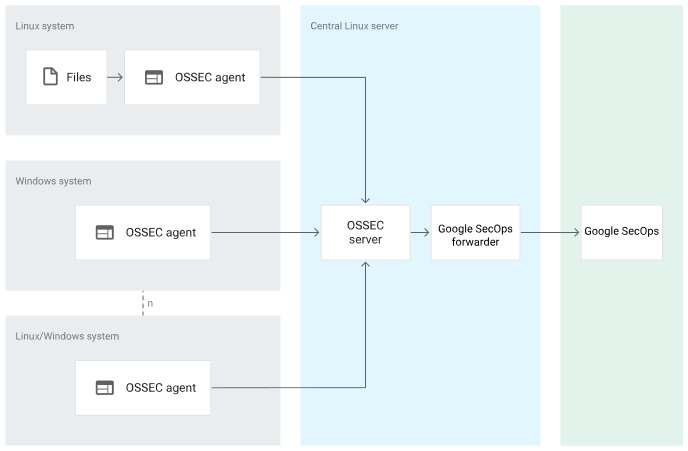
דיאגרמת הארכיטקטורה מציגה את הרכיבים הבאים:
מערכת Linux. מערכת Linux שרוצים לנטר. מערכת Linux כוללת את הקבצים למעקב ואת סוכן OSSEC.
מערכת Microsoft Windows. מערכת Microsoft Windows שרוצים לעקוב אחריה, שבה מותקן סוכן OSSEC.
OSSEC agent. הסוכן של OSSEC אוסף מידע ממערכת Microsoft Windows או Linux ומעביר אותו לשרת של OSSEC.
שרת OSSEC. שרת OSSEC עוקב אחרי סוכני OSSEC ומקבל מהם מידע, מנתח את היומנים ומעביר אותם למעביר של Google Security Operations.
סוכן Bindplane: סוכן Bindplane מאחזר יומנים מ-osquery ושולח אותם ל-Google SecOps.
Google Security Operations forwarder. רכיב ההעברה של Google Security Operations הוא רכיב תוכנה קל שפורסים ברשת של הלקוח, והוא תומך ב-syslog. המעביר של Google Security Operations מעביר את היומנים אל Google Security Operations.
Google Security Operations. Google Security Operations שומרת ומנתחת את היומנים משרת OSSEC.
תווית הטמעה מזהה את מנתח התוכן שמנרמל נתוני יומן גולמיים לפורמט UDM מובנה. המידע במסמך הזה רלוונטי למנתח עם תווית הטמעת הנתונים OSSEC.
לפני שמתחילים
מוודאים שסוכן OSSEC מותקן במערכות Microsoft Windows או Linux שאתם מתכננים לנטר. מידע נוסף על התקנת סוכן OSSEC זמין במאמר התקנת OSSEC.
משתמשים בגרסת OSSEC שהכלי לניתוח של Google Security Operations תומך בה. הכלי לניתוח נתונים של Google Security Operations תומך ב-OSSEC בגרסה 3.6.0.
מוודאים ששרת OSSEC מותקן ומוגדר בשרת Linux המרכזי.
בודקים את סוגי היומנים שנתמכים על ידי המנתח של Google Security Operations. בטבלה הבאה מפורטים המוצרים והנתיבים של קובצי היומן שנתמכים על ידי המנתח של Google Security Operations:
מערכת הפעלה מוצר נתיב קובץ היומן Microsoft Windows Microsoft Windows יומני אירועים Linux Linux /var/log/audit/audit.log Linux Linux /var/log/syslog Linux Linux /var/log/ulog/syslogemu.log Linux apache2 /var/log/apache2/access.log Linux apache2 /var/log/apache2/error.log Linux apache2 /var/log/apache2/other_vhosts_access.log Linux apache2 /var/log/apache2/novnc-server-access.log Linux OpenVpn /var/log/openvpnas.log Linux Nginx /var/log/nginx/access.log Linux Nginx /var/log/nginx/error.log Linux rkhunter /var/log/rkhunter.log Linux – שרת OSSEC OSSEC /var/ossec/logs/ossec.log Linux Linux /var/log/auth.log Linux Linux /var/log/kern.log Linux rundeck /var/log/rundeck/rundeck.api.log Linux rundeck /var/log/rundeck/service.log Linux Samba /var/log/samba/log.winbindd Linux Linux /var/log/mail.log מוודאים שכל המערכות בארכיטקטורת הפריסה מוגדרות לאזור הזמן UTC.
הגדרת סוכן ושרת OSSEC, ומעביר נתונים של Google Security Operations
כדי להגדיר את הסוכן והשרת של OSSEC ואת המעביר של Google Security Operations, מבצעים את הפעולות הבאות:
כדי לעקוב אחרי היומנים שמערכות Linux יוצרות, יוצרים קובץ
ossec.confכדי לציין את הגדרות המעקב אחרי היומנים של הסוכן. הנה דוגמה לקובץ תצורה של הסוכן במערכת Linux:<ossec_config> <!-- Files to monitor (localfiles) --> <localfile> <log_format>syslog</log_format> <location>/var/ossec/logs/ossec.log</location> </localfile> <localfile> <log_format>syslog</log_format> <location>/var/log/auth.log</location> </localfile> <localfile> <log_format>syslog</log_format> <location>/var/log/kern.log</location> </localfile> <localfile> <log_format>syslog</log_format> <location>/var/log/mail.log</location> </localfile> <localfile> <log_format>syslog</log_format> <location>/var/log/syslog</location> </localfile> <localfile> <log_format>apache</log_format> <location>/var/log/apache2/error.log</location> </localfile> <localfile> <log_format>apache</log_format> <location>/var/log/apache2/access.log</location> </localfile> <localfile> <log_format>apache</log_format> <location>/var/log/apache2/other_vhost_access.log</location> </localfile> <localfile> <log_format>apache</log_format> <location>/var/log/apache2/nonvnc-server-access.log</location> </localfile> <localfile> <log_format>syslog</log_format> <location>/var/log/nginx/access.log</location> </localfile> <localfile> <log_format>syslog</log_format> <location>/var/log/nginx/error.log</location> </localfile> <localfile> <log_format>syslog</log_format> <location>/var/log/openvpnas.log</location> </localfile> <localfile> <log_format>syslog</log_format> <location>/var/log/rkhunter.log</location> </localfile> <localfile> <log_format>syslog</log_format> <location>/var/log/rundeck/service.log</location> </localfile> <localfile> <log_format>syslog</log_format> <location>/var/log/samba/log.winbindd</location> </localfile> <localfile> <log_format>command</log_format> <command>df -P</command> </localfile> <localfile> <log_format>syslog</log_format> <location>/var/log/audit/audit.log</location> </localfile> <localfile> <log_format>full_command</log_format> <command>netstat -tan |grep LISTEN |egrep -v '(192.0.2.1| ::1)' | sort</command> </localfile> <localfile> <log_format>full_command</log_format> <command>last -n 5</command> </localfile> </ossec_config>כדי לעקוב אחרי היומנים שנוצרים במערכות של Microsoft Windows, צריך ליצור קובץ
ossec.confכדי לציין את הגדרות המעקב אחרי היומנים של הסוכן. זו דוגמה לקובץ תצורה של הסוכן במערכת Microsoft Windows:<ossec_config> <!-- Channels to monitor (localfiles) --> <localfile> <log_format>Security</log_format> <location>eventchannel</location> </localfile> <localfile> <log_format>System</log_format> <location>eventchannel</location> </localfile> <localfile> <log_format>Application</log_format> <location>eventchannel</location> </localfile> </ossec_config>כדי להעביר את היומנים משרת OSSEC ל-Google Security Operations באמצעות פרוטוקול syslog, צריך ליצור את קובץ ההגדרות של שרת
syslog.confOSSEC בפורמט הבא:.*.@<CHRONICLE_FORWARDER_IP>:<CHRONICLE_FORWARDER_PORT>מגדירים את המעביר של Google Security Operations לשליחת יומנים אל Google Security Operations. מידע נוסף מופיע במאמר בנושא התקנה והגדרה של המעביר ב-Linux. הדוגמה הבאה היא של הגדרת מעביר ב-Google Security Operations:
  - syslog:
      common:
        enabled: true
        data_type: OSSEC
        batch_n_seconds: 10
        batch_n_bytes: 1048576
      tcp_address: 0.0.0.0:10514
      connection_timeout_sec: 60
העברת יומנים ל-Google SecOps באמצעות סוכן Bindplane
- מתקינים ומגדירים מכונה וירטואלית של Linux.
- התקנה והגדרה של סוכן Bindplane ב-Linux כדי להעביר יומנים ל-Google SecOps. מידע נוסף על התקנה והגדרה של סוכן Bindplane זמין בהוראות להתקנה ולהגדרה של סוכן Bindplane.
אם נתקלתם בבעיות ביצירת פידים, פנו לתמיכה של Google SecOps.
פורמטים נתמכים של יומנים ב-OSSEC
מנתח הנתונים של OSSEC תומך ביומנים בפורמט SYSLOG+JSON, SYSLOG ו-SYSLOG+KV.
יומנים נתמכים לדוגמה של OSSEC
SYSLOG+JSON:
2022 Jan 30 23: 13: 05 (wintest) 198.51.100.0->EventChannel {
  "win": {
    "system": {
      "providerName": "Microsoft-Windows-PowerShell",
      "providerGuid": "{A0C1853B-5C40-ABCD-1234-3CF1C58F985A}",
      "eventID": "4104",
      "version": "1",
      "level": "5",
      "task": "2",
      "opcode": "15",
      "keywords": "0x0",
      "systemTime": "2021-07-29T12:57:03.579362300Z",
      "eventRecordID": "150518739",
      "processID": "16520",
      "threadID": "6036",
      "channel": "Microsoft-Windows-PowerShell/Operational",
      "computer": "WINTEST.cbn.local",
      "severityValue": "VERBOSE",
      "message": "\\"Creating Scriptblock text (1 of 1):\\""
    },
    "eventdata": {
      "messageNumber": "1",
      "messageTotal": "1",
      "scriptBlockText": "$global:?",
      "scriptBlockId": "8d4870bf-4032-5432-1234-51ae1e6a05d5"
    }
  }
}
SYSLOG:
2024/04/02 15:31:58 ossec-testrule: INFO: Reading local decoder file.SYSLOG+KV:
2022 Jan 30 12:57:02 (ossectest) 198.51.100.0->/var/log/audit/audit.log type=LOGIN msg=audit(1627367436.123:8618732): pid=18281 uid=0 old-auid=1234967321 auid=996 tty=(none) old-ses=1234967321 ses=102952 res=1
הפניה למיפוי שדות
בקטע הזה מוסבר איך המנתח של Google Security Operations מחיל תבניות grok על מערכות Linux ו-Microsoft Windows, ואיך הוא ממפה שדות של יומני OSSEC לשדות של מודל הנתונים המאוחד (UDM) של Google Security Operations לכל סוג יומן.
מידע על מיפוי הפניה של שדות נפוצים זמין במאמר שדות נפוצים
בקטעים הבאים מופיע מידע על נתיבי יומנים, תבניות Grok ליומנים לדוגמה, סוגי אירועים ושדות UDM במערכות Linux:
מידע על אירועים נתמכים ב-Microsoft Windows ושדות UDM תואמים זמין במאמר נתוני אירוע של Microsoft Windows
שדות נפוצים
בטבלה הבאה מפורטים שדות היומן הנפוצים והשדות התואמים להם ב-UDM.
| שדה נפוץ ביומן | שדה UDM |
|---|---|
| collected_time | metadata.collected_timestamp |
| אפליקציה | principal.application |
| יומן | metadata.description |
| ip | target.ip או principal.ip |
| שם המארח | target.hostname או principal.hostname |
מערכת Linux
בטבלה הבאה מפורטים נתיבי היומן של מערכת Linux, תבנית grok ליומנים לדוגמה, סוג האירוע ומיפוי UDM:
| נתיב היומן | יומן לדוגמה | תבנית Grok | סוג אירוע | מיפוי UDM |
|---|---|---|---|---|
| /var/log/apache2/error.log | [Thu Apr 28 16:13:01.283342 2022] [core:notice] [pid 18394:tid 140188660751296] [client 1.200.32.47:59840] failed to make connection | [{timestamp}][{log_module}:{log_level}][pid{pid}(<optional_field>:tid{tid}|)](<optional_field> [client {client_ip}:{client_port}]|) (?<error_message>.*) | NETWORK_UNCATEGORIZED | חותמת הזמן ממופה אל metadata.event_timestamp log_module ממופה אל target.resource.name log_level ממופה ל-security_result.severity pid ממופה אל target.process.parent_process.pid tid ממופה אל target.process.pid client_ip ממופה ל-principal.ip client_port ממופה ל-principal.port השדה error_message ממופה לשדה security_result.description הערך של network.application_protocol מוגדר כ-"HTTP" ההגדרה של target.platform היא LINUX הערך של metadata.vendor_name הוא Apache metadata.product_name מוגדר ל-"Apache HTTP Server" |
| /var/log/apache2/error.log | [Thu Apr 28 16:13:01.283342 2022] [core:notice] [pid 18394:tid 140188660751296] failed to make connection | [{timestamp}][{log_module}:{severity}][pid{pid}(<optional_field>:tid{tid}|)]{error_message} | NETWORK_UNCATEGORIZED | חותמת הזמן ממופה אל metadata.event_timestamp log_module ממופה אל target.resource.name log_level ממופה ל-security_result.severity pid ממופה אל target.process.parent_process.pid tid ממופה אל target.process.pid error_message ממופה ל-security_result.description הערך של network.application_protocol מוגדר כ-"HTTP" ההגדרה של target.platform היא LINUX הערך של metadata.vendor_name הוא Apache metadata.product_name מוגדר ל-"Apache HTTP Server" |
| /var/log/apache2/error.log | [Thu Apr 28 16:13:01.283342 2022] [core:notice] [pid 18394:tid 140188660751296] AH00094: Command line: '/usr/sbin/apache2' | [{timestamp}][{log_module}:{log_level}][pid{pid}(<optional_field>:tid{tid}|)](<optional_field> [client {client_ip}:{client_port}]|) (?<error_message>.*),referer{referer_url} | NETWORK_UNCATEGORIZED | הערך של metadata.vendor_name הוא Apache הערך של metadata.product_name מוגדר כ-Apache HTTP Server timestamp ממופה ל-metadata.event_timestamp log_module ממופה אל target.resource.name log_level ממופה ל-security_result.severity pid ממופה אל target.process.parent_process.pid tid ממופה אל target.process.pid client_ip ממופה ל-principal.ip client_port ממופה ל-principal.port השדה error_message ממופה לשדה security_result.description target.platform מוגדר כ-"LINUX" הפרמטר referer_url ממופה לפרמטר network.http.referral_url |
| /var/log/apache2/error.log | Sun Jan 30 15:14:47.260309 2022] [proxy_http:error] [pid 12515:tid 140035781285632] [client 1.200.32.47:59840] AH01114: HTTP: failed to make connection to backend: 192.0.2.1 , referer altostrat.com | [{timestamp}] [{log_module}:{log_level}] [pid {pid}(<optional_field>:tid{tid}|)] [client {client_ip}:{client_port}]( <message_text>HTTP: )?{error_message}:( {target_ip})(<optional_field>,referer{referer_url})?" | NETWORK_HTTP | חותמת הזמן ממופה אל metadata.event_timestamp log_module ממופה אל target.resource.name log_level ממופה ל-security_result.severity pid ממופה אל target.process.parent_process.pid tid ממופה אל target.process.pid client_ip ממופה ל-principal.ip client_port ממופה ל-principal.port error_message ממופה ל-security_result.description target_ip ממופה ל-target.ip referer_url ממופה ל-network.http.referral_url הערך של network.application_protocol מוגדר כ-"HTTP" ההגדרה של target.platform היא LINUX הערך של metadata.vendor_name הוא Apache metadata.product_name מוגדר ל-"Apache HTTP Server" |
| /var/log/apache2/error.log | [Sat Feb 02 00:30:55 2019] New connection: [connection: gTxkX8Z6tjk] [client 192.0.2.1:50786] | [{timestamp}]<message_text>connection:[connection:{connection_id}][client{client_ip}:{client_port}] | NETWORK_UNCATEGORIZED | חותמת הזמן ממופה אל metadata.event_timestamp client_ip ממופה ל-principal.ip client_port ממופה ל-principal.port connection_id ממופה אל network.session_id הערך של network.application_protocol הוא HTTP ההגדרה של target.platform היא LINUX הערך של metadata.vendor_name הוא Apache metadata.product_name מוגדר ל-"Apache HTTP Server" |
| /var/log/apache2/error.log | [Sat Feb 02 00:30:55 2019] New request: [connection: j8BjX4Z5tjk] [request: ACtkX1Z5tjk] [pid 8] [client 192.0.2.1:50784] | [{timestamp}]<message_text>request:[connection:{connection_id}][request:{request_id}][pid{pid}][client{client_ip}:{client_port}] | NETWORK_UNCATEGORIZED | חותמת הזמן ממופה אל metadata.event_timestamp request_id ממופה ל-security_result.detection_fields.(key/value) client_ip ממופה ל-principal.ip client_port ממופה ל-principal.port pid ממופה ל-target.process.parent_process.pid connection_id ממופה ל-network.session_id הערך של network.application_protocol הוא HTTP ההגדרה של target.platform היא LINUX הערך של metadata.vendor_name הוא Apache metadata.product_name מוגדר ל-"Apache HTTP Server" |
| /var/log/apache2/error.log | [Sat Feb 02 00:30:55 2019] [info] [C: j8BjX4Z5tjk] [R: p7pjX4Z5tjk] [pid 8] core.c(4739): [client 192.0.2.1:50784] AH00128: File does not exist: /usr/local/apache2/htdocs/favicon.ico | [{timestamp}] [{log_level}][C:{connection_id}][R:{request_id}][pid {pid}(<optional_field>:tid{tid}|)]<message_text>[client {client_ip}:{client_port}]{error_message}:{file_path} | NETWORK_UNCATEGORIZED | חותמת הזמן ממופה אל metadata.event_timestamp log_level ממופה ל-security_result.severity request_id ממופה ל-security_result.detection_fields.(key/value) client_ip ממופה ל-principal.ip client_port ממופה ל-principal.port pid ממופה ל-target.process.parent_process.pid connection_id ממופה ל-network.session_id השדה error_message ממופה לשדה security_result.description file_path ממופה ל-target.file.full_path הערך של network.application_protocol מוגדר כ-"HTTP" ההגדרה של target.platform היא LINUX הערך של metadata.vendor_name הוא Apache הערך של metadata.product_name מוגדר כ-Apache HTTP Server |
| /var/log/apache2/access.log | 10.50.0.1 - - [28/Apr/2022:18:02:13 +0530] "POST /test/first.html HTTP/1.1" 200 491 "http://192.0.2.1/test/first.html" "Mozilla/5.0 (Windows NT 10.0; Win64; x64) AppleWebKit/537.36 (KHTML, like Gecko) Chrome/100.0.4896.127 Safari/537.36" | ({client_ip})?<message_text>{userid}[{timestamp}](<optional_field>{method}/(<optional_field>{resource}?) {client_protocol}?){result_status}{object_size}(<optional_field>(<optional_field>{referer_url}?)(<optional_field>{user_agent}?)? | NETWORK_HTTP | client_ip ממופה ל-principal.ip userid ממופה ל-principal.user.userid המארח ממופה ל-principal.hostname חותמת הזמן ממופה אל metadata.event_timestamp השדה method ממופה לשדה network.http.method המשאב ממופה ל-principal.resource.name client_protocol ממופה ל-network.application_protocol result_status ממופה ל-network.http.response_code object_size ממופה ל-network.sent_bytes referer_url ממופה ל-network.http.referral_url user_agent ממופה ל-network.http.user_agent הערך של network.ip_protocol הוא TCP network.direction מוגדר כ-"OUTBOUND" הערך של network.application_protocol מוגדר כ-"HTTP" ההגדרה של target.platform היא LINUX הערך של metadata.vendor_name הוא Apache הערך של metadata.product_name מוגדר כ-Apache HTTP Server |
| var/log/apache2/other_vhosts_access.log | wintest.example.com:80 ::1 - - [14/Jan/2022:14:08:16 -0700] \"GET /server-status?auto HTTP/1.1\" 200 1415 \"-\" \"Python-urllib/2.7\" | {target_host}:{NUMBER:target_port} {client_ip} - (<optional_field>{host}?) [{timestamp}](<optional_field>{method}/(<optional_field>{resource}?){client_protocol}?){result_status}{object_size}(<optional_field>{referer_url}?)(<optional_field>{user_agent}?) | NETWORK_HTTP | target_host ממופה אל target.hostname target_port ממופה ל-target.port client_ip ממופה ל-principal.ip userid ממופה ל-principal.user.userid המארח ממופה ל-principal.hostname חותמת הזמן ממופה אל metadata.event_timestamp השדה method ממופה לשדה network.http.method המשאב ממופה אל principal.resource.name result_status ממופה ל-network.http.response_code object_size ממופה ל-network.sent_bytes referer_url ממופה ל-network.http.referral_url user_agent ממופה ל-network.http.user_agent הערך של network.ip_protocol הוא TCP הערך של network.direction הוא OUTBOUND target.platform מוגדר כ-"LINUX" הערך של metadata.vendor_name הוא Apache metadata.product_name מוגדר ל-"Apache HTTP Server" הערך של network.application_protocol מוגדר כ-"HTTP" |
| /var/log/apache2/access.log | "http://192.0.2.1/test/first.html" -> /altostrat.com | (<optional_field>{referer_url}?)->(<optional_field>{path}?) | GENERIC_EVENT | הנתיב ממופה אל target.url referer_url ממופה ל-network.http.referral_url network.direction מוגדר כ-"OUTBOUND" ההגדרה של target.platform היא LINUX הערך של network.application_protocol מוגדר כ-"HTTP" ההגדרה של target.platform היא LINUX הערך של metadata.vendor_name הוא Apache הערך של metadata.product_name מוגדר כ-Apache HTTP Server |
| /var/log/apache2/access.log | Mozilla/5.0 (Windows NT 10.0; Win64; x64) AppleWebKit/537.36 (KHTML, like Gecko) Code/1.67.0 Chrome/98.0.4758.141 Electron/17.4.1 Safari/537.36 | (<optional_field>{user_agent}) | GENERIC_EVENT | user_agent ממופה ל-network.http.user_agent network.direction מוגדר כ-"OUTBOUND" ההגדרה של target.platform היא LINUX הערך של network.application_protocol מוגדר כ-"HTTP" ההגדרה של target.platform היא LINUX הערך של metadata.vendor_name הוא Apache metadata.product_name מוגדר ל-"Apache HTTP Server" |
| var/log/nginx/access.log | 172.16.19.228 - admin [05/May/2022:11:53:27 +0530] "GET /icons/ubuntu-logo.png HTTP/1.1" 404 209 "http://192.0.2.1/" "Mozilla/5.0 (Windows NT 10.0; Win64; x64) AppleWebKit/537.36 (KHTML, like Gecko) Chrome/100.0.4896.127 Safari/537.36" | {principal_ip} - (<optional_field>{principal_user_userid}?) [{timestamp}] {http_method} /(<optional_field>{resource_name}?|) {protocol}(<message_text>){response_code} {received_bytes}(<optional_field>{referer_url}) ({user_agent}|{user_agent})? | NETWORK_HTTP | השדה time ממופה אל metadata.timestamp כתובת ה-IP ממופה ל-target.ip principal_ip ממופה ל-principal.ip principal_user_userid ממופה אל principal.user.userid metadata_timestamp ממופה ל-timestamp http_method ממופה ל-network.http.method resource_name ממופה אל principal.resource.name הפרוטוקול ממופה ל-network.application_protocol = (HTTP) response_code ממופה ל-network.http.response_code המאפיין received_bytes ממופה למאפיין network.sent_bytes הפרמטר referer_url ממופה לפרמטר network.http.referral_url user_agent ממופה ל-network.http.user_agent ההגדרה של target.platform היא LINUX הערך של metadata.vendor_name הוא NGINX metadata.product_name מוגדר כ-"NGINX" הערך של network.ip_protocol הוא TCP network.direction מוגדר כ-"OUTBOUND" |
| var/log/nginx/error.log | 2022/01/29 13:51:48 [error] 593#593: *62432 open() \"/usr/share/nginx/html/nginx_status\" failed (2: No such file or directory), client: 192.0.2.1, server: localhost, request: \"GET /nginx_status HTTP/1.1\", host: \"192.0.2.1:8080\" | "{year}\/{month}\/{day}{time}[{severity}]{pid}#{thread_id}:{inner_message2}"
inner_message2 ממופה ל-"{security_result_description_2},client:{principal_ip},server:(<optional_field>{target_hostname}?),request:"{http_method} /(<optional_field>{resource_name}?) {protocol}/1.1",host:"({target_ip}:{target_port})?" "bind() to ({target_ip}|[{target_ip}]):{target_port} failed ({security_description})", "\*{cid}{security_description}", "{security_description}" |
NETWORK_HTTP | thread_id ממופה ל-principal.process.pid השדה severity ממופה לשדה security_result.severity (debug ממופה ל-UNKNOWN_SEVERITY, info ממופה ל-INFORMATIONAL, notice ממופה ל-LOW, warn ממופה ל-MEDIUM, error ממופה ל-ERROR, crit ממופה ל-CRITICAL, alert ממופה ל-HIGH) target_file_full_path ממופה אל target.file.full_path principal_ip ממופה ל-principal.ip target_hostname ממופה ל-target.hostname http_method ממופה ל-network.http.method resource_name ממופה אל principal.resource.name הפרוטוקול ממופה ל-"TCP" target_ip ממופה אל target.ip target_port ממופה ל-target.port security_description + security_result_description_2 ממופה ל-security_result.description pid ממופה אל principal.process.parent_process.pid network.application_protocol מוגדר כ-"HTTP" חותמת הזמן ממופה ל-%{year}/%{day}/%{month} %{time} target.platform מוגדר כ-"LINUX" הערך של metadata.vendor_name הוא NGINX metadata.product_name מוגדר כ-"NGINX" הערך של network.ip_protocol הוא TCP network.direction מוגדר כ-"OUTBOUND" |
| var/log/rkhunter.log | [14:10:40] בדיקת הפקודות הנדרשות נכשלה | [<message_text>]{security_description} | STATUS_UPDATE | השדה time ממופה לשדה metadata.timestamp השדה securtiy_description ממופה לשדה security_result.description principal.platform מוגדר כ-"LINUX" metadata.vendor_name מוגדר כ-"RootKit Hunter" הערך של metadata.product_name הוא "RootKit Hunter" |
| var/log/rkhunter.log | [14:09:52] בדיקה אם הקובץ '/dev/.oz/.nap/rkit/terror' קיים [ לא נמצא ] | [<message_text>] {security_description} {file_path}[{metadata_description}] | FILE_UNCATEGORIZED | המאפיין metadata_description ממופה אל metadata.description file_path ממופה ל-target.file.full_path security_description ממופה אל security_result.description principal.platform מוגדר כ-"LINUX" metadata.vendor_name מוגדר כ-"RootKit Hunter" הערך של metadata.product_name הוא "RootKit Hunter" |
| var/log/rkhunter.log | ossec: File size reduced (inode remained): '/var/log/rkhunter.log'. | (<optional_field><message_text>:){metadata_description}:'{file_path}' | FILE_UNCATEGORIZED | השדה time ממופה לשדה metadata.timestamp metadata_description ממופה ל-metadata.description file_path ממופה ל-target.file.full_path הערך של principal.platform מוגדר כ-'LINUX' metadata.vendor_name מוגדר כ-"RootKit Hunter" הערך של metadata.product_name הוא "RootKit Hunter" |
| /var/log/kern.log | Jul 7 18:48:32 zynvpnsvr kernel: [2081387.006876] IPv4: martian source 1.20.32.39 from 192.0.2.1, on dev as0t5 | {timestamp}{principal_hostname}{metadata_product_event_type}: [<message_text>?] <message_text>?{target_ip}\from{principal_ip}, on dev {target_user_userid} | NETWORK_CONNECTION | חותמת הזמן ממופה ל-"metadata.event_timestamp" principal_hostname ממופה ל-principal.hostname metadata_product_event_type ממופה אל metadata.product_event_type target_ip ממופה ל-"target.ip" principal_ip ממופה ל-"principal.ip" target_user_userid ממופה אל target.user.userid metadata.vendor_name מוגדר ל-"OSSEC" metadata.product_name מוגדר ל-"OSSEC" principal.platform מוגדר כ-"LINUX" |
| /var/log/kern.log | Oct 25 10:10:51 localhost kernel: [ 31.974576] audit: type=1400 audit(1635136846.152:2): apparmor="STATUS" operation="profile_load" profile="unconfined" name="/usr/bin/lxc-start" pid=752 | {timestamp}{principal_hostname}{metadata_product_event_type}: <message_text>\operation="{metadata_description}"\profile="<message_text>"\name="{file_path}"\pid={pid} |
STATUS_UPDATE | חותמת הזמן ממופה ל-metadata.event_timestamp principal_hostname ממופה ל-principal.hostname metadata_product_event_type ממופה אל metadata.product_event_type metadata_description ממופה אל metadata.description הנתיב file_path ממופה אל 'principal.process.file' pid ממופה ל-"principal.process.pid" metadata.vendor_name מוגדר ל-"OSSEC" metadata.product_name מוגדר ל-"OSSEC" principal.platform מוגדר כ-"LINUX" |
| /var/log/kern.log | Apr 28 12:41:35 localhost kernel: [ 5079.912215] ctnetlink v0.93: registering with nfnetlink. | {timestamp}{principal_hostname}{metadata_product_event_type}:[<message_text>?]{metadata_description} | STATUS_UPDATE | חותמת הזמן ממופה ל-metadata.event_timestamp principal_hostname ממופה ל-principal.hostname metadata_product_event_type ממופה אל metadata.product_event_type metadata_description ממופה ל-"metadata.description" metadata.vendor_name מוגדר ל-"OSSEC" metadata.product_name מוגדר ל-"OSSEC" principal.platform מוגדר כ-"LINUX" |
| /var/log/kern.log | Apr 28 11:17:01 localhost kernel: [ 0.030139] smpboot: CPU0: Intel(R) Xeon(R) Gold 5220R CPU @ 2.20GHz (family: 0x6, model: 0x55, stepping: 0x7) | {timestamp}{principal_hostname}{metadata_product_event_type}:([<message_text>])<message_text>:\CPU0:{principal_asset_hardware_cpu_model}({metadata_description}) | STATUS_UPDATE | חותמת הזמן ממופה ל-metadata.event_timestamp principal_hostname ממופה ל-principal.hostname metadata_product_event_type ממופה אל metadata.product_event_type principal_asset_hardware_cpu_model ממופה ל-"principal.asset.hardware.cpu_model" metadata_description ממופה ל-"metadata.description" metadata.vendor_name מוגדר ל-"OSSEC" metadata.product_name מוגדר ל-"OSSEC" principal.platform מוגדר כ-"LINUX" cpu_model ממופה ל-principal.asset.hardware.cpu_model |
| /var/log/syslog.log | Jan 29 13:51:46 winevt env[29194]: [29/Jan/2022:13:51:46] REQUES GET 200 /api/systems/0000-0041 (10.0.1.1) 3179 | {collected_timestamp}{hostname}{command_line}[{pid}]:[{date}<message_text>]REQUES{http_method}{response_code}(<optional_field>{resource}?)({target_ip}){received_bytes} | NETWORK_CONNECTION | collected_time ממופה ל-metadata.event_timestamp שם המארח ממופה ל-principal.hostname pid ממופה אל principal.process.pid http_method ממופה ל-network.http.method response_code ממופה ל-network.http.response_code המשאב ממופה ל-target.url target_ip ממופה ל-target.ip המאפיין received_bytes ממופה למאפיין network.received_bytes metadata.vendor_name מוגדר ל-"OSSEC" metadata.product_name מוגדר ל-"OSSEC" principal.platform מוגדר כ-"LINUX" command_line ממופה ל-principal.process.command_line |
| /var/log/syslog.log | Jul 26 23:13:03 zynossec ossec-authd[1096]: 2021/07/26 23:13:03 ossec-authd: INFO: Received request for a new agent (zsecmgr0000-0719) from: 3.4.5.6 | {collected_timestamp}<message_text>{command_line}[{pid}]:{date} {time} {command_line}:{log_level}:{message}({hostname})from: {target_ip} | STATUS_UPDATE | collected_time ממופה ל-metadata.event_timestamp שם המארח ממופה ל-principal.hostname pid ממופה אל principal.process.pid log_level ממופה ל-security_result.severity ההודעה ממופה ל-metadata.description command_line ממופה ל-principal.process.command_line metadata.vendor_name מוגדר ל-"OSSEC" metadata.product_name מוגדר ל-"OSSEC" הערך של principal.platform מוגדר כ-'LINUX' target_ip ממופה אל target.ip |
| /var/log/syslog.log | Jul 26 23:13:03 zynossec ossec-authd[1096]: 2021/07/26 23:13:03 ossec-authd: INFO: New connection from 3.4.5.6 | {collected_time}{hostname}{command_line}[{pid}]:{date} {time} {command_line}:{log_level}:{description}from {target_ip} | STATUS_UPDATE | collected_time ממופה ל-metadata.event_timestamp שם המארח ממופה ל-principal.hostname pid ממופה אל principal.process.pid log_level ממופה ל-security_result.severity description ממופה ל-security_result.description command_line ממופה ל-principal.process.command_line metadata.vendor_name מוגדר ל-"OSSEC" metadata.product_name מוגדר ל-"OSSEC" principal.platform מוגדר כ-"LINUX" |
| /var/log/syslog.log | Jan 29 13:51:46 zynossec ossec-authd[1096]: 2021/07/26 23:13:03 ossec-authd: ERROR: Invalid agent name zsecmgr0000-0719 (duplicated) | {collected_timestamp}<message_text>{command_line}[{pid}]:{date}<message_text>:{log_level}:{description}{hostname}({reason}) | STATUS_UPDATE | collected_time ממופה ל-metadata.event_timestamp שם המארח ממופה ל-principal.hostname pid ממופה אל principal.process.pid log_level ממופה ל-security_result.severity השדות description + reason ממופים לשדה security_result.description command_line ממופה ל-principal.process.command_line metadata.vendor_name מוגדר ל-"OSSEC" metadata.product_name מוגדר ל-"OSSEC" principal.platform מוגדר כ-"LINUX" |
| /var/log/syslog.log | May 2 06:25:01 localhost apachectl[64942]: AH00558: apache2: Could not reliably determine the server's fully qualified domain name, using ::1. כדי להסתיר את ההודעה הזו, צריך להגדיר את ההנחיה ServerName באופן גלובלי | {collected_timestamp}{hostname}{command_line}(<optional_field>|[{pid}]):{message} | STATUS_UPDATE | collected_time ממופה ל-metadata.event_timestamp שם המארח ממופה ל-principal.hostname pid ממופה ל-principal.process.pid ההודעה ממופה ל-metadata.description metadata.vendor_name מוגדר ל-"OSSEC" metadata.product_name מוגדר ל-"OSSEC" principal.platform מוגדר כ-"LINUX" command_line ממופה ל-principal.process.command_line |
| /var/log/syslog.log | May 2 00:00:45 localhost fstrim[64727]: /: 6.7 GiB (7205015552 bytes) trimmed | {collected_timestamp}{hostname}{command_line}(<optional_field>|[{pid}]):{message} | STATUS_UPDATE | collected_time ממופה ל-metadata.event_timestamp שם המארח ממופה ל-principal.hostname pid ממופה ל-principal.process.pid ההודעה ממופה ל-metadata.description metadata.vendor_name מוגדר ל-"OSSEC" metadata.product_name מוגדר ל-"OSSEC" principal.platform מוגדר כ-"LINUX" command_line ממופה ל-principal.process.command_line |
| /var/log/syslog.log | May 3 10:14:37 localhost rsyslogd: rsyslogd's userid changed to 102 | {collected_timestamp}{hostname}{command_line}:{message}to{user_id} | STATUS_UPDATE | השדה collected_time ממופה אל metadata.collected_timestamp hostname ממופה ל-principal.hostname ההודעה ממופה ל-metadata.description user_id ממופה ל-principal.user.userid command_line ממופה ל-principal.process.command_line metadata.vendor_name מוגדר ל-"OSSEC" metadata.product_name מוגדר ל-"OSSEC" principal.platform מוגדר כ-"LINUX" |
| /var/log/syslog.log | May 5 10:36:48 localhost systemd[1]: Starting System Logging Service... | {collected_timestamp}{hostname}{command_line}(<optional_field>|[{pid}]):{message} | STATUS_UPDATE | collected_time ממופה ל-metadata.event_timestamp שם המארח ממופה ל-principal.hostname pid ממופה ל-principal.process.pid ההודעה ממופה ל-metadata.description metadata.vendor_name מוגדר ל-"OSSEC" metadata.product_name מוגדר ל-"OSSEC" principal.platform מוגדר כ-"LINUX" command_line ממופה ל-principal.process.command_line |
| /var/log/mail.log | Mar 16 11:40:56 Ubuntu18 sendmail[9341]: 22G6AtwH009341: from=<ossecm@Ubuntu18>, size=377, class=0, nrcpts=1, metadata_descriptionid=<202203160610.22G6AtwH009341@Ubuntu18.cdsys.local>, proto=SMTP, daemon=MTA-v4, relay=localhost [192.0.2.1] | {timestamp} {target_hostname} {application}[{pid}]: <message_text>:{KV} | STATUS_UPDATE | target_hostname ממופה ל-target.hostname application ממופה ל-target.application pid ממופה אל target.process.pid metadata.vendor_name מוגדר ל-"OSSEC" הערך של metadata.product_name הוא OSSEC |
| /var/log/mail.log | Apr 7 13:44:01 prod postfix/pickup[22580]: AE4271627DB: uid=0 from=<root> | {timestamp} {target_hostname} {application}[{pid}]: <message_text>{KV} | EMAIL_UNCATEGORIZED | target_hostname ממופה אל target.hostname application ממופה ל-target.application pid ממופה אל target.process.pid metadata.vendor_name מוגדר ל-"OSSEC" הערך של metadata.product_name הוא OSSEC |
| /var/log/mail.log | Apr 7 13:44:01 prod postfix/cleanup[23434]: AE4271627DB: message-id=<20150207184401.AE4271627DB@server.hostname.01> | {timestamp} {target_hostname} {application}[{pid}]: <message_text> message-id=<{resource_name}> | STATUS_UPDATE | target_hostname ממופה ל-target.hostname application ממופה ל-target.application pid ממופה אל target.process.pid resource_name ממופה ל-target.resource.name metadata.vendor_name מוגדר ל-"OSSEC" הערך של metadata.product_name הוא OSSEC |
| /var/log/mail.log | Apr 7 13:44:01 prod postfix/qmgr[3539]: AE4271627DB: from=<root@server.hostname.01>, size=565, nrcpt=1 (queue active) | {timestamp} {target_hostname} {application}[{pid}]: <message_text>{KV} | EMAIL_UNCATEGORIZED | target_hostname ממופה אל target.hostname application ממופה ל-target.application pid ממופה אל target.process.pid metadata.vendor_name מוגדר ל-"OSSEC" הערך של metadata.product_name הוא OSSEC |
| /var/log/mail.log | Apr 7 13:44:01 prod postfix/smtp[23436]: connect to gmail-smtp-in.l.google.com[2607:f8b0:400d:c03::1b]:25: Network is unreachable | {timestamp} {target_hostname} {application}[{pid}]: <message_text>{KV} | STATUS_UPDATE | target_hostname ממופה ל-target.hostname application ממופה ל-target.application pid ממופה אל target.process.pid metadata.vendor_name מוגדר ל-"OSSEC" הערך של metadata.product_name הוא OSSEC |
| /var/log/mail.log | Apr 7 13:44:02 prod postfix/local[23439]: E62521627DC: to=<root@server.hostname.01>, relay=local, delay=0.01, delays=0/0.01/0/0, dsn=2.0.0, status=sent (delivered to mailbox) | {timestamp} {target_hostname} {application}[{pid}]: <message_text>{KV} | EMAIL_UNCATEGORIZED | target_hostname ממופה אל target.hostname application ממופה ל-target.application pid ממופה אל target.process.pid metadata.vendor_name מוגדר ל-"OSSEC" metadata.product_name מוגדר ל-"OSSEC" |
| /var/log/rundeck/service.log | [2022-05-04T17:03:11,166] WARN config.NavigableMap - Accessing config key '[filterNames]' through dot notation is deprecated, and it will be removed in a future release. במקום זאת, צריך להשתמש ב-"config.getProperty(key, targetClass)". | [{timestamp}]{severity}{summary}\-{security_description}
, ב-{command_line}\({file_path}:<message_text>\) |
STATUS_UPDATE | command_line ממופה אל target.process.command_line file_path ממופה אל target.process.file.full_path חותמת הזמן ממופה ל-"metadata.event_timestamp" השדה severity ממופה לשדה security_result.severity summary ממופה ל-"security_result.summary" security_description ממופה ל-"security_result.description" הערך של metadata.product_name הוא OSSEC הערך של metadata.vendor_name הוא OSSEC |
| /var/log/auth.log | Apr 27 21:03:03 Ubuntu18 systemd-logind[836]: Removed session 3080. | {timestamp} {principal_hostname}{principal_application}(<optional_field>[{pid}]):{security_description}{network_session_id}?(of user{principal_user_userid})? | USER_LOGOUT | חותמת הזמן ממופה ל-"metadata.timestamp" אם metadata.event_type הוא USER_LOGOUT, אז principal_hostname ממופה ל-"target.hostname", אחרת הוא ממופה ל-"principal.hostname". אם הערך של metadata.event_type הוא USER_LOGOUT, אז principal_application ממופה ל-"target.application", אחרת הוא ממופה ל-"principal.application". אם metadata.event_type הוא USER_LOGOUT, אז pid ממופה ל-"target.process.pid", אחרת הוא ממופה ל-"principal.process.pid". security_description ממופה אל security_result.description network_session_id ממופה ל-"network.session_id" אם metadata.event_type הוא USER_LOGOUT, principal_user_userid ממופה אל principal.user.userid, אחרת הוא ממופה אל target.user.userid. הערך principal.platform ממופה ל-LINUX אם(removed_session) event_type מוגדר כ-USER_LOGOUT הערך של extensions.auth.type מוגדר כ-AUTHTYPE_UNSPECIFIED הערך של metadata.vendor_name הוא OSSEC metadata.product_name מוגדר כ-"OSSEC" |
| /var/log/auth.log | Apr 28 11:33:24 Ubuntu18 systemd-logind[836]: New session 3205 of user root. | {timestamp} {principal_hostname}{principal_application}(<optional_field>[{pid}]):{security_description}{network_session_id}?(of user{principal_user_userid})? | USER_LOGIN | חותמת הזמן ממופה ל-"metadata.timestamp" אם metadata.event_type הוא USER_LOGOUT, אז principal_hostname ממופה ל-"target.hostname", אחרת הוא ממופה ל-"principal.hostname". אם הערך של metadata.event_type הוא USER_LOGOUT, אז principal_application ממופה ל-"target.application", אחרת הוא ממופה ל-"principal.application". אם metadata.event_type הוא USER_LOGOUT, אז pid ממופה ל-"target.process.pid", אחרת הוא ממופה ל-"principal.process.pid". security_description ממופה אל security_result.description network_session_id ממופה ל-"network.session_id" אם metadata.event_type הוא USER_LOGOUT, principal_user_userid ממופה אל principal.user.userid, אחרת הוא ממופה אל target.user.userid. הערך principal.platform ממופה ל-LINUX "network.application_protocol" ממופה ל-"SSH" אם(new_session) event_type מוגדר כ-USER_LOGIN הערך של extensions.auth.type מוגדר כ-AUTHTYPE_UNSPECIFIED הערך של metadata.vendor_name הוא OSSEC metadata.product_name מוגדר כ-"OSSEC" |
| /var/log/auth.log | Apr 28 11:35:31 Ubuntu18 sshd[23573]: Accepted password for root from 10.0.1.1 port 40503 ssh2 | {timestamp} {principal_hostname}{principal_application}(<optional_field>[{pid}])<optional_field> {security_description} for (invalid user )?{principal_user_userid} from {principal_ip} port {principal_port} ssh2(:{security_result_detection_fileds_ssh_kv}SHA256:{security_result_detection_fileds_kv})? | USER_LOGIN | חותמת הזמן ממופה ל-"metadata.timestamp" אם metadata.event_type הוא USER_LOGOUT, אז principal_hostname ממופה ל-"target.hostname", אחרת הוא ממופה ל-"principal.hostname". אם הערך של metadata.event_type הוא USER_LOGOUT, אז principal_application ממופה ל-"target.application", אחרת הוא ממופה ל-"principal.application". אם metadata.event_type הוא USER_LOGOUT, אז pid ממופה ל-"target.process.pid", אחרת הוא ממופה ל-"principal.process.pid". security_description ממופה ל-"security_result.description" אם metadata.event_type הוא USER_LOGOUT, principal_user_userid ממופה אל principal.user.userid, אחרת הוא ממופה אל target.user.userid. principal_ip ממופה ל-"principal.ip" principal_port ממופה ל-principal.port security_result_detection_fields_ssh_kv ממופה ל-"security_result.detection_fields.key/value" security_result_detection_fields_kv ממופה ל-"security_result.detection_fields.key/value" "principal.platform" מוגדר כ-"LINUX" הערך של "network.application_protocol" הוא "SSH" metadata.vendor_name מוגדר ל-"OSSEC" metadata.product_name מוגדר כ-"OSSEC" |
| /var/log/auth.log | Apr 28 11:50:20 Ubuntu18 sshd[24145]: pam_unix(sshd:auth): authentication failure; logname= uid=0 euid=0 tty=ssh ruser= rhost=10.0.1.1 user=root | {timestamp} {principal_hostname}{principal_application}([{pid}])<optional_field> <message_text>: {security_description};logname=(<message_text>)?uid=({principal_user_userid})?euid=({principal_user_attribute_labels_euid_kv})?tty=(<message_text>)?ruser=({principal_ruser_userid})?rhost=({target_ip})?(user=(<optional_field>{principal_user_userid}|{principal_user_userid})?)? | USER_LOGIN | חותמת הזמן ממופה ל-"metadata.timestamp" אם metadata.event_type הוא USER_LOGOUT, אז principal_hostname ממופה ל-"target.hostname", אחרת הוא ממופה ל-"principal.hostname". אם הערך של metadata.event_type הוא USER_LOGOUT, אז principal_application ממופה ל-"target.application", אחרת הוא ממופה ל-"principal.application". אם metadata.event_type הוא USER_LOGOUT, אז pid ממופה ל-"target.process.pid", אחרת הוא ממופה ל-"principal.process.pid". security_description ממופה ל-"security_result.description" principal_user_uuserid ממופה ל-"principal.user.attribute.labels" principal_user_attribute_labels_euid_kv ממופה אל 'principal.user.attribute.labels.key/value' principal_ruser_userid ממופה ל-"principal.user.attribute.labels.key/value" target_ip ממופה ל-target.ip אם metadata.event_type הוא USER_LOGOUT, אז principal_user_userid ממופה ל-"principal.user.userid", אחרת הוא ממופה ל-"target.user.userid" הערך של 'principal.platform' מוגדר כ-'LINUX' הערך של "network.application_protocol" הוא "SSH" metadata.vendor_name מוגדר ל-"OSSEC" metadata.product_name מוגדר כ-"OSSEC" |
| /var/log/auth.log | Feb 24 00:13:02 precise32 sudo: tsg : user NOT in sudoers ; TTY=pts/1 ; PWD=/home/vagrant ; USER=root ; COMMAND=/bin/ls | {timestamp} {principal_hostname}{principal_application}(<optional_field>[{pid}])<optional_field> {principal_user_userid} :( {security_description} ;)? TTY=<message_text> ; PWD={principal_process_command_line_1} ; USER={principal_user_attribute_labels_uid_kv} ; COMMAND={principal_process_command_line_2} | STATUS_UPDATE | חותמת הזמן ממופה אל metadata.timestamp principal_hostname ממופה ל-principal.hostname principal_application ממופה ל-principal.application pid ממופה ל-principal.process.pid principal_user_userid ממופה ל-target.user.userid security_description ממופה ל-"security_result.description" principal_process_command_line_1 ממופה אל principal.process.command_line principal_process_command_line_2 ממופה אל principal.process.command_line principal_user_attribute_labels_uid_kv ממופה ל-"principal.user.attribute.labels.key/value" "principal.platform" מוגדר כ-"LINUX" |
| /var/log/auth.log | Apr 26 07:39:01 Ubuntu18 CRON[2126]: pam_unix(cron:session): session opened for user root by (uid=0) | {timestamp} {principal_hostname}{principal_application}(<optional_field>[{pid}])<optional_field> {security_description} for (invalid user|user)?{principal_user_userid}(by (uid={principal_user_attribute_labels_uid_kv}))?$ | USER_LOGIN | timestamp ממופה ל-metadata.timestamp אם metadata.event_type הוא USER_LOGOUT, אז principal_hostname ממופה ל-"target.hostname", אחרת הוא ממופה ל-"principal.hostname". אם הערך של metadata.event_type הוא USER_LOGOUT, אז principal_application ממופה ל-"target.application", אחרת הוא ממופה ל-"principal.application". אם metadata.event_type הוא USER_LOGOUT, אז pid ממופה ל-"target.process.pid", אחרת הוא ממופה ל-"principal.process.pid". security_description ממופה ל-"security_result.description" אם הערך של metadata.event_type הוא USER_LOGOUT, אז principal_user_userid ממופה ל-"principal.user.userid", אחרת הוא ממופה ל-"target.user.userid". principal_user_attribute_labels_uid_kv ממופה ל-"principal.user.attribute.labels.key/value" "principal.platform" מוגדר כ-"LINUX" הערך של "network.application_protocol" הוא "SSH" metadata.vendor_name מוגדר ל-"OSSEC" metadata.product_name מוגדר כ-"OSSEC" |
| /var/log/auth.log | Apr 26 07:39:01 Ubuntu18 CRON[2126]: pam_unix(cron:session): session closed for user root | {timestamp} {principal_hostname}{principal_application}(<optional_field>[{pid}])<optional_field> {security_description} for (invalid user|user)?{principal_user_userid}(by (uid={principal_user_attribute_labels_uid_kv}))?$ | USER_LOGOUT | חותמת הזמן ממופה אל metadata.timestamp אם metadata.event_type הוא USER_LOGOUT, אז principal_hostname ממופה ל-"target.hostname", אחרת הוא ממופה ל-"principal.hostname". אם הערך של metadata.event_type הוא USER_LOGOUT, אז principal_application ממופה ל-"target.application", אחרת הוא ממופה ל-"principal.application". אם metadata.event_type הוא USER_LOGOUT, אז pid ממופה ל-"target.process.pid", אחרת הוא ממופה ל-"principal.process.pid". security_description ממופה ל-"security_result.description" אם הערך של metadata.event_type הוא USER_LOGOUT, אז principal_user_userid ממופה ל-"principal.user.userid", אחרת הוא ממופה ל-"target.user.userid". principal_user_attribute_labels_uid_kv ממופה ל-principal.user.attribute.labels.key/value הערך של 'principal.platform' מוגדר כ-'LINUX' הערך של metadata.vendor_name הוא OSSEC metadata.product_name מוגדר כ-"OSSEC" |
| /var/log/auth.log | May 24 12:56:31 ip-10-50-2-176 sshd[119931]: Timeout, client not responding. | {timestamp} {principal_hostname}{principal_application}([{pid}])<optional_field> {security_result_description} | STATUS_UPDATE | חותמת הזמן ממופה אל metadata.timestamp principal_hostname ממופה ל-principal.hostname principal_application ממופה ל-principal.application pid ממופה ל-principal.process.pid security_result_description ממופה ל-security_result_description "principal.platform" מוגדר כ-"LINUX" הערך של metadata.vendor_name הוא OSSEC metadata.product_name מוגדר ל-OSSEC |
| var/log/samba/log.winbindd | [2022/05/05 13:51:22.212484, 0] ../source3/winbindd/winbindd_cache.c:3170(initialize_winbindd_cache)initialize_winbindd_cache: clearing cache and re-creating with version number 2 | {timestamp},{severity}(<optional_field>,pid={pid},effective({principal_user_attribute_labels_kv},{principal_group_attribute_labels_kv}),real({principal_user_userid},{principal_group_product_object_id}))?]<message_text>:{security_description} | STATUS_UPDATE | חותמת הזמן ממופה ל-"metadata.timestamp" pid ממופה ל-"principal.process.pid" principal_user_attribute_labels_kv ממופה אל principal.user.attribute.labels principal_group_attribute_labels_kv ממופה ל-"principal.group.attribute.labels" principal_user_userid ממופה ל-"principal.user.userid" principal_group_product_object_id ממופה ל-"principal.group.product_object_id" security_description ממופה אל security_result.description metadata_description ממופה אל metadata.description metadata.product_name מוגדר כ-"OSSEC" "metadata.vendor_name" מוגדר כ-"OSSEC" |
| var/log/samba/log.winbindd | messaging_dgm_init: bind failed: No space left on device | {user_id}: {desc} | STATUS_UPDATE | metadata.product_name מוגדר ל-"OSSEC" הערך של metadata.vendor_name הוא OSSEC user_id ממופה אל principal.user.userid desc ממופה ל-metadata.description |
| var/log/openvpnas.log | 2022-04-29T10:51:22+0530 [stdout#info] [OVPN 4] OUT: '2022-04-29 05:21:22 mohit_AUTOLOGIN/10.50.0.1:16245 MULTI: Learn: 172.27.232.2 -> mohit_AUTOLOGIN/10.50.0.1:16245' | {timestamp}[stdout#{log_level}][OVPN <message_text>]OUT:(<optional_field>'|")<message_text>-<message_text>{user}\/{ip}:{port}MULTI:Learn:{local_ip}->{target_hostname}?{target_ip}:{port}(<optional_field>'|") | NETWORK_HTTP | timestamp ממופה ל-metadata.timestamp log_level ממופה ל-security_result.severity local_ip ממופה ל-principal.ip target_ip ממופה ל-target.ip target_hostname ממופה ל-principal.hostname היציאה ממופה ל-target.port המשתמש ממופה ל-principal.user.user_display_name הערך של metadata.vendor_name מוגדר כ-OpenVPN הערך של metadata.product_name הוא OpenVPN Access Server principal.platform מוגדר כ-"LINUX" |
| var/log/openvpnas.log | 2022-04-28T16:14:13+0530 [stdout#info] [OVPN 6] OUT: '2022-04-28 16:14:13 library versions: OpenSSL 1.1.1 11 Sep 2018, LZO 2.08' | {timestamp}[stdout#{log_level}][OVPN <message_text>]OUT:(<optional_field>'|")<message_text>{msg}(<optional_field>'|") | STATUS_UPDATE | חותמת הזמן ממופה אל metadata.timestamp log_level ממופה ל-security_result.severity השדה msg ממופה לשדה security_result.description הערך של metadata.vendor_name מוגדר כ-OpenVPN הערך של metadata.product_name הוא OpenVPN Access Server principal.platform מוגדר כ-"LINUX" |
| var/log/openvpnas.log | 2022-04-29T10:51:22+0530 [stdout#info] [OVPN 4] OUT: '2022-04-29 05:21:22 10.50.0.1:16245 [mohit_AUTOLOGIN] Peer Connection Initiated with [AF_INET]10.50.0.1:16245 (via [AF_INET]10.50.2.175%ens160)' | {timestamp}[stdout#{log_level}][OVPN <message_text>]OUT:(<optional_field>'|")<message_text>{message}(<optional_field>'|")
ההודעה ממופה ל-<message_text>with[<message_text>]<message_text>:{port}<message_text> |
STATUS_UPDATE | חותמת הזמן ממופה אל metadata.timestamp log_level ממופה ל-security_result.severity ההודעה ממופה ל-security_result.description metadata.vendor_name מוגדר ל-"OpenVPN" הערך של metadata.product_name הוא OpenVPN Access Server principal.platform מוגדר כ-"LINUX" |
| var/log/openvpnas.log | 2022-04-29T10:51:22+0530 [stdout#info] [OVPN 4] OUT: "2022-04-29 05:21:22 mohit_AUTOLOGIN/10.50.0.1:16245 SENT CONTROL [mohit_AUTOLOGIN]: 'PUSH_REPLY,explicit-exit-notify,topology subnet,route-delay 5 30,dhcp-pre-release,dhcp-renew,dhcp-release,route-metric 101,ping 12,ping-restart 50,redirect-gateway def1,redirect-gateway bypass-dhcp,redirect-gateway autolocal,route-gateway 172.27.232.1,dhcp-option DNS 10.0.1.99,dhcp-option DNS 10.0.1.94,register-dns,block-ipv6,ifconfig 172.27.232.2 255.255.254.0,peer-id 0,auth-tokenSESS_ID,cipher AES-256-GCM,key-derivation tls-ekm' (status=1)" | {timestamp}[stdout#{log_level}][OVPN <message_text>]OUT:(<optional_field>'|")<message_text>{user}\/{ip}:{message}(<optional_field>'|") | STATUS_UPDATE | חותמת הזמן ממופה אל metadata.timestamp log_level ממופה ל-security_result.severity ההודעה ממופה ל-security_result.description המשתמש ממופה ל-principal.user.user_display_name ip ממופה ל-principal.ip metadata.vendor_name מוגדר ל-"OpenVPN" הערך של metadata.product_name הוא OpenVPN Access Server principal.platform מוגדר כ-"LINUX" |
| var/log/openvpnas.log | 2022-04-29T10:51:22+0530 [stdout#info] AUTH SUCCESS {'status': 0, 'user': 'mohit', 'reason': 'AuthAutoLogin: autologin certificate auth succeeded', 'proplist': {'prop_autogenerate': 'true', 'prop_autologin': 'true', 'pvt_password_digest': '[redacted]', 'type': 'user_connect'}, 'common_name': 'mohit_AUTOLOGIN', 'serial': '3', 'serial_list': []} cli='win'/'3.git::d3f8b18b'/'OCWindows_3.3.6-2752' | {timestamp}[stdout#{log_level}]{summary}{'<message_text>':({status})?'<message_text>':({user})?'<message_text>':({reason})?<message_text>}, 'common_name':'{user_name}'<message_text>}cli='{cli}' | STATUS_UPDATE | חותמת הזמן ממופה אל metadata.timestamp log_level ממופה ל-security_result.severity ההודעה ממופה ל-security_result.description השדה summary ממופה לשדה security_result.summary המשתנה user_name ממופה אל principal.user.user_display_name cli ממופה אל principal.process.command_line הסטטוס ממופה אל principal.user.user_authentication_status metadata.vendor_name מוגדר ל-"OpenVPN" הערך של metadata.product_name הוא OpenVPN Access Server principal.platform מוגדר כ-"LINUX" |
| /var/log/audit.log | type=SYSTEM_RUNLEVEL metadata_description=audit(1651576133.423:202): pid=1571 uid=0 auid=4294967295 ses=4294967295 metadata_description='old-level=N new-level=5 comm="systemd-update-utmp" exe="/lib/systemd/systemd-update-utmp" hostname=? addr=? terminal=? res=success' | type={audit_log_type} |
EventType בכרטיסייה 'מיפוי של EventType ביומן ביקורת' בגיליון הנוכחי | audit_log_type ממופה ל-metadata.product_event_type metadata_ingested_timestamp ממופה ל-"metadata.event_timestamp" הערך של metadata.vendor_name הוא OSSEC metadata.product_name מוגדר ל-"OSSEC" principal.platform מוגדר כ-"LINUX" הנתונים ממופים לצמד ערכי מפתח -> מיפוי UDM בכרטיסייה audit.log בגיליון הנוכחי |
| var/ossec/logs/ossec.log | 2022/05/12 18:15:34 ossec-syscheckd: INFO: Starting syscheck scan | {timestamp} {application}(({pid}))<optional_field>{severity}:{metadata_description} | STATUS_UPDATE | האפליקציה ממופה אל target.application pid ממופה אל target.process.pid החומרה ממופה ל-security_result.severity metadata_description ממופה ל-metadata.description metadata.vendor_name מוגדר ל-"OSSEC" metadata.product_name מוגדר ל-"OSSEC" |
| var/ossec/logs/ossec.log | 2022/05/11 19:34:27 ossec-logcollector: INFO: Monitoring full output of command(360): last -n 5 | {timestamp} {application}(({pid}))<optional_field>{severity}:(?<metadata_description>.*command.*(<message_text>)):{command_line} | PROCESS_UNCATEGORIZED | application ממופה ל-target.application pid ממופה אל target.process.pid החומרה ממופה ל-security_result.severity command_line ממופה ל-target.process.command_line metadata_description ממופה ל-metadata.description metadata.vendor_name מוגדר ל-"OSSEC" metadata.product_name מוגדר ל-"OSSEC" |
| var/ossec/logs/ossec.log | 2022/05/11 19:34:27 ossec-analysisd(1210): ERROR: Queue '/queue/alerts/ar' not accessible: 'Connection refused'. | {timestamp} {application}(({pid}))<optional_field>{severity}: Queue '{resource}'<message_text>:'{metadata_description}' | USER_RESOURCE_ACCESS | application ממופה ל-target.application pid ממופה אל target.process.pid החומרה ממופה ל-security_result.severity metadata_description ממופה ל-metadata.description המשאב ממופה אל target.resource.name metadata.vendor_name מוגדר ל-"OSSEC" metadata.product_name מוגדר ל-"OSSEC" |
| var/ossec/logs/ossec.log | 2022/05/11 19:34:27 ossec-logcollector(1950): INFO: Analyzing file: '/var/log/rundeck/rundeck.log'. | {timestamp} {application}(({pid}))<optional_field>{severity}:(?<metadata_description><message_tewxt>file<message_text>):'{file_path}' | FILE_UNCATEGORIZED | האפליקציה ממופה אל target.application pid ממופה אל target.process.pid החומרה ממופה ל-security_result.severity file_path ממופה אל target.file.full_path metadata_description ממופה ל-metadata.description metadata.vendor_name מוגדר ל-"OSSEC" metadata.product_name מוגדר ל-"OSSEC" |
| var/ossec/logs/ossec.log | 2022/05/11 19:34:25 ossec-syscheckd: INFO: ignoring: 'C:\WINDOWS/PCHEALTH/HELPCTR/DataColl' | {timestamp} {application}(({pid}))<optional_field>{severity}:<message_text>ignoring<message_text>:'{file_path}' | SCAN_PROCESS | application ממופה ל-target.application pid ממופה אל target.process.pid החומרה ממופה ל-security_result.severity file_path ממופה אל target.file.full_path metadata.vendor_name מוגדר ל-OSSEC metadata.product_name מוגדר ל-OSSEC |
| var/ossec/logs/ossec.log | 2022/05/11 19:34:21 ossec-remoted(1410): INFO: Reading authentication keys file. | {timestamp} {application}(({pid}))<optional_field>{severity}:{metadata_description} | STATUS_UPDATE | האפליקציה ממופה אל target.application pid ממופה אל target.process.pid החומרה ממופה ל-security_result.severity metadata_description ממופה ל-metadata.description metadata.vendor_name מוגדר ל-"OSSEC" metadata.product_name מוגדר ל-"OSSEC" |
| var/ossec/logs/ossec.log | 2022/05/11 19:34:21 ossec-remoted(1103): ERROR: Could not open file '/queue/rids/004' due to [(13)-(Permission denied)]. | {timestamp} {application}(({pid}))<optional_field>{severity}:(?<metadata_description><message_text>file<message_text>) '{file_path}'<message_text>[({error_code})-({error_metadata_description})] | FILE_UNCATEGORIZED | האפליקציה ממופה אל target.application pid ממופה אל target.process.pid החומרה ממופה ל-security_result.severity file_path ממופה אל target.file.full_path המאפיין metadata_description ממופה אל metadata.description השדה error_code ממופה אל security_result.summary השדה error_metadata_description ממופה לשדה security_result.summary הערך של metadata.vendor_name הוא OSSEC metadata.product_name מוגדר ל-"OSSEC" |
| var/ossec/logs/ossec.log | 2022/03/23 13:00:51 ossec-remoted(1206): ERROR: Unable to Bind port '1514' | {timestamp} {application}(({pid}))<optional_field>{severity}:{metadata_description}port'{port}' | STATUS_UPDATE | האפליקציה ממופה אל target.application pid ממופה אל target.process.pid החומרה ממופה ל-security_result.severity המאפיין metadata_description ממופה אל metadata.description היציאה ממופה ל-target.port הערך של metadata.vendor_name הוא OSSEC metadata.product_name מוגדר ל-"OSSEC" |
| var/ossec/logs/ossec.log | 2022/05/11 19:32:05 ossec-analysisd: INFO: Reading rules file: 'ms-se_rules.xml' | {timestamp} {application}(({pid}))<optional_field>{severity}:{metadata_description}:'{file_path}' | FILE_READ | האפליקציה ממופה אל target.application pid ממופה אל target.process.pid החומרה ממופה ל-security_result.severity metadata_description ממופה ל-metadata.description file_path ממופה ל-target.file.full_path metadata.vendor_name מוגדר ל-"OSSEC" metadata.product_name מוגדר ל-"OSSEC" |
| var/ossec/logs/ossec.log | 2022/05/11 19:32:06 ossec-analysisd: INFO: Ignoring file: '/etc/mnttab' | {timestamp} {application}(({pid}))<optional_field>{severity}:<message_text>(ignoring|Ignoring file)<message_text>:'{file_path}' | FILE_UNCATEGORIZED | האפליקציה ממופה אל target.application pid ממופה אל target.process.pid החומרה ממופה ל-security_result.severity file_path ממופה אל target.file.full_path metadata.vendor_name מוגדר ל-"OSSEC" metadata.product_name מוגדר כ-"OSSEC" |
| תהליך ntpd | udp6 0 0 fe80::c59:3eff:fe14:123 :::* 999 20209 570/ntpd | {protocol}{rec}{send}{ip}:{port}<message_text>{pid}/{process_name} | STATUS_UPDATE | הפרוטוקול ממופה ל-network.ip_protocol pid ממופה אל principal.process.pid הערך של metadata.description מוגדר בתור שם התוכנית: %{process_name} metadata.vendor_name מוגדר ל-"OSSEC" metadata.product_name מוגדר ל-"OSSEC" הערך של principal.platform מוגדר כ-'LINUX' |
| syscheck | הקובץ "/usr/bin/fwts" השתנה | הקובץ "{file_path}" {description} | FILE_MODIFICATION | השדה description ממופה לשדה metadata.description file_path ממופה אל target.file.full_path metadata.vendor_name מוגדר ל-"OSSEC" metadata.product_name מוגדר ל-"OSSEC" הערך של principal.platform מוגדר כ-'LINUX' |
ביקורת
שדות של יומן ביקורת לשדות של UDM
בטבלה הבאה מפורטים שדות היומן של סוג יומן הביקורת והשדות התואמים ב-UDM.
| שדה ביומן | שדה UDM |
|---|---|
| acct | target.user.user_display_name |
| addr | principal.ip |
| קשת | about.labels.key/value |
| auid | target.user.userid |
| cgroup | principal.process.file.full_path |
| cmd | target.process.command_line |
| comm | target.application |
| cwd | target.file.full_path |
| נתונים | about.labels.key/value |
| devmajor | about.labels.key/value |
| devminor | about.labels.key/value |
| egid | target.group.product_object_id |
| euid | target.user.userid |
| exe | target.process.file.full_path |
| יציאה | target.labels.key/value |
| משפחה | network.ip_protocol מוגדר כ-"IP6IN4" אם "ip_protocol" == 2, אחרת הוא מוגדר כ-"UNKNOWN_IP_PROTOCOL" |
| filetype | target.file.mime_type |
| fsgid | target.group.product_object_id |
| fsuid | target.user.userid |
| gid | target.group.product_object_id |
| שם המארח | target.hostname |
| icmptype | network.ip_protocol מוגדר כ-"ICMP" |
| id | אם [audit_log_type] == "ADD_USER", אז target.user.userid מוגדר כ-"%{id}"
If [audit_log_type] == "ADD_GROUP", target.group.product_object_id is set to "%{id}" אחרת, הערך של target.user.attribute.labels.key/value מוגדר כ-id |
| inode | target.resource.product_object_id |
| key | security_result.detection_fields.key/value |
| list | security_result.about.labels.key/value |
| מצב | target.resource.attribute.permissions.name
target.resource.attribute.permissions.type |
| name | target.file.full_path |
| new-disk | target.resource.name |
| new-mem | target.resource.attribute.labels.key/value |
| new-vcpu | target.resource.attribute.labels.key/value |
| new-net | pincipal.mac |
| new_gid | target.group.product_object_id |
| oauid | target.user.userid |
| ocomm | target.process.command_line |
| opid | target.process.pid |
| מערכות הפעלה | network.session_id |
| ouid | target.user.userid |
| obj_gid | target.group.product_object_id |
| obj_role | target.user.attribute.role.name |
| obj_uid | target.user.userid |
| obj_user | target.user.user_display_name |
| ogid | target.group.product_object_id |
| ouid | target.user.userid |
| נתיב | target.file.full_path |
| פרמננט | target.asset.attribute.permissions.name |
| pid | target.process.pid |
| ppid | target.parent_process.pid |
| proto | אם [ip_protocol] == 2, הערך של network.ip_protocol מוגדר כ-"IP6IN4"
אחרת, הערך של network.ip_protocol מוגדר כ-"UNKNOWN_IP_PROTOCOL" |
| res | security_result.summary |
| result | security_result.summary |
| saddr | security_result.detection_fields.key/value |
| sauid | target.user.attribute.labels.key/value |
| ses | network.session_id |
| sgid | target.group.product_object_id |
| sig | security_result.detection_fields.key/value |
| subj_user | target.user.user_display_name |
| הפעולה בוצעה | אם success=='yes', securtiy_result.summary מוגדר כ-'system call was successful'
אחרת, הערך של securtiy_result.summary מוגדר כ-"systemcall was failed" |
| suid | target.user.userid |
| syscall | about.labels.key/value |
| טרמינל | target.labels.key/value |
| tty | target.labels.key/value |
| uid | אם [audit_log_type] ב-[SYSCALL, SERVICE_START, ADD_GROUP, ADD_USER, MAC_IPSEC_EVENT, MAC_UNLBL_STCADD, OBJ_PID, CONFIG_CHANGE, SECCOMP, USER_CHAUTHTOK, USYS_CONFIG, DEL_GROUP, DEL_USER, USER_CMD, USER_MAC_POLICY_LOAD] uid מוגדר ל-principal.user.userid
אחרת, uid מוגדר ל-target.user.userid |
| vm | target.resource.name |
סוגי יומני ביקורת לסוג אירוע ב-UDM
בטבלה הבאה מפורטים סוגי יומני הביקורת וסוגי האירועים התואמים ב-UDM.
| סוג יומן הביקורת | סוג אירוע ב-UDM | תיאור |
|---|---|---|
| ADD_GROUP | GROUP_CREATION | מופעלת כשמוסיפים קבוצה למרחב משתמשים. |
| ADD_USER | USER_CREATION | מופעל כשמוסיפים חשבון משתמש במרחב המשתמש. |
| ANOM_ABEND | GENERIC_EVENT / PROCESS_TERMINATION | מופעל כשמסתיימים תהליכים באופן חריג (עם אות שיכול לגרום לתמונת מצב בזמן שגיאה, אם האפשרות מופעלת). |
| AVC | GENERIC_EVENT | מופעל כדי לתעד בדיקת הרשאות של SELinux. |
| CONFIG_CHANGE | USER_RESOURCE_UPDATE_CONTENT | מופעל כשמשנים את ההגדרה של מערכת הביקורת. |
| CRED_ACQ | USER_LOGIN | מופעל כשמשתמש מקבל פרטי כניסה במרחב המשתמש. |
| CRED_DISP | USER_LOGOUT | מופעל כשמשתמש משליך פרטי כניסה של מרחב המשתמש. |
| CRED_REFR | USER_LOGIN | מופעל כשמשתמש מרענן את פרטי הכניסה שלו במרחב המשתמש. |
| CRYPTO_KEY_USER | USER_RESOURCE_ACCESS | מופעל כדי לתעד את מזהה המפתח הקריפטוגרפי שמשמש למטרות קריפטוגרפיות. |
| CRYPTO_SESSION | PROCESS_TERMINATION | מופעל כדי להקליט פרמטרים שמוגדרים במהלך יצירת סשן TLS. |
| CWD | SYSTEM_AUDIT_LOG_UNCATEGORIZED | מופעל כדי לתעד את ספריית העבודה הנוכחית. |
| DAEMON_ABORT | PROCESS_TERMINATION | מופעל כש-daemon נעצר בגלל שגיאה. |
| DAEMON_END | PROCESS_TERMINATION | מופעל כש-daemon נעצר בהצלחה. |
| DAEMON_RESUME | PROCESS_UNCATEGORIZED | מופעל כשהדמון auditd ממשיך את הרישום ביומן. |
| DAEMON_ROTATE | PROCESS_UNCATEGORIZED | מופעל כשהדמון auditd מחליף את קובצי יומן הביקורת. |
| DAEMON_START | PROCESS_LAUNCH | מופעל כשמתחיל הדימון (daemon) של auditd. |
| DEL_GROUP | GROUP_DELETION | מופעל כשקבוצה במרחב המשתמש נמחקת |
| בהמתנה | USER_DELETION | מופעל כשמשתמש נמחק ממרחב המשתמשים |
| EXECVE | PROCESS_LAUNCH | מופעל כדי להקליט את הארגומנטים של קריאת המערכת execve(2). |
| MAC_CONFIG_CHANGE | GENERIC_EVENT | מופעל כשערך בוליאני של SELinux משתנה. |
| MAC_IPSEC_EVENT | SYSTEM_AUDIT_LOG_UNCATEGORIZED | מופעל כדי לתעד מידע על אירוע IPSec, כשמזוהה אירוע כזה או כשההגדרות של IPSec משתנות. |
| MAC_POLICY_LOAD | GENERIC_EVENT | מופעל כשנטען קובץ מדיניות של SELinux. |
| MAC_STATUS | GENERIC_EVENT | מופעל כשמצב SELinux (אכיפה, מתירני, כבוי) משתנה. |
| MAC_UNLBL_STCADD | SYSTEM_AUDIT_LOG_UNCATEGORIZED | מופעל כשמוסיפים תווית סטטית בזמן השימוש ביכולות של תיוג חבילות של הליבה (kernel) שסופקו על ידי NetLabel. |
| NETFILTER_CFG | GENERIC_EVENT | מופעל כשמזוהים שינויים בשרשרת Netfilter. |
| OBJ_PID | SYSTEM_AUDIT_LOG_UNCATEGORIZED | מופעל כדי לתעד מידע על תהליך שאליו נשלח אות. |
| PATH | FILE_OPEN/GENERIC_EVENT | מופעל כדי לתעד את פרטי הנתיב של שם הקובץ. |
| SELINUX_ERR | GENERIC_EVENT | מופעל כשמזוהה שגיאת SELinux פנימית. |
| SERVICE_START | SERVICE_START | מופעל כששירות מתחיל. |
| SERVICE_STOP | SERVICE_STOP | מופעל כששירות נעצר. |
| SYSCALL | GENERIC_EVENT | מופעל כדי לתעד קריאת מערכת לליבה. |
| SYSTEM_BOOT | STATUS_STARTUP | מופעל כשהמערכת מופעלת. |
| SYSTEM_RUNLEVEL | STATUS_UPDATE | מופעל כשמשנים את רמת ההרצה של המערכת. |
| SYSTEM_SHUTDOWN | STATUS_SHUTDOWN | מופעל כשהמערכת נסגרת. |
| USER_ACCT | SETTING_MODIFICATION | מופעל כשמשנים חשבון משתמש במרחב המשתמש. |
| USER_AUTH | USER_LOGIN | מופעל כשמזוהה ניסיון אימות של מרחב משתמש. |
| USER_AVC | USER_UNCATEGORIZED | מופעל כשנוצרת הודעת AVC במרחב משתמש. |
| USER_CHAUTHTOK | USER_RESOURCE_UPDATE_CONTENT | מופעל כשמשנים מאפיין של חשבון משתמש. |
| USER_CMD | USER_COMMUNICATION | מופעל כשפקודת מעטפת של מרחב משתמשים מופעלת. |
| USER_END | USER_LOGOUT | מופעל כשסשן של מרחב משתמש מסתיים. |
| USER_ERR | USER_UNCATEGORIZED | מופעלת כשמזוהה שגיאה בסטטוס של חשבון משתמש. |
| USER_LOGIN | USER_LOGIN | מופעל כשמשתמש מתחבר לחשבון. |
| USER_LOGOUT | USER_LOGOUT | מופעל כשמשתמש מתנתק. |
| USER_MAC_POLICY_LOAD | RESOURCE_READ | מופעל כשדמון במרחב המשתמש טוען מדיניות SELinux. |
| USER_MGMT | USER_UNCATEGORIZED | מופעל כדי לתעד נתוני ניהול של מרחב המשתמש. |
| USER_ROLE_CHANGE | USER_CHANGE_PERMISSIONS | מופעל כשמשנים את תפקיד SELinux של משתמש. |
| USER_START | USER_LOGIN | מופעל כשמתחיל סשן במרחב המשתמש. |
| USYS_CONFIG | USER_RESOURCE_UPDATE_CONTENT | מופעל כשמזוהה שינוי בהגדרות המערכת של מרחב המשתמש. |
| VIRT_CONTROL | STATUS_UPDATE | מופעל כשמכונה וירטואלית מופעלת, מושהית או נעצרת. |
| VIRT_MACHINE_ID | USER_RESOURCE_ACCESS | מופעל כדי לתעד את הקישור של תווית למכונה וירטואלית. |
| VIRT_RESOURCE | USER_RESOURCE_ACCESS | מופעל כדי לתעד הקצאת משאבים של מכונה וירטואלית. |
שליחת אימייל
שדות ביומן הדואר לשדות ב-UDM
בטבלה הבאה מפורטים שדות היומן של סוג יומן הדואר והשדות התואמים ב-UDM.
| שדה ביומן | שדה UDM |
|---|---|
| מחלקה | about.labels.key/value |
| כתובת בקרה | principal.user.user_display_name |
| מאת | network.email.from |
| Msgid | network.email.mail_id |
| Proto | network.application_protocol |
| שרת ממסר | intermediary.hostname
intermediary.ip |
| גודל | network.received_bytes |
| נתון סטטיסטי | security_result.summary |
| הם במצב | network.email.to |
סוגי יומני אימייל לסוג אירוע UDM
בטבלה הבאה מפורטים סוגי יומני הדואר וסוגי האירועים התואמים ב-UDM.
| סוג יומן האימייל | סוג אירוע ב-UDM |
|---|---|
| sendmail | GENERIC_EVENT |
| איסוף | EMAIL_UNCATEGORIZED |
| ניקוי נתונים | GENERIC_EVENT |
| qmgr | EMAIL_UNCATEGORIZED |
| smtp | GENERIC_EVENT |
| מקומי | EMAIL_UNCATEGORIZED |
המאמרים הבאים
יומן שינויים
צפייה ביומן השינויים של כלי הניתוח הזה
הבעיה עדיין לא נפתרה? קבלת תשובות מחברי הקהילה וממומחי Google SecOps.