


Fluentd-Logs erfassen
Parserversion:16.0
In diesem Dokument wird beschrieben, wie Sie Fluentd-Logs erfassen können, indem Sie Fluentd und einen Google Security Operations-Forwarder konfigurieren. In diesem Dokument werden auch die unterstützten Logtypen und die unterstützte Fluentd-Version aufgeführt.
Weitere Informationen finden Sie unter Datenaufnahme in Google Security Operations.
Übersicht
Das folgende Architekturdiagramm zur Bereitstellung zeigt, wie Fluentd auf dem Forwarder-Server und dem Aggregator-Server installiert wird, um Logs an Google Security Operations zu senden. Die Bereitstellung bei jedem Kunden kann von dieser Darstellung abweichen und komplexer sein.
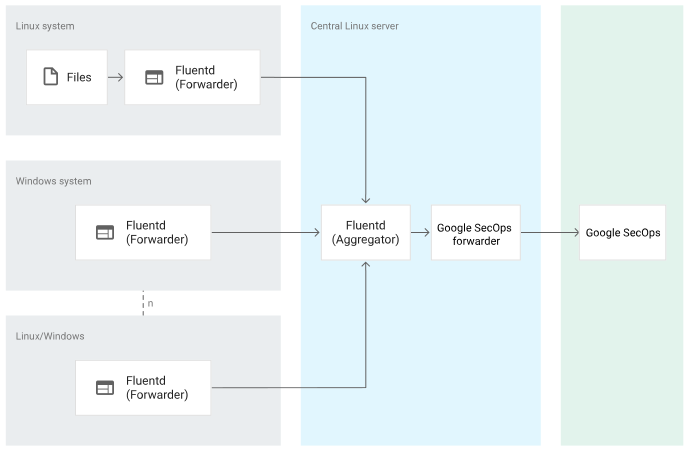
Das Architekturdiagramm zeigt die folgenden Komponenten:
Linux-System. Das zu überwachende Linux-System. Das Linux-System besteht aus den zu überwachenden Dateien und dem Fluentd-Forwarder-Server.
Microsoft Windows-System Das Microsoft Windows-System, das überwacht werden soll und auf dem der Fluentd-Forwarder-Server installiert ist.
Fluentd-Forwarder: Der Fluentd-Forwarder erfasst Informationen aus dem Microsoft Windows- oder Linux-System und leitet sie an den Fluentd-Aggregator weiter.
Fluentd-Aggregator: Der Fluentd-Aggregator empfängt Logs vom Fluentd-Forwarder und leitet sie an den Google Security Operations-Forwarder weiter.
BindPlane-Agent: Der BindPlane-Agent ruft Logs von Zscaler ZPA ab und sendet sie an Google SecOps.
Google Security Operations-Forwarder. Der Google Security Operations-Forwarder ist eine einfache Softwarekomponente, die im Netzwerk des Kunden bereitgestellt wird und Syslog unterstützt. Der Google Security Operations-Forwarder leitet die Logs an Google Security Operations weiter.
Google Security Operations. Google Security Operations speichert und analysiert die Logs des Fluentd-Aggregators.
Ein Erfassungslabel gibt den Parser an, der Logrohdaten in das strukturierte UDM-Format normalisiert. Die Informationen in diesem Dokument beziehen sich auf den Parser mit dem Aufnahme-Label FLUENTD.
Hinweis
Prüfen Sie, ob der Fluentd-Forwarder auf den Microsoft Windows- oder Linux-Systemen installiert ist, die Sie überwachen möchten. Weitere Informationen zur Installation des Fluentd-Forwarders finden Sie unter Fluentd-Installation.
Verwenden Sie eine Fluentd-Version, die vom Google Security Operations-Parser unterstützt wird. Der Google Security Operations-Parser unterstützt Fluentd-Version 1.0.
Prüfen Sie, ob der Fluentd-Aggregator auf dem zentralen Linux-Server installiert und konfiguriert ist.
Achten Sie darauf, dass alle Systeme in der Bereitstellungsarchitektur in der UTC-Zeitzone konfiguriert sind.
Prüfen Sie, welche Logtypen vom Google Security Operations-Parser unterstützt werden. In der folgenden Tabelle sind die Produkte und Logdateipfade aufgeführt, die vom Google Security Operations-Parser unterstützt werden:
Betriebssystem Produkt Pfad der Protokolldatei Microsoft Windows Microsoft Windows Ereignisprotokolle Linux Linux /var/log/audit/audit.log Linux Linux /var/log/syslog Linux apache2 /var/log/apache2/access.log Linux apache2 /var/log/apache2/error.log Linux apache2 /var/log/apache2/other_vhosts_access.log Linux apache2 /var/log/apache2/novnc-server-access.log Linux OpenVpn /var/log/openvpnas.log Linux Nginx /var/log/nginx/access.log Linux Nginx /var/log/nginx/error.log Linux rkhunter /var/log/rkhunter.log Linux Linux /var/log/auth.log Linux Linux /var/log/kern.log Linux rundeck /var/log/rundeck/service.log Linux Samba /var/log/samba/log.winbindd Linux Linux /var/log/mail.log
Fluentd-Forwarder und ‑Aggregator sowie den Google Security Operations-Forwarder konfigurieren
Wenn Sie die von den Linux-Systemen generierten Protokolle überwachen möchten, erstellen Sie eine
td-agent.conf-Datei, um die Konfiguration für die Protokollüberwachung für den Fluentd-Forwarder anzugeben. Hier sehen Sie ein Beispiel für eine Konfigurationsdatei für den Fluentd-Forwarder auf dem Linux-System:<source> @type tail path /var/log/nginx/access.log pos_file /var/log/td-agent/nginx-access.log.pos tag mytag.nginx.access <parse> @type none </parse> </source> <source> @type tail path /var/log/nginx/error.log pos_file /var/log/td-agent/nginx-error.log.pos tag mytag.nginx.error <parse> @type none </parse> </source> <source> @type tail path /var/log/apache2/access.log pos_file /var/log/td-agent/apache-access.log.pos tag mytag.apache.access <parse> @type none </parse> </source> <source> @type tail path /var/log/apache2/error.log pos_file /var/log/td-agent/apache-error.log.pos tag mytag.apache.error <parse> @type none </parse> </source> <source> @type tail path /var/log/audit/audit.log pos_file /var/log/td-agent/audit.log.pos tag mytag.audit <parse> @type none </parse> </source> <source> @type tail path /var/log/syslog/syslog.log pos_file /var/log/td-agent/syslog.log.pos tag mytag.syslog <parse> @type none </parse> </source> <source> @type tail path /var/log/apache2/other_vhosts_access.log pos_file /var/log/td-agent/vhost.log.pos tag mytag.apache.other_vhosts_access <parse> @type none </parse> </source> <source> @type tail path /var/log/apache2/novnc-server-access.log pos_file /var/log/td-agent/novnc.log.pos tag mytag.apache.novnc-server-access <parse> @type none </parse> </source> <source> @type tail path /var/log/openvpnas.log pos_file /var/log/td-agent/openvpnas.log.pos tag mytag.openvpnas <parse> @type none </parse> </source> <source> @type tail path /var/log/auth.log pos_file /var/log/td-agent/auth.log.pos tag mytag.auth <parse> @type none </parse> </source> <source> @type tail path /var/log/kern.log pos_file /var/log/td-agent/kern.log.pos tag mytag.kern <parse> @type none </parse> </source> <source> @type tail path /var/log/rundeck/service.log pos_file /var/log/td-agent/rundeck.log.pos tag mytag.rundeck <parse> @type none </parse> </source> <source> @type tail path /var/log/mail.log pos_file /var/log/td-agent/mail.log.pos tag mytag.mail <parse> @type none </parse> </source> <source> @type tail path /var/log/rkhunter.log pos_file /var/log/td-agent/rkhunter.log.pos tag mytag.rkhunter <parse> @type none </parse> </source> <source> @type tail Path /var/log/samba/log.winbindd pos_file /var/log/td-agent/winbindd.log.pos tag mytag.winbindd <parse> @type none </parse> </source> <filter mytag.**> @type record_transformer <record> forwarder_hostname "#{Socket.gethostname}" </record> </filter> <filter mytag.nginx.access.**> @type record_transformer <record> path "/var/log/nginx/access.log" </record> </filter> <filter mytag.nginx.error.**> @type record_transformer <record> path "/var/log/nginx/error.log" </record> </filter> <filter mytag.apache.access.**> @type record_transformer <record> path "/var/log/apache2/access.log" </record> </filter> <filter mytag.apache.error.**> @type record_transformer <record> path "/var/log/apache2/error.log" </record> </filter> <filter mytag.audit.**> @type record_transformer <record> path "/var/log/audit/audit.log" </record> </filter> <filter mytag.syslog.**> @type record_transformer <record> path "/var/log/syslog/syslog.log" </record> </filter> <filter mytag.apache.other_vhosts_access.**> @type record_transformer <record> path "/var/log/apache2/other_vhosts_access.log" </record> </filter> <filter mytag.apache.novnc-server-access.**> @type record_transformer <record> path "/var/log/apache2/novnc-server-access.log" </record> </filter> <filter mytag.openvpnas.**> @type record_transformer <record> path "/var/log/openvpnas.log" </record> </filter> <filter mytag.auth.**> @type record_transformer <record> path "/var/log/auth.log" </record> </filter> <filter mytag.kern.**> @type record_transformer <record> path "/var/log/kern.log" </record> </filter> <filter mytag.rundeck.**> @type record_transformer <record> path "/var/log/rundeck/service.log" </record> </filter> <filter mytag.mail.**> @type record_transformer <record> path "/var/log/mail.log" </record> </filter> <filter mytag.rkhunter.**> @type record_transformer <record> path "/var/log/rkhunter.log" </record> </filter> <filter mytag.winbindd.**> @type record_transformer <record> path "/var/log/samba/log.winbindd" </record> </filter> <match mytag.**> @type forward # primary host <server> host <AGGREGATOR_HOSTNAME> port <AGGREGATOR_PORT> </server> </match>Wenn Sie die von den Microsoft Windows-Systemen generierten Logs überwachen möchten, erstellen Sie eine
td-agent.conf-Datei, um die Konfiguration für die Logüberwachung für den Fluentd-Forwarder anzugeben. Hier sehen Sie ein Beispiel für eine Konfigurationsdatei für den Fluentd-Forwarder auf dem Microsoft Windows-System:<source> @type windows_eventlog @id windows_eventlog channels application,security,system read_existing_events true read_interval 2 tag windows.raw render_as_xml true <storage> @type local persistent true path E:\windows.pos </storage> </source> <match windowslog> @type forward <server> host <AGGREGATOR_HOSTNAME> port <AGGREGATOR_PORT> username <AGGREGATOR_USERNAME> password <AGGREGATOR_PASSWORD> </server> </match>Wenn Sie die Logs vom Fluentd-Aggregator an den Google Security Operations-Forwarder weiterleiten möchten, erstellen Sie eine Konfigurationsdatei im folgenden Format:
<source>
@type forward
port <AGGREGATOR_PORT>
</source>

## Forwarding
<match mytag.**>
@id output_system_forward
@type forward
# IP and port of the forwarder
<server>
 host <CHRONICLE_FORWARDER_HOSTNAME>
 port <CHRONICLE_FORWARDER_PORT>
</server>
</match>
Konfigurieren Sie den Google Security Operations-Forwarder so, dass Logs an Google Security Operations gesendet werden. Weitere Informationen finden Sie unter Forwarder unter Linux installieren und konfigurieren. Hier sehen Sie ein Beispiel für eine Google Security Operations-Weiterleitungskonfiguration:
common:
  enabled: true
  data_type: FLUENTD
  batch_n_seconds: 10
  batch_n_bytes: 1048576
tcp_address: 0.0.0.0:10514
connection_timeout_sec: 60
Logs mit dem Bindplane-Agent an Google SecOps weiterleiten
- Installieren und richten Sie eine virtuelle Linux-Maschine ein.
- Bindplane-Agent unter Linux installieren und konfigurieren, um Logs an Google SecOps weiterzuleiten. Weitere Informationen zum Installieren und Konfigurieren des BindPlane-Agents finden Sie in der Installations- und Konfigurationsanleitung für den BindPlane-Agent.
Wenn beim Erstellen von Feeds Probleme auftreten, wenden Sie sich an den Google SecOps-Support.
Unterstützte Fluentd-Logformate
Der Fluentd-Parser unterstützt Logs im SYSLOG+JSON-Format.
Unterstützte Fluentd-Beispiellogs
SYSLOG + JSON
"2022-06-30T17:10:10+05:30 mytag.apache.error {\"message\":\"[Sat Jun 02 00:30:55 2022] New connection: [connection: gTxkX8Z6tjk] [client 172.17.0.1:50786]\",\"forwarder_hostname\":\"Ubuntu18\",\"path\":\"/var/log/apache2/error.log\"}"
Referenz zur Feldzuordnung
In diesem Abschnitt wird erläutert, wie der Parser Grok-Muster für Linux- und Microsoft Windows-Systeme anwendet und wie er Fluentd-Logfelder für jeden Logtyp den Feldern des einheitlichen Datenmodells (Unified Data Model, UDM) von Google Security Operations zuordnet.
Informationen zum Zuordnen von Referenzen für gängige Felder finden Sie unter Gängige Felder.
Referenzinformationen zu Logpfaden, Grok-Mustern für Beispiel-Logs, Ereignistypen und UDM-Feldern auf Linux-Systemen finden Sie in den folgenden Abschnitten:
Informationen zu unterstützten Microsoft Windows-Ereignissen und den entsprechenden UDM-Feldern finden Sie unter Microsoft Windows-Ereignisdaten.
Häufig verwendete Felder
In der folgenden Tabelle sind die allgemeinen Logfelder und die entsprechenden UDM-Felder aufgeführt.
| Häufig verwendetes Logfeld | UDM-Feld |
|---|---|
| collected_time | metadata.collected_timestamp |
| inner_message.message | inner_message |
| inner_message.forwarder_hostname | target.hostname oder principal.hostname |
| inner_message.path | event_source |
Linux-System
In der folgenden Tabelle sind die Logpfade für Linux-Systeme, das Grok-Muster für Beispiel-Logs, der Ereignistyp und die UDM-Zuweisungen aufgeführt:
| Protokollpfad | Beispiellog | Grok-Muster | Ereignistyp | UDM-Zuordnung |
|---|---|---|---|---|
| /var/log/apache2/error.log | [Thu Apr 28 16:13:01.283342 2022] [core:notice] [pid 18394:tid 140188660751296] [client 1.200.32.47:59840] failed to make connection | [{timestamp}][{log_module}:{log_level}][pid{pid}(<optional_field>:tid{tid}|)](<optional_field> [client {client_ip}:{client_port}]|) (?<error_message>.*) | NETWORK_UNCATEGORIZED | „timestamp“ wird „metadata.event_timestamp“ zugeordnet. „log_module“ wird „target.resource.name“ zugeordnet. „log_level“ wird „security_result.severity“ zugeordnet. „pid“ wird „target.process.parent_process.pid“ zugeordnet. „tid“ wird „target.process.pid“ zugeordnet. „client_ip“ wird „principal.ip“ zugeordnet. client_port wird principal.port zugeordnet. error_message wird security_result.description zugeordnet. network.application_protocol ist auf „HTTP“ festgelegt. target.platform ist auf „LINUX“ festgelegt. metadata.vendor_name ist auf „Apache“ festgelegt. metadata.product_name ist auf „Apache HTTP Server“ festgelegt. |
| /var/log/apache2/error.log | [Thu Apr 28 16:13:01.283342 2022] [core:notice] [pid 18394:tid 140188660751296] failed to make connection | [{timestamp}][{log_module}:{severity}][pid{pid}(<optional_field>:tid{tid}|)]{error_message} | NETWORK_UNCATEGORIZED | „timestamp“ wird „metadata.event_timestamp“ zugeordnet. „log_module“ wird „target.resource.name“ zugeordnet. „log_level“ wird „security_result.severity“ zugeordnet. „pid“ wird „target.process.parent_process.pid“ zugeordnet. „tid“ wird „target.process.pid“ zugeordnet. error_message wird security_result.description zugeordnet. network.application_protocol ist auf „HTTP“ festgelegt. target.platform ist auf „LINUX“ festgelegt. metadata.vendor_name ist auf „Apache“ festgelegt. metadata.product_name ist auf „Apache HTTP Server“ festgelegt. |
| /var/log/apache2/error.log | [Thu Apr 28 16:13:01.283342 2022] [core:notice] [pid 18394:tid 140188660751296] AH00094: Command line: '/usr/sbin/apache2' | [{timestamp}][{log_module}:{log_level}][pid{pid}(<optional_field>:tid{tid}|)](<optional_field> [client {client_ip}:{client_port}]|) (?<error_message>.*),referer{referer_url} | NETWORK_UNCATEGORIZED | metadata.vendor_name ist auf „Apache“ festgelegt. metadata.product_name ist auf „Apache HTTP Server“ festgelegt. „timestamp“ wird „metadata.event_timestamp“ zugeordnet. „log_module“ wird „target.resource.name“ zugeordnet. „log_level“ wird „security_result.severity“ zugeordnet. „pid“ wird „target.process.parent_process.pid“ zugeordnet. „tid“ wird „target.process.pid“ zugeordnet. „client_ip“ wird „principal.ip“ zugeordnet. client_port wird principal.port zugeordnet. error_message wird security_result.description zugeordnet. target.platform ist auf „LINUX“ festgelegt. referer_url wird network.http.referral_url zugeordnet. |
| /var/log/apache2/error.log | [Sun Jan 30 15:14:47.260309 2022] [proxy_http:error] [pid 12515:tid 140035781285632] [client 1.200.32.47:59840] AH01114: HTTP: failed to make connection to backend: 192.0.2.1 , referer http:// | [{timestamp}] [{log_module}:{log_level}] [pid {pid}(<optional_field>:tid{tid}|)] [client {client_ip}:{client_port}]( <message_text>HTTP: )?{error_message}:( {target_ip})(<optional_field>,referer{referer_url})?" | NETWORK_HTTP | „timestamp“ wird „metadata.event_timestamp“ zugeordnet. „log_module“ wird „target.resource.name“ zugeordnet. „log_level“ wird „security_result.severity“ zugeordnet. „pid“ wird „target.process.parent_process.pid“ zugeordnet. „tid“ wird „target.process.pid“ zugeordnet. „client_ip“ wird „principal.ip“ zugeordnet. client_port wird principal.port zugeordnet. error_message wird security_result.description zugeordnet. target_ip wird target.ip zugeordnet referer_url wird network.http.referral_url zugeordnet. network.application_protocol ist auf „HTTP“ festgelegt. target.platform ist auf „LINUX“ festgelegt. metadata.vendor_name ist auf „Apache“ festgelegt. metadata.product_name ist auf „Apache HTTP Server“ festgelegt. |
| /var/log/apache2/error.log | [Sat Feb 02 00:30:55 2019] New connection: [connection: gTxkX8Z6tjk] [client 192.0.2.1:50786] | [{timestamp}]<message_text>connection:[connection:{connection_id}][client{client_ip}:{client_port}] | NETWORK_UNCATEGORIZED | „timestamp“ wird „metadata.event_timestamp“ zugeordnet. „client_ip“ wird „principal.ip“ zugeordnet. client_port wird principal.port zugeordnet. connection_id wird network.session_id zugeordnet. network.application_protocol ist auf „HTTP“ festgelegt. target.platform ist auf „LINUX“ festgelegt. metadata.vendor_name ist auf „Apache“ festgelegt. metadata.product_name ist auf „Apache HTTP Server“ festgelegt. |
| /var/log/apache2/error.log | [Sa 02.02.2019 00:30:55] Neue Anfrage: [connection: j8BjX4Z5tjk] [request: ACtkX1Z5tjk] [pid 8] [client 192.0.2.1:50784] | [{timestamp}]<message_text>request:[connection:{connection_id}][request:{request_id}][pid{pid}][client{client_ip}:{client_port}] | NETWORK_UNCATEGORIZED | „timestamp“ wird „metadata.event_timestamp“ zugeordnet. „request_id“ wird „security_result.detection_fields.(key/value)“ zugeordnet. „client_ip“ wird „principal.ip“ zugeordnet. client_port wird principal.port zugeordnet. „pid“ wird „target.process.parent_process.pid“ zugeordnet. connection_id wird network.session_id zugeordnet. network.application_protocol ist auf „HTTP“ festgelegt. target.platform ist auf „LINUX“ festgelegt. metadata.vendor_name ist auf „Apache“ festgelegt. metadata.product_name ist auf „Apache HTTP Server“ festgelegt. |
| /var/log/apache2/error.log | [Sat Feb 02 00:30:55 2019] [info] [C: j8BjX4Z5tjk] [R: p7pjX4Z5tjk] [pid 8] core.c(4739): [client 192.0.2.1:50784] AH00128: File does not exist: /usr/local/apache2/htdocs/favicon.ico | [{timestamp}] [{log_level}][C:{connection_id}][R:{request_id}][pid {pid}(<optional_field>:tid{tid}|)]<message_text>[client {client_ip}:{client_port}]{error_message}:{file_path} | NETWORK_UNCATEGORIZED | „timestamp“ wird „metadata.event_timestamp“ zugeordnet. „log_level“ wird „security_result.severity“ zugeordnet. „request_id“ wird „security_result.detection_fields.(key/value)“ zugeordnet. „client_ip“ wird „principal.ip“ zugeordnet. client_port wird principal.port zugeordnet. „pid“ wird „target.process.parent_process.pid“ zugeordnet. connection_id wird network.session_id zugeordnet. error_message wird security_result.description zugeordnet. file_path wird target.file.full_path zugeordnet. network.application_protocol ist auf „HTTP“ festgelegt. target.platform ist auf „LINUX“ festgelegt. metadata.vendor_name ist auf „Apache“ festgelegt. metadata.product_name ist auf „Apache HTTP Server“ festgelegt. |
| /var/log/apache2/access.log | 192.0.2.1 - - [28/Apr/2022:17:35:52 +0530] "GET / HTTP/1.1" 200 3476 "-" "Mozilla/5.0 (Windows NT 10.0; Win64; x64) AppleWebKit/537.36 (KHTML, like Gecko) Chrome/192.0.2.1 Safari/537.36" | ({client_ip})?<message_text>{userid}[{timestamp}](<optional_field>{method}/(<optional_field>{resource}?) {client_protocol}?){result_status}{object_size}(<optional_field>(<optional_field>{referer_url}?)(<optional_field>{user_agent}?)? | NETWORK_HTTP | „client_ip“ wird „principal.ip“ zugeordnet. „userid“ wird „principal.user.userid“ zugeordnet. Der Host wird „principal.hostname“ zugeordnet. „timestamp“ wird „metadata.event_timestamp“ zugeordnet. Die Methode wird network.http.method zugeordnet. Die Ressource wird „principal.resource.name“ zugeordnet. client_protocol wird network.application_protocol zugeordnet. result_status wird network.http.response_code zugeordnet. object_size wird network.sent_bytes zugeordnet. referer_url wird network.http.referral_url zugeordnet. user_agent wird network.http.user_agent zugeordnet. network.ip_protocol ist auf „TCP“ festgelegt. network.direction ist auf „OUTBOUND“ festgelegt. network.application_protocol ist auf „HTTP“ festgelegt. target.platform ist auf „LINUX“ festgelegt. metadata.vendor_name ist auf „Apache“ festgelegt. metadata.product_name ist auf „Apache HTTP Server“ festgelegt. |
| var/log/apache2/other_vhosts_access.log | wintest.example.com:80 ::1 - - [14/Jan/2022:14:08:16 -0700] \"GET /server-status?auto HTTP/1.1\" 200 1415 \"-\" \"Python-urllib/2.7\" | {target_host}:{NUMBER:target_port} {client_ip} - (<optional_field>{host}?) [{timestamp}](<optional_field>{method}/(<optional_field>{resource}?){client_protocol}?){result_status}{object_size}(<optional_field>{referer_url}?)(<optional_field>{user_agent}?) | NETWORK_HTTP | target_host wird target.hostname zugeordnet.
target_port wird target.port zugeordnet „client_ip“ wird „principal.ip“ zugeordnet. „userid“ wird „principal.user.userid“ zugeordnet. Der Host wird „principal.hostname“ zugeordnet. „timestamp“ wird „metadata.event_timestamp“ zugeordnet. Die Methode wird network.http.method zugeordnet. Die Ressource wird „principal.resource.name“ zugeordnet. result_status wird network.http.response_code zugeordnet. object_size wird network.sent_bytes zugeordnet. referer_url wird network.http.referral_url zugeordnet. user_agent wird network.http.user_agent zugeordnet. network.ip_protocol ist auf „TCP“ festgelegt. network.direction ist auf „OUTBOUND“ festgelegt. target.platform ist auf „LINUX“ festgelegt. metadata.vendor_name ist auf „Apache“ festgelegt. metadata.product_name ist auf „Apache HTTP Server“ festgelegt. network.application_protocol ist auf „HTTP“ festgelegt. |
| var/log/apache2/novnc-server-access.log | wintest.example.com:80 ::1 - - [14/Jan/2022:14:08:16 -0700] \"GET /server-status?auto HTTP/1.1\" 200 1415 \"-\" \"http://\" | {target_host}:{NUMBER:target_port} {client_ip} - (<optional_field>{host}?) [{timestamp}](<optional_field>{method}/(<optional_field>{resource}?){client_protocol}?){result_status}{object_size}(<optional_field>{referer_url}?)(<optional_field>{user_agent}?) | NETWORK_HTTP | „client_ip“ wird „principal.ip“ zugeordnet. „userid“ wird „principal.user.userid“ zugeordnet. Die Methode wird network.http.method zugeordnet. „path“ wird „target.url“ zugeordnet. result_status wird network.http.response_code zugeordnet. object_size wird network.sent_bytes zugeordnet. referer_url wird network.http.referral_url zugeordnet. user_agent wird network.http.user_agent zugeordnet. network.ip_protocol ist auf „TCP“ festgelegt. network.direction ist auf „OUTBOUND“ festgelegt. target.platform ist auf „LINUX“ festgelegt. metadata.vendor_name ist auf „Apache“ festgelegt. metadata.product_name ist auf „Apache HTTP Server“ festgelegt. network.application_protocol ist auf „HTTP“ festgelegt. |
| /var/log/apache2/access.log | „http://192.0.2.1/test/first.html“ –> /google.com | (<optional_field>{referer_url}?)->(<optional_field>{path}?) | GENERIC_EVENT | „path“ wird „target.url“ zugeordnet. referer_url wird network.http.referral_url zugeordnet. network.direction ist auf „OUTBOUND“ festgelegt. target.platform ist auf „LINUX“ festgelegt. network.application_protocol ist auf „HTTP“ festgelegt. target.platform ist auf „LINUX“ festgelegt. metadata.vendor_name ist auf „Apache“ festgelegt. metadata.product_name ist auf „Apache HTTP Server“ festgelegt. |
| /var/log/apache2/access.log | Mozilla/5.0 (Windows NT 10.0; Win64; x64) AppleWebKit/537.36 (KHTML, like Gecko) Code/1.67.0 Chrome/98.0.4758.141 Electron/17.4.1 Safari/537.36 | (<optional_field>{user_agent}) | GENERIC_EVENT | user_agent wird network.http.user_agent zugeordnet. network.direction ist auf „OUTBOUND“ festgelegt. target.platform ist auf „LINUX“ festgelegt. network.application_protocol ist auf „HTTP“ festgelegt. target.platform ist auf „LINUX“ festgelegt. metadata.vendor_name ist auf „Apache“ festgelegt. metadata.product_name ist auf „Apache HTTP Server“ festgelegt. |
| var/log/nginx/access.log | 192.0.2.1 - admin [05/May/2022:11:53:27 +0530] "GET /icons/ubuntu-logo.png HTTP/1.1" 404 209 "http://198.51.100.1/" "Mozilla/5.0 (Windows NT 10.0; Win64; x64) AppleWebKit/537.36 (KHTML, like Gecko) Chrome/192.0.2.1 Safari/537.36" | {principal_ip} – (<optional_field>{principal_user_userid}?) [{timestamp}] {http_method} /(<optional_field>{resource_name}?|) {protocol}(<message_text>){response_code} {received_bytes}(<optional_field>{referer_url}) ({user_agent}|{user_agent})? | NETWORK_HTTP | Die Zeit wird metadata.timestamp zugeordnet. „ip“ wird „target.ip“ zugeordnet. „principal_ip“ wird „principal.ip“ zugeordnet. „principal_user_userid“ wird „principal.user.userid“ zugeordnet. metadata_timestamp wird timestamp zugeordnet http_method wird network.http.method zugeordnet resource_name wird principal.resource.name zugeordnet Das Protokoll wird network.application_protocol = (HTTP) zugeordnet. response_code wird network.http.response_code zugeordnet. received_bytes wird network.sent_bytes zugeordnet. referer_url wird network.http.referral_url zugeordnet. user_agent wird network.http.user_agent zugeordnet. target.platform ist auf „LINUX“ festgelegt. metadata.vendor_name ist auf „NGINX“ festgelegt. metadata.product_name ist auf „NGINX“ festgelegt. network.ip_protocol ist auf „TCP“ festgelegt. network.direction ist auf „OUTBOUND“ festgelegt. |
| var/log/nginx/error.log | 2022/01/29 13:51:48 [error] 593#593: *62432 open() \"/usr/share/nginx/html/nginx_status\" failed (2: No such file or directory), client: 192.0.2.1, server: localhost, request: \"GET /nginx_status HTTP/1.1\", host: \"192.0.2.1:8080\" | "{year}\/{month}\/{day}{time}[{severity}]{pid}#{thread_id}:{inner_message2}"
inner_message2 wird „{security_result_description_2},client:{principal_ip},server:(<optional_field>{target_hostname}?),request:"{http_method} /(<optional_field>{resource_name}?)“ zugeordnet. {protocol}/1.1",host:"({target_ip}:{target_port})?" „bind() to ({target_ip}|[{target_ip}]):{target_port} failed ({security_description})“ (bind() an ({target_ip}|[{target_ip}]):{target_port} fehlgeschlagen ({security_description})) "\*{cid}{security_description}", "{security_description}" |
NETWORK_HTTP | thread_id wird principal.process.pid zugeordnet. Der Schweregrad wird security_result.severity zugeordnet. („debug“ wird UNKNOWN_SEVERITY zugeordnet, „info“ wird INFORMATIONAL zugeordnet, „notice“ wird LOW zugeordnet, „warn“ wird MEDIUM zugeordnet, „error“ wird ERROR zugeordnet, „crit“ wird CRITICAL zugeordnet und „alert“ wird HIGH zugeordnet.) target_file_full_path wird target.file.full_path zugeordnet. „principal_ip“ wird „principal.ip“ zugeordnet. target_hostname wird target.hostname zugeordnet. http_method wird network.http.method zugeordnet resource_name wird principal.resource.name zugeordnet Das Protokoll ist „TCP“. target_ip wird target.ip zugeordnet target_port wird target.port zugeordnet security_description + security_result_description_2 wird security_result.description zugeordnet. „pid“ wird „principal.process.parent_process.pid“ zugeordnet. network.application_protocol ist auf „HTTP“ festgelegt. Der Zeitstempel wird {year}/{day}/{month} {time} zugeordnet. target.platform ist auf „LINUX“ festgelegt. metadata.vendor_name ist auf „NGINX“ festgelegt. metadata.product_name ist auf „NGINX“ festgelegt. network.ip_protocol ist auf „TCP“ festgelegt. network.direction ist auf „OUTBOUND“ festgelegt. |
| var/log/rkhunter.log | [14:10:40] Prüfung der erforderlichen Befehle fehlgeschlagen | [<message_text>]{security_description} | STATUS-UPDATE | Die Zeit wird metadata.timestamp zugeordnet. security_description wird security_result.description zugeordnet. principal.platform ist auf „LINUX“ festgelegt. metadata.vendor_name ist auf „RootKit Hunter“ festgelegt. metadata.product_name ist auf „RootKit Hunter“ festgelegt. |
| var/log/rkhunter.log | [14:09:52] Suche nach Datei „/dev/.oz/.nap/rkit/terror“ [Nicht gefunden ] | [<message_text>] {security_description} {file_path}[\{metadata_description}] | FILE_UNCATEGORIZED | metadata_description wird metadata.description zugeordnet.
file_path wird target.file.full_path zugeordnet. security_description wird security_result.description zugeordnet. principal.platform ist auf „LINUX“ festgelegt. metadata.vendor_name ist auf „RootKit Hunter“ festgelegt. metadata.product_name ist auf „RootKit Hunter“ festgelegt. |
| var/log/rkhunter.log | fluentd: File size reduced (inode remained): '/var/log/rkhunter.log'. | (<optional_field><message_text>:){metadata_description}:'{file_path}' | FILE_UNCATEGORIZED | Die Zeit wird metadata.timestamp zugeordnet. metadata_description wird metadata.description zugeordnet. file_path wird target.file.full_path zugeordnet. principal.platform ist auf „LINUX“ festgelegt. metadata.vendor_name ist auf „RootKit Hunter“ festgelegt. metadata.product_name ist auf „RootKit Hunter“ festgelegt. |
| /var/log/kern.log | 28. Apr. 12:41:35 localhost kernel: [ 5079.912215] ctnetlink v0.93: registering with nfnetlink. | {timestamp}{principal_hostname}{metadata_product_event_type}:[<message_text>]{metadata_description} | STATUS-UPDATE | „timestamp“ wird „metadata.event_timestamp“ zugeordnet. „principal_hostname“ wird „principal.hostname“ zugeordnet. „metadata_product_event_type“ wird „metadata.product_event_type“ zugeordnet. metadata_description wird „metadata.description“ zugeordnet. metadata.vendor_name ist auf „FLUENTD“ festgelegt. metadata.product_name ist auf „FLUENTD“ festgelegt. principal.platform ist auf „LINUX“ festgelegt. |
| /var/log/kern.log | Jul 6 11:17:01 Ubuntu18 kernel: [ 0.030139] smpboot: CPU0: Intel(R) Xeon(R) Gold 5220R CPU @ 2.20GHz (family: 0x6, model: 0x55, stepping: 0x7) | {timestamp}{principal_hostname}{metadata_product_event_type}:([<message_text>])<message_text>:\CPU0:{principal_asset_hardware_cpu_model}({metadata_description}) | STATUS_UPDATE | „timestamp“ wird „metadata.event_timestamp“ zugeordnet. „principal_hostname“ wird „principal.hostname“ zugeordnet. „metadata_product_event_type“ wird „metadata.product_event_type“ zugeordnet. principal_asset_hardware_cpu_model wird „principal.asset.hardware.cpu_model“ zugeordnet. metadata_description wird „metadata.description“ zugeordnet. metadata.vendor_name ist auf „FLUENTD“ festgelegt. metadata.product_name ist auf „FLUENTD“ festgelegt. principal.platform ist auf „LINUX“ festgelegt. „cpu_model“ wird „principal.asset.hardware.cpu_model“ zugeordnet. |
| /var/log/syslog.log | 24. Mai 10:30:42 Ubuntu18 systemd[1]: Started Session 112 of user kajal. | {collected_timestamp}{hostname}{command_line}(<optional_field>[{pid}]):{message} | STATUS_UPDATE | „collected_time“ wird „metadata.event_timestamp“ zugeordnet. hostname wird principal.hostname zugeordnet „pid“ wird „principal.process.pid“ zugeordnet. Die Nachricht wird „metadata.description“ zugeordnet. metadata.vendor_name ist auf „FLUENTD“ festgelegt. metadata.product_name ist auf „FLUENTD“ festgelegt. principal.platform ist auf „LINUX“ festgelegt. command_line wird principal.process.command_line zugeordnet. |
| /var/log/syslog.log | Jul 06 10:14:37 Ubuntu18 rsyslogd: rsyslogd's userid changed to 102 | {collected_timestamp}{hostname}{command_line}:{message}to{user_id} | STATUS_UPDATE | „collected_time“ wird „metadata.collected_timestamp“ zugeordnet. hostname wird principal.hostname zugeordnet Die Nachricht wird „metadata.description“ zugeordnet. „user_id“ wird „principal.user.userid“ zugeordnet. command_line wird principal.process.command_line zugeordnet. metadata.vendor_name ist auf „FLUENTD“ festgelegt. metadata.product_name ist auf „FLUENTD“ festgelegt. principal.platform ist auf „LINUX“ festgelegt. |
| /var/log/syslog.log | 06. Juli 10:36:48 Ubuntu18 systemd[1]: Starting System Logging Service... | {collected_timestamp}{hostname}{command_line}(<optional_field>|[{pid}]):{message} | STATUS_UPDATE | „collected_time“ wird „metadata.event_timestamp“ zugeordnet. hostname wird principal.hostname zugeordnet „pid“ wird „principal.process.pid“ zugeordnet. Die Nachricht wird „metadata.description“ zugeordnet. metadata.vendor_name ist auf „FLUENTD“ festgelegt. metadata.product_name ist auf „FLUENTD“ festgelegt. principal.platform ist auf „LINUX“ festgelegt. command_line wird principal.process.command_line zugeordnet. |
| var/log/openvpnas.log | 2022-04-29T10:51:22+0530 [stdout#info] [OVPN 4] OUT: '2022-04-29 05:21:22 mohit_AUTOLOGIN/198.51.100.1:16245 MULTI: Learn: 198.51.100.1 -> mohit_AUTOLOGIN/203.0.113.1:16245' | {timestamp}[stdout#{log_level}][OVPN <message_text>]OUT:(<optional_field>'|")<message_text>-<message_text>{user}\/{ip}:{port}MULTI:Learn:{local_ip}->{target_hostname}?{target_ip}:{port}(<optional_field>'|") | NETWORK_HTTP | Der Zeitstempel wird metadata.timestamp zugeordnet. „log_level“ wird „security_result.severity“ zugeordnet. local_ip wird principal.ip zugeordnet. target_ip wird target.ip zugeordnet „target_hostname“ wird „principal.hostname“ zugeordnet. Der Port wird „target.port“ zugeordnet. Der Nutzer wird „principal.user.user_display_name“ zugeordnet. metadata.vendor_name ist auf „OpenVPN“ festgelegt. metadata.product_name ist auf „OpenVPN Access Server“ festgelegt. principal.platform ist auf „LINUX“ festgelegt. |
| var/log/openvpnas.log | 2022-04-28T16:14:13+0530 [stdout#info] [OVPN 6] OUT: '2022-04-28 16:14:13 library versions: OpenSSL 1.1.1 11 Sep 2018, LZO 2.08' | {timestamp}[stdout#{log_level}][OVPN <message_text>]OUT:(<optional_field>'|")<message_text>{msg}(<optional_field>'|") | STATUS-UPDATE | Der Zeitstempel wird metadata.timestamp zugeordnet. „log_level“ wird „security_result.severity“ zugeordnet. msg wird security_result.description zugeordnet. metadata.vendor_name ist auf „OpenVPN“ festgelegt. metadata.product_name ist auf „OpenVPN Access Server“ festgelegt. principal.platform ist auf „LINUX“ festgelegt. |
| var/log/openvpnas.log | 2022-04-28T16:14:13+0530 [stdout#info] [OVPN 6] OUT: '2022-04-28 16:14:13 net_addr_v4_add: 198.51.100.1/23 dev as0t6' | {timestamp}[stdout#{log_level}][OVPN <message_text>]OUT:<optional_field>'|"<message_text>-<message_text>-<message_text><message_text>{message}<optional_field>'|" Die Nachricht wird zugeordnet zu (net_addr_v4_add|net_route_v4_best_gw):{target_ip}/{target_port} |
STATUS-UPDATE | principal.platform ist auf „LINUX“ festgelegt. target_ip wird target.ip zugeordnet target_port wird target.port zugeordnet Der Schweregrad wird security_result.severity zugeordnet. Der Zeitstempel wird metadata.timestamp zugeordnet. metadata.vendor_name ist auf OpenVPN festgelegt. metadata.product_name ist auf OpenVPN Access Server festgelegt. |
| var/log/openvpnas.log | 2022-04-29T10:51:22+0530 [stdout#info] [OVPN 4] OUT: '2022-04-29 05:21:22 198.51.100.1:16245 [mohit_AUTOLOGIN] Peer Connection Initiated with [AF_INET]192.0.2.1:16245 (via [AF_INET]198.51.100.1%ens160)' | {timestamp}[stdout#{log_level}][OVPN <message_text>]OUT:(<optional_field>'|")<message_text>{message}(<optional_field>'|") Die Nachricht wird <message_text> mit [<message_text>]<message_text>:{port}<message_text> zugeordnet. |
STATUS-UPDATE | Der Zeitstempel wird metadata.timestamp zugeordnet. „log_level“ wird „security_result.severity“ zugeordnet. metadata.vendor_name ist auf OpenVPN festgelegt. metadata.product_name ist auf OpenVPN Access Server festgelegt. principal.platform ist auf „Linux“ festgelegt. target_ip wird target.ip zugeordnet target_port wird target.port zugeordnet target_hostname wird target.hostname zugeordnet. intermediary_ip wird intermediary.ip zugeordnet |
| var/log/openvpnas.log | 2022-04-29T10:51:22+0530 [stdout#info] [OVPN 4] OUT: \"2022-04-29 05:21:22 mohit_AUTOLOGIN/198.51.100.1:16245 SENT CONTROL [mohit_AUTOLOGIN]: 'PUSH_REPLY,explicit-exit-notify,topology subnet,route-delay 5 30,dhcp-pre-release,dhcp-renew,dhcp-release,route-metric 101,ping 12,ping-restart 50,redirect-gateway def1,redirect-gateway bypass-dhcp,redirect-gateway autolocal,route-gateway 198.51.100.1,dhcp-option DNS 192.0.2.1,dhcp-option DNS 192.0.2.1,register-dns,block-ipv6,ifconfig 198.51.100.1 203.0.113.1,peer-id 0,auth-tokenSESS_ID,cipher AES-256-GCM,key-derivation tls-ekm' (status=1)\" | {timestamp}[stdout#{log_level}][OVPN <message_text>]OUT:(<optional_field>'|")<message_text>{user}\/{ip}:{message}(<optional_field>'|") | STATUS-UPDATE | Der Zeitstempel wird metadata.timestamp zugeordnet. „log_level“ wird „security_result.severity“ zugeordnet. Die Nachricht wird „metadata.description“ zugeordnet. Der Nutzer wird „target.hostname“ zugeordnet. „ip“ wird „target.ip“ zugeordnet. Der Port ist „target.port“ zugeordnet. metadata.vendor_name ist auf OpenVPN festgelegt. metadata.product_name ist auf OpenVPN Access Server festgelegt. principal.platform ist auf „Linux“ festgelegt. |
| var/log/openvpnas.log | 2022-04-29T10:51:22+0530 [stdout#info] AUTH SUCCESS {'status': 0, 'user': 'mohit', 'reason': 'AuthAutoLogin: autologin certificate auth succeeded', 'proplist': {'prop_autogenerate': 'true', 'prop_autologin': 'true', 'pvt_password_digest': '[redacted]', 'type': 'user_connect'}, 'common_name': 'mohit_AUTOLOGIN', 'serial': '3', 'serial_list': []} cli='win'/'3.git::d3f8b18b'/'OCWindows_3.3.6-2752' | {timestamp}[stdout#{log_level}]{summary}{'<message_text>':({status})?'<message_text>':({user})?'<message_text>':({reason})?<message_text>}, 'common_name':'{user_name}'<message_text>}cli='{cli}' | STATUS-UPDATE | Der Zeitstempel wird metadata.timestamp zugeordnet. „log_level“ wird „security_result.severity“ zugeordnet. Die Nachricht wird security_result.description zugeordnet. Die Zusammenfassung wird security_result.summary zugeordnet. user_name wird principal.user.user_display_name zugeordnet. „cli“ wird „principal.process.command_line“ zugeordnet. Der Status wird principal.user.user_authentication_status zugeordnet. metadata.vendor_name ist auf „OpenVPN“ festgelegt. metadata.product_name ist auf „OpenVPN Access Server“ festgelegt. principal.platform ist auf „LINUX“ festgelegt. |
| /var/log/rundeck/service.log | [2022-05-04T17:03:11,166] WARN config.NavigableMap - Accessing config key '[filterNames]' through dot notation is deprecated, and it will be removed in a future release. Verwenden Sie stattdessen „config.getProperty(key, targetClass)“. | [{timestamp}]{severity}{summary}\-{security_description}
, unter {command_line}\({file_path}:<message_text>\) |
STATUS-UPDATE | command_line wird „target.process.command_line“ zugeordnet.
file_path wird „target.process.file.full_path“ zugeordnet. „timestamp“ wird „metadata.event_timestamp“ zugeordnet. „severity“ wird „security_result.severity“ zugeordnet. Die Zusammenfassung wird „security_result.summary“ zugeordnet. security_description wird „security_result.description“ zugeordnet. metadata.product_name ist auf „FLUENTD“ festgelegt. metadata.vendor_name ist auf „FLUENTD“ festgelegt. |
| /var/log/auth.log | Jul 4 19:26:19 Ubuntu18 systemd-logind[982]: Removed session 153. | {timestamp} {principal_hostname}{principal_application}(<optional_field>[{pid}]):{security_description}{network_session_id}?(of user{principal_user_userid})? | USER_LOGOUT | Der Zeitstempel wird „metadata.timestamp“ zugeordnet. „principal_hostname“ wird „target.hostname“ zugeordnet, wenn der Wert „USER_LOGOUT“ ist. Andernfalls wird es „principal.hostname“ zugeordnet. „principal_application“ wird „target.application“ zugeordnet, wenn der Wert „USER_LOGOUT“ ist. Andernfalls wird es „principal.application“ zugeordnet. „pid“ wird „target.process.pid“ zugeordnet, wenn der Wert „USER_LOGOUT“ ist. Andernfalls wird „principal.process.pid“ zugeordnet. security_description wird „security_result.description“ zugeordnet. network_session_id wird „network.session_id“ zugeordnet. „principal_user_userid“ wird „principal.user.userid“ zugeordnet, wenn der Wert „USER_LOGOUT“ ist. Andernfalls wird es „target.user.userid“ zugeordnet. „principal.platform“ ist auf „LINUX“ festgelegt. Wenn „event.security_description“ „Removed session“ (Sitzung entfernt) ist, wird „event_type“ auf „USER_LOGOUT“ gesetzt. extensions.auth.type ist auf AUTHTYPE_UNSPECIFIED festgelegt. metadata.vendor_name ist auf „FLUENTD“ festgelegt. metadata.product_name ist auf „FLUENTD“ festgelegt. |
| /var/log/auth.log | 27. Juni 11:07:17 Ubuntu18 systemd-logind[804]: New session 564 of user root. | {timestamp} {principal_hostname}{principal_application}(<optional_field>[{pid}]):{security_description}{network_session_id}?(of user{principal_user_userid})? | USER_LOGIN | Der Zeitstempel wird „metadata.timestamp“ zugeordnet. „principal_hostname“ wird „target.hostname“ zugeordnet, wenn der Wert „USER_LOGOUT“ ist. Andernfalls wird es „principal.hostname“ zugeordnet. „principal_application“ wird „target.application“ zugeordnet, wenn der Wert „USER_LOGOUT“ ist. Andernfalls wird es „principal.application“ zugeordnet. „pid“ wird „target.process.pid“ zugeordnet, wenn der Wert „USER_LOGOUT“ ist. Andernfalls wird „principal.process.pid“ zugeordnet. security_description wird „security_result.description“ zugeordnet. network_session_id wird „network.session_id“ zugeordnet. „principal_user_userid“ wird „principal.user.userid“ zugeordnet, wenn der Wert „USER_LOGOUT“ ist. Andernfalls wird es „target.user.userid“ zugeordnet. „principal.platform“ ist auf „LINUX“ festgelegt. „network.application_protocol“ ist „SSH“ zugeordnet. if(new_session) event_type is set to USER_LOGIN extensions.auth.type ist auf AUTHTYPE_UNSPECIFIED festgelegt. metadata.vendor_name ist auf „FLUENTD“ festgelegt. metadata.product_name ist auf „FLUENTD“ festgelegt. |
| /var/log/auth.log | Jun 27 11:07:17 Ubuntu18 sshd[9349]: Accepted password for root from 198.51.100.1 port 57619 ssh2 | {timestamp} {principal_hostname}{principal_application}(<optional_field>[{pid}])<optional_field> {security_description} for (invalid user )?{principal_user_userid} from {principal_ip} port {principal_port} ssh2(:{security_result_detection_fields_ssh_kv}SHA256:{security_result_detection_fields_kv})? | USER_LOGIN | Der Zeitstempel wird „metadata.timestamp“ zugeordnet. „principal_hostname“ wird „target.hostname“ zugeordnet, wenn der Wert „USER_LOGOUT“ ist. Andernfalls wird es „principal.hostname“ zugeordnet. „principal_application“ wird „target.application“ zugeordnet, wenn der Wert „USER_LOGOUT“ ist. Andernfalls wird es „principal.application“ zugeordnet. „pid“ wird „target.process.pid“ zugeordnet, wenn der Wert „USER_LOGOUT“ ist. Andernfalls wird „principal.process.pid“ zugeordnet. security_description wird „security_result.description“ zugeordnet. „principal_user_userid“ wird „principal.user.userid“ zugeordnet, wenn der Wert „USER_LOGOUT“ ist. Andernfalls wird es „target.user.userid“ zugeordnet. „principal_ip“ wird „principal.ip“ zugeordnet. „principal_port“ wird „principal.port“ zugeordnet. security_result_detection_fields_ssh_kv wird „security_result.detection_fields.key/value“ zugeordnet. security_result_detection_fields_kv wird „security_result.detection_fields.key/value“ zugeordnet. „principal.platform“ ist auf „LINUX“ festgelegt. „network.application_protocol“ ist auf „SSH“ festgelegt. metadata.vendor_name ist auf „FLUENTD“ festgelegt. metadata.product_name ist auf „FLUENTD“ festgelegt. |
| /var/log/auth.log | 28. Apr. 11:51:13 Ubuntu18 sudo[24149]: root : TTY=pts/5 ; PWD=/ ; USER=root ; COMMAND=/bin/ls | {timestamp} {principal_hostname}{principal_application}(<optional_field>[{pid}])<optional_field> {principal_user_userid} :( {security_description} ;)? TTY=<message_text> ; PWD={principal_process_command_line_1} ; USER={principal_user_attribute_labels_uid_kv} ; COMMAND={principal_process_command_line_2} | STATUS-UPDATE | Der Zeitstempel wird metadata.timestamp zugeordnet. „principal_hostname“ wird „principal.hostname“ zugeordnet. „principal_application“ wird „principal.application“ zugeordnet. „pid“ wird „principal.process.pid“ zugeordnet. principal_user_userid wird target.user.userid zugeordnet. security_description wird „security_result.description“ zugeordnet. principal_process_command_line_1 wird „principal.process.command_line“ zugeordnet. principal_process_command_line_2 wird „principal.process.command_line“ zugeordnet. principal_user_attribute_labels_uid_kv wird „principal.user.attribute.labels.key/value“ zugeordnet. „principal.platform“ ist auf „LINUX“ festgelegt. |
| /var/log/auth.log | Jul 4 19:39:01 Ubuntu18 CRON[17217]: pam_unix(cron:session): session opened for user root by (uid=0) | {timestamp} {principal_hostname}{principal_application}(<optional_field>[{pid}])<optional_field> {security_description} for (invalid user|user)?{principal_user_userid}(by (uid={principal_user_attribute_labels_uid_kv}))?$ | USER_LOGIN | Der Zeitstempel wird metadata.timestamp zugeordnet. „principal_hostname“ wird „target.hostname“ zugeordnet, wenn der Wert „USER_LOGOUT“ ist. Andernfalls wird es „principal.hostname“ zugeordnet. „principal_application“ wird „target.application“ zugeordnet, wenn der Wert „USER_LOGOUT“ ist. Andernfalls wird es „principal.application“ zugeordnet. „pid“ wird „target.process.pid“ zugeordnet, wenn der Wert „USER_LOGOUT“ ist. Andernfalls wird „principal.process.pid“ zugeordnet. security_description wird „security_result.description“ zugeordnet. „principal_user_userid“ wird „principal.user.userid“ zugeordnet, wenn der Wert „USER_LOGOUT“ ist. Andernfalls wird es „target.user.userid“ zugeordnet. principal_user_attribute_labels_uid_kv wird „principal.user.attribute.labels.key/value“ zugeordnet. „principal.platform“ ist auf „LINUX“ festgelegt. „network.application_protocol“ ist auf „SSH“ festgelegt. metadata.vendor_name ist auf „FLUENTD“ festgelegt. metadata.product_name ist auf „FLUENTD“ festgelegt. |
| /var/log/auth.log | 4. Juli 19:24:43 Ubuntu18 sshd[14731]: pam_unix(sshd:session): session closed for user root | {timestamp} {principal_hostname}{principal_application}<optional_filed>[{pid}]): {security_description} for (invalid user|user){principal_user_userid} | USER_LOGOUT | Der Zeitstempel wird metadata.timestamp zugeordnet. „principal_hostname“ wird „target.hostname“ zugeordnet, wenn der Wert „USER_LOGOUT“ ist. Andernfalls wird es „principal.hostname“ zugeordnet. „principal_application“ wird „target.application“ zugeordnet, wenn der Wert „USER_LOGOUT“ ist. Andernfalls wird es „principal.application“ zugeordnet. „pid“ wird „target.process.pid“ zugeordnet, wenn der Wert „USER_LOGOUT“ ist. Andernfalls wird „principal.process.pid“ zugeordnet. security_description wird „security_result.description“ zugeordnet. „principal_user_userid“ wird „principal.user.userid“ zugeordnet, wenn der Wert „USER_LOGOUT“ ist. Andernfalls wird es „target.user.userid“ zugeordnet. principal_user_attribute_labels_uid_kv wird principal.user.attribute.labels.key/value zugeordnet. „principal.platform“ ist auf „LINUX“ festgelegt. metadata.vendor_name ist auf „FLUENTD“ festgelegt. metadata.product_name ist auf „FLUENTD“ festgelegt. |
| /var/log/auth.log | Jun 30 11:32:26 Ubuntu18 sshd[29425]: Connection reset by authenticating user root 198.51.100.1 port 52518 [preauth] | {timestamp} {principal_hostname}{principal_application}(<optional_field>[{pid}]):{security_description}(from|{principal_user_userid}){target_ip}port{target_port}<optional_field>[preauth]|:<text_message>{security_summary}|) | USER_LOGOUT | Der Zeitstempel wird metadata.timestamp zugeordnet. „principal_hostname“ wird „target.hostname“ zugeordnet, wenn der Wert „USER_LOGOUT“ ist. Andernfalls wird es „principal.hostname“ zugeordnet. „principal_application“ wird „target.application“ zugeordnet, wenn der Wert „USER_LOGOUT“ ist. Andernfalls wird es „principal.application“ zugeordnet. „pid“ wird „target.process.pid“ zugeordnet, wenn der Wert „USER_LOGOUT“ ist. Andernfalls wird „principal.process.pid“ zugeordnet. security_description wird security_result.description zugeordnet. security_summary wird security_result.summary zugeordnet. „principal_user_userid“ wird „principal.user.userid“ zugeordnet, wenn der Wert „USER_LOGOUT“ ist. Andernfalls wird es „target.user.userid“ zugeordnet. target_ip wird target.ip zugeordnet target_port wird target.port zugeordnet.“ „principal.platform“ ist auf „LINUX“ festgelegt. metadata.vendor_name ist auf „FLUENTD“ festgelegt. metadata.product_name ist auf „FLUENTD“ festgelegt. |
| var/log/samba/log.winbindd | [2022/05/05 13:51:22.212484, 0] ../source3/winbindd/winbindd_cache.c:3170(initialize_winbindd_cache)initialize_winbindd_cache: clearing cache and re-creating with version number 2 | {timestamp},{severity}(<optional_field>,pid={pid},effective({principal_user_attribute_labels_kv},{principal_group_attribute_labels_kv}),real({principal_user_userid},{principal_group_product_object_id}))?]<message_text>:{security_description} | STATUS-UPDATE | Der Zeitstempel wird „metadata.timestamp“ zugeordnet. „pid“ wird „principal.process.pid“ zugeordnet. principal_user_attribute_labels_kv wird „principal.user.attribute.labels“ zugeordnet. principal_group_attribute_labels_kv wird „principal.group.attribute.labels“ zugeordnet. „principal_user_userid“ wird „principal.user.userid“ zugeordnet. „principal_group_product_object_id“ wird „principal.group.product_object_id“ zugeordnet. security_description wird „security_result.description“ zugeordnet. metadata_description wird „metadata.description“ zugeordnet. metadata.product_name“ ist auf „FLUENTD“ festgelegt. „metadata.vendor_name“ ist auf „FLUENTD“ festgelegt. |
| var/log/samba/log.winbindd | messaging_dgm_init: bind failed: No space left on device | {user_id}: {desc} | STATUS-UPDATE | metadata.product_name“ ist auf „FLUENTD“ festgelegt. „metadata.vendor_name“ ist auf „FLUENTD“ festgelegt. „user_id“ wird „principal.user.userid“ zugeordnet. „desc“ wird „metadata.description“ zugeordnet. |
| /var/log/mail.log | July 16 11:40:56 Ubuntu18 sendmail[9341]: 22G6AtwH009341: from=<fluentd@Ubuntu18>, size=377, class=0, nrcpts=1, metadata_descriptionid=<202203160610.22G6AtwH009341@Ubuntu18.cdsys.local>, proto=SMTP, daemon=MTA-v4, relay=localhost [192.0.2.1] | {timestamp} {target_hostname} {application}[{pid}]: <message_text>:{KV} | STATUS-UPDATE | target_hostname wird target.hostname zugeordnet. Anwendung wird „target.application“ zugeordnet „pid“ wird „target.process.pid“ zugeordnet. metadata.vendor_name ist auf „FLUENTD“ festgelegt. metadata.product_name ist auf „FLUENTD“ festgelegt. |
| /var/log/mail.log | 7. Juli 13:44:01 prod postfix/pickup[22580]: AE4271627DB: uid=0 from=<root> | {timestamp} {target_hostname} {application}[{pid}]: <message_text>{KV} | EMAIL_UNCATEGORIZED | target_hostname wird target.hostname zugeordnet. Anwendung wird „target.application“ zugeordnet „pid“ wird „target.process.pid“ zugeordnet. metadata.vendor_name ist auf „FLUENTD“ festgelegt. metadata.product_name ist auf „FLUENTD“ festgelegt. |
| /var/log/mail.log | 7. Juli 13:44:01 prod postfix/cleanup[23434]: AE4271627DB: message-id=<20150207184401.AE4271627DB@server.hostname.01> | {timestamp} {target_hostname} {application}[{pid}]: <message_text> message-id=<{resource_name}> | STATUS-UPDATE | target_hostname wird target.hostname zugeordnet. Anwendung wird „target.application“ zugeordnet „pid“ wird „target.process.pid“ zugeordnet. resource_name wird target.resource.name zugeordnet. metadata.vendor_name ist auf „FLUENTD“ festgelegt. metadata.product_name ist auf „FLUENTD“ festgelegt. |
| /var/log/mail.log | 7. Juli 13:44:01 prod postfix/qmgr[3539]: AE4271627DB: from=<root@server.hostname.01>, size=565, nrcpt=1 (queue active) | {timestamp} {target_hostname} {application}[{pid}]: <message_text>{KV} | EMAIL_UNCATEGORIZED | target_hostname wird target.hostname zugeordnet. Anwendung wird „target.application“ zugeordnet „pid“ wird „target.process.pid“ zugeordnet. metadata.vendor_name ist auf „FLUENTD“ festgelegt. metadata.product_name ist auf „FLUENTD“ festgelegt. |
| /var/log/mail.log | 7. Juli 13:44:01 prod postfix/smtp[23436]: connect to gmail-smtp-in.l.example.com[2607:xxxx:xxxx:xxx::xx]:25: Network is unreachable | {timestamp} {target_hostname} {application}[{pid}]: <message_text>{KV} | STATUS-UPDATE | target_hostname wird target.hostname zugeordnet. Anwendung wird „target.application“ zugeordnet „pid“ wird „target.process.pid“ zugeordnet. metadata.vendor_name ist auf „FLUENTD“ festgelegt. metadata.product_name ist auf „FLUENTD“ festgelegt. |
| /var/log/mail.log | 7. Juli 13:44:02 prod postfix/local[23439]: E62521627DC: to=<root@server.hostname.01>, relay=local, delay=0.01, delays=0/0.01/0/0, dsn=2.0.0, status=sent (delivered to mailbox) | {timestamp} {target_hostname} {application}[{pid}]: <message_text>{KV} | EMAIL_UNCATEGORIZED | target_hostname wird target.hostname zugeordnet. Anwendung wird „target.application“ zugeordnet „pid“ wird „target.process.pid“ zugeordnet. metadata.vendor_name ist auf „FLUENTD“ festgelegt. metadata.product_name ist auf „FLUENTD“ festgelegt. |
Audit
Audit-Log-Felder zu UDM-Feldern
In der folgenden Tabelle sind die Logfelder des Audit-Logtyps und die entsprechenden UDM-Felder aufgeführt.
| Logfeld | UDM-Feld |
|---|---|
| acct | target.user.user_display_name |
| addr | principal.ip |
| arch | about.labels.key/value |
| auid | target.user.userid |
| cgroup | principal.process.file.full_path |
| CMD | target.process.command_line |
| comm | target.application |
| cwd | target.file.full_path |
| Daten | about.labels.key/value |
| devmajor | about.labels.key/value |
| devminor | about.labels.key/value |
| egid | target.group.product_object_id |
| euid | target.user.userid |
| exe | target.process.file.full_path |
| exit | target.labels.key/value |
| Familie | network.ip_protocol wird auf „IP6IN4“ gesetzt, wenn „ip_protocol“ == 2 ist, andernfalls auf „UNKNOWN_IP_PROTOCOL“. |
| filetype | target.file.mime_type |
| fsgid | target.group.product_object_id |
| fsuid | target.user.userid |
| gid | target.group.product_object_id |
| Hostname | target.hostname |
| icmptype | network.ip_protocol ist auf „ICMP“ festgelegt. |
| id | Wenn [audit_log_type] == „ADD_USER“, wird target.user.userid auf „%{id}“ gesetzt.
Wenn [audit_log_type] == "ADD_GROUP", wird target.group.product_object_id auf "%{id}" festgelegt. andernfalls wird target.user.attribute.labels.key/value auf „id“ gesetzt. |
| Inode | target.resource.product_object_id |
| Schlüssel | security_result.detection_fields.key/value |
| list | security_result.about.labels.key/value |
| Modus | target.resource.attribute.permissions.name
target.resource.attribute.permissions.type |
| Name | target.file.full_path |
| new-disk | target.resource.name |
| new-mem | target.resource.attribute.labels.key/value |
| new-vcpu | target.resource.attribute.labels.key/value |
| new-net | pincipal.mac |
| new_gid | target.group.product_object_id |
| oauid | target.user.userid |
| ocomm | target.process.command_line |
| opid | target.process.pid |
| oses | network.session_id |
| ouid | target.user.userid |
| obj_gid | target.group.product_object_id |
| obj_role | target.user.attribute.role.name |
| obj_uid | target.user.userid |
| obj_user | target.user.user_display_name |
| ogid | target.group.product_object_id |
| ouid | target.user.userid |
| Pfad | target.file.full_path |
| perm | target.asset.attribute.permissions.name |
| pid | target.process.pid |
| ppid | target.parent_process.pid |
| Proto | Wenn [ip_protocol] == 2, wird network.ip_protocol auf „IP6IN4“ gesetzt.
andernfalls wird network.ip_protocol auf „UNKNOWN_IP_PROTOCOL“ gesetzt. |
| res | security_result.summary |
| Ergebnis | security_result.summary |
| saddr | security_result.detection_fields.key/value |
| sauid | target.user.attribute.labels.key/value |
| ses | network.session_id |
| sgid | target.group.product_object_id |
| sig | security_result.detection_fields.key/value |
| subj_user | target.user.user_display_name |
| Erfolgreich | Wenn success=='yes', wird security_result.summary auf 'system call was successful' gesetzt, andernfalls auf 'systemcall was failed' |
| suid | target.user.userid |
| syscall | about.labels.key/value |
| Terminal | target.labels.key/value |
| tty | target.labels.key/value |
| uid | Wenn [audit_log_type] in [SYSCALL, SERVICE_START, ADD_GROUP, ADD_USER, MAC_IPSEC_EVENT, MAC_UNLBL_STCADD, OBJ_PID, CONFIG_CHANGE, SECCOMP, USER_CHAUTHTOK, USYS_CONFIG, DEL_GROUP, DEL_USER, USER_CMD, USER_MAC_POLICY_LOAD] enthalten ist, wird „uid“ auf „principal.user.userid“ festgelegt.
andernfalls wird „uid“ auf „target.user.userid“ festgelegt. |
| vm | target.resource.name |
Audit-Log-Typen zu UDM-Ereignistyp
In der folgenden Tabelle sind die Audit-Log-Typen und die entsprechenden UDM-Ereignistypen aufgeführt.
| Audit-Logtyp | UDM-Ereignistyp | Beschreibung |
|---|---|---|
| ADD_GROUP | GROUP_CREATION | Wird ausgelöst, wenn eine Nutzergruppenbereich-Gruppe hinzugefügt wird. |
| ADD_USER | USER_CREATION | Wird ausgelöst, wenn ein Nutzerkonto im Nutzerbereich hinzugefügt wird. |
| ANOM_ABEND | GENERIC_EVENT / PROCESS_TERMINATION | Wird ausgelöst, wenn ein Prozess abnormal beendet wird (mit einem Signal, das bei Aktivierung einen Core-Dump verursachen könnte). |
| AVC | GENERIC_EVENT | Wird ausgelöst, um eine SELinux-Berechtigungsprüfung aufzuzeichnen. |
| CONFIG_CHANGE | USER_RESOURCE_UPDATE_CONTENT | Wird ausgelöst, wenn die Konfiguration des Auditsystems geändert wird. |
| CRED_ACQ | USER_LOGIN | Wird ausgelöst, wenn ein Nutzer Anmeldedaten für den Nutzerbereich erhält. |
| CRED_DISP | USER_LOGOUT | Wird ausgelöst, wenn ein Nutzer Anmeldedaten im Nutzerbereich löscht. |
| CRED_REFR | USER_LOGIN | Wird ausgelöst, wenn ein Nutzer seine Anmeldedaten für den Nutzerbereich aktualisiert. |
| CRYPTO_KEY_USER | USER_RESOURCE_ACCESS | Wird ausgelöst, um die Kennung des kryptografischen Schlüssels aufzuzeichnen, der für kryptografische Zwecke verwendet wird. |
| CRYPTO_SESSION | PROCESS_TERMINATION | Wird ausgelöst, um Parameter aufzuzeichnen, die während der Einrichtung einer TLS-Sitzung festgelegt wurden. |
| CWD | SYSTEM_AUDIT_LOG_UNCATEGORIZED | Wird ausgelöst, um das aktuelle Arbeitsverzeichnis aufzuzeichnen. |
| DAEMON_ABORT | PROCESS_TERMINATION | Wird ausgelöst, wenn ein Daemon aufgrund eines Fehlers beendet wird. |
| DAEMON_END | PROCESS_TERMINATION | Wird ausgelöst, wenn ein Daemon erfolgreich beendet wurde. |
| DAEMON_RESUME | PROCESS_UNCATEGORIZED | Wird ausgelöst, wenn der Auditd-Daemon die Protokollierung fortsetzt. |
| DAEMON_ROTATE | PROCESS_UNCATEGORIZED | Wird ausgelöst, wenn der Auditd-Daemon die Audit-Logdateien rotiert. |
| DAEMON_START | PROCESS_LAUNCH | Wird ausgelöst, wenn der Auditd-Daemon gestartet wird. |
| DEL_GROUP | GROUP_DELETION | Wird ausgelöst, wenn eine Nutzerbereichsgruppe gelöscht wird |
| Ausstehend | USER_DELETION | Wird ausgelöst, wenn ein Nutzer im Nutzerbereich gelöscht wird |
| EXECVE | PROCESS_LAUNCH | Wird ausgelöst, um Argumente des Systemaufrufs „execve(2)“ aufzuzeichnen. |
| MAC_CONFIG_CHANGE | GENERIC_EVENT | Wird ausgelöst, wenn ein boolescher SELinux-Wert geändert wird. |
| MAC_IPSEC_EVENT | SYSTEM_AUDIT_LOG_UNCATEGORIZED | Wird ausgelöst, um Informationen zu einem IPSec-Ereignis aufzuzeichnen, wenn ein solches erkannt wird oder wenn sich die IPSec-Konfiguration ändert. |
| MAC_POLICY_LOAD | GENERIC_EVENT | Wird ausgelöst, wenn eine SELinux-Richtliniendatei geladen wird. |
| MAC_STATUS | GENERIC_EVENT | Wird ausgelöst, wenn der SELinux-Modus (Erzwingen, Zulassen, Aus) geändert wird. |
| MAC_UNLBL_STCADD | SYSTEM_AUDIT_LOG_UNCATEGORIZED | Wird ausgelöst, wenn ein statisches Label hinzugefügt wird, wenn die Paketlabeling-Funktionen des vom NetLabel bereitgestellten Kernels verwendet werden. |
| NETFILTER_CFG | GENERIC_EVENT | Wird ausgelöst, wenn Änderungen an der Netfilter-Kette erkannt werden. |
| OBJ_PID | SYSTEM_AUDIT_LOG_UNCATEGORIZED | Wird ausgelöst, um Informationen zu einem Prozess aufzuzeichnen, an den ein Signal gesendet wird. |
| PFAD | FILE_OPEN/GENERIC_EVENT | Wird ausgelöst, um Informationen zum Dateinamenpfad aufzuzeichnen. |
| SELINUX_ERR | GENERIC_EVENT | Wird ausgelöst, wenn ein interner SELinux-Fehler erkannt wird. |
| SERVICE_START | SERVICE_START | Wird ausgelöst, wenn ein Dienst gestartet wird. |
| SERVICE_STOP | SERVICE_STOP | Wird ausgelöst, wenn ein Dienst beendet wird. |
| SYSCALL | GENERIC_EVENT | Wird ausgelöst, um einen Systemaufruf an den Kernel aufzuzeichnen. |
| SYSTEM_BOOT | STATUS_STARTUP | Wird ausgelöst, wenn das System hochgefahren wird. |
| SYSTEM_RUNLEVEL | STATUS_UPDATE | Wird ausgelöst, wenn sich die Ausführungsebene des Systems ändert. |
| SYSTEM_SHUTDOWN | STATUS_SHUTDOWN | Wird ausgelöst, wenn das System heruntergefahren wird. |
| USER_ACCT | SETTING_MODIFICATION | Wird ausgelöst, wenn ein Nutzerkonto im Nutzerbereich geändert wird. |
| USER_AUTH | USER_LOGIN | Wird ausgelöst, wenn ein Authentifizierungsversuch im Nutzerbereich erkannt wird. |
| USER_AVC | USER_UNCATEGORIZED | Wird ausgelöst, wenn eine AVC-Nachricht für einen Nutzerbereich generiert wird. |
| USER_CHAUTHTOK | USER_RESOURCE_UPDATE_CONTENT | Wird ausgelöst, wenn ein Attribut eines Nutzerkontos geändert wird. |
| USER_CMD | USER_COMMUNICATION | Wird ausgelöst, wenn ein Shell-Befehl im Userspace ausgeführt wird. |
| USER_END | USER_LOGOUT | Wird ausgelöst, wenn eine Nutzerspace-Sitzung beendet wird. |
| USER_ERR | USER_UNCATEGORIZED | Wird ausgelöst, wenn ein Fehler im Status eines Nutzerkontos erkannt wird. |
| USER_LOGIN | USER_LOGIN | Wird ausgelöst, wenn sich ein Nutzer anmeldet. |
| USER_LOGOUT | USER_LOGOUT | Wird ausgelöst, wenn sich ein Nutzer abmeldet. |
| USER_MAC_POLICY_LOAD | RESOURCE_READ | Wird ausgelöst, wenn ein Nutzerbereichs-Daemon eine SELinux-Richtlinie lädt. |
| USER_MGMT | USER_UNCATEGORIZED | Wird ausgelöst, um Verwaltungsdaten für den Nutzerbereich aufzuzeichnen. |
| USER_ROLE_CHANGE | USER_CHANGE_PERMISSIONS | Wird ausgelöst, wenn die SELinux-Rolle eines Nutzers geändert wird. |
| USER_START | USER_LOGIN | Wird ausgelöst, wenn eine Sitzung im Nutzerbereich gestartet wird. |
| USYS_CONFIG | USER_RESOURCE_UPDATE_CONTENT | Wird ausgelöst, wenn eine Änderung der Systemkonfiguration des Nutzerbereichs erkannt wird. |
| VIRT_CONTROL | STATUS_UPDATE | Wird ausgelöst, wenn eine virtuelle Maschine gestartet, pausiert oder beendet wird. |
| VIRT_MACHINE_ID | USER_RESOURCE_ACCESS | Wird ausgelöst, um die Bindung eines Labels an eine virtuelle Maschine aufzuzeichnen. |
| VIRT_RESOURCE | USER_RESOURCE_ACCESS | Wird ausgelöst, um die Ressourcenzuweisung einer virtuellen Maschine aufzuzeichnen. |
Mail-Logfelder UDM-Feldern zuordnen
In der folgenden Tabelle sind die Logfelder des E-Mail-Logtyps und die entsprechenden UDM-Felder aufgeführt.
| Logfeld | UDM-Feld |
|---|---|
| Klasse | about.labels.key/value |
| Ctladdr | principal.user.user_display_name |
| Von | network.email.from |
| Msgid | network.email.mail_id |
| Proto | network.application_protocol |
| Relay | intermediary.hostname
intermediary.ip |
| Größe | network.received_bytes |
| Stat | security_result.summary |
| bis | network.email.to |
E‑Mail-Logtypen für UDM-Ereignistyp
In der folgenden Tabelle sind die E-Mail-Protokolltypen und die entsprechenden UDM-Ereignistypen aufgeführt.
| E‑Mail-Logtyp | UDM-Ereignistyp |
|---|---|
| sendmail | STATUS-UPDATE |
| Abholung | EMAIL_UNCATEGORIZED |
| cleanup | STATUS-UPDATE |
| qmgr | EMAIL_UNCATEGORIZED |
| smtp | STATUS-UPDATE |
| lokal | EMAIL_UNCATEGORIZED |
Nächste Schritte
Änderungsprotokoll
Änderungsprotokoll für diesen Parser ansehen
Benötigen Sie weitere Hilfe? Antworten von Community-Mitgliedern und Google SecOps-Experten erhalten