


כדי להשתמש ב-Apigee hybrid, צריך להפעיל את ממשקי ה-API הבאים לפרויקט במסוף Google Cloud:
- Apigee API: מספק תקשורת בין הפרויקט שלכם לבין שירותים היברידיים אחרים ולבין Google Cloud APIs.
- Apigee Connect API: מספק תקשורת בין מישור הניהול של Apigee לבין שירות MART במישור זמן הריצה.
- Cloud Pub/Sub API: נדרש כדי שהמכסה תפעל.
- Cloud Resource Manager API: משמש את Hybrid לאימות חשבונות שירות.
- Compute Engine API: משמש לניהול אשכולות (אשכולות מבוססי GKE בלבד).
- Kubernetes Engine API: צריך להפעיל את ה-API הזה אם מתכננים להשתמש ב-Google Kubernetes Engine (GKE) או ב-GKE on-prem (ב-Anthos) להתקנת זמן הריצה ההיברידי.
מפעילים את ממשקי ה-API הנדרשים בפרויקט ב-Google Cloud:
אפשר להפעיל את ממשקי ה-API באמצעות ה-CLI או ממשק המשתמש של מסוף Google Cloud.
ממשק המשתמש של Google Cloud
כדי להפעיל את ממשקי ה-API באמצעות ממשק המשתמש, פועלים לפי השלבים הבאים:
- פותחים את מסוף Google Cloud ונכנסים לחשבון שיצרתם בשלב 1: יצירת חשבון Google Cloud.
- בוחרים את הפרויקט שיצרתם בשלב 2: יצירת פרויקט ב-Google Cloud.
- מפעילים את Apigee API באופן הבא:
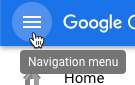
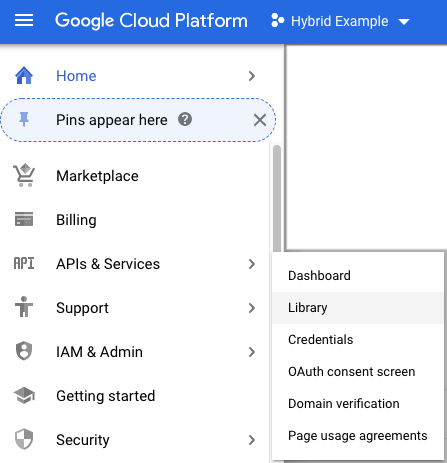
- בתפריט הניווט, בוחרים באפשרות APIs & Services > Library (ממשקי API ושירותים > ספרייה).
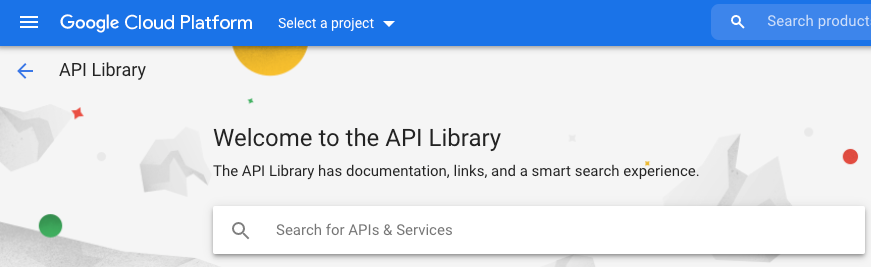
- בתצוגה API Library (ספריית ה-API), מחפשים את Apigee.
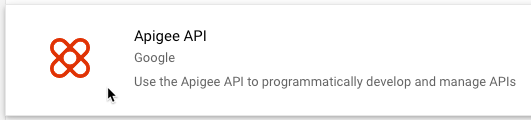
ב-Google Cloud מוצגת רשימה של ממשקי API שתואמים ל-Apigee
- מחפשים את השירות Apigee API ולוחצים עליו.
- בתצוגת Apigee API, לוחצים על Enable.
מערכת Google Cloud מפעילה את Apigee API בפרויקט שלכם ב-Google Cloud.
- בתפריט הניווט, בוחרים באפשרות APIs & Services > Library (ממשקי API ושירותים > ספרייה).
- מפעילים את Apigee Connect API:
- בתצוגה API Library, מחפשים את Apigee Connect.
- מאתרים את Apigee Connect API ומפעילים אותו.
מערכת Google Cloud מפעילה את Apigee Connect API בפרויקט שלכם ב-Google Cloud.
- מפעילים את Cloud Pub/Sub API:
- בתצוגה API Library, מחפשים את Cloud Pub/Sub API.
- מאתרים את Cloud Pub/Sub API ומפעילים אותו.
מערכת Google Cloud מפעילה את Cloud Pub/Sub API בפרויקט בענן שלכם ב-Google Cloud.
- מפעילים את Cloud Resource Manager API:
- בתצוגה API Library, מחפשים את Cloud Resource Manager.
- מאתרים את Cloud Resource Manager ומפעילים אותו.
מערכת Google Cloud מפעילה את Cloud Resource Manager API עבור הפרויקט שלכם ב-Google Cloud.
- (אשכולות מבוססי GKE בלבד) מפעילים את Compute Engine API:
- בתצוגה API Library, מחפשים את Compute Engine.
- מאתרים את Compute Engine API ומפעילים אותו.
מערכת Google Cloud מפעילה את Compute Engine API בפרויקט שלכם ב-Google Cloud.
- (באשכולות שמבוססים על GKE בלבד) מפעילים את Google Kubernetes Engine API:
- בתצוגה API Library, מחפשים את Google Kubernetes Engine.
- מאתרים את Google Kubernetes API ומפעילים אותו.
Google Cloud מאפשרת את Google Kubernetes API בפרויקט בענן שלכם ב-Google Cloud.
- כדי לוודא שהפעלתם את ממשקי ה-API, בוחרים באפשרות APIs & Services > Dashboard.
ממשקי ה-API שהוספתם מוצגים ברשימת ממשקי ה-API המופעלים:
- Apigee API
- Apigee Connect API
- Cloud Pub/Sub API
- Cloud Resource Manager API
- Compute Engine API
- Kubernetes Engine API
CLI של gcloud
כדי להפעיל את ממשקי ה-API באמצעות ה-CLI, מבצעים את השלבים הבאים:
- פותחים חלון טרמינל במכשיר שבו משתמשים לניהול Apigee.
- כדי לוודא ש-
gcloudמותקן במעטפת המקומית, מריצים את הפקודה הבאה: הכליgcloudמספק את ממשק שורת הפקודה העיקרי ל-Cloud.gcloud -hאם
gcloudלא מותקן, צריך להתקין את Cloud SDK. -
מוודאים שהמשתנה
PROJECT_IDמוגדר עם מזהה הפרויקט בענן שיצרתם בשלב 2: יצירת פרויקט ב-Google Cloud:echo $PROJECT_ID
אם הוא לא מוגדר, מגדירים את משתנה הסביבה
PROJECT_IDבאמצעות הפקודה הבאה:export PROJECT_ID=your_project_id
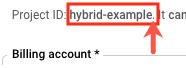
- בוחרים את הכרטיסייה של ההתקנה הרצויה כדי לראות את הפקודה להפעלת ממשקי ה-API:
GKE
אם אתם מריצים את האשכולות ב-Google Cloud (GKE), מפעילים את ממשקי ה-API באמצעות הפקודה הבאה:
gcloud services enable \
    apigee.googleapis.com \
    apigeeconnect.googleapis.com \
    pubsub.googleapis.com \
    cloudresourcemanager.googleapis.com \
    compute.googleapis.com \
    container.googleapis.com --project $PROJECT_ID
GKE On-Prem
אם אתם מריצים את האשכולות ב-GKE on-prem (Anthos), מפעילים את ממשקי ה-API באמצעות הפקודה הבאה:
gcloud services enable \
    apigee.googleapis.com \
    apigeeconnect.googleapis.com \
    cloudresourcemanager.googleapis.com \
    pubsub.googleapis.com  --project $PROJECT_ID
AKS
אם אתם מריצים את האשכולות שלכם ב-Azure Kubernetes Service (AKS), מפעילים את ממשקי ה-API באמצעות הפקודה הבאה:
gcloud services enable \ apigee.googleapis.com \ apigeeconnect.googleapis.com \ pubsub.googleapis.com \ cloudresourcemanager.googleapis.com --project $PROJECT_IDGKE ב-AWS
אם אתם מריצים את האשכולות שלכם ב-GKE ב-AWS, אתם צריכים להפעיל את ממשקי ה-API באמצעות הפקודה הבאה:
gcloud services enable \
    apigee.googleapis.com \
    apigeeconnect.googleapis.com \
    pubsub.googleapis.com \
    cloudresourcemanager.googleapis.com  --project $PROJECT_ID
EKS
אם אתם מריצים את האשכולות ב-Amazon EKS, מפעילים את ממשקי ה-API באמצעות הפקודה הבאה:
gcloud services enable \ apigee.googleapis.com \ apigeeconnect.googleapis.com \ pubsub.googleapis.com \ cloudresourcemanager.googleapis.com --project $PROJECT_ID -
מריצים את הפקודה הבאה כדי לוודא שכל ממשקי ה-API מופעלים:
gcloud services list
הפלט שמתקבל:
NAME                                 TITLE
apigee.googleapis.com                Apigee API
apigeeconnect.googleapis.com         Apigee Connect API
bigquery.googleapis.com              BigQuery API
bigquery.googleapis.com              BigQuery API
bigquerystorage.googleapis.com       BigQuery Storage API
cloudapis.googleapis.com             Google Cloud APIs
clouddebugger.googleapis.com         Cloud Debugger API
cloudresourcemanager.googleapis.com  Cloud Resource Manager API
cloudtrace.googleapis.com            Cloud Trace API
compute.googleapis.com               Compute Engine API
container.googleapis.com             Kubernetes Engine API
containeranalysis.googleapis.com     Container Analysis API
containerregistry.googleapis.com     Container Registry API
datastore.googleapis.com             Cloud Datastore API
iam.googleapis.com                   Identity and Access Management (IAM) API
iamcredentials.googleapis.com        IAM Service Account Credentials API
logging.googleapis.com               Cloud Logging API
monitoring.googleapis.com            Cloud Monitoring API
oslogin.googleapis.com               Cloud OS Login API
pubsub.googleapis.com                Cloud Pub/Sub API
servicemanagement.googleapis.com     Service Management API
serviceusage.googleapis.com          Service Usage API
sql-component.googleapis.com         Cloud SQL
storage-api.googleapis.com           Google Cloud Storage JSON API
storage-component.googleapis.com     Cloud Storage
מידע נוסף על הפעלת ממשקי API במסוף Google Cloud זמין במאמר בנושא הפעלת API בפרויקט בענן של Google Cloud במסמכי התיעוד של Cloud.
1 2 3 (הבא) שלב 4: יצירת ארגון 5