

This page applies to Apigee and Apigee hybrid.
Specification boost is an AI-powered add-on that lets you automatically enhance the readability and discoverability of your API specifications in API hub. It analyzes your existing specification files and generates boosted versions enriched with richer details, including additional examples, clearer descriptions, better error documentation, and more.
A key benefit of using the specification boost add-on is that it makes your specification files agent ready. Boosting your specifications makes them more accessible to developers, API consumers, and AI agents.
Enable specification boost
To start using specification boost, you must first enable and configure it in the Add-on management page in API hub.
Before you begin
-
Grant the API hub Add-on Admin (
roles/apihub.addonsAdmin) IAM role to your principal account. For information about granting IAM roles, see Grant or revoke multiple IAM roles using the Google Cloud console.
Console
To enable the specification boost add-on, do the following:
- In the Google Cloud console, go to the API hub > Add-on management page.
-
Locate the Specification boost add-on card and click Enable add-on.
Enabling the add-on triggers an asynchronous operation that automatically processes and boosts all your API specification files in API hub.
REST API
To enable the specification boost add-on, submit this request:
curl --location 'https://apihub.googleapis.com/v1/projects/PROJECT_ID/locations/LOCATION/addons/system-specboost:manageConfig' \
  --header 'Authorization: Bearer $(gcloud auth print-access-token)' \
  --header 'Content-Type: application/json' \
  --data '{
    "name": "projects/PROJECT_ID/locations/LOCATION/addons/system-specboost",
    "config": {
      "allDataAddonConfig": {
        "enabled": true
      }
    }
  }'
Where:
PROJECT_IDis the ID of the host project for your API hub instance.LOCATIONis the location where your API hub instance is hosted.
View boosted specifications
Boosted specifications are generated asynchronously. Depending on the number of specification files and their size, it may take some time for the asynchronous operation to complete. Once the asynchronous operation completes, you can view the boosted specifications as an additional version of the original specification.
Console
To view the boosted specification files, do the following:
In the Google Cloud console, go to the API hub page.
Go to API hub- Click APIs.
- Use Filter to specify keywords to filter the list of APIs. If needed, use Search to locate an API.
- Click an API to view its details.
- Go to the Versions tab, and select the API version for which you want to view the boosted specifications.
- Scroll to the Specification file section to view the list of specifications linked to the version.
The Boosted specification column displays the boosted specification files if they are available.
-
To view the details of a boosted specification, click the name of the boosted specification file.
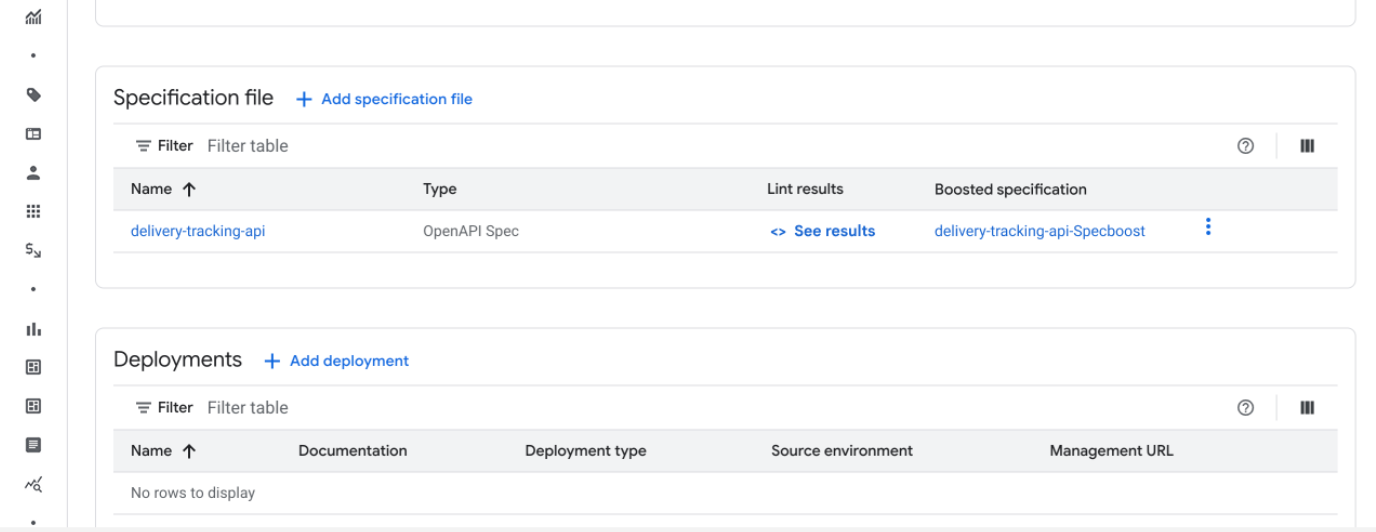

- To see the differences in the boosted specification, click View diff in the tridot menu in the row for that specification file.
Disable specification boost
To disable the specification boost add-on, do the following:
Console
To disable the specification boost add-on, do the following:
- In the Google Cloud console, go to the API hub > Add-on management page.
- Locate the Specification boost add-on card and click Disable add-on.
-
In the Disable specification boost confirmation dialog, enter
disable, and then click Disable.The specification boost add-on is disabled in a few minutes.
REST API
To disable the specification boost add-on, submit this request:
curl --location 'https://apihub.googleapis.com/v1/projects/PROJECT_ID/locations/LOCATION/addons/system-specboost:manageConfig' \
  --header 'Authorization: Bearer $(gcloud auth print-access-token)' \
  --header 'Content-Type: application/json' \
  --data '{
    "name": "projects/PROJECT_ID/locations/LOCATION/addons/system-specboost",
    "config": {
      "allDataAddonConfig": {
        "enabled": false
      }
    }
  }'
Where:
PROJECT_IDis the ID of the host project for your API hub instance.LOCATIONis the location where your API hub instance is hosted.
Supported regions
Specification boost is only available for API hub instances provisioned in the following regions:
us-central1us-east4us-west1europe-west1europe-west2europe-west3europe-west4europe-southwest1asia-east1asia-northeast1asia-south1asia-southeast1australia-southeast2
Considerations
- AI can make mistakes. Review all boosted specifications carefully before using them in production.
- Boosted specifications are generated asynchronously. Depending on the number of specification files and their size, it may take some time for the asynchronous operation to complete.
- Once the add-on is enabled, any new or updated specification file is automatically boosted asynchronously.
Limitations
- Specification boost is only available for API hub instances provisioned in specific regions. For a list of supported regions, see Supported regions.
- You can't select specific specification files to boost. All specification files are boosted asynchronously after the add-on is enabled.
- Specification boost doesn't support replacing or merging the boosted content into your original specification file.
- At this time, specification boost is not available for customers using VPC-SC.
What's next
- Learn about API specifications.
- Learn about API versions.