

This page applies to Apigee and Apigee hybrid.
API hub supports the Model Context Protocol (MCP) as a first-class API style, alongside REST, gRPC, and others. You can import, register, and manage MCP APIs and their associated tools directly within API hub, creating a centralized registry for your agentic APIs and services.
For information about MCP in Apigee, see MCP in Apigee overview.
Import Apigee MCP proxies
API hub automatically imports all MCP proxies created in your associated Apigee organization. These proxies are registered with the MCP API style, and their specification files are parsed to extract MCP tools.
If you have additional runtime projects that are not currently attached to your API hub instance, you can attach them manually from the API hub > Settings page. For more information, see Attach a runtime project.
Register an MCP API
You can register MCP APIs using the Google Cloud console or the API hub API.
Console
To register a MCP API, do the following:
- In the Google Cloud console, go to the API hub > APIs page.
- Provide the required API details.
- Under System attributes, set the API style to MCP.
- Click Register.
The MCP API is registered. You can edit the API details and attach a specification file at a later time.
REST
To register a MCP API, use the Create API REST API.
curl -X POST -H "Content-Type: application/json"
-H "Authorization: Bearer $(gcloud auth print-access-token)" "https://apihub.googleapis.com/v1/projects/HUB_PROJECT/locations/HUB_LOCATION/apis?api_id=API_ID
-d '{
  "display_name": "DISPLAY_NAME",
  "description": "DESCRIPTION",
  "owner": {
    "display_name": "OWNER_DISPLAY_NAME",
    "email": "OWNER_EMAIL"
  },
  "api_style": {
    "enum_values": {
      "values": [
        {
          "id": "mcp-api"
        }
      ]
    }
  },
  "attributes": {
    "projects/HUB_PROJECT/locations/HUB_LOCATION/custom-attribute-1": {
      "attribute": "projects/HUB_PROJECT/locations/HUB_LOCATION/custom-attribute-1",
      "enum_values": {
        "values": [
          {
            "id": "ATTRIBUTE_VALUE"
          }
        ]
      }
    }
  }
}'
Replace the following:
- HUB_PROJECT: The project ID of the API hub instance.
- HUB_LOCATION: The location of the API hub instance.
- API_ID: The ID of the API resource.
- DISPLAY_NAME: The display name of the API resource. You can use any name you wish.
- DESCRIPTION: A description of the API resource.
- OWNER_DISPLAY_NAME: The display name of the API owner.
- OWNER_EMAIL: The email address of the API owner.
- ATTRIBUTE_VALUE: The value of a custom user-defined attribute. This is optional.
View MCP APIs
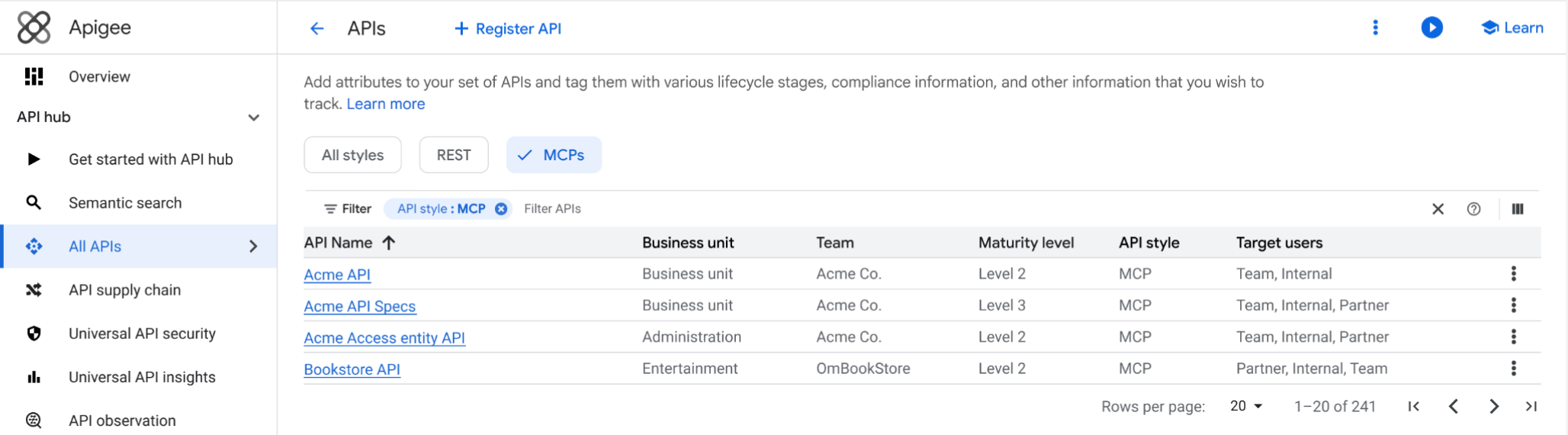
The API list view in API hub allows you to filter APIs by style to find specific resources. To view only registered MCP APIs, select the MCP filter tag at the top of the list.
The following image shows the API list view in API hub, with the top filter tags highlighted:
What's next
- Learn how to Manage MCP tools.
- Learn how to Manage API resources.
- Learn how to Manage MCP proxies.