

Data ingestion overview
Google Security Operations ingests customer logs, normalizes the data, and detects security alerts. It provides self-service features for data ingestion, threat detection, alerts, and case management. Google SecOps can also receive alerts from other SIEM systems and analyze them.
Data ingestion architecture overview
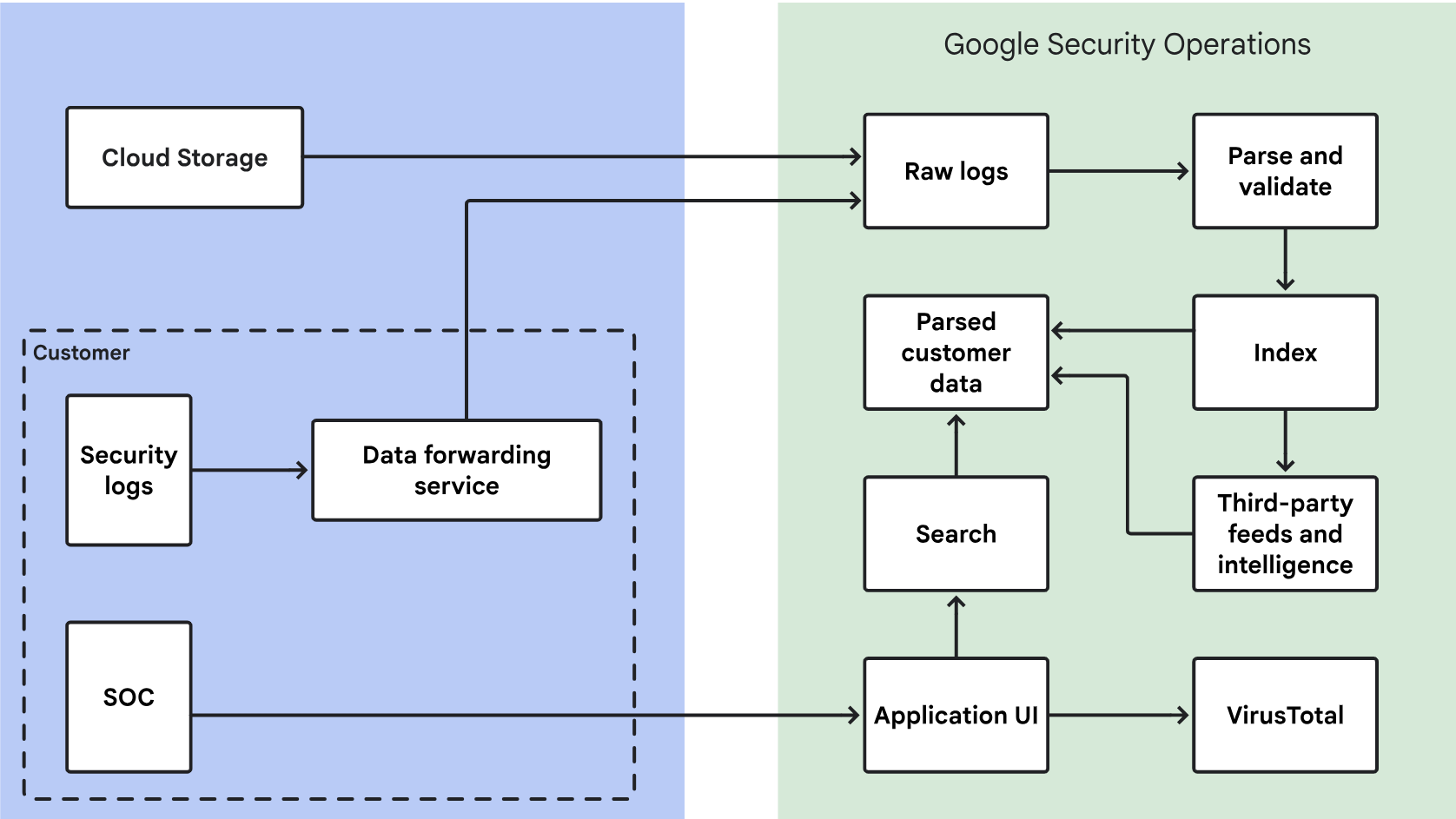
The following diagram illustrates how your security data flows into Google SecOps and how the system processes that data for analysis in the interface.
Key steps involved in data ingestion
Google SecOps processes your security data as follows:
- Retrieves security data from cloud services like Amazon S3 or the Google Cloud. Google SecOps encrypts this data in transit.
- Separates and stores your encrypted security data in your account. Access is limited to you and a small number of Google personnel for product support, development, and maintenance.
- Parses and validates raw security data, making it easier to process and view.
- Indexes the data for quick searches.
- Stores the parsed and indexed data within your account.
- Offers secure access for users to search and review their security data.
- Compares your security data with the VirusTotal malware database to identify matches. In a Google SecOps event view, such as the Asset view, click VT Context to see VirusTotal information. Google SecOps doesn't share your security data with VirusTotal.
Overview of data ingestion methods
The Google SecOps ingestion service acts as a gateway for all data.
Google SecOps ingests data using the following systems:
Google Cloud: Google SecOps retrieves data directly from your Google Cloud organization, which is the primary method for all standard Google Cloud logs (for example, Audit, VPC Flow, DNS, and Firewall). It is the most cost-effective and performant way to bring in Google Cloud telemetry to Google SecOps. For more information, see Ingest Google Cloud data to Google SecOps.
Bindplane agent: This is a managed agent for collecting logs from on-premises environments and servers (Windows or Linux). Bindplane is a telemetry pipeline that can collect, refine, and export logs from any source into Google SecOps, and therefore provides flexibility in collecting different types of logs that don't work with other methods. You can use it for on-premises data, such as Firewall logs, Windows and Linux logs, or for cloud data you want to preprocess (for example, refine or filter) before ingesting into Google SecOps. You can also manage this agent by using the Bindplane OP Management console. For more information, see Use the Bindplane agent.
Data feeds: Data feeds are used primarily for cloud-based logs where the third-party logs are already aggregated into an object store, such as Cloud Storage or Amazon S3, or when the third party supports 'push'-based methods, such as webhook. Data feeds also provide out-of-the-box support for a predefined set of API based integrations. Use Data feeds for cloud-based logs such as EDRs or any SaaS application and for the specific integrations predefined as Direct API. The data feeds send logs directly to the Google SecOps ingestion service. For more information, see the feed management documentation. Data feeds support log lines up to 4 MB in size. You can monitor feed activity and errors using Cloud Logging. For more information, see Analyze feed activity with Cloud Logging.
Chronicle API ingestion methods: Use the modern Chronicle API ingestion methods for custom, high-volume, or home-grown applications that don't fit into other methods. This method is slightly more complex to use than other ingestion methods.
- Forwarders: The Forwarder is now end of life. Google recommends you use the Bindplane agent instead.
Parsers convert logs from customer systems into a Unified Data Model (UDM). Downstream systems within Google SecOps use the UDM to provide additional capabilities, including rules and UDM search.
See Understand data availability for search for full details of the data ingestion lifecycle, including end-to-end data flow and latency, and how these factors impact the availability of recently ingested data for querying and analysis.
Specifications:
When ingesting files, the file's content format must match the expected format from the file extension in order to successfully ingest the logs.
Large files (5-10 GB or larger) can significantly delay data ingestion.
Ingestion only supports UTF-8 encoding.
Understanding ingestion and data availability times
Data availability for analysis in Google SecOps depends on several stages. To troubleshoot delays, distinguish between source system delays and Google SecOps processing time.
Source system delays (pre-ingestion): Many data sources have inherent latencies. Data might not be available for collection immediately after an event occurs. Common causes include:
- Source processing and batching schedules.
- Time required to write events to log files or API endpoints.
- API rate limits.
- The difference between the event timestamp and the time the log is
available for ingestion (for example,
createTime).
Google SecOps ingestion and processing delays: After data reaches an ingestion point, the following steps can introduce delays:
- Collection interval: For pooled sources (such as APIs or storage buckets), the configured feed frequency (for example, every 5 minutes or every hour) dictates the maximum delay.
- Internal pipeline: Parsing, normalization, indexing, and enrichment. For more information, see Understand data availability for search.
If you experience delays, determine whether the source or Google SecOps is the cause. For example, logs from blob storage services are not real-time and depend on the polling frequency.
For a list of log types with known source-side delays, see the Feed management API reference.
Need more help? Get answers from Community members and Google SecOps professionals.