

This page applies to Apigee, but not to Apigee hybrid.
View
Apigee Edge documentation.

This document describes how to monitor the health of your Cloud External Key Manager (Cloud EKM) used with Apigee and how to configure alerts for Cloud EKM-related issues using Cloud Logging.
Apigee may rely on Cloud EKM for CMEK. If the Cloud EKM becomes unavailable due to network issues, or if keys are disabled or unreachable, Apigee services that rely on encryption may be impacted.
Monitoring Cloud EKM issues in Cloud Logging
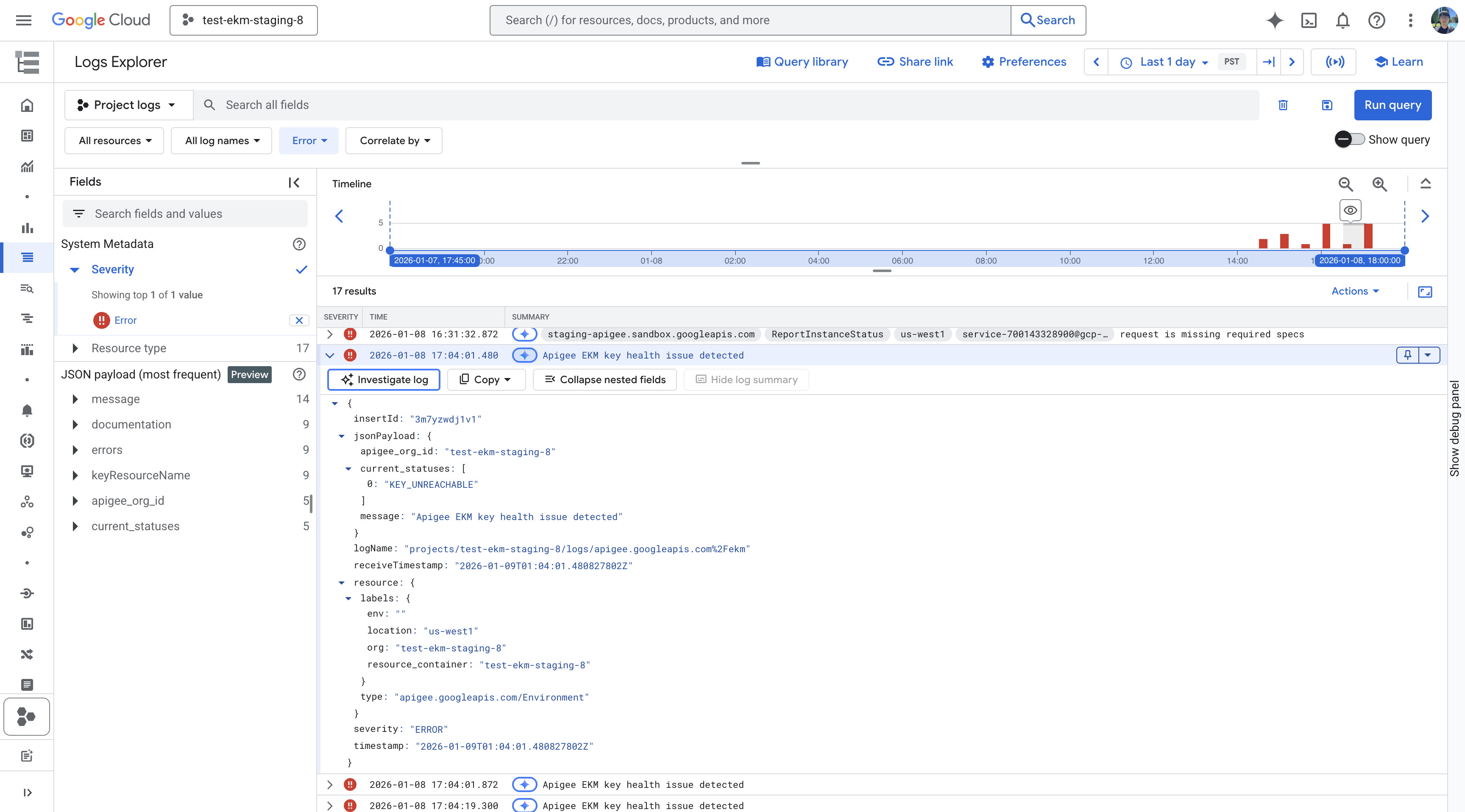
When Apigee encounters an issue with a Cloud EKM, such as a state change to denied, key disabled, billing disabled, or key unreachable, it generates a log entry in Cloud Logging. You can view these logs in the Logs Explorer and configure log-based alerts to be notified of such events.
The log entry contains details about the organization and instance experiencing the issue, but omits the key name for security reasons.
To find Cloud EKM-related log entries in Logs Explorer, follow these steps:
- Go to the Logs Explorer page in the Google Cloud console.
- Enter the following query in the query editor field and click Run query:
Apigee EKM key health issue detected
- If Cloud EKM issues have occurred, the query results will show log entries detailing the event.
Configure log-based alerts for Cloud EKM issues
You can create a log-based alert policy to notify you when Apigee logs an Cloud EKM-related error. These alerts can help you proactively identify and address issues with your Cloud EKM.
To configure a log-based alert based on the Cloud EKM error message string, see Configure log-based alerting policies in the Cloud Logging documentation.
When creating the alert, use the same query filter as described in Monitoring Cloud EKM issues in Cloud Logging to match the specific Cloud EKM log entries.
Alerting limitations and recovery
Be aware of the following limitations when you configure and respond to Cloud EKM health alerts:
- Recurring alerts: While a key remains unreachable, Apigee generates a log entry approximately once every hour. If you configure a log-based alert, you receive a notification at this cadence until the underlying issue is resolved.
- No recovery notification: Apigee does not generate a log entry or send a notification when the Cloud EKM becomes reachable again. A log-based alert resolves on its own after Apigee stops generating the error log entries, based on the auto-close configuration of your alerting policy.
- Verifying recovery: Because no recovery log entry is generated, confirm that your Cloud EKM is reachable again by performing an operation that requires the key, such as deploying an API proxy, and verifying that it succeeds.
Troubleshooting limitations
Apigee logging indicates when there is an issue with the Cloud EKM connection or key status. However, detailed troubleshooting of the Cloud EKM itself (e.g., diagnosing network connectivity issues or problems on the external key manager's side) is outside the scope of Apigee monitoring. If you receive alerts about Cloud EKM issues, you should investigate the health and configuration of your Cloud EKM service.