

This page applies to Apigee and Apigee hybrid.
View
Apigee Edge documentation.

This page describes how to use Apigee to expose your APIs
as MCP tools to agentic applications. MCP in Apigee is available for
Subscription, Pay-as-you-go, and Evaluation organizations, including
Data Residency-enabled organizations. Starting with Apigee hybrid version
1.17.0, MCP is also available for Apigee hybrid — the
runtime data plane runs inside your own Kubernetes cluster rather than on
Google-managed infrastructure. See
Enable MCP in Apigee hybrid
for the Hybrid-specific installation and configuration flow.
What is MCP?
Model Context Protocol (MCP) is an open source protocol developed by Anthropic that standardizes the way that AI applications connect to data sources, workflows, and tools.
AI applications can use MCP to access Google Cloud and Apigee services as tools. In this context, the following MCP terms are useful to understand:
- MCP host: The AI application or environment that interacts with the user. The MCP host uses large language models (LLMs) to process requests that may require external data or tools.
- MCP client: A component within the MCP host that helps the LLM and MCP server communicate with each other. It translates the LLM's requests for the MCP server and converts MCP server's replies for the LLM. It also finds and uses available MCP servers.
- MCP server: The external service that provides context, data, or capabilities to the LLM, acting as a proxy between the LLM and the MCP client.
How MCP in Apigee works
MCP endpoints for Google, Google Cloud, and Apigee implement the MCP server specification. This lets compliant MCP clients access them to:
- Discover available endpoints.
- List the available tools at an endpoint.
- Authenticate to an endpoint.
- Call tools according to defined access policies.
Any MCP client that supports remote MCP endpoints over HTTP/S can access these tools.
Because the endpoints are managed, you don't need to install or manage local MCP servers, remote MCP servers, or additional infrastructure to
enable agentic applications to access your services.
MCP in Apigee offers JSON-RPC support for tools/list and tools/call methods. You can customize your MCP endpoint
with parameters for discoverability, security, network availability, and observability.
Deployment models
MCP is available in two Apigee deployment models:
- Apigee (SaaS): The MCP data plane is hosted on Google-managed infrastructure. You deploy the MCP Discovery proxy and the endpoint is immediately available.
- Apigee hybrid (self-hosted, starting in Apigee hybrid
1.17.0): The MCP data plane runs inside your own Kubernetes cluster. The Apigee control plane generates MCP tool configuration from your OpenAPI Specification, and your cluster fetches that configuration on its own schedule. MCP request traffic never leaves your cluster. See Enable MCP in Apigee hybrid.
MCP data plane architecture in Apigee hybrid
The following diagram shows how the MCP components are distributed between the Apigee control plane and your Apigee hybrid cluster.
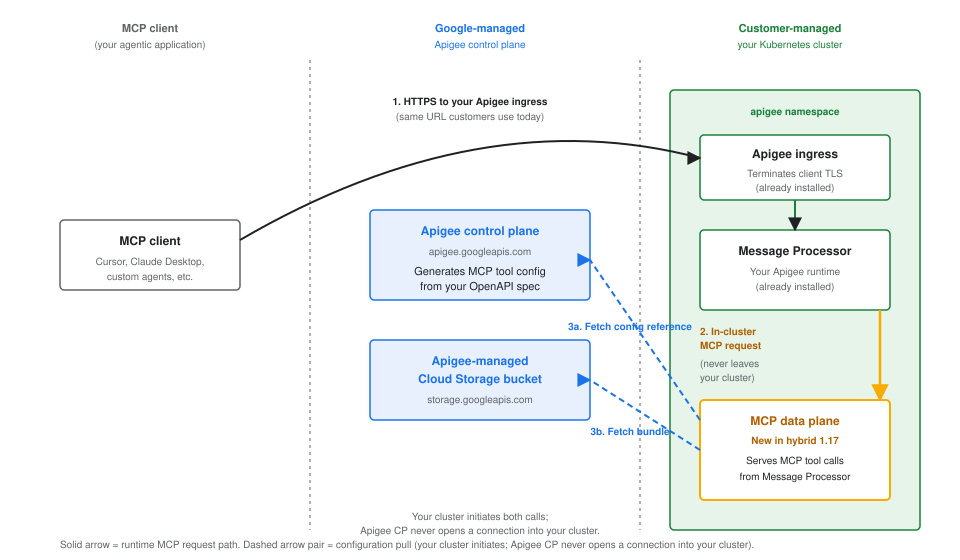
Two properties of this architecture matter for planning and security review:
- MCP request traffic stays inside your cluster. MCP clients hit your existing Apigee ingress at the same URL they would use for any other Apigee proxy. Your Message Processor then routes the request to the MCP data plane in the same cluster. No MCP request or response crosses the boundary to Google Cloud at request time.
- Configuration is pulled, not pushed. MCP tool configuration is generated by the Apigee control plane and retrieved by a component in your cluster on a schedule. The Apigee control plane never initiates a connection into your cluster. See Outbound network requirements for the exact endpoints your cluster egress must permit.
Key features of MCP in Apigee
MCP in Apigee offers features for tool discovery, security, and governance. These features help you manage how agentic applications interact with your services.
Simplified tool discovery with API hub
You can discover available MCP endpoints for Apigee services using a directory service accessible over a
REST interface. Each MCP endpoint also supports the MCP tools/list method, which lets MCP
clients discover the tools available in that endpoint.
Additionally, MCP integrates with Apigee API hub. When an MCP Discovery Proxy is deployed, API hub automatically ingests its OpenAPI specification, assigns it the MCP API style, and maps API operations to individual MCP tools. This allows developers to easily filter for MCP-enabled APIs in API hub and use Semantic Search with natural language queries to find relevant tools for their agentic applications.
Security
MCP in Apigee includes multiple layers of security to protect your services. You can control access using authentication, authorization, network boundaries, and content scanning.
Authentication
Apigee hosted MCP endpoints support OAuth 2.1 and OpenID Connect (OIDC) for authentication. This ensures that only agents, MCP clients, and end-users with established identities can access your MCP endpoints and call MCP tools. Protected Resource Metadata lets clients discover the OAuth authorization servers.
Fine-grained authorization policies
You can restrict access to your MCP tools based on OAuth client identities. For example, you can configure a policy in your MCP Discovery proxy to specify that only designated agents with known client identities can access an MCP tool for a payments service.
Client responsibility for tool invocations
MCP client applications are responsible for enforcing human oversight of tool invocations, such as prompting the user before executing state-mutating operations. For more information, refer to the Model Context Protocol documentation.
Observability and analytics
For Apigee hosted endpoints, you can use Apigee Analytics to view detailed usage information for your MCP tools.
Analytics allows you to segment MCP-specific traffic from standard API traffic and view metrics
at the individual tool level, such as the volume of tools/list (discovery) versus
tools/call (execution) requests. Performance metrics also help you distinguish
between proxy overhead and target response time, allowing you
to pinpoint bottlenecks more effectively.
Reliability and troubleshooting
To improve troubleshooting and provide more visibility into the deployment process, Apigee surfaces specific infrastructure and configuration errors in the UI. If a deployment fails due to an invalid OpenAPI specification or a regional infrastructure issue, the UI will provide actionable feedback to help you resolve the issue without requiring support intervention.
Using MCP with Apigee
You can expose your existing Apigee APIs as MCP tools and make them accessible through MCP endpoints.
These endpoints can be configured at either a per-host or environment group level. For example, if your cymbal organization has
eight hostnames (e.g., api.cymbal.com, partners.cymbal.com), each associated with a different environment group,
you can host a dedicated MCP server for each hostname.
A managed target endpoint (ORG_NAME.mcp.apigee.internal) is deployed using a specialized MCP Discovery proxy in your Apigee organization, where your MCP servers are made available.
The following table shows an example of how customers, including the fictional cymbal organization, can configure multiple MCP endpoints using Apigee.
| Customer | Hostname and MCP basepath | MCP server target endpoint | API proxy | Environment / Environment group |
|---|---|---|---|---|
| cymbal | api.cymbal.com/mcp |
cymbal.mcp.apigee.internal(cymbal org's tenant project) |
mcp-api-proxy1 |
prod / prod-env-group |
api-internal.cymbal.com/mcp |
cymbal.mcp.apigee.internal(cymbal org's tenant project) |
mcp-api-proxy2 |
internal / internal-env-group |
|
api-service.cymbal.com/mcp |
cymbal.mcp.apigee.internal(cymbal org's tenant project) |
mcp-api-proxy3 |
dev / dev-env-group |
Limitations
The following limitations apply to MCP in Apigee:
- The number of MCP tools in an Apigee organization is limited to 1000.
- MCP infrastructure deployment may be subject to capacity limitations in the following regions:
europe-central2europe-southwest1europe-west9me-central2
If you see a provisioning error, or the provisioning status never changes to Deployed, it might be due to temporary infrastructure capacity limits in the selected region. Try deploying the proxy to an environment in a different region.
- MCP in Apigee supports the following OpenAPI versions: 3.0.0, 3.0.1, 3.0.2., 3.0.3.
- API insights in Apigee API hub is not available for MCP APIs and tools deployed in Apigee organizations with VPC-SC enabled.
- GET calls on MCP error responses will return a
405error, as the MCP server currently does not support Server-Sent Events (SSE) streams. - Apigee API hub API insights will not display MCP style APIs or traffic for MCP resources until Apigee version 1-17-0-apigee-6 is fully rolled out to all available regions.
- You cannot change the API style attribute to MCP for an API resource that has existing API operations.
Apigee hybrid-specific limitations
The following limitations apply to MCP in Apigee hybrid:
- MCP tool count is bounded by size, not by a fixed number. Unlike
Apigee (which enforces a fixed maximum number of MCP tools per
organization), Apigee hybrid bounds tool capacity through four size
limits: OpenAPI specification file size, MCP proxy bundle size,
tools/listresponse size per hostname, and the number of hostnames per environment group. For most OpenAPI specifications, you can typically expect to fit 10,000 MCP tools per organization at the default response size limit. Actual capacity varies with the specific shape of your specification (dominated by the number of parameters and request-body properties, plus the description length); response schemas do not count against the budget. To estimate capacity for your specific OpenAPI specifications and to see the four hard limits and their failure modes, see Estimate MCP tool capacity. - Enabling or disabling MCP triggers a staged canary release of Message
Processor pods. The Apigee operator updates your Message Processor pod spec
when you enable or disable MCP, and the Message Processor
ApigeeDeploymentcontroller runs the change through a staged canary release rather than as a vanilla Kubernetes rolling restart. The release fires only on the enable and disable transitions, not on ongoing MCP deployment activity or steady-state MCP traffic. Schedule the initial enable and any subsequent disable operations during an approved maintenance window. - MCP pod resource sizing is customer-managed. The MCP pods run with the
resource requests and limits set by the built-in defaults in the Apigee hybrid
Helm charts. If your workload requires more capacity, adjust CPU and memory in
overrides.yaml. See theoverrides.yamlfield reference for the available fields. - One MCP data plane per Apigee organization, per cluster. In version
1.17.0, the Apigee operator provisions one MCP data plane for each Apigee organization installed in the cluster. A cluster that hosts multiple Apigee organizations runs one MCP data plane per organization; the data planes are independent and do not share configuration. - Uniform enablement across an environment group is required. Enable MCP
uniformly across all clusters serving the same Apigee environment group. If MCP is
enabled on some clusters and not others within a group, MCP requests that route to a
cluster without MCP enabled will receive a
503 Service Unavailableresponse. - One-way TLS between Message Processor and MCP data plane. Version
1.17.0uses one-way TLS between Message Processor and the MCP data plane. - The MCP data plane relies on Message Processor for caller identity. The MCP
data plane in the cluster does not independently authenticate its callers in
1.17.0; it trusts that requests reaching it have already been authenticated by an Apigee proxy running in Message Processor. Every MCP request that should be authenticated must arrive through an Apigee MCP proxy that enforces an authentication policy (see Manage MCP tool access). Production customers should apply cluster ingress controls so that only Message Processor pods (Kubernetes labelapp=apigee-runtimein the same Kubernetes namespace where Apigee hybrid is installed) can reach the MCP Service on TCP443. Use whichever policy engine your platform supports (Kubernetes NetworkPolicy, Cilium, Calico, Istio AuthorizationPolicy) to enforce this restriction.
What's next
- Learn how to Get started with Apigee and MCP.
- For Apigee hybrid, first enable MCP in your cluster, then follow the quickstart.
- To access other Google and Google Cloud products through MCP tools, see Google Cloud MCP servers overview