提供意見
步驟 1:建立 Google Cloud 帳戶
透過集合功能整理內容
你可以依據偏好儲存及分類內容。
您目前查看的是 Apigee Hybrid 說明文件的 1.3 版本。 This version is end of life. You should upgrade to a
newer version. 詳情請參閱「支援的版本 」。
Version 1.3 (unsupported)keyboard_arrow_down
第一步是建立 Google Cloud 控制台 帳戶。本節說明如何建立 Google Cloud 帳戶。如果貴機構已設定 Cloud Identity 或 G Suite,請跳至下一個步驟 (步驟 2:建立 Google Cloud 專案 )。
注意: 這些操作說明會引導您使用公司電子郵件地址建立 Google 帳戶,並為該帳戶啟用 Google Cloud 存取權。如要為機構設定 Cloud Identity,請參閱「設定 Cloud Identity 」。如果您選擇設定 Cloud Identity,則必須驗證網域。
如何建立 Google Cloud 帳戶:
在瀏覽器中開啟 Google Cloud 控制台 。
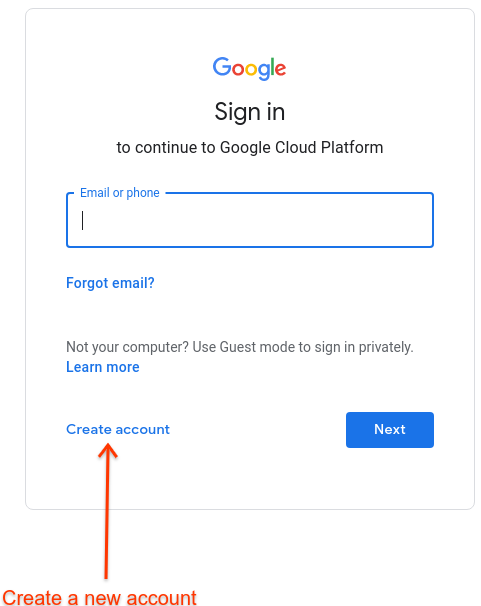
系統提示登入時,請按一下「建立帳戶」
按照操作說明,將公司電子郵件地址註冊為 Google 帳戶 。
或者,您也可以使用 Gmail 帳戶或其他 Google 帳戶。
繼續前往 Google Cloud 控制台 ,並接受顯示的 Google Cloud 條款。
注意: 您不需要啟用 Google Cloud 即可使用 Apigee Hybrid,但如果您想測試 Google Cloud 服務,我們提供免費試用方案,並附贈 $300 美元抵免額。
設定 Cloud Identity
如果您偏好使用 Cloud Identity 管理 Apigee 的機構身分,請注意下列事項:
如需 Cloud Identity 的一般資訊,請參閱「什麼是 Cloud Identity 」一文,或造訪 Cloud Identity 說明中心 。
Cloud Identity 提供多種方式,可讓您從機構大量建立使用者,包括與 LDAP 伺服器 同步處理的工具,以及設定SSO 的功能。
將 Cloud Identity 與 Google Cloud 搭配使用,即可取得 Google Cloud 機構,進而設定更進階的資源階層。雖然 Apigee Hybrid 不需要 Google Cloud 專案,但如果您打算使用其他 Google Cloud 服務,或讓貴機構的多位成員存取產品,這項專案就可能派上用場。
如要使用 Cloud Identity,您必須驗證您打算使用的網域擁有權 。
1
(下一步) 步驟 2:建立 Google Cloud 專案
3
4
5
6
提供意見
除非另有註明,否則本頁面中的內容是採用創用 CC 姓名標示 4.0 授權 ,程式碼範例則為阿帕契 2.0 授權 。詳情請參閱《Google Developers 網站政策 》。Java 是 Oracle 和/或其關聯企業的註冊商標。
上次更新時間:2026-01-24 (世界標準時間)。
想進一步說明嗎?
[[["容易理解","easyToUnderstand","thumb-up"],["確實解決了我的問題","solvedMyProblem","thumb-up"],["其他","otherUp","thumb-up"]],[["難以理解","hardToUnderstand","thumb-down"],["資訊或程式碼範例有誤","incorrectInformationOrSampleCode","thumb-down"],["缺少我需要的資訊/範例","missingTheInformationSamplesINeed","thumb-down"],["翻譯問題","translationIssue","thumb-down"],["其他","otherDown","thumb-down"]],["上次更新時間:2026-01-24 (世界標準時間)。"],[],[]]