

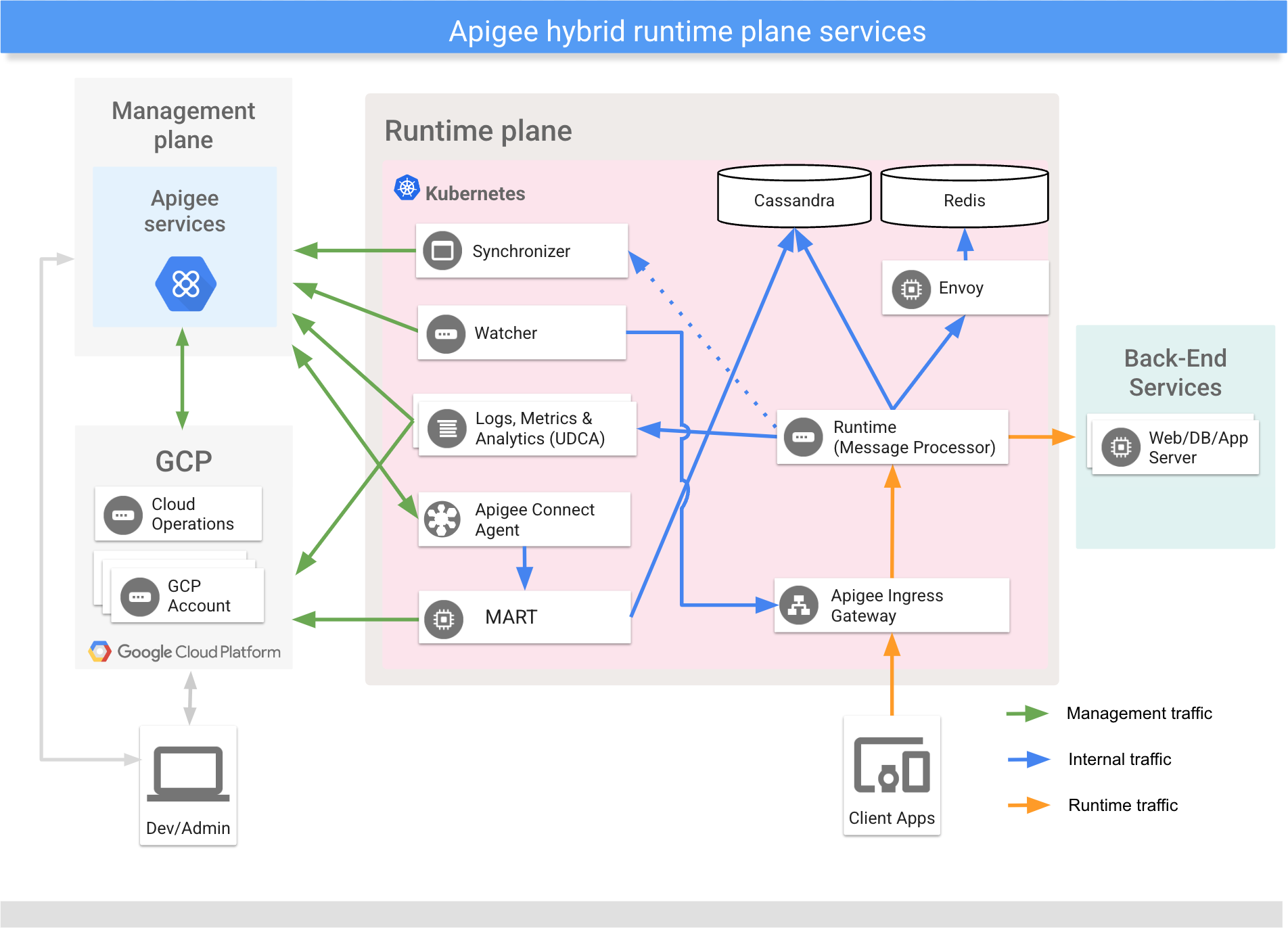
本節說明如何使用 Apigee Connect,在混合式管理平面和執行階段平面的 MART 服務之間進行通訊。
簡介
Apigee Connect 可讓 Apigee Hybrid 管理層安全地連線至執行階段層中的 MART 服務,不必將 MART 端點公開至網際網路。如果您使用 Apigee Connect,就不必透過主機別名和授權的 DNS 憑證設定 MART 輸入閘道。
必要條件
Apigee Hybrid 1.2.0 以上版本。
將 Apigee Connect 新增至 Hybrid 執行階段
如果安裝 Apigee Hybrid 1.3.0 以上版本,系統預設會啟用 Apigee Connect。因此,如果您是從舊版升級,最有可能需要執行這些步驟。
設定並啟用 Apigee Connect 後,系統會忽略 MART 進入流量:管理平面只會透過 Apigee Connect 連線至 MART。混合式執行階段層之間的所有 MART 流量,都會透過安全的 Apigee Connect 連線傳輸。
如要透過 Apigee Hybrid 啟用及使用 Apigee Connect,請按照下列步驟操作:
- 在
Google Cloud API 程式庫中啟用 Apigee Connect API。您可以在
Google Cloud 控制台中啟用 API,也可以使用
gcloud。如需在 Google Cloud 控制台中啟用 API 的操作說明,請參閱 步驟 3:啟用 API。如要使用gcloud啟用 API,請按照下列步驟操作:- 將 gcloud 中的目前專案設為同一個 Google Cloud 專案,該專案已啟用 Apigee 並佈建 Apigee 機構。
$ gcloud config set project YOUR_GCP_PROJECT_ID
其中
YOUR_GCP_PROJECT_ID是專案 ID。 - 檢查 Apigee Connect API 是否已啟用:
gcloud services list
NAME                                 TITLE
apigee.googleapis.com                Apigee API
apigeeconnect.googleapis.com         Apigee Connect API
bigquery.googleapis.com              BigQuery API

...
- 如果結果未顯示
apigeeconnect.googleapis.com,請啟用 API:$ gcloud services enable apigeeconnect.googleapis.com
- 將 gcloud 中的目前專案設為同一個 Google Cloud 專案,該專案已啟用 Apigee 並佈建 Apigee 機構。
- 將「Apigee Connect Agent」角色新增至您在 Apigee Hybrid 安裝說明中「建立服務帳戶」步驟建立的 MART 服務帳戶:
- 如有需要,請取得 MART 服務帳戶的電子郵件地址:
gcloud iam service-accounts list
NAME                          EMAIL                                                 DISABLED
apigee-mart                   apigee-mart@hybrid-example.iam.gserviceaccount.com       False

...
- 檢查 MART 服務帳戶是否已獲派角色:
gcloud projects get-iam-policy YOUR_GCP_PROJECT_ID
...

- members:
  - serviceAccount:apigee-mart@hybrid-example.iam.gserviceaccount.com
  role: roles/apigeeconnect.Agent

...
- 如果結果未包含
role: roles/apigeeconnect.Agent,請指派角色:gcloud projects add-iam-policy-binding YOUR_GCP_PROJECT_ID \ --member serviceAccount:YOUR_MART_SERVICE_ACCOUNT_EMAIL --role roles/apigeeconnect.Agent
其中
YOUR_GCP_PROJECT_ID是 Google Cloud 專案的 ID,YOUR_MART_SERVICE_ACCOUNT_EMAIL則是 MART 服務帳戶的電子郵件地址。
Apigee Connect 代理程式角色是預先定義的角色,並已指派下列權限:
權限 說明 apigeeconnect.endpoints.connect這是設定 Apigee Connect 代理程式的權限。 如要瞭解如何透過 Google Cloud 控制台或 API 指派存取權,請參閱下列文章:
- 如有需要,請取得 MART 服務帳戶的電子郵件地址:
- 請務必將 MART 服務帳戶的金鑰檔案放在
hybrid_files/service_accounts目錄中,如「建立服務帳戶」一文所述。 - 開啟覆寫檔案。如果
connectAgent:enabled屬性未設為 true,或是遺漏,請新增或更新下列節。Apigee Connect 節必須緊接在 k8sCluster 節下方。
設定時,您必須提供下載的服務帳戶金鑰路徑。金鑰必須屬於具有 Apigee Connect 代理程式 角色的服務帳戶。
# Apigee Connect Agent connectAgent: enabled: true serviceAccountPath: ./service-accounts/MART_SA_KEYFILE.json# Apigee Connect Agent connectAgent: enabled: true replicaCountMin: 3 serviceAccountPath: ./service-accounts/connect_agent_sa_key.json - 為貴機構啟用 Apigee Connect 功能。功能名稱為
features.mart.connect.enabled。- 找出您最初安裝 Apigee Hybrid 時使用的服務帳戶金鑰,該帳戶具有 Apigee 機構管理員角色,如「啟用同步器存取權」一節所述。這是
apigee-org-admin 服務帳戶。 您需要這個金鑰才能產生權杖,並進行 API 呼叫,詳情請見下文。 - 執行下列兩個指令來取得權杖:
export GOOGLE_APPLICATION_CREDENTIALS=org-admin-service-account-file
$ export TOKEN=$(gcloud auth application-default print-access-token)
其中 org-admin-service-account-file 是系統上服務帳戶金鑰的路徑,該金鑰具有「Apigee Organization Admin」角色。
- 檢查是否已啟用 Apigee Connect:
curl  https://apigee.googleapis.com/v1/organizations/your_org_name \
  -H "Authorization: Bearer $TOKEN"
在結果中尋找:
"properties": { "property": [ { "name": "features.mart.connect.enabled", "value": "true" }, { "name": "features.hybrid.enabled", "value": "true" } ] }, - 如果結果未包含設為
true的features..mart.connect.enabled,請呼叫下列 Apigee API,為貴機構啟用 Apigee Connect:curl -v -X PUT \ https://apigee.googleapis.com/v1/organizations/your_org_name \ -H "Content-Type: application/json" \ -H "Authorization: Bearer $TOKEN" \ -d '{ "name" : "your_org_name", "properties" : { "property" : [ { "name" : "features.hybrid.enabled", "value" : "true" }, { "name" : "features.mart.connect.enabled", "value" : "true" } ] } }'
- 找出您最初安裝 Apigee Hybrid 時使用的服務帳戶金鑰,該帳戶具有 Apigee 機構管理員角色,如「啟用同步器存取權」一節所述。這是
- 在叢集中啟動 Apigee Connect 代理程式。
如果您在上述任一步驟中進行變更,請使用下列指令啟動 Apigee Connect 代理程式:
$APIGEECTL_HOME/apigeectl apply -f your_overrides_file.yaml --org
- 檢查 Apigee Connect 代理程式記錄。如果沒有回報任何錯誤,表示升級成功:
kubectl logs -n namespace apigee-connect-agent-pod-name
Apigee Connect 代理程式會回報下列記錄類別:
如需在 Apigee Hybrid 中查看稽核記錄的相關說明,請參閱「 稽核記錄資訊」。稽核記錄類別 作業 DATA_READ ConnectionService.ListConnectionsDATA_WRITE Tether.Egress - 測試安裝結果。
mart:
  hostAlias: "mart.apigee-hybrid-docs.net"  # ignored when Apigee Connect is enabled.
  serviceAccountPath: ./service-accounts/example-project-apigee-mart.json
  sslCertPath: ./certs/fullchain.pem  # ignored when Apigee Connect is enabled.
  sslKeyPath: ./certs/privkey.key  # ignored when Apigee Connect is enabled.
升級後,Hybrid 執行階段層會透過 Apigee Connect 與管理層通訊。
另請參閱:移除 Apigee Connect。
測試安裝
- 開啟 Apigee Hybrid 使用者介面。
- 確認先前建立的任何開發人員和開發人員應用程式是否顯示在 UI 中。 由於這些實體是從 MART 伺服器查詢而來,因此只有在管理和執行階段層之間的通訊設定正確無誤時,才會顯示這些實體。
- 如要確保要求是透過 Apigee Connect 傳送,而非透過 MART 傳入,請檢查 MART 伺服器的記錄。您應該會看到名為
apigee-connect-agent-1.0的 Apigee Connect 代理程式項目:kubectl logs -n apigee apigee-mart-orgname-rc101-q72tl --org | grep connect
例如:
"2020-07-31 04:59:52,321 org: env: target: action: context-id: mode: pool-1-thread-1 INFO.
gserviceaccount.com 1576040392317 /v1/organizations/apigee-connect-hybrid-prod/developers/
count=100&expand=true&startKey=4ee9e8f7-12b2-4cde-bf10-32d991469876 200 GET apigee-connect
-hybrid-prod 10.40.11.3 10.40.0.5 apigee-connect-agent-1.0 null"
- 重新整理授權權杖:
export TOKEN=$(gcloud auth application-default print-access-token)
- 呼叫 Apigee API,查看與端點連線的可用串流:
apigee-martcurl -s https://apigeeconnect.googleapis.com/v1/projects/YOUR_GCP_PROJECT_ID/endpoints/apigee_mart/connections \ -H "Authorization: Bearer $TOKEN"
{
  "connections": [
    {
      "endpoint": "projects/865098068308/endpoints/apigee_mart",
      "cluster": {
        "name": "apigee-connect-test-cluster2",
        "region": "australia-southeast1"
      },
      "streamCount": 4
    },
    {
      "endpoint": "projects/865098068308/endpoints/apigee_mart",
      "cluster": {
        "name": "apigee-connect-test-cluster",
        "region": "us-central1"
      },
      "streamCount": 2
    }
  ]
}
- 檢查 Apigee Connect 代理程式記錄:
kubectl logs -n namespace apigee-connect-agent-YOUR_GCP_PROJECT_ID-<....>
下列記錄表示 Apigee Connect 代理程式已啟動,且通訊正常:
I0719 11.66:10.765526 2314949 main.go:47] Agent's flag values below
I0719 11.66:10.765928 2314949 main.go:50] "alsologtostderr" : false
I0719 11.66:10.765940 2314949 main.go:50] "cluster_name" : testABC
I0719 11.66:10.765947 2314949 main.go:50] "cluster_region" : us-west2
I0719 11.66:10.765953 2314949 main.go:50] "cpu_profile_enabled" : false
I0719 11.66:10.765959 2314949 main.go:50] "http_client_timeout" : 2m0s
I0719 11.66:10.765966 2314949 main.go:50] "http_port" : 7070
I0719 11.66:10.765972 2314949 main.go:50] "http_server" : false
I0719 11.66:10.765978 2314949 main.go:50] "insecure_ssl" : false
I0719 11.66:10.765984 2314949 main.go:50] "local_cert" :
I0719 11.66:10.765990 2314949 main.go:50] "log_backtrace_at" : :0
I0719 11.66:10.766001 2314949 main.go:50] "log_dir" :
I0719 11.66:10.766007 2314949 main.go:50] "logtostderr" : true
I0719 11.66:10.766012 2314949 main.go:50] "mem_profile_enabled" : false
I0719 11.66:10.766018 2314949 main.go:50] "project" : projects/apigee-connect-hybrid-prod
I0719 11.66:10.766025 2314949 main.go:50] "resource_id" :
I0719 11.66:10.766031 2314949 main.go:50] "server_addr" : apigeeconnect.googleapis.com:443
I0719 11.66:10.766036 2314949 main.go:50] "server_cert" : ./server.crt
I0719 11.66:10.766042 2314949 main.go:50] "server_key" : ./server.key
I0719 11.66:10.766047 2314949 main.go:50] "stderrthreshold" : 2
I0719 11.66:10.766054 2314949 main.go:50] "target_server" : http://127.0.0.1/
I0719 11.66:10.766059 2314949 main.go:50] "tether_endpoint" : APIGEE_MART
I0719 11.66:10.766065 2314949 main.go:50] "v" : 0
I0719 11.66:10.766072 2314949 main.go:50] "vmodule" :
I0719 11.66:10.845441 2314949 agent.go:400] successfully initiated http client
I0719 11.66:10.845772 2314949 agent.go:728] starting metrics http server at ":7070"
I0719 11.66:11.231.69 2314949 agent.go:245] listening on tether 6407043920806543360
I0719 11.68:11.346544 2314949 agent.go:245] listening on tether 2101602677040349184
I0719 12:00:11.461084 2314949 agent.go:245] listening on tether 9109203697228840960
I0719 12:02:11.683743 2314949 agent.go:245] listening on tether 8978599308035096576
I0719 12:02:40.325633 2314949 agent.go:255] tether id 6407043920806543360 is closed

...
- 在混合式 UI 中,建立 API 產品、開發人員和開發人員應用程式。然後對 Proxy 進行幾次 API 呼叫。
處理要求時產生的 Connect Agent 記錄有助於查看健康狀態或錯誤:
kubectl logs -n namespace apigee-connect-agent-YOUR_GCP_PROJECT_ID-<....>
INFO: 2020/04/13 03:29:08 "961ff385-600a-427a-8864-ba066ff42330": received response from target
"apigee-mart-apigee-connect-hybrid-prod.apigee.svc.cluster.local:8843", status code: 200
INFO: 2020/04/13 03:29:08 Attempting to send response 961ff385-600a-427a-8864-ba066ff42330 on
tether 16734438331890270208
INFO: 2020/04/13 03:29:09 "e2fc0492-6e78-4c58-972b-7de8258b9e86": received response from target
"apigee-mart-apigee-connect-hybrid-prod.apigee.svc.cluster.local:8843", status code: 200
INFO: 2020/04/13 03:29:09 Attempting to send response e2fc0492-6e78-4c58-972b-7de8258b9e86 on
tether 12483040283652521984
INFO: 2020/04/13 03:29:10 "1ab3023b-b763-4b91-bf4f-ca8c02f62e50": received response from target
"apigee-mart-apigee-connect-hybrid-prod.apigee.svc.cluster.local:8843", status code: 200
INFO: 2020/04/13 03:29:10 Attempting to send response 1ab3023b-b763-4b91-bf4f-ca8c02f62e50 on
tether 12483040283652521984
INFO: 2020/04/13 03:29:12 "1fa3e3c3-a36e-4ff1-b2d3-5cf14f2f8fdd": received response from target
"apigee-mart-apigee-connect-hybrid-prod.apigee.svc.cluster.local:8843", status code: 200
INFO: 2020/04/13 03:29:12 Attempting to send response 1fa3e3c3-a36e-4ff1-b2d3-5cf14f2f8fdd on
tether 16734438331890270208
INFO: 2020/04/13 03:29:13 "09b7ef9d-f53d-466a-a174-e88fc7e5286d": received response from target
"apigee-mart-apigee-connect-hybrid-prod.apigee.svc.cluster.local:8843", status code: 200
INFO: 2020/04/13 03:29:13 Attempting to send response 09b7ef9d-f53d-466a-a174-e88fc7e5286d on
tether 16734438331890270208
INFO: 2020/04/13 03:29:14 "c2ce8b73-8faf-4a05-88d9-24fb2bf45552": received response from target
"apigee-mart-apigee-connect-hybrid-prod.apigee.svc.cluster.local:8843", status code: 200
INFO: 2020/04/13 03:29:14 Attempting to send response c2ce8b73-8faf-4a05-88d9-24fb2bf45552 on
tether 12483040283652521984
INFO: 2020/04/13 03:29:15 "fdc3bac5-2b83-4b57-a28d-d8b455dae71e": received response from target
"apigee-mart-apigee-connect-hybrid-prod.apigee.svc.cluster.local:8843", status code: 200
INFO: 2020/04/13 03:29:15 Attempting to send response fdc3bac5-2b83-4b57-a28d-d8b455dae71e on
tether 12483040283652521984
INFO: 2020/04/13 03:29:16 "260026a9-f578-4447-a1d2-d8e49cf181d8": received response from target
"apigee-mart-apigee-connect-hybrid-prod.apigee.svc.cluster.local:8843", status code: 200
INFO: 2020/04/13 03:29:16 Attempting to send response 260026a9-f578-4447-a1d2-d8e49cf181d8 on
tether 12483040283652521984
INFO: 2020/04/13 03:29:17 "bf3d74a1-94ae-4041-892f-56f1ed9c9cff": received response from target
"apigee-mart-apigee-connect-hybrid-prod.apigee.svc.cluster.local:8843", status code: 200
INFO: 2020/04/13 03:29:17 Attempting to send response bf3d74a1-94ae-4041-892f-56f1ed9c9cff on
tether 16734438331890270208
INFO: 2020/04/13 03:29:18 "6d017278-3b7a-40fb-9c63-7c34320e7df1": received response from target
"apigee-mart-apigee-connect-hybrid-prod.apigee.svc.cluster.local:8843", status code: 200
Connect Agent 發生 IAM 權限遭拒錯誤,導致代理程式當機,並產生記錄:
F0719 12:34:33.128565 2326128 tether.go:29] failed to register stream with Apigee Connect, got
'PermissionDenied': rpc error: code = PermissionDenied desc = Permission denied on resource '//
apigeeconnect.googleapis.com/projects/apigee-connect-hybrid-prod/endpoints/APIGEE_MART' (or it
may not exist).
F0719 12:34:33.128565 2326128 tether.go:29] failed to register stream with Apigee Connect, got
'PermissionDenied': rpc error: code = PermissionDenied desc = Permission denied on resource pro
ject apigee-connect-hybrid-prod.
移除 Apigee Connect
刪除 Apigee Connect 部署作業後,Pod 狀態最多可能在「終止」狀態停留七分鐘。這是預期時間。Apigee Connect 代理程式會等待現有連線到期,而不是突然停止連線。延遲可確保不會遺失進行中的要求。