

This page applies to Apigee and Apigee hybrid.
This page describes how to create and manage security profiles for your Apigee Advanced API Security add-on in API hub.
A security profile defines the criteria for calculating API risk scores. By configuring the type and weight of specific security assessments, security profiles provide granular control over your organization's security posture.
With Apigee Advanced API Security's multi-gateway support, you can manage security profiles from a single, centralized location and apply them consistently across all your connected Apigee projects, environments, and gateways. This ensures that all your APIs are evaluated against the same security standards, regardless of where they are deployed.
A default security profile, google-default, is provided. It includes the essential security checks that are required for risk assessment. You can create custom security profiles based on the default profile or including any of the available assessments to further refine the security posture of your organization.
Before you begin
- Enable and configure the Apigee Advanced API Security add-on for your API hub instance. For more information, see Configure Apigee Advanced API Security for multiple Apigee organizations and gateways.
- Grant the required IAM roles and permissions to your principal account. For more information, see IAM roles and permissions.
View security profiles
You can view the list of all security profiles, both default and custom, that are available across your API hub instance.
Console
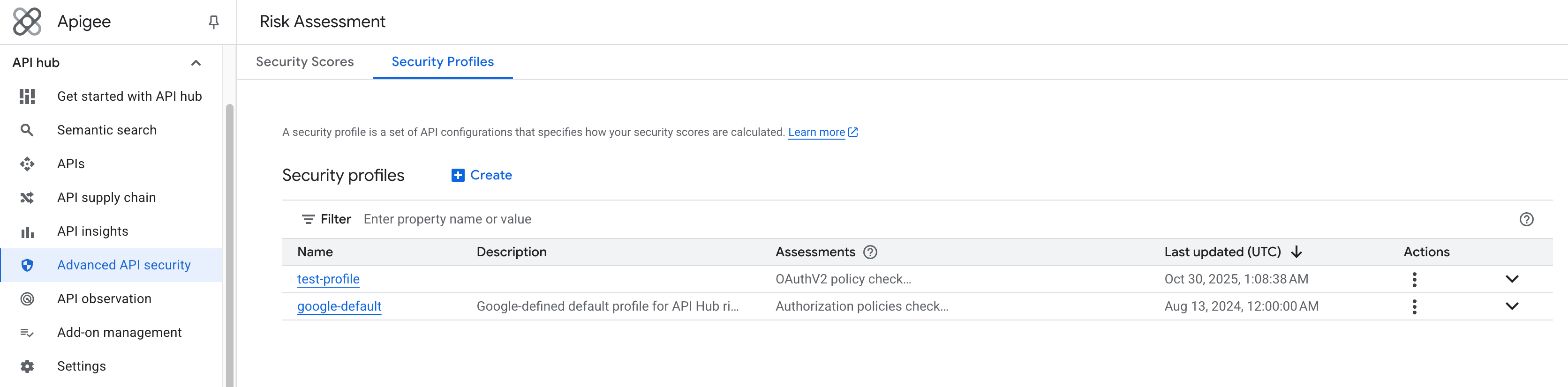
To view the list of available security profiles, go to the API hub > Risk assessment page and select the Security profiles tab.
To view the complete details of a specific security profile, click the name of the profile. The following security profile details are displayed:
- Description: the description of the security profile.
- Last updated (UTC): the date and time when the security profile was last modified.
- Profile type: the type of the security profile. The supported types are
Google-defaultandUser-defined. - Security scores: a link to the Security scores page, where you can view the risk assessment security scores calculated using the security profile.
- Assessments configurations: the list of assessments and checks that are included in the security profile, along with their assigned weights and gateway types.
REST
To view the list of security profiles, make a GET request to the securityProfilesV2 API.
curl -H "Authorization: Bearer $(gcloud auth print-access-token)"
"https://apigee.googleapis.com/v1/organizations/APIGEE_ORG/securityProfilesV2?risk_assessment_type=API_HUB"
To view the complete details of a specific security profile, make a GET request as follows:
curl -H "Authorization: Bearer $(gcloud auth print-access-token)"
"https://apigee.googleapis.com/v1/organizations/APIGEE_ORG/securityProfilesV2/PROFILE_ID?risk_assessment_type=API_HUB"
Replace the following:
APIGEE_ORG: Name of the Apigee organization provisioned in your Google Cloud project.PROFILE_ID: The name of the security profile.
Create a security profile
Create custom security profiles to tailor risk evaluation to your organization's specific standards and apply them across your API landscape. For more information about custom security profiles, see Security profiles v2.
Console
To create a custom security profile, do the following:
- In the Google Cloud console, go to the API hub > Risk assessment page.
- In the Risk assessment page, click the Security profiles tab.
- Click Create.
The Create security profile page appears.
- Enter a Name and Description for the security profile.
- In the Assessments and checks section, configure the assessment checks that you want to include in the security profile:
- Assessment: choose the assessments you want to include in the profile. For the list of available assessments, see Supported assessment categories and checks.
- Weight: assign Minor, Moderate, or Major to determine the assessment check's significance in the overall security score calculation (Minor=1 point, Moderate=5 points, Major=15 points).
- Gateway types: select the gateway types to which this assessment applies. The supported gateway types include Apigee X, Apigee hybrid, Apigee Edge Public Cloud, and Apigee Edge Private Cloud.
- To add another assessment check, click + Add and repeat the previous steps.
- Click Create.
The security profile is created and you are returned to the Security profiles tab.
REST
To create a custom security profile, make a POST request to the securityProfilesV2 API.
curl "https://apigee.googleapis.com/v1/organizations/APIGEE_ORG/securityProfilesV2?security_profile_v2_id=PROFILE_ID"
-X POST  -H "Authorization: Bearer $(gcloud auth print-access-token)"
-H 'Content-type: application/json'   -d '
{
  "description": "SECURITY_PROFILE_DESCRIPTION",
  "risk_assessment_type": "API_HUB",
  "profile_assessment_configs": {
    "ASSESSMENT": {
      "weight": "WEIGHT",
      "include": {
        "gateway_types": ["GATEWAY_TYPES"]
      }
    }
  }
}'
Replace the following:
APIGEE_ORG: Name of the Apigee organization provisioned in your Google Cloud project.PROFILE_ID: The name of the security profile.SECURITY_PROFILE_DESCRIPTION: The description of the security profile.ASSESSMENT: The assessment that you want to include in the security profile. For the list of available assessments, see Supported assessment categories and checks.WEIGHT: The weight of the assessment. The supported weights areMINOR,MODERATE, andMAJOR.GATEWAY_TYPES: The gateway types to which this assessment applies. The supported gateway types areAPIGEE_X,APIGEE_HYBRID, andAPIGEE_EDGE_CLOUD.
Duplicate a security profile
You can duplicate an existing profile to quickly create a new one based on existing settings. For information about duplicating a security profile from your Apigee X/hybrid instance into your API hub instance, see Manage security profiles for Apigee.
Console
To duplicate an existing security profile, do the following:
- Go to the API hub > Risk assessment page.
- In the Risk assessment page, click the Security profiles tab.
The Security profiles tab displays the list of all the security profiles created in API hub.
- Click the name of the security profile that you want to duplicate.
- Click Duplicate.
- Enter a Name for the duplicated security profile.
- Click Create.
Edit a security profile
You can edit an existing security profile to update its description and assessment configurations.
Console
To edit a custom security profile, do the following:
- Go to the API hub > Risk assessment page.
- In the Risk assessment page, click the Security profiles tab.
The Security profiles tab displays the list of all the security profiles created in API hub.
- Click the name of the security profile that you want to edit.
- Click Edit.
- In the Edit security profile page, make the required edits to the assessment configurations.
- Click Save.
REST
To edit a custom security profile, make a PATCH request to the securityProfilesV2 API.
curl "https://apigee.googleapis.com/v1/organizations/APIGEE_ORG/securityProfilesV2/PROFILE_ID?update_mask=profile_assessment_configs"
-X PATCH  -H "Authorization: Bearer $(gcloud auth print-access-token)"
-H 'Content-type: application/json'   -d '
{
  "risk_assessment_type": "API_HUB",
  "profile_assessment_configs": {
    "ASSESSMENT": {
      "weight": "WEIGHT",
      "include": {
        "gateway_types": ["GATEWAY_TYPES"]
      }
    }
  }
}'
Replace the following:
APIGEE_ORG: Name of the Apigee organization provisioned in your Google Cloud project.PROFILE_ID: The name of the security profile.ASSESSMENT: The assessment that you want to include in the security profile. For the list of available assessments, see Supported assessment categories and checks.WEIGHT: The weight of the assessment. The supported weights areMINOR,MODERATE, andMAJOR.GATEWAY_TYPES: The gateway types to which this assessment applies. The supported gateway types areAPIGEE_X,APIGEE_HYBRID, andAPIGEE_EDGE_CLOUD.
Delete a security profile
Deleting a custom security profile stops the profile from being applied to API deployments and, subsequently, from calculating their security scores. You can't delete the default security profile.
Console
To delete a custom security profile, do the following:
- Go to the API hub > Risk assessment page.
- In the Risk assessment page, click the Security profiles tab.
The Security profiles tab displays the list of all the security profiles created in API hub.
- Click the name of the security profile that you want to delete.
- Click Delete.
- Enter the security profile name and click Delete to confirm the deletion.
REST
To delete a custom security profile, make a DELETE request to the securityProfilesV2 API.
curl -H "Authorization: Bearer $(gcloud auth print-access-token)"
"https://apigee.googleapis.com/v1/organizations/APIGEE_ORG/securityProfilesV2/PROFILE_ID?risk_assessment_type=API_HUB"
-X DELETE
Replace the following:
APIGEE_ORG: Name of the Apigee organization provisioned in your Google Cloud project.PROFILE_ID: The name of the security profile.
Supported assessment categories and checks
The following table lists the supported assessment categories and checks for multi-gateway security profiles.
| Assessment category | Assessment check | Supported gateway types | ||
|---|---|---|---|---|
| Apigee X | Apigee hybrid | Apigee Edge Public Cloud | ||
| Auth | Auth policies check / auth-policies-check |
|||
| Auth | ContinueOnError check in auth policies / continue-on-error-auth-policies-check |
|||
| Auth | AccessControl policy check / access-control-policy-check |
|||
| Auth | BasicAuthentication policy check / basic-auth-policy-check |
|||
| Auth | HMAC policy check / hmac-policy-check |
|||
| Auth | OAuthV2 policy check / oauthv2-policy-check |
|||
| Auth | VerifyAPIKey policy / verify-api-key-policy-check |
|||
| Auth | VerifyJWS policy / verify-jws-policy-check |
|||
| Auth | VerifyJWT policy / verify-jwt-policy-check |
|||
| Auth | ValidateSAMLAssertion policy check / validate-saml-assertion-policy-check |
|||
| Auth | VerifyIAM policy / verify-IAM-policy-check |
|||
| AI | SanitizeUserPrompt / sanitize-user-prompt-policy-check |
|||
| AI | SanitizeModelResponse / sanitize-model-response-policy-check |
|||
| AI | SemanticCacheLookup / semantic-cache-lookup-policy-check |
|||
| Cors | CORS policies check / cors-policies-check |
|||
| Cors | CORS policy check / cors-policy-check |
|||
| Cors | CORS AssignMessage policy check / cors-assign-message-policy-check |
|||
| Mediation | Mediation policies check / mediation-policies-check |
|||
| Mediation | SOAPMessageValidation policy check / soap-validation-policy-check |
|||
| Mediation | OASValidation policy check / oas-validation-policy-check |
|||
| Target | Target Server TLS check / tls-target-server-check |
|||
| Target | Target Server mTLS check / mtls-target-server-check |
|||
| Target | Target Server enforce field check / target-enforce-field-check |
|||
| Threat | Threat policies check / threat-policies-check |
|||
| Threat | ContinueOnError check in threat policies / continue-on-error-threat-policies-check |
|||
| Threat | JSONThreatProtection policy check / json-threat-protection-policy-check |
|||
| Threat | RegularExpressionProtection policy check / regex-protection-policy-check |
|||
| Threat | XMLThreatProtection policy check / xml-threat-protection-policy-check |
|||
| Traffic | Traffic management policies check / traffic-management-policies-check |
|||
| Traffic | LookupCache policy check / lookup-cache-policy-check |
|||
| Traffic | Quota policy check / quota-policy-check |
|||
| Traffic | ResponseCache policy check / response-cache-policy-check |
|||
| Traffic | SpikeArrest policy check / spike-arrest-policy-check |
|||
Risk assessment scoring behavior for unsupported gateway types
Assessment checks are evaluated based on the gateway types explicitly configured in a security profile. If a profile includes an assessment check whose associated configuration option isn't supported by a gateway type, the security score is affected as follows:
- If the check is applied to an unsupported gateway type: The check always fails for deployments of the unsupported gateway type, and this failure lowers their score.
For example, if the
VerifyIAMcheck is included in a profile and explicitly enabled for theAPIGEE_EDGE_CLOUDgateway type, the check fails for Edge proxies because they do not supportVerifyIAM. - If the check is not applied to an unsupported gateway type: The assessment is ignored for deployments of the unsupported gateway type, and their score is not impacted.
For example, if the
VerifyIAMcheck is enabled only forAPIGEE_XandAPIGEE_HYBRIDin a profile, the check is skipped when scoring an Apigee Edge proxy.
Limitations
The following limitations apply to security profiles:
- You can create a maximum of 100 custom security profiles per organization.
- You can add a maximum of 50 assessment configurations to a security profile.
- Security profile names are shared across your API hub instance and your Apigee organization. A profile created in one instance can't use the same name as a profile in the other.
What's next
- View security scores across all projects and gateways, see View security scores across all projects and gateways.
- View security scores for a given API across its deployments in gateways, see View security scores for APIs.
- Learn about the available assessment categories and checks.