יצירת בקשות API וטיפול בתגובות

במאמר הזה מוסבר איך ליצור בקשות ל-API ואיך לטפל בתגובות ל-API מ-Compute Engine API. המאמר מסביר איך:

  • יוצרים את גוף הבקשה.
  • קובעים את ה-URIs של המשאבים שנדרשים לבקשה.
  • טיפול בתגובות מה-API.
  • לבדוק אם בקשת API הצליחה.

במאמר הזה לא מוסבר איך לבצע אימות ל-API. כדי לקבל מידע על אימות ל-API, אפשר לקרוא את המאמר אימות ל-Compute Engine.

לפני שמתחילים

יצירת בקשת API

ה-Compute Engine API מצפה שבקשות ה-API יהיו בפורמט JSON. כדי לשלוח בקשת API, אפשר לשלוח בקשת HTTP ישירה באמצעות כלים כמו curl או httplib2, או להשתמש באחת מספריות הלקוח הזמינות.

כששולחים בקשת API שדורשת גוף בקשה, כמו בקשת POST,‏ UPDATE או PATCH, גוף הבקשה מכיל מאפייני משאב שרוצים להגדיר בבקשה הזו. לדוגמה, הפקודה curl הבאה שולחת בקשת POST ל-URI של משאב המכונות. הבקשה יוצרת מופע עם המאפיינים שמוגדרים בגוף הבקשה. גוף הבקשה מסומן בדגל -d:

curl -X POST -H "Authorization: Bearer [OAUTH_TOKEN]" -H "Content-Type: application/json" \
https://compute.googleapis.com/compute/v1/projects/PROJECT_ID/zones/ZONE/instances -d \
'{
  "disks":[
    {
      "boot":"true",
      "initializeParams":{
        "sourceImage":"https://www.googleapis.com/compute/v1/projects/debian-cloud/global/images/debian-10-buster-v20210122"
      }
    }
  ],
  "machineType":"https://www.googleapis.com/compute/v1/projects/PROJECT_ID/zones/ZONE/machineTypes/e2-standard-2",
  "name":"VM_NAME",
  "networkInterfaces":[
    {
      "accessConfigs":[
        {
          "name":"external-nat",
          "type":"ONE_TO_ONE_NAT"
        }
      ],
      "network":"https://www.googleapis.com/compute/v1/projects/PROJECT_ID/global/networks/default"
    }
  ]
}'

ל-URI של התמונה יש מזהה פרויקט שונה (debian-cloud) ממזהה הפרויקט שלכם, כי התמונות שייכות לפרויקטים שונים, בהתאם לסוג התמונה. לדוגמה, כל תמונות Debian שזמינות לציבור ומוצעות על ידי Compute Engine מתארחות בפרויקט debian-cloud.

כשמפנים למשאב אחר, צריך להשתמש ב-URI המוגדר במלואו של המשאב. לדוגמה, המאפיין network משתמש במזהה משאבים אחיד (URI) מוגדר במלואו ברשת default.

דוגמאות לבקשות API

Python

from __future__ import annotations

import re
import sys
from typing import Any
import warnings

from google.api_core.extended_operation import ExtendedOperation
from google.cloud import compute_v1


def get_image_from_family(project: str, family: str) -> compute_v1.Image:
    """
    Retrieve the newest image that is part of a given family in a project.

    Args:
        project: project ID or project number of the Cloud project you want to get image from.
        family: name of the image family you want to get image from.

    Returns:
        An Image object.
    """
    image_client = compute_v1.ImagesClient()
    # List of public operating system (OS) images: https://cloud.google.com/compute/docs/images/os-details
    newest_image = image_client.get_from_family(project=project, family=family)
    return newest_image


def disk_from_image(
    disk_type: str,
    disk_size_gb: int,
    boot: bool,
    source_image: str,
    auto_delete: bool = True,
) -> compute_v1.AttachedDisk:
    """
    Create an AttachedDisk object to be used in VM instance creation. Uses an image as the
    source for the new disk.

    Args:
         disk_type: the type of disk you want to create. This value uses the following format:
            "zones/{zone}/diskTypes/(pd-standard|pd-ssd|pd-balanced|pd-extreme)".
            For example: "zones/us-west3-b/diskTypes/pd-ssd"
        disk_size_gb: size of the new disk in gigabytes
        boot: boolean flag indicating whether this disk should be used as a boot disk of an instance
        source_image: source image to use when creating this disk. You must have read access to this disk. This can be one
            of the publicly available images or an image from one of your projects.
            This value uses the following format: "projects/{project_name}/global/images/{image_name}"
        auto_delete: boolean flag indicating whether this disk should be deleted with the VM that uses it

    Returns:
        AttachedDisk object configured to be created using the specified image.
    """
    boot_disk = compute_v1.AttachedDisk()
    initialize_params = compute_v1.AttachedDiskInitializeParams()
    initialize_params.source_image = source_image
    initialize_params.disk_size_gb = disk_size_gb
    initialize_params.disk_type = disk_type
    boot_disk.initialize_params = initialize_params
    # Remember to set auto_delete to True if you want the disk to be deleted when you delete
    # your VM instance.
    boot_disk.auto_delete = auto_delete
    boot_disk.boot = boot
    return boot_disk


def wait_for_extended_operation(
    operation: ExtendedOperation, verbose_name: str = "operation", timeout: int = 300
) -> Any:
    """
    Waits for the extended (long-running) operation to complete.

    If the operation is successful, it will return its result.
    If the operation ends with an error, an exception will be raised.
    If there were any warnings during the execution of the operation
    they will be printed to sys.stderr.

    Args:
        operation: a long-running operation you want to wait on.
        verbose_name: (optional) a more verbose name of the operation,
            used only during error and warning reporting.
        timeout: how long (in seconds) to wait for operation to finish.
            If None, wait indefinitely.

    Returns:
        Whatever the operation.result() returns.

    Raises:
        This method will raise the exception received from `operation.exception()`
        or RuntimeError if there is no exception set, but there is an `error_code`
        set for the `operation`.

        In case of an operation taking longer than `timeout` seconds to complete,
        a `concurrent.futures.TimeoutError` will be raised.
    """
    result = operation.result(timeout=timeout)

    if operation.error_code:
        print(
            f"Error during {verbose_name}: [Code: {operation.error_code}]: {operation.error_message}",
            file=sys.stderr,
            flush=True,
        )
        print(f"Operation ID: {operation.name}", file=sys.stderr, flush=True)
        raise operation.exception() or RuntimeError(operation.error_message)

    if operation.warnings:
        print(f"Warnings during {verbose_name}:\n", file=sys.stderr, flush=True)
        for warning in operation.warnings:
            print(f" - {warning.code}: {warning.message}", file=sys.stderr, flush=True)

    return result


def create_instance(
    project_id: str,
    zone: str,
    instance_name: str,
    disks: list[compute_v1.AttachedDisk],
    machine_type: str = "n1-standard-1",
    network_link: str = "global/networks/default",
    subnetwork_link: str = None,
    internal_ip: str = None,
    external_access: bool = False,
    external_ipv4: str = None,
    accelerators: list[compute_v1.AcceleratorConfig] = None,
    preemptible: bool = False,
    spot: bool = False,
    instance_termination_action: str = "STOP",
    custom_hostname: str = None,
    delete_protection: bool = False,
) -> compute_v1.Instance:
    """
    Send an instance creation request to the Compute Engine API and wait for it to complete.

    Args:
        project_id: project ID or project number of the Cloud project you want to use.
        zone: name of the zone to create the instance in. For example: "us-west3-b"
        instance_name: name of the new virtual machine (VM) instance.
        disks: a list of compute_v1.AttachedDisk objects describing the disks
            you want to attach to your new instance.
        machine_type: machine type of the VM being created. This value uses the
            following format: "zones/{zone}/machineTypes/{type_name}".
            For example: "zones/europe-west3-c/machineTypes/f1-micro"
        network_link: name of the network you want the new instance to use.
            For example: "global/networks/default" represents the network
            named "default", which is created automatically for each project.
        subnetwork_link: name of the subnetwork you want the new instance to use.
            This value uses the following format:
            "regions/{region}/subnetworks/{subnetwork_name}"
        internal_ip: internal IP address you want to assign to the new instance.
            By default, a free address from the pool of available internal IP addresses of
            used subnet will be used.
        external_access: boolean flag indicating if the instance should have an external IPv4
            address assigned.
        external_ipv4: external IPv4 address to be assigned to this instance. If you specify
            an external IP address, it must live in the same region as the zone of the instance.
            This setting requires `external_access` to be set to True to work.
        accelerators: a list of AcceleratorConfig objects describing the accelerators that will
            be attached to the new instance.
        preemptible: boolean value indicating if the new instance should be preemptible
            or not. Preemptible VMs have been deprecated and you should now use Spot VMs.
        spot: boolean value indicating if the new instance should be a Spot VM or not.
        instance_termination_action: What action should be taken once a Spot VM is terminated.
            Possible values: "STOP", "DELETE"
        custom_hostname: Custom hostname of the new VM instance.
            Custom hostnames must conform to RFC 1035 requirements for valid hostnames.
        delete_protection: boolean value indicating if the new virtual machine should be
            protected against deletion or not.
    Returns:
        Instance object.
    """
    instance_client = compute_v1.InstancesClient()

    # Use the network interface provided in the network_link argument.
    network_interface = compute_v1.NetworkInterface()
    network_interface.network = network_link
    if subnetwork_link:
        network_interface.subnetwork = subnetwork_link

    if internal_ip:
        network_interface.network_i_p = internal_ip

    if external_access:
        access = compute_v1.AccessConfig()
        access.type_ = compute_v1.AccessConfig.Type.ONE_TO_ONE_NAT.name
        access.name = "External NAT"
        access.network_tier = access.NetworkTier.PREMIUM.name
        if external_ipv4:
            access.nat_i_p = external_ipv4
        network_interface.access_configs = [access]

    # Collect information into the Instance object.
    instance = compute_v1.Instance()
    instance.network_interfaces = [network_interface]
    instance.name = instance_name
    instance.disks = disks
    if re.match(r"^zones/[a-z\d\-]+/machineTypes/[a-z\d\-]+$", machine_type):
        instance.machine_type = machine_type
    else:
        instance.machine_type = f"zones/{zone}/machineTypes/{machine_type}"

    instance.scheduling = compute_v1.Scheduling()
    if accelerators:
        instance.guest_accelerators = accelerators
        instance.scheduling.on_host_maintenance = (
            compute_v1.Scheduling.OnHostMaintenance.TERMINATE.name
        )

    if preemptible:
        # Set the preemptible setting
        warnings.warn(
            "Preemptible VMs are being replaced by Spot VMs.", DeprecationWarning
        )
        instance.scheduling = compute_v1.Scheduling()
        instance.scheduling.preemptible = True

    if spot:
        # Set the Spot VM setting
        instance.scheduling.provisioning_model = (
            compute_v1.Scheduling.ProvisioningModel.SPOT.name
        )
        instance.scheduling.instance_termination_action = instance_termination_action

    if custom_hostname is not None:
        # Set the custom hostname for the instance
        instance.hostname = custom_hostname

    if delete_protection:
        # Set the delete protection bit
        instance.deletion_protection = True

    # Prepare the request to insert an instance.
    request = compute_v1.InsertInstanceRequest()
    request.zone = zone
    request.project = project_id
    request.instance_resource = instance

    # Wait for the create operation to complete.
    print(f"Creating the {instance_name} instance in {zone}...")

    operation = instance_client.insert(request=request)

    wait_for_extended_operation(operation, "instance creation")

    print(f"Instance {instance_name} created.")
    return instance_client.get(project=project_id, zone=zone, instance=instance_name)

Java

public static Operation startInstance(Compute compute, String instanceName) throws IOException {
  System.out.println("================== Starting New Instance ==================");

  // Create VM Instance object with the required properties.
  Instance instance = new Instance();
  instance.setName(instanceName);
  instance.setMachineType(
      String.format(
          "https://www.googleapis.com/compute/v1/projects/%s/zones/%s/machineTypes/e2-standard-1",
          PROJECT_ID, ZONE_NAME));
  // Add Network Interface to be used by VM Instance.
  NetworkInterface ifc = new NetworkInterface();
  ifc.setNetwork(
      String.format(
          "https://www.googleapis.com/compute/v1/projects/%s/global/networks/default",
          PROJECT_ID));
  List<AccessConfig> configs = new ArrayList<>();
  AccessConfig config = new AccessConfig();
  config.setType(NETWORK_INTERFACE_CONFIG);
  config.setName(NETWORK_ACCESS_CONFIG);
  configs.add(config);
  ifc.setAccessConfigs(configs);
  instance.setNetworkInterfaces(Collections.singletonList(ifc));

  // Add attached Persistent Disk to be used by VM Instance.
  AttachedDisk disk = new AttachedDisk();
  disk.setBoot(true);
  disk.setAutoDelete(true);
  disk.setType("PERSISTENT");
  AttachedDiskInitializeParams params = new AttachedDiskInitializeParams();
  // Assign the Persistent Disk the same name as the VM Instance.
  params.setDiskName(instanceName);
  // Specify the source operating system machine image to be used by the VM Instance.
  params.setSourceImage(SOURCE_IMAGE_PREFIX + SOURCE_IMAGE_PATH);
  // Specify the disk type as Standard Persistent Disk
  params.setDiskType(
      String.format(
          "https://www.googleapis.com/compute/v1/projects/%s/zones/%s/diskTypes/pd-standard",
          PROJECT_ID, ZONE_NAME));
  disk.setInitializeParams(params);
  instance.setDisks(Collections.singletonList(disk));

  // Initialize the service account to be used by the VM Instance and set the API access scopes.
  ServiceAccount account = new ServiceAccount();
  account.setEmail("default");
  List<String> scopes = new ArrayList<>();
  scopes.add("https://www.googleapis.com/auth/devstorage.full_control");
  scopes.add("https://www.googleapis.com/auth/compute");
  account.setScopes(scopes);
  instance.setServiceAccounts(Collections.singletonList(account));

  // Optional - Add a startup script to be used by the VM Instance.
  Metadata meta = new Metadata();
  Metadata.Items item = new Metadata.Items();
  item.setKey("startup-script-url");
  // If you put a script called "vm-startup.sh" in this Google Cloud Storage
  // bucket, it will execute on VM startup.  This assumes you've created a
  // bucket named the same as your PROJECT_ID.
  // For info on creating buckets see:
  // https://cloud.google.com/storage/docs/cloud-console#_creatingbuckets
  item.setValue(String.format("gs://%s/vm-startup.sh", PROJECT_ID));
  meta.setItems(Collections.singletonList(item));
  instance.setMetadata(meta);

  System.out.println(instance.toPrettyString());
  Compute.Instances.Insert insert = compute.instances().insert(PROJECT_ID, ZONE_NAME, instance);
  return insert.execute();
}

יצירת כתובות URI של משאבים

ב-Compute Engine API, הפניה למשאב אחר Google Cloud מופיעה כ-URI מוגדר במלואו:

https://compute.googleapis.com/compute/v1/projects/PROJECT_ID/zones/ZONE/RESOURCE_TYPE/SPECIFIC_RESOURCE

בכל פעם שמציינים תמונה, סוג מכונה, רשת או כל משאב אחר, צריך לספק את ה-URI של המשאב כשמשתמשים ב-API. כלים ללקוחות כמו Google Cloud CLI ומסוף Google Cloud מסתירים את המורכבות הזו ומטפלים ביצירה של מזהי ה-URI של המשאבים האלה בשבילכם, אבל כשמתקשרים עם ה-API ישירות, צריך ליצור את מזהי ה-URI של המשאבים האלה בעצמכם.

יש מזהי URI שונים למשאבים מסוגים שונים. לדוגמה, למשאב של תחום מוגדר יש את המפרט zone ב-URI:

https://compute.googleapis.com/compute/v1/projects/PROJECT_ID/zones/ZONE/machineTypes/e2-standard-2

משאבים אזוריים מחליפים את המפרט zone במפרט region:

https://compute.googleapis.com/compute/v1/projects/PROJECT_ID/regions/REGION/addresses/ADDRESS_NAME

באופן דומה, משאבים גלובליים כוללים את המפרט global:

https://compute.googleapis.com/compute/v1/projects/PROJECT_ID/global/images/VM_NAME

‫Compute Engine API מקבל גם כתובות URI חלקיות, כי השירות יכול להסיק מידע כמו מזהה הפרויקט. לכן, גם הגרסאות החלקיות הבאות של מזהי ה-URI הקודמים מקובלות:

zones/ZONE/machineTypes/e2-standard-2
regions/REGION/addresses/ADDRESS_NAME
project/PROJECT_ID/global/images/VM_NAME

במזהי ה-URI החלקיים, גם מזהי ה-URI האזוריים וגם מזהי ה-URI של האזורים לא כללו את מזהה הפרויקט, אבל מזהה ה-URI של התמונה כן כלל אותו. הסיבה לכך היא שתמונות שזמינות לציבור ומוצעות על ידי Compute Engine מתארחות בפרויקטים אחרים, כמו debian-cloud לכל תמונות Debian ו-ubuntu-os-cloud לכל תמונות Ubuntu. כדי להשתמש בתמונות האלה, צריך לספק את מזהה הפרויקט המתאים. אם לא מציינים את מזהה הפרויקט של התמונות, מערכת Compute Engine מנסה למצוא את התמונה בפרויקט, והבקשה נכשלת כי התמונה לא קיימת.

עם זאת, אם משתמשים בתמונה בהתאמה אישית ששייכת לפרויקט (אותו פרויקט שבו יוצרים את המשאב הזה), אפשר להשמיט את הגדרת הפרויקט כשמספקים URI של תמונה.

איך קובעים אילו מאפיינים נדרשים

במאמרי העזרה של Compute Engine API, שזמינים ל-API בגרסה v1 ול-API בגרסת בטא, מפורטות כל האפשרויות להגדרת מאפיינים של משאב ספציפי. במסמכי העזר יש הבחנה בין מאפיינים שניתנים לשינוי לבין מאפיינים שלא ניתן לשנות (מסומנים ב-[Output Only] בתיאור המאפיין), אבל כדי לדעת אילו מאפיינים נדרשים למשאב מסוים, צריך לעיין במסמכים שמתייחסים ספציפית למשימה הזו.

לדוגמה, אם אתם יוצרים מכונה, כדאי לקרוא את המסמך יצירת מכונה מתמונה כדי לראות את מאפייני ה-API שנדרשים לבקשה. אם אתם רוצים ליצור כתובת IP חיצונית סטטית ב-API, כדאי לקרוא את מסמכי התיעוד בנושא כתובות IP חיצוניות סטטיות.

אימות בקשות API

כדי לאמת את בקשות ה-API:

  1. בהפניה ל-API של Compute Engine, מחפשים את ה-method שהקוד קורא לו. לדוגמה, v1/compute.instances.insert.
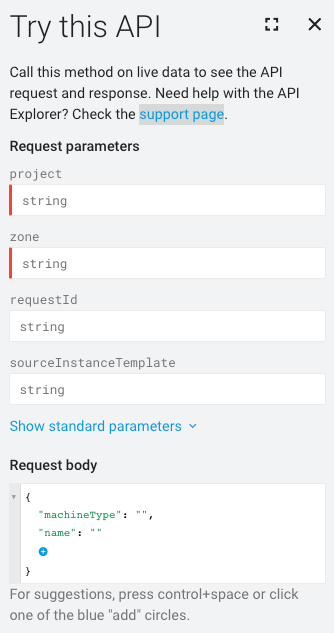
  2. בתפריט התוכן, לוחצים על אפשר לנסות! ייפתח החלון Try this API.
    הלחצן &#39;אני רוצה למדוד&#39; בתפריט התוכן.

  3. בקטע Request parameters (פרמטרים של בקשה), לא צריך לציין project (פרויקט) או zone (אזור) כי האימות לא דורש שליחת הבקשה.

  4. בקטע Request body, מדביקים את הבקשה.

    חלון Try this API (ניסיון של ה-API הזה), שבו מוצג השדה Request body (גוף הבקשה) כדי להראות איפה צריך להדביק בקשה לאימות.

אלמנטים לא תקינים בבקשה יודגשו בקו תחתון כחול. כדי לקבל מידע נוסף על הבעיה שצריך לטפל בה, לוחצים על כל קטע עם קו תחתון.

טיפול בתגובות מה-API

אם שולחים בקשה שמשנה נתונים, Compute Engine מחזיר אובייקט Operation שאפשר לשלוח לו שאילתות כדי לקבל את סטטוס הפעולות של הבקשה. משאב Operation נראה כך:

{
 "kind": "compute#operation",
 "id": "7127550864823803662",
 "name": "operation-1458856416788-52ed27a803e22-1c3bd86a-9e95017b",
 "zone": "https://www.googleapis.com/compute/v1/projects/PROJECT_ID/zones/ZONE",
 "operationType": "insert",
 "targetLink": "https://www.googleapis.com/compute/v1/projects/PROJECT_ID/zones/ZONE/instances/EXAMPLE_VM",
 "targetId": "4132355614508179214",
 "status": "PENDING",
 "user": "user@example.com",
 "progress": 0,
 "insertTime": "2016-03-24T14:53:37.788-07:00",
 "selfLink": "https://www.googleapis.com/compute/v1/projects/PROJECT_ID/zones/ZONE/operations/operation-1458856416788-52ed27a803e22-1c3bd86a-9e95017b"
}

אם הבקשה המקורית היא לשנות משאב של תחום מוגדר – לדוגמה, ליצור תמונת מצב של דיסק או להפסיק מכונה –‏ Compute Engine מחזיר אובייקט zoneOperations. באופן דומה, משאבים אזוריים וגלובליים מחזירים אובייקט regionOperations או globalOperations, בהתאמה. כדי לקבל את הסטטוס של פעולה, צריך לבצע בקשה באמצעות השיטה get או wait למשאב Operation הספציפי ולספק את name של הפעולה.

הבקשה תושלם רק אם הסטטוס של המשאב Operation יהיה DONE. הזמן שיידרש לטיפול בבקשה תלוי באופי הבקשה. אחר כך, אחרי שהסטטוס של רכיב Operation חוזר כ-DONE, אפשר לבדוק אם הפעולה הצליחה ואם היו שגיאות.

לדוגמה, התגובה הבאה מציינת שהפעולה הקודמת הושלמה, כפי שמצוין בסטטוס DONE:

endTime: '2016-03-24T14:54:07.119-07:00'
id: '7127550864823803662'
insertTime: '2016-03-24T14:53:37.788-07:00'
kind: compute#operation
name: operation-1458856416788-52ed27a803e22-1c3bd86a-9e95017b
operationType: insert
progress: 100
selfLink: https://compute.googleapis.com/compute/v1/projects/PROJECT_ID/zones/ZONE/operations/operation-1458856416788-52ed27a803e22-1c3bd86a-9e95017b
startTime: '2016-03-24T14:53:38.397-07:00'
status: DONE
targetId: '4132355614508179214'
targetLink: https://compute.googleapis.com/compute/v1/projects/PROJECT_ID/zones/ZONE/instances/EXAMPLE_VM
user: user@example.com
zone: https://compute.googleapis.com/compute/v1/projects/PROJECT_ID/zones/ZONE

כדי לאשר, שולחים בקשת get למשאב כדי לבדוק שהוא קיים ופועל. לדוגמה:

GET /compute/v1/projects/PROJECT_ID/zones/ZONE/instances/EXAMPLE_VM

{
  "cpuPlatform": "Intel Haswell",
  "creationTimestamp": "2016-03-24T14:53:37.170-07:00",
  "disks": [
    ..[snip]..
  "selfLink": "https://www.googleapis.com/compute/v1/projects/PROJECT_ID/zones/ZONE/instances/EXAMPLE_VM",
  "status": "RUNNING",
  "tags": {
    "fingerprint": "42WmSpB8rSM="
  },
  "zone": "https://www.googleapis.com/compute/v1/projects/PROJECT_ID/zones/ZONE"
}

פעולות דגימה

אפשר לכתוב קוד שידגום את הפעולה באופן תקופתי באמצעות בקשת get או wait, שתחזור כשהסטטוס של הפעולה יהיה DONE.

בבקשת get, הפעולה מוחזרת באופן מיידי, ללא קשר לסטטוס שלה. צריך לבצע דגימה של הפעולה באופן קבוע כדי לדעת מתי היא תסתיים.

אם שולחים בקשת wait, הבקשה מוחזרת כשהפעולה DONE או אם הבקשה מתקרבת למועד האחרון של 2 דקות. אתם יכולים להשתמש בשיטה wait או בשיטה get כדי לבצע סקר של הפעולות שלכם, אבל לשיטה wait יש יתרונות מסוימים על פני השיטה get:

  • אתם יכולים להגדיר את הלקוחות כך שיבדקו את סטטוס הפעולה בתדירות נמוכה יותר, וכך להקטין את השימוש ב-QPS של Compute Engine API.
  • החביון הממוצע בין סיום הפעולה לבין העדכון של הלקוח על סיום הפעולה קטן משמעותית, כי השרת מגיב ברגע שהפעולה מסתיימת.
  • השיטה מספקת זמני המתנה מוגבלים. השיטה ממתינה לזמן שמוגדר כברירת מחדל לזמן הקצוב לתפוגה של HTTP (2 דקות) ואז מחזירה את המצב הנוכחי של הפעולה, שיכול להיות DONE או עדיין בתהליך.

השיטה wait היא API מסוג best-effort. אם השרת עמוס מדי, יכול להיות שהבקשה תחזור לפני שהיא תגיע למועד האחרון שמוגדר כברירת מחדל, או אחרי המתנה של אפס שניות בלבד. בנוסף, אין ערובה לכך שה-method תחזיר ערך רק כשהפעולה היא DONE. לדוגמה, אם הבקשה מתקרבת למועד האחרון של 2 דקות, השיטה מחזירה ערך גם אם הפעולה לא הסתיימה. כדי לבדוק את הפעולות, מומלץ להשתמש בשיטה wait או בשיטה get – בלולאת ניסיון חוזר עם השהיה בין הניסיונות – כדי לדגום מעת לעת את סטטוס הפעולה. המרווח המקסימלי לניסיון חוזר לא יכול להיות ארוך יותר מתקופת השמירה המינימלית של הפעולה.

דוגמה לסקר

בדוגמאות הבאות נעשה שימוש במתודה get. אפשר להחליף את השיטה get בשיטה wait:

Python

import time

from google.cloud import compute_v1


def wait_for_operation(
    operation: compute_v1.Operation, project_id: str
) -> compute_v1.Operation:
    """
    This method waits for an operation to be completed. Calling this function
    will block until the operation is finished.

    Args:
        operation: The Operation object representing the operation you want to
            wait on.
        project_id: project ID or project number of the Cloud project you want to use.

    Returns:
        Finished Operation object.
    """
    kwargs = {"project": project_id, "operation": operation.name}
    if operation.zone:
        client = compute_v1.ZoneOperationsClient()
        # Operation.zone is a full URL address of a zone, so we need to extract just the name
        kwargs["zone"] = operation.zone.rsplit("/", maxsplit=1)[1]
    elif operation.region:
        client = compute_v1.RegionOperationsClient()
        # Operation.region is a full URL address of a region, so we need to extract just the name
        kwargs["region"] = operation.region.rsplit("/", maxsplit=1)[1]
    else:
        client = compute_v1.GlobalOperationsClient()

    while True:
        result = client.get(**kwargs)

        if result.status == compute_v1.Operation.Status.DONE:
            print("Operation finished.")
            if result.error:
                print(f"Error during operation: {result.error}")
            return result

        print("Waiting for operation to complete...")
        time.sleep(2)

Java

/**
 * Wait until {@code operation} is completed.
 *
 * @param compute the {@code Compute} object
 * @param operation the operation returned by the original request
 * @param timeout the timeout, in millis
 * @return the error, if any, else {@code null} if there was no error
 * @throws InterruptedException if we timed out waiting for the operation to complete
 * @throws IOException if we had trouble connecting
 */
public static Operation.Error blockUntilComplete(
    Compute compute, Operation operation, long timeout) throws Exception {
  long start = System.currentTimeMillis();
  final long pollInterval = 5 * 1000;
  String zone = getLastWordFromUrl(operation.getZone()); // null for global/regional operations
  String region = getLastWordFromUrl(operation.getRegion());
  String status = operation.getStatus();
  String opId = operation.getName();
  while (operation != null && !status.equals("DONE")) {
    Thread.sleep(pollInterval);
    long elapsed = System.currentTimeMillis() - start;
    if (elapsed >= timeout) {
      throw new InterruptedException("Timed out waiting for operation to complete");
    }
    System.out.println("waiting...");
    if (zone != null) {
      Compute.ZoneOperations.Get get = compute.zoneOperations().get(PROJECT_ID, zone, opId);
      operation = get.execute();
    } else if (region != null) {
      Compute.RegionOperations.Get get = compute.regionOperations().get(PROJECT_ID, region, opId);
      operation = get.execute();
    } else {
      Compute.GlobalOperations.Get get = compute.globalOperations().get(PROJECT_ID, opId);
      operation = get.execute();
    }
    if (operation != null) {
      status = operation.getStatus();
    }
  }
  return operation == null ? null : operation.getError();
}