


Gemini Robotics ER 2 יכול להצביע על אובייקטים, לעקוב אחריהם בסרטון, לזהות אותם באמצעות תיבות תוחמות וליצור מסלולי תנועה. כל הדוגמאות בדף הזה משתמשות בהנחיות בשפה טבעית עם generate_content.
במדריך לרובוטיקה יש קוד מלא שאפשר להריץ.
הצבעה על אובייקטים
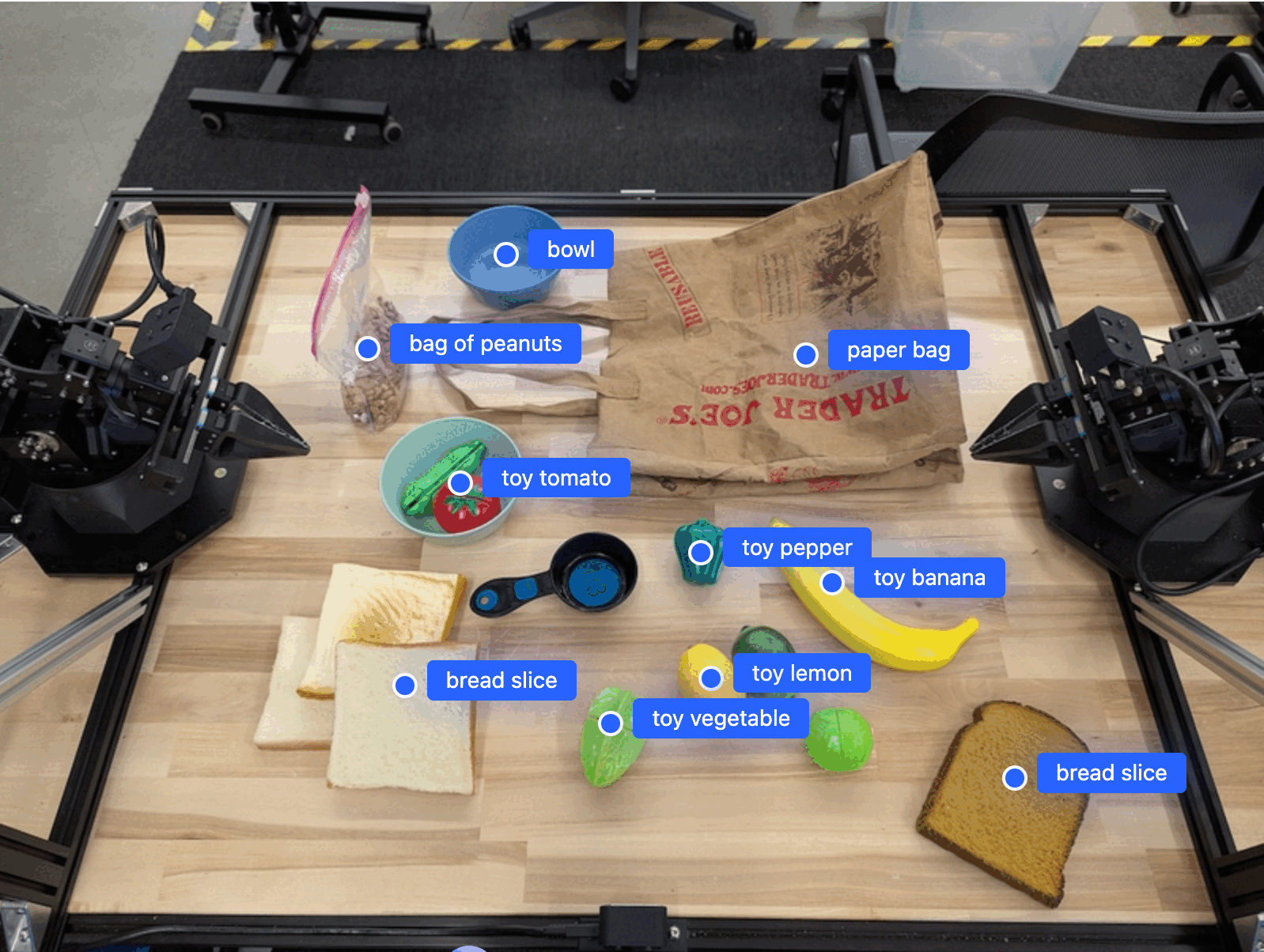
בדוגמה הבאה, הפונקציה מאתרת אובייקטים ספציפיים בתמונה ומחזירה את הקואורדינטות המנורמלות שלהם ב-[y, x]:
Python
from google import genai
from google.genai import types

PROMPT = """
          Point to no more than 10 items in the image. The label returned
          should be an identifying name for the object detected.
          The answer should follow the json format: [{"point": <point>,
          "label": <label1>}, ...]. The points are in [y, x] format
          normalized to 0-1000.
        """
client = genai.Client(
    enterprise=True,
    project="your-project-id",
    location="global",
)

# Load your image
with open("my-image.png", 'rb') as f:
    image_bytes = f.read()

image_response = client.models.generate_content(
    model="gemini-robotics-er-2-preview",
    contents=[
        types.Part.from_bytes(
            data=image_bytes,
            mime_type='image/png',
        ),
        PROMPT
    ],
    config = types.GenerateContentConfig(
        thinking_config=types.ThinkingConfig(
            thinking_level=types.ThinkingLevel.HIGH
        )
    )
)

print(image_response.text)
REST
# First, ensure you have the image file locally.
# Encode the image to base64
IMAGE_BASE64=$(base64 -w 0 my-image.png)

# Set your Google Cloud project and location.
export PROJECT_ID="your-project-id"
export LOCATION="global"
export MODEL="gemini-robotics-er-2-preview"

curl -X POST \
  "https://aiplatform.googleapis.com/v1/projects/${PROJECT_ID}/locations/${LOCATION}/publishers/google/models/${MODEL}:generateContent" \
  -H "Authorization: Bearer $(gcloud auth application-default print-access-token)" \
  -H "Content-Type: application/json" \
  -d '{
    "contents": [
      {
        "parts": [
          {
            "inlineData": {
              "mimeType": "image/png",
              "data": "'"${IMAGE_BASE64}"'"
            }
          },
          {
            "text": "Point to no more than 10 items in the image. The label returned should be an identifying name for the object detected. The answer should follow the json format: [{\"point\": [y, x], \"label\": <label1>}, ...]. The points are in [y, x] format normalized to 0-1000."
          }
        ]
      }
    ],
    "generationConfig": {
      "thinkingConfig": {
        "thinkingLevel": "HIGH"
      }
    }
  }'
הפלט יהיה מערך JSON שמכיל אובייקטים, כל אחד עם point (קואורדינטות [y, x] מנורמלות) ו-label שמזהה את האובייקט.
JSON
[
  {"point": [376, 508], "label": "small banana"},
  {"point": [287, 609], "label": "larger banana"},
  {"point": [223, 303], "label": "pink starfruit"},
  {"point": [435, 172], "label": "paper bag"},
  {"point": [270, 786], "label": "green plastic bowl"},
  {"point": [488, 775], "label": "metal measuring cup"},
  {"point": [673, 580], "label": "dark blue bowl"},
  {"point": [471, 353], "label": "light blue bowl"},
  {"point": [492, 497], "label": "bread"},
  {"point": [525, 429], "label": "lime"}
]
בתמונה הבאה מוצגת דוגמה לאופן שבו הנקודות האלה יכולות להופיע:
מעקב אחרי אובייקטים בסרטון
Gemini Robotics ER 2 יכול גם לנתח פריימים של סרטונים כדי לעקוב אחרי אובייקטים לאורך זמן.
Python
from google import genai
from google.genai import types

client = genai.Client(
    enterprise=True,
    project="your-project-id",
    location="global",
)

# Load your video
with open("my-video.mp4", 'rb') as f:
    video_bytes = f.read()

prompt = """
          Point to the red ball in every frame where it appears.
          The answer should follow the json format: [{"point": [y, x],
          "label": <label>}, ...]. The points are in [y, x] format
          normalized to 0-1000. Return one entry per frame that contains
          the object.
        """

image_response = client.models.generate_content(
  model="gemini-robotics-er-2-preview",
  contents=[
    types.Part.from_bytes(
      data=video_bytes,
      mime_type='video/mp4',
    ),
    prompt
  ],
  config = types.GenerateContentConfig(
      thinking_config=types.ThinkingConfig(
          thinking_level=types.ThinkingLevel.HIGH
      )
  )
)

print(image_response.text)
זיהוי אובייקטים ותיבות תוחמות (bounding box)
בנוסף לנקודות, אתם יכולים לבקש מהמודל להחזיר תיבות תוחמות דו-ממדיות, שמספקות יותר פרטים מרחביים על האובייקטים שזוהו.
Python
from google import genai
from google.genai import types

client = genai.Client(
    enterprise=True,
    project="your-project-id",
    location="global",
)

with open("my-image.png", 'rb') as f:
    image_bytes = f.read()

prompt = """
          Detect all objects in this image and return bounding boxes.
          The answer should follow the JSON format:
          [{"label": <label>, "y": <y_min>, "x": <x_min>,
            "y2": <y_max>, "x2": <x_max>}, ...]
          where coordinates are normalized to 0-1000.
        """

image_response = client.models.generate_content(
  model="gemini-robotics-er-2-preview",
  contents=[
    types.Part.from_bytes(
      data=image_bytes,
      mime_type='image/png',
    ),
    prompt
  ],
  config = types.GenerateContentConfig(
      thinking_config=types.ThinkingConfig(
          thinking_level=types.ThinkingLevel.LOW
      )
  )
)

print(image_response.text)
מסלולים
Gemini Robotics ER 2 יכול ליצור רצפים של נקודות שמגדירות מסלול, וזה שימושי להנחיית התנועה של הרובוט.
בדוגמה הזו, הבקשה היא למסלול להעברת עט אדום למארגן, כולל הערכה של נקודות הציון בדרך. הקוד צומצם כדי להציג רק את ההנחיה.
Python
prompt = """
          Generate a trajectory for the robotic arm to pick up the red pen
          and place it in the organizer. Return a list of waypoints as JSON:
          [{"step": <int>, "point": [y, x], "action": <description>}, ...]
          where coordinates are normalized to 0-1000.
        """
פנו מקום למחשב נייד
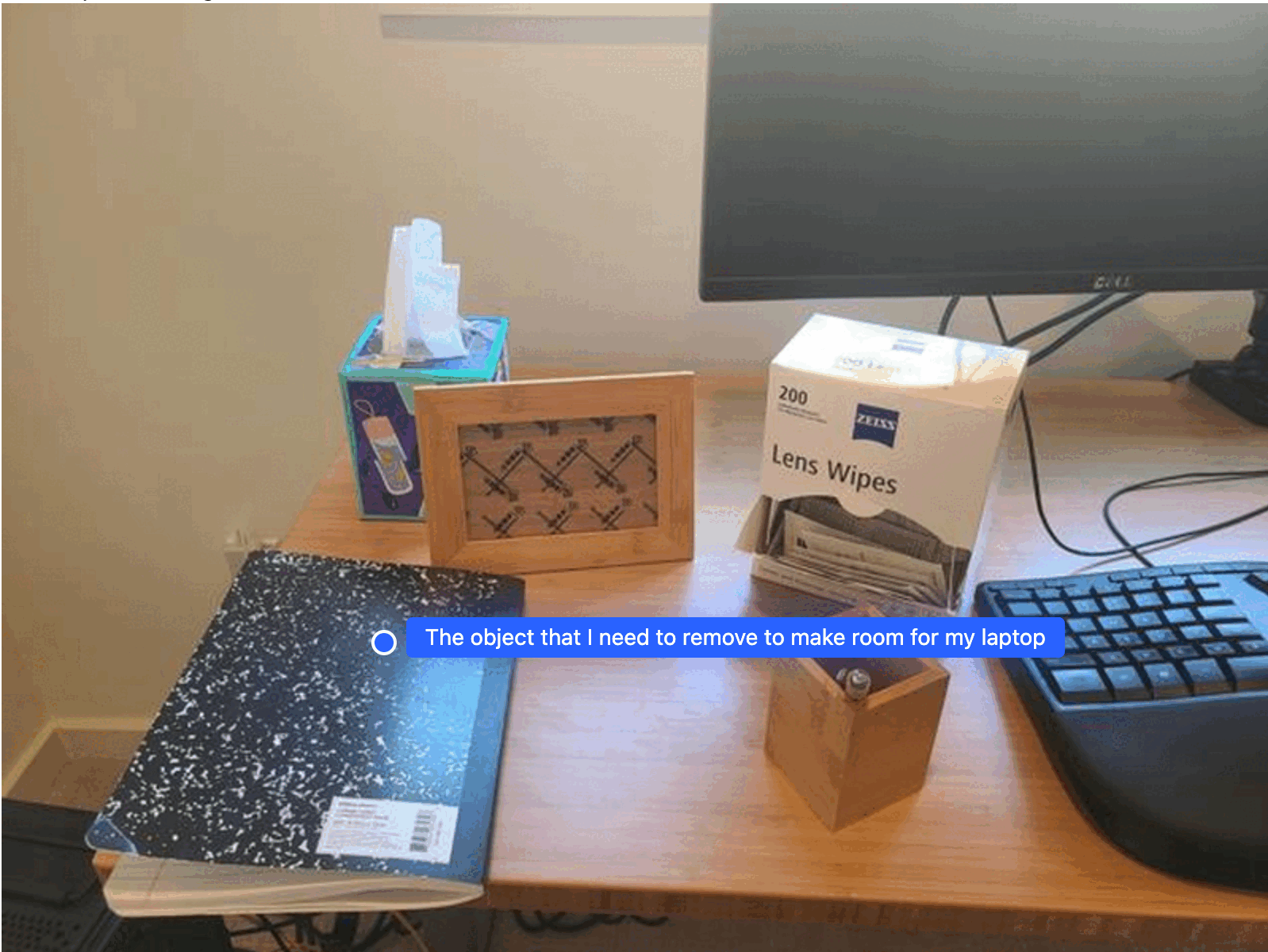
הדוגמה הזו מראה איך Gemini Robotics ER 2 יכול להסיק מסקנות לגבי מרחב. ההנחיה מבקשת מהמודל לזהות איזה אובייקט צריך להזיז כדי לפנות מקום לפריט אחר.
Python
from google import genai
from google.genai import types

client = genai.Client(
    enterprise=True,
    project="your-project-id",
    location="global",
)

# Load your image
with open('path/to/image-with-objects.jpg', 'rb') as f:
    image_bytes = f.read()

prompt = """
          Point to the object that I need to remove to make room for my laptop
          The answer should follow the JSON format: [{"point": <point>,
          "label": <label1>}, ...]. The points are in [y, x] format normalized to 0-1000.
        """

image_response = client.models.generate_content(
  model="gemini-robotics-er-2-preview",
  contents=[
    types.Part.from_bytes(
      data=image_bytes,
      mime_type='image/jpeg',
    ),
    prompt
  ],
  config = types.GenerateContentConfig(
      thinking_config=types.ThinkingConfig(
          thinking_level=types.ThinkingLevel.HIGH
      )
  )
)

print(image_response.text)
התשובה מכילה קואורדינטה דו-ממדית של האובייקט שעונה על השאלה של המשתמש, במקרה הזה, האובייקט שצריך להזיז כדי לפנות מקום למחשב הנייד.
[
  {"point": [672, 301], "label": "The object that I need to remove to make room for my laptop"}
]
לארוז ארוחת צהריים
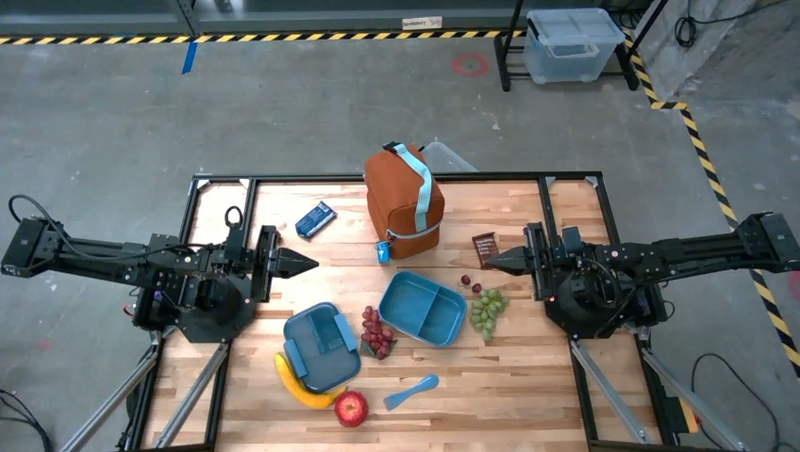
המודל יכול גם לספק הוראות למשימות עם כמה שלבים ולהצביע על אובייקטים רלוונטיים לכל שלב. בדוגמה הזו אפשר לראות איך המודל מתכנן סדרה של שלבים לאריזת תיק אוכל.
Python
from google import genai
from google.genai import types

client = genai.Client(
    enterprise=True,
    project="your-project-id",
    location="global",
)

# Load your image and set up your prompt
with open('path/to/image-of-lunch.jpg', 'rb') as f:
    image_bytes = f.read()

prompt = """
          Explain how to pack the lunch box and lunch bag. Point to each
          object that you refer to. Each point should be in the format:
          [{"point": [y, x], "label": }], where the coordinates are
          normalized between 0-1000.
        """

image_response = client.models.generate_content(
  model="gemini-robotics-er-2-preview",
  contents=[
    types.Part.from_bytes(
      data=image_bytes,
      mime_type='image/jpeg',
    ),
    prompt
  ],
  config = types.GenerateContentConfig(
      thinking_config=types.ThinkingConfig(
          thinking_level=types.ThinkingLevel.HIGH
      )
  )
)

print(image_response.text)
התשובה להנחיה הזו היא קבוצה של הוראות מפורטות לאריזת תיק אוכל לפי קלט התמונה.
תמונת קלט
הפלט מהמודל
Based on the image, here is a plan to pack the lunch box and lunch bag:

1.  **Pack the fruit into the lunch box.** Place the apple, banana, red grapes, and green grapes into the blue lunch box.
2.  **Add the spoon to the lunch box.** Put the blue spoon inside the lunch box as well.
3.  **Close the lunch box.** Secure the lid on the blue lunch box.
4.  **Place the lunch box inside the lunch bag.** Put the closed blue lunch box into the brown lunch bag.
5.  **Pack the remaining items into the lunch bag.** Place the blue snack bar and the brown snack bar into the brown lunch bag.

Here is the list of objects and their locations:
*   [{"point": [899, 440], "label": "apple"}]
*   [{"point": [814, 363], "label": "banana"}]
*   [{"point": [727, 470], "label": "red grapes"}]
*   [{"point": [675, 608], "label": "green grapes"}]
*   [{"point": [706, 529], "label": "blue lunch box"}]
*   [{"point": [864, 517], "label": "blue spoon"}]
*   [{"point": [499, 401], "label": "blue snack bar"}]
*   [{"point": [614, 705], "label": "brown snack bar"}]
*   [{"point": [448, 501], "label": "brown lunch bag"}]
המאמרים הבאים
מידע נוסף על Gemini Robotics ER 2 זמין במקורות המידע הבאים:
- יכולות אג'נטיות: הרצת קוד, קריאת מכשירים והוספת הערות לתמונות.
- תזמור משימות: משימות ארוכות טווח עם ממשקי API מותאמים אישית לרובוטים.
- הבנת סרטונים: איתור רגעים וסיווג התקדמות.
- סקירה כללית על Gemini Robotics ER 2: יכולות והתחלה מהירה.
- מידע על המודל Gemini Robotics ER 2: מפרט טכני, מגבלות טוקנים ויכולות נתמכות.