

AlphaFold 3 is a deep learning model developed by Google DeepMind and Isomorphic Labs. It is designed to predict the 3D structures and interactions of proteins, DNA, RNA, ligands and ions. This document describes how to deploy and use the AlphaFold 3 model using Model Garden on Gemini Enterprise Agent Platform.
Key capabilities
Deploying AlphaFold 3 on Agent Platform provides the following capabilities needed for advanced research and development (R&D) and commercial drug discovery workflows:
Commercial use: AlphaFold 3 on Model Garden is available for commercial use.
Arbitrary custom ligands: AlphaFold 3 supports the unified co-folding of proteins, DNA, and RNA alongside custom ligands defined using SMILES strings or CIF Chemical Component Dictionary (CCD) codes.
Workflow flexibility: AlphaFold 3 on Model Garden supports complete end-to-end folding pipeline (combining database search and model prediction) or an inference-only mode where you can provide pre-computed MSA alignments to optimize execution time and GPU utilization.
Considerations
When evaluating AlphaFold 3 for workloads, keep the following constraints in mind:
Concurrency: The AlphaFold 3 endpoint has a concurrency limit of one per node. For higher concurrency, endpoints can be scaled to multiple nodes. If a prediction request is sent while another prediction is actively running, the endpoint rejects the new request with an
HTTP 429 Too Many
Requests
error if the number of requests are more than the number of nodes.Token limits: The maximum prediction duration on Agent Platform endpoints is 60 minutes. Due to variable MSA search overhead, the maximum sequence size supported on A3 GPUs is approximately 4,500 biological tokens (such as amino acids, nucleotides, or ligand atoms) overhead. Supplying pre-computed alignments bypasses the MSA search execution, which enables complex folding up to the hardware limit of approximately 5,400 tokens.
Payload limits: Standard prediction REST requests have an 8 MB size limit. If you use inference-only mode, large pre-computed alignments (
.a3mfiles) must be referenced using Cloud Storage URIs rather than embedded as inline strings to avoid payload rejection.Network configuration: Because predictions are long-running operations that can take up to 60 minutes to complete, you should only deploy the endpoint with Private Service Connect (PSC) to bypass standard endpoint timeout limits of 10 minutes.
Deployment instructions
This section details deploying AlphaFold 3 to an endpoint provided by Agent Platform in a Google Cloud project.
Before you begin
Before deploying AlphaFold 3, you must:
- Request model access.
- Procure GPU resources.
- Configure the required Identity and Access Management (IAM) permissions:
- Create a service account with the Agent Platform Administrator IAM. role.
- Ensure that your IAM principal has the
roles/iam.serviceAccountCreatorrole to act as the service account while deploying the model.
- Verify your resource quotas.
Resource requirements
AlphaFold 3 requires an a3-highgpu-1g virtual machine (VM).
Before deployment, ensure that your Google Cloud project has sufficient quota in the target deployment region for the following resources:
Accelerators: At least one
a3-highgpu-1gmachine type.Local SSD: The A3 VM is provisioned with 750 GB of Local SSD space. This is required to persistently cache the reference sequence databases (UniProt, MGnify, Rfam), enabling low-latency reads during genetic database searches (Jackhmmer/Nhmmer) across all prediction requests.
Cloud Storage bucket
AlphaFold 3 requires a Cloud Storage bucket to store any supplied MSA files, and to export full prediction outputs. To avoid cross-region transfers, we recommend that you use a either a Cloud Storage bucket in the same region as your endpoint, or use a multi-region bucket.
Identity and Access Management roles
Configure the following roles across the participating identities:
Model deployer (also known as IT admin): The identity deploying the model requires the
roles/aiplatform.adminpermission to create endpoints and manage deployments.Serving identity: When running inference, the AlphaFold 3 endpoints write output structures directly to Cloud Storage using the tenant project service account. The corresponding service account requires the
roles/storage.objectUseron the target Cloud Storage bucket.Model users: The accounts that start predictions require the following:
roles/aiplatform.userto send prediction requests to the endpoint.roles/storage.objectUserto access prediction outputs in the Cloud Storage bucket.
Deploy AlphaFold 3
Deploy AlphaFold 3 programmatically using the Agent Platform SDK either as a Google Cloud Dedicated endpoint or as a Private Service Connect endpoint only. It can take 10-15 minutes for the endpoint to be ready for inferencing depending on your GPU availability.
The following is a sample Python snippet that shows how to deploy the model in a Google Cloud project, including an extension of the inference timeout:
import google.auth
from google.auth.transport.requests import AuthorizedSession
import vertexai
from vertexai import model_garden

PROJECT_ID = "YOUR_PROJECT_ID"
LOCATION = "us-west1"
MODEL_ID = "google/alphafold3@v3_0_4"
MACHINE_TYPE = "a3-highgpu-1g"

vertexai.init(project=PROJECT_ID, location=LOCATION)

# 1. Deploy Model Garden OpenModel to Dedicated Endpoint
af3_model = model_garden.OpenModel(MODEL_ID)
endpoint = af3_model.deploy(
    endpoint_display_name="af3-dedicated-ep",
    model_display_name="af3-on-mg",
    machine_type=MACHINE_TYPE,
    accelerator_type="NVIDIA_H100_80GB",
    accelerator_count=1,
    reservation_affinity_type="ANY_RESERVATION",
    use_dedicated_endpoint=True,
    accept_eula=True,
    min_replica_count=1,
    max_replica_count=1,
    serving_container_deployment_timeout=3600,
)

# 2. Update inference timeout to 3,600 seconds
credentials, _ = google.auth.default(
    scopes=["https://www.googleapis.com/auth/cloud-platform"]
)
session = AuthorizedSession(credentials)
url = f"https://{LOCATION}-aiplatform.googleapis.com/v1/{endpoint.resource_name}:update"
payload = {
    "endpoint": {
        "name": endpoint.resource_name,
        "clientConnectionConfig": {
            "inferenceTimeout": {
                "seconds": 3600
            }
        }
    }
}
response = session.post(url, json=payload)
response.raise_for_status()
print(f"Endpoint Resource Name: {endpoint.resource_name}")
API reference
This section describes the endpoint location, URL format, path parameters, and the request payload schema.
HTTP Request
POST https://HOST/v1/projects/PROJECT_ID/locations/LOCATION/endpoints/ENDPOINT_ID:predict
Replace the following:
HOST: the service endpoint host. This depends on whether the deployment type is a dedicated public endpoint or uses Private Service Connect.PROJECT_ID: the Google Cloud project ID hosting the deployed endpoint.LOCATION: the Google Cloud region where the endpoint is deployed (such asus-central1).ENDPOINT_ID: the unique identifier of the deployed Agent Platform endpoint.
Request body
The request body contains data with the following JSON structure:
{
  "instances": [
    {
      # The AlphaFold 3 input JSON - see the input documentation at
      # https://github.com/google-deepmind/alphafold3/blob/main/docs/input.md
    }
  ],
  "parameters": {
    "output_dir": "string",
    "dry_run": boolean,
    "run_data_pipeline": boolean,
    "force_output_dir": boolean,
    "resolve_msa_overlaps": boolean,
    "max_template_date": "string",
    "conformer_max_iterations": integer,
    "fix_standalone_glycans": boolean,
    "flash_attention_implementation": "string",
    "num_recycles": integer,
    "num_diffusion_samples": integer,
    "save_embeddings": boolean,
    "save_distogram": boolean,
    "compress_large_output_files": boolean,
    "num_seeds": integer
  }
}
Top-level request fields
| Field | Type | Description |
|---|---|---|
instances |
array |
Required. The list of biological sequence configurations to
predict. This list must contain exactly one element. Passing zero
or more than one element results in an HTTP 422 Unprocessable
Entity error. The instances body should specify
inputs as per the specification published in the
AlphaFold 3 documentation.
|
parameters |
object |
Optional. An object containing execution parameters to configure the
prediction run (such as dry_run, output_dir).
|
Parameters
Configure execution flags for the AlphaFold 3 run.
| Field | Type | Default value | Description |
|---|---|---|---|
dry_run |
boolean |
false |
Optional. If true, the API executes request
validation but bypasses model execution and returns an empty response
immediately. Useful for connectivity and syntax checks.
|
run_data_pipeline |
boolean |
true |
Optional. If true, runs the full pipeline (MSA
search and inference). If false, runs inference-only (skips
database search; requires pre-computed MSAs). See the
documentation on GitHub for additional details.
|
output_dir |
string |
null |
Optional. The Cloud Storage URI (such as gs://bucket/path) where
the full raw output files (including CIF structures, PAE, and ranking
CSVs) are uploaded upon successful execution.
|
force_output_dir |
boolean |
false |
Optional. If true, allows overwriting existing files
in the specified output_dir. If false, the API
returns an HTTP 400 Bad Request error immediately if the
Cloud Storage path is not empty to prevent accidental data
loss.
|
resolve_msa_overlaps |
boolean |
true |
Optional. Whether to deduplicate unpaired MSAs against paired MSAs. See the guidelines on the GitHub AlphaFold 3 documentation for best practices. |
max_template_date |
string |
null |
Optional. Maximum template release date to consider in
YYYY-MM-DD format (such as, "2024-05-15").
Fails validation with an HTTP 422 error if formatting is
incorrect.
|
conformer_max_iterations |
integer |
null |
Optional. Override for the maximum number of iterations to run
for the RDKit conformer search. Must be a non-negative integer (greater
than or equal to zero). Fails validation with an HTTP 422
error for negative values.
|
fix_standalone_glycans |
boolean |
false |
Optional. Enables standalone glycan position fixing. |
flash_attention_implementation |
string |
null |
Optional. Flash attention backend implementation to use. Allowed
values are "triton", "cudnn",
"xla".
|
num_recycles |
integer |
10 |
Optional. Number of recycling iterations to use during inference. Must be a positive integer (greater than zero). See the best practices section to learn about the tradeoffs. |
num_diffusion_samples |
integer |
5 |
Optional. Number of diffusion samples to generate. Must be a positive integer (greater than zero). See the best practices section to learn about the tradeoffs. |
save_embeddings |
boolean |
false |
Optional. Whether to save the final trunk single and pair
embeddings in the output_dir location. If
true, embeddings are written as .npz files
under a subfolder named seed-{SEED}_embeddings/ (for
example, outputs_config_job_seed-50_embeddings.npz).
|
save_distogram |
boolean |
false |
Optional. Whether to save the final predicted distogram in the
output_dir location. If true, embeddings are
written as .npz files under a subfolder named
seed-{SEED}_embeddings/ (for example,
outputs_config_job_seed-50_embeddings.npz).
|
compress_large_output_files |
boolean |
false |
Optional. If true, compresses the large output files
(mmCIF structures and confidences JSON) using zstandard. This outputs
files with .cif.zst and .json.zst extensions
instead of .cif and .json. Small files (like
ranking_scores.csv) remain uncompressed.
|
num_seeds |
integer |
null |
Optional. Number of random seeds to use for inference. In
general, you should set seeds inside the instances.modelSeeds
field for reproducibility. See the
best practices section to learn about the
tradeoffs.
|
Response (output)
This section describes the fields returned in the API response upon successful execution.
Response body
Upon successful execution, the endpoint returns the response in standard Agent Platform online prediction schema format:
{
  "deployedModelId": "string",
  "model": "string",
  "modelDisplayName": "string",
  "modelVersionId": "string",
  "predictions": [
    {
      "structure_cif": "string",
      "plddt": [
        number
      ],
      "pae": [
        [
          number
        ]
      ],
      "summary": {
        "ptm": number,
        "iptm": number,
        "fraction_disordered": number,
        "has_clash": boolean,
        "ranking_score": number,
        "chain_pair_pae_min": [
          [
            number
          ]
        ],
        "chain_pair_iptm": [
          [
            number
          ]
        ],
        "chain_ptm": [
          number
        ],
        "chain_iptm": [
          number
        ],
        "chain_ids": [
          string
        ]
      },
      "output_dir": "string"
    }
  ]
}
Top-level response fields
| Field | Type | Description |
|---|---|---|
deployedModelId |
string |
The ID of the deployed model on the Agent Platform endpoint. |
model |
string |
The fully qualified resource name of the model. |
modelDisplayName |
string |
The display name of the deployed model (always
"alphafold3").
|
modelVersionId |
string |
The version ID of the deployed model. |
predictions |
array |
The list of prediction results. For AlphaFold 3, this array contains exactly one prediction result object. |
Prediction result details (predictions[])
The AlphaFold 3 prediction endpoint returns an HTTP 200 JSON response
containing a predictions array with structural coordinates and confidence
metrics for the top-ranked candidate. For comprehensive field definitions and
output file specifications, refer to the official AlphaFold 3
documentation on
GitHub.
Depending on whether parameters.output_dir is provided in the request, the
output structure in API response can vary:
Prediction in HTTP response: The inline response returns global summary metrics (
summary), 3D structure coordinates (structure_cif), per-atom confidence scores (plddt), and the 2D Predicted Aligned Error matrix (pae) directly within the HTTP JSON response payload body. When an output directory is specified, large payload fields (structure_cif,plddt, andpae) are omitted (null) from the HTTP response payload to prevent serialization bottlenecks. Instead, all raw model outputs are exported asynchronously to the specified Cloud Storage bucket.Saved artifact in Cloud Storage bucket: When an output directory (
parameters.output_dir) is specified, the comprehensive prediction results are uploaded to Cloud Storage. The output folder contains data as per the specification published in the AlphaFold 3 documentation on GitHub.
Make predictions
Model Garden deployment simplifies executing end to end prediction pipeline, including data pipeline and model inference in a single API call. The following diagram shows the high level architecture of AlphaFold 3 predictions:
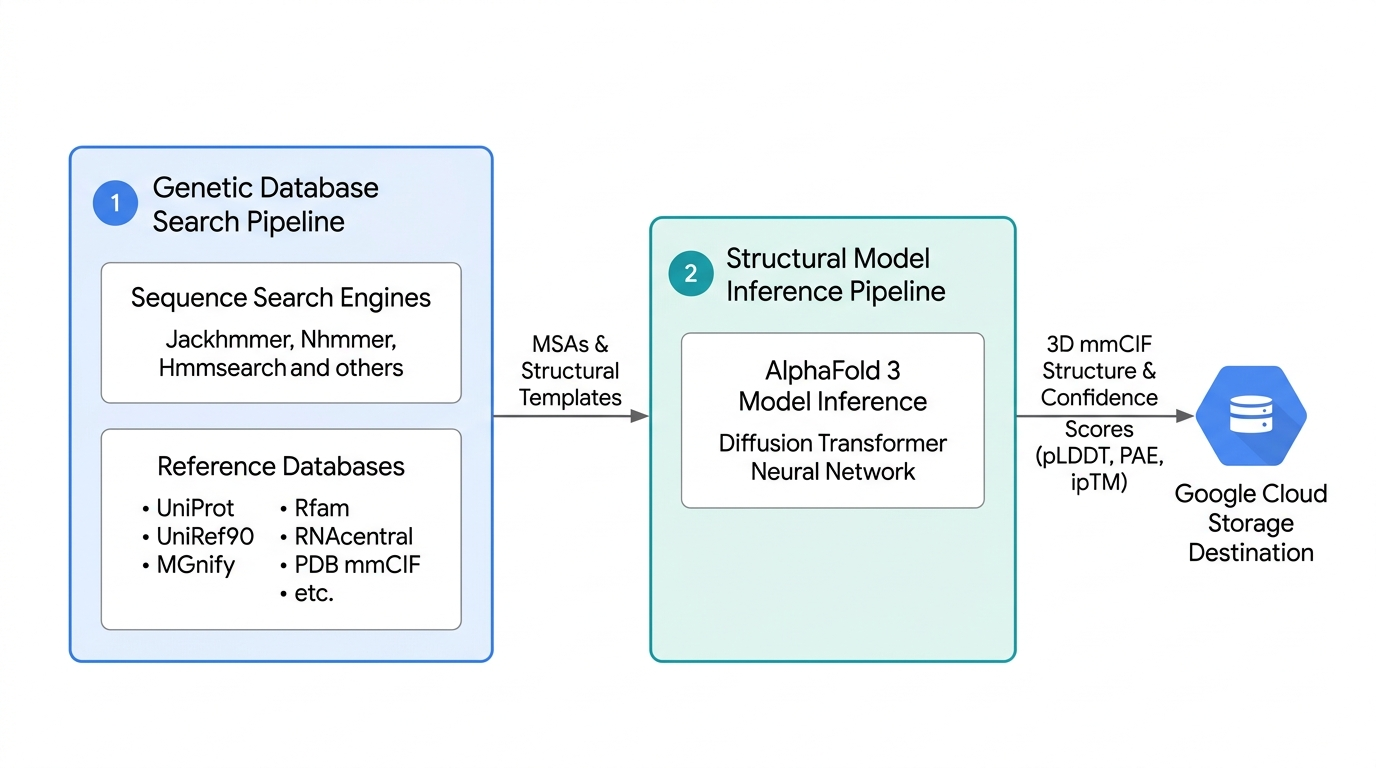
When executing predictions, it is highly recommended to provide a Cloud Storage bucket directly in parameters to export the full raw dataset, including per-sample subdirectories, ranking manifests, and raw outputs. For a full breakdown of all configurable request fields including parameter tuning for multi-seed sampling, neural recycling, diffusion trajectories, and custom covalent bonds, see the API reference section.
Before launching long-running folding jobs or batch pipelines, you can execute a dry run to verify your authentication, IAM permissions, and endpoint network connectivity quickly.
Prediction options
Depending on the workflow, AlphaFold 3 processing can be organized into four distinct execution modes:
- Dry run mode
- End-to-end prediction mode
- Inference-only with pre-computed MSAs and templates
- Running MSA- and template-free
Dry run mode
To verify API connectivity, authentication, networking, and JSON schemas without
starting the prediction pipeline, you can submit a request with "dry_run":
true in the parameters object. The endpoint executes all validation
routines (including checking Cloud Storage bucket write permissions and
validating sequence characters) but skips the execution, immediately
returning an empty prediction response.
The following is an example Python script for dry run mode:
from google.cloud import aiplatform

PROJECT_ID = "YOUR_PROJECT_ID"
LOCATION = "us-west1"
ENDPOINT_ID = "YOUR_ENDPOINT_ID"

# Initialize AI Platform SDK
aiplatform.init(project=PROJECT_ID, location=LOCATION)

# Connect to Dedicated Endpoint
endpoint = aiplatform.Endpoint(ENDPOINT_ID)

# Define prediction payload
instances = [
    {
        "name": "preflight_check",
        "dialect": "alphafold3",
        "version": 4,
        "modelSeeds": [1],
        "sequences": [
            {
                "protein": {
                    "id": "A",
                    "sequence": "PVLSCGEWQL",
                }
            }
        ],
    }
]

parameters = {
    "dry_run": True,
}

# Execute prediction request
response = endpoint.predict(
    instances=instances,
    parameters=parameters
)
print(response.predictions)
End-to-end prediction mode
To run end-to-end prediction, submit raw biological sequences (proteins, DNA, RNA, ligands, and PTMs) in a single request. The endpoint automatically executes genetic database search followed immediately by model inference. This is recommended for folding jobs without pre-existing alignments.
The following is an example Python script for end-to-end prediction mode:
from google.cloud import aiplatform

# Configuration
PROJECT_ID = "YOUR_PROJECT_ID"
LOCATION = "us-west1"
ENDPOINT_ID = "YOUR_ENDPOINT_ID"
STORAGE_OUTPUT_DIR = "gs://YOUR_BUCKET_NAME/alphafold_output/"

# Initialize AI Platform SDK
aiplatform.init(project=PROJECT_ID, location=LOCATION)

# Instantiate Endpoint reference
endpoint = aiplatform.Endpoint(ENDPOINT_ID)

# Define Prediction Payload
instances = [
    {
        "name": "e2e_protein_ligand_complex",
        "dialect": "alphafold3",
        "version": 4,
        "modelSeeds": [1],
        "sequences": [
            {
                "protein": {
                    "id": "A",
                    "sequence": "PVLSCGEWQL",
                    "modifications": [
                        {"ptmType": "HY3", "ptmPosition": 1}
                    ],
                }
            },
            {
                "ligand": {
                    "id": "B",
                    "ccdCodes": ["MG"],
                }
            },
        ],
    }
]

parameters = {
    "output_dir": STORAGE_OUTPUT_DIR,
}

# Execute Prediction
response = endpoint.predict(
    instances=instances,
    parameters=parameters
)

print(response.predictions)
Inference-only with pre-computed MSAs and templates
You may already have pre-computed MSAs and mmCIF templates either from a previous execution or generated outside the model endpoint. In those scenarios, the genetic database search can be bypassed entirely by supplying the alignments and templates, routing the request directly for structure prediction. This can also significantly reduce inference response time. This is recommended path in the following scenarios:
- When docking multiple different small-molecule ligands against a single static protein target, the MSAs can be reused.
- Running the same molecule sequence across multiple random seeds, iteratively, to map structural flexibility.
- Aligning sequences offline against private, non-public genomic databases.
- Optimizing GPU resources for AlphaFold 3, to focus only on structure generation.
The following is an example Python script for inference-only mode:
from google.cloud import aiplatform

# Configuration
PROJECT_ID = "YOUR_PROJECT_ID"
LOCATION = "us-west1"
ENDPOINT_ID = "YOUR_ENDPOINT_ID"
STORAGE_OUTPUT_DIR = "gs://YOUR_BUCKET_NAME/af3_results/inference_only"

# Initialize AI Platform SDK
aiplatform.init(project=PROJECT_ID, location=LOCATION)

# Instantiate Endpoint reference
endpoint = aiplatform.Endpoint(ENDPOINT_ID)

# Define Prediction Payload
instances = [
    {
        "name": "inference_protein_ligand_complex",
        "dialect": "alphafold3",
        "version": 4,
        "modelSeeds": [1],
        "sequences": [
            {
                "protein": {
                    "id": "A",
                    "sequence": "PVLSCGEWQL",
                    "modifications": [
                        {"ptmType": "HY3", "ptmPosition": 1}
                    ],
                    "unpairedMsaPath": "gs://YOUR_BUCKET_NAME/path/to/unpaired.a3m",
                    "pairedMsa": "",
                    "templates": [],
                }
            },
            {
                "ligand": {
                    "id": "B",
                    "ccdCodes": ["MG"],
                }
            },
        ],
    }
]

parameters = {
    "run_data_pipeline": False,
    "output_dir": STORAGE_OUTPUT_DIR,
    "force_output_dir": True,
}

# Execute Prediction
response = endpoint.predict(
    instances=instances,
    parameters=parameters
)

print(response.predictions)
Running MSA- and template-free
There is also the option where genetic database search and template matching can
be bypassed entirely. The model predicts the 3D structure using only the query
sequence, without homologous sequences or co-evolutionary information. To
trigger this mode, supply empty strings for the MSA parameters unpairedMsa and
pairedMsa and an empty list for templates in the instance, and set
run_data_pipeline to false in the parameters. This can be useful for
synthetic or engineered molecule design or testing structural predictions in the
absence of evolutionary context.
The following is an example Python script for running AlphaFold 3 MSA- and template-free:
from google.cloud import aiplatform

# Configuration
PROJECT_ID = "YOUR_PROJECT_ID"
LOCATION = "us-west1"
ENDPOINT_ID = "YOUR_ENDPOINT_ID"
STORAGE_OUTPUT_DIR = "gs://YOUR_BUCKET_NAME/af3_results/inference_only_gcs_job"

# Initialize AI Platform SDK
aiplatform.init(project=PROJECT_ID, location=LOCATION)

# Instantiate Endpoint reference
endpoint = aiplatform.Endpoint(ENDPOINT_ID)

# Define Prediction Payload
instances = [
    {
        "name": "inference_only_gcs_job",
        "dialect": "alphafold3",
        "version": 4,
        "modelSeeds": [1, 2, 3],
        "sequences": [
            {
                "protein": {
                    "id": "A",
                    "sequence": "PVLSCGEWQL",
                    "unpairedMsa": "",
                    "pairedMsa": "",
                    "templates": [],
                }
            }
        ],
    }
]

parameters = {
    "output_dir": STORAGE_OUTPUT_DIR,
    "run_data_pipeline": False,
}

# Execute Prediction
response = endpoint.predict(
    instances=instances,
    parameters=parameters,
    timeout=3600.0,
)

print(response.predictions)
For detailed specifications, entity parameters, and output confidence metrics, see the AlphaFold 3 documentation on GitHub.
Prediction outputs
The AlphaFold 3 prediction service provides two complementary delivery mechanisms for retrieving prediction outputs. By default, the API response returns prediction results inline synchronously, for the top-ranked candidate. Optionally, you can specify a Cloud Storage directory.
This following section provides an overview of the prediction output. For additional details, see the AlphaFold 3 documentation on GitHub for additional details.
Inline response versus saved artifacts
The AlphaFold 3 predictions service supports two primary output patterns:
- Inline response: Returns the 3D structure coordinates and confidence metrics for only the top-ranked candidate directly within the HTTP REST response payload. This is ideal for quick interactive prototyping or single-sequence queries.
- Saved Artifacts (Cloud Storage): Specifying an output directory exports the complete multi-sample dataset to Cloud Storage. This includes individual coordinate files, confidence JSONs, distograms, embeddings, and summary metrics for every generated random seed and diffusion sample. Using Cloud Storage is recommended for production workloads, mapping conformational ensembles, and bypassing the request payload size limit.
The following is a Python example of how to retrieve saved artifacts from Cloud Storage for downstream analysis:
from google.cloud import storage

BUCKET_NAME = "your-bucket-name"
JOB_NAME = "my_alphafold_job"
STORAGE_PREFIX = f"af3_results/my_folder/{JOB_NAME}"

# Initialize Cloud Storage client
client = storage.Client(project="your-project-id")
bucket = client.bucket(BUCKET_NAME)

# Download the top-ranked 3D structure and global ranking ledger
bucket.blob(f"{STORAGE_PREFIX}/{JOB_NAME}_model.cif").download_to_filename("model.cif")
bucket.blob(f"{STORAGE_PREFIX}/{JOB_NAME}_ranking_scores.csv").download_to_filename("ranking_scores.csv")
bucket.blob(f"{STORAGE_PREFIX}/{JOB_NAME}_summary_confidences.json").download_to_filename("summary.json")
Because AlphaFold 3 utilizes a generative diffusion model, each prediction run generates an ensemble of candidate 3D structures across seeds and sampling trajectories. Evaluating and comparing these candidate runs can help in interpreting prediction outputs before performing detailed structural analysis.
You can investigate the complete multi-sample artifact dataset using three core files:
ranking_scores.csv: The main ledger listing every generated trajectory pair and its compositeranking_score. Rows are saved in trajectory execution order (sorted by seed ascending, then sample index ascending), not pre-sorted by score. Users should sort byranking_scoredescending to identify candidate ranks.summary_confidences.json: Contains global quality metrics (pTM,ipTM,has_clash,fraction_disordered) for the top candidate.Per-Sample
summary_confidences.json: Located inside individualseed-{SEED}_sample-{INDEX}/folders, allowing you to inspect chain-level pTM and ipTM matrices for specific non-top candidate runs if needed.
The following Python example parses ranking_scores.csv and
summary_confidences.json to rank candidate samples and validate top candidate
quality:
import csv
import json

print("=== Candidate Samples Ledger (ranking_scores.csv) ===")
with open("ranking_scores.csv", "r", newline="", encoding="utf-8") as f:
    rows = sorted(
        csv.DictReader(f), key=lambda x: float(x["ranking_score"]), reverse=True
    )

# Calculate column widths cleanly and readably
headers = list(rows[0].keys())
widths = {}
for col in headers:
    lengths = [len(col)] + [len(r[col]) for r in rows]
    widths[col] = max(lengths)

print("  ".join(col.rjust(widths[col]) for col in headers))
for r in rows:
    print("  ".join(r[col].rjust(widths[col]) for col in headers))

top = rows[0]
print(
    f"\nPromoted Top Candidate: Seed {int(top['seed'])}, Sample"
    f" {int(top['sample'])} (Score: {float(top['ranking_score']):.4f})"
)

print("\n=== Top Candidate Quality Validation (summary.json) ===")
with open("summary.json", "r", encoding="utf-8") as f:
    summary = json.load(f)

clash_str = (
    "DETECTED (FAIL)" if summary.get("has_clash") else "None Detected (PASS)"
)
print("Top Candidate Metrics:")
print(f"  • Ranking Score : {summary.get('ranking_score', 'N/A')}")
print(f"  • Global pTM    : {summary.get('ptm', 'N/A')}")
print(f"  • Interface ipTM: {summary.get('iptm', 'N/A')}")
print(f"  • Steric Clash  : {clash_str}")
For exhaustive schema specifications of the saved files and mmCIF attributes, see the AlphaFold 3 documentation on GitHub. Also, see the How to assess the quality of AlphaFold 3 predictions guide on EMBL-EBI to understand how to assess the quality of the predictions.
Best practices
The following sections describe best practices while using AlphaFold 3 on Agent Platform:
Mitigate request timeouts
Endpoints on Agent Platform enforce a default maximum execution timeout of 60 minutes per request. To ensure your predictions complete successfully without timing out, adhere to the following guidelines:
- Avoid over-sampling in a single request: Initializing a wide sweep of seeds or excessively high reverse-diffusion parameters in a single API call can cause the execution time to exceed the 60 minute limit.
- Deconstruct large sweeps: For large-scale studies, split your seeds and parameter sweeps into multiple smaller prediction payloads and submit them as separate jobs. This also takes advantage of your endpoint's autoscaling capacities.
Bypass MSA search
The genetic database search pipeline is the most time-consuming phase of the AlphaFold pipeline. When running iterative predictions on the same sequence (such as, executing ligand screening sweeps on a fixed protein target), you can dramatically optimize the execution times by bypassing the database search completely:
- Extract the MSA: Run an initial end-to-end prediction with a
Cloud Storage output directory (
output_dir) specified. Download the generated{JOB_NAME}_data.jsonfile from the output Cloud Storage bucket. - Submit inference-only predictions: Locate the
unpairedMsaandpairedMsafields inside the JSON file. Extract these MSA strings and pass them into subsequent prediction requests usingunpairedMsaPathandpairedMsaPathpointing to Cloud Storage URIs.
Alternatively, you can execute MSA search on your own infrastructure and input the pre-computed MSA templates in the prediction request.
Handle low-confidence runs
When prediction outputs yield low confidence metrics, rather than treating it as irrecoverable prediction failures, you can attempt a targeted remediation. Optimizing specific parameters lets you probe alternative latent trajectories. This section lists some approaches to recover in case of low-confidence predictions.
Use multi-seed sampling
AlphaFold 3 initializes 3D coordinate generation from random noise in latent space. When a prediction is submitted with a single certain seed, the diffusion trajectory might follow a different path compared to another seed. Passing an array of seeds forces the model to sample trajectories starting from different states.
Multi-seed sampling provides two critical advantages: it verifies structural consistency across independent runs and probes functional conformational dynamics. If, for example, all five seeds converge to identical 3D coordinates, then you can have high confidence in the global fold. Conversely, if different seeds produce distinct, high-confidence binding poses, the ensemble may be revealing biologically meaningful conformational states, such as open versus closed active-site loops or alternative domain-swapped dimers.
Expand diffusion trajectories
While modelSeeds alters the starting noise state in latent space, the
num_diffusion_samples parameter (default 5) controls how many candidate 3D
structures are generated per seed during the reverse diffusion process. For
flexible loop regions or shallow binding pockets, increasing sampling expands
the candidate pool for each seed. This is particularly effective when local
confidence scores dip in specific loops (pLDDT < 70) while the overall domain
fold remains confident (pTM > 0.80). This may help uncover high-confidence
candidate structures that would have been missed in the initial run.
Increase recycling iterations
Before the diffusion module generates 3D coordinates, AlphaFold 3
processes sequence and pairwise features. The num_recycles parameter dictates
how many times intermediate structure representations and pairwise spatial
embeddings are fed iteratively back through the network.
For large complex molecules, or targets with weak co-evolutionary signals,
increasing num_recycles gives the trunk network additional iterations to
resolve spatial relationships between distant chains before passing inputs to
the diffusion module. This approach can be attempted when off-diagonal PAE
matrices show high inter-chain uncertainty (> 15 Å) despite individual chains
showing high local fold confidence (pLDDT > 70). Note that increasing recycles
linearly increases prediction runtime, so it should be reserved for difficult
interface targets.
Use a custom alignment pipeline
AlphaFold 3 automatically executes the genetic database search pipeline
to generate MSA templates. Users can also supply private, pre-computed, custom
alignments in .a3m format using Cloud Storage URIs using unpairedMsaPath and
pairedMsaPath. Supplying deep MSAs provides strong co-evolutionary
constraints, frequently converting low-confidence predictions into
high-confidence models.