


Gemini Robotics ER 2 יכול לכתוב ולהריץ קוד Python כדי לערוך תמונות ולהפעיל לוגיקה לפני שהוא עונה. בדף הזה מופיעות דוגמאות להרצת קוד: זיהוי אובייקטים עם זום וחיתוך, קריאת מכשירים, מדידת נוזלים, קריאת לוחות מעגלים והוספת הערות לתמונות.
במדריך לרובוטיקה יש קוד מלא שאפשר להריץ.
רמת ההעמקה
אתם יכולים לשלוט ברמת החשיבה כדי להחליף בין זמן אחזור לדיוק. משימות מרחביות כמו זיהוי אובייקטים פועלות היטב ברמת חשיבה נמוכה. למשימות מורכבות כמו ספירה או הערכת משקל, כדאי להשתמש בערך גבוה יותר.
בדוגמה הבאה, רמת החשיבה מוגדרת כגבוהה בשביל משימת ספירה מורכבת:
Python
from google import genai
from google.genai import types

client = genai.Client(
    enterprise=True,
    project="your-project-id",
    location="global",
)

# Load your image
with open('scene.jpeg', 'rb') as f:
    image_bytes = f.read()

response = client.models.generate_content(
    model="gemini-robotics-er-2-preview",
    contents=[
        types.Part.from_bytes(
            data=image_bytes,
            mime_type='image/jpeg',
        ),
        "Identify and count all objects on the table."
    ],
    config = types.GenerateContentConfig(
        thinking_config=types.ThinkingConfig(
            # Use MINIMAL or LOW for faster spatial tasks.
            thinking_level=types.ThinkingLevel.HIGH
        ),
    )
)

print(response.text)
פרטים נוספים מופיעים בקטע חשיבה.
זיהוי אובייקטים (זום וחיתוך)
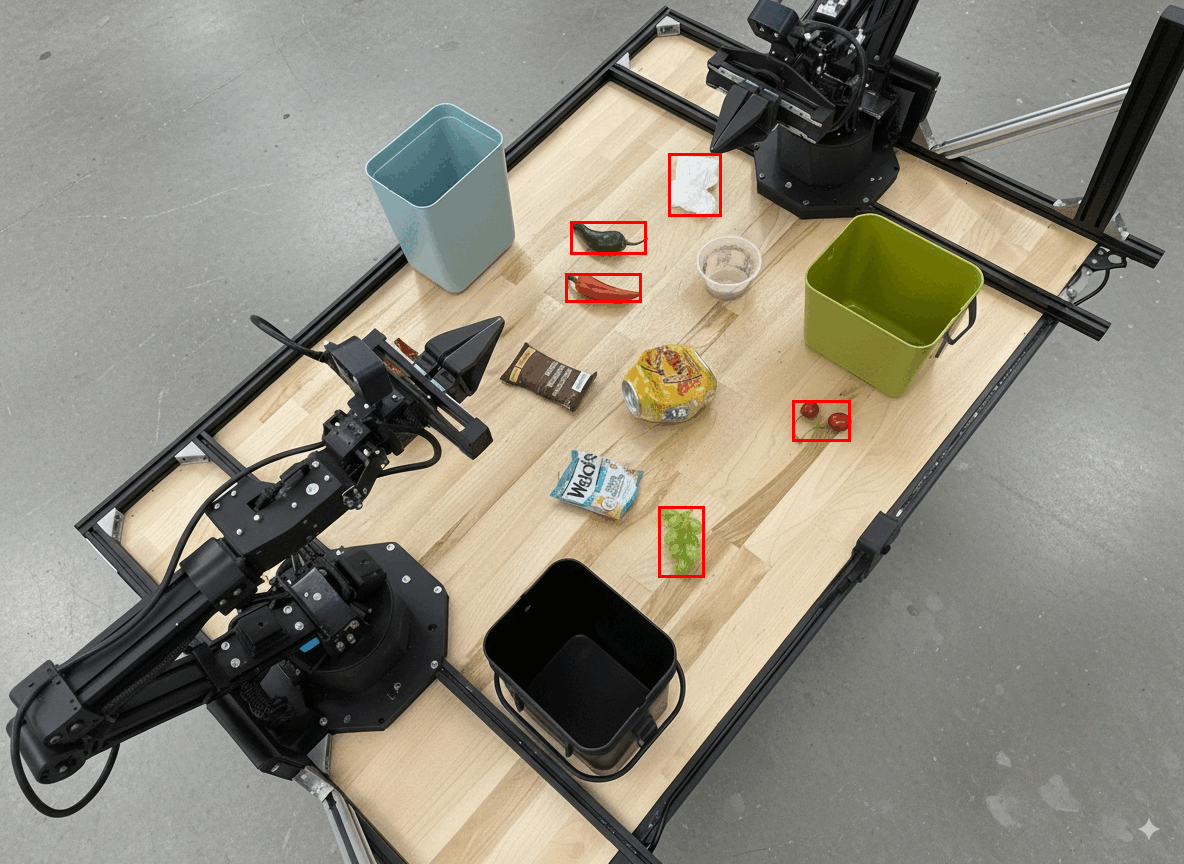
בדוגמה הבאה מוסבר איך להשתמש בהרצת קוד כדי להגדיל ולחתוך תמונה, כדי לקבל תצוגה ברורה יותר כשמזהים אובייקטים ומחזירים תיבות תוחמות.
Python
from google import genai
from google.genai import types

client = genai.Client(
    enterprise=True,
    project="your-project-id",
    location="global",
)

# Load your image
with open('sorting.jpeg', 'rb') as f:
    image_bytes = f.read()

prompt = """
Return JSON in the format {label: val, y: val, x: val, y2: val, x2: val} for
the compostable objects in this scene. Please Zoom and crop the image for a
clearer view. Return an annotated image of the final result with the bounding
boxes drawn on it to the API caller as a part of your process.
"""

response = client.models.generate_content(
    model="gemini-robotics-er-2-preview",
    contents=[
        types.Part.from_bytes(
            data=image_bytes,
            mime_type='image/jpeg',
        ),
        prompt
    ],
    config = types.GenerateContentConfig(
        tools=[types.Tool(code_execution=types.ToolCodeExecution)],
    )
)

print(response.text)
הפלט מהמודל יהיה דומה לזה:
[
  {"label": "compostable", "y": 256, "x": 482, "y2": 295, "x2": 546},
  {"label": "compostable", "y": 317, "x": 478, "y2": 350, "x2": 542},
  {"label": "compostable", "y": 586, "x": 556, "y2": 668, "x2": 595},
  {"label": "compostable", "y": 463, "x": 669, "y2": 511, "x2": 718},
  {"label": "compostable", "y": 178, "x": 565, "y2": 250, "x2": 609}
]
התיבות שמוחזרות מהמודל מוצגות בהמשך.
קריאת מד אנלוגי ויישום לוגיקה
הדוגמה הבאה ממחישה איך להשתמש במודל כדי לקרוא מד אנלוגי ולבצע חישובי זמן. היא משתמשת בהוראות מערכת כדי לאכוף פלט בפורמט JSON.
Python
from google import genai
from google.genai import types

client = genai.Client(
    enterprise=True,
    project="your-project-id",
    location="global",
)

with open('gauge.jpeg', 'rb') as f:
    image_bytes = f.read()

system_instruction = "Be precise. When JSON is requested, reply with ONLY that JSON (no preface, no code block)."

response = client.models.generate_content(
    model="gemini-robotics-er-2-preview",
    contents=[
        types.Part.from_bytes(
            data=image_bytes,
            mime_type='image/jpeg',
        ),
        """Read the current value from this gauge. Then, calculate how long
        it will take at the current rate for the value to reach maximum.
        Reply in JSON: {"current_value": val, "max_value": val,
        "time_to_max_minutes": val}"""
    ],
    config = types.GenerateContentConfig(
        system_instruction=system_instruction,
        tools=[types.Tool(code_execution=types.ToolCodeExecution)],
    )
)

print(response.text)
מדידת נוזל במיכל
בדוגמה הבאה מוסבר איך להשתמש בהרצת קוד כדי למדוד את כמות הנוזל במכל.
Python
from google import genai
from google.genai import types

client = genai.Client(
    enterprise=True,
    project="your-project-id",
    location="global",
)

with open('fluid.jpeg', 'rb') as f:
    image_bytes = f.read()

system_instruction = "Be precise. When JSON is requested, reply with ONLY that JSON (no preface, no code block)."

response = client.models.generate_content(
    model="gemini-robotics-er-2-preview",
    contents=[
        types.Part.from_bytes(
            data=image_bytes,
            mime_type='image/jpeg',
        ),
        """Measure the amount of fluid in the container. Reply in JSON:
        {"fluid_level_ml": val, "container_capacity_ml": val,
        "percentage_full": val}"""
    ],
    config = types.GenerateContentConfig(
        system_instruction=system_instruction,
        tools=[types.Tool(code_execution=types.ToolCodeExecution)],
    )
)

print(response.text)
קריאת סימונים על מעגל מודפס
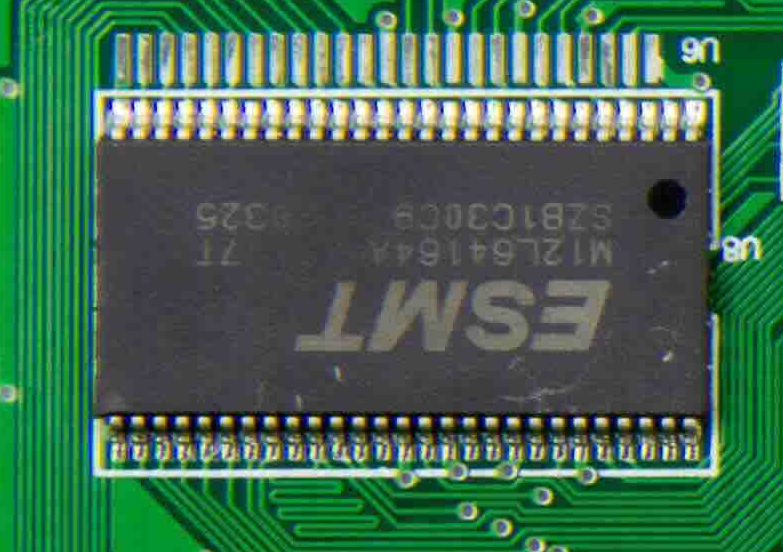
בדוגמה הבאה מוסבר איך להשתמש בהרצת קוד כדי לקרוא את הסימונים על לוח מעגלים.
Python
from google import genai
from google.genai import types

client = genai.Client(
    enterprise=True,
    project="your-project-id",
    location="global",
)

with open('circuit_board.jpeg', 'rb') as f:
    image_bytes = f.read()

system_instruction = "Be precise. When JSON is requested, reply with ONLY that JSON (no preface, no code block)."

response = client.models.generate_content(
    model="gemini-robotics-er-2-preview",
    contents=[
        types.Part.from_bytes(
            data=image_bytes,
            mime_type='image/jpeg',
        ),
        """Read all visible component labels and markings on this circuit
        board. Reply in JSON: {"components": [{"label": val,
        "location": [y, x]}]}"""
    ],
    config = types.GenerateContentConfig(
        system_instruction=system_instruction,
        tools=[types.Tool(code_execution=types.ToolCodeExecution)],
    )
)

print(response.text)
הערה לתמונה
בדוגמה הבאה מוסבר איך להשתמש בהרצת קוד כדי להוסיף הערות לתמונה (למשל, ציור חצים להוראות סילוק) ולהחזיר את התמונה ששונתה.
Python
from google import genai
from google.genai import types

client = genai.Client(
    enterprise=True,
    project="your-project-id",
    location="global",
)

# Load your image
with open('sorting.jpeg', 'rb') as f:
    image_bytes = f.read()

prompt = """
Look at this image and return it as an annotated version using arrows of
different colors to represent which items should go in which bins for
disposal. You must return the final image to the API caller.
"""

response = client.models.generate_content(
    model="gemini-robotics-er-2-preview",
    contents=[
        types.Part.from_bytes(
            data=image_bytes,
            mime_type='image/jpeg',
        ),
        prompt
    ],
    config = types.GenerateContentConfig(
        tools=[types.Tool(code_execution=types.ToolCodeExecution)],
    )
)

print(response.text)
הנה דוגמה לתמונה שהוזנה.
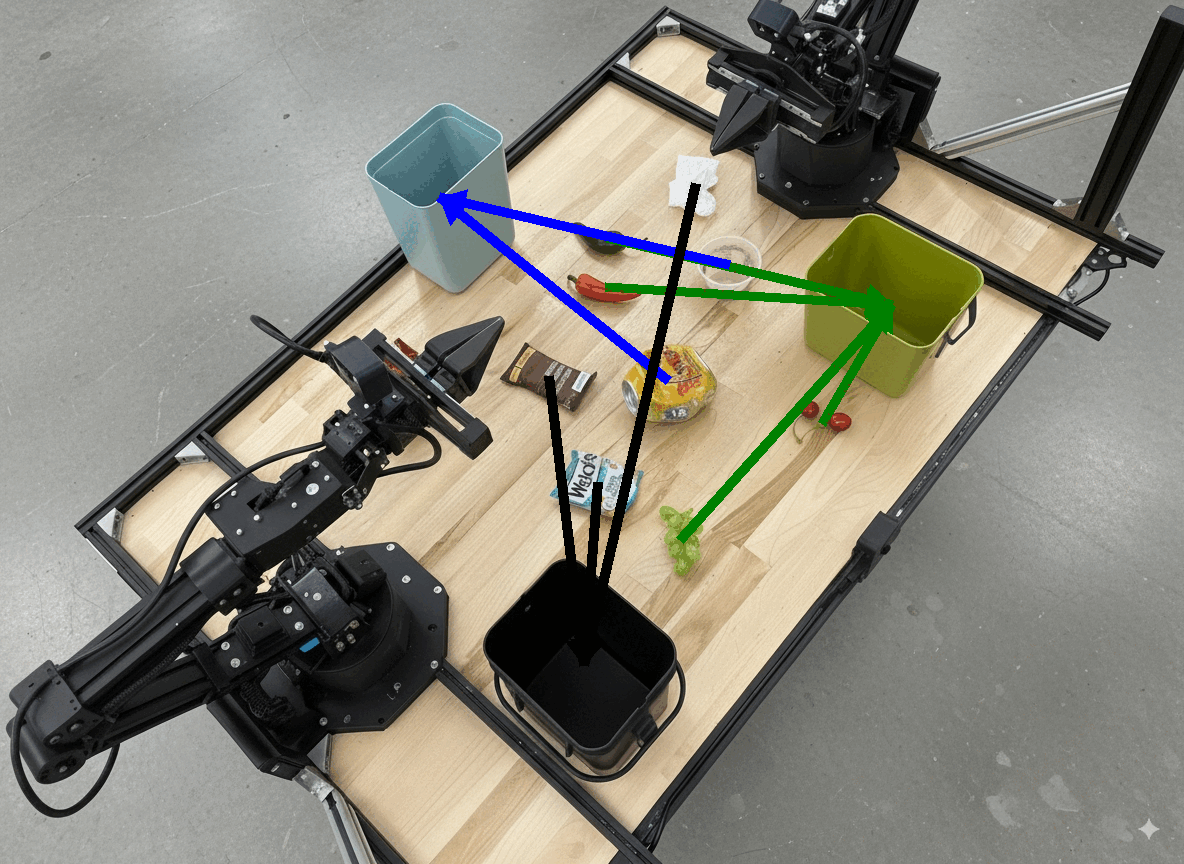
הפלט מהמודל יהיה דומה לזה:
  The annotated image shows the suggested disposal locations for the items on the table:
  - **Green bin (Compost/Organic)**: Green chili, red chili, grapes, and cherries.
  - **Blue bin (Recycling)**: Yellow crushed can and plastic container.
  - **Black bin (Trash)**: Chocolate bar wrapper, Welch's packet, and white tissue.
המאמרים הבאים
מידע נוסף על Gemini Robotics ER 2 זמין במקורות המידע הבאים:
- תזמור משימות: משימות ארוכות טווח עם ממשקי API מותאמים אישית לרובוטים.
- חשיבה מרחבית: הצבעה, מעקב, תיבות תוחמות ומסלולים.
- הבנת סרטונים: איתור רגעים וסיווג התקדמות.
- סקירה כללית על Gemini Robotics ER 2: יכולות והתחלה מהירה.
- מידע על המודל Gemini Robotics ER 2: מפרט טכני, מגבלות טוקנים ויכולות נתמכות.