


Playground 採用預先部署的 Gemini Enterprise Agent Platform 線上預測端點,不會產生費用。開啟支援模型的模型資訊卡後,即可使用「試用」面板傳送文字提示詞,快速測試模型功能。您也可以設定一些最常見的參數,例如溫度參數和輸出詞元數量。Playground 僅限輸入和輸出文字。
啟動 Spaces 時,您會獲得可用的網頁應用程式,與部署模型並建構應用程式來使用模型端點相比,手動作業大幅減少。Model Garden 會在 Gemini Enterprise Agent Platform 中部署所選模型,並在 Cloud Run 執行個體上部署範例應用程式,該執行個體會使用已部署模型的端點。應用程式也可以使用現有端點或 MaaS 端點。
事前準備
本教學課程需要設定 Google Cloud 專案,並啟用 Agent Platform API。
- 登入 Google Cloud 帳戶。如果您是 Google Cloud新手,歡迎 建立帳戶,親自評估產品在實際工作環境中的成效。新客戶還能獲得價值 $300 美元的免費抵免額,可用於執行、測試及部署工作負載。
-
In the Google Cloud console, on the project selector page, select or create a Google Cloud project.
Roles required to select or create a project
- Select a project: Selecting a project doesn't require a specific IAM role—you can select any project that you've been granted a role on.
-
Create a project: To create a project, you need the Project Creator role
(
roles/resourcemanager.projectCreator), which contains theresourcemanager.projects.createpermission. Learn how to grant roles.
-
If you're using an existing project for this guide, verify that you have the permissions required to complete this guide. If you created a new project, then you already have the required permissions.
-
Verify that billing is enabled for your Google Cloud project.
Enable the Gemini Enterprise Agent Platform, Artifact Registry, Cloud Build, Cloud Logging, and Cloud Run Admin APIs, if any are not already enabled.
Roles required to enable APIs
To enable APIs, you need the
serviceusage.services.enablepermission. If you created the project, then you likely already have this permission through the Owner role (roles/owner). Otherwise, you can get this permission through the Service Usage Admin role (roles/serviceusage.serviceUsageAdmin). Learn how to grant roles.-
In the Google Cloud console, on the project selector page, select or create a Google Cloud project.
Roles required to select or create a project
- Select a project: Selecting a project doesn't require a specific IAM role—you can select any project that you've been granted a role on.
-
Create a project: To create a project, you need the Project Creator role
(
roles/resourcemanager.projectCreator), which contains theresourcemanager.projects.createpermission. Learn how to grant roles.
-
If you're using an existing project for this guide, verify that you have the permissions required to complete this guide. If you created a new project, then you already have the required permissions.
-
Verify that billing is enabled for your Google Cloud project.
Enable the Gemini Enterprise Agent Platform, Artifact Registry, Cloud Build, Cloud Logging, and Cloud Run Admin APIs, if any are not already enabled.
Roles required to enable APIs
To enable APIs, you need the
serviceusage.services.enablepermission. If you created the project, then you likely already have this permission through the Owner role (roles/owner). Otherwise, you can get this permission through the Service Usage Admin role (roles/serviceusage.serviceUsageAdmin). Learn how to grant roles.- 如要試用 Model Garden Spaces,請確認 Compute Engine 預設服務帳戶具備啟動 Spaces 的必要權限。
必要的角色
如要在 Model Garden 中測試模型功能,請確保您和 Compute Engine 預設服務帳戶都具備必要的 IAM 角色。
使用者必須具備的角色
如要取得在 Model Garden 中測試模型功能所需的權限,請要求管理員在 Google Cloud 專案中授予您下列 IAM 角色:
- 服務使用情形管理員 (
roles/serviceusage.serviceUsageAdmin) - Artifact Registry 管理員 (
roles/artifactregistry.admin) - Cloud Run 管理員 (
roles/run.admin) - 儲存空間管理員 (
roles/storage.admin) - Agent Platform 使用者 (
roles/aiplatform.user)
如要進一步瞭解如何授予角色,請參閱「管理專案、資料夾和組織的存取權」。
Compute Engine 預設服務帳戶的必要角色
系統會使用 Compute Engine 預設服務帳戶啟動 Space。
為確保 Compute Engine 預設服務帳戶具備啟動 Spaces 的必要權限,請要求管理員在您的 Google Cloud 專案中,將下列 IAM 角色授予 Compute Engine 預設服務帳戶:
- Agent Platform 服務代理 (
roles/aiplatform.serviceAgent) - Cloud Build 服務帳戶 (
roles/cloudbuild.builds.builder)
如要進一步瞭解如何授予角色,請參閱「管理專案、資料夾和組織的存取權」。
管理員或許也能透過自訂角色或其他預先定義的角色,將必要權限授予 Compute Engine 預設服務帳戶。
試用 Playground
在 Google Cloud 控制台中,前往支援模型的資訊卡,例如 Gemma 2 模型資訊卡。
在「試試看」面板中:
- 在「Region」(區域) 部分,接受預設值或選擇您的區域。
- 在「Endpoint」部分,選取「Demo playground」。
- 在「提示詞」方塊中輸入
Why is the sky blue?。 - 展開「進階選項」部分,查看預設參數。
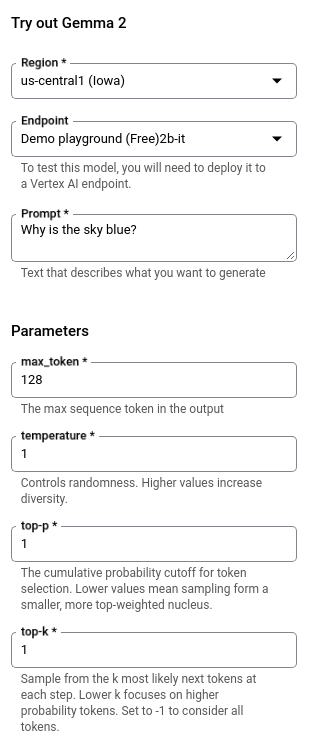
按一下「提交」。輸出內容會顯示在「提交」按鈕下方。
試用 Spaces
如要啟動模型,請開啟支援模型的模型資訊卡,然後在「試用 Space」面板中,按一下要啟動的 Space。系統會針對部署作業使用的機器,以及代管應用程式的 Cloud Run 執行個體收費。
您可以啟動 Spaces,並使用 Gemini、Gemma、Llama 和 Stable Diffusion 等模型。
啟動 Spaces
啟動 Spaces,透過範例 Gradio 應用程式測試及實驗模型。
前往 Google Cloud 控制台的 Model Garden,查看模型的模型資訊卡。
選取要使用的模型。支援的模型會顯示「試用 Spaces」面板,例如 Gemma 3 模型資訊卡。
按一下「rocket_launch」rocket_launch「執行」即可啟動 Space。
- 您可以選擇「需要驗證」 (透過 Identity Aware Proxy) 或「允許公開存取」。詳情請參閱「為首次部署啟用 API 並授予權限」。
- 按一下「建立新服務」即可開始部署。您可以從模型資訊卡監控部署狀態。
當「空間」狀態變更為「就緒」後,請按一下該空間,查看部署詳細資料。
如要獲得基本保護,網頁應用程式需要密鑰,提交提示時必須將密鑰附加至網址。這個密鑰會顯示在「密鑰」欄位中。
- 按一下「開啟」即可開始使用應用程式。您可以在應用程式中傳送提示給模型,並查看模型的回覆。
你可以分享網址,讓其他人也能試用應用程式。
- 如要關閉應用程式的存取權,請按一下「存取控管」欄位中的「編輯」圖示 。
在 Cloud Run 應用程式的「安全性」分頁中,選取「需要驗證」,然後按一下「儲存」。這樣一來,應用程式就不會再透過網址提供服務。如果有人造訪該網址,系統會傳回 403 錯誤 (禁止)。
清除所用資源
如要避免系統向您的 Google Cloud 帳戶收取本頁面所用資源的費用,請按照下列步驟操作。
刪除聊天室
如要清理 Spaces,您必須刪除模型資源和 Cloud Run 上的範例應用程式資源。
刪除模型資源
您可以在 Gradio 應用程式中刪除模型端點,藉此清理 Gemini Enterprise Agent Platform 資源。接著,您需要刪除 Cloud Run 服務,才能停止並刪除 Gradio 應用程式。
如要手動刪除 Gemini Enterprise Agent Platform 資源,請參閱「取消部署模型並刪除資源」。
刪除 Cloud Run 服務
刪除與服務相關的資源,包括服務的所有修訂版本。刪除服務時,不會一併刪除 Artifact Registry 中的容器映像檔等項目。 詳情請參閱 Cloud Run 說明文件中的「管理服務」。
在 Google Cloud 控制台中,查看 Cloud Run 服務清單:
找出要刪除的服務,然後選取該服務。
按一下「刪除」。這項操作會刪除服務的所有修訂版本。
刪除專案
如要避免付費,最簡單的方法就是刪除您為了本教學課程所建立的專案。
刪除專案的方法如下:
- 前往 Google Cloud 控制台的「Manage resources」(管理資源) 頁面。
- 在專案清單中選取要刪除的專案,然後點選「Delete」(刪除)。
- 在對話方塊中輸入專案 ID,然後按一下 [Shut down] (關閉) 以刪除專案。
後續步驟
請參閱 Model Garden 總覽。