


函式呼叫 (也稱為工具使用) 會向 LLM 提供外部工具的定義 (例如 get_current_weather 函式)。處理提示時,模型會智慧判斷是否需要工具,如果需要,則會輸出結構化資料,指定要呼叫的工具及其參數 (例如 get_current_weather(location='Boston'))。接著,應用程式會執行這項工具,將結果傳回模型,讓模型能使用動態、真實世界的資訊或動作結果完成回覆。這能有效連結 LLM 與系統,並擴充 LLM 的功能。
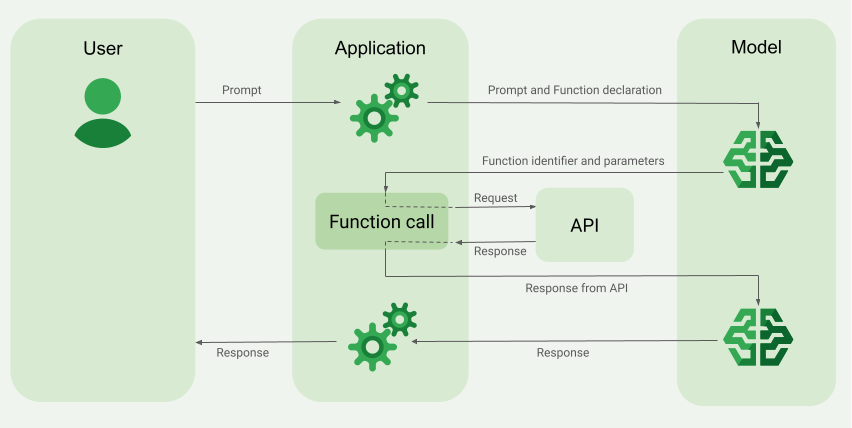
呼叫函式主要有兩種用途:
擷取資料:擷取最新資訊,用於模型回覆,例如目前天氣、貨幣換算,或知識庫和 API (RAG) 的特定資料。
採取行動:執行外部作業,例如提交表單、更新應用程式狀態,或安排 Agentic Workflows (例如對話交接)。
如要查看更多採用呼叫函式技術的用途和範例,請參閱「用途」。
功能與限制
下列模型支援呼叫函式:
- Gemini 模型:
按一下即可展開支援的模型
開放式模型:
請以 OpenAPI 結構定義格式定義函式。
如果是 Gemini 3 和後續模型,您可以在傳回模型的
functionResponse訊息中加入多模態內容 (圖片和 PDF)。詳情請參閱「多模態函式回覆」。如果是 Gemini 3 和後續模型,只要在
functionCallingConfig中將streamFunctionCallArguments設為true,即可在生成函式呼叫引數時串流輸出。詳情請參閱「串流函式呼叫引數」。如要瞭解函式宣告的最佳做法,包括名稱和說明的提示,請參閱「最佳做法」。
如要使用開放式模型,請參閱這份使用手冊。
如何建立函式呼叫應用程式
如要使用函式呼叫功能,請執行下列工作:
步驟 1:將提示詞和函式宣告提交至模型
以與 OpenAPI 結構定義相容的結構定義格式宣告 Tool。詳情請參閱「結構定義範例」。
下列範例會將提示和函式宣告提交至 Gemini 模型:
REST
PROJECT_ID=myproject
LOCATION=us-central1
MODEL_ID=gemini-2.5-flash

curl -X POST \
  -H "Authorization: Bearer $(gcloud auth print-access-token)" \
  -H "Content-Type: application/json" \
  https://${LOCATION}-aiplatform.googleapis.com/v1/projects/${PROJECT_ID}/locations/${LOCATION}/publishers/google/models/${MODEL_ID}:generateContent \
  -d '{
    "contents": [{
      "role": "user",
      "parts": [{
        "text": "What is the weather in Boston?"
      }]
    }],
    "tools": [{
      "functionDeclarations": [
        {
          "name": "get_current_weather",
          "description": "Get the current weather in a given location",
          "parameters": {
            "type": "object",
            "properties": {
              "location": {
                "type": "string",
                "description": "The city name of the location for which to get the weather.",
                "default": {
                  "string_value": "Boston, MA"
                }
              }
            },
            "required": [
              "location"
            ]
          }
        }
      ]
    }]
  }'
Google Gen AI SDK for Python
from google import genai
from google.genai.types import GenerateContentConfig, Part

# The project and location are passed directly to the client,
# and vertexai=True is added to specify the use of the Agent Platform backend.
client = genai.Client(vertexai=True, project="PROJECT_ID", location="global")

def get_current_weather(location: str) -> str:
  """Returns the current weather.

  Args:
    location: The city and state, e.g. San Francisco, CA
  """
  return 'sunny'

response = client.models.generate_content(
    model="gemini-2.5-flash",
    contents="What is the weather in boston?",
    config=GenerateContentConfig(tools=[get_current_weather]),
)
Agent Platform SDK
您可以使用 Python 字典手動指定結構定義,也可以使用 from_func 輔助函式自動指定。以下範例說明如何手動宣告函式:
import vertexai
from vertexai.generative_models import (
    Content,
    FunctionDeclaration,
    GenerationConfig,
    GenerativeModel,
    Part,
    Tool,
    ToolConfig
)

# Initialize Agent Platform
# TODO(developer): Update the project
vertexai.init(project="PROJECT_ID", location="us-central1")

# Initialize Gemini model
model = GenerativeModel(model_name="gemini-2.5-flash")

# Manual function declaration
get_current_weather_func = FunctionDeclaration(
    name="get_current_weather",
    description="Get the current weather in a given location",
    # Function parameters are specified in JSON schema format
    parameters={
        "type": "object",
        "properties": {
            "location": {
              "type": "string",
              "description": "The city name of the location for which to get the weather.",
              "default": {
                "string_value": "Boston, MA"
              }
           }
        },
    },
)

response = model.generate_content(
    contents = [
      Content(
        role="user",
          parts=[
              Part.from_text("What is the weather like in Boston?"),
          ],
      )
    ],
    generation_config = GenerationConfig(temperature=0),
    tools = [
      Tool(
        function_declarations=[get_current_weather_func],
      )
    ]
)
或者,您也可以使用 from_func 輔助函式自動宣告函式,如以下範例所示:
def get_current_weather(location: str = "Boston, MA"):
  """
  Get the current weather in a given location

  Args:
      location: The city name of the location for which to get the weather.

  """
  # This example uses a mock implementation.
  # You can define a local function or import the requests library to call an API
  return {
    "location": "Boston, MA",
    "temperature": 38,
    "description": "Partly Cloudy",
    "icon": "partly-cloudy",
    "humidity": 65,
    "wind": {
        "speed": 10,
        "direction": "NW"
    }
  }
get_current_weather_func = FunctionDeclaration.from_func(get_current_weather)
Node.js
這個範例示範一個函式和一個提示的文字情境。
Node.js
在試用這個範例之前,請先按照「使用用戶端程式庫的 Agent Platform 快速入門導覽課程」中的 Node.js 設定說明操作。
如要向 Agent Platform 進行驗證,請設定應用程式預設憑證。詳情請參閱「為本機開發環境設定驗證機制」。
Go
這個範例示範文字情境,其中包含一個函式和一個提示。
詳情請參閱 SDK 參考文件。
設定環境變數,以便透過 Vertex AI 使用 Google Gen AI SDK:
# Replace the `GOOGLE_CLOUD_PROJECT` and `GOOGLE_CLOUD_LOCATION` values
# with appropriate values for your project.
export GOOGLE_CLOUD_PROJECT=GOOGLE_CLOUD_PROJECT
export GOOGLE_CLOUD_LOCATION=global
export GOOGLE_GENAI_USE_ENTERPRISE=True
C#
這個範例示範文字情境,其中包含一個函式和一個提示。
C#
在試用這個範例之前,請先按照「使用用戶端程式庫的 Agent Platform 快速入門導覽課程」中的 C# 設定說明操作。
如要向 Agent Platform 進行驗證,請設定應用程式預設憑證。詳情請參閱「為本機開發環境設定驗證機制」。
Java
Java
在試用這個範例之前,請先按照「使用用戶端程式庫的 Agent Platform 快速入門導覽課程」中的 Java 設定說明操作。
如要向 Agent Platform 進行驗證,請設定應用程式預設憑證。詳情請參閱「為本機開發環境設定驗證機制」。
如果模型判定需要特定函式的輸出內容,應用程式從模型收到的回覆就會包含函式名稱,以及呼叫函式時應使用的參數值。
以下是模型對使用者提示「波士頓天氣如何?」的回覆範例。模型建議使用 Boston, MA 參數呼叫 get_current_weather 函式。
candidates {
  content {
    role: "model"
    parts {
      function_call {
        name: "get_current_weather"
        args {
          fields {
            key: "location"
            value {
              string_value: "Boston, MA"
            }
          }
        }
      }
    }
  }
  ...
}
步驟 2:將 API 輸出內容提供給模型
叫用外部 API,並將 API 輸出內容傳回模型。
以下範例使用合成資料模擬外部 API 的回應酬載,並將輸出內容提交回模型:
REST
PROJECT_ID=myproject
MODEL_ID=gemini-2.5-flash
LOCATION="us-central1"

curl -X POST \
-H "Authorization: Bearer $(gcloud auth print-access-token)" \
-H "Content-Type: application/json" \
https://${LOCATION}-aiplatform.googleapis.com/v1/projects/${PROJECT_ID}/locations/${LOCATION}/publishers/google/models/${MODEL_ID}:generateContent \
-d '{
"contents": [
{
  "role": "user",
  "parts": {
    "text": "What is the weather in Boston?"
  }
},
{
  "role": "model",
  "parts": [
    {
      "functionCall": {
        "name": "get_current_weather",
        "args": {
          "location": "Boston, MA"
        }
      }
    }
  ]
},
{
  "role": "user",
  "parts": [
    {
      "functionResponse": {
        "name": "get_current_weather",
        "response": {
          "temperature": 20,
          "unit": "C"
        }
      }
    }
  ]
}
],
"tools": [
{
  "function_declarations": [
    {
      "name": "get_current_weather",
      "description": "Get the current weather in a specific location",
      "parameters": {
        "type": "object",
        "properties": {
          "location": {
            "type": "string",
            "description": "The city name of the location for which to get the weather."
          }
        },
        "required": [
          "location"
        ]
      }
    }
  ]
}
]
}'
Agent Platform SDK
function_response_contents = []
function_response_parts = []

# Iterates through the function calls in the response in case there are parallel function call requests
for function_call in response.candidates[0].function_calls:
    print(f"Function call: {function_call.name}")

    # In this example, we'll use synthetic data to simulate a response payload from an external API
    if (function_call.args['location'] == "Boston, MA"):
      api_response = { "location": "Boston, MA", "temperature": 38, "description": "Partly Cloudy" }
    if (function_call.args['location'] == "San Francisco, CA"):
      api_response = { "location": "San Francisco, CA", "temperature": 58, "description": "Sunny" }

    function_response_parts.append(
        Part.from_function_response(
            name=function_call.name,
            response={"contents": api_response}
        )
    )
    # Add the function call response to the contents
    function_response_contents = Content(role="user", parts=function_response_parts)

# Submit the User's prompt, model's response, and API output back to the model
response = model.generate_content(
  [
    Content( # User prompt
      role="user",
      parts=[
          Part.from_text("What is the weather like in Boston?"),
      ],
    ),
    response.candidates[0].content,  # Function call response
    function_response_contents   # API output
  ],
  tools=[
    Tool(
      function_declarations=[get_current_weather_func],
    )
  ],
)
# Get the model summary response
print(response.text)
如需 API 叫用相關最佳做法,請參閱「最佳做法 - API 叫用」。
如果模型提出多個平行函式呼叫,應用程式必須將所有回覆傳回模型。詳情請參閱「平行函式呼叫範例」。
模型可能會判斷需要另一個函式的輸出內容,才能回覆提示。在這種情況下,應用程式從模型收到的回覆會包含另一個函式名稱和另一組參數值。
如果模型判定 API 回應足以回應使用者提示,就會建立自然語言回覆,並傳回應用程式。在這種情況下,應用程式必須將回應傳回給使用者。以下是自然語言回覆的範例:
It is currently 38 degrees Fahrenheit in Boston, MA with partly cloudy skies.
呼叫函式並顯示思考過程
在啟用思考功能的情況下呼叫函式時,您需要從模型回應物件取得 thought_signature,並在將函式執行結果傳回模型時一併傳回。例如:
Python
# Call the model with function declarations
# ...Generation config, Configure the client, and Define user prompt (No changes)

# Send request with declarations (using a thinking model)
response = client.models.generate_content(
  model="gemini-2.5-flash", config=config, contents=contents)

# See thought signatures
for part in response.candidates[0].content.parts:
  if not part.text:
    continue
  if part.thought and part.thought_signature:
    print("Thought signature:")
    print(part.thought_signature)
您不一定要查看思考簽章,但需要調整步驟 2,讓模型在傳回函式執行結果時一併傳回思考簽章,以便將思考過程納入最終回覆:
Python
# Create user friendly response with function result and call the model again
# ...Create a function response part (No change)

# Append thought signatures, function call and result of the function execution to contents
function_call_content = response.candidates[0].content
# Append the model's function call message, which includes thought signatures
contents.append(function_call_content)
contents.append(types.Content(role="user", parts=[function_response_part])) # Append the function response

final_response = client.models.generate_content(
    model="gemini-2.5-flash",
    config=config,
    contents=contents,
)

print(final_response.text)
傳回思考簽章時,請遵循下列規範:
- 模型會在回覆的其他部分傳回簽章,例如函式呼叫或文字、文字或思考摘要部分。在後續對話中,將整個回覆連同所有部分傳回模型。
- 請勿將含有簽章的部分與另一個也含有簽章的部分合併。簽名無法串連。
- 請勿將有簽章的部分與沒有簽章的部分合併。這會破壞簽名所代表想法的正確定位。
平行函式呼叫
如果提示為「取得波士頓和舊金山的天氣詳細資料」,模型可能會提出多個平行函式呼叫。如要查看支援平行函式呼叫的模型清單,請參閱「支援的模型」。
如果模型在單一回覆中傳回多個 functionCall 部分,您必須在下一個回合中,將所有對應的 functionResponse 部分一併傳回單一 Content 物件。請勿在不同輪次中交錯使用 functionCall 和 functionResponse 部分。
為確保每個 functionResponse 都與正確的 functionCall 相符,請按照模型傳回 functionCall 部分的順序,在 parts 陣列中傳回 functionResponse 部分,並將每個 functionResponse.name 設為對應的 functionCall.name。這項位置排序適用於所有支援的 Gemini 模型和 API 版本。
如果是 Gemini 3 以上版本模型,API 也支援按照下列優先順序,將平行函式回應與函式呼叫進行比對:
- 依
id:如果functionCall中填入id(Gemini 3 以上模型的v1beta1API 支援),且functionResponse中包含相符的id,API 會將回應與具有相同id的呼叫進行比對,無論parts陣列中的順序為何。functionResponse.name仍須與對應的functionCall.name相符,否則要求會失敗,並傳回400錯誤。 - 依
name和順序:如果未提供id(例如在v1API 中),API 會將每個functionResponse與具有相同name的不相符functionCall進行比對。如果模型在單一回合中多次平行呼叫同一個函式名稱,系統會按照parts陣列中的出現順序,依序比對具有該name的回應。
REST
這個範例說明一個 get_current_weather 函式的情境。使用者提示為「取得波士頓和舊金山的天氣詳細資料」。模型會提出兩個平行 get_current_weather 函式呼叫:一個使用 Boston 參數,另一個使用 San Francisco 參數。
{
"candidates": [
  {
    "content": {
      "role": "model",
      "parts": [
        {
          "functionCall": {
            "name": "get_current_weather",
            "args": {
              "location": "Boston"
            }
          }
        },
        {
          "functionCall": {
            "name": "get_current_weather",
            "args": {
              "location": "San Francisco"
            }
          }
        }
      ]
    },
    ...
  }
],
...
}
下列指令示範如何將函式輸出內容提供給模型。將 my-project 替換為 Google Cloud 專案名稱。
模型要求
PROJECT_ID=my-project
MODEL_ID=gemini-2.5-flash
LOCATION="us-central1"
curl -X POST \
-H "Authorization: Bearer $(gcloud auth print-access-token)" \
-H "Content-Type: application/json" \
https://${LOCATION}-aiplatform.googleapis.com/v1/projects/${PROJECT_ID}/locations/${LOCATION}/publishers/google/models/${MODEL_ID}:generateContent \
-d '{
"contents": [
{
  "role": "user",
  "parts": {
    "text": "What is difference in temperature in Boston and San Francisco?"
  }
},
{
  "role": "model",
  "parts": [
    {
      "functionCall": {
        "name": "get_current_weather",
        "args": {
          "location": "Boston"
        }
      }
    },
    {
      "functionCall": {
        "name": "get_current_weather",
        "args": {
          "location": "San Francisco"
        }
      }
    }
  ]
},
{
  "role": "user",
  "parts": [
    {
      "functionResponse": {
        "name": "get_current_weather",
        "response": {
          "temperature": 30.5,
          "unit": "C"
        }
      }
    },
    {
      "functionResponse": {
        "name": "get_current_weather",
        "response": {
          "temperature": 20,
          "unit": "C"
        }
      }
    }
  ]
}
],
"tools": [
{
  "function_declarations": [
    {
      "name": "get_current_weather",
      "description": "Get the current weather in a specific location",
      "parameters": {
        "type": "object",
        "properties": {
          "location": {
            "type": "string",
            "description": "The city name of the location for which to get the weather."
          }
        },
        "required": [
          "location"
        ]
      }
    }
  ]
}
]
}'
模型建立的自然語言回覆大致如下:
模型回覆
[
{
    "candidates": [
        {
            "content": {
                "parts": [
                    {
                        "text": "The temperature in Boston is 30.5C and the temperature in San Francisco is 20C. The difference is 10.5C. \n"
                    }
                ]
            },
            "finishReason": "STOP",
            ...
        }
    ]
    ...
}
]
Python
這個範例說明一個 get_current_weather 函式的情境。使用者提示為「波士頓和舊金山的天氣如何?」。
將 my-project 替換為 Google Cloud 專案名稱。
import vertexai
from vertexai.generative_models import (
    Content,
    FunctionDeclaration,
    GenerationConfig,
    GenerativeModel,
    Part,
    Tool,
    ToolConfig
)

# Initialize Agent Platform
# TODO(developer): Update the project
vertexai.init(project="my-project", location="us-central1")

# Initialize Gemini model
model = GenerativeModel(model_name="gemini-2.5-flash")

# Manual function declaration
get_current_weather_func = FunctionDeclaration(
    name="get_current_weather",
    description="Get the current weather in a given location",
    # Function parameters are specified in JSON schema format
    parameters={
        "type": "object",
        "properties": {
            "location": {
              "type": "string",
              "description": "The city name of the location for which to get the weather.",
              "default": {
                "string_value": "Boston, MA"
              }
          }
        },
    },
)

response = model.generate_content(
    contents = [
      Content(
        role="user",
          parts=[
              Part.from_text("What is the weather like in Boston and San Francisco?"),
          ],
      )
    ],
    generation_config = GenerationConfig(temperature=0),
    tools = [
      Tool(
        function_declarations=[get_current_weather_func],
      )
    ]
)
下列指令示範如何將函式輸出內容提供給模型。
function_response_contents = []
function_response_parts = []

# You can have parallel function call requests for the same function type.
# For example, 'location_to_lat_long("London")' and 'location_to_lat_long("Paris")'
# In that case, collect API responses in parts and send them back to the model

for function_call in response.candidates[0].function_calls:
    print(f"Function call: {function_call.name}")

    # In this example, we'll use synthetic data to simulate a response payload from an external API
    if (function_call.args['location'] == "Boston, MA"):
      api_response = { "location": "Boston, MA", "temperature": 38, "description": "Partly Cloudy" }
    if (function_call.args['location'] == "San Francisco, CA"):
      api_response = { "location": "San Francisco, CA", "temperature": 58, "description": "Sunny" }

    function_response_parts.append(
        Part.from_function_response(
            name=function_call.name,
            response={"contents": api_response}
        )
    )
    # Add the function call response to the contents
    function_response_contents = Content(role="user", parts=function_response_parts)

function_response_contents

response = model.generate_content(
    contents = [
        Content(
        role="user",
          parts=[
              Part.from_text("What is the weather like in Boston and San Francisco?"),
          ],
        ),  # User prompt
        response.candidates[0].content,  # Function call response
        function_response_contents,  # Function response
    ],
    tools = [
      Tool(
        function_declarations=[get_current_weather_func],
      )
    ]
)
# Get the model summary response
print(response.text)
Go
多模態函式回覆
如果是 Gemini 3 和後續模型,您可以在傳送給模型的函式回覆部分中,加入多模態內容。模型可以在下一個回合處理這項多模態內容,生成更實用的回覆。函式回覆中的多模態內容支援下列 MIME 類型:
- 圖片:
image/png、image/jpeg、image/webp - 文件:
application/pdf、text/plain
如要在函式回應中加入多模態資料,請將其做為一或多個部分,巢狀嵌入 functionResponse 部分。每個多模態部分都必須包含 inlineData 或 fileData。如果從結構化 response 欄位中參照多模態部分,則該部分必須包含不重複的 displayName。
您也可以使用 JSON 參照格式 {"$ref": "<displayName>"},從 functionResponse 部分的結構化 response 欄位中參照多模態部分。模型在處理回覆時,會將參照替換為多模態內容。每個 displayName 只能在結構化 response 欄位中參照一次。
以下範例顯示的訊息包含名為 get_image 的函式 functionResponse,以及包含圖片資料的巢狀部分。functionResponse 的 response 欄位會參照這個圖片部分:
Python
from google import genai
from google.genai import types

client = genai.Client()

# This is a manual, two turn multimodal function calling workflow:

# 1. Define the function tool
get_image_declaration = types.FunctionDeclaration(
  name="get_image",
  description="Retrieves the image file reference for a specific order item.",
  parameters={
      "type": "object",
      "properties": {
          "item_name": {
              "type": "string",
              "description": "The name or description of the item ordered (e.g., 'green shirt')."
          }
      },
      "required": ["item_name"],
  },
)
tool_config = types.Tool(function_declarations=[get_image_declaration])

# 2. Send a message that triggers the tool
prompt = "Show me the green shirt I ordered last month."
response_1 = client.models.generate_content(
  model="gemini-3.5-flash",
  contents=[prompt],
  config=types.GenerateContentConfig(
      tools=[tool_config],
  )
)

# 3. Handle the function call
function_call = response_1.function_calls[0]
requested_item = function_call.args["item_name"]
print(f"Model wants to call: {function_call.name}")

# Execute your tool (e.g., call an API)
# (This is a mock response for the example)
print(f"Calling external tool for: {requested_item}")

function_response_data = {
  "image_ref": {"$ref": "dress.jpg"},
}

function_response_multimodal_data = types.FunctionResponsePart(
  file_data=types.FunctionResponseFileData(
    mime_type="image/png",
    display_name="dress.jpg",
    file_uri="gs://cloud-samples-data/generative-ai/image/dress.jpg",
  )
)

# 4. Send the tool's result back
# Append this turn's messages to history for a final response.
history = [
  types.Content(role="user", parts=[types.Part(text=prompt)]),
  response_1.candidates[0].content,
  types.Content(
    role="tool",
    parts=[
        types.Part.from_function_response(
          name=function_call.name,
          response=function_response_data,
          parts=[function_response_multimodal_data]
        )
    ],
  )
]

response_2 = client.models.generate_content(
  model="gemini-3.5-flash",
  contents=history,
  config=types.GenerateContentConfig(
      tools=[tool_config],
      thinking_config=types.ThinkingConfig(include_thoughts=True)
  ),
)

print(f"\nFinal model response: {response_2.text}")
REST
"contents": [
  ...,
  {
    "role": "user",
    "parts": [
      {
        "functionResponse": {
          "name": "get_image",
          "response": {
            "image_ref": {
              "$ref": "wakeupcat.jpg"
            }
          },
          "parts": [
            {
              "fileData": {
                "displayName": "wakeupcat.jpg",
                "mimeType": "image/jpeg",
                "fileUri": "gs://cloud-samples-data/vision/label/wakeupcat.jpg"
              }
            }
          ]
        }
      }
    ]
  }
]
串流函式呼叫引數
如果是 Gemini 3 和後續模型,您可以要求在模型生成函式呼叫引數時,以串流方式傳送引數,而不必等待整組引數生成完畢。這有助於減少呼叫函式時的感知延遲時間。
這項功能含有以下限制:
v1和v1beta1API 版本都支援這項功能。
如要啟用函式呼叫引數的串流功能,請在呼叫 streamGenerateContent 時,將 toolConfig.functionCallingConfig 中的 streamFunctionCallArguments 設為 true。
啟用 streamFunctionCallArguments 時,中繼回覆會包含 functionCall 物件,其中含有 partialArgs 和 willContinue 欄位。partialArgs 包含引數片段 (在生成時),willContinue 則表示是否預期函式呼叫會有更多片段。
partialArgs:PartialArg物件陣列,每個物件包含:jsonPath:JSONPath 字串,指出函式參數物件中這個片段的路徑。路徑可以指向引數 (例如$.location),如果引數是物件,則可以指向引數內的元素 (例如$.location.latitude)。- 片段的值,可以是
numberValue、stringValue、boolValue或nullValue。 willContinue:partialArgs物件中的布林值。只有在字串值以區塊形式串流,且預期這個引數會有更多區塊時,stringValue片段的這個欄位才會是true。
willContinue:functionCall物件中的布林值。如果true,後續串流回覆中的整體函式呼叫預計會出現更多partialArgs。如果為false或未提供,則這是目前函式呼叫的最終串流回應。
以下範例顯示一系列串流 generateContent 區塊,其中串流單一函式呼叫的引數:
{
  "parts": [
    {
      "functionCall": {
        "name": "controlLight",
        "partialArgs": [
          {
            "jsonPath": "$.brightness",
            "numberValue": 50
          }
        ],
        "willContinue": true
      }
    }
  ],
  "role": "model"
}
{
  "parts": [
    {
      "functionCall": {
        "partialArgs": [
          {
            "jsonPath": "$.colorTemperature",
            "stringValue": "warm",
            "willContinue": true
          }
        ],
        "willContinue": true
      }
    }
  ],
  "role": "model"
}
{
  "parts": [
    {
      "functionCall": {
        "partialArgs": [
          {
            "jsonPath": "$.colorTemperature"
          }
        ],
        "willContinue": true
      }
    }
  ],
  "role": "model"
}
{
  "parts": [
    {
      "functionCall": {}
    }
  ],
  "role": "model"
}
以下範例說明如何針對「新德里和舊金山的氣溫有何差異?」這個提示,透過多個回應串流傳輸平行函式呼叫的引數:
{
  "candidates": [{
    "content": {
      "role": "model",
      "parts": [{
        "functionCall": {
          "name": "get_current_weather",
          "willContinue": true
        },
      }]
    }
  }],
}
{
  "candidates": [{
    "content": {
      "role": "model",
      "parts": [{
        "functionCall": {
          "partialArgs": [{
            "jsonPath": "$.location",
            "stringValue": "New Delhi",
            "willContinue": true
          }],
          "willContinue": true
        }
      }]
    }
  }],
}
{
  "candidates": [{
    "content": {
      "role": "model",
      "parts": [{
        "functionCall": {
          "partialArgs": [{
            "jsonPath": "$.location",
            "stringValue": ""
          }],
          "willContinue": true
        }
      }]
    }
  }],
}
{
  "candidates": [{
    "content": {
      "role": "model",
      "parts": [{
        "functionCall": {
        }
      }]
    }
  }],
}
{
  "candidates": [{
    "content": {
      "role": "model",
      "parts": [{
        "functionCall": {
          "name": "get_current_weather",
          "willContinue": true
        },
      }]
    }
  }],
}
{
  "candidates": [{
    "content": {
      "role": "model",
      "parts": [{
        "functionCall": {
          "partialArgs": [{
            "jsonPath": "$.location",
            "stringValue": "San Francisco",
            "willContinue": true
          }],
          "willContinue": true
        }
      }]
    }
  }],
}
{
  "candidates": [{
    "content": {
      "role": "model",
      "parts": [{
        "functionCall": {
          "partialArgs": [{
            "jsonPath": "$.location",
            "stringValue": ""
          }],
          "willContinue": true
        }
      }]
    }
  }],
}
{
  "candidates": [{
    "content": {
      "role": "model",
      "parts": [{
        "functionCall": {
        }
      }]
    }
  }],
}
Python
from google import genai
from google.genai import types

client = genai.Client()

get_weather_declaration = types.FunctionDeclaration(
  name="get_weather",
  description="Gets the current weather temperature for a given location.",
  parameters={
      "type": "object",
      "properties": {"location": {"type": "string"}},
      "required": ["location"],
  },
)
get_weather_tool = types.Tool(function_declarations=[get_weather_declaration])

for chunk in client.models.generate_content_stream(
  model="gemini-3.5-flash",
  contents="What's the weather in London and New York?",
  config=types.GenerateContentConfig(
      tools=[get_weather_tool],
      tool_config = types.ToolConfig(
          function_calling_config=types.FunctionCallingConfig(
              mode=types.FunctionCallingConfigMode.AUTO,
              stream_function_call_arguments=True,
          )
      ),
  ),
):
  function_call = chunk.function_calls[0]
  if function_call and function_call.name:
      print(f"{function_call.name}")
      print(f"will_continue={function_call.will_continue}")
呼叫函式模式
您可以在 function_calling_config 中設定模式,控管模型如何使用提供的工具 (函式宣告)。
| 模式 | 說明 |
|---|---|
AUTO |
預設模型行為。模型會根據情境,決定要預測函式呼叫,還是以自然語言回覆。這是最具彈性的模式,建議在大多數情況下使用。 |
VALIDATED |
模型只能預測函式呼叫或自然語言,並確保函式結構定義符合規範。如未提供 allowed_function_names,模型會從所有可用的函式宣告中挑選。如果提供 allowed_function_names,模型會從允許的函式組合中挑選。從 Gemini 3 開始,這個模式也會強制要求提供必要參數。 |
ANY |
模型一律只會預測一或多個函式呼叫,並確保符合函式結構定義。如未提供 allowed_function_names,模型會從所有可用的函式宣告中挑選。如果提供 allowed_function_names,模型會從允許的函式組合中挑選。如果每個提示都需要函式呼叫回應 (如適用),請使用這個模式。 |
NONE |
模型禁止呼叫函式。這等同於傳送不含任何函式宣告的要求。使用這個模式,即可暫時停用函式呼叫,不必移除工具定義。 |
強制呼叫函式
您可以強制模型只預測函式呼叫,而非讓模型在自然語言回覆和函式呼叫之間選擇。這稱為強制呼叫函式。您也可以選擇提供一組完整的函式宣告,但限制模型只能使用部分函式。
以下範例會強制模型只預測 get_weather 函式呼叫。
Python
response = model.generate_content(
    contents = [
      Content(
        role="user",
          parts=[
              Part.from_text("What is the weather like in Boston?"),
          ],
      )
    ],
    generation_config = GenerationConfig(temperature=0),
    tools = [
      Tool(
        function_declarations=[get_weather_func, some_other_function],
      )
    ],
    tool_config=ToolConfig(
        function_calling_config=ToolConfig.FunctionCallingConfig(
            # ANY mode forces the model to predict only function calls
            mode=ToolConfig.FunctionCallingConfig.Mode.ANY,
            # Allowed function calls to predict when the mode is ANY. If empty, any of
            # the provided function calls will be predicted.
            allowed_function_names=["get_weather"],
        )
    )
)
函式結構定義範例
函式宣告與 OpenAPI 結構定義相容。我們支援下列屬性:type、nullable、required、format、description、properties、items、enum、anyOf、$ref 和 $defs。不支援其餘屬性。
包含物件和陣列參數的函式
以下範例使用 Python 字典宣告函式,該函式會同時採用物件和陣列參數:
extract_sale_records_func = FunctionDeclaration(
  name="extract_sale_records",
  description="Extract sale records from a document.",
  parameters={
      "type": "object",
      "properties": {
          "records": {
              "type": "array",
              "description": "A list of sale records",
              "items": {
                  "description": "Data for a sale record",
                  "type": "object",
                  "properties": {
                      "id": {"type": "integer", "description": "The unique id of the sale."},
                      "date": {"type": "string", "description": "Date of the sale, in the format of MMDDYY, e.g., 031023"},
                      "total_amount": {"type": "number", "description": "The total amount of the sale."},
                      "customer_name": {"type": "string", "description": "The name of the customer, including first name and last name."},
                      "customer_contact": {"type": "string", "description": "The phone number of the customer, e.g., 650-123-4567."},
                  },
                  "required": ["id", "date", "total_amount"],
              },
          },
      },
      "required": ["records"],
  },
)
包含列舉參數的函式
以下範例使用 Python 字典宣告函式,該函式會採用整數 enum 參數:
set_status_func = FunctionDeclaration(
  name="set_status",
  description="set a ticket's status field",
  # Function parameters are specified in JSON schema format
  parameters={
      "type": "object",
      "properties": {
        "status": {
          "type": "integer",
          "enum": [ "10", "20", "30" ],   # Provide integer (or any other type) values as strings.
        }
      },
  },
)
包含 ref 和 def 的函式
下列 JSON 函式宣告使用 ref 和 defs 屬性:
{
  "contents": ...,
  "tools": [
    {
      "function_declarations": [
        {
          "name": "get_customer",
          "description": "Search for a customer by name",
          "parameters": {
            "type": "object",
            "properties": {
              "first_name": { "ref": "#/defs/name" },
              "last_name": { "ref": "#/defs/name" }
            },
            "defs": {
              "name": { "type": "string" }
            }
          }
        }
      ]
    }
  ]
}
使用須知:
- 與 OpenAPI 結構定義不同,請指定
ref和defs,不含$符號。 ref必須參照defs的直接子項,不得參照外部項目。- 巢狀結構定義的最大深度為 32。
defs中的遞迴深度 (自我參照) 限制為 2。
from_func (含陣列參數)
下列程式碼範例宣告一個函式,可將數字陣列相乘,並使用 from_func 生成 FunctionDeclaration 結構定義。
from typing import List

# Define a function. Could be a local function or you can import the requests library to call an API
def multiply_numbers(numbers: List[int] = [1, 1]) -> int:
  """
  Calculates the product of all numbers in an array.

  Args:
      numbers: An array of numbers to be multiplied.

  Returns:
      The product of all the numbers. If the array is empty, returns 1.
  """

  if not numbers:  # Handle empty array
      return 1

  product = 1
  for num in numbers:
      product *= num

  return product

multiply_number_func = FunctionDeclaration.from_func(multiply_numbers)

"""
multiply_number_func contains the following schema:

{'name': 'multiply_numbers',
  'description': 'Calculates the product of all numbers in an array.',
  'parameters': {'properties': {'numbers': {'items': {'type': 'INTEGER'},
    'description': 'list of numbers',
    'default': [1.0, 1.0],
    'title': 'Numbers',
    'type': 'ARRAY'}},
  'description': 'Calculates the product of all numbers in an array.',
  'title': 'multiply_numbers',
  'property_ordering': ['numbers'],
  'type': 'OBJECT'}}
"""
呼叫函式的最佳做法
如要提升使用函式呼叫功能的效果,請遵循下列最佳做法:
撰寫清楚詳細的函式名稱、參數說明和指示
函式名稱開頭須為英文字母或底線,且只能包含 a-z、A-Z、0-9、底線、半形句號或破折號,長度上限為 64 個字元。
請務必清楚具體地描述函式和參數。模型會依據這些資訊選擇正確的函式,並提供適當的引數。舉例來說,
book_flight_ticket函式的說明可以是book flight tickets after confirming users' specific requirements, such as time, departure, destination, party size and preferred airline
使用強型別參數
如果參數值來自有限集合,請新增 enum 欄位,不要將值集合放入說明中。如果參數值一律為整數,請將類型設為 integer,而非 number。
工具選擇
雖然模型可以使用任意數量的工具,但提供過多工具可能會增加選錯或選到次佳工具的風險。為求最佳效果,請只提供與情境或工作相關的工具,並盡量將有效工具數量控制在 10 到 20 個。如果工具總數較多,建議根據對話情境動態選取工具。
如果提供一般、低階的工具 (例如 bash),模型可能會更常使用該工具,但準確度較低。如果提供特定高階工具 (例如 get_weather),模型就能更準確地使用工具,但使用頻率可能不高。
使用系統指令
使用含有日期、時間或位置參數的函式時,請在系統指令中加入目前的日期、時間或相關位置資訊 (例如城市和國家/地區)。這樣一來,即使使用者的提示缺乏詳細資訊,模型也能取得必要背景資訊,準確處理要求。
提示工程
為達最佳效果,請在使用者提示詞開頭加上下列詳細資料:
- 模型的額外背景資訊,例如
You are a flight API assistant to help with searching flights based on user preferences. - 函式的使用方式和時機等詳細資料或指示,例如
Don't make assumptions on the departure or destination airports. Always use a future date for the departure or destination time. - 如果使用者查詢內容不明確,請提出釐清問題,例如:
Ask clarifying questions if not enough information is available.
使用生成設定
請將 temperature 參數設為 0 或其他低值。這會指示模型生成更可靠的結果,並減少幻覺。
使用結構化輸出內容
函式呼叫功能可與結構化輸出搭配使用,讓模型一律預測符合特定結構定義的函式呼叫或輸出內容,這樣一來,即使模型未生成函式呼叫,您也能收到格式一致的回覆。
驗證 API 呼叫
如果模型建議叫用會傳送訂單、更新資料庫或產生其他重大影響的函式,請先向使用者驗證函式呼叫,再執行。
使用想法簽名
為獲得最佳結果,思考簽章應一律與呼叫函式搭配使用。
定價
呼叫函式的計費方式,是根據文字輸入和輸出內容的字元數計算。詳情請參閱「Gemini Enterprise Agent Platform 定價」。
這裡的文字輸入 (提示) 是指目前對話回合的使用者提示、目前對話回合的函式宣告,以及對話記錄。對話記錄包含先前對話回合的查詢、函式呼叫和函式回覆。Gemini Enterprise Agent Platform 會在對話記錄達到 32,000 個字元時截斷。
文字輸出 (回覆) 是指目前對話輪次的函式呼叫和文字回覆。
呼叫函式的用途
您可以使用函式呼叫功能執行下列工作:
| 用途 | 範例說明 | 範例連結 |
|---|---|---|
| 與外部 API 整合 | 使用氣象 API 取得天氣資訊 | Notebook 教學課程 |
| 將地址轉換為經緯度座標 | Notebook 教學課程 | |
| 使用貨幣兌換 API 轉換幣別 | Codelab | |
| 建構進階聊天機器人 | 回答顧客對產品和服務的提問 | Notebook 教學課程 |
| 建立助理,回答有關公司的財務和新聞問題 | Notebook 教學課程 | |
| 結構和控制函式呼叫 | 從原始記錄資料擷取結構化實體 | Notebook 教學課程 |
| 從使用者輸入內容擷取單一或多個參數 | Notebook 教學課程 | |
| 在函式呼叫中處理清單和巢狀資料結構 | Notebook 教學課程 | |
| 處理函式呼叫行為 | 處理平行函式呼叫和回應 | Notebook 教學課程 |
| 管理模型可呼叫的函式和呼叫時機 | Notebook 教學課程 | |
| 以自然語言查詢資料庫 | 將自然語言問題轉換為 BigQuery 的 SQL 查詢 | 範例應用程式 |
| 多模態呼叫函式 | 使用圖片、影片、音訊和 PDF 做為輸入內容,觸發函式呼叫 | Notebook 教學課程 |
以下是更多用途:
解讀語音指令:建立與車內工作對應的函式。舉例來說,您可以建立開啟收音機或空調的功能。將使用者語音指令的音訊檔案傳送至模型,並要求模型將音訊轉換為文字,以及識別使用者要呼叫的函式。
根據環境觸發條件自動執行工作流程:建立函式來代表可自動執行的程序。提供環境感應器的資料給模型,並要求模型剖析及處理資料,判斷是否應啟用一或多個工作流程。舉例來說,模型可以處理倉庫中的溫度資料,並選擇啟用灑水器函式。
自動指派支援單:提供支援單、記錄和情境感知規則給模型,要求模型處理所有資訊,判斷應將支援單指派給誰。呼叫函式,將票證指派給模型建議的人員。
從知識庫檢索資訊:建立函式,檢索特定主題的學術文章並摘要。讓模型回答學術主題的問題,並提供答案的引用來源。
後續步驟
- 請參閱函式呼叫的 API 參考資料。