


בדף הזה מוסבר איך להעריך את המודלים והאפליקציות שלכם מבוססי-AI גנרטיבי במגוון תרחישי שימוש באמצעות GenAI Client ב-Agent Platform SDK.
לפני שמתחילים
-
נכנסים לחשבון Google Cloud . אם אתם משתמשים חדשים ב- Google Cloud, צרו חשבון כדי שתוכלו להעריך את הביצועים של המוצרים שלנו בתרחישים מהעולם האמיתי. לקוחות חדשים מקבלים בחינם גם קרדיט בשווי 300$ להרצה, לבדיקה ולפריסה של עומסי העבודה.
In the Google Cloud console, on the project selector page, select or create a Google Cloud project.
Roles required to select or create a project
- Select a project: Selecting a project doesn't require a specific IAM role—you can select any project that you've been granted a role on.
-
Create a project: To create a project, you need the Project Creator role
(
roles/resourcemanager.projectCreator), which contains theresourcemanager.projects.createpermission. Learn how to grant roles.
Verify that billing is enabled for your Google Cloud project.
In the Google Cloud console, on the project selector page, select or create a Google Cloud project.
Roles required to select or create a project
- Select a project: Selecting a project doesn't require a specific IAM role—you can select any project that you've been granted a role on.
-
Create a project: To create a project, you need the Project Creator role
(
roles/resourcemanager.projectCreator), which contains theresourcemanager.projects.createpermission. Learn how to grant roles.
Verify that billing is enabled for your Google Cloud project.
מתקינים את Agent Platform SDK:
!pip install google-cloud-aiplatform[evaluation]מגדירים את פרטי הכניסה. אם אתם מריצים את המדריך הזה ב-Colaboratory, מריצים את הפקודה הבאה:
from google.colab import auth
auth.authenticate_user()
בסביבות אחרות, אפשר לעיין במאמר בנושא אימות בפלטפורמת הסוכנים.
אתחול הלקוח של GenAI
כדי לאתחל את GenAI Client, מריצים את הפקודה הבאה:
from vertexai import Client

client = Client(project="YOUR_PROJECT_ID", location="YOUR_LOCATION")
כאשר:
-
YOUR_PROJECT_ID: מזהה הפרויקט ב- Google Cloud . -
YOUR_LOCATION: האזור בענן, לדוגמה,us-central1.
יצירת תשובות
יוצרים תשובות של המודל לקבוצת הנתונים באמצעות run_inference():
מכינים את מערך הנתונים כ-Pandas DataFrame:
import pandas as pd

eval_df = pd.DataFrame({
  "prompt": [
      "Explain software 'technical debt' using a concise analogy of planting a garden.",
      "Write a Python function to find the nth Fibonacci number using recursion with memoization, but without using any imports.",
      "Write a four-line poem about a lonely robot, where every line must be a question and the word 'and' cannot be used.",
      "A drawer has 10 red socks and 10 blue socks. In complete darkness, what is the minimum number of socks you must pull out to guarantee you have a matching pair?",
      "An AI discovers a cure for a major disease, but the cure is based on private data it analyzed without consent. Should the cure be released? Justify your answer."
  ]
})
יצירת תשובות של מודל באמצעות
run_inference():eval_dataset = client.evals.run_inference( model="gemini-2.5-flash", src=eval_df, )כדי להציג את תוצאות ההיסק, קוראים ל-
.show()באובייקטEvaluationDatasetכדי לבדוק את הפלט של המודל לצד ההנחיות וההפניות המקוריות:eval_dataset.show()
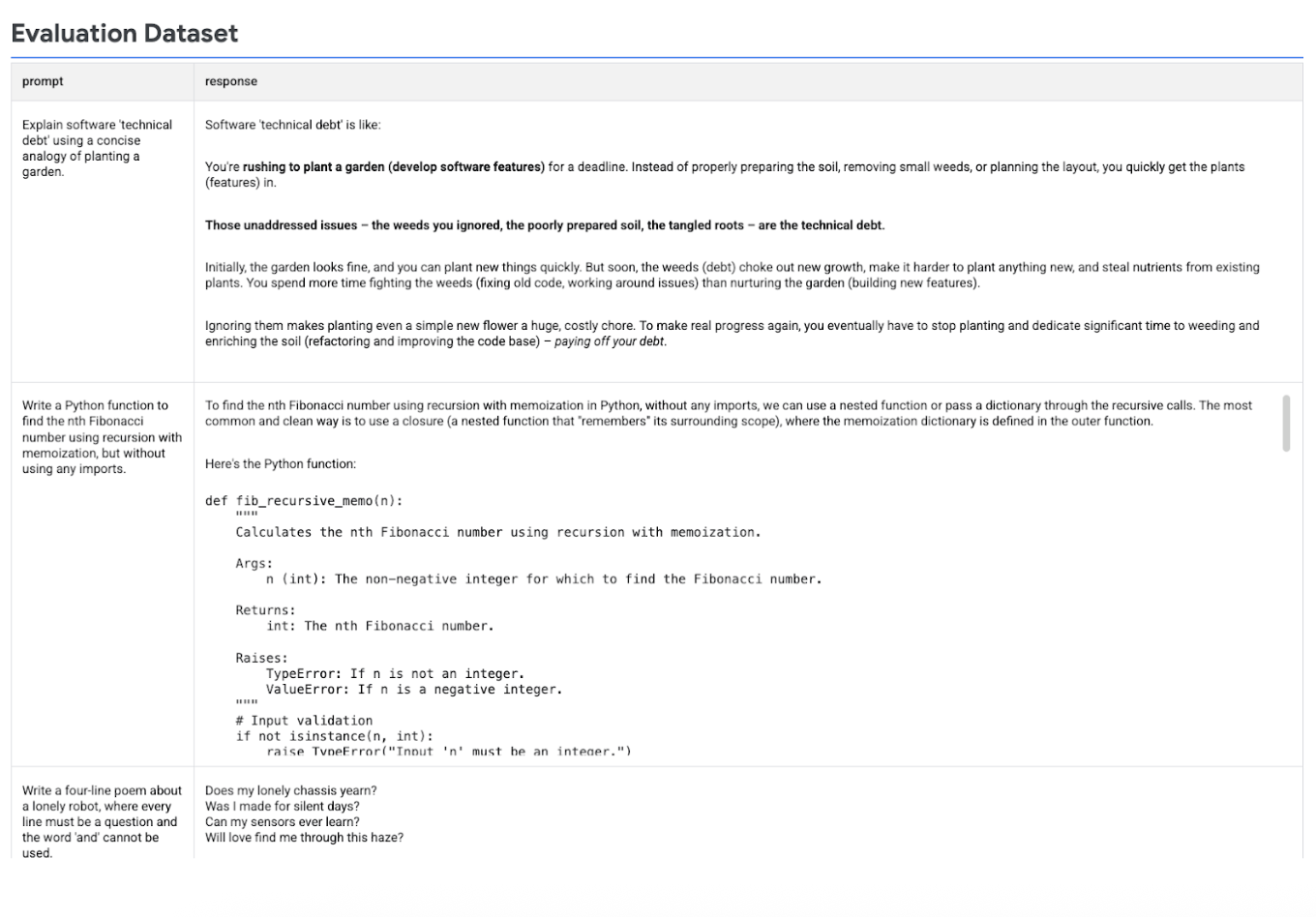
בתמונה הבאה מוצג מערך הנתונים של ההערכה עם ההנחיות והתשובות התואמות שנוצרו:
הרצת ההערכה
מריצים את evaluate() כדי להעריך את התשובות של המודל:
הערכת תשובות המודל באמצעות
GENERAL_QUALITYמדד ברירת המחדל של קריטריון הערכה דינמי:eval_result = client.evals.evaluate(dataset=eval_dataset)הדמיה של תוצאות ההערכה על ידי קריאה ל-
.show()באובייקטEvaluationResultכדי להציג מדדי סיכום ותוצאות מפורטות:eval_result.show()
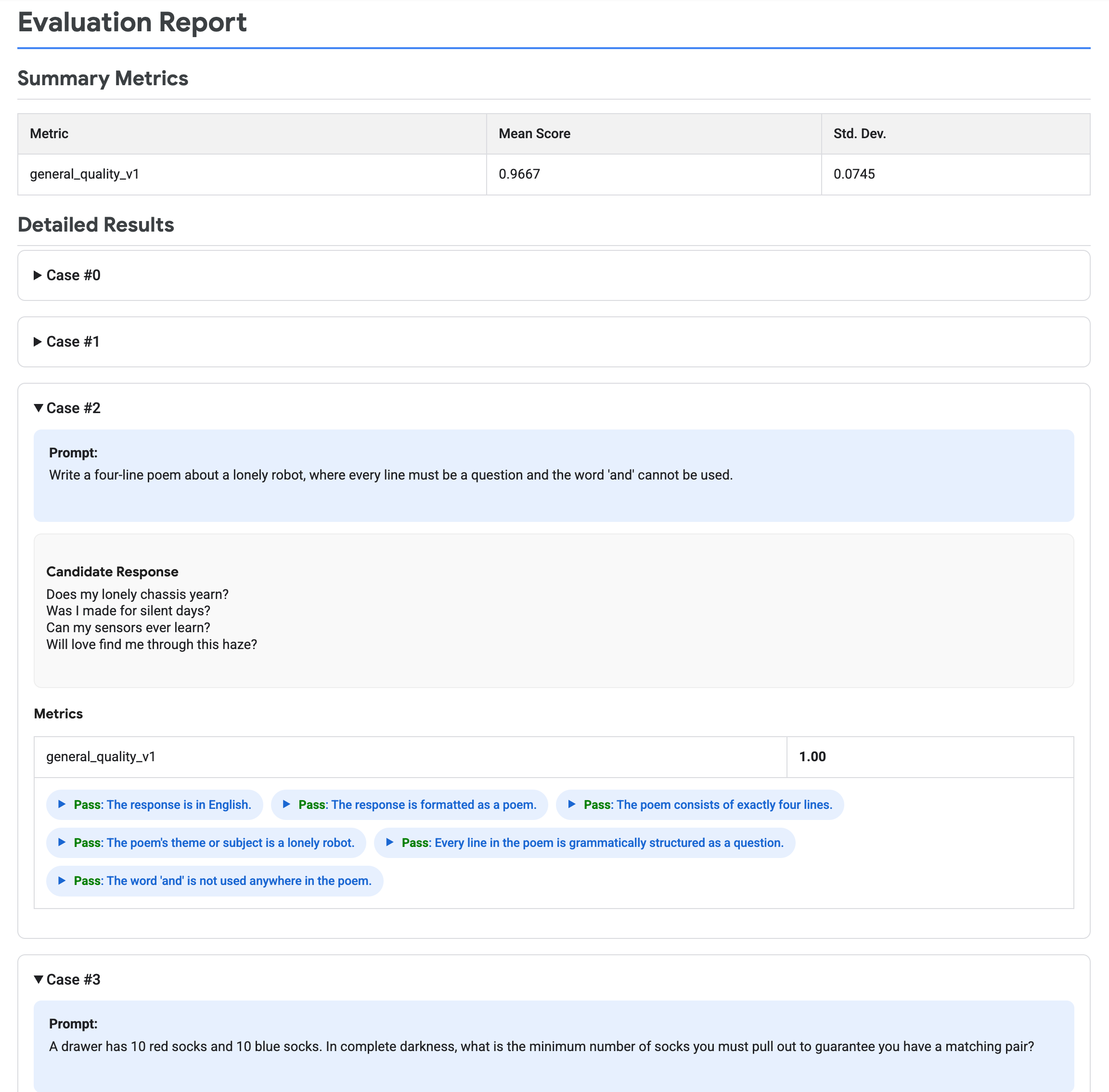
בתמונה הבאה מוצג דוח הערכה, שבו מופיעים מדדי סיכום ותוצאות מפורטות לכל צמד של הנחיה ותגובה.
הסרת המשאבים
במהלך ההדרכה הזו לא נוצרים משאבים של Gemini Enterprise Agent Platform.