
評估及疊代 AutoML 圖片分類模型

本頁面說明如何評估 AutoML Image 圖片分類模型,以便疊代模型。

Gemini Enterprise Agent Platform 提供模型評估指標,協助您判斷模型效能,例如精確度和召回率指標。Agent Platform 會使用測試集計算評估指標。

如何使用模型評估指標

模型評估指標會透過量化方式,評估模型在測試集的效能。如何解讀及使用這些指標,取決於您的業務需求,以及模型訓練要解決的問題。舉例來說,您對偽陽性的容忍度可能低於偽陰性,反之亦然。這類問題會影響您要著重的指標。

如要進一步瞭解如何疊代模型來提升效能,請參閱「疊代模型」。

Agent Platform 傳回的評估指標

Agent Platform 會傳回多項評估指標,例如精確度、喚回度和可信度門檻。Agent Platform 傳回的指標取決於模型目標。舉例來說,Agent Platform 為圖像分類模型和圖像物件偵測模型提供的評估指標就不同。

結構定義檔案可從 Cloud Storage 位置下載,用於決定 Agent Platform 為各項目標提供的評估指標。下列分頁提供結構定義檔案的連結,並說明各模型目標的評估指標。

您可以透過下列 Cloud Storage 位置查看及下載結構定義檔案:
gs://google-cloud-aiplatform/schema/modelevaluation/

  • AuPRC:精確度與喚回度 (PR) 曲線下的面積,也稱為平均精確度。這個值的範圍介於 0 到 1 之間,值越大代表模型品質越高。
  • 對數損失:模型推論與目標值之間的交叉熵。範圍從零到無限大,值越低代表模型品質越高。
  • 可信度門檻:決定要傳回哪些推論的可信度分數。模型會傳回等於或高於這個值的推論。可信度門檻越高,精確度就越高,但召回率會下降。Agent Platform 會傳回不同門檻值的信心指標,顯示門檻對精確度和召回率的影響。
  • 召回率:模型正確預測出這個類別的推論比例。也稱為真陽率。
  • 精確度:模型產生的分類推論中,正確推論所占的比例。
  • 混淆矩陣:混淆矩陣會顯示模型正確預測結果的頻率。對於預測錯誤的結果,矩陣會顯示模型預測的結果。混淆矩陣可協助您瞭解模型在哪些地方「混淆」了兩個結果。

取得評估指標

您可以取得模型的匯總評估指標,以及特定目標、類別或標籤的評估指標。特定類別或標籤的評估指標也稱為「評估切片」。以下內容說明如何使用 Google Cloud 控制台或 API,取得匯總評估指標和評估切片。

Google Cloud 控制台

  1. 前往 Google Cloud 控制台「Agent Platform」部分的「Models」(模型) 頁面。

    前往「Models」(模型) 頁面

  2. 在「Region」(區域) 下拉式選單中,選取模型所在的區域。

  3. 在模型清單中點選模型,開啟模型的「Evaluate」(評估) 分頁。

    在「Evaluate」(評估) 分頁中,您可以查看模型的匯總評估指標,例如「Average precision」(平均精確度) 和「Recall」(喚回度)。

    如果模型目標有評估切片,控制台會顯示標籤清單。您可以點選標籤,查看該標籤的評估指標,如下例所示:
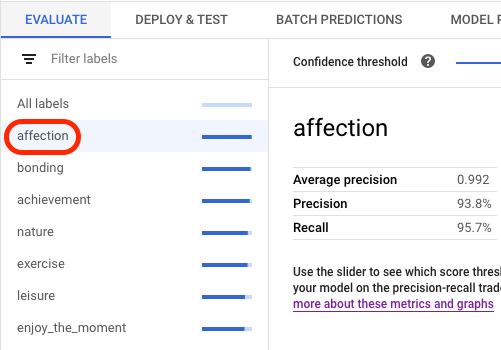
    在控制台中選取標籤

    (預先發布版) 針對每個標籤,您可以查看分組為真陽性、偽陽性和偽陰性的預測圖片。每張圖片都有 L2 平方距離指標,用於衡量圖片與訓練圖片的相似程度。標有「離群值」徽章的圖片與所有訓練圖片之間的差距相當大。如要提升模型效能,建議您新增更多與離群值相似的訓練圖片。

API

無論資料類型和目標為何,取得評估指標的 API 要求都相同,但輸出內容不同。以下範例顯示相同要求,但回應不同。

取得匯總模型評估指標

匯總模型評估指標提供模型整體的相關資訊。如要查看特定切片的資訊,請列出模型評估切片。

如要查看匯總模型評估指標,請使用 projects.locations.models.evaluations.get 方法。

Agent Platform 會傳回一組信賴度指標。每個元素都會顯示不同 confidenceThreshold 值的評估指標 (從 0 開始,最高為 1)。查看不同的門檻值,即可瞭解門檻對精確度和喚回度等其他指標的影響。

選取與您語言或環境對應的分頁:

REST

使用任何要求資料之前,請先修改下列項目的值:

  • LOCATION:模型儲存區域。
  • PROJECT:您的專案 ID。。
  • MODEL_ID:模型資源的 ID。
  • PROJECT_NUMBER:系統自動產生的專案編號。
  • EVALUATION_ID:模型評估 ID (顯示在回覆中)。

HTTP 方法和網址:

GET https://LOCATION-aiplatform.googleapis.com/v1/projects/PROJECT/locations/LOCATION/models/MODEL_ID/evaluations

如要傳送要求,請選擇以下其中一個選項:

curl

執行下列指令:

curl -X GET \
-H "Authorization: Bearer $(gcloud auth print-access-token)" \
"https://LOCATION-aiplatform.googleapis.com/v1/projects/PROJECT/locations/LOCATION/models/MODEL_ID/evaluations"

PowerShell

執行下列指令:

$cred = gcloud auth print-access-token
$headers = @{ "Authorization" = "Bearer $cred" }

Invoke-WebRequest `
-Method GET `
-Headers $headers `
-Uri "https://LOCATION-aiplatform.googleapis.com/v1/projects/PROJECT/locations/LOCATION/models/MODEL_ID/evaluations" | Select-Object -Expand Content

您應該會收到如下的 JSON 回覆:

Java

在試用這個範例之前,請先按照「使用用戶端程式庫的 Agent Platform 快速入門導覽課程」中的 Java 設定說明操作。

如要向 Agent Platform 進行驗證,請設定應用程式預設憑證。詳情請參閱「為本機開發環境設定驗證機制」。


import com.google.cloud.aiplatform.v1.ModelEvaluation;
import com.google.cloud.aiplatform.v1.ModelEvaluationName;
import com.google.cloud.aiplatform.v1.ModelServiceClient;
import com.google.cloud.aiplatform.v1.ModelServiceSettings;
import java.io.IOException;

public class GetModelEvaluationImageClassificationSample {

  public static void main(String[] args) throws IOException {
    // TODO(developer): Replace these variables before running the sample.
    // To obtain evaluationId run the code block below after setting modelServiceSettings.
    //
    // try (ModelServiceClient modelServiceClient = ModelServiceClient.create(modelServiceSettings))
    // {
    //   String location = "us-central1";
    //   ModelName modelFullId = ModelName.of(project, location, modelId);
    //   ListModelEvaluationsRequest modelEvaluationsrequest =
    //   ListModelEvaluationsRequest.newBuilder().setParent(modelFullId.toString()).build();
    //   for (ModelEvaluation modelEvaluation :
    //     modelServiceClient.listModelEvaluations(modelEvaluationsrequest).iterateAll()) {
    //       System.out.format("Model Evaluation Name: %s%n", modelEvaluation.getName());
    //   }
    // }
    String project = "YOUR_PROJECT_ID";
    String modelId = "YOUR_MODEL_ID";
    String evaluationId = "YOUR_EVALUATION_ID";
    getModelEvaluationImageClassificationSample(project, modelId, evaluationId);
  }

  static void getModelEvaluationImageClassificationSample(
      String project, String modelId, String evaluationId) throws IOException {
    ModelServiceSettings modelServiceSettings =
        ModelServiceSettings.newBuilder()
            .setEndpoint("us-central1-aiplatform.googleapis.com:443")
            .build();

    // Initialize client that will be used to send requests. This client only needs to be created
    // once, and can be reused for multiple requests. After completing all of your requests, call
    // the "close" method on the client to safely clean up any remaining background resources.
    try (ModelServiceClient modelServiceClient = ModelServiceClient.create(modelServiceSettings)) {
      String location = "us-central1";
      ModelEvaluationName modelEvaluationName =
          ModelEvaluationName.of(project, location, modelId, evaluationId);

      ModelEvaluation modelEvaluation = modelServiceClient.getModelEvaluation(modelEvaluationName);

      System.out.println("Get Model Evaluation Image Classification Response");
      System.out.format("Model Name: %s\n", modelEvaluation.getName());
      System.out.format("Metrics Schema Uri: %s\n", modelEvaluation.getMetricsSchemaUri());
      System.out.format("Metrics: %s\n", modelEvaluation.getMetrics());
      System.out.format("Create Time: %s\n", modelEvaluation.getCreateTime());
      System.out.format("Slice Dimensions: %s\n", modelEvaluation.getSliceDimensionsList());
    }
  }
}

Node.js

在試用這個範例之前,請先按照「使用用戶端程式庫的 Agent Platform 快速入門導覽課程」中的 Node.js 設定說明操作。

如要向 Agent Platform 進行驗證,請設定應用程式預設憑證。詳情請參閱「為本機開發環境設定驗證機制」。

/**
 * TODO(developer): Uncomment these variables before running the sample
 * (not necessary if passing values as arguments). To obtain evaluationId,
 * instantiate the client and run the following the commands.
 */
// const parentName = `projects/${project}/locations/${location}/models/${modelId}`;
// const evalRequest = {
//   parent: parentName
// };
// const [evalResponse] = await modelServiceClient.listModelEvaluations(evalRequest);
// console.log(evalResponse);

// const modelId = 'YOUR_MODEL_ID';
// const evaluationId = 'YOUR_EVALUATION_ID';
// const project = 'YOUR_PROJECT_ID';
// const location = 'YOUR_PROJECT_LOCATION';

// Imports the Google Cloud Model Service Client library
const {ModelServiceClient} = require('@google-cloud/aiplatform');

// Specifies the location of the api endpoint
const clientOptions = {
  apiEndpoint: 'us-central1-aiplatform.googleapis.com',
};

// Instantiates a client
const modelServiceClient = new ModelServiceClient(clientOptions);

async function getModelEvaluationImageClassification() {
  // Configure the name resources
  const name = `projects/${project}/locations/${location}/models/${modelId}/evaluations/${evaluationId}`;
  const request = {
    name,
  };

  // Create get model evaluation request
  const [response] = await modelServiceClient.getModelEvaluation(request);

  console.log('Get model evaluation image classification response');
  console.log(`\tName : ${response.name}`);
  console.log(`\tMetrics schema uri : ${response.metricsSchemaUri}`);
  console.log(`\tMetrics : ${JSON.stringify(response.metrics)}`);
  console.log(`\tCreate time : ${JSON.stringify(response.createTime)}`);
  console.log(`\tSlice dimensions : ${response.sliceDimensions}`);

  const modelExplanation = response.modelExplanation;
  if (modelExplanation === null) {
    console.log(`\tModel explanation: ${JSON.stringify(modelExplanation)}`);
  } else {
    const meanAttributions = modelExplanation.meanAttributions;
    for (const meanAttribution of meanAttributions) {
      console.log('\t\tMean attribution');
      console.log(
        `\t\t\tBaseline output value : \
           ${meanAttribution.baselineOutputValue}`
      );
      console.log(
        `\t\t\tInstance output value : \
           ${meanAttribution.instanceOutputValue}`
      );
      console.log(
        `\t\t\tFeature attributions : \
           ${JSON.stringify(meanAttribution.featureAttributions)}`
      );
      console.log(`\t\t\tOutput index : ${meanAttribution.outputIndex}`);
      console.log(
        `\t\t\tOutput display name : \
           ${meanAttribution.outputDisplayName}`
      );
      console.log(
        `\t\t\tApproximation error : \
           ${meanAttribution.approximationError}`
      );
    }
  }
}
getModelEvaluationImageClassification();

Python

如要瞭解如何安裝或更新 Vertex AI SDK for Python,請參閱「安裝 Vertex AI SDK for Python」。詳情請參閱 Python API 參考文件。

from google.cloud import aiplatform


def get_model_evaluation_image_classification_sample(
    project: str,
    model_id: str,
    evaluation_id: str,
    location: str = "us-central1",
    api_endpoint: str = "us-central1-aiplatform.googleapis.com",
):
    """
    To obtain evaluation_id run the following commands where LOCATION
    is the region where the model is stored, PROJECT is the project ID,
    and MODEL_ID is the ID of your model.

    model_client = aiplatform.gapic.ModelServiceClient(
        client_options={
            'api_endpoint':'LOCATION-aiplatform.googleapis.com'
            }
        )
    evaluations = model_client.list_model_evaluations(parent='projects/PROJECT/locations/LOCATION/models/MODEL_ID')
    print("evaluations:", evaluations)
    """
    # The AI Platform services require regional API endpoints.
    client_options = {"api_endpoint": api_endpoint}
    # Initialize client that will be used to create and send requests.
    # This client only needs to be created once, and can be reused for multiple requests.
    client = aiplatform.gapic.ModelServiceClient(client_options=client_options)
    name = client.model_evaluation_path(
        project=project, location=location, model=model_id, evaluation=evaluation_id
    )
    response = client.get_model_evaluation(name=name)
    print("response:", response)

列出所有評估配量

projects.locations.models.evaluations.slices.list 方法會列出模型的所有評估切片。您必須取得模型的評估 ID,查看匯總評估指標時即可取得。

您可以使用模型評估切片,判斷模型在特定標籤上的成效。value 欄位會指出指標所屬的標籤。

Agent Platform 會傳回一組信賴度指標。每個元素都會顯示不同 confidenceThreshold 值的評估指標 (從 0 開始,最高為 1)。查看不同的門檻值,即可瞭解門檻對精確度和喚回度等其他指標的影響。

REST

使用任何要求資料之前,請先修改下列項目的值:

  • LOCATION:模型所在區域。例如:us-central1。
  • PROJECT:
  • MODEL_ID:模型的 ID。
  • EVALUATION_ID:模型評估 ID,其中包含要列出的評估切片。

HTTP 方法和網址:

GET https://LOCATION-aiplatform.googleapis.com/v1/projects/PROJECT/locations/LOCATION/models/MODEL_ID/evaluations/EVALUATION_ID/slices

如要傳送要求,請選擇以下其中一個選項:

curl

執行下列指令:

curl -X GET \
-H "Authorization: Bearer $(gcloud auth print-access-token)" \
"https://LOCATION-aiplatform.googleapis.com/v1/projects/PROJECT/locations/LOCATION/models/MODEL_ID/evaluations/EVALUATION_ID/slices"

PowerShell

執行下列指令:

$cred = gcloud auth print-access-token
$headers = @{ "Authorization" = "Bearer $cred" }

Invoke-WebRequest `
-Method GET `
-Headers $headers `
-Uri "https://LOCATION-aiplatform.googleapis.com/v1/projects/PROJECT/locations/LOCATION/models/MODEL_ID/evaluations/EVALUATION_ID/slices" | Select-Object -Expand Content

您應該會收到如下的 JSON 回覆:

Java

在試用這個範例之前,請先按照「使用用戶端程式庫的 Agent Platform 快速入門導覽課程」中的 Java 設定說明操作。

如要向 Agent Platform 進行驗證,請設定應用程式預設憑證。詳情請參閱「為本機開發環境設定驗證機制」。


import com.google.cloud.aiplatform.v1.ModelEvaluationName;
import com.google.cloud.aiplatform.v1.ModelEvaluationSlice;
import com.google.cloud.aiplatform.v1.ModelEvaluationSlice.Slice;
import com.google.cloud.aiplatform.v1.ModelServiceClient;
import com.google.cloud.aiplatform.v1.ModelServiceSettings;
import java.io.IOException;

public class ListModelEvaluationSliceSample {

  public static void main(String[] args) throws IOException {
    // TODO(developer): Replace these variables before running the sample.
    // To obtain evaluationId run the code block below after setting modelServiceSettings.
    //
    // try (ModelServiceClient modelServiceClient = ModelServiceClient.create(modelServiceSettings))
    // {
    //   String location = "us-central1";
    //   ModelName modelFullId = ModelName.of(project, location, modelId);
    //   ListModelEvaluationsRequest modelEvaluationsrequest =
    //   ListModelEvaluationsRequest.newBuilder().setParent(modelFullId.toString()).build();
    //   for (ModelEvaluation modelEvaluation :
    //     modelServiceClient.listModelEvaluations(modelEvaluationsrequest).iterateAll()) {
    //       System.out.format("Model Evaluation Name: %s%n", modelEvaluation.getName());
    //   }
    // }
    String project = "YOUR_PROJECT_ID";
    String modelId = "YOUR_MODEL_ID";
    String evaluationId = "YOUR_EVALUATION_ID";
    listModelEvaluationSliceSample(project, modelId, evaluationId);
  }

  static void listModelEvaluationSliceSample(String project, String modelId, String evaluationId)
      throws IOException {
    ModelServiceSettings modelServiceSettings =
        ModelServiceSettings.newBuilder()
            .setEndpoint("us-central1-aiplatform.googleapis.com:443")
            .build();

    // Initialize client that will be used to send requests. This client only needs to be created
    // once, and can be reused for multiple requests. After completing all of your requests, call
    // the "close" method on the client to safely clean up any remaining background resources.
    try (ModelServiceClient modelServiceClient = ModelServiceClient.create(modelServiceSettings)) {
      String location = "us-central1";
      ModelEvaluationName modelEvaluationName =
          ModelEvaluationName.of(project, location, modelId, evaluationId);

      for (ModelEvaluationSlice modelEvaluationSlice :
          modelServiceClient.listModelEvaluationSlices(modelEvaluationName).iterateAll()) {
        System.out.format("Model Evaluation Slice Name: %s\n", modelEvaluationSlice.getName());
        System.out.format("Metrics Schema Uri: %s\n", modelEvaluationSlice.getMetricsSchemaUri());
        System.out.format("Metrics: %s\n", modelEvaluationSlice.getMetrics());
        System.out.format("Create Time: %s\n", modelEvaluationSlice.getCreateTime());

        Slice slice = modelEvaluationSlice.getSlice();
        System.out.format("Slice Dimensions: %s\n", slice.getDimension());
        System.out.format("Slice Value: %s\n\n", slice.getValue());
      }
    }
  }
}

Node.js

在試用這個範例之前,請先按照「使用用戶端程式庫的 Agent Platform 快速入門導覽課程」中的 Node.js 設定說明操作。

如要向 Agent Platform 進行驗證,請設定應用程式預設憑證。詳情請參閱「為本機開發環境設定驗證機制」。

/**
 * TODO(developer): Uncomment these variables before running the sample
 * (not necessary if passing values as arguments). To obtain evaluationId,
 * instantiate the client and run the following the commands.
 */
// const parentName = `projects/${project}/locations/${location}/models/${modelId}`;
// const evalRequest = {
//   parent: parentName
// };
// const [evalResponse] = await modelServiceClient.listModelEvaluations(evalRequest);
// console.log(evalResponse);

// const modelId = 'YOUR_MODEL_ID';
// const evaluationId = 'YOUR_EVALUATION_ID';
// const project = 'YOUR_PROJECT_ID';
// const location = 'YOUR_PROJECT_LOCATION';

// Imports the Google Cloud Model Service Client library
const {ModelServiceClient} = require('@google-cloud/aiplatform');

// Specifies the location of the api endpoint
const clientOptions = {
  apiEndpoint: 'us-central1-aiplatform.googleapis.com',
};

// Instantiates a client
const modelServiceClient = new ModelServiceClient(clientOptions);

async function listModelEvaluationSlices() {
  // Configure the parent resources
  const parent = `projects/${project}/locations/${location}/models/${modelId}/evaluations/${evaluationId}`;
  const request = {
    parent,
  };

  // Get and print out a list of all the evaluation slices for this resource
  const [response] =
    await modelServiceClient.listModelEvaluationSlices(request);
  console.log('List model evaluation response', response);
  console.log(response);
}
listModelEvaluationSlices();

Python

如要瞭解如何安裝或更新 Vertex AI SDK for Python,請參閱「安裝 Vertex AI SDK for Python」。詳情請參閱 Python API 參考文件。

from google.cloud import aiplatform


def list_model_evaluation_slices_sample(
    project: str,
    model_id: str,
    evaluation_id: str,
    location: str = "us-central1",
    api_endpoint: str = "us-central1-aiplatform.googleapis.com",
):
    """
    To obtain evaluation_id run the following commands where LOCATION
    is the region where the model is stored, PROJECT is the project ID,
    and MODEL_ID is the ID of your model.

    model_client = aiplatform.gapic.ModelServiceClient(
        client_options={
            'api_endpoint':'LOCATION-aiplatform.googleapis.com'
            }
        )
    evaluations = model_client.list_model_evaluations(parent='projects/PROJECT/locations/LOCATION/models/MODEL_ID')
    print("evaluations:", evaluations)
    """
    # The AI Platform services require regional API endpoints.
    client_options = {"api_endpoint": api_endpoint}
    # Initialize client that will be used to create and send requests.
    # This client only needs to be created once, and can be reused for multiple requests.
    client = aiplatform.gapic.ModelServiceClient(client_options=client_options)
    parent = client.model_evaluation_path(
        project=project, location=location, model=model_id, evaluation=evaluation_id
    )
    response = client.list_model_evaluation_slices(parent=parent)
    for model_evaluation_slice in response:
        print("model_evaluation_slice:", model_evaluation_slice)

取得單一配量的指標

如要查看單一配量的評估指標,請使用 projects.locations.models.evaluations.slices.get 方法。您必須擁有配量 ID,系統會在您列出所有配量時提供。以下範例適用於所有資料類型和目標。

REST

使用任何要求資料之前,請先修改下列項目的值:

  • LOCATION:模型所在區域。例如 us-central1。
  • PROJECT:
  • MODEL_ID:模型的 ID。
  • EVALUATION_ID:模型評估 ID,其中包含要擷取的評估切片。
  • SLICE_ID:要取得的評估切片 ID。
  • PROJECT_NUMBER:系統自動產生的專案編號。
  • EVALUATION_METRIC_SCHEMA_FILE_NAME:結構定義檔案的名稱,用於定義要傳回的評估指標,例如 classification_metrics_1.0.0。

HTTP 方法和網址:

GET https://LOCATION-aiplatform.googleapis.com/v1/projects/PROJECT/locations/LOCATION/models/MODEL_ID/evaluations/EVALUATION_ID/slices/SLICE_ID

如要傳送要求,請選擇以下其中一個選項:

curl

執行下列指令:

curl -X GET \
-H "Authorization: Bearer $(gcloud auth print-access-token)" \
"https://LOCATION-aiplatform.googleapis.com/v1/projects/PROJECT/locations/LOCATION/models/MODEL_ID/evaluations/EVALUATION_ID/slices/SLICE_ID"

PowerShell

執行下列指令:

$cred = gcloud auth print-access-token
$headers = @{ "Authorization" = "Bearer $cred" }

Invoke-WebRequest `
-Method GET `
-Headers $headers `
-Uri "https://LOCATION-aiplatform.googleapis.com/v1/projects/PROJECT/locations/LOCATION/models/MODEL_ID/evaluations/EVALUATION_ID/slices/SLICE_ID" | Select-Object -Expand Content

您應該會收到如下的 JSON 回覆:

Java

在試用這個範例之前,請先按照「使用用戶端程式庫的 Agent Platform 快速入門導覽課程」中的 Java 設定說明操作。

如要向 Agent Platform 進行驗證,請設定應用程式預設憑證。詳情請參閱「為本機開發環境設定驗證機制」。


import com.google.cloud.aiplatform.v1.ModelEvaluationSlice;
import com.google.cloud.aiplatform.v1.ModelEvaluationSlice.Slice;
import com.google.cloud.aiplatform.v1.ModelEvaluationSliceName;
import com.google.cloud.aiplatform.v1.ModelServiceClient;
import com.google.cloud.aiplatform.v1.ModelServiceSettings;
import java.io.IOException;

public class GetModelEvaluationSliceSample {

  public static void main(String[] args) throws IOException {
    // TODO(developer): Replace these variables before running the sample.
    // To obtain evaluationId run the code block below after setting modelServiceSettings.
    //
    // try (ModelServiceClient modelServiceClient = ModelServiceClient.create(modelServiceSettings))
    // {
    //   String location = "us-central1";
    //   ModelName modelFullId = ModelName.of(project, location, modelId);
    //   ListModelEvaluationsRequest modelEvaluationsrequest =
    //   ListModelEvaluationsRequest.newBuilder().setParent(modelFullId.toString()).build();
    //   for (ModelEvaluation modelEvaluation :
    //     modelServiceClient.listModelEvaluations(modelEvaluationsrequest).iterateAll()) {
    //       System.out.format("Model Evaluation Name: %s%n", modelEvaluation.getName());
    //   }
    // }
    String project = "YOUR_PROJECT_ID";
    String modelId = "YOUR_MODEL_ID";
    String evaluationId = "YOUR_EVALUATION_ID";
    String sliceId = "YOUR_SLICE_ID";
    getModelEvaluationSliceSample(project, modelId, evaluationId, sliceId);
  }

  static void getModelEvaluationSliceSample(
      String project, String modelId, String evaluationId, String sliceId) throws IOException {
    ModelServiceSettings modelServiceSettings =
        ModelServiceSettings.newBuilder()
            .setEndpoint("us-central1-aiplatform.googleapis.com:443")
            .build();

    // Initialize client that will be used to send requests. This client only needs to be created
    // once, and can be reused for multiple requests. After completing all of your requests, call
    // the "close" method on the client to safely clean up any remaining background resources.
    try (ModelServiceClient modelServiceClient = ModelServiceClient.create(modelServiceSettings)) {
      String location = "us-central1";
      ModelEvaluationSliceName modelEvaluationSliceName =
          ModelEvaluationSliceName.of(project, location, modelId, evaluationId, sliceId);

      ModelEvaluationSlice modelEvaluationSlice =
          modelServiceClient.getModelEvaluationSlice(modelEvaluationSliceName);

      System.out.println("Get Model Evaluation Slice Response");
      System.out.format("Model Evaluation Slice Name: %s\n", modelEvaluationSlice.getName());
      System.out.format("Metrics Schema Uri: %s\n", modelEvaluationSlice.getMetricsSchemaUri());
      System.out.format("Metrics: %s\n", modelEvaluationSlice.getMetrics());
      System.out.format("Create Time: %s\n", modelEvaluationSlice.getCreateTime());

      Slice slice = modelEvaluationSlice.getSlice();
      System.out.format("Slice Dimensions: %s\n", slice.getDimension());
      System.out.format("Slice Value: %s\n", slice.getValue());
    }
  }
}

Node.js

在試用這個範例之前,請先按照「使用用戶端程式庫的 Agent Platform 快速入門導覽課程」中的 Node.js 設定說明操作。

如要向 Agent Platform 進行驗證,請設定應用程式預設憑證。詳情請參閱「為本機開發環境設定驗證機制」。

/**
 * TODO(developer): Uncomment these variables before running the sample
 * (not necessary if passing values as arguments). To obtain evaluationId,
 * instantiate the client and run the following the commands.
 */
// const parentName = `projects/${project}/locations/${location}/models/${modelId}`;
// const evalRequest = {
//   parent: parentName
// };
// const [evalResponse] = await modelServiceClient.listModelEvaluations(evalRequest);
// console.log(evalResponse);

// const modelId = 'YOUR_MODEL_ID';
// const evaluationId = 'YOUR_EVALUATION_ID';
// const sliceId = 'YOUR_SLICE_ID';
// const project = 'YOUR_PROJECT_ID';
// const location = 'YOUR_PROJECT_LOCATION';

// Imports the Google Cloud Model Service client library
const {ModelServiceClient} = require('@google-cloud/aiplatform');
// Specifies the location of the api endpoint
const clientOptions = {
  apiEndpoint: 'us-central1-aiplatform.googleapis.com',
};
// Specifies the location of the api endpoint
const modelServiceClient = new ModelServiceClient(clientOptions);

async function getModelEvaluationSlice() {
  // Configure the parent resource
  const name = `projects/${project}/locations/${location}/models/${modelId}/evaluations/${evaluationId}/slices/${sliceId}`;
  const request = {
    name,
  };

  // Get and print out a list of all the endpoints for this resource
  const [response] =
    await modelServiceClient.getModelEvaluationSlice(request);

  console.log('Get model evaluation slice');
  console.log(`\tName : ${response.name}`);
  console.log(`\tMetrics_Schema_Uri : ${response.metricsSchemaUri}`);
  console.log(`\tMetrics : ${JSON.stringify(response.metrics)}`);
  console.log(`\tCreate time : ${JSON.stringify(response.createTime)}`);

  console.log('Slice');
  const slice = response.slice;
  console.log(`\tDimension :${slice.dimension}`);
  console.log(`\tValue :${slice.value}`);
}
getModelEvaluationSlice();

Python

如要瞭解如何安裝或更新 Vertex AI SDK for Python,請參閱「安裝 Vertex AI SDK for Python」。詳情請參閱 Python API 參考文件。

from google.cloud import aiplatform


def get_model_evaluation_slice_sample(
    project: str,
    model_id: str,
    evaluation_id: str,
    slice_id: str,
    location: str = "us-central1",
    api_endpoint: str = "us-central1-aiplatform.googleapis.com",
):
    """
    To obtain evaluation_id run the following commands where LOCATION
    is the region where the model is stored, PROJECT is the project ID,
    and MODEL_ID is the ID of your model.

    model_client = aiplatform.gapic.ModelServiceClient(
        client_options={
            'api_endpoint':'LOCATION-aiplatform.googleapis.com'
            }
        )
    evaluations = model_client.list_model_evaluations(parent='projects/PROJECT/locations/LOCATION/models/MODEL_ID')
    print("evaluations:", evaluations)
    """
    # The AI Platform services require regional API endpoints.
    client_options = {"api_endpoint": api_endpoint}
    # Initialize client that will be used to create and send requests.
    # This client only needs to be created once, and can be reused for multiple requests.
    client = aiplatform.gapic.ModelServiceClient(client_options=client_options)
    name = client.model_evaluation_slice_path(
        project=project,
        location=location,
        model=model_id,
        evaluation=evaluation_id,
        slice=slice_id,
    )
    response = client.get_model_evaluation_slice(name=name)
    print("response:", response)

反覆訓練模型

如果模型不符合預期,您可以從模型評估指標著手,開始偵錯。舉例來說,如果精確度和喚回度分數偏低,可能代表模型需要更多訓練資料,或標籤不一致。精確度和喚回度完美,可能表示測試資料太容易預測,可能無法妥善一般化。

您可以疊代訓練資料並建立新模型。建立新模型後,您可以比較現有模型和新模型的評估指標。

以下建議有助於改善標示項目的模型,例如分類或偵測模型:

  • 建議在訓練資料中加入更多或更多元的範例。舉例來說,如果是圖像分類模型,您可以加入廣角圖像、解析度較高或較低的圖像,或不同視角的圖像。如需更多指引,請參閱「準備資料」。
  • 建議您移除樣本數不多的類別或標籤。如果樣本不足,模型就無法持續且準確地預測這些類別或標籤。
  • 機器無法解讀類別或標籤的名稱,也無法理解兩者之間的細微差異,例如「door」和「door_with_knob」。您必須提供資料,協助機器辨識這類細微差異。
  • 使用更多真陽性和真陰性範例擴充資料,尤其是接近決策邊界的範例,以減少模型混淆。
  • 指定自己的資料分割 (訓練、驗證和測試)。Agent Platform 會隨機將項目指派給各個組合。因此,訓練集和驗證集可能會分配到近似重複項目,導致過度配適,進而降低測試集的效能。如要進一步瞭解如何自行設定資料分割,請參閱「關於 AutoML 模型的資料分割」。
  • 如果模型的評估指標包含混淆矩陣,您可以查看模型是否混淆兩個標籤,其中模型預測特定標籤的次數明顯多於實際標籤。請檢查資料,確認樣本標籤正確無誤。
  • 如果訓練時間較短 (節點時數上限較低),可以延長訓練時間 (提高節點時數上限),取得品質較高的模型。