

With the Mobile SDKs, by default, calls are made using VoIP and require a data connection. When the mobile app detects that the data connectivity does not meet the configured performance threshold, CCAI Platform doesn't place a VoIP call. Instead, a fallback option to a PSTN call which does not require a data connection. This option allows for a seamless experience for the end-user, while still providing rich data within the CRM record.
Configuration
iOS/Android Developer: With Multiple Mobile Apps in use, the threshold for PSTN Callback calls will be configured from within the Admin Portal in Settings > Developer Settings > Edit Mobile App > Fallback phone number/threshold.
CCAI Platform portal: The configuration setting needs to be configured per-queue.
Routing
The PSTN fallback option will be presented after the end-user navigates the Mobile queues. When the end-user selects to make a call and the app determines it is in PSTN fallback mode, the PSTN call will be mapped to a pre-configured, corresponding destination menu in the IVR queue. Since IVR and Mobile menus are often not identical, each Mobile menu selection needs to be paired with a corresponding IVR menu to use for fallback.
PSTN fallback to IVR set up in the CCAI Platform portal uses a queue search that offers IVR menus. If multiple languages are used, only the IVR menu options for that language will be available.
Example: If the Mobile menu 'Existing Customer Help' is mapped to the IVR menu 'Customer' for PSTN fallback, and an end-user selects 'Existing Customer Help' when PSTN fallback is active, the call would automatically be directed to IVR queue menu 'Customer.'
If no PSTN fallback to IVR option is enabled and configured, the PSTN fallback call will be directed to the top of the IVR structure for that language.
If an IVR queue menu is mapped as an Mobile PSTN fallback, the queue cannot be deleted without removing this association
Rich data
The following data is passed to the CRM ticket for the IVR fallback call:
End-user's phone number
To gather the phone number data, the end-user is required to input their phone number
Example phone number gathering screen in Mobile:
Selected queue menu
- When the end-user makes a PSTN call, the system retrieves the queue name and custom data package using a phone number lookup
Custom data package (as configured by your mobile development team)
- The custom data package is mapped to the correct ticket based on the active call session with the phone number entered by the end-user in the app
CCAI Platform portal configuration
Go to Settings > Queue > Mobile.
Select a sub-queue (Top level queues won't have this setting available).
Navigate to the PSTN Fallback to IVR Menu section and click to toggle the setting to ON.
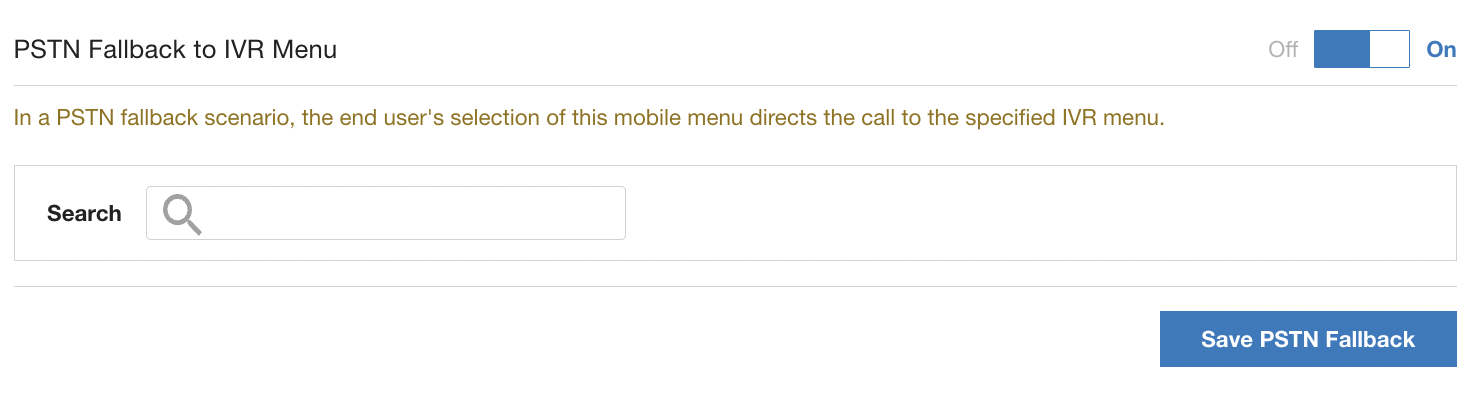
Use the search field to select from IVR queues to route a PSTN fallback call to.
Click Save PSTN Fallback to save.
Repeat this step for all Mobile sub queue menus for all languages used.