


O Gemini Robotics ER 2 pode escrever e executar código Python para manipular imagens e aplicar lógica antes de responder. Esta página aborda exemplos de execução de código: detecção de objetos com zoom e corte, leitura de instrumentos, medição de fluidos, leitura de placas de circuito e anotação de imagens.
Para ver o código executável completo, consulte o guia de robótica.
Nível de pensamento
É possível controlar o nível de raciocínio para trocar latência por precisão. Tarefas espaciais, como detecção de objetos, funcionam bem com um nível de pensamento baixo. Tarefas complexas, como contagem ou estimativa de peso, se beneficiam de uma resolução mais alta.
O exemplo a seguir define o nível de pensamento como alto para uma tarefa de contagem complexa:
Python
from google import genai
from google.genai import types

client = genai.Client(
    enterprise=True,
    project="your-project-id",
    location="global",
)

# Load your image
with open('scene.jpeg', 'rb') as f:
    image_bytes = f.read()

response = client.models.generate_content(
    model="gemini-robotics-er-2-preview",
    contents=[
        types.Part.from_bytes(
            data=image_bytes,
            mime_type='image/jpeg',
        ),
        "Identify and count all objects on the table."
    ],
    config = types.GenerateContentConfig(
        thinking_config=types.ThinkingConfig(
            # Use MINIMAL or LOW for faster spatial tasks.
            thinking_level=types.ThinkingLevel.HIGH
        ),
    )
)

print(response.text)
Consulte Raciocínio para mais detalhes.
Detecção de objetos (zoom e corte)
O exemplo a seguir demonstra como usar a execução de código para ampliar e cortar uma imagem para uma visualização mais clara ao detectar objetos e retornar caixas delimitadoras.
Python
from google import genai
from google.genai import types

client = genai.Client(
    enterprise=True,
    project="your-project-id",
    location="global",
)

# Load your image
with open('sorting.jpeg', 'rb') as f:
    image_bytes = f.read()

prompt = """
Return JSON in the format {label: val, y: val, x: val, y2: val, x2: val} for
the compostable objects in this scene. Please Zoom and crop the image for a
clearer view. Return an annotated image of the final result with the bounding
boxes drawn on it to the API caller as a part of your process.
"""

response = client.models.generate_content(
    model="gemini-robotics-er-2-preview",
    contents=[
        types.Part.from_bytes(
            data=image_bytes,
            mime_type='image/jpeg',
        ),
        prompt
    ],
    config = types.GenerateContentConfig(
        tools=[types.Tool(code_execution=types.ToolCodeExecution)],
    )
)

print(response.text)
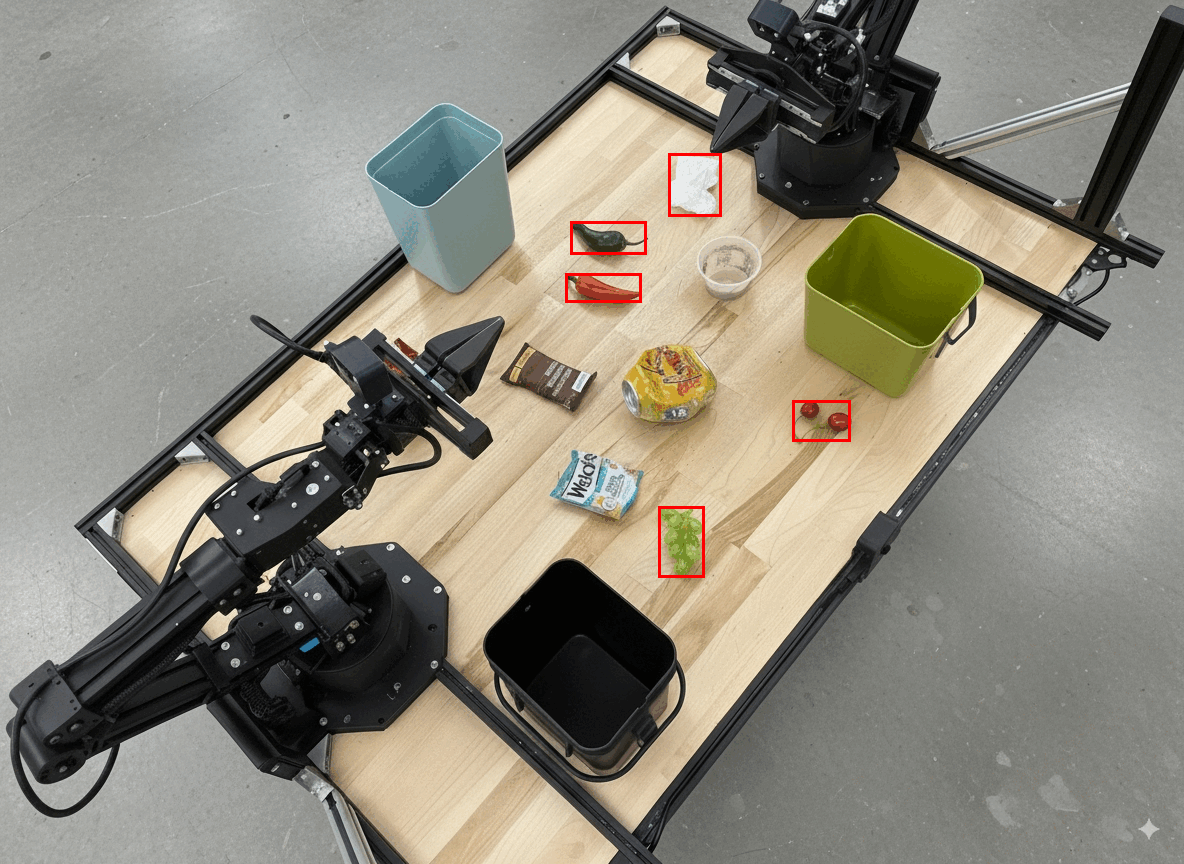
A saída do modelo seria semelhante a esta:
[
  {"label": "compostable", "y": 256, "x": 482, "y2": 295, "x2": 546},
  {"label": "compostable", "y": 317, "x": 478, "y2": 350, "x2": 542},
  {"label": "compostable", "y": 586, "x": 556, "y2": 668, "x2": 595},
  {"label": "compostable", "y": 463, "x": 669, "y2": 511, "x2": 718},
  {"label": "compostable", "y": 178, "x": 565, "y2": 250, "x2": 609}
]
Veja a seguir as caixas retornadas pelo modelo.
Ler um medidor analógico e aplicar lógica
O exemplo a seguir demonstra como usar o modelo para ler um medidor analógico e realizar cálculos de tempo. Ele usa uma instrução do sistema para aplicar uma saída JSON.
Python
from google import genai
from google.genai import types

client = genai.Client(
    enterprise=True,
    project="your-project-id",
    location="global",
)

with open('gauge.jpeg', 'rb') as f:
    image_bytes = f.read()

system_instruction = "Be precise. When JSON is requested, reply with ONLY that JSON (no preface, no code block)."

response = client.models.generate_content(
    model="gemini-robotics-er-2-preview",
    contents=[
        types.Part.from_bytes(
            data=image_bytes,
            mime_type='image/jpeg',
        ),
        """Read the current value from this gauge. Then, calculate how long
        it will take at the current rate for the value to reach maximum.
        Reply in JSON: {"current_value": val, "max_value": val,
        "time_to_max_minutes": val}"""
    ],
    config = types.GenerateContentConfig(
        system_instruction=system_instruction,
        tools=[types.Tool(code_execution=types.ToolCodeExecution)],
    )
)

print(response.text)
Medir o fluido em um recipiente
O exemplo a seguir demonstra como usar a execução de código para medir o nível de fluido em um recipiente.
Python
from google import genai
from google.genai import types

client = genai.Client(
    enterprise=True,
    project="your-project-id",
    location="global",
)

with open('fluid.jpeg', 'rb') as f:
    image_bytes = f.read()

system_instruction = "Be precise. When JSON is requested, reply with ONLY that JSON (no preface, no code block)."

response = client.models.generate_content(
    model="gemini-robotics-er-2-preview",
    contents=[
        types.Part.from_bytes(
            data=image_bytes,
            mime_type='image/jpeg',
        ),
        """Measure the amount of fluid in the container. Reply in JSON:
        {"fluid_level_ml": val, "container_capacity_ml": val,
        "percentage_full": val}"""
    ],
    config = types.GenerateContentConfig(
        system_instruction=system_instruction,
        tools=[types.Tool(code_execution=types.ToolCodeExecution)],
    )
)

print(response.text)
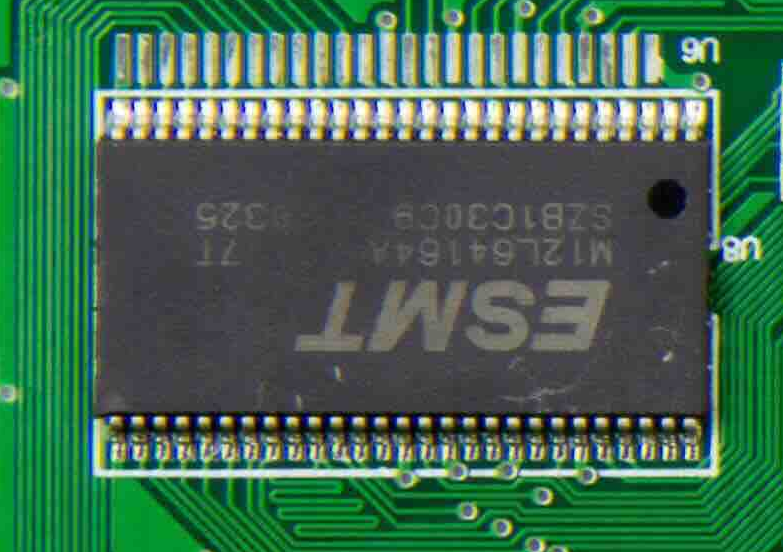
Ler marcações em uma placa de circuito
O exemplo a seguir demonstra como usar a execução de código para ler as marcações em uma placa de circuito.
Python
from google import genai
from google.genai import types

client = genai.Client(
    enterprise=True,
    project="your-project-id",
    location="global",
)

with open('circuit_board.jpeg', 'rb') as f:
    image_bytes = f.read()

system_instruction = "Be precise. When JSON is requested, reply with ONLY that JSON (no preface, no code block)."

response = client.models.generate_content(
    model="gemini-robotics-er-2-preview",
    contents=[
        types.Part.from_bytes(
            data=image_bytes,
            mime_type='image/jpeg',
        ),
        """Read all visible component labels and markings on this circuit
        board. Reply in JSON: {"components": [{"label": val,
        "location": [y, x]}]}"""
    ],
    config = types.GenerateContentConfig(
        system_instruction=system_instruction,
        tools=[types.Tool(code_execution=types.ToolCodeExecution)],
    )
)

print(response.text)
Anotação de imagem
O exemplo a seguir demonstra como usar a execução de código para anotar uma imagem (como desenhar setas para instruções de descarte) e retornar a imagem modificada.
Python
from google import genai
from google.genai import types

client = genai.Client(
    enterprise=True,
    project="your-project-id",
    location="global",
)

# Load your image
with open('sorting.jpeg', 'rb') as f:
    image_bytes = f.read()

prompt = """
Look at this image and return it as an annotated version using arrows of
different colors to represent which items should go in which bins for
disposal. You must return the final image to the API caller.
"""

response = client.models.generate_content(
    model="gemini-robotics-er-2-preview",
    contents=[
        types.Part.from_bytes(
            data=image_bytes,
            mime_type='image/jpeg',
        ),
        prompt
    ],
    config = types.GenerateContentConfig(
        tools=[types.Tool(code_execution=types.ToolCodeExecution)],
    )
)

print(response.text)
Veja a seguir um exemplo de entrada de imagem.
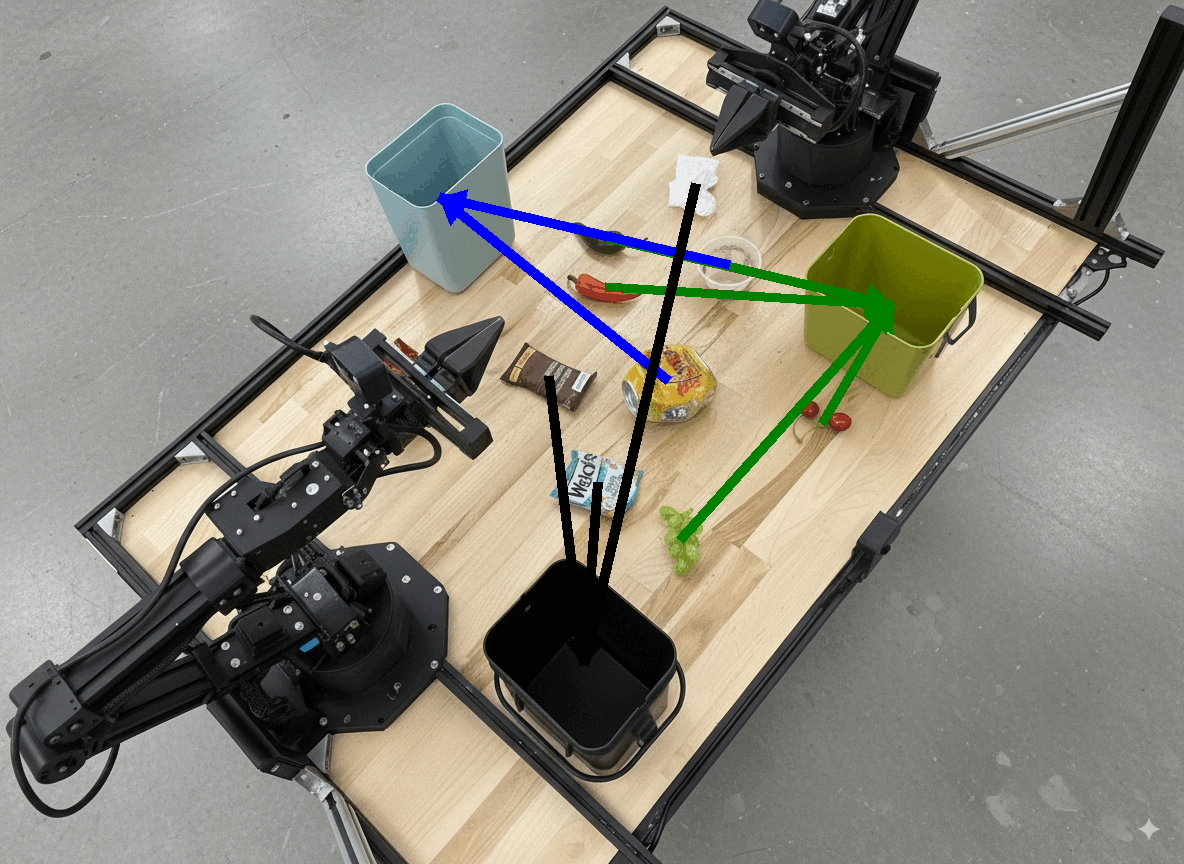
A saída do modelo seria semelhante a esta:
  The annotated image shows the suggested disposal locations for the items on the table:
  - **Green bin (Compost/Organic)**: Green chili, red chili, grapes, and cherries.
  - **Blue bin (Recycling)**: Yellow crushed can and plastic container.
  - **Black bin (Trash)**: Chocolate bar wrapper, Welch's packet, and white tissue.
A seguir
Para saber mais sobre o Gemini Robotics ER 2, consulte os seguintes recursos:
- Orquestração de tarefas: tarefas de longo alcance com APIs de robô personalizadas.
- Raciocínio espacial: apontamento, rastreamento, caixas delimitadoras e trajetórias.
- Compreensão de vídeo: localização de momentos e classificação de progresso.
- Visão geral do Gemini Robotics ER 2: recursos e guia de início rápido.
- Informações sobre o modelo Gemini Robotics ER 2: especificações técnicas, limites de tokens e recursos compatíveis.