


Gemini Robotics ER 2 peut écrire et exécuter du code Python pour manipuler des images et appliquer une logique avant de répondre. Cette page présente des exemples d'exécution de code : détection d'objets avec zoom et recadrage, lecture d'instruments, mesure de fluides, lecture de circuits imprimés et annotation d'images.
Pour obtenir un code exécutable complet, consultez le guide de robotique.
Niveau de réflexion
Vous pouvez contrôler le niveau de réflexion pour privilégier la latence ou la précision. Les tâches spatiales comme la détection d'objets fonctionnent bien avec un niveau de réflexion faible. Les tâches complexes telles que le comptage ou l'estimation du poids bénéficient d'une valeur plus élevée.
L'exemple suivant définit le niveau de réflexion sur "Élevé" pour une tâche de comptage complexe :
Python
from google import genai
from google.genai import types

client = genai.Client(
    enterprise=True,
    project="your-project-id",
    location="global",
)

# Load your image
with open('scene.jpeg', 'rb') as f:
    image_bytes = f.read()

response = client.models.generate_content(
    model="gemini-robotics-er-2-preview",
    contents=[
        types.Part.from_bytes(
            data=image_bytes,
            mime_type='image/jpeg',
        ),
        "Identify and count all objects on the table."
    ],
    config = types.GenerateContentConfig(
        thinking_config=types.ThinkingConfig(
            # Use MINIMAL or LOW for faster spatial tasks.
            thinking_level=types.ThinkingLevel.HIGH
        ),
    )
)

print(response.text)
Pour en savoir plus, consultez Réflexion.
Détection d'objets (zoom et recadrage)
L'exemple suivant montre comment utiliser l'exécution de code pour zoomer et recadrer une image afin d'obtenir une vue plus claire lors de la détection d'objets et du renvoi de cadres de délimitation.
Python
from google import genai
from google.genai import types

client = genai.Client(
    enterprise=True,
    project="your-project-id",
    location="global",
)

# Load your image
with open('sorting.jpeg', 'rb') as f:
    image_bytes = f.read()

prompt = """
Return JSON in the format {label: val, y: val, x: val, y2: val, x2: val} for
the compostable objects in this scene. Please Zoom and crop the image for a
clearer view. Return an annotated image of the final result with the bounding
boxes drawn on it to the API caller as a part of your process.
"""

response = client.models.generate_content(
    model="gemini-robotics-er-2-preview",
    contents=[
        types.Part.from_bytes(
            data=image_bytes,
            mime_type='image/jpeg',
        ),
        prompt
    ],
    config = types.GenerateContentConfig(
        tools=[types.Tool(code_execution=types.ToolCodeExecution)],
    )
)

print(response.text)
La sortie du modèle ressemblerait à ceci :
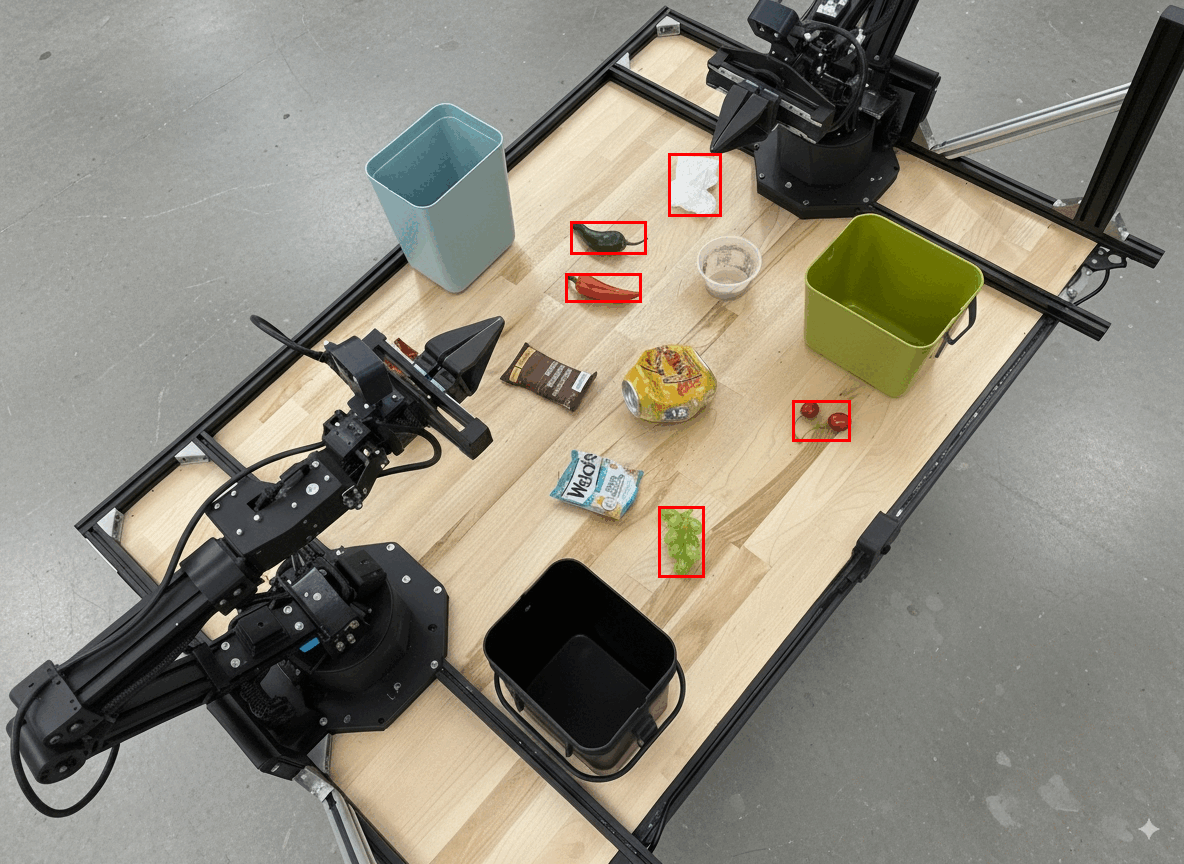
[
  {"label": "compostable", "y": 256, "x": 482, "y2": 295, "x2": 546},
  {"label": "compostable", "y": 317, "x": 478, "y2": 350, "x2": 542},
  {"label": "compostable", "y": 586, "x": 556, "y2": 668, "x2": 595},
  {"label": "compostable", "y": 463, "x": 669, "y2": 511, "x2": 718},
  {"label": "compostable", "y": 178, "x": 565, "y2": 250, "x2": 609}
]
Les éléments suivants affichent les cadres renvoyés par le modèle.
Lire une jauge analogique et appliquer une logique
L'exemple suivant montre comment utiliser le modèle pour lire une jauge analogique et effectuer des calculs de temps. Il utilise une instruction système pour appliquer une sortie JSON.
Python
from google import genai
from google.genai import types

client = genai.Client(
    enterprise=True,
    project="your-project-id",
    location="global",
)

with open('gauge.jpeg', 'rb') as f:
    image_bytes = f.read()

system_instruction = "Be precise. When JSON is requested, reply with ONLY that JSON (no preface, no code block)."

response = client.models.generate_content(
    model="gemini-robotics-er-2-preview",
    contents=[
        types.Part.from_bytes(
            data=image_bytes,
            mime_type='image/jpeg',
        ),
        """Read the current value from this gauge. Then, calculate how long
        it will take at the current rate for the value to reach maximum.
        Reply in JSON: {"current_value": val, "max_value": val,
        "time_to_max_minutes": val}"""
    ],
    config = types.GenerateContentConfig(
        system_instruction=system_instruction,
        tools=[types.Tool(code_execution=types.ToolCodeExecution)],
    )
)

print(response.text)
Mesurer un fluide dans un récipient
L'exemple suivant montre comment utiliser l'exécution de code pour mesurer le niveau de liquide dans un conteneur.
Python
from google import genai
from google.genai import types

client = genai.Client(
    enterprise=True,
    project="your-project-id",
    location="global",
)

with open('fluid.jpeg', 'rb') as f:
    image_bytes = f.read()

system_instruction = "Be precise. When JSON is requested, reply with ONLY that JSON (no preface, no code block)."

response = client.models.generate_content(
    model="gemini-robotics-er-2-preview",
    contents=[
        types.Part.from_bytes(
            data=image_bytes,
            mime_type='image/jpeg',
        ),
        """Measure the amount of fluid in the container. Reply in JSON:
        {"fluid_level_ml": val, "container_capacity_ml": val,
        "percentage_full": val}"""
    ],
    config = types.GenerateContentConfig(
        system_instruction=system_instruction,
        tools=[types.Tool(code_execution=types.ToolCodeExecution)],
    )
)

print(response.text)
Lire les inscriptions sur un circuit imprimé
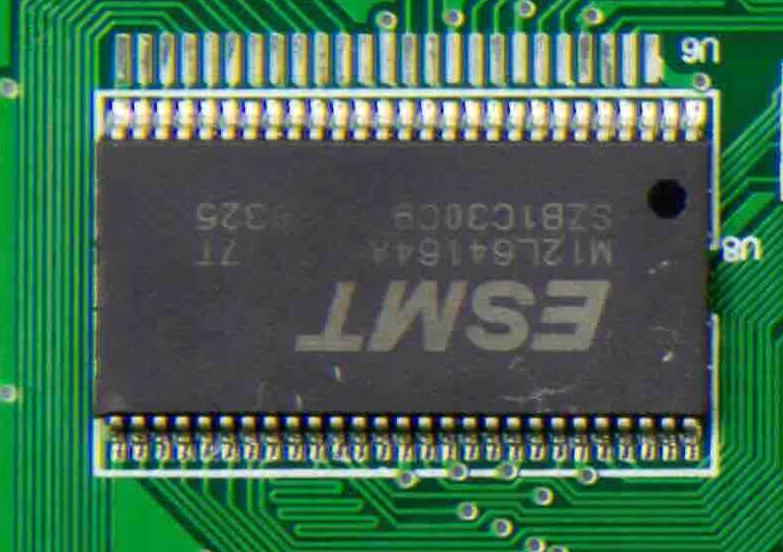
L'exemple suivant montre comment utiliser l'exécution de code pour lire les marquages sur un circuit imprimé.
Python
from google import genai
from google.genai import types

client = genai.Client(
    enterprise=True,
    project="your-project-id",
    location="global",
)

with open('circuit_board.jpeg', 'rb') as f:
    image_bytes = f.read()

system_instruction = "Be precise. When JSON is requested, reply with ONLY that JSON (no preface, no code block)."

response = client.models.generate_content(
    model="gemini-robotics-er-2-preview",
    contents=[
        types.Part.from_bytes(
            data=image_bytes,
            mime_type='image/jpeg',
        ),
        """Read all visible component labels and markings on this circuit
        board. Reply in JSON: {"components": [{"label": val,
        "location": [y, x]}]}"""
    ],
    config = types.GenerateContentConfig(
        system_instruction=system_instruction,
        tools=[types.Tool(code_execution=types.ToolCodeExecution)],
    )
)

print(response.text)
Annotation d'images
L'exemple suivant montre comment utiliser l'exécution de code pour annoter une image (par exemple, en dessinant des flèches pour les instructions de mise au rebut) et renvoyer l'image modifiée.
Python
from google import genai
from google.genai import types

client = genai.Client(
    enterprise=True,
    project="your-project-id",
    location="global",
)

# Load your image
with open('sorting.jpeg', 'rb') as f:
    image_bytes = f.read()

prompt = """
Look at this image and return it as an annotated version using arrows of
different colors to represent which items should go in which bins for
disposal. You must return the final image to the API caller.
"""

response = client.models.generate_content(
    model="gemini-robotics-er-2-preview",
    contents=[
        types.Part.from_bytes(
            data=image_bytes,
            mime_type='image/jpeg',
        ),
        prompt
    ],
    config = types.GenerateContentConfig(
        tools=[types.Tool(code_execution=types.ToolCodeExecution)],
    )
)

print(response.text)
Voici un exemple d'image d'entrée.
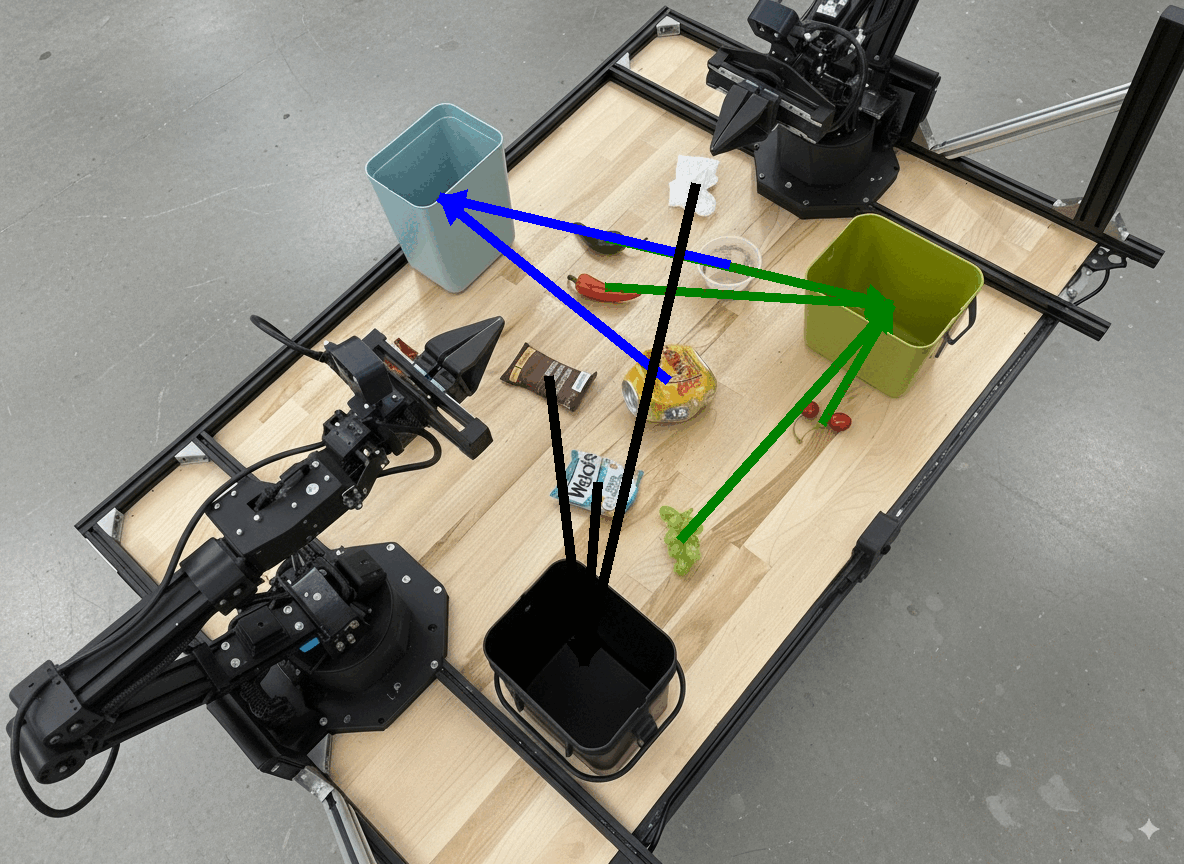
La sortie du modèle ressemblerait à ceci :
  The annotated image shows the suggested disposal locations for the items on the table:
  - **Green bin (Compost/Organic)**: Green chili, red chili, grapes, and cherries.
  - **Blue bin (Recycling)**: Yellow crushed can and plastic container.
  - **Black bin (Trash)**: Chocolate bar wrapper, Welch's packet, and white tissue.
Étapes suivantes
Pour en savoir plus sur Gemini Robotics ER 2, consultez les ressources suivantes :
- Orchestration des tâches : tâches à long horizon avec des API de robot personnalisées.
- Raisonnement spatial : pointage, suivi, cadres de délimitation et trajectoires.
- Compréhension des vidéos : recherche de moments et classification de la progression.
- Présentation de Gemini Robotics ER 2 : fonctionnalités et démarrage rapide.
- Informations sur le modèle Gemini Robotics ER 2 : caractéristiques techniques, limites de jetons et fonctionnalités compatibles.