


您可以使用 GDC 控制台或 gdcloud CLI 變更下列資料庫叢集屬性:
- 管理員使用者的資料庫密碼
- 外部連線 (已啟用/已停用)
- 可用性等級
- 已啟用備份功能和備份保留天數
- 資料庫標記
- 指派給資料庫叢集的 CPU、記憶體或儲存空間
如要瞭解如何修改屬性,請參閱要更新的屬性類型對應的工作流程:
控制台
高可用性
啟用或停用同區域高可用性。詳情請參閱「設定高可用性」一節。
資料保護
您可以為所有資料庫叢集類型啟用或停用資料保護功能:
- 前往「資料保護」,然後按一下「編輯」,即可存取資料保護設定表單。如果啟用自動備份功能,您也可以設定備份資料的保留時間。
- 變更完成後,按一下「儲存」,即可將更新套用至資料庫叢集。
連線能力
對於所有資料庫叢集類型,您可以選擇資料庫叢集是否只能從 GDC 專案內部存取,或是也能從專案外部存取:
- 前往「連線」,然後按一下「編輯」。
- 更新連線設定。
按一下 [Save] (儲存) 套用您的變更。
執行個體
對於所有資料庫叢集類型,您都可以編輯主要執行個體屬性:
- 前往「主要執行個體」,然後按一下「編輯」。
您可以選擇「高效能」、「標準」、「最低」或「自訂」設定。「自訂」選項可讓您選擇主要執行個體的 CPU 數量、記憶體和儲存空間。
更新主要執行個體的 CPU、記憶體或儲存空間時,需要重新啟動。選取「儲存並重新啟動」即可套用變更。
對於所有資料庫叢集類型,您也可以透過這個表單新增、修改或移除資料庫標記。可用的旗標組合由 GDC 預先決定。詳情請參閱「設定資料庫旗標」一節。
gdcloud CLI
使用下列指令更新資料庫叢集:
sh
gdcloud database clusters update CLUSTER_NAME [options]
更改下列內容:
- CLUSTER_NAME,並輸入要更新的資料庫叢集名稱。
如需完整選項清單,請參閱指令參考資料或執行
sh
gdcloud database clusters update --help
API
資料保護
對於所有資料庫叢集類型,您都可以為該資料庫叢集建立 BackupPlan 資源,啟用資料保護功能。
apiVersion: postgresql.dbadmin.gdc.goog/v1
kind: BackupPlan
metadata:
  name: DBCLUSTER_NAME-backupplan
  namespace: USER_PROJECT
spec:
  dbclusterRef: DBCLUSTER_NAME
  backupRetainDays: RETENTION_DAYS
請替換下列變數:
DBCLUSTER_NAME:要啟用資料保護的資料庫叢集名稱。USER_PROJECT:要在其中建立資料庫叢集的使用者專案名稱。RETENTION_DAYS:營運商保留這項備份的天數。必須是介於 1 至 90 之間的整數。
您也可以編輯對應的 BackupPlan 資源,設定資料保護設定 (例如保留天數)。
如要關閉資料庫叢集的資料保護功能,請刪除先前建立的對應 BackupPlan 資源。
重設管理員使用者密碼
對於所有資料庫叢集類型,您都可以重設管理員使用者的資料庫密碼。
建立密碼密鑰。
apiVersion: v1
kind: Secret
metadata:
  name: db-pw-DBCLUSTER_NAME
  namespace: USER_PROJECT
type: Opaque
data:
  DBCLUSTER_NAME: "BASE64_PASSWORD"
修補 DBCluster。
kubectl patch dbcluster.postgresql.dbadmin.gdc.goog DBCLUSTER_NAME -p '{"spec":{"primarySpec": {"adminUser": {"passwordRef": {"name": "db-pw-DBCLUSTER_NAME"}}}}}' --type=merge -n USER_PROJECT
請替換下列變數:
DBCLUSTER_NAME:資料庫叢集名稱。USER_PROJECT:使用者專案的名稱,資料庫叢集將在該專案中更新。BASE64_PASSWORD:資料庫管理員密碼的 base64 編碼。
新密碼大約一分鐘後就會生效。
設定資料庫旗標
GDC 隨附的資料庫映像檔會採用預設設定。不過,您可以自訂預設資料庫引擎,以滿足應用程式的需求。資料庫叢集提供預先定義的旗標,您可以使用 GDC 控制台或 gdcloud CLI 設定這些旗標:
控制台
在導覽選單中選取「資料庫服務」。
在資料庫叢集清單中,按一下要設定資料庫標記的資料庫叢集。
在「資料庫叢集中的執行個體」部分,按一下「編輯主要節點」。
在「旗標」部分,按一下「新增資料庫旗標」。
選擇旗標並輸入值。如果您輸入的值無效,GDC 控制台會提供操作說明,引導您輸入符合規定範圍或值類型的值。
按一下「完成」。
如要設定,請按一下「儲存」。如要讓部分標記生效,您必須重新啟動資料庫叢集。在本例中,請按一下「儲存並重新啟動」。
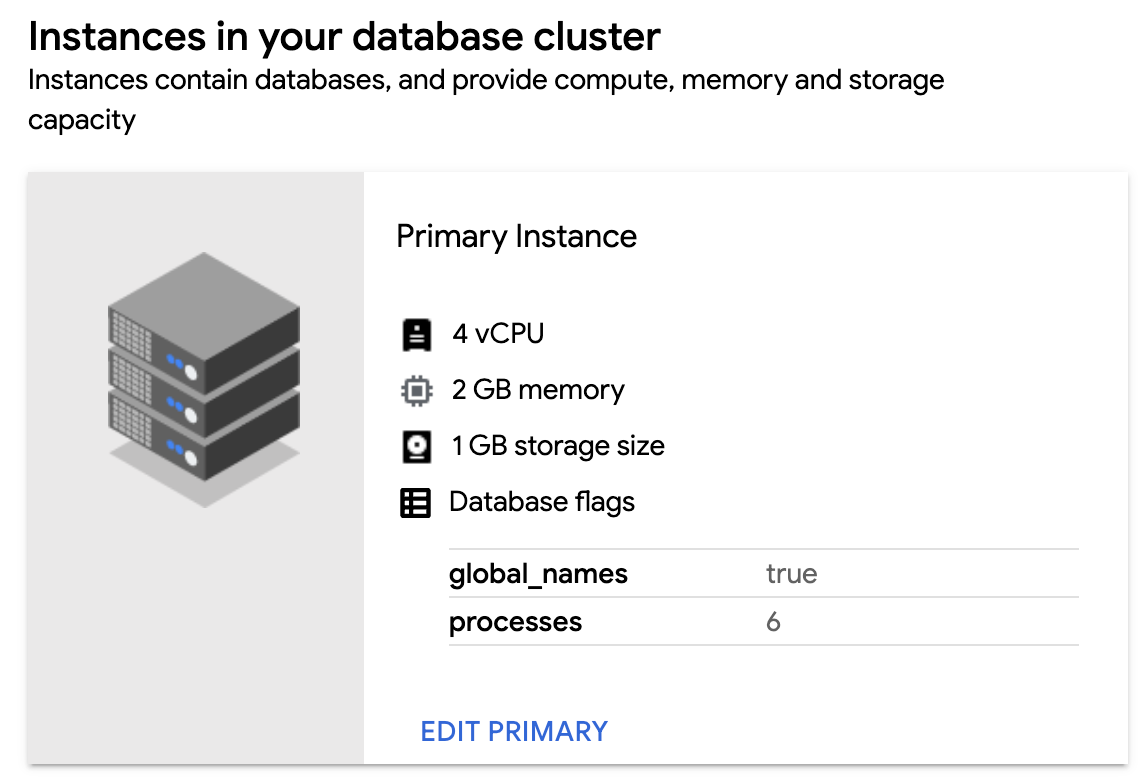
如要確認已設定新旗標,請返回資料庫叢集的「Instances in your database cluster」(資料庫叢集中的執行個體) 部分,並確認新旗標和值是否顯示。
如要編輯資料庫旗標,請返回「旗標」部分,然後修改現有旗標。將游標懸停在旗標元件上,然後按一下「刪除」圖示,即可移除資料庫旗標。
gdcloud
您可以為叢集設定新的資料庫標記,或將所有現有標記重設為預設值:
如要為資料庫叢集設定資料庫旗標,請執行下列指令:
gdcloud database clusters update CLUSTER_NAME \
    --database-flags DB_FLAGS
更改下列內容:
CLUSTER_NAME:資料庫叢集名稱。DB_FLAGS:以逗號分隔的資料庫標記清單,用於在資料庫叢集中執行的資料庫上設定。每個資料庫旗標和值都會設為鍵/值組合。定義沒有值的旗標時,=字元後方不必加上字串。
舉例來說,下列指令會為
test-db-cluster設定多個資料庫標記:gdcloud database clusters update test-db-cluster \ --database-flags max_allowed_packet=55555,skip_grant_tables=,log_output=1如要查看可用的資料庫標記清單,請參閱「可用的資料庫標記」。
如要將所有資料庫旗標重設為預設設定,請執行下列指令:
gdcloud database clusters update CLUSTER_NAME --clear-database-flags將
CLUSTER_NAME替換為資料庫叢集的名稱。
API
如要為資料庫叢集設定資料庫旗標,請執行下列指令:
kubectl patch dbcluster.postgresql.dbadmin.gdc.goog DBCLUSTER_NAME -p '{"spec":{"primarySpec": {"parameters": DB_FLAGS}}}' --type=merge -n USER_PROJECT請替換下列變數:
DBCLUSTER_NAME:資料庫叢集名稱。USER_PROJECT:建立資料庫叢集的使用者專案名稱。DB_FLAGS:要新增或更新的資料庫設定參數。這應該是鍵/值組合的 JSON 格式物件,其中鍵是資料庫參數名稱,值則是各自的設定。舉例來說,下列程式碼會設定多個資料庫旗標:
"autovacuum": "on", "autovacuum_analyze_threshold": "2147483647", "dbs.enable_anon": "on"如要查看可用的資料庫標記清單,請參閱「可用的資料庫標記」。
如要將所有資料庫旗標重設為預設設定,請執行下列指令:
kubectl patch dbcluster.postgresql.dbadmin.gdc.goog DBCLUSTER_NAME --type=json -p='[{"op": "remove", "path": "/spec/primarySpec/parameters"}]' -n USER_PROJECT請替換下列變數:
DBCLUSTER_NAME:資料庫叢集名稱。USER_PROJECT:建立資料庫叢集的使用者專案名稱。
可用的資料庫旗標
| 標記 | 範圍 | 類型 | 需要重新啟動 |
|---|---|---|---|
| google_columnar_engine.enabled | 開啟、關閉 | 布林值 | TRUE |
| google_columnar_engine.memory_size_in_mb | [128, 2147483647] | 整數 | TRUE |
| anon.algorithm | 字串 | FALSE | |
| anon.maskschema | 字串 | FALSE | |
| anon.restrict_to_trusted_schemas | 開啟、關閉 | 布林值 | FALSE |
| anon.salt | 字串 | FALSE | |
| anon.sourceschema | 字串 | FALSE | |
| dbs.enable_anon | on、off | 布林值 | TRUE |
| dbs.enable_pg_bigm | on、off | 布林值 | TRUE |
| dbs.enable_pg_cron | on、off | 布林值 | TRUE |
| dbs.enable_pg_hint_plan | on、off | 布林值 | TRUE |
| dbs.enable_pg_squeeze | on、off | 布林值 | TRUE |
| dbs.enable_pg_wait_sampling | on、off | 布林值 | TRUE |
| pg_bigm.enable_recheck | 開啟、關閉 | 布林值 | FALSE |
| pg_bigm.gin_key_limit | [0, 2147483647] | 整數 | FALSE |
| pg_bigm.similarity_limit | [0, 1] | 浮點值 | FALSE |
| pg_hint_plan.debug_print | off、on、detailed、verbose、0、1、2、3、no、yes、false、true | 列舉 | TRUE |
| pg_hint_plan.enable_hint | 開啟、關閉 | 布林值 | FALSE |
| pg_hint_plan.enable_hint_table | 開啟、關閉 | 布林值 | FALSE |
| pg_hint_plan.message_level | debug5、debug4、debug3、debug2、debug1、debug、info、notice、warning、error、log | 列舉 | FALSE |
| pg_hint_plan.parse_messages | debug5、debug4、debug3、debug2、debug1、debug、info、notice、warning、error、log | 列舉 | FALSE |
| pg_stat_statements.max | [100, 2147483647] | 整數 | TRUE |
| pg_stat_statements.save | 開啟、關閉 | 布林值 | FALSE |
| pg_stat_statements.track | none、top、all | 列舉 | FALSE |
| pg_stat_statements.track_utility | 開啟、關閉 | 布林值 | FALSE |
| pg_wait_sampling.history_period | [1, 2147483647] | 整數 | FALSE |
| pg_wait_sampling.history_size | [1, 2147483647] | 整數 | FALSE |
| pg_wait_sampling.profile_period | [1, 2147483647] | 整數 | FALSE |
| pg_wait_sampling.profile_pid | 開啟、關閉 | 布林值 | FALSE |
| pg_wait_sampling.profile_queries | 開啟、關閉 | 布林值 | FALSE |
| pgaudit.log | read、write、function、role、ddl、misc、misc_set、 all、none、-read、-write、-function、-role、-ddl、 -misc、-misc_set、-all、-none |
重複字串 | FALSE |
| pgaudit.log_client | 開啟、關閉 | 布林值 | FALSE |
| pgaudit.log_parameter | 開啟、關閉 | 布林值 | FALSE |
| pgaudit.log_level | debug5、debug4、debug3、debug2、debug1、info、 notice、warning、error、log |
列舉 | FALSE |
| pgaudit.log_relation | 開啟、關閉 | 布林值 | FALSE |
| pgaudit.log_catalog | 開啟、關閉 | 布林值 | FALSE |
| pgaudit.role | 字串 | FALSE | |
| pgaudit.log_statement_once | 開啟、關閉 | 布林值 | FALSE |
| pglogical.batch_inserts | 開啟、關閉 | 布林值 | TRUE |
| pglogical.conflict_log_level | debug5、debug4、debug3、debug2、debug1、info、notice、warning、error、log、fatal、panic | 列舉 | FALSE |
| pglogical.conflict_resolution | error、apply_remote、keep_local、last_update_wins、first_update_wins | 列舉 | FALSE |
| pglogical.extra_connection_options | 字串 | FALSE | |
| pglogical.synchronous_commit | 開啟、關閉 | 布林值 | TRUE |
| pglogical.use_spi | 開啟、關閉 | 布林值 | TRUE |
| pgtt.enabled | 開啟、關閉 | 布林值 | FALSE |
| plv8.execution_timeout | [1, 65536] | 整數 | FALSE |
| plv8.memory_limit | [256, 3096] | 整數 | FALSE |
| plv8.start_proc | 字串 | FALSE |