

This document provides step-by-step instructions for deploying open weight models on Google Distributed Cloud (GDC) air-gapped environments. It covers using vLLM for high-throughput serving using the GDC platform's capabilities, including Kubernetes, Harbor, and accelerator (GPU) resources.
Architecture
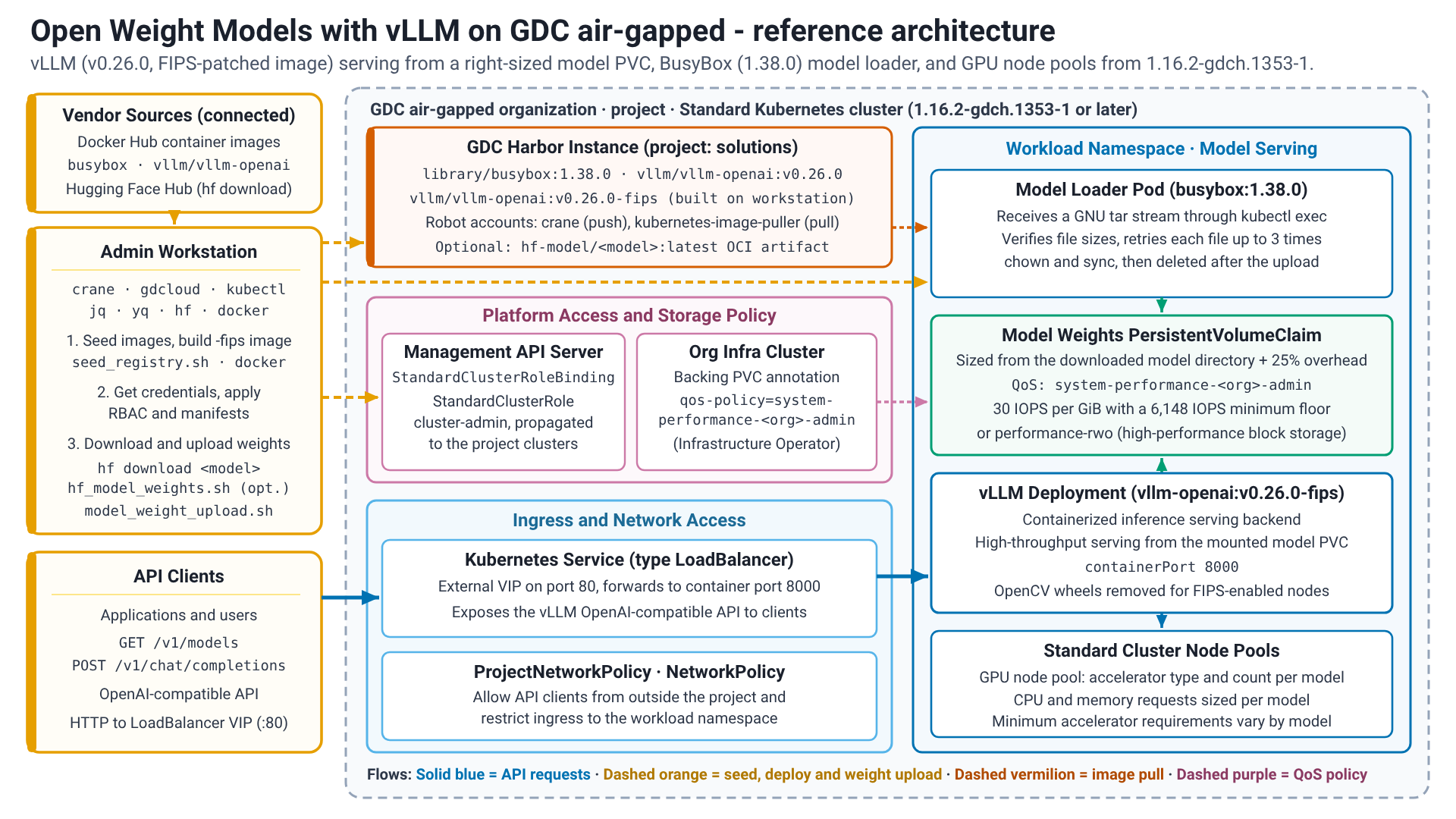
The solution involves deploying vLLM as a containerized inference serving
backend (Deployment) within a standard cluster. Model weights are stored on
Persistent Volumes that are dynamically sized from the downloaded model
directory with 25% overhead, configured with the
system-performance-<org>-admin storage QoS policy (30 IOPS per GiB with a
6,148 IOPS minimum floor, or performance-rwo where high-performance block
storage is enabled), and populated using a model loader workflow. Kubernetes
Services of type LoadBalancer expose the backend API and NetworkPolicy /
ProjectNetworkPolicy objects secure access to it.
Before you begin
Before proceeding with the deployment, ensure that your environment meets all necessary prerequisites and that the required command-line utilities are properly configured. Setting up these tools on your workstation is essential for managing container registries, interacting with clusters, and automating the deployment process.
- Standard cluster created with sufficient resources (CPU, Memory, accelerator). The minimum accelerator requirements will vary depending on the model.
- Harbor instance available and accessible.
- Necessary IAM applied.
- Workstation with the necessary connectivity to the environment and internet
- Hugging Face token and terms accepted if using gated models.
Environment configuration
Identity and Access Management
Ensure that the necessary IAM accounts, roles, and permissions are properly configured.
GDC User roles on organization:
- Optional: Standard Cluster Admin (View clusters from the console)
GDC User roles on project (RoleBinding in the
project namespace, granted by a Project IAM Admin):
- Harbor Instance Viewer (
harbor-instance-viewer) - Harbor Project Creator (
harbor-project-creator, only if the Harbor project doesn't exist yet) - Standard Cluster Admin (
standard-cluster-admin, required forgdcloud clusters get-credentials)
GDC User role on the standard cluster: the
preceding project roles grant no permissions inside the cluster. A Project
IAM Admin must additionally bind the user to the
StandardClusterRole cluster-admin with a StandardClusterRoleBinding in the
project namespace on the management API server; the binding is propagated to the
standard clusters of the project within seconds (status.clusters[].conditions
shows Propagated=True).
cat <<EOF | kubectl apply --kubeconfig MANAGEMENT_API_SERVER -f -
apiVersion: iam.gdc.goog/v1
kind: StandardClusterRoleBinding
metadata:
  name: BINDING_NAME
  namespace: PROJECT
spec:
  roleRef:
    apiGroup: iam.gdc.goog
    kind: StandardClusterRole
    name: cluster-admin
  subjects:
    - apiGroup: rbac.authorization.k8s.io
      kind: User
      name: USER
EOF
Replace the following:
MANAGEMENT_API_SERVER: the path to the management API server kubeconfig file.BINDING_NAME: a name for the binding, for examplealex-cluster-admin(lowercase letters, digits, and hyphens).PROJECT: the name of the project.USER: the username to bind, exactly as your identity provider reports it (for example, an email address).
Infrastructure Operator assistance (only when performance-rwo isn't
available on the standard cluster): the user guides create the model
PersistentVolumeClaim with the default standard-rwo StorageClass, which
limits right-sized model volumes to 3 IOPS per GiB. Ask your Infrastructure
Operator to apply the system-performance-<ORG>-admin QoS policy to the volume
that backs the model PersistentVolumeClaim so that it receives the 6,148 IOPS
floor. The user guides print the values that the Infrastructure Operator needs.
Permissions of the Harbor robot account for crane:
- List Repository
- Pull Repository
- Push Repository
- Read Artifact
- List Artifact
- Create Tag
- List Tag
Permissions of the Harbor robot account for Kubernetes image pulls:
- List Repository
- Pull Repository
- Read Artifact
- List Artifact
- List Tag
Workstation
Run all commands in this guide from a workstation with the required tools and connectivity to the environment and internet, unless a step states otherwise.
Requirements
The following tools need to be installed on the workstation:
crane: manage and copy container images between registries (documentation).docker: builds and pushes the patched vLLM container image.gdcloud: command-line interface (CLI) for managing GDC resources (documentation).hf: command-line interface (CLI) used to access Hugging Face.kubectl: command-line interface (CLI) used to communicate with and manage a Kubernetes cluster.jq: lightweight and flexible command-line JSON processor.yq: portable command-line YAML processor.
Workstation configuration
The following information about the environment is required for the Workstation Configuration:
GDC_STANDARD_CLUSTER_NAME: The name of the GDC standard cluster.GDC_DOMAIN_SUFFIX: The domain suffix for the GDC environment (for example,gdc.example.com).GDC_ORG: The name of the GDC organization.GDC_PROJECT: The name of the GDC project.GDC_ZONE: The name of the GDC deployment zone.GDC_HARBOR_INSTANCE_NAME: The name of the Harbor instance in the project.GDCS_HARBOR_PROJECT_NAME: The name of the Harbor project to use for images (default:solutions).GDCS_HARBOR_CRANE_ROBOT_NAME: The name of the Harborcranerobot account.GDCS_HARBOR_CRANE_ROBOT_TOKEN: The authentication token for the Harborcranerobot account.GDCS_HARBOR_K8S_ROBOT_NAME: The name of the Harbor Kubernetes image pull robot account.GDCS_HARBOR_K8S_ROBOT_TOKEN: The authentication token for the Harbor Kubernetes image pull robot account.
Once you have gathered the values for all required variables, proceed with generating the environment variables file. After it is created, you can manually edit the file at any time.
Create the root solution directories and secrets folder:
mkdir -p ${HOME}/gdcag-solutions/env.d
mkdir -p ${HOME}/gdcag-solutions/secrets

touch ${HOME}/gdcag-solutions/secrets/harbor_crane_robot_token
touch ${HOME}/gdcag-solutions/secrets/harbor_k8s_robot_token

chmod u=rwx,go= ${HOME}/gdcag-solutions/secrets
chmod -R u=rw,go= ${HOME}/gdcag-solutions/secrets/*
Create the platform environment configuration file:
cat << 'EOF' > ${HOME}/gdcag-solutions/env.d/platform.sh && echo "Successfully created." || echo "Failed to create!"
# Infrastructure (Platform Native)
export GDC_STANDARD_CLUSTER_NAME="STANDARD_CLUSTER_NAME"
export GDC_DOMAIN_SUFFIX="DOMAIN_SUFFIX"
export GDC_ORG="ORG"
export GDC_PROJECT="PROJECT"
export GDC_ZONE="ZONE"
export GDC_HARBOR_INSTANCE_NAME="HARBOR_INSTANCE_NAME"

# Derived platform values
export GDC_ZONAL_HOSTNAME="${GDC_ORG}.${GDC_ZONE}.${GDC_DOMAIN_SUFFIX}"
export GDC_ZONAL_CONSOLE_URL="https://console.${GDC_ZONAL_HOSTNAME}"
export GDC_HARBOR_HOST="${GDC_HARBOR_INSTANCE_NAME}-${GDC_PROJECT}.${GDC_ORG}.${GDC_ZONE}.${GDC_DOMAIN_SUFFIX}"
EOF
Replace the following:
STANDARD_CLUSTER_NAME: GDC standard cluster name.DOMAIN_SUFFIX: GDC domain suffix.ORG: GDC organization.PROJECT: GDC project.ZONE: GDC zone.HARBOR_INSTANCE_NAME: GDC Harbor instance name.
Create the registry environment configuration file:
cat << 'EOF' > ${HOME}/gdcag-solutions/env.d/registry.sh && echo "Successfully created." || echo "Failed to create!"
# GDC Solutions Registry & Secrets
export GDCS_HARBOR_PROJECT_NAME="solutions"
export GDCS_HARBOR_CRANE_ROBOT_NAME='HARBOR_CRANE_ROBOT_NAME'
export GDCS_HARBOR_CRANE_ROBOT_TOKEN="$(cat ${GDCS_ROOT_HOME}/secrets/harbor_crane_robot_token)"
export GDCS_HARBOR_K8S_ROBOT_NAME='HARBOR_K8S_ROBOT_NAME'
export GDCS_HARBOR_K8S_ROBOT_TOKEN="$(cat ${GDCS_ROOT_HOME}/secrets/harbor_k8s_robot_token)"
export GDCS_HARBOR_K8S_PULL_SECRET="gdcs-image-pull-secret"

# Derived registry values
export GDCS_HARBOR_PROJECT_URI="${GDC_HARBOR_HOST}/${GDCS_HARBOR_PROJECT_NAME}"
export GDCS_HARBOR_CHART_OCI_URI="oci://${GDCS_HARBOR_PROJECT_URI}"
EOF
Replace the following:
HARBOR_CRANE_ROBOT_NAME: the full name of the Harbor robot account forcrane, as Harbor shows it, including therobot$prefix. Keep the single quotes so that the shell doesn't expand$.HARBOR_K8S_ROBOT_NAME: the full name of the Harbor robot account for Kubernetes image pulls, as Harbor shows it, including therobot$prefix. Keep the single quotes so that the shell doesn't expand$.
Add your tokens to the secret files:
set +o history

echo "CRANE_ROBOT_TOKEN" > ${HOME}/gdcag-solutions/secrets/harbor_crane_robot_token
echo "KUBERNETES_ROBOT_TOKEN" > ${HOME}/gdcag-solutions/secrets/harbor_k8s_robot_token

set -o history
Replace the following:
CRANE_ROBOT_TOKEN: the secret of thecranerobot account.KUBERNETES_ROBOT_TOKEN: the secret of the Kubernetes image pull robot account.
Create the root environment loader file:
cat << 'EOF' > ${HOME}/gdcag-solutions/env.sh && echo "Successfully created." || echo "Failed to create!"
export GDCS_ROOT_HOME="${HOME}/gdcag-solutions"
echo "GDCS_ROOT_HOME=${GDCS_ROOT_HOME}"

# Sourced in dependency order
source "${GDCS_ROOT_HOME}/env.d/platform.sh"
source "${GDCS_ROOT_HOME}/env.d/registry.sh"
EOF
Configure solution variables
Create the solution implementation directory and secrets folder:
mkdir -p ${HOME}/gdcag-solutions/open-weight-models/vllm/env.d
mkdir -p ${HOME}/gdcag-solutions/open-weight-models/vllm/secrets

touch ${HOME}/gdcag-solutions/open-weight-models/vllm/secrets/huggingface_token
chmod u=rwx,go= ${HOME}/gdcag-solutions/open-weight-models/vllm/secrets
chmod -R u=rw,go= ${HOME}/gdcag-solutions/open-weight-models/vllm/secrets/*
Add your Hugging Face token to the secret file:
set +o history

echo "HUGGINGFACE_TOKEN" > ${HOME}/gdcag-solutions/open-weight-models/vllm/secrets/huggingface_token

set -o history
Replace the following:
HUGGINGFACE_TOKEN: your Hugging Face access token.
Create the accelerator configuration file:
cat << 'EOF' > ${HOME}/gdcag-solutions/open-weight-models/vllm/env.d/accelerator.sh && echo "Successfully created." || echo "Failed to create!"
# Workload Accelerator (NVIDIA GPU)
export GDCS_WORKLOAD_ACCELERATOR_TYPE="WORKLOAD_ACCELERATOR_TYPE"
export GDCS_WORKLOAD_ACCELERATOR_COUNT="1"
EOF
Replace the following:
WORKLOAD_ACCELERATOR_TYPE: the GPU resource name that your GPU nodes expose, for examplenvidia.com/gpu-pod-NVIDIA_A100_80GB_PCIE. The user guides list the resource name of every GPU that GDC air-gapped offers. After you retrieve the cluster credentials, you can list the names in your cluster withkubectl get nodes --output=json | jq -r '[.items[].status.allocatable | keys[] | select(startswith("nvidia.com/"))] | unique[]'.
Create the solution environment configuration file:
cat << 'EOF' > ${HOME}/gdcag-solutions/open-weight-models/vllm/env.d/vllm.sh && echo "Successfully created." || echo "Failed to create!"
# Hugging Face
export HF_TOKEN="$(cat ${GDCS_IMPLEMENTATION_HOME}/secrets/huggingface_token 2>/dev/null || echo '')"

# Images
export GDCS_BUSYBOX_IMAGE_TAG="1.38.0"
export GDCS_VLLM_IMAGE_TAG="v0.26.0"

# Docker configuration directories for crane and Kubernetes
export GDCS_HARBOR_CRANE_DOCKER_CONFIG="${GDCS_IMPLEMENTATION_HOME}/docker/crane"
export GDCS_HARBOR_K8S_DOCKER_CONFIG="${GDCS_IMPLEMENTATION_HOME}/docker/k8s"
EOF
Create the implementation environment loader file:
cat << 'EOF' > ${HOME}/gdcag-solutions/open-weight-models/vllm/env.sh && echo "Successfully created." || echo "Failed to create!"
source "${HOME}/gdcag-solutions/env.sh"

export GDCS_IMPLEMENTATION_HOME="${HOME}/gdcag-solutions/open-weight-models/vllm"
echo "GDCS_IMPLEMENTATION_HOME=${GDCS_IMPLEMENTATION_HOME}"

# Sourced in dependency order
source "${GDCS_IMPLEMENTATION_HOME}/env.d/accelerator.sh"
source "${GDCS_IMPLEMENTATION_HOME}/env.d/vllm.sh"
EOF
Edit and review the environment files with your preferred editor:
${EDITOR:-vi} ${HOME}/gdcag-solutions/env.d/platform.sh
${EDITOR:-vi} ${HOME}/gdcag-solutions/env.d/registry.sh
${EDITOR:-vi} ${HOME}/gdcag-solutions/open-weight-models/vllm/env.d/accelerator.sh
${EDITOR:-vi} ${HOME}/gdcag-solutions/open-weight-models/vllm/env.d/vllm.sh
Source the environment file:
source ${HOME}/gdcag-solutions/open-weight-models/vllm/env.shThe output is similar to the following:
GDCS_ROOT_HOME=HOME_DIRECTORY_PATH/gdcag-solutions
GDCS_IMPLEMENTATION_HOME=HOME_DIRECTORY_PATH/gdcag-solutions/open-weight-models/vllm
GDC
This guide assumes that your workstation is configured to trust the TLS certificates for your GDC environment and Harbor instance.
Configure
gdcloud:gdcloud config set core/account "default-user" gdcloud config set core/organization_console_url "${GDC_ZONAL_CONSOLE_URL}" gdcloud config set core/project "${GDC_PROJECT}" gdcloud config set core/zone "${GDC_ZONE}"Authenticate to the GDC environment:
gdcloud auth login
Cluster
Retrieve cluster credentials:
gdcloud clusters get-credentials "${GDC_STANDARD_CLUSTER_NAME}" \
--project="${GDC_PROJECT}" \
--standard \
--zone="${GDC_ZONE}"
Verify connectivity to the cluster:
kubectl get nodes -L node.cluster.private.gdc.goog/machine-class
Artifact migration preparation
- Verify connectivity and configuration for the artifact registry.
Create a Docker configuration file for crane. A robot account is used for pushing large image layers to avoid auth token timeouts when using the Managed Harbor Service (MHS) credential helper (docker-credential-mhs) with a user account:
export DOCKER_CONFIG="${GDCS_HARBOR_CRANE_DOCKER_CONFIG}"

crane auth login "${GDC_HARBOR_HOST}" \
--password="${GDCS_HARBOR_CRANE_ROBOT_TOKEN}" \
--username="${GDCS_HARBOR_CRANE_ROBOT_NAME}"
Create a Docker configuration file for Kubernetes:
export DOCKER_CONFIG="${GDCS_HARBOR_K8S_DOCKER_CONFIG}"

crane auth login "${GDC_HARBOR_HOST}" \
--password="${GDCS_HARBOR_K8S_ROBOT_TOKEN}" \
--username="${GDCS_HARBOR_K8S_ROBOT_NAME}"
Create the
seed_registry.shscript:cat << 'EOF' > ${GDCS_IMPLEMENTATION_HOME}/seed_registry.sh && echo "Successfully created." || echo "Failed to create!" #!/bin/bash # seed_registry.sh: Modular artifact migration for GDC Solutions # Requires the env.sh file to be sourced first. SCRIPT_DIR="$(cd "$(dirname "${BASH_SOURCE[0]}")" && pwd)" set -o nounset source "${SCRIPT_DIR}/env.sh" # Set the Docker config export DOCKER_CONFIG="${GDCS_HARBOR_CRANE_DOCKER_CONFIG}" eval "${SERIALIZED_IMAGES}" # Ensure GDCS_REGISTRY_IMAGES is set if [[ ${#GDCS_REGISTRY_IMAGES[@]} -eq 0 ]]; then echo "GDCS_REGISTRY_IMAGES must be set, exiting..." exit 1 fi # Migrate the images for source_image in "${GDCS_REGISTRY_IMAGES[@]}"; do # Strip the registry host only when the first path segment is a host (contains a dot or a port) first_segment="${source_image%%/*}" if [[ "${first_segment}" == *.* || "${first_segment}" == *:* ]]; then image_path="${source_image#*/}" else image_path="${source_image}" fi destination_image="${GDCS_HARBOR_PROJECT_URI}/${image_path}" # Ensure the folder structure is created crane append \ --new_layer=<(tar czf - -T /dev/null) \ --new_tag="${destination_image%:*}:create" \ --oci-empty-base 2> /dev/null || true # Copy the linux/amd64 platform only to avoid transferring multi-arch layers over air-gapped links crane copy --platform linux/amd64 "${source_image}" "${destination_image}" || { echo "Failed to copy ${source_image} to ${destination_image}"; exit 1; } done echo "Migration complete: Images are available at ${GDCS_HARBOR_PROJECT_URI}" EOF chmod u+x "${GDCS_IMPLEMENTATION_HOME}/seed_registry.sh"Define the list of required container images for the solution:
declare -a GDCS_REGISTRY_IMAGES=(
  "docker.io/library/busybox:${GDCS_BUSYBOX_IMAGE_TAG}"
  "docker.io/vllm/vllm-openai:${GDCS_VLLM_IMAGE_TAG}"
)
export SERIALIZED_IMAGES=$(declare -p GDCS_REGISTRY_IMAGES)
Seed the required container images to the artifact registry:
${GDCS_IMPLEMENTATION_HOME}/seed_registry.sh
Create a Dockerfile to patch the vLLM container until upstream changes are implemented:
cat <<EOF > ${GDCS_IMPLEMENTATION_HOME}/docker/vllm-${GDCS_VLLM_IMAGE_TAG}-patch.dockerfile && echo "Successfully created." || echo "Failed to create!" FROM docker.io/vllm/vllm-openai:${GDCS_VLLM_IMAGE_TAG} RUN pip install --upgrade "opencv-python-headless<=4.12.0.88" EOFBuild and push the patched image:
context_dir="${GDCS_IMPLEMENTATION_HOME}/docker/empty-context"
image="${GDCS_HARBOR_PROJECT_URI}/vllm/vllm-openai:${GDCS_VLLM_IMAGE_TAG}-fips"

mkdir -p "${context_dir}"
rm -rf "${context_dir}"/*

export DOCKER_CONFIG="${GDCS_HARBOR_CRANE_DOCKER_CONFIG}"

docker build \
--file="${GDCS_IMPLEMENTATION_HOME}/docker/vllm-${GDCS_VLLM_IMAGE_TAG}-patch.dockerfile" \
--tag="${image}" \
"${context_dir}"

docker push "${image}"
Create the
model_weight_upload.shscript. It copies a local model directory into thePersistentVolumethrough the model loaderPod(GNUtarstreaming, files larger than 8 GiB included) and skips files that are already present with the same size:cat << 'EOF' > ${GDCS_IMPLEMENTATION_HOME}/model_weight_upload.sh && echo "Successfully created." || echo "Failed to create!" #!/bin/bash # model_weight_upload.sh: copy LOCAL_MODEL_DIR into REMOTE_MODEL_DIR on the PersistentVolume mounted in the loader Pod. # Requires: GDCS_WORKLOAD_NAMESPACE, GDCS_MODEL_LOADER_POD_NAME, LOCAL_MODEL_DIR, REMOTE_MODEL_DIR # Optional: REMOTE_MOUNT_DIR (PersistentVolume mount path, defaults to REMOTE_MODEL_DIR) - its lost+found directory is removed. SCRIPT_DIR="$(cd "$(dirname "${BASH_SOURCE[0]}")" && pwd)" set -o errexit set -o nounset set -o pipefail # Ensure LOCAL_MODEL_DIR is set if [[ -z "${LOCAL_MODEL_DIR:-}" ]]; then echo "LOCAL_MODEL_DIR must be set, exiting..." exit 1 fi # Ensure REMOTE_MODEL_DIR is set if [[ -z "${REMOTE_MODEL_DIR:-}" ]]; then echo "REMOTE_MODEL_DIR must be set, exiting..." exit 1 fi REMOTE_MOUNT_DIR="${REMOTE_MOUNT_DIR:-${REMOTE_MODEL_DIR}}" KEEPALIVE_INTERVAL_SEC=300 start_session_keepalive() { echo "[KeepAlive] Started background heartbeat (every ${KEEPALIVE_INTERVAL_SEC}s)." while true; do sleep "${KEEPALIVE_INTERVAL_SEC}" # Lightweight API request to prevent session inactivity logout if kubectl get namespace "${GDCS_WORKLOAD_NAMESPACE}" >/dev/null 2>&1; then echo "[KeepAlive] Session heartbeat sent at $(date)" else echo "[KeepAlive] Heartbeat failed or context expired at $(date)" fi done } start_session_keepalive & MY_KEEPALIVE_PID=$! cleanup() { echo "[Cleanup] Stopping keep-alive process (PID: ${MY_KEEPALIVE_PID})..." kill "${MY_KEEPALIVE_PID}" 2>/dev/null || true wait "${MY_KEEPALIVE_PID}" 2>/dev/null || true echo "[Cleanup] Session keep-alive terminated." } trap cleanup EXIT INT TERM # Remove the lost+found directory kubectl exec "pod/${GDCS_MODEL_LOADER_POD_NAME}" \ --namespace="${GDCS_WORKLOAD_NAMESPACE}" \ -- rm -rf "${REMOTE_MOUNT_DIR}/lost+found" # Create the model directory kubectl exec "pod/${GDCS_MODEL_LOADER_POD_NAME}" \ --namespace="${GDCS_WORKLOAD_NAMESPACE}" \ -- mkdir -p "${REMOTE_MODEL_DIR}" # Loop through all files in the local directory FAILED_FILES=() MAX_UPLOAD_ATTEMPTS="${MAX_UPLOAD_ATTEMPTS:-3}" remote_size_of() { # Prints the remote file size (0 if the file does not exist) kubectl exec "pod/${GDCS_MODEL_LOADER_POD_NAME}" --namespace="${GDCS_WORKLOAD_NAMESPACE}" -- stat -c%s "$1" 2>/dev/null || echo 0 } # Loop through all files in the local directory (process substitution keeps FAILED_FILES in this shell) while read -r local_file; do # Get relative path rel_path="${local_file#"${LOCAL_MODEL_DIR}"/}" remote_file="${REMOTE_MODEL_DIR}/${rel_path}" # Get local file size local_size=$(stat -L -c%s "${local_file}") # Get remote file size (returns 0 if file does not exist) remote_size=$(remote_size_of "${remote_file}") if [ "${local_size}" -eq "${remote_size}" ]; then echo "[Loader] Skipping: ${rel_path} (Size matches)" continue fi if [ "${remote_size}" -ne "0" ]; then echo "[Loader] Mismatch: ${rel_path} (${remote_size} remote vs ${local_size} local)" fi # Ensure remote parent subdirectories exist if your model has folders remote_parent=$(dirname "${remote_file}") kubectl exec "pod/${GDCS_MODEL_LOADER_POD_NAME}" \ --namespace="${GDCS_WORKLOAD_NAMESPACE}" \ -- mkdir -p "${remote_parent}" attempt=1 while [ "${attempt}" -le "${MAX_UPLOAD_ATTEMPTS}" ]; do echo "[Loader] Uploading: ${rel_path} (${local_size} bytes, attempt ${attempt}/${MAX_UPLOAD_ATTEMPTS})..." # Copy the individual file using GNU tar streaming. # Note: 'kubectl cp' uses Go's archive/tar, which defaults to PAX format for files > 8 GiB. # BusyBox's tar in the loader pod does not parse PAX size headers and fails with 'tar: invalid tar magic'. # Streaming via GNU tar (--format=gnu) uses base-256 binary encoding for files > 8 GiB, which BusyBox tar supports. tar --format=gnu -C "$(dirname "${local_file}")" -cf - "$(basename "${local_file}")" | \ kubectl exec -i "pod/${GDCS_MODEL_LOADER_POD_NAME}" \ --namespace="${GDCS_WORKLOAD_NAMESPACE}" \ -- tar -xf - -C "${remote_parent}" || true # Verify: an interrupted exec stream leaves a truncated file behind without an error remote_size=$(remote_size_of "${remote_file}") if [ "${local_size}" -eq "${remote_size}" ]; then echo "[Loader] Verified: ${rel_path} (${remote_size} bytes)" break fi echo "[Loader] Incomplete upload: ${rel_path} (${remote_size} remote vs ${local_size} local), retrying..." attempt=$((attempt + 1)) done if [ "${local_size}" -ne "${remote_size}" ]; then FAILED_FILES+=("${rel_path}") fi done < <(find -L "${LOCAL_MODEL_DIR}" -type f) if [ "${#FAILED_FILES[@]}" -ne 0 ]; then echo "[Loader] FAILED: ${#FAILED_FILES[@]} file(s) could not be uploaded completely after ${MAX_UPLOAD_ATTEMPTS} attempts:" printf '[Loader] %s\n' "${FAILED_FILES[@]}" exit 1 fi echo "[Loader] Completed" # Fix file permissions kubectl exec "pod/${GDCS_MODEL_LOADER_POD_NAME}" \ --namespace="${GDCS_WORKLOAD_NAMESPACE}" \ -- chown 0:0 -R "${REMOTE_MODEL_DIR}" # Flush the volume before the loader Pod is deleted (a detached volume with unwritten page cache loses data) kubectl exec "pod/${GDCS_MODEL_LOADER_POD_NAME}" \ --namespace="${GDCS_WORKLOAD_NAMESPACE}" \ -- sync EOF chmod u+x "${GDCS_IMPLEMENTATION_HOME}/model_weight_upload.sh"
Deploy a model
- Gemma models with vLLM user guide: Gemma 4 E2B, E4B, 12B, 26B-A4B, and 31B, with the GPU options of GDC air-gapped
- Mistral models with vLLM user guide: Mistral 7B Instruct, Mistral NeMo 12B, Mistral Small 3.2 24B, Ministral 8B, Mixtral 8x7B, and Magistral Small 1.2, with the GPU options of GDC air-gapped