

You can change the following database cluster attributes with the GDC console or the gdcloud CLI:
- Database password for the admin user
- External connections (enabled/disabled)
- Availability level
- Backup enabled and backup retention days
- Database flags
- CPU, memory, or storage allocated to the database cluster
For information on how to modify an attribute, see the workflow corresponding to the attribute type you want to update:
Console
High Availability
Enable or disable same zone high availability. See the Configure high availability section for more information.
Data Protection
For all database cluster types, you can enable or disable Data protection:
- Go to Data protection and click edit Edit to access the data protection settings form. If automated backups are enabled, you can also configure how long the backups are to be retained.
- After making changes, click Save to have the updates applied to your database cluster.
Connectivity
For all database cluster types, you can choose whether the database cluster can be accessed only from inside the GDC project, or if it is accessible from outside the project as well:
- Go to Connectivity and click edit Edit.
- Update your connectivity configurations.
Click Save to apply your changes.
Instances
For all database cluster types, you can edit the primary instance properties:
- Go to Primary Instance and click edit Edit.
Choose between High Performance, Standard, Minimum, or Custom configurations. The Custom option lets you choose the number of CPUs, memory, and storage for your primary instance.
Updating your primary instance's CPU, memory, or storage will require a restart. Select Save and Restart to apply your changes.
For all database cluster types, this form also lets you add, modify, or remove database flags. The set of flags available is predetermined by GDC. See the Configure database flags section for more information.
gdcloud CLI
Use the following command to update a database cluster:
sh
gdcloud database clusters update CLUSTER_NAME [options]
Replace the following:
- CLUSTER_NAME with the name of the database cluster to update.
For the full list of options, see the command reference or run
sh
gdcloud database clusters update --help
API
Data Protection
For all database cluster types, you can enable data protection feature by creating a BackupPlan resource for that database cluster.
apiVersion: postgresql.dbadmin.gdc.goog/v1
kind: BackupPlan
metadata:
  name: DBCLUSTER_NAME-backupplan
  namespace: USER_PROJECT
spec:
  dbclusterRef: DBCLUSTER_NAME
  backupRetainDays: RETENTION_DAYS
Replace the following variables:
DBCLUSTER_NAME: the name of the database cluster to enable data protection for.USER_PROJECT: the name of the user project where the database cluster will be created.RETENTION_DAYS: the number of days for which the operator retains this backup. It must be an integer between 1 and 90.
You can also configure data protection settings like retention days by editing the corresponding BackupPlan resource.
To turn off data protection for a database cluster, delete the corresponding BackupPlan resource previously created.
Reset Administrator User Password
For all database cluster types, you can reset the database password for the administrator user.
Create a password secret.
apiVersion: v1
kind: Secret
metadata:
  name: db-pw-DBCLUSTER_NAME
  namespace: USER_PROJECT
type: Opaque
data:
  DBCLUSTER_NAME: "BASE64_PASSWORD"
Patch the DBCluster.
kubectl patch dbcluster.postgresql.dbadmin.gdc.goog DBCLUSTER_NAME -p '{"spec":{"primarySpec": {"adminUser": {"passwordRef": {"name": "db-pw-DBCLUSTER_NAME"}}}}}' --type=merge -n USER_PROJECT
Replace the following variables:
DBCLUSTER_NAME: the name of the database cluster.USER_PROJECT: the name of the user project where the database cluster will be updated.BASE64_PASSWORD: the base64 encoding of the database's administrator password.
It takes about a minute for the new password to take effect.
Configure database flags
Database images that ship with GDC come with default settings. However, you can customize the default database engine to satisfy requirements for your applications. Database clusters provide predefined flags that you can set using the GDC console or gdcloud CLI:
Console
In the navigation menu, select Database Service.
From the database cluster list, click the database cluster you want to configure database flags for.
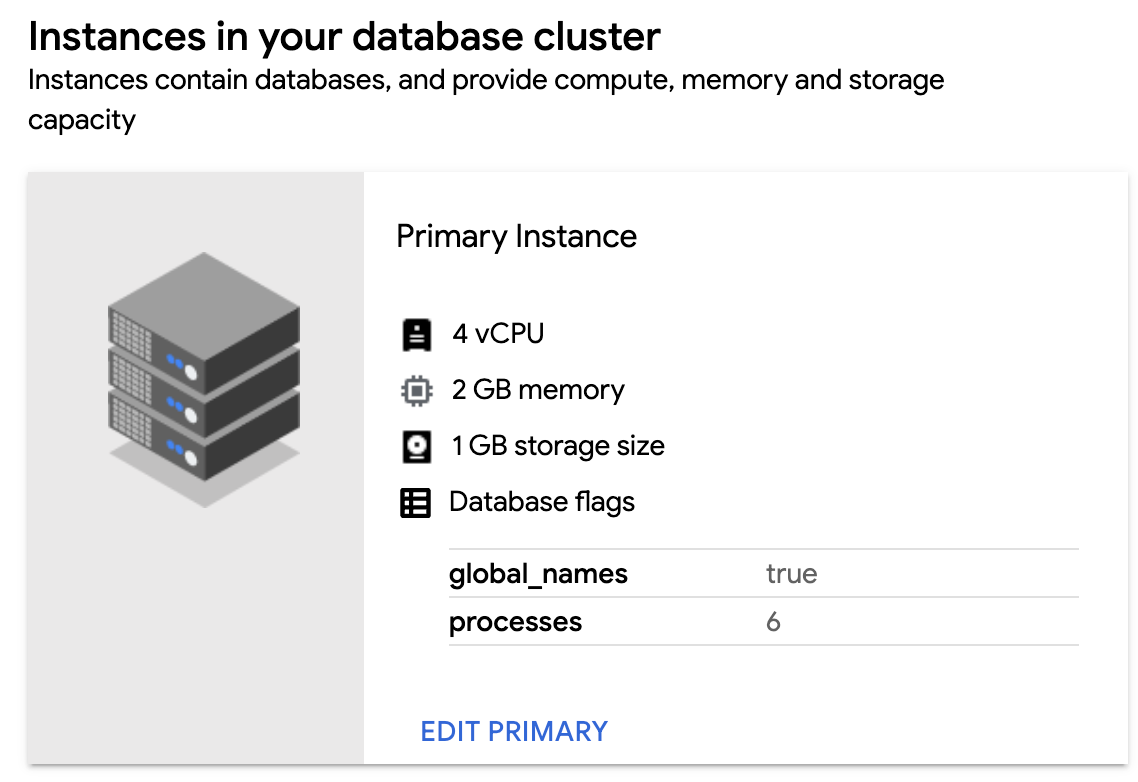
In the Instances in your database cluster section, click Edit Primary.
In the Flags section, click Add a Database Flag.
Choose your flag and enter the value. If the value you input is not valid, the GDC console gives you instructions on how to satisfy the required range or value type.
Click Done.
To set the configuration, click Save. For some flags to take effect, you must restart the database cluster. For this case, click Save and Restart.
To confirm your new flag is set, return to the Instances in your database cluster section of your database cluster and verify the new flag and value are visible.
To edit your database flags, return to the Flags section and modify the existing flags. Hover over a flag component and click the Delete icon to remove a database flag.
gdcloud
You can configure new database flags for your cluster or reset all existing flags back to their default values:
To configure a database flag for your database cluster, run:
gdcloud database clusters update CLUSTER_NAME \
    --database-flags DB_FLAGS
Replace the following:
CLUSTER_NAME: the name of the database cluster.DB_FLAGS: the comma-separated list of database flags to set on the database running in the database cluster. Each database flag and value are set as a key-value pair. Flags without a value can be defined without a string following the=character.
For example, the following command sets several database flags for the
test-db-cluster:gdcloud database clusters update test-db-cluster \ --database-flags max_allowed_packet=55555,skip_grant_tables=,log_output=1For a list of available database flags, see Available database flags.
To reset all your database flags to their default settings, run:
gdcloud database clusters update CLUSTER_NAME --clear-database-flagsReplace
CLUSTER_NAMEwith the name of the database cluster.
API
To configure database flags for your database cluster, run:
kubectl patch dbcluster.postgresql.dbadmin.gdc.goog DBCLUSTER_NAME -p '{"spec":{"primarySpec": {"parameters": DB_FLAGS}}}' --type=merge -n USER_PROJECTReplace the following variables:
DBCLUSTER_NAME: the name of the database cluster.USER_PROJECT: the name of the user project where the database cluster was created.DB_FLAGS: the database configuration parameters to be added or updated. This should be JSON-formatted object of key-value pairs, where keys are the database parameter names and values are their respective settings. For example, the following sets several database flags:
"autovacuum": "on", "autovacuum_analyze_threshold": "2147483647", "dbs.enable_anon": "on"For a list of available database flags, see Available database flags.
To reset all your database flags to their default settings, run:
kubectl patch dbcluster.postgresql.dbadmin.gdc.goog DBCLUSTER_NAME --type=json -p='[{"op": "remove", "path": "/spec/primarySpec/parameters"}]' -n USER_PROJECTReplace the following variables:
DBCLUSTER_NAME: the name of the database cluster.USER_PROJECT: the name of the user project where the database cluster was created.
Available database flags
| Flag | Range | Type | Need restart |
|---|---|---|---|
| google_columnar_engine.enabled | on, off | Boolean | TRUE |
| google_columnar_engine.memory_size_in_mb | [128, 2147483647] | Integer | TRUE |
| anon.algorithm | String | FALSE | |
| anon.maskschema | String | FALSE | |
| anon.restrict_to_trusted_schemas | on, off | Boolean | FALSE |
| anon.salt | String | FALSE | |
| anon.sourceschema | String | FALSE | |
| dbs.enable_anon | on, off | Boolean | TRUE |
| dbs.enable_pg_bigm | on, off | Boolean | TRUE |
| dbs.enable_pg_cron | on, off | Boolean | TRUE |
| dbs.enable_pg_hint_plan | on, off | Boolean | TRUE |
| dbs.enable_pg_squeeze | on, off | Boolean | TRUE |
| dbs.enable_pg_wait_sampling | on, off | Boolean | TRUE |
| pg_bigm.enable_recheck | on, off | Boolean | FALSE |
| pg_bigm.gin_key_limit | [0, 2147483647] | Integer | FALSE |
| pg_bigm.similarity_limit | [0, 1] | Float | FALSE |
| pg_hint_plan.debug_print | off, on, detailed, verbose, 0, 1, 2, 3, no, yes, false, true | Enum | TRUE |
| pg_hint_plan.enable_hint | on, off | Boolean | FALSE |
| pg_hint_plan.enable_hint_table | on, off | Boolean | FALSE |
| pg_hint_plan.message_level | debug5, debug4, debug3, debug2, debug1, debug, info, notice, warning, error, log | Enum | FALSE |
| pg_hint_plan.parse_messages | debug5, debug4, debug3, debug2, debug1, debug, info, notice, warning, error, log | Enum | FALSE |
| pg_stat_statements.max | [100, 2147483647] | Integer | TRUE |
| pg_stat_statements.save | on, off | Boolean | FALSE |
| pg_stat_statements.track | none, top, all | Enum | FALSE |
| pg_stat_statements.track_utility | on, off | Boolean | FALSE |
| pg_wait_sampling.history_period | [1, 2147483647] | Integer | FALSE |
| pg_wait_sampling.history_size | [1, 2147483647] | Integer | FALSE |
| pg_wait_sampling.profile_period | [1, 2147483647] | Integer | FALSE |
| pg_wait_sampling.profile_pid | on, off | Boolean | FALSE |
| pg_wait_sampling.profile_queries | on, off | Boolean | FALSE |
| pgaudit.log | read, write, function, role, ddl, misc, misc_set, all, none , -read, -write, -function, -role, -ddl, -misc, -misc_set, -all, -none |
Repeated string | FALSE |
| pgaudit.log_client | on, off | Boolean | FALSE |
| pgaudit.log_parameter | on, off | Boolean | FALSE |
| pgaudit.log_level | debug5, debug4, debug3, debug2, debug1, info, notice, warning, error, log |
Enum | FALSE |
| pgaudit.log_relation | on, off | Boolean | FALSE |
| pgaudit.log_catalog | on, off | Boolean | FALSE |
| pgaudit.role | String | FALSE | |
| pgaudit.log_statement_once | on, off | Boolean | FALSE |
| pglogical.batch_inserts | on, off | Boolean | TRUE |
| pglogical.conflict_log_level | debug5, debug4, debug3 , debug2, debug1 , info, notice , warning, error , log, fatal , panic | Enum | FALSE |
| pglogical.conflict_resolution | error, apply_remote, keep_local, last_update_wins, first_update_wins | Enum | FALSE |
| pglogical.extra_connection_options | String | FALSE | |
| pglogical.synchronous_commit | on, off | Boolean | TRUE |
| pglogical.use_spi | on, off | Boolean | TRUE |
| pgtt.enabled | on, off | Boolean | FALSE |
| plv8.execution_timeout | [1, 65536] | Integer | FALSE |
| plv8.memory_limit | [256, 3096] | Integer | FALSE |
| plv8.start_proc | String | FALSE |