

This document provides step-by-step instructions for configuring Body-Based
Routing (BBR) for Large Language Model (LLM) traffic with Envoy Agent Router
(formerly Envoy AI Gateway) on Google Distributed Cloud (GDC) air-gapped environments. With
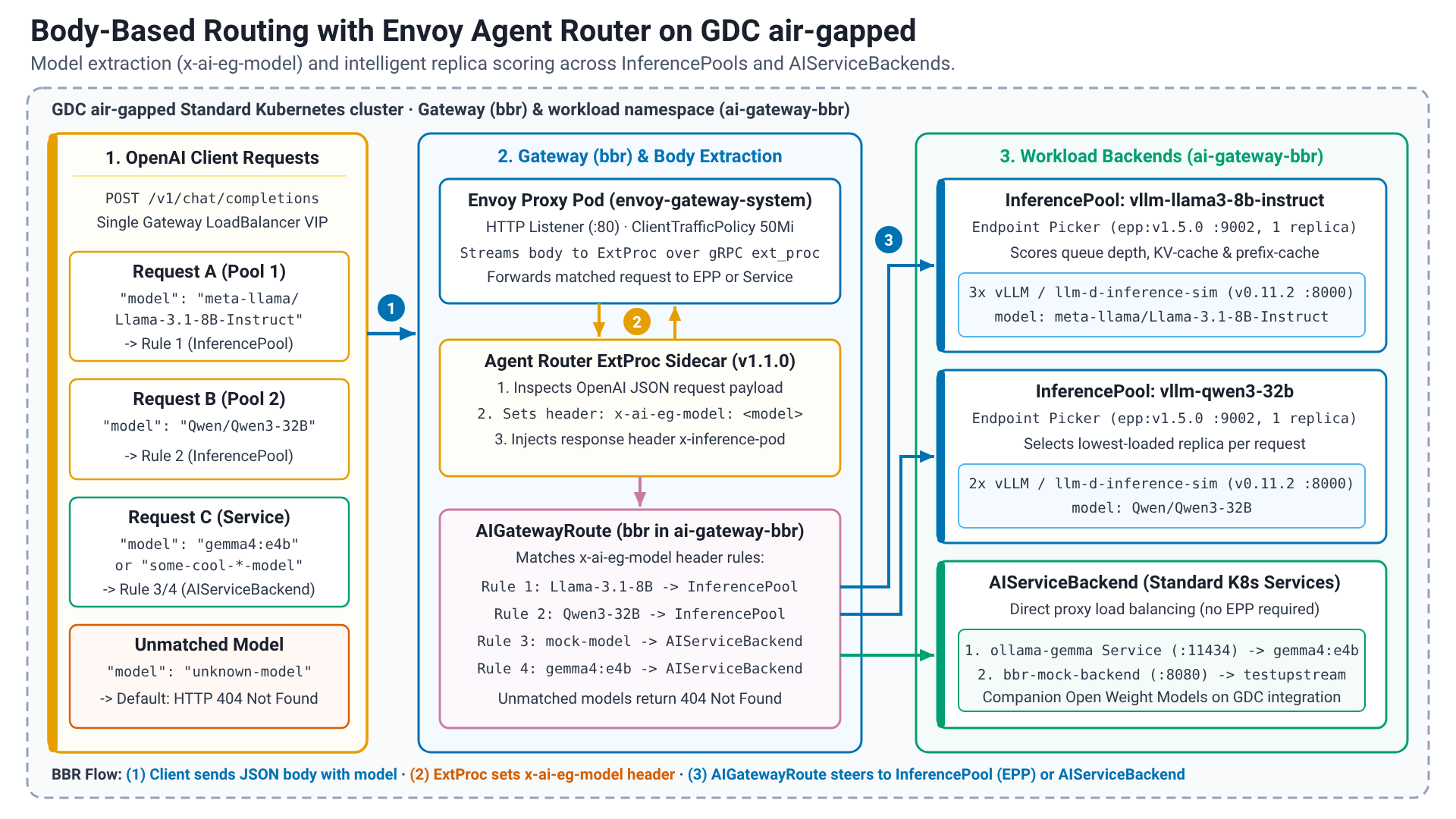
body-based routing the gateway inspects the JSON payload of an OpenAI-compatible
request, extracts the model field into the x-ai-eg-model header and routes
the request to the backend that serves that model: an InferencePool, whose
Endpoint Picker (EPP) selects the best replica from real-time metrics such as
queue depth and KV-cache utilization, or a standard AIServiceBackend.
The guide deploys two simulated vLLM model servers
(meta-llama/Llama-3.1-8B-Instruct and Qwen/Qwen3-32B, served by the llm-d
inference simulator so that no accelerator is required), one InferencePool
with an Endpoint Picker per model, a mock OpenAI-compatible backend, and a
single AIGatewayRoute that routes by model name. An optional section adds a
real open weight model served with Ollama from the companion Open Weight Models
on GDC air-gapped guides to the same route.
Architecture
A Gateway of the GatewayClass created by the reference implementation
exposes one HTTP listener. Envoy Agent Router injects its external processor
into the Envoy proxy Pod of the Gateway; the processor parses each request
body and sets the routing header. The AIGatewayRoute matches on that header
and forwards to either an InferencePool (a set of model server Pods selected
by label, fronted by an Endpoint Picker Deployment that the proxy consults per
request) or to an AIServiceBackend that points at a Kubernetes Service. All
resources of this guide live in one workload namespace; the proxy Pods
themselves run in the Envoy Gateway namespace.
Before you begin
Ensure that the Envoy Agent Router reference
implementation has been deployed using the
workstation and you have access to the gdcag-solutions/ai-gateway/envoy
directory.
Identity and Access Management
Ensure that the necessary IAM accounts, roles, and permissions are properly configured.
GDC User roles on project:
- Standard Cluster Admin (
standard-cluster-admin)
GDC User role on the standard cluster:
StandardClusterRoleBindingto theStandardClusterRolecluster-admin(created by a Project IAM Admin, see the Identity and Access Management section of the reference implementation)
Workstation
This guide requires a workstation with the necessary connectivity to the environment and internet.
Create the user guide directory structure:
mkdir -p ${HOME}/gdcag-solutions/ai-gateway/envoy/bbr/env.dCreate the user guide environment configuration file:
cat << 'EOF' > ${HOME}/gdcag-solutions/ai-gateway/envoy/bbr/env.d/bbr.sh && echo "Successfully created." || echo "Failed to create!"
# Workload
export GDCS_WORKLOAD_NAMESPACE="ai-gateway-bbr"
export GDCS_BBR_GATEWAY_NAME="bbr"

# Simulated model servers (llm-d inference simulator, no accelerator required)
export GDCS_INFERENCE_SIM_IMAGE_TAG="v0.11.2"
export GDCS_BBR_MODEL_1_NAME="meta-llama/Llama-3.1-8B-Instruct"
export GDCS_BBR_MODEL_1_POOL="vllm-llama3-8b-instruct"
export GDCS_BBR_MODEL_1_REPLICAS="3"
export GDCS_BBR_MODEL_2_NAME="Qwen/Qwen3-32B"
export GDCS_BBR_MODEL_2_POOL="vllm-qwen3-32b"
export GDCS_BBR_MODEL_2_REPLICAS="2"

# Endpoint Picker (Gateway API Inference Extension)
export GDCS_EPP_IMAGE_TAG="${GDCS_GATEWAY_API_INFERENCE_EXTENSION_VERSION}"
export GDCS_EPP_CHART_VERSION="${GDCS_GATEWAY_API_INFERENCE_EXTENSION_VERSION}"

# Mock OpenAI-compatible backend (traditional AIServiceBackend)
export GDCS_BBR_MOCK_MODEL_NAME="some-cool-self-hosted-model"
EOF
Create the user guide environment loader file:
cat << 'EOF' > ${HOME}/gdcag-solutions/ai-gateway/envoy/bbr/env.sh && echo "Successfully created." || echo "Failed to create!"
source "${HOME}/gdcag-solutions/ai-gateway/envoy/env.sh"

export GDCS_USER_GUIDE_HOME="${HOME}/gdcag-solutions/ai-gateway/envoy/bbr"
echo "GDCS_USER_GUIDE_HOME=${GDCS_USER_GUIDE_HOME}"

# Sourced in dependency order
source "${GDCS_USER_GUIDE_HOME}/env.d/bbr.sh"

if [[ -f "${GDCS_USER_GUIDE_HOME}/env.d/ollama.sh" ]]; then
  source "${GDCS_USER_GUIDE_HOME}/env.d/ollama.sh"
fi
EOF
Edit and review the environment file with your preferred editor:
${EDITOR:-vi} ${HOME}/gdcag-solutions/ai-gateway/envoy/bbr/env.d/bbr.shSource the environment file:
source ${HOME}/gdcag-solutions/ai-gateway/envoy/bbr/env.sh
Verify the environment variables have been set:
echo "GDCS_USER_GUIDE_HOME=${GDCS_USER_GUIDE_HOME}"
echo "GDCS_HARBOR_PROJECT_URI=${GDCS_HARBOR_PROJECT_URI}"
Cluster
Retrieve cluster credentials:
gdcloud clusters get-credentials "${GDC_STANDARD_CLUSTER_NAME}" \
--project="${GDC_PROJECT}" \
--standard \
--zone="${GDC_ZONE}"
Verify connectivity to the cluster:
kubectl get nodes -L node.cluster.private.gdc.goog/machine-classVerify that every node runs the Kubernetes version that the Before you begin section of this guide requires:
kubectl get nodes -o custom-columns='NAME:.metadata.name,VERSION:.status.nodeInfo.kubeletVersion'Verify the
GatewayClassof the reference implementation is Accepted:kubectl get gatewayclass "${GDCS_GATEWAY_CLASS_NAME}"
Implementation
The implementation seeds the additional artifacts, deploys the simulated model
servers with their inference pools and Endpoint Pickers, adds a mock backend,
and finally creates the Gateway and the AIGatewayRoute.
Artifact migration
Define the list of required container images for this guide:
declare -a GDCS_REGISTRY_IMAGES=(
  "ghcr.io/llm-d/llm-d-inference-sim:${GDCS_INFERENCE_SIM_IMAGE_TAG}"
  "registry.k8s.io/gateway-api-inference-extension/epp:${GDCS_EPP_IMAGE_TAG}"
)
export SERIALIZED_IMAGES=$(declare -p GDCS_REGISTRY_IMAGES)
Seed the required container images to the artifact registry:
${GDCS_IMPLEMENTATION_HOME}/seed_registry.shDefine the list of required Helm charts for this guide:
declare -a GDCS_REGISTRY_CHARTS=(
  "registry.k8s.io/gateway-api-inference-extension/charts/inferencepool:${GDCS_EPP_CHART_VERSION}"
)
export SERIALIZED_CHARTS=$(declare -p GDCS_REGISTRY_CHARTS)
Seed the required Helm charts to the artifact registry:
${GDCS_IMPLEMENTATION_HOME}/seed_charts.shVerify the images and the chart are available in Harbor:
crane ls "${GDCS_HARBOR_PROJECT_URI}/llm-d/llm-d-inference-sim"
crane ls "${GDCS_HARBOR_PROJECT_URI}/gateway-api-inference-extension/epp"
helm show chart "${GDCS_HARBOR_CHART_OCI_URI}/gateway-api-inference-extension/charts/inferencepool" --version "${GDCS_EPP_CHART_VERSION}" | grep -E '^(name|version):'
Namespace
Create the namespace:
kubectl create namespace "${GDCS_WORKLOAD_NAMESPACE}"Add the
imagePullSecret:kubectl create secret docker-registry "${GDCS_HARBOR_K8S_PULL_SECRET}" \ --dry-run=client \ --from-file=.dockerconfigjson=${GDCS_HARBOR_K8S_DOCKER_CONFIG}/config.json \ --namespace="${GDCS_WORKLOAD_NAMESPACE}" \ --output=yaml | kubectl apply -f -
Simulated model servers
Each simulated model server is a Deployment of the llm-d inference simulator,
which exposes the vLLM OpenAI-compatible API and metrics on port 8000 and
answers with random sentences. The app label of the Pods is the selector of
the corresponding InferencePool.
Create the manifest for the first simulated model server:
cat <<EOF > "${GDCS_USER_GUIDE_HOME}/${GDCS_BBR_MODEL_1_POOL}-sim.yaml" && echo "Successfully created." || echo "Failed to create!"
apiVersion: apps/v1
kind: Deployment
metadata:
  name: ${GDCS_BBR_MODEL_1_POOL}
  labels:
    app: ${GDCS_BBR_MODEL_1_POOL}
    inference.networking.k8s.io/engine-type: vllm
spec:
  replicas: ${GDCS_BBR_MODEL_1_REPLICAS}
  selector:
    matchLabels:
      app: ${GDCS_BBR_MODEL_1_POOL}
  template:
    metadata:
      labels:
        app: ${GDCS_BBR_MODEL_1_POOL}
        inference.networking.k8s.io/engine-type: vllm
    spec:
      containers:
        - name: vllm-sim
          image: ${GDCS_HARBOR_PROJECT_URI}/llm-d/llm-d-inference-sim:${GDCS_INFERENCE_SIM_IMAGE_TAG}
          imagePullPolicy: IfNotPresent
          args:
            - --model
            - ${GDCS_BBR_MODEL_1_NAME}
            - --port
            - "8000"
            - --max-loras
            - "2"
            - --lora-modules
            - '{"name": "food-review-1"}'
          env:
            - name: POD_NAME
              valueFrom:
                fieldRef:
                  fieldPath: metadata.name
            - name: NAMESPACE
              valueFrom:
                fieldRef:
                  fieldPath: metadata.namespace
          ports:
            - containerPort: 8000
              name: http
              protocol: TCP
          readinessProbe:
            httpGet:
              path: /health
              port: 8000
            periodSeconds: 5
          resources:
            limits:
              memory: 256Mi
            requests:
              cpu: 50m
              memory: 64Mi
      imagePullSecrets:
        - name: ${GDCS_HARBOR_K8S_PULL_SECRET}
EOF
Apply the manifest for the first simulated model server:
kubectl apply \
--filename="${GDCS_USER_GUIDE_HOME}/${GDCS_BBR_MODEL_1_POOL}-sim.yaml" \
--namespace="${GDCS_WORKLOAD_NAMESPACE}"
Create the manifest for the second simulated model server:
cat <<EOF > "${GDCS_USER_GUIDE_HOME}/${GDCS_BBR_MODEL_2_POOL}-sim.yaml" && echo "Successfully created." || echo "Failed to create!"
apiVersion: apps/v1
kind: Deployment
metadata:
  name: ${GDCS_BBR_MODEL_2_POOL}
  labels:
    app: ${GDCS_BBR_MODEL_2_POOL}
    inference.networking.k8s.io/engine-type: vllm
spec:
  replicas: ${GDCS_BBR_MODEL_2_REPLICAS}
  selector:
    matchLabels:
      app: ${GDCS_BBR_MODEL_2_POOL}
  template:
    metadata:
      labels:
        app: ${GDCS_BBR_MODEL_2_POOL}
        inference.networking.k8s.io/engine-type: vllm
    spec:
      containers:
        - name: vllm-sim
          image: ${GDCS_HARBOR_PROJECT_URI}/llm-d/llm-d-inference-sim:${GDCS_INFERENCE_SIM_IMAGE_TAG}
          imagePullPolicy: IfNotPresent
          args:
            - --model
            - ${GDCS_BBR_MODEL_2_NAME}
            - --port
            - "8000"
            - --max-loras
            - "2"
            - --lora-modules
            - '{"name": "food-review-1"}'
          env:
            - name: POD_NAME
              valueFrom:
                fieldRef:
                  fieldPath: metadata.name
            - name: NAMESPACE
              valueFrom:
                fieldRef:
                  fieldPath: metadata.namespace
          ports:
            - containerPort: 8000
              name: http
              protocol: TCP
          readinessProbe:
            httpGet:
              path: /health
              port: 8000
            periodSeconds: 5
          resources:
            limits:
              memory: 256Mi
            requests:
              cpu: 50m
              memory: 64Mi
      imagePullSecrets:
        - name: ${GDCS_HARBOR_K8S_PULL_SECRET}
EOF
Apply the manifest for the second simulated model server:
kubectl apply \
--filename="${GDCS_USER_GUIDE_HOME}/${GDCS_BBR_MODEL_2_POOL}-sim.yaml" \
--namespace="${GDCS_WORKLOAD_NAMESPACE}"
Wait for the simulated model servers to be Available:
watch --color --interval 5 --no-title \
"kubectl get deployments --selector='inference.networking.k8s.io/engine-type' \
--namespace=${GDCS_WORKLOAD_NAMESPACE} | GREP_COLORS='mt=01;92' egrep --color=always -e '^' -e '${GDCS_BBR_MODEL_1_REPLICAS}/${GDCS_BBR_MODEL_1_REPLICAS}' -e '${GDCS_BBR_MODEL_2_REPLICAS}/${GDCS_BBR_MODEL_2_REPLICAS}'"
Inference pools and endpoint Pickers
The inferencepool Helm chart of the Gateway API Inference Extension creates,
per model, the InferencePool, the Endpoint Picker Deployment and Service
(gRPC port 9002), its plugin configuration (queue-scorer,
kv-cache-utilization-scorer, prefix-cache-scorer) and the namespace-scoped
RBAC the picker needs to watch Pods and InferencePools.
Create the shared Helm values file for the Endpoint Pickers. The chart has no image pull secret value, so the secret is added to the
Deploymentafter the install:cat <<EOF > "${GDCS_USER_GUIDE_HOME}/epp-values.yaml" && echo "Successfully created." || echo "Failed to create!" inferenceExtension: image: pullPolicy: IfNotPresent registry: ${GDCS_HARBOR_PROJECT_URI} repository: gateway-api-inference-extension/epp tag: ${GDCS_EPP_IMAGE_TAG} replicas: 1 resources: limits: memory: 4Gi requests: cpu: 500m memory: 1Gi inferencePool: modelServerType: vllm targetPorts: - number: 8000 provider: name: none EOFInstall the
InferencePooland Endpoint Picker for the first model:helm upgrade --install "${GDCS_BBR_MODEL_1_POOL}" "${GDCS_HARBOR_CHART_OCI_URI}/gateway-api-inference-extension/charts/inferencepool" \ --namespace="${GDCS_WORKLOAD_NAMESPACE}" \ --set "inferencePool.modelServers.matchLabels.app=${GDCS_BBR_MODEL_1_POOL}" \ --values="${GDCS_USER_GUIDE_HOME}/epp-values.yaml" \ --version="${GDCS_EPP_CHART_VERSION}"Install the
InferencePooland Endpoint Picker for the second model:helm upgrade --install "${GDCS_BBR_MODEL_2_POOL}" "${GDCS_HARBOR_CHART_OCI_URI}/gateway-api-inference-extension/charts/inferencepool" \ --namespace="${GDCS_WORKLOAD_NAMESPACE}" \ --set "inferencePool.modelServers.matchLabels.app=${GDCS_BBR_MODEL_2_POOL}" \ --values="${GDCS_USER_GUIDE_HOME}/epp-values.yaml" \ --version="${GDCS_EPP_CHART_VERSION}"Add the
imagePullSecretto the Endpoint PickerDeployments. The patch starts a new rollout with the secret:for pool in "${GDCS_BBR_MODEL_1_POOL}" "${GDCS_BBR_MODEL_2_POOL}"; do kubectl patch deployment "${pool}-epp" \ --namespace="${GDCS_WORKLOAD_NAMESPACE}" \ --patch="{\"spec\":{\"template\":{\"spec\":{\"imagePullSecrets\":[{\"name\":\"${GDCS_HARBOR_K8S_PULL_SECRET}\"}]}}}}" doneWait for the Endpoint Pickers to be Available:
watch --color --interval 5 --no-title \
"kubectl get deployments --selector='inference.networking.k8s.io/igw-mode=inferencepool' \
--namespace=${GDCS_WORKLOAD_NAMESPACE} | GREP_COLORS='mt=01;92' egrep --color=always -e '^' -e '1/1     1            1'"
Verify the
InferencePools exist:kubectl get inferencepools \ --namespace="${GDCS_WORKLOAD_NAMESPACE}"The output is similar to the following:
NAME                      AGE
vllm-llama3-8b-instruct   1m
vllm-qwen3-32b            1m
Create the manifest for the
InferenceObjectives. An objective binds a priority to anInferencePool; the Endpoint Picker prefers higher priorities when the pool is saturated:cat <<EOF > "${GDCS_USER_GUIDE_HOME}/inferenceobjectives.yaml" && echo "Successfully created." || echo "Failed to create!" apiVersion: inference.networking.x-k8s.io/v1alpha2 kind: InferenceObjective metadata: name: ${GDCS_BBR_MODEL_1_POOL} spec: poolRef: name: ${GDCS_BBR_MODEL_1_POOL} priority: 10 --- apiVersion: inference.networking.x-k8s.io/v1alpha2 kind: InferenceObjective metadata: name: ${GDCS_BBR_MODEL_2_POOL} spec: poolRef: name: ${GDCS_BBR_MODEL_2_POOL} priority: 5 EOFApply the manifest for the
InferenceObjectives:kubectl apply \ --filename="${GDCS_USER_GUIDE_HOME}/inferenceobjectives.yaml" \ --namespace="${GDCS_WORKLOAD_NAMESPACE}"
Mock backend
Create the manifest for the mock OpenAI-compatible backend and its
AIServiceBackend. It stands in for any model server that is addressed as a plain KubernetesServiceinstead of anInferencePool:cat <<EOF > "${GDCS_USER_GUIDE_HOME}/mock-backend.yaml" && echo "Successfully created." || echo "Failed to create!" apiVersion: aigateway.envoyproxy.io/v1beta1 kind: AIServiceBackend metadata: name: mock-backend spec: schema: name: OpenAI backendRef: name: mock-backend kind: Backend group: gateway.envoyproxy.io --- apiVersion: gateway.envoyproxy.io/v1alpha1 kind: Backend metadata: name: mock-backend spec: endpoints: - fqdn: hostname: mock-backend.${GDCS_WORKLOAD_NAMESPACE}.svc.cluster.local port: 80 --- apiVersion: apps/v1 kind: Deployment metadata: name: mock-backend spec: replicas: 1 selector: matchLabels: app: mock-backend template: metadata: labels: app: mock-backend spec: containers: - name: testupstream image: ${GDCS_HARBOR_PROJECT_URI}/envoyproxy/ai-gateway-testupstream:${GDCS_ENVOY_AGENT_ROUTER_VERSION} imagePullPolicy: IfNotPresent ports: - containerPort: 8080 env: - name: TESTUPSTREAM_ID value: test readinessProbe: httpGet: path: /health port: 8080 initialDelaySeconds: 1 periodSeconds: 1 imagePullSecrets: - name: ${GDCS_HARBOR_K8S_PULL_SECRET} --- apiVersion: v1 kind: Service metadata: name: mock-backend spec: selector: app: mock-backend ports: - protocol: TCP port: 80 targetPort: 8080 type: ClusterIP EOFApply the manifest for the mock backend:
kubectl apply \
--filename="${GDCS_USER_GUIDE_HOME}/mock-backend.yaml" \
--namespace="${GDCS_WORKLOAD_NAMESPACE}"
Gateway and route
Create the manifest for the
Gatewayand itsClientTrafficPolicy. The buffer limit is raised from the 32 KiB default because the external processor buffers the request body:cat <<EOF > "${GDCS_USER_GUIDE_HOME}/gateway.yaml" && echo "Successfully created." || echo "Failed to create!" apiVersion: gateway.networking.k8s.io/v1 kind: Gateway metadata: name: ${GDCS_BBR_GATEWAY_NAME} spec: gatewayClassName: ${GDCS_GATEWAY_CLASS_NAME} listeners: - name: http protocol: HTTP port: 80 --- apiVersion: gateway.envoyproxy.io/v1alpha1 kind: ClientTrafficPolicy metadata: name: ${GDCS_BBR_GATEWAY_NAME}-buffer-limit spec: targetRefs: - group: gateway.networking.k8s.io kind: Gateway name: ${GDCS_BBR_GATEWAY_NAME} connection: bufferLimit: 50Mi EOFApply the manifest for the
Gateway:kubectl apply \ --filename="${GDCS_USER_GUIDE_HOME}/gateway.yaml" \ --namespace="${GDCS_WORKLOAD_NAMESPACE}"Create the manifest for the
AIGatewayRoute. Each rule matches thex-ai-eg-modelheader that the external processor derives from themodelfield of the request body:cat <<EOF > "${GDCS_USER_GUIDE_HOME}/aigatewayroute.yaml" && echo "Successfully created." || echo "Failed to create!" apiVersion: aigateway.envoyproxy.io/v1beta1 kind: AIGatewayRoute metadata: name: ${GDCS_BBR_GATEWAY_NAME} spec: parentRefs: - name: ${GDCS_BBR_GATEWAY_NAME} kind: Gateway group: gateway.networking.k8s.io rules: - matches: - headers: - type: Exact name: x-ai-eg-model value: ${GDCS_BBR_MODEL_1_NAME} backendRefs: - group: inference.networking.k8s.io kind: InferencePool name: ${GDCS_BBR_MODEL_1_POOL} - matches: - headers: - type: Exact name: x-ai-eg-model value: ${GDCS_BBR_MODEL_2_NAME} backendRefs: - group: inference.networking.k8s.io kind: InferencePool name: ${GDCS_BBR_MODEL_2_POOL} - matches: - headers: - type: Exact name: x-ai-eg-model value: ${GDCS_BBR_MOCK_MODEL_NAME} backendRefs: - name: mock-backend EOFApply the manifest for the
AIGatewayRoute:kubectl apply \ --filename="${GDCS_USER_GUIDE_HOME}/aigatewayroute.yaml" \ --namespace="${GDCS_WORKLOAD_NAMESPACE}"Wait for the
Gatewayto be Programmed:watch --color --interval 5 --no-title \ "kubectl get gateway/${GDCS_BBR_GATEWAY_NAME} \ --namespace=${GDCS_WORKLOAD_NAMESPACE} | GREP_COLORS='mt=01;92' egrep --color=always -e '^' -e 'True'"Verify the
AIGatewayRouteis Accepted:kubectl get aigatewayroute/${GDCS_BBR_GATEWAY_NAME} \ --namespace="${GDCS_WORKLOAD_NAMESPACE}" \ --output=jsonpath='{range .status.conditions[*]}{.type}={.status} {.message}{"\n"}{end}'The output is similar to the following:
Accepted=True AI Gateway Route is accepted
Validation
Start port forwarding to the Envoy
Serviceof theGateway:export ENVOY_SERVICE=$(kubectl get service --namespace="${GDCS_ENVOY_GATEWAY_NAMESPACE}" --selector="gateway.envoyproxy.io/owning-gateway-namespace=${GDCS_WORKLOAD_NAMESPACE},gateway.envoyproxy.io/owning-gateway-name=${GDCS_BBR_GATEWAY_NAME}" --output=jsonpath='{.items[0].metadata.name}') echo "ENVOY_SERVICE=${ENVOY_SERVICE}" kubectl port-forward "service/${ENVOY_SERVICE}" \ --namespace="${GDCS_ENVOY_GATEWAY_NAMESPACE}" 8888:80 & PF_PID=$! sleep 2Send a request for the first model. The response headers show the
Podthe Endpoint Picker selected:curl http://127.0.0.1:8888/v1/chat/completions \ --data '{"model": "'${GDCS_BBR_MODEL_1_NAME}'", "messages": [{"role": "user", "content": "Say this is a test."}]}' \ --dump-header - \ --header "Content-Type: application/json" \ --no-progress-meter \ --show-error | grep -E -i '^(HTTP|x-inference-pod|x-inference-port)|"model"|"content"'The output is similar to the following:
HTTP/1.1 200 OK
x-inference-port: 8000
x-inference-pod: vllm-llama3-8b-instruct-...
  "model": "meta-llama/Llama-3.1-8B-Instruct",
        "content": "..."
Send a request for the second model:
curl http://127.0.0.1:8888/v1/chat/completions \
--data '{"model": "'${GDCS_BBR_MODEL_2_NAME}'", "messages": [{"role": "user", "content": "Say this is a test."}]}' \
--dump-header - \
--header "Content-Type: application/json" \
--no-progress-meter \
--show-error | grep -E -i '^(HTTP|x-inference-pod|x-inference-port)|"model"|"content"'
The output is similar to the following:
HTTP/1.1 200 OK
x-inference-port: 8000
x-inference-pod: vllm-qwen3-32b-...
  "model": "Qwen/Qwen3-32B",
        "content": "..."
Send a request for the model served by the mock backend:
curl http://127.0.0.1:8888/v1/chat/completions \
--data '{"model": "'${GDCS_BBR_MOCK_MODEL_NAME}'", "messages": [{"role": "user", "content": "Say this is a test."}]}' \
--dump-header - \
--header "Content-Type: application/json" \
--no-progress-meter \
--show-error | grep -E -i '^(HTTP|testupstream-id|x-model)|"content"'
The output is similar to the following:
HTTP/1.1 200 OK
testupstream-id: test
x-model: some-cool-self-hosted-model
        "content": "..."
Send a request for a model that no rule serves. The gateway rejects it instead of forwarding it:
curl http://127.0.0.1:8888/v1/chat/completions \
--data '{"model": "unknown-model", "messages": [{"role": "user", "content": "Say this is a test."}]}' \
--header "Content-Type: application/json" \
--no-progress-meter \
--show-error \
--write-out '\nHTTP %{http_code}\n'
The output is similar to the following:
...
HTTP 404
Send several requests for the first model and confirm that the Endpoint Picker spreads them over the replicas of the pool:
for i in $(seq 1 6); do
  curl http://127.0.0.1:8888/v1/chat/completions \
  --data '{"model": "'${GDCS_BBR_MODEL_1_NAME}'", "messages": [{"role": "user", "content": "Request '${i}'"}]}' \
  --dump-header - \
  --header "Content-Type: application/json" \
  --no-progress-meter \
  --output /dev/null \
  --show-error | grep -i '^x-inference-pod'
done | sort | uniq -c
Stop the port forwarding:
kill -9 ${PF_PID}
Route to an open weight model
This optional section adds a real model to the route: the Gemma 4 E4B
model served with Ollama by the companion guide Gemma 4 E4B with
Ollama on GDC air-gapped user guide. Ollama exposes an
OpenAI-compatible API, so it is attached as an AIServiceBackend whose
Backend points at the in-cluster Service of the Ollama Deployment. Any
other OpenAI-compatible model server, for example the vLLM Deployment of the
companion guides, can be attached the same way.
Create the Ollama backend configuration file. The
Servicename and namespace are those of the Ollama user guide:cat << 'EOF' > ${HOME}/gdcag-solutions/ai-gateway/envoy/bbr/env.d/ollama.sh && echo "Successfully created." || echo "Failed to create!" # Open weight model backend (Ollama user guide) export GDCS_BBR_OLLAMA_MODEL_NAME="BBR_OLLAMA_MODEL_NAME" export GDCS_BBR_OLLAMA_SERVICE_NAME="BBR_OLLAMA_SERVICE_NAME" export GDCS_BBR_OLLAMA_SERVICE_NAMESPACE="BBR_OLLAMA_SERVICE_NAMESPACE" export GDCS_BBR_OLLAMA_SERVICE_PORT="80" EOFReplace the following:
BBR_OLLAMA_MODEL_NAME: the Ollama model name (GDCS_OLLAMA_MODEL of the Ollama user guide).BBR_OLLAMA_SERVICE_NAME: the Ollama Service name (GDCS_OLLAMA_MODEL_KUBERNETES of the Ollama user guide).BBR_OLLAMA_SERVICE_NAMESPACE: the Ollama namespace (GDCS_WORKLOAD_NAMESPACE of the Ollama user guide).
Source the environment file:
source ${HOME}/gdcag-solutions/ai-gateway/envoy/bbr/env.shVerify the Ollama
Serviceis reachable by name from inside the cluster:kubectl get service "${GDCS_BBR_OLLAMA_SERVICE_NAME}" \ --namespace="${GDCS_BBR_OLLAMA_SERVICE_NAMESPACE}"Create the manifest for the Ollama
AIServiceBackend:cat <<EOF > "${GDCS_USER_GUIDE_HOME}/ollama-backend.yaml" && echo "Successfully created." || echo "Failed to create!" apiVersion: aigateway.envoyproxy.io/v1beta1 kind: AIServiceBackend metadata: name: ollama-backend spec: schema: name: OpenAI backendRef: name: ollama-backend kind: Backend group: gateway.envoyproxy.io --- apiVersion: gateway.envoyproxy.io/v1alpha1 kind: Backend metadata: name: ollama-backend spec: endpoints: - fqdn: hostname: ${GDCS_BBR_OLLAMA_SERVICE_NAME}.${GDCS_BBR_OLLAMA_SERVICE_NAMESPACE}.svc.cluster.local port: ${GDCS_BBR_OLLAMA_SERVICE_PORT} EOFApply the manifest for the Ollama
AIServiceBackend:kubectl apply \ --filename="${GDCS_USER_GUIDE_HOME}/ollama-backend.yaml" \ --namespace="${GDCS_WORKLOAD_NAMESPACE}"Add a rule for the Ollama model to the
AIGatewayRouteand apply it:cat <<EOF >> "${GDCS_USER_GUIDE_HOME}/aigatewayroute.yaml" && echo "Successfully added." || echo "Failed to add!" - matches: - headers: - type: Exact name: x-ai-eg-model value: ${GDCS_BBR_OLLAMA_MODEL_NAME} backendRefs: - name: ollama-backend EOF kubectl apply \ --filename="${GDCS_USER_GUIDE_HOME}/aigatewayroute.yaml" \ --namespace="${GDCS_WORKLOAD_NAMESPACE}"Send a request for the Ollama model through the gateway. The route change of the previous step takes a few seconds to reach the proxy, so the request retries on transient errors; on CPU-only clusters the model answers slowly, so it allows five minutes:
export ENVOY_SERVICE=$(kubectl get service --namespace="${GDCS_ENVOY_GATEWAY_NAMESPACE}" --selector="gateway.envoyproxy.io/owning-gateway-namespace=${GDCS_WORKLOAD_NAMESPACE},gateway.envoyproxy.io/owning-gateway-name=${GDCS_BBR_GATEWAY_NAME}" --output=jsonpath='{.items[0].metadata.name}')

kubectl port-forward "service/${ENVOY_SERVICE}" \
--namespace="${GDCS_ENVOY_GATEWAY_NAMESPACE}" 8888:80 &
PF_PID=$!

sleep 2

curl http://127.0.0.1:8888/v1/chat/completions \
--data '{"model": "'${GDCS_BBR_OLLAMA_MODEL_NAME}'", "messages": [{"role": "user", "content": "Explain Google Distributed Cloud air-gapped in one sentence."}], "max_tokens": 256}' \
--fail-with-body \
--header "Content-Type: application/json" \
--max-time 300 \
--no-progress-meter \
--output "${GDCS_USER_GUIDE_HOME}/ollama-response.json" \
--retry 5 \
--retry-all-errors \
--retry-delay 5 \
--show-error \
--write-out 'HTTP %{http_code} in %{time_total}s\n'

jq '{model, system_fingerprint, finish_reason: .choices[0].finish_reason, content: .choices[0].message.content, reasoning: ((.choices[0].message.reasoning // "") | .[0:160])}' "${GDCS_USER_GUIDE_HOME}/ollama-response.json"

kill -9 ${PF_PID}
The output is similar to the following:
HTTP 200 in 41.2s
{
  "model": "gemma4:e4b",
  "system_fingerprint": "fp_ollama",
  "finish_reason": "length",
  "content": "",
  "reasoning": "Here's a thinking process to construct the one-sentence explanation: ..."
}
Operations
Day-two tasks for the route and its backends.
Expose the gateway outside the cluster
- The Envoy
Serviceof aGatewayis of typeLoadBalancerby default and receives an external IP address from the GDC load balancer (kubectl get service "${ENVOY_SERVICE}" --namespace="${GDCS_ENVOY_GATEWAY_NAMESPACE}"). Traffic from outside the project additionally requires aProjectNetworkPolicy(networking.gdc.goog/v1) created in the project namespace by a Project NetworkPolicy Admin, see Configure project network policies.
Scale a model
- Scale the model server
Deployment(kubectl scale deployment/${GDCS_BBR_MODEL_1_POOL} --replicas=<n> --namespace="${GDCS_WORKLOAD_NAMESPACE}"); theInferencePoolselects the newPods automatically and the Endpoint Picker starts scoring them once they are Ready.
Change scheduling priorities
- Edit the
priorityof anInferenceObjectiveand re-applyinferenceobjectives.yaml; the Endpoint Picker sheds lower priorities first when the pool is saturated.
Observe the endpoint Picker
- The picker exposes Prometheus metrics on port 9090 of its
Service(kubectl port-forward service/${GDCS_BBR_MODEL_1_POOL}-epp 9090:9090 --namespace="${GDCS_WORKLOAD_NAMESPACE}"thencurl http://127.0.0.1:9090/metrics), and its scheduling decisions are logged at verbosity--v=4(inferenceExtension.flags.v: 4inepp-values.yaml).
Upgrade the endpoint Picker
- Seed the new
eppimage andinferencepoolchart, updateGDCS_GATEWAY_API_INFERENCE_EXTENSION_VERSIONin the reference implementation environment file, run the samehelm upgrade --installcommands and re-apply theimagePullSecretpatch.
Troubleshooting
| Symptom | Likely cause | Action |
|---|---|---|
Endpoint Picker Pod in ImagePullBackOff |
The imagePullSecret patch was not applied, or the epp image was not seeded |
Re-run the patch step; crane ls "${GDCS_HARBOR_PROJECT_URI}/gateway-api-inference-extension/epp". |
AIGatewayRoute shows Accepted=False with a message about the InferencePool |
The InferencePool doesn't exist in the namespace, or Envoy Gateway can't read inferencepools |
kubectl get inferencepools --namespace="${GDCS_WORKLOAD_NAMESPACE}"; check the ClusterRoleBinding envoy-gateway-inferencepool-reader from the reference implementation. |
Requests for a pool model return 503 |
No Ready Pod matches the pool selector, or the picker isn't Ready |
kubectl get pods --selector=app=${GDCS_BBR_MODEL_1_POOL} --namespace="${GDCS_WORKLOAD_NAMESPACE}"; kubectl logs deployment/${GDCS_BBR_MODEL_1_POOL}-epp --namespace="${GDCS_WORKLOAD_NAMESPACE}". |
Requests return 404 for a model that has a rule |
The model value in the body differs from the rule (x-ai-eg-model is an exact match, case-sensitive) |
Compare the request body with the value of the rule; kubectl get aigatewayroute ${GDCS_BBR_GATEWAY_NAME} --namespace="${GDCS_WORKLOAD_NAMESPACE}" --output=yaml. |
Request with a large prompt is rejected with 413 |
Buffer limit too small for the request body | Raise connection.bufferLimit in the ClientTrafficPolicy. |
| Ollama request times out | The model is loading or generating on CPU; the NetworkPolicy of the Ollama namespace doesn't admit the proxy |
Retry with a longer --max-time; verify the Ollama NetworkPolicy admits ingress on port 11434 from the Envoy Gateway namespace. |
Clean up
Remove the route, the gateway and the backends:
kubectl delete \
--filename="${GDCS_USER_GUIDE_HOME}/aigatewayroute.yaml" \
--filename="${GDCS_USER_GUIDE_HOME}/gateway.yaml" \
--filename="${GDCS_USER_GUIDE_HOME}/mock-backend.yaml" \
--filename="${GDCS_USER_GUIDE_HOME}/inferenceobjectives.yaml" \
--ignore-not-found \
--namespace="${GDCS_WORKLOAD_NAMESPACE}"

kubectl delete \
--filename="${GDCS_USER_GUIDE_HOME}/ollama-backend.yaml" \
--ignore-not-found \
--namespace="${GDCS_WORKLOAD_NAMESPACE}" 2>/dev/null || true
Uninstall the Endpoint Pickers and remove the simulated model servers:
helm uninstall "${GDCS_BBR_MODEL_1_POOL}" --namespace="${GDCS_WORKLOAD_NAMESPACE}"
helm uninstall "${GDCS_BBR_MODEL_2_POOL}" --namespace="${GDCS_WORKLOAD_NAMESPACE}"

kubectl delete \
--filename="${GDCS_USER_GUIDE_HOME}/${GDCS_BBR_MODEL_1_POOL}-sim.yaml" \
--filename="${GDCS_USER_GUIDE_HOME}/${GDCS_BBR_MODEL_2_POOL}-sim.yaml" \
--ignore-not-found \
--namespace="${GDCS_WORKLOAD_NAMESPACE}"
Delete the namespace:
kubectl delete namespace "${GDCS_WORKLOAD_NAMESPACE}"
Additional materials
- InferencePool support | Envoy Agent Router
- AIGatewayRoute + InferencePool guide | Envoy Agent Router
- Gateway API Inference Extension
- llm-d inference simulator
- Configure project network policies | Google Distributed Cloud air-gapped
- AI Gateway reference architecture
- Envoy Agent Router reference implementation