

Problem statement
Organizations operating in air-gapped environments face a significant challenge: they need large language models but are strictly prohibited from connecting to external cloud-based APIs due to rigorous security protocols. To bridge this gap, these customers need a robust, self-contained ecosystem capable of hosting and managing open weight models directly on their Google Distributed Cloud (GDC) air-gapped infrastructure. This localized deployment is essential for maintaining absolute data sovereignty, ensuring that sensitive information never leaves the physical premises. By integrating secure execution environments with serving backends, users can use advanced AI capabilities while retaining full administrative control over their data, model weights, and internal security posture.
While Gemini on GDC provides powerful, managed frontier capabilities, customers often deploy open-weight models like Gemma 4 or Llama 4 for greater granularity and control. Deploying open-weight models on air-gapped GDC environments offers significant cost advantages over managed proprietary services. By owning the model weights, organizations eliminate recurring per-token API fees, which can become prohibitive for high-volume, automated workloads. Furthermore, open weight models enable quantization (for example, 4-bit or 8-bit), allowing high-performance reasoning to run on smaller, cheaper hardware footprints at the edge. This vertical optimization, combined with the ability to share infrastructure across multiple internal applications without extra licensing costs, results in a significantly lower Total Cost of Ownership (TCO) for sustained, large-scale inference operations.
Proposed solution
This document outlines the reference architecture for deploying and managing open weight Large Language Models (LLMs) on Google Distributed Cloud (GDC) air-gapped environments. Many customers, especially those in highly regulated sectors, can't use cloud-based LLM APIs due to strict data sovereignty and security requirements. This architecture addresses the need to run powerful LLMs locally within their own secure GDC instance.
What is included: This architecture covers the deployment of open weight
models (such as Gemma 4, Llama, DeepSeek, Mistral) using either the
vLLM or Ollama serving backends. It includes the use of Kubernetes for
orchestration, Harbor for artifact storage, Persistent Volumes for model
weights, network policies (NetworkPolicy / ProjectNetworkPolicy) for network
security, and Open WebUI as an optional browser frontend.
What isn't included: This architecture doesn't cover managed AI Gateway services, proprietary models like Google's Gemini, model fine-tuning processes, or GenAI models for other modalities like image generation.
Audience: The primary audience for this document includes Platform Administrators responsible for deploying and managing services on GDC, and technical architects designing AI solutions within the air-gapped environment. End users and developers who will interact with the deployed models are secondary audiences who benefit from understanding the underlying structure.
Architecture
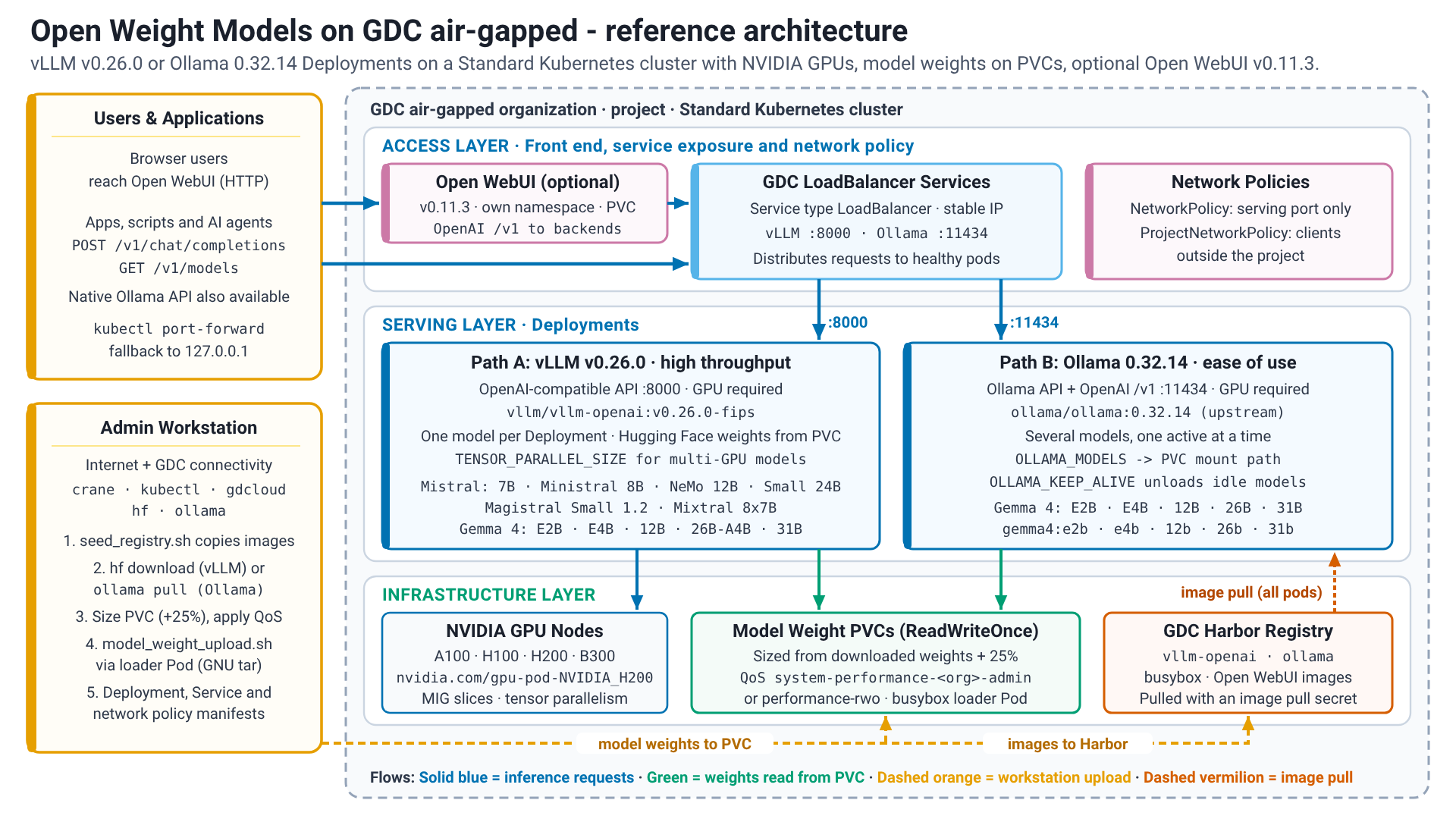
The solution deploys vLLM, Ollama, or both as containerized inference serving
backends (Deployments) within a standard cluster. Model weights are stored on
Persistent Volumes that are populated from the workstation through a model
loader Pod. Kubernetes Services of type LoadBalancer expose the backend
APIs, NetworkPolicy / ProjectNetworkPolicy objects secure access to them,
and Open WebUI can optionally be deployed as a browser frontend for the
OpenAI-compatible APIs.
Solution components
The solution uses the following components:
| Solution Component | Responsibilities | Data Flow | Interfaces |
|---|---|---|---|
| GDC air-gapped customer zone | Hosts the Kubernetes clusters, networking, and storage infrastructure | Foundational Platform | Infrastructure management interfaces for the IO. Kubernetes API for Platform Administrators and users |
| Load Balancer | Exposes the LLM serving pods (vLLM, Ollama) to traffic from outside the Kubernetes cluster, providing a stable IP address. | External client requests are sent to the LoadBalancer's External IP. The LoadBalancer distributes the requests across the healthy backend pods (vLLM or Ollama) based on the Service's selector | Kubernetes Service API. Automatically provisions a network load balancer within the GDC environment. |
| vLLM | High-throughput LLM inference serving. Optimized for low latency using techniques like PagedAttention. Typically serves one model per instance. | Receives HTTP inference requests from clients. Loads model weights from the mounted PVC. Performs computations on attached GPUs. Returns HTTP responses with generated text. | OpenAI-compatible RESTful API for inference. Accepts JSON requests. |
| Ollama | LLM inference serving, designed for ease of use; one instance can serve several models and loads them on demand. | Receives HTTP inference requests. Loads models from the mounted PVC (OLLAMA_MODELS). Performs computations on attached GPUs. Returns HTTP responses. Models are unloaded after a configurable period of inactivity (OLLAMA_KEEP_ALIVE). |
Ollama RESTful API and OpenAI-compatible API (/v1). Accepts JSON requests. Also has a CLI. |
| NVIDIA GPUs and MIG | Provide hardware acceleration for LLM inference. | The LLM backends (vLLM, Ollama) offload the intensive model computations (such as matrix multiplications) to the GPUs to accelerate inference. MIG allows partitioning a single GPU to be used by multiple smaller model instances. | Exposed as a resource type in Kubernetes (for example, nvidia.com/gpu-pod-NVIDIA_H200; the exact resource name depends on the installed GPU model and is discovered from the nodes). Pods request these resources |
| Harbor | Securely stores and manages container images for vLLM, Ollama, Open WebUI, and any helper pods (like busybox) | Container images are copied from public registries into Harbor with seed_registry.sh (crane) from a workstation with internet access. Kubernetes nodes pull these images from Harbor to run containers. |
Docker Registry API. Kubernetes nodes interface with Harbor to pull images during pod creation. Users interface using crane, the Docker CLI or the Harbor UI to push images. |
| Persistent Volume Claims | Provides persistent storage for LLM model weights, decoupled from pod lifecycles. | Model files are downloaded on the workstation, used to dynamically calculate the PVC size with 25% overhead, and streamed into the Persistent Volume through a temporary model loader Pod (busybox) with model_weight_upload.sh. The PVC is provisioned with performance-rwo where high-performance block storage is enabled; otherwise an Infrastructure Operator applies the system-performance-<org>-admin QoS policy to its backing volume. Either option provides 30 IOPS per GiB (6,148 IOPS minimum floor). Both backends read their model weights from this mounted volume at startup: vLLM loads the Hugging Face model directory, Ollama points OLLAMA_MODELS at the mount path. No kubectl cp is used and no models are bundled into container images. |
Kubernetes storage API. Defined in YAML (ReadWriteOnce) and mounted into pods as volumes. |
| Network Policies | Enforce network isolation and control traffic flow to the LLM services. A namespace NetworkPolicy (networking.k8s.io/v1) admits traffic to the serving port from inside the cluster; a ProjectNetworkPolicy (networking.gdc.goog/v1) is additionally required for access from outside the project. |
Network traffic to and from pods within the namespace is inspected. The policy rules dictate whether connections to the LLM service ports (for example, 8000 for vLLM, 11434 for Ollama) are allowed, typically based on source IP ranges or other labels. | Kubernetes networking.k8s.io/v1 and networking.gdc.goog/v1 APIs. Defined in YAML. |
| Open WebUI | Optional browser-based frontend for end users. Talks to the OpenAI-compatible APIs of vLLM and Ollama; it holds no model weights and needs no accelerator. | Users reach Open WebUI through its Kubernetes Service. Open WebUI forwards chat requests to the vLLM and Ollama Services over the OpenAI-compatible /v1 API and keeps its own state (users, chats, settings) on a Persistent Volume. |
HTTP (browser) towards users, OpenAI-compatible REST API towards the backends. Stateful workload deployed in its own namespace. |
Features and capabilities
This reference architecture provides the following core capabilities:
- Open Weight LLM Serving: Enables hosting and inference of various open
weight models (for example, Gemma 4, Llama, DeepSeek, Mistral).
- Components: LLM Serving Backends (vLLM, Ollama), Kubernetes Deployments/Pods.
- Responsibilities: Loading model weights, managing the inference process, executing models on hardware accelerators, and exposing endpoints.
- Interfaces: REST APIs (OpenAI-compatible for vLLM and Ollama, plus the Ollama-specific API) for inference requests, typically using JSON.
- Bring Your Own Model (BYOM): Users can import and deploy their chosen
open weight LLMs into the air-gapped environment.
- Components: Harbor, Persistent Volume Claims, model loader Pod, Kubernetes.
- Responsibilities: Secure storage of container images and model
weights. Mechanism to transfer models into the environment
(
model_weight_upload.shthrough the loader Pod) and make them accessible to the serving engines. - Interfaces: Docker Registry API (for Harbor), Kubernetes API (for PVCs and volume mounts).
- Hardware Accelerated Inference: Uses NVIDIA GPUs within the
GDC cluster to run LLM inferences efficiently.
- Components: NVIDIA GPUs, Kubernetes, Device Plugins.
- Responsibilities: Scheduling pods on nodes with GPU resources.
Exposing GPU hardware to the LLM backend containers. Supports
Multi-Instance GPU (MIG) for partitioning and multi-GPU tensor
parallelism (
TENSOR_PARALLEL_SIZE) for large models such as Mixtral 8x7Bbf16. - Interfaces: Kubernetes API (for requesting GPU resources like
nvidia.com/gpu-pod-NVIDIA_H200ornvidia.com/gpu-pod-NVIDIA_A100_80GB_PCIE).
- Network Controlled Access: Ensures that access to the LLM inference
endpoints is controlled and isolated within the GDC
environment.
- Components: Kubernetes Services (LoadBalancer), NetworkPolicy, ProjectNetworkPolicy.
- Responsibilities: Exposing inference services using a stable IP. Defining and enforcing network rules to allow or deny traffic to the LLM backends based on source, destination, and ports.
- Interfaces: Kubernetes API (for Services, NetworkPolicy and ProjectNetworkPolicy).
- Scalable Serving: Allows for adjusting capacity based on demand.
- Components: Kubernetes Deployments.
- Responsibilities: Enabling horizontal scaling by increasing the number of replicas for the LLM backend pods. Vertical scaling by adjusting resource requests/limits.
- Interfaces: Kubernetes API (for managing Deployment replicas and resources).
- Browser Front End (optional): Lets end users chat with the deployed
models without writing API calls.
- Components: Open WebUI Deployment, Service and Persistent Volume Claim.
- Responsibilities: Presenting the models served by vLLM and Ollama in one interface; persisting users, chats and settings.
- Interfaces: HTTP (browser); OpenAI-compatible
/v1API towards the backends.
Architectural principles
- Security First: All components and data reside within the
GDC air-gapped boundary, ensuring maximum data
security and control. Network access is restricted using
NetworkPolicyandProjectNetworkPolicyobjects. - Data Sovereignty: Customers retain full control over their models and data, with no external connectivity required for operation.
- Open & Flexible: The architecture uses open-source serving backends (vLLM, Ollama) and supports a variety of open weight LLMs, giving customers choice and avoiding vendor lock-in for the inference engine.
- Component Decoupling: Key functions like model storage (PVCs), image management (Harbor), inference serving (vLLM/Ollama pods) and the user interface (Open WebUI) are distinct components, allowing for independent management and updates.
- Scalability & Performance: Designed to scale both horizontally by increasing the number of pod replicas and vertically by adjusting CPU/GPU resources (including multi-GPU tensor parallelism) to meet performance demands. vLLM is chosen for high-throughput, low-latency scenarios.
- Resource Optimization: Supports NVIDIA Multi-Instance GPU (MIG) to allow smaller models to share GPU resources efficiently, and dynamic PVC sizing (+25% overhead) paired with high-performance storage QoS to eliminate storage overprovisioning without sacrificing model load speed.
- Standard Interfaces: Built upon Kubernetes standards for orchestration, deployment, and service exposure. Inference endpoints provide REST APIs, with both vLLM and Ollama offering OpenAI compatibility.
- Resilience: Uses Kubernetes health checks and replication to ensure service availability.
Considerations
- Scalability and Performance:
- Horizontal scaling is achieved by increasing the number of replicas in
the Kubernetes Deployment for both vLLM and Ollama. Without a
ReadOnlyManyStorageClass a model Deployment is limited to one replica (the model volume isReadWriteOnce); additional capacity then comes from additional Deployments, each with its own PVC. - Vertical scaling involves allocating more CPU/memory and larger GPU
slices, up to full GPUs or multi-GPU tensor parallelism
(
TENSOR_PARALLEL_SIZE) across multiple GPUs on the same node. - vLLM serves one model per instance, requiring new Deployments for additional models. Ollama can serve several models from one instance; in these guides each Ollama Deployment serves one model.
- Each model's PVC is sized dynamically from its downloaded weights with
25% overhead and configured with the high-performance storage QoS policy
(
system-performance-<org>-admin, 30 IOPS per GiB with a 6,148 IOPS floor, orperformance-rwowhere high-performance block storage is enabled) so that model load times aren't throttled by the defaultstandard-rwo3 IOPS per GiB cap.
- Horizontal scaling is achieved by increasing the number of replicas in
the Kubernetes Deployment for both vLLM and Ollama. Without a
- Resource Management:
- Careful planning of GPU resources is essential. NVIDIA MIG can be used
to partition GPUs for smaller models, improving utilization, while
larger models (such as Mixtral 8x7B in
bf16) can shard weights across multiple GPUs using tensor parallelism. - Adequate CPU and memory must be allocated to handle both inference and model management overhead; vLLM and Ollama serve models with GPU acceleration.
- Sufficient storage must be provisioned for PVCs to accommodate model sizes and ensure performance.
- Careful planning of GPU resources is essential. NVIDIA MIG can be used
to partition GPUs for smaller models, improving utilization, while
larger models (such as Mixtral 8x7B in
- Availability and Reliability:
- Kubernetes Deployments provide self-healing and rolling update capabilities.
- LoadBalancer Services distribute traffic across healthy pods, masking individual pod failures.
- Storing model weights on PVCs ensures persistence across pod restarts.
- Operational Complexity:
- Managing container images for different backends and versions in Harbor.
- Procedures for securely transferring model weights into the air-gapped environment.
- Creating and managing Kubernetes manifests (Deployments, Services, PVCs, Network Policies) for each model and backend.
- Monitoring GPU utilization, inference latency, and error rates.
- Security and Compliance:
- The entire solution operates within the GDC air-gapped security perimeter.
- Network policies are mandatory to enforce strict network isolation and
control access to the LLM endpoints: a namespace
NetworkPolicyfor in-cluster access and aProjectNetworkPolicyfor access from outside the project. - Harbor robot accounts and Kubernetes image pull secrets ensure secure access to container images.
- Network policies restrict which clients can reach the endpoints. Data at rest on PVCs relies on GDC storage encryption.
Design decisions
The following key design decisions have been made for this reference architecture:
Decision 1: Offer both vLLM and Ollama instead of one serving backend
| Context | Key Decision | Rationale |
|---|---|---|
| Offer one serving backend (vLLM or Ollama) or both. | Offer both, because users and use cases differ in their requirements for performance, API compatibility, and ease of model management. | vLLM provides high-throughput, low-latency serving and OpenAI API compatibility, suited for production applications. Ollama offers a simpler setup, easier management of multiple models, and ease of use, better for development and experimentation. Supporting both provides flexibility. |
Decision 2: model weights on PersistentVolumeClaims
| Context | Key Decision | Rationale |
|---|---|---|
| vLLM and Ollama require model weights on the file system at runtime. In an air-gapped environment, models can't be downloaded on demand. | Store each model's weights on its own ReadWriteOnce PersistentVolumeClaim, populated from the workstation through a temporary model loader Pod. |
PersistentVolumeClaims provide a resilient and persistent storage layer for large model files, decoupled from the inference pod lifecycle. This allows models to be loaded quickly on pod start. |
Decision 3: Model weights on PersistentVolumes for Ollama (loader Pod) instead of bundling them in the image
| Context | Key Decision | Rationale |
|---|---|---|
| Ollama can download models, but this requires internet access, which isn't available in air-gapped environments. Bundling the models into a custom Ollama image instead requires a rebuilt image for every model and stores multi-GB images in Harbor. | Ollama uses the same loader-Pod workflow as vLLM: the model is pulled on the workstation (ollama pull through ollama_model_weight_download.sh), streamed into the PVC through the model loader Pod with model_weight_upload.sh (GNU tar), and OLLAMA_MODELS is pointed at the mount path. |
One workflow for both backends; models can be added or updated without rebuilding images; the unmodified upstream Ollama image stays small in Harbor. |
Decision 4: Exposing vLLM and Ollama using LoadBalancer Services versus no load balancer
| Context | Key Decision | Rationale |
|---|---|---|
| LLM APIs need to be accessible to applications within the GDC environment. | Expose each backend through a Service of type LoadBalancer, the standard Kubernetes approach. This relies on the load balancer provisioning of the GDC air-gapped platform. |
Kubernetes Services of type LoadBalancer provide a standard, reliable method to expose the LLM backends, providing a stable IP address and distributing load. |
Decision 5: Enforcing Mandatory Network Policies (NetworkPolicy and ProjectNetworkPolicy)
| Context | Key Decision | Rationale |
|---|---|---|
| Security and isolation are critical in GDC air-gapped deployments. | Enforce network policies on every LLM endpoint (a namespace NetworkPolicy that admits only the serving port, complemented by a ProjectNetworkPolicy when clients outside the project need access) to enhance the security posture of the deployed LLM services. |
NetworkPolicy objects provide a Kubernetes-native way to enforce network isolation at the namespace level and ProjectNetworkPolicy objects extend it to the project boundary, ensuring only authorized traffic can reach the LLM services. |
Decision 6: Dynamic PVC Right-Sizing (+25% Overhead) Paired with High-Performance Storage QoS Policy
| Context | Key Decision | Rationale |
|---|---|---|
The default standard-rwo StorageClass enforces the standard-<org>-admin ONTAP Adaptive QoS policy (3,072 IOPS per TiB, or 3 IOPS per GiB, with a 75 IOPS minimum floor). Sizing a standard-rwo PVC strictly to a model's weight size throttles sequential weight reads to 5 to 21 MBps, and overprovisioning static 300 to 500 GiB PVCs wastes storage while still capping sequential read throughput at ~60 MBps. |
Download the model weights first, dynamically compute GDCS_MODEL_PVC_SIZE from the downloaded directory with 25% overhead rounded up to the next whole GiB, and use storageClassName: performance-rwo where high-performance block storage is enabled, or ask an Infrastructure Operator to apply the system-performance-${GDC_ORG}-admin QoS policy to the backing volume. |
The system-performance-<org>-admin QoS policy provides 30,720 IOPS per TiB (30 IOPS per GiB, 10x higher than standard) with a 6,148 IOPS minimum floor (~393 MBps ONTAP ceiling) for any volume up to 204 GiB. Pairing dynamic 25%-overhead sizing with system-performance eliminates 3x to 40x storage overprovisioning (12Gi to 109Gi instead of 100Gi to 500Gi) while raising single-LUN KubeVirt virtio-scsi sequential read speed to ~150 MBps (2.5x to 30x faster model startup). |
Assumptions and limitations
- GDC air-gapped 1.16.2 hotfix 1
(
1.16.2-gdch.1353-1) or later environment is available (GPU node pools in standard clusters require this release; earlier releases offer GPUs only in shared clusters). - Sufficient hardware resources (including NVIDIA GPUs) are present in the standard cluster. Both vLLM and Ollama require a GPU.
- Harbor instance is set up and accessible.
- A workstation with internet access and connectivity to the GDC environment (Harbor and Kubernetes API) is available for seeding images and uploading model weights.
- Users have the necessary permissions: project roles Harbor Instance Viewer and Standard Cluster Admin plus a StandardClusterRoleBinding (cluster-admin) on the standard cluster, see the SRIs.
- Models are compatible with the chosen serving backends (vLLM/Ollama).
- Limitation: the model weight PVC is
ReadWriteOnce; without aReadOnlyManyStorageClass each model Deployment is limited to one replica.
User flow
The following is a comprehensive user flow for deploying open weight Large Language Models (LLMs) on Google Distributed Cloud (GDC) air-gapped environments. The flow is divided into common setup, two deployment paths (vLLM and Ollama), an optional frontend, and final validation.
1. Common setup: image management
Before deploying any LLM, you must configure how the GDC environment will pull container images from your private Harbor registry.
- Create Harbor Robot Accounts: Generate robot accounts in the Harbor UI:
one with push permissions for
crane(image seeding) and one with pull permissions for the Kubernetes image pull secret. - Authenticate crane and seed images: Use the robot account credentials to
sign in to Harbor from a workstation with internet access
(
crane auth login) and copy the required container images (busybox,ollama/ollama,vllm/vllm-openai, optionally Open WebUI) into Harbor withseed_registry.sh. - Create Kubernetes Secret: Create a docker-registry secret in the workload namespace using kubectl to store the pull robot account credentials for the cluster to use.
2. Deployment path A: vLLM for high throughput
This path is recommended for serving performance-oriented models like Mistral 7B Instruct on GPUs.
- Acquire Image: Seed the vLLM image (
vllm/vllm-openai:v0.26.0) into Harbor withseed_registry.sh, then build and push the patched image tagv0.26.0-fipsas described in the SRI. - Prepare Model Storage:
- Download weights from Hugging Face on the workstation (
hf download). - Calculate the required PVC size from the downloaded weights (with 25%
overhead), create a
ReadWriteOncePersistent Volume Claim (PVC) to store the model weights, and apply the high-performance QoS policy. - Start a temporary model loader Pod (
busybox) that mounts the PVC and stream the weights into it withmodel_weight_upload.sh(GNU tar overkubectl exec;kubectl cpisn't used because BusyBox tar can't read its PAX headers for files larger than 8 GiB), then delete the loader Pod.
- Download weights from Hugging Face on the workstation (
- Deploy Backend: Apply a Kubernetes Deployment manifest that references
the vLLM image, requests the accelerator resource discovered from the nodes
(for example,
nvidia.com/gpu-pod-NVIDIA_H200) and mounts the model weight PVC. - Expose Service: Create a LoadBalancer service to provide an external IP for the vLLM API.
- Secure Network: Apply a namespace NetworkPolicy to allow ingress traffic on the service port (8000); add a ProjectNetworkPolicy when clients outside the project need access.
3. Deployment path B: Ollama for ease of use
This path focuses on a simplified setup. It uses the upstream Ollama image unchanged and the same model loader workflow as vLLM.
- Seed Image: Copy the upstream Ollama image (
ollama/ollama:0.32.14) into Harbor withseed_registry.sh. - Prepare Model Storage:
- Pull the model (for example,
gemma4:e4b) on the workstation withollama_model_weight_download.sh, which runs a temporary localollama servewithOLLAMA_MODELSpointed at the download directory. - Calculate the required PVC size from the downloaded weights (with 25%
overhead), create a
ReadWriteOncePVC, apply the high-performance QoS policy, and start a temporary model loader Pod that mounts it. - Upload the download directory into the PVC with
model_weight_upload.sh, then delete the loader Pod.
- Pull the model (for example,
- Deploy & Expose: Create an Ollama Deployment with
OLLAMA_MODELSpointed at the PVC mount path (requesting the accelerator resource discovered from the nodes) and a LoadBalancer service. - Secure Network: Apply a namespace NetworkPolicy for the Ollama port (11434); add a ProjectNetworkPolicy when clients outside the project need access.
4. Optional: open WebUI
- Deploy Open WebUI: Seed the Open WebUI image into Harbor and deploy it
in its own namespace with persistent storage for its state; point it at the
OpenAI-compatible
/v1endpoints of the vLLM Service, the Ollama Service, or both. The steps are in the Open WebUI for Open Weight Models user guide.
5. Validation and testing
Once deployed, the final steps involve verifying that the services are functional.
- Check Status: Verify that pods are Running and services have been assigned external IP addresses.
- Test Inference:
- vLLM: Send a curl request to the vLLM LoadBalancer IP using the
OpenAI-compatible
/v1/modelsand/v1/chat/completionsendpoints. - Ollama: Send a curl request to the Ollama LoadBalancer IP using the
same OpenAI-compatible
/v1/modelsand/v1/chat/completionsendpoints.
- vLLM: Send a curl request to the vLLM LoadBalancer IP using the
OpenAI-compatible
- Port-forward fallback: When the LoadBalancer IP isn't reachable from the
workstation (for example because no ProjectNetworkPolicy is in place yet),
use
kubectl port-forwardto the Service and send the same requests to127.0.0.1.
6. Operations and scaling
- Vertical Scaling: Increase GPU slices or move to multi-GPU configurations for larger models.
- Horizontal Scaling: Increase the number of replicas in the deployment
(requires a
ReadOnlyManymodel volume) or deploy additional model Deployments to handle more concurrent user requests. - Troubleshooting: Monitor logs using
kubectl logsand check for common issues like FIPS self-test failures or network policy restrictions.
The detailed steps are in the Open Weight Models with Ollama reference implementation, the Open Weight Models with vLLM reference implementation and their user guides.
Additional materials
- Open Weight Models with Ollama reference implementation
- Open Weight Models with vLLM reference implementation
- Gemma 4 E4B with Ollama user guide
- [SUG] Mistral 7B Instruct with vLLM on GDC air-gapped
- [SUG] Mistral NeMo 12B Instruct with vLLM on GDC air-gapped
- [SUG] Mistral Small 3.2 24B Instruct with vLLM on GDC air-gapped
- [SUG] Ministral 8B Instruct with vLLM on GDC air-gapped
- [SUG] Mixtral 8x7B Instruct with vLLM on GDC air-gapped
- [SUG] Magistral Small 1.2 24B with vLLM on GDC air-gapped
- Open WebUI for Open Weight Models user guide
- vLLM documentation
- Ollama
- Open WebUI
- Google Distributed Cloud air-gapped documentation