

This document provides step-by-step instructions for deploying an AI Gateway on Google Distributed Cloud (GDC) air-gapped environments. The gateway is built from Envoy Gateway, the Kubernetes Gateway API implementation based on Envoy proxy, and Envoy Agent Router (formerly Envoy AI Gateway), the extension that turns Envoy Gateway into a unified, OpenAI-compatible entry point for Large Language Model (LLM) traffic. It covers seeding the container images and Helm charts into the local Harbor registry, installing both control planes on a standard cluster, preparing the optional token-based rate limiting backend, and validating the installation with sample workloads.
Model serving backends (Ollama, vLLM) are deployed with the companion set of guides Open Weight Models on GDC air-gapped; the Body-based routing with Envoy Agent Router user guide shows how to route requests to them by model name.
Architecture
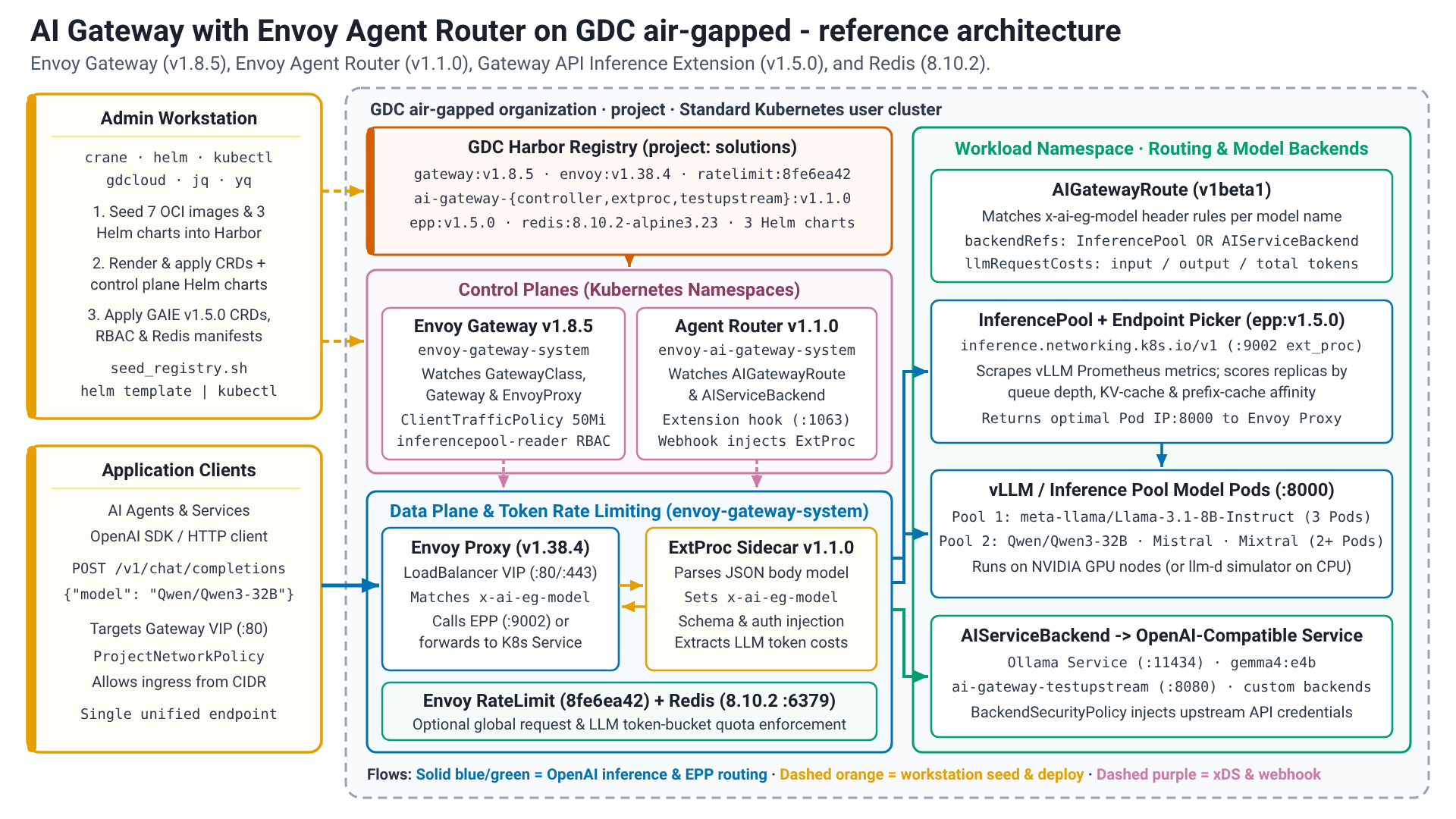
The solution runs in a GDC standard cluster. An
administrator workstation seeds the images and Helm charts into the Harbor
registry of the project and installs the two control planes: the Envoy Gateway
controller, which programs the Envoy proxy data plane from Gateway API resources
(GatewayClass, Gateway, HTTPRoute), and the Envoy Agent Router controller,
which extends that data plane with an external processor (ExtProc) for AI
traffic (AIGatewayRoute, AIServiceBackend, InferencePool). Application
clients send OpenAI-compatible requests to the Envoy proxy, which routes them to
the model serving backends or InferencePools. An optional Redis instance
stores the counters of the Envoy rate limit service for token-based rate
limiting.
Envoy Gateway
Envoy Gateway is an open-source project, built
on Envoy proxy, that simplifies the adoption, use
and management of Envoy proxy as a Kubernetes API gateway. It implements and
extends the Kubernetes Gateway API, the
successor of the Ingress API: GatewayClass and Gateway resources describe
the entry points, route resources such as HTTPRoute describe how traffic is
matched and forwarded, and the role-oriented design separates the
responsibilities of infrastructure and application teams. Envoy Gateway adds its
own extension APIs, for example EnvoyProxy (data plane settings), Backend
(endpoints outside the cluster or referenced by FQDN) and ClientTrafficPolicy
(connection settings such as buffer limits).
Envoy Agent Router
Envoy Agent Router (formerly Envoy AI
Gateway) is an open-source project that uses Envoy Gateway to handle request
traffic from application clients to Generative AI services. It provides a
unified layer for routing and managing LLM traffic with model-aware routing,
upstream authentication, token-based rate limiting and observability, and it
integrates with the Gateway API Inference
Extension
(InferencePool, Endpoint Picker) for metrics-aware endpoint selection. The
controller watches the aigateway.envoyproxy.io/v1beta1 resources and injects
an external processor next to the Envoy proxy; the external processor parses the
request body (for example the model field of an OpenAI chat completion
request), sets routing headers such as x-ai-eg-model, and translates between
API schemas where required.
Before you begin
Before proceeding with the deployment, ensure that your environment meets all necessary prerequisites and that the required command-line utilities are properly configured. Setting up these tools on your workstation is essential for managing container registries, interacting with clusters, and automating the deployment process.
- GDC air-gapped 1.16.2-hf1 or later environment is available with a standard cluster that runs Kubernetes v1.32.13-gke.400 or later.
- Standard cluster created with sufficient resources. The gateway components run on CPU only; model serving backends have their own accelerator requirements (see the Open Weight Models on GDC air-gapped guides).
- Harbor instance available and accessible.
- Necessary IAM applied.
- Workstation with the necessary connectivity to the environment and internet
Environment configuration
The environment configuration covers the identities and permissions, the workstation and the access to the GDC environment and the cluster.
Identity and Access Management
Ensure that the necessary IAM accounts, roles, and permissions are properly configured.
GDC User roles on project (RoleBinding in the
project namespace, granted by a Project IAM Admin):
- Harbor Instance Viewer (
harbor-instance-viewer) - Harbor Project Creator (
harbor-project-creator, only if the Harbor project doesn't exist yet) - Standard Cluster Admin (
standard-cluster-admin, required forgdcloud clusters get-credentials)
GDC User role on the standard cluster: the
preceding project roles grant no permissions inside the cluster. A Project
IAM Admin must additionally bind the user to the
StandardClusterRole cluster-admin with a StandardClusterRoleBinding in the
project namespace on the management API server; the binding is propagated to the
standard clusters of the project within seconds (status.clusters[].conditions
shows Propagated=True). Cluster-wide permissions are required because this
guide installs Custom Resource Definitions, ClusterRoles and a GatewayClass.
cat <<EOF | kubectl --kubeconfig MANAGEMENT_API_SERVER apply -f -
apiVersion: iam.gdc.goog/v1
kind: StandardClusterRoleBinding
metadata:
  name: user-USER-cluster-admin
  namespace: PROJECT
spec:
  roleRef:
    apiGroup: iam.gdc.goog
    kind: StandardClusterRole
    name: cluster-admin
  subjects:
    - apiGroup: rbac.authorization.k8s.io
      kind: User
      name: USER
EOF
Replace the following:
MANAGEMENT_API_SERVER: the path to the management API server kubeconfig file.USER: user.PROJECT: project.
Harbor crane (crane) robot account permissions:
- List Repository
- Pull Repository
- Push Repository
- Read Artifact
- List Artifact
- Create Tag
- List Tag
Harbor Kubernetes image pull (kubernetes-image-puller) robot account permissions:
- List Repository
- Pull Repository
- Read Artifact
- List Artifact
- List Tag
Workstation
This guide requires a workstation with the necessary connectivity to the environment and internet.
Requirements
The following tools need to be installed on the workstation:
crane: manage and copy container images and OCI artifacts between registries (documentation).gdcloud: command-line interface (CLI) for managing GDC resources (documentation).kubectl: command-line interface (CLI) used to communicate with and manage a Kubernetes cluster.helm: package manager for Kubernetes, version 3.8 or higher (OCI registry support) (documentation).curl: command-line tool for transferring data with URLs.jq: lightweight and flexible command-line JSON processor.yq: portable command-line YAML processor.
Run all commands in this guide from the workstation unless a step states otherwise.
Workstation configuration
The following information about the environment is required for the Workstation Configuration:
GDC_STANDARD_CLUSTER_NAME: The name of the GDC standard cluster.GDC_DOMAIN_SUFFIX: The domain suffix for the GDC environment (for example,gdc.example.com).GDC_ORG: The name of the GDC organization.GDC_PROJECT: The name of the GDC project.GDC_ZONE: The name of the GDC deployment zone.GDC_HARBOR_INSTANCE_NAME: The name of the Harbor instance in the project.GDCS_HARBOR_PROJECT_NAME: The name of the Harbor project to use for image (default:solutions)GDCS_HARBOR_CRANE_ROBOT_NAME: The name of the Harborcranerobot account.GDCS_HARBOR_CRANE_ROBOT_TOKEN: The authentication token for the Harborcranerobot account.GDCS_HARBOR_K8S_ROBOT_NAME: The name of the Harbor Kubernetes image pull robot account.GDCS_HARBOR_K8S_ROBOT_TOKEN: The authentication token for the Harbor Kubernetes image pull robot account.
Once you have gathered the values for all required variables, proceed with generating the environment variables file. After it is created, you can manually edit the file at any time.
Create the root solution directories and secrets folder:
mkdir -p ${HOME}/gdcag-solutions/env.d
mkdir -p ${HOME}/gdcag-solutions/secrets

touch ${HOME}/gdcag-solutions/secrets/harbor_crane_robot_token
touch ${HOME}/gdcag-solutions/secrets/harbor_k8s_robot_token

chmod u=rwx,go= ${HOME}/gdcag-solutions/secrets
chmod -R u=rw,go= ${HOME}/gdcag-solutions/secrets/*
Create the platform environment configuration file:
cat << 'EOF' > ${HOME}/gdcag-solutions/env.d/platform.sh && echo "Successfully created." || echo "Failed to create!"
# Infrastructure (Platform Native)
export GDC_STANDARD_CLUSTER_NAME="STANDARD_CLUSTER_NAME"
export GDC_DOMAIN_SUFFIX="DOMAIN_SUFFIX"
export GDC_ORG="ORG"
export GDC_PROJECT="PROJECT"
export GDC_ZONE="ZONE"
export GDC_HARBOR_INSTANCE_NAME="HARBOR_INSTANCE_NAME"

# Derived platform values
export GDC_ZONAL_HOSTNAME="${GDC_ORG}.${GDC_ZONE}.${GDC_DOMAIN_SUFFIX}"
export GDC_ZONAL_CONSOLE_URL="https://console.${GDC_ZONAL_HOSTNAME}"
export GDC_HARBOR_HOST="${GDC_HARBOR_INSTANCE_NAME}-${GDC_PROJECT}.${GDC_ORG}.${GDC_ZONE}.${GDC_DOMAIN_SUFFIX}"
EOF
Replace the following:
STANDARD_CLUSTER_NAME: GDC standard cluster name.DOMAIN_SUFFIX: GDC domain suffix.ORG: GDC organization.PROJECT: GDC project.ZONE: GDC zone.HARBOR_INSTANCE_NAME: GDC Harbor instance name.
Create the registry environment configuration file:
cat << 'EOF' > ${HOME}/gdcag-solutions/env.d/registry.sh && echo "Successfully created." || echo "Failed to create!"
# GDC Solutions Registry & Secrets
export GDCS_HARBOR_PROJECT_NAME="solutions"
export GDCS_HARBOR_CRANE_ROBOT_NAME="HARBOR_CRANE_ROBOT_NAME"
export GDCS_HARBOR_CRANE_ROBOT_TOKEN="$(cat ${GDCS_ROOT_HOME}/secrets/harbor_crane_robot_token)"
export GDCS_HARBOR_K8S_ROBOT_NAME="HARBOR_K8S_ROBOT_NAME"
export GDCS_HARBOR_K8S_ROBOT_TOKEN="$(cat ${GDCS_ROOT_HOME}/secrets/harbor_k8s_robot_token)"
export GDCS_HARBOR_K8S_PULL_SECRET="gdcs-image-pull-secret"

# Derived registry values
export GDCS_HARBOR_PROJECT_URI="${GDC_HARBOR_HOST}/${GDCS_HARBOR_PROJECT_NAME}"
export GDCS_HARBOR_CHART_OCI_URI="oci://${GDCS_HARBOR_PROJECT_URI}"
EOF
Replace the following:
HARBOR_CRANE_ROBOT_NAME: GDC Harbor robot account name.HARBOR_K8S_ROBOT_NAME: GDC Harbor robot account name.
Add your tokens to the secret files:
set +o history

echo "CRANE_ROBOT_TOKEN" > ${HOME}/gdcag-solutions/secrets/harbor_crane_robot_token
echo "KUBERNETES_ROBOT_TOKEN" > ${HOME}/gdcag-solutions/secrets/harbor_k8s_robot_token

set -o history
Replace the following:
CRANE_ROBOT_TOKEN: crane robot token.KUBERNETES_ROBOT_TOKEN: Kubernetes robot token.
Create the root environment loader file:
cat << 'EOF' > ${HOME}/gdcag-solutions/env.sh && echo "Successfully created." || echo "Failed to create!"
export GDCS_ROOT_HOME="${HOME}/gdcag-solutions"
echo "GDCS_ROOT_HOME=${GDCS_ROOT_HOME}"

# Sourced in dependency order
source "${GDCS_ROOT_HOME}/env.d/platform.sh"
source "${GDCS_ROOT_HOME}/env.d/registry.sh"
EOF
Configure solution variables
Create the solution implementation directory:
mkdir -p ${HOME}/gdcag-solutions/ai-gateway/envoy/env.dCreate the solution environment configuration file:
cat << 'EOF' > ${HOME}/gdcag-solutions/ai-gateway/envoy/env.d/envoy.sh && echo "Successfully created." || echo "Failed to create!"
# Envoy Gateway
export GDCS_ENVOY_GATEWAY_NAMESPACE="envoy-gateway-system"
export GDCS_ENVOY_GATEWAY_VERSION="v1.8.5"
export GDCS_ENVOY_PROXY_IMAGE_TAG="distroless-v1.38.4"
export GDCS_ENVOY_RATELIMIT_IMAGE_TAG="8fe6ea42"
export GDCS_GATEWAY_API_ECHO_IMAGE_TAG="v1.5.1"

# Envoy Agent Router (formerly Envoy AI Gateway; the images and charts keep the ai-gateway names)
export GDCS_ENVOY_AGENT_ROUTER_NAMESPACE="envoy-ai-gateway-system"
export GDCS_ENVOY_AGENT_ROUTER_VERSION="v1.1.0"

# Gateway API Inference Extension (InferencePool, Endpoint Picker)
export GDCS_GATEWAY_API_INFERENCE_EXTENSION_VERSION="v1.5.0"

# Redis (token-based rate limiting backend)
export GDCS_REDIS_IMAGE_TAG="8.10.2-alpine3.23"
export GDCS_REDIS_NAMESPACE="${GDCS_ENVOY_GATEWAY_NAMESPACE}"

# Gateway class shared by the user guides
export GDCS_GATEWAY_CLASS_NAME="envoy-ai-gateway"

# Docker configuration directories for crane and Kubernetes
export GDCS_HARBOR_CRANE_DOCKER_CONFIG="${GDCS_IMPLEMENTATION_HOME}/docker/crane"
export GDCS_HARBOR_K8S_DOCKER_CONFIG="${GDCS_IMPLEMENTATION_HOME}/docker/k8s"
EOF
Create the implementation environment loader file:
cat << 'EOF' > ${HOME}/gdcag-solutions/ai-gateway/envoy/env.sh && echo "Successfully created." || echo "Failed to create!"
source "${HOME}/gdcag-solutions/env.sh"

export GDCS_IMPLEMENTATION_HOME="${HOME}/gdcag-solutions/ai-gateway/envoy"
echo "GDCS_IMPLEMENTATION_HOME=${GDCS_IMPLEMENTATION_HOME}"

# Sourced in dependency order
source "${GDCS_IMPLEMENTATION_HOME}/env.d/envoy.sh"
EOF
Edit and review the environment files with your preferred editor:
${EDITOR:-vi} ${HOME}/gdcag-solutions/env.d/platform.sh
${EDITOR:-vi} ${HOME}/gdcag-solutions/env.d/registry.sh
${EDITOR:-vi} ${HOME}/gdcag-solutions/ai-gateway/envoy/env.d/envoy.sh
Source the environment file:
source ${HOME}/gdcag-solutions/ai-gateway/envoy/env.shThe output is similar to the following:
GDCS_ROOT_HOME=HOME_DIRECTORY_PATH/gdcag-solutions
GDCS_IMPLEMENTATION_HOME=HOME_DIRECTORY_PATH/gdcag-solutions/ai-gateway/envoy
GDC
This guide assumes that your workstation is configured to trust the TLS certificates for your GDC environment and Harbor instance.
Configure
gdcloud:gdcloud config set core/account "default-user" gdcloud config set core/organization_console_url "${GDC_ZONAL_CONSOLE_URL}" gdcloud config set core/project "${GDC_PROJECT}" gdcloud config set core/zone "${GDC_ZONE}"Authenticate to the GDC environment:
gdcloud auth login
Cluster
Retrieve cluster credentials:
gdcloud clusters get-credentials "${GDC_STANDARD_CLUSTER_NAME}" \
--project="${GDC_PROJECT}" \
--standard \
--zone="${GDC_ZONE}"
Verify connectivity to the cluster:
kubectl get nodes -L node.cluster.private.gdc.goog/machine-classVerify that every node runs the Kubernetes version that the Before you begin section of this guide requires:
kubectl get nodes -o custom-columns='NAME:.metadata.name,VERSION:.status.nodeInfo.kubeletVersion'
Artifact migration preparation
- Verify connectivity and configuration for the artifact registry.
Create a Docker configuration file for crane. A robot account is used for pushing large image layers to avoid auth token timeouts when using the Managed Harbor Service (MHS) credential helper (docker-credential-mhs) with a user account:
set +o history

export DOCKER_CONFIG="${GDCS_HARBOR_CRANE_DOCKER_CONFIG}"

crane auth login "${GDC_HARBOR_HOST}" \
--password="${GDCS_HARBOR_CRANE_ROBOT_TOKEN}" \
--username="${GDCS_HARBOR_CRANE_ROBOT_NAME}"

set -o history
Create a Docker configuration file for Kubernetes:
set +o history

export DOCKER_CONFIG="${GDCS_HARBOR_K8S_DOCKER_CONFIG}"

crane auth login "${GDC_HARBOR_HOST}" \
--password="${GDCS_HARBOR_K8S_ROBOT_TOKEN}" \
--username="${GDCS_HARBOR_K8S_ROBOT_NAME}"

set -o history
Sign in to the Harbor OCI registry with
helmusing the Kubernetes image pull robot account.helmkeeps its own registry credentials and needs them to fetch the charts from Harbor:set +o history helm registry login "${GDC_HARBOR_HOST}" \ --password="${GDCS_HARBOR_K8S_ROBOT_TOKEN}" \ --username="${GDCS_HARBOR_K8S_ROBOT_NAME}" set -o historyThe output is similar to the following:
Login SucceededCreate the
seed_registry.shscript:cat << 'EOF' > ${GDCS_IMPLEMENTATION_HOME}/seed_registry.sh && echo "Successfully created." || echo "Failed to create!" #!/bin/bash # seed_registry.sh: Modular artifact migration for GDC Solutions # Requires the env.sh file to be sourced first. SCRIPT_DIR="$(cd "$(dirname "${BASH_SOURCE[0]}")" && pwd)" set -o nounset source "${SCRIPT_DIR}/env.sh" # Set the Docker config export DOCKER_CONFIG="${GDCS_HARBOR_CRANE_DOCKER_CONFIG}" eval "${SERIALIZED_IMAGES}" # Ensure GDCS_REGISTRY_IMAGES is set if [[ ${#GDCS_REGISTRY_IMAGES[@]} -eq 0 ]]; then echo "GDCS_REGISTRY_IMAGES must be set, exiting..." exit 1 fi # Migrate the images for source_image in "${GDCS_REGISTRY_IMAGES[@]}"; do # Strip the registry host only when the first path segment is a host (contains a dot or a port) first_segment="${source_image%%/*}" if [[ "${first_segment}" == *.* || "${first_segment}" == *:* ]]; then image_path="${source_image#*/}" else image_path="${source_image}" fi destination_image="${GDCS_HARBOR_PROJECT_URI}/${image_path}" # Ensure the folder structure is created crane append \ --new_layer=<(tar czf - -T /dev/null) \ --new_tag="${destination_image%:*}:create" \ --oci-empty-base 2> /dev/null || true # Copy the linux/amd64 platform only to avoid transferring multi-arch layers over air-gapped links crane copy --platform linux/amd64 "${source_image}" "${destination_image}" 2> /dev/null done echo "Migration complete: Images are available at ${GDCS_HARBOR_PROJECT_URI}" EOF chmod u+x "${GDCS_IMPLEMENTATION_HOME}/seed_registry.sh"Create the
seed_charts.shscript. Helm charts published as OCI artifacts are copied withcraneas well, without platform selection and without thecreatetag used for container image repositories:cat << 'EOF' > ${GDCS_IMPLEMENTATION_HOME}/seed_charts.sh && echo "Successfully created." || echo "Failed to create!" #!/bin/bash # seed_charts.sh: OCI Helm chart migration for GDC Solutions # Requires the env.sh file to be sourced first. SCRIPT_DIR="$(cd "$(dirname "${BASH_SOURCE[0]}")" && pwd)" set -o nounset source "${SCRIPT_DIR}/env.sh" # Set the Docker config export DOCKER_CONFIG="${GDCS_HARBOR_CRANE_DOCKER_CONFIG}" eval "${SERIALIZED_CHARTS}" # Ensure GDCS_REGISTRY_CHARTS is set if [[ ${#GDCS_REGISTRY_CHARTS[@]} -eq 0 ]]; then echo "GDCS_REGISTRY_CHARTS must be set, exiting..." exit 1 fi # Migrate the charts (source format: REGISTRY_HOST/REPOSITORY:CHART_VERSION) for source_chart in "${GDCS_REGISTRY_CHARTS[@]}"; do chart_path="${source_chart#*/}" destination_chart="${GDCS_HARBOR_PROJECT_URI}/${chart_path}" crane copy "${source_chart}" "${destination_chart}" || { echo "Failed to copy ${source_chart} to ${destination_chart}"; exit 1; } done echo "Migration complete: Charts are available at ${GDCS_HARBOR_CHART_OCI_URI}" EOF chmod u+x "${GDCS_IMPLEMENTATION_HOME}/seed_charts.sh"Replace the following:
REGISTRY_HOST: registry host.REPOSITORY: repository.CHART_VERSION: chart version.
Define the list of required container images for the solution:
declare -a GDCS_REGISTRY_IMAGES=(
  "docker.io/envoyproxy/gateway:${GDCS_ENVOY_GATEWAY_VERSION}"
  "docker.io/envoyproxy/envoy:${GDCS_ENVOY_PROXY_IMAGE_TAG}"
  "docker.io/envoyproxy/ratelimit:${GDCS_ENVOY_RATELIMIT_IMAGE_TAG}"
  "docker.io/envoyproxy/ai-gateway-controller:${GDCS_ENVOY_AGENT_ROUTER_VERSION}"
  "docker.io/envoyproxy/ai-gateway-extproc:${GDCS_ENVOY_AGENT_ROUTER_VERSION}"
  "docker.io/envoyproxy/ai-gateway-testupstream:${GDCS_ENVOY_AGENT_ROUTER_VERSION}"
  "docker.io/library/redis:${GDCS_REDIS_IMAGE_TAG}"
  "registry.k8s.io/gateway-api/echo-basic:${GDCS_GATEWAY_API_ECHO_IMAGE_TAG}"
)
export SERIALIZED_IMAGES=$(declare -p GDCS_REGISTRY_IMAGES)
Seed the required container images to the artifact registry:
${GDCS_IMPLEMENTATION_HOME}/seed_registry.sh
Define the list of required Helm charts for the solution:
declare -a GDCS_REGISTRY_CHARTS=(
  "docker.io/envoyproxy/gateway-crds-helm:${GDCS_ENVOY_GATEWAY_VERSION}"
  "docker.io/envoyproxy/gateway-helm:${GDCS_ENVOY_GATEWAY_VERSION}"
  "docker.io/envoyproxy/ai-gateway-crds-helm:${GDCS_ENVOY_AGENT_ROUTER_VERSION}"
  "docker.io/envoyproxy/ai-gateway-helm:${GDCS_ENVOY_AGENT_ROUTER_VERSION}"
)
export SERIALIZED_CHARTS=$(declare -p GDCS_REGISTRY_CHARTS)
Seed the required Helm charts to the artifact registry:
${GDCS_IMPLEMENTATION_HOME}/seed_charts.shVerify the charts can be read back from Harbor:
helm show chart "${GDCS_HARBOR_CHART_OCI_URI}/envoyproxy/gateway-helm" --version "${GDCS_ENVOY_GATEWAY_VERSION}" | grep -E '^(name|version):'
helm show chart "${GDCS_HARBOR_CHART_OCI_URI}/envoyproxy/ai-gateway-helm" --version "${GDCS_ENVOY_AGENT_ROUTER_VERSION}" | grep -E '^(name|version):'
The output is similar to the following:
name: gateway-helm
version: v1.8.5
name: ai-gateway-helm
version: v1.1.0
Download the Gateway API Inference Extension manifests. They are published as a release asset, not as a chart:
mkdir -p "${GDCS_IMPLEMENTATION_HOME}/manifests"

curl --fail --location --show-error --silent \
--output "${GDCS_IMPLEMENTATION_HOME}/manifests/gateway-api-inference-extension-${GDCS_GATEWAY_API_INFERENCE_EXTENSION_VERSION}.yaml" \
"https://github.com/kubernetes-sigs/gateway-api-inference-extension/releases/download/${GDCS_GATEWAY_API_INFERENCE_EXTENSION_VERSION}/manifests.yaml"

grep --count '^kind: CustomResourceDefinition' "${GDCS_IMPLEMENTATION_HOME}/manifests/gateway-api-inference-extension-${GDCS_GATEWAY_API_INFERENCE_EXTENSION_VERSION}.yaml"
The output is similar to the following:
4
Envoy Gateway
Envoy Gateway is installed first and validated on its own with the upstream quickstart; the Envoy Agent Router integration follows in the next section.
Namespace
Create the namespace for Envoy Gateway. The Envoy proxy
Deployments of everyGatewayare created in this namespace as well:kubectl create namespace "${GDCS_ENVOY_GATEWAY_NAMESPACE}"Add the
imagePullSecret:kubectl create secret docker-registry "${GDCS_HARBOR_K8S_PULL_SECRET}" \ --dry-run=client \ --from-file=.dockerconfigjson=${GDCS_HARBOR_K8S_DOCKER_CONFIG}/config.json \ --namespace="${GDCS_ENVOY_GATEWAY_NAMESPACE}" \ --output=yaml | kubectl apply -f -
Custom Resource Definitions
Install the Gateway API (standard channel) and Envoy Gateway Custom Resource Definitions (CRDs) from the seeded chart:
helm template eg-crds "${GDCS_HARBOR_CHART_OCI_URI}/envoyproxy/gateway-crds-helm" \
--set crds.gatewayAPI.channel=standard \
--set crds.gatewayAPI.enabled=true \
--set crds.envoyGateway.enabled=true \
--version "${GDCS_ENVOY_GATEWAY_VERSION}" | kubectl apply --server-side --filename=-
Verify the CRDs are registered:
kubectl get crd | grep -E 'gateway.networking.k8s.io|gateway.envoyproxy.io'
Controller
Create the Helm values file for Envoy Gateway. The images are pulled from Harbor with the image pull secret;
crds.enabled=falsebecause the CRDs were installed separately:cat <<EOF > "${GDCS_IMPLEMENTATION_HOME}/envoy-gateway-values.yaml" && echo "Successfully created." || echo "Failed to create!" config: envoyGateway: extensionApis: enableBackend: true enableEnvoyPatchPolicy: true gateway: controllerName: gateway.envoyproxy.io/gatewayclass-controller logging: level: default: info provider: type: Kubernetes crds: enabled: false global: imagePullSecrets: - name: ${GDCS_HARBOR_K8S_PULL_SECRET} imageRegistry: ${GDCS_HARBOR_PROJECT_URI} images: envoyProxy: image: ${GDCS_HARBOR_PROJECT_URI}/envoyproxy/envoy:${GDCS_ENVOY_PROXY_IMAGE_TAG} pullSecrets: - name: ${GDCS_HARBOR_K8S_PULL_SECRET} EOFInstall Envoy Gateway:
helm upgrade --install eg "${GDCS_HARBOR_CHART_OCI_URI}/envoyproxy/gateway-helm" \
--namespace="${GDCS_ENVOY_GATEWAY_NAMESPACE}" \
--values="${GDCS_IMPLEMENTATION_HOME}/envoy-gateway-values.yaml" \
--version="${GDCS_ENVOY_GATEWAY_VERSION}"
Wait for the Envoy Gateway controller to be Available:
watch --color --interval 5 --no-title \
"kubectl get deployment/envoy-gateway \
--namespace=${GDCS_ENVOY_GATEWAY_NAMESPACE} | GREP_COLORS='mt=01;92' egrep --color=always -e '^' -e '1/1     1            1'"
Verify the images of the controller and its certificate generation job come from Harbor:
kubectl get pods --namespace="${GDCS_ENVOY_GATEWAY_NAMESPACE}" \
--output=jsonpath='{range .items[*]}{.metadata.name}{"\t"}{.spec.containers[*].image}{"\n"}{end}'
Envoy proxy and Gateway class
Create the manifest for the
EnvoyProxydata plane template and theGatewayClass. TheEnvoyProxysets the proxy image, the image pull secret and the resource requests of the proxyPods; theGatewayClassis shared by the user guides:cat <<EOF > "${GDCS_IMPLEMENTATION_HOME}/gateway-class.yaml" && echo "Successfully created." || echo "Failed to create!" apiVersion: gateway.envoyproxy.io/v1alpha1 kind: EnvoyProxy metadata: name: ${GDCS_GATEWAY_CLASS_NAME} namespace: ${GDCS_ENVOY_GATEWAY_NAMESPACE} spec: provider: type: Kubernetes kubernetes: envoyDeployment: container: image: ${GDCS_HARBOR_PROJECT_URI}/envoyproxy/envoy:${GDCS_ENVOY_PROXY_IMAGE_TAG} resources: limits: memory: 2Gi requests: cpu: 250m memory: 512Mi pod: imagePullSecrets: - name: ${GDCS_HARBOR_K8S_PULL_SECRET} --- apiVersion: gateway.networking.k8s.io/v1 kind: GatewayClass metadata: name: ${GDCS_GATEWAY_CLASS_NAME} spec: controllerName: gateway.envoyproxy.io/gatewayclass-controller parametersRef: group: gateway.envoyproxy.io kind: EnvoyProxy name: ${GDCS_GATEWAY_CLASS_NAME} namespace: ${GDCS_ENVOY_GATEWAY_NAMESPACE} EOFApply the manifest for the
EnvoyProxyand theGatewayClass:kubectl apply \ --filename="${GDCS_IMPLEMENTATION_HOME}/gateway-class.yaml"Verify the
GatewayClassis Accepted:kubectl get gatewayclass "${GDCS_GATEWAY_CLASS_NAME}"The output is similar to the following:
NAME               CONTROLLER                                      ACCEPTED   AGE
envoy-ai-gateway   gateway.envoyproxy.io/gatewayclass-controller   True       5s
Validation
The validation deploys the Envoy Gateway quickstart (an echo backend behind an
HTTPRoute) into the Envoy Gateway namespace and removes it afterwards.
Create the manifest for the quickstart workload:
cat <<EOF > "${GDCS_IMPLEMENTATION_HOME}/eg-quickstart.yaml" && echo "Successfully created." || echo "Failed to create!"
apiVersion: gateway.networking.k8s.io/v1
kind: Gateway
metadata:
  name: eg-quickstart
spec:
  gatewayClassName: ${GDCS_GATEWAY_CLASS_NAME}
  listeners:
    - name: http
      protocol: HTTP
      port: 80
---
apiVersion: v1
kind: ServiceAccount
metadata:
  name: eg-quickstart-backend
---
apiVersion: v1
kind: Service
metadata:
  name: eg-quickstart-backend
  labels:
    app: eg-quickstart-backend
spec:
  ports:
    - name: http
      port: 3000
      targetPort: 3000
  selector:
    app: eg-quickstart-backend
---
apiVersion: apps/v1
kind: Deployment
metadata:
  name: eg-quickstart-backend
spec:
  replicas: 1
  selector:
    matchLabels:
      app: eg-quickstart-backend
  template:
    metadata:
      labels:
        app: eg-quickstart-backend
    spec:
      serviceAccountName: eg-quickstart-backend
      containers:
        - image: ${GDCS_HARBOR_PROJECT_URI}/gateway-api/echo-basic:${GDCS_GATEWAY_API_ECHO_IMAGE_TAG}
          imagePullPolicy: IfNotPresent
          name: backend
          ports:
            - containerPort: 3000
          env:
            - name: POD_NAME
              valueFrom:
                fieldRef:
                  fieldPath: metadata.name
            - name: NAMESPACE
              valueFrom:
                fieldRef:
                  fieldPath: metadata.namespace
      imagePullSecrets:
        - name: ${GDCS_HARBOR_K8S_PULL_SECRET}
---
apiVersion: gateway.networking.k8s.io/v1
kind: HTTPRoute
metadata:
  name: eg-quickstart-backend
spec:
  parentRefs:
    - name: eg-quickstart
  hostnames:
    - "www.example.com"
  rules:
    - backendRefs:
        - group: ""
          kind: Service
          name: eg-quickstart-backend
          port: 3000
          weight: 1
      matches:
        - path:
            type: PathPrefix
            value: /
EOF
Apply the manifest for the quickstart workload:
kubectl apply \
--filename="${GDCS_IMPLEMENTATION_HOME}/eg-quickstart.yaml" \
--namespace="${GDCS_ENVOY_GATEWAY_NAMESPACE}"
Wait for the
Gatewayto be Programmed:watch --color --interval 5 --no-title \ "kubectl get gateway/eg-quickstart \ --namespace=${GDCS_ENVOY_GATEWAY_NAMESPACE} | GREP_COLORS='mt=01;92' egrep --color=always -e '^' -e 'True'"Wait for the backend
Deploymentto be Available:watch --color --interval 5 --no-title \ "kubectl get deployment/eg-quickstart-backend \ --namespace=${GDCS_ENVOY_GATEWAY_NAMESPACE} | GREP_COLORS='mt=01;92' egrep --color=always -e '^' -e '1/1 1 1'"Send a test request through the gateway using port forwarding. The Envoy
Serviceof aGatewayis found by its owning-gateway labels:export ENVOY_SERVICE=$(kubectl get service --namespace="${GDCS_ENVOY_GATEWAY_NAMESPACE}" --selector="gateway.envoyproxy.io/owning-gateway-namespace=${GDCS_ENVOY_GATEWAY_NAMESPACE},gateway.envoyproxy.io/owning-gateway-name=eg-quickstart" --output=jsonpath='{.items[0].metadata.name}') echo "ENVOY_SERVICE=${ENVOY_SERVICE}" kubectl port-forward "service/${ENVOY_SERVICE}" \ --namespace="${GDCS_ENVOY_GATEWAY_NAMESPACE}" 8888:80 & PF_PID=$! sleep 2 curl --header "Host: www.example.com" \ --no-progress-meter \ --show-error \ http://127.0.0.1:8888/get | jq kill -9 ${PF_PID}The output is similar to the following:
{
  "path": "/get",
  "host": "www.example.com",
  "method": "GET",
  ...
  "namespace": "envoy-gateway-system",
  "pod": "eg-quickstart-backend-...",
  ...
}
Remove the quickstart workload:
kubectl delete \
--filename="${GDCS_IMPLEMENTATION_HOME}/eg-quickstart.yaml" \
--namespace="${GDCS_ENVOY_GATEWAY_NAMESPACE}"
Envoy Agent Router
Envoy Agent Router is installed into its own namespace; Envoy Gateway is then reconfigured to call it as its extension server.
Namespace
Create the namespace for the Envoy Agent Router controller:
kubectl create namespace "${GDCS_ENVOY_AGENT_ROUTER_NAMESPACE}"Add the
imagePullSecret:kubectl create secret docker-registry "${GDCS_HARBOR_K8S_PULL_SECRET}" \ --dry-run=client \ --from-file=.dockerconfigjson=${GDCS_HARBOR_K8S_DOCKER_CONFIG}/config.json \ --namespace="${GDCS_ENVOY_AGENT_ROUTER_NAMESPACE}" \ --output=yaml | kubectl apply -f -
Custom Resource Definitions
Install the Envoy Agent Router CRDs from the seeded chart:
helm template aieg-crds "${GDCS_HARBOR_CHART_OCI_URI}/envoyproxy/ai-gateway-crds-helm" \
--version "${GDCS_ENVOY_AGENT_ROUTER_VERSION}" | kubectl apply --server-side --filename=-
Install the Gateway API Inference Extension CRDs (
InferencePool,InferenceObjective) from the downloaded manifests:kubectl apply --server-side \ --filename="${GDCS_IMPLEMENTATION_HOME}/manifests/gateway-api-inference-extension-${GDCS_GATEWAY_API_INFERENCE_EXTENSION_VERSION}.yaml"Verify the CRDs are registered:
kubectl get crd | grep -E 'aigateway.envoyproxy.io|inference.networking'The output is similar to the following:
aigatewayroutes.aigateway.envoyproxy.io                 ...
aiservicebackends.aigateway.envoyproxy.io               ...
backendsecuritypolicies.aigateway.envoyproxy.io         ...
gatewayconfigs.aigateway.envoyproxy.io                  ...
inferencemodelrewrites.inference.networking.x-k8s.io    ...
inferenceobjectives.inference.networking.x-k8s.io       ...
inferencepoolimports.inference.networking.x-k8s.io      ...
inferencepools.inference.networking.k8s.io              ...
mcproutes.aigateway.envoyproxy.io                       ...
quotapolicies.aigateway.envoyproxy.io                   ...
Redis
Token-based rate limiting is enforced by the Envoy rate limit service, which
stores its counters in Redis. This guide deploys a single-replica Redis without
persistence; an existing Redis service can be used instead by changing the
rateLimit.backend.redis.url value in the next section.
Create the manifest for the Redis
Deployment:cat <<EOF > "${GDCS_IMPLEMENTATION_HOME}/redis.yaml" && echo "Successfully created." || echo "Failed to create!" apiVersion: v1 kind: Service metadata: name: redis labels: app: redis spec: ports: - name: redis port: 6379 selector: app: redis --- apiVersion: apps/v1 kind: Deployment metadata: name: redis spec: replicas: 1 selector: matchLabels: app: redis template: metadata: labels: app: redis spec: containers: - image: ${GDCS_HARBOR_PROJECT_URI}/library/redis:${GDCS_REDIS_IMAGE_TAG} imagePullPolicy: IfNotPresent name: redis ports: - name: redis containerPort: 6379 resources: limits: memory: 512Mi requests: cpu: 100m memory: 128Mi imagePullSecrets: - name: ${GDCS_HARBOR_K8S_PULL_SECRET} restartPolicy: Always EOFApply the manifest for the Redis
Deployment:kubectl apply \ --filename="${GDCS_IMPLEMENTATION_HOME}/redis.yaml" \ --namespace="${GDCS_REDIS_NAMESPACE}"Wait for the Redis
Deploymentto be Available:watch --color --interval 5 --no-title \ "kubectl get deployment/redis \ --namespace=${GDCS_REDIS_NAMESPACE} | GREP_COLORS='mt=01;92' egrep --color=always -e '^' -e '1/1 1 1'"
Controller
Create the Helm values file for Envoy Agent Router:
cat <<EOF > "${GDCS_IMPLEMENTATION_HOME}/envoy-agent-router-values.yaml" && echo "Successfully created." || echo "Failed to create!"
controller:
  image:
    repository: ${GDCS_HARBOR_PROJECT_URI}/envoyproxy/ai-gateway-controller
  imagePullSecrets:
    - name: ${GDCS_HARBOR_K8S_PULL_SECRET}
envoyGateway:
  namespace: ${GDCS_ENVOY_GATEWAY_NAMESPACE}
extProc:
  image:
    repository: ${GDCS_HARBOR_PROJECT_URI}/envoyproxy/ai-gateway-extproc
  imagePullSecrets:
    - name: ${GDCS_HARBOR_K8S_PULL_SECRET}
global:
  imagePullSecrets:
    - name: ${GDCS_HARBOR_K8S_PULL_SECRET}
EOF
Install Envoy Agent Router:
helm upgrade --install aieg "${GDCS_HARBOR_CHART_OCI_URI}/envoyproxy/ai-gateway-helm" \
--namespace="${GDCS_ENVOY_AGENT_ROUTER_NAMESPACE}" \
--values="${GDCS_IMPLEMENTATION_HOME}/envoy-agent-router-values.yaml" \
--version="${GDCS_ENVOY_AGENT_ROUTER_VERSION}"
Wait for the Envoy Agent Router controller to be Available:
watch --color --interval 5 --no-title \
"kubectl get deployment/ai-gateway-controller \
--namespace=${GDCS_ENVOY_AGENT_ROUTER_NAMESPACE} | GREP_COLORS='mt=01;92' egrep --color=always -e '^' -e '1/1     1            1'"
Envoy Gateway integration
Envoy Gateway must be reconfigured to call the Envoy Agent Router controller as
its extension server, to accept InferencePool resources as backends and to use
the Redis-backed rate limit service.
Create the Helm values file for the integration:
cat <<EOF > "${GDCS_IMPLEMENTATION_HOME}/envoy-gateway-agent-router-values.yaml" && echo "Successfully created." || echo "Failed to create!"
config:
  envoyGateway:
    extensionManager:
      backendResources:
        - group: inference.networking.k8s.io
          kind: InferencePool
          version: v1
      hooks:
        xdsTranslator:
          post:
            - Translation
            - Cluster
            - Route
          translation:
            cluster:
              includeAll: true
            listener:
              includeAll: true
            route:
              includeAll: true
            secret:
              includeAll: true
      service:
        fqdn:
          hostname: ai-gateway-controller.${GDCS_ENVOY_AGENT_ROUTER_NAMESPACE}.svc.cluster.local
          port: 1063
    rateLimit:
      backend:
        redis:
          url: redis.${GDCS_REDIS_NAMESPACE}.svc.cluster.local:6379
        type: Redis
EOF
Upgrade Envoy Gateway with both values files:
helm upgrade --install eg "${GDCS_HARBOR_CHART_OCI_URI}/envoyproxy/gateway-helm" \
--namespace="${GDCS_ENVOY_GATEWAY_NAMESPACE}" \
--values="${GDCS_IMPLEMENTATION_HOME}/envoy-gateway-values.yaml" \
--values="${GDCS_IMPLEMENTATION_HOME}/envoy-gateway-agent-router-values.yaml" \
--version="${GDCS_ENVOY_GATEWAY_VERSION}"
Create the manifest for the
ClusterRolethat lets the Envoy Gateway controller watchInferencePoolresources. The chart doesn't grant this permission; a separateClusterRoleBindingsurvives chart upgrades, unlike a patch of the chart-managedClusterRole:cat <<EOF > "${GDCS_IMPLEMENTATION_HOME}/envoy-gateway-inferencepool-rbac.yaml" && echo "Successfully created." || echo "Failed to create!" apiVersion: rbac.authorization.k8s.io/v1 kind: ClusterRole metadata: name: envoy-gateway-inferencepool-reader rules: - apiGroups: - inference.networking.k8s.io resources: - inferencepools verbs: - get - list - watch --- apiVersion: rbac.authorization.k8s.io/v1 kind: ClusterRoleBinding metadata: name: envoy-gateway-inferencepool-reader roleRef: apiGroup: rbac.authorization.k8s.io kind: ClusterRole name: envoy-gateway-inferencepool-reader subjects: - kind: ServiceAccount name: envoy-gateway namespace: ${GDCS_ENVOY_GATEWAY_NAMESPACE} EOFApply the manifest for the
ClusterRole:kubectl apply \ --filename="${GDCS_IMPLEMENTATION_HOME}/envoy-gateway-inferencepool-rbac.yaml"Restart the Envoy Gateway controller so that it picks up the new configuration and permissions, and wait for it to be Available:
kubectl rollout restart deployment/envoy-gateway \
--namespace="${GDCS_ENVOY_GATEWAY_NAMESPACE}"

kubectl rollout status deployment/envoy-gateway \
--namespace="${GDCS_ENVOY_GATEWAY_NAMESPACE}" \
--timeout=5m
Verify the rate limit service was deployed and is Available:
watch --color --interval 5 --no-title \
"kubectl get deployment/envoy-ratelimit \
--namespace=${GDCS_ENVOY_GATEWAY_NAMESPACE} | GREP_COLORS='mt=01;92' egrep --color=always -e '^' -e '1/1     1            1'"
Validation
The validation deploys the Envoy Agent Router basic example (a mock
OpenAI-compatible upstream behind an AIGatewayRoute) into the Envoy Agent
Router namespace and removes it afterwards.
Create the manifest for the validation workload:
cat <<EOF > "${GDCS_IMPLEMENTATION_HOME}/aieg-basic.yaml" && echo "Successfully created." || echo "Failed to create!"
apiVersion: gateway.networking.k8s.io/v1
kind: Gateway
metadata:
  name: aieg-basic
spec:
  gatewayClassName: ${GDCS_GATEWAY_CLASS_NAME}
  listeners:
    - name: http
      protocol: HTTP
      port: 80
---
apiVersion: gateway.envoyproxy.io/v1alpha1
kind: ClientTrafficPolicy
metadata:
  name: aieg-basic-buffer-limit
spec:
  targetRefs:
    - group: gateway.networking.k8s.io
      kind: Gateway
      name: aieg-basic
  connection:
    bufferLimit: 50Mi
---
apiVersion: aigateway.envoyproxy.io/v1beta1
kind: AIGatewayRoute
metadata:
  name: aieg-basic
spec:
  parentRefs:
    - name: aieg-basic
      kind: Gateway
      group: gateway.networking.k8s.io
  rules:
    - matches:
        - headers:
            - type: Exact
              name: x-ai-eg-model
              value: some-cool-self-hosted-model
      backendRefs:
        - name: aieg-basic-testupstream
---
apiVersion: aigateway.envoyproxy.io/v1beta1
kind: AIServiceBackend
metadata:
  name: aieg-basic-testupstream
spec:
  schema:
    name: OpenAI
  backendRef:
    name: aieg-basic-testupstream
    kind: Backend
    group: gateway.envoyproxy.io
---
apiVersion: gateway.envoyproxy.io/v1alpha1
kind: Backend
metadata:
  name: aieg-basic-testupstream
spec:
  endpoints:
    - fqdn:
        hostname: aieg-basic-testupstream.${GDCS_ENVOY_AGENT_ROUTER_NAMESPACE}.svc.cluster.local
        port: 80
---
apiVersion: apps/v1
kind: Deployment
metadata:
  name: aieg-basic-testupstream
spec:
  replicas: 1
  selector:
    matchLabels:
      app: aieg-basic-testupstream
  template:
    metadata:
      labels:
        app: aieg-basic-testupstream
    spec:
      containers:
        - name: testupstream
          image: ${GDCS_HARBOR_PROJECT_URI}/envoyproxy/ai-gateway-testupstream:${GDCS_ENVOY_AGENT_ROUTER_VERSION}
          imagePullPolicy: IfNotPresent
          ports:
            - containerPort: 8080
          env:
            - name: TESTUPSTREAM_ID
              value: test
          readinessProbe:
            httpGet:
              path: /health
              port: 8080
            initialDelaySeconds: 5
            periodSeconds: 10
          livenessProbe:
            httpGet:
              path: /health
              port: 8080
            initialDelaySeconds: 10
            periodSeconds: 20
      imagePullSecrets:
        - name: ${GDCS_HARBOR_K8S_PULL_SECRET}
---
apiVersion: v1
kind: Service
metadata:
  name: aieg-basic-testupstream
spec:
  selector:
    app: aieg-basic-testupstream
  ports:
    - protocol: TCP
      port: 80
      targetPort: 8080
  type: ClusterIP
EOF
Apply the manifest for the validation workload:
kubectl apply \
--filename="${GDCS_IMPLEMENTATION_HOME}/aieg-basic.yaml" \
--namespace="${GDCS_ENVOY_AGENT_ROUTER_NAMESPACE}"
Wait for the
Gatewayto be Programmed:watch --color --interval 5 --no-title \ "kubectl get gateway/aieg-basic \ --namespace=${GDCS_ENVOY_AGENT_ROUTER_NAMESPACE} | GREP_COLORS='mt=01;92' egrep --color=always -e '^' -e 'True'"Wait for the mock upstream
Deploymentto be Available:watch --color --interval 5 --no-title \ "kubectl get deployment/aieg-basic-testupstream \ --namespace=${GDCS_ENVOY_AGENT_ROUTER_NAMESPACE} | GREP_COLORS='mt=01;92' egrep --color=always -e '^' -e '1/1 1 1'"Verify the Envoy proxy
Podof theGatewayruns the external processor sidecar injected by Envoy Agent Router:kubectl get pods --namespace="${GDCS_ENVOY_GATEWAY_NAMESPACE}" \ --selector="gateway.envoyproxy.io/owning-gateway-name=aieg-basic" \ --output=jsonpath='{range .items[*]}{.metadata.name}{"\t"}{.spec.containers[*].name}{"\n"}{end}'The output is similar to the following:
envoy-envoy-ai-gateway-system-aieg-basic-... envoy shutdown-manager ai-gateway-extprocSend a chat completion request through the gateway using port forwarding. The external processor reads the
modelfield of the request body and routes it to the mock upstream:export ENVOY_SERVICE=$(kubectl get service --namespace="${GDCS_ENVOY_GATEWAY_NAMESPACE}" --selector="gateway.envoyproxy.io/owning-gateway-namespace=${GDCS_ENVOY_AGENT_ROUTER_NAMESPACE},gateway.envoyproxy.io/owning-gateway-name=aieg-basic" --output=jsonpath='{.items[0].metadata.name}') echo "ENVOY_SERVICE=${ENVOY_SERVICE}" kubectl port-forward "service/${ENVOY_SERVICE}" \ --namespace="${GDCS_ENVOY_GATEWAY_NAMESPACE}" 8888:80 & PF_PID=$! sleep 2 curl http://127.0.0.1:8888/v1/chat/completions \ --data '{"model": "some-cool-self-hosted-model", "messages": [{"role": "user", "content": "Say this is a test."}]}' \ --header "Content-Type: application/json" \ --no-progress-meter \ --show-error | jq kill -9 ${PF_PID}The output is similar to the following:
{
  "choices": [
    {
      "index": 0,
      "message": {
        "role": "assistant",
        "content": "..."
      },
      "finish_reason": "stop"
    }
  ],
  "usage": {
    ...
  }
}
Remove the validation workload:
kubectl delete \
--filename="${GDCS_IMPLEMENTATION_HOME}/aieg-basic.yaml" \
--namespace="${GDCS_ENVOY_AGENT_ROUTER_NAMESPACE}"
Operations
Day-two tasks for the gateway control planes.
Upgrade
- Seed the images and charts of the new versions (update the version variables
in
env.sh, re-runseed_registry.shandseed_charts.sh), apply the new CRD charts withkubectl apply --server-side, then run the samehelm upgrade --installcommands with the new--version. Check the Envoy Agent Router compatibility matrix for the Envoy Gateway and Gateway API versions supported by the target release; Envoy Agent Router 1.1.0 is built against Envoy Gateway 1.8.
Uninstall
- Delete the
Gateway,AIGatewayRouteandInferencePoolresources of the user guides first, thenhelm uninstall aieg --namespace="${GDCS_ENVOY_AGENT_ROUTER_NAMESPACE}",helm uninstall eg --namespace="${GDCS_ENVOY_GATEWAY_NAMESPACE}", theClusterRoleenvoy-gateway-inferencepool-reader, theGatewayClass, the RedisDeploymentand finally the CRDs.
Troubleshooting
| Symptom | Likely cause | Action |
|---|---|---|
helm show chart or helm upgrade fails with unauthorized or FetchReference |
helm has no credentials for Harbor (it doesn't use the crane Docker configuration) |
Run the helm registry login step again with the Kubernetes image pull robot account. |
Envoy Gateway or Envoy Agent Router Pods stay in ImagePullBackOff |
Image not seeded, or the image pull secret is missing in the namespace | Check kubectl describe pod, compare the image path with crane ls "${GDCS_HARBOR_PROJECT_URI}/envoyproxy/gateway", and verify the secret exists in ${GDCS_ENVOY_GATEWAY_NAMESPACE} and ${GDCS_ENVOY_AGENT_ROUTER_NAMESPACE}. |
Gateway stays Programmed=False after the integration |
The Envoy Gateway controller can't reach the extension server, or was not restarted after the upgrade | kubectl logs deployment/envoy-gateway --namespace="${GDCS_ENVOY_GATEWAY_NAMESPACE}"; confirm service/ai-gateway-controller exists in ${GDCS_ENVOY_AGENT_ROUTER_NAMESPACE} and port 1063 is listed; repeat the rollout restart. |
AIGatewayRoute referencing an InferencePool isn't Accepted |
Envoy Gateway lacks permission to read inferencepools, or the InferencePool CRDs are missing |
Verify the ClusterRoleBinding envoy-gateway-inferencepool-reader and the inferencepools.inference.networking.k8s.io CRD; check the controller logs for forbidden. |
Chat completion request returns 413 or the connection is reset for large prompts |
The default Envoy buffer limit (32 KiB) is too small for AI payloads | Attach a ClientTrafficPolicy with connection.bufferLimit (the validation uses 50Mi) to the Gateway. |
Rate limit service Pod is CrashLoopBackOff |
Redis isn't reachable at the configured URL | kubectl get service redis --namespace="${GDCS_REDIS_NAMESPACE}"; fix rateLimit.backend.redis.url in the integration values file and upgrade again. |
Additional materials
- Envoy Agent Router documentation
- Envoy Agent Router release notes and compatibility matrix
- Envoy Gateway documentation
- Kubernetes Gateway API
- Gateway API Inference Extension
- Create a standard cluster | Google Distributed Cloud air-gapped
Create Harbor projects | Google Distributed Cloud air-gapped