


根據預設,Gemini Enterprise Agent Platform 會加密靜態客戶內容。Agent Platform 會為您處理加密作業,您不必採取其他動作。這個選項稱為「Google 預設加密機制」。
如要控管加密金鑰,您可以在 Cloud KMS 中使用客戶自行管理的加密金鑰 (CMEK),並搭配整合 CMEK 的服務,包括 Agent Platform。使用 Cloud KMS 金鑰,即可控管保護等級、位置、輪替時間表、使用權限和存取權,以及加密範圍。 使用 Cloud KMS 還能追蹤金鑰用量、查看稽核記錄,以及控管金鑰生命週期。 您可以在 Cloud KMS 中控管及管理用於保護資料的對稱金鑰加密金鑰 (KEK),而非由 Google 擁有及管理。
使用 CMEK 設定資源後,存取 Agent Platform 資源的體驗與使用 Google 預設加密功能類似。如要進一步瞭解加密選項,請參閱「客戶自行管理的加密金鑰 (CMEK)」。
本指南說明在 Gemini Enterprise Agent Platform 資源使用 CMEK 的優點,並逐步說明如何設定訓練工作來使用 CMEK。
如要進一步瞭解如何將 CMEK 用於 Colab Enterprise,請參閱 Colab Enterprise CMEK 頁面。如要進一步瞭解如何將 CMEK 用於 Gemini Enterprise Agent Platform Workbench 執行個體,請參閱 Agent Platform Workbench 執行個體 CMEK 頁面。
Gemini Enterprise Agent Platform 資源的 CMEK
下列各節說明 Gemini Enterprise Agent Platform 資源 CMEK 的基本資訊,您必須先瞭解這些資訊,才能為工作設定 CMEK。
CMEK 的優點
一般來說,如果您需要完全控管用於加密資料的金鑰,CMEK 最實用。有了 CMEK,您就能在 Cloud Key Management Service 中管理金鑰。例如,您可以輪替或停用金鑰,也可以使用 Cloud KMS API 設定輪替排程。如要進一步瞭解 CMEK,包括啟用時機和原因,請參閱 Cloud KMS 說明文件。
執行 AutoML 或自訂 訓練工作時,程式碼會在 Gemini Enterprise Agent Platform 管理的一或多個虛擬機器 (VM) 執行個體上執行。為 Gemini Enterprise Agent Platform 資源啟用 CMEK 後,系統會使用您指定的金鑰 (而非 Google 代管的金鑰),加密這些 VM 開機磁碟上的資料。CMEK 金鑰會加密下列類型的資料:
- VM 上的程式碼副本。
- 程式碼載入的任何資料。
- 程式碼儲存至本機磁碟的任何暫存資料。
- AutoML 訓練的模型。
- 上傳至媒體資料集的媒體檔案 (資料)。
一般來說,CMEK 金鑰「不會」加密與作業相關聯的中繼資料,例如工作名稱和區域,或資料集的顯示名稱。與作業相關聯的中繼資料一律會使用 Google 的預設加密機制加密。
如果是資料集,當使用者將資料匯入資料集時,資料項目和註解會以 CMEK 加密。資料集顯示名稱未經 CMEK 加密。
對於模型,儲存在儲存系統 (例如磁碟) 中的模型會以 CMEK 加密。所有模型評估結果都會以 CMEK 加密。
如果是端點,端點下用於模型部署作業的所有模型檔案都會以 CMEK 加密。這不包括任何記憶體內資料。
如果是批次預測,用於執行批次預測工作的任何暫存檔案 (例如模型檔案、記錄、VM 磁碟) 都會以 CMEK 加密。批次預測結果會儲存在使用者提供的目的地。因此,Agent Platform 會遵循目的地加密設定的預設值。否則,結果也會使用 CMEK 加密。
如果是資料標籤,任何輸入檔案 (圖片、文字、表格)、臨時討論 (例如問題、意見回饋) 和輸出內容 (標籤結果) 都會以 CMEK 加密。標註規格顯示名稱未以 CMEK 加密。
如果是代理,CMEK 會加密用於開發代理的所有來源檔案。此外,代理的容器映像檔和已部署的執行個體也會以 CMEK 加密。
外部金鑰
您可以使用 Cloud External Key Manager (Cloud EKM) 建立由您管理的外部金鑰,用於加密 Google Cloud中的資料。
使用 Cloud EKM 金鑰時,Google 無法控管外部代管金鑰的可用性。如果您要求存取以外部代管金鑰加密的資源,但金鑰無法使用,Gemini Enterprise Agent Platform 就會拒絕要求。金鑰可用後,最多可能需要 10 分鐘才能存取資源。
如要進一步瞭解使用外部金鑰時的注意事項,請參閱「Cloud EKM」。
搭配使用 CMEK 與其他 Google Cloud 產品
為 Gemini Enterprise Agent Platform 資源設定 CMEK,不會自動為與 Gemini Enterprise Agent Platform 搭配使用的其他 Google Cloud 產品設定 CMEK。如要使用 CMEK 加密其他Google Cloud 產品中的資料,則須進行額外設定。例如:
Cloud Storage:執行自訂訓練時,Agent Platform 通常會從 Cloud Storage 載入資料。當您使用 Python 訓練應用程式和預先建構的容器進行訓練時,Gemini Enterprise Agent Platform 也會從 Cloud Storage bucket 載入程式碼。此外,部分訓練工作會將訓練好的模型構件 (例如 TensorFlow SaveModel 目錄) 匯出至 Cloud Storage bucket,做為輸出內容的一部分。
如要確保 Cloud Storage 中的資料是以 CMEK 加密,請參閱 Cloud Storage 指南,瞭解如何使用客戶自行管理的加密金鑰。您可以將加密金鑰設為 Gemini Enterprise Agent Platform 所用 Cloud Storage bucket 的預設金鑰,也可以用來加密特定物件。
Artifact Registry:使用自訂容器進行訓練時,您可以設定 Agent Platform,從 Artifact Registry 載入容器映像檔。
為確保容器映像檔是以 CMEK 加密,請參閱 Artifact Registry 的 CMEK 指南。
Cloud Logging:執行訓練工作時,Gemini Enterprise Agent Platform 訓練會將記錄儲存至 Logging。如要使用 CMEK 加密這些記錄,請參閱「設定 Cloud Logging 的 CMEK」。
目前支援 CMEK 的資源
目前由 CMEK 保護的 Gemini Enterprise Agent Platform 資源如下。預先發布版功能的 CMEK 支援也處於預先發布版狀態。
| 資源 | 材料已加密 | 說明文件連結 |
|---|---|---|
| 資料集 |
|
|
| 型號 |
|
|
| 端點 |
|
|
| CustomJob |
|
|
| HyperparameterTuningJob |
|
|
| TrainingPipeline |
|
|
| BatchPredictionJob (不含 AutoML 圖片 batchPrediction) |
|
|
| ModelDeploymentMonitoringJob |
|
|
| PipelineJob |
|
|
| MetadataStore |
|
|
| TensorBoard |
|
|
| Featurestore |
|
|
| 索引 |
|
|
| IndexEndpoint |
|
|
| Colab Enterprise 執行階段 |
|
|
| Colab Enterprise 筆記本 |
|
|
| Agent Runtime |
|
|
| Agent Platform 沙箱 |
|
|
ServingProfile
|
|
生成式 AI 調整管道支援 CMEK
下列模型的微調管道支援 CMEK:
BERTT5image-generation (GPU)
限制
下列項目不支援 CMEK:
- AutoML Image 模型批次預測 (
BatchPredictionJob) - TPU 調整
- Agent Platform Memory Bank 或 Agent Platform 工作階段已設為使用全域端點。Cloud KMS 要求加密金鑰必須位於固定的地理資料落地邊界內。由於全域區域沒有實體地理邊界,因此無法加密本地化的區域或多區域資源。
- 無資源 API 的服務設定檔 CMEK 僅限用於 Gemini Live API 和 Interactions API,且僅限於
us和eu多區域。不支援全域區域。
為資源設定 CMEK
下列各節說明如何在 Cloud KMS 中建立金鑰環和金鑰、為金鑰授予 Agent Platform 加密器和解密器權限,以及建立使用 CMEK 的資源。
事前準備
本指南假設您使用兩個不同的 Google Cloud 專案,為 Agent Platform 資料設定 CMEK:
- 用於管理加密金鑰的專案 (稱為「Cloud KMS 專案」)。
- 用於存取 Cloud Storage 中的 Agent Platform 資料或輸出內容,以及與用途所需的任何其他 Google Cloud產品互動 (稱為「AI Platform 專案」)。
這項建議設定支援分散權責。
或者,您也可以在整個指南中使用單一 Google Cloud 專案。如要這麼做,請在下列所有參照 Cloud KMS 專案和 AI 平台專案的工作中,使用同一個專案。
設定 Cloud KMS 專案
- 登入 Google Cloud 帳戶。如果您未曾使用過 Google Cloud,歡迎 建立帳戶,親自體驗實際使用我們產品的成效。新客戶還能獲得價值 $300 美元的免費抵免額,用於執行、測試及部署工作負載。
-
In the Google Cloud console, on the project selector page, select or create a Google Cloud project.
Roles required to select or create a project
- Select a project: Selecting a project doesn't require a specific IAM role—you can select any project that you've been granted a role on.
-
Create a project: To create a project, you need the Project Creator role
(
roles/resourcemanager.projectCreator), which contains theresourcemanager.projects.createpermission. Learn how to grant roles.
-
Verify that billing is enabled for your Google Cloud project.
Enable the Cloud KMS API, if it is not already enabled.
Roles required to enable APIs
To enable APIs, you need the
serviceusage.services.enablepermission. If you created the project, then you likely already have this permission through the Owner role (roles/owner). Otherwise, you can get this permission through the Service Usage Admin role (roles/serviceusage.serviceUsageAdmin). Learn how to grant roles.-
In the Google Cloud console, on the project selector page, select or create a Google Cloud project.
Roles required to select or create a project
- Select a project: Selecting a project doesn't require a specific IAM role—you can select any project that you've been granted a role on.
-
Create a project: To create a project, you need the Project Creator role
(
roles/resourcemanager.projectCreator), which contains theresourcemanager.projects.createpermission. Learn how to grant roles.
-
Verify that billing is enabled for your Google Cloud project.
Enable the Cloud KMS API, if it is not already enabled.
Roles required to enable APIs
To enable APIs, you need the
serviceusage.services.enablepermission. If you created the project, then you likely already have this permission through the Owner role (roles/owner). Otherwise, you can get this permission through the Service Usage Admin role (roles/serviceusage.serviceUsageAdmin). Learn how to grant roles.
設定 AI 平台專案
- 登入 Google Cloud 帳戶。如果您未曾使用過 Google Cloud,歡迎 建立帳戶,親自體驗實際使用我們產品的成效。新客戶還能獲得價值 $300 美元的免費抵免額,用於執行、測試及部署工作負載。
-
In the Google Cloud console, on the project selector page, select or create a Google Cloud project.
Roles required to select or create a project
- Select a project: Selecting a project doesn't require a specific IAM role—you can select any project that you've been granted a role on.
-
Create a project: To create a project, you need the Project Creator role
(
roles/resourcemanager.projectCreator), which contains theresourcemanager.projects.createpermission. Learn how to grant roles.
-
Verify that billing is enabled for your Google Cloud project.
Enable the Agent Platform API, if it is not already enabled.
Roles required to enable APIs
To enable APIs, you need the
serviceusage.services.enablepermission. If you created the project, then you likely already have this permission through the Owner role (roles/owner). Otherwise, you can get this permission through the Service Usage Admin role (roles/serviceusage.serviceUsageAdmin). Learn how to grant roles.-
In the Google Cloud console, on the project selector page, select or create a Google Cloud project.
Roles required to select or create a project
- Select a project: Selecting a project doesn't require a specific IAM role—you can select any project that you've been granted a role on.
-
Create a project: To create a project, you need the Project Creator role
(
roles/resourcemanager.projectCreator), which contains theresourcemanager.projects.createpermission. Learn how to grant roles.
-
Verify that billing is enabled for your Google Cloud project.
Enable the Agent Platform API, if it is not already enabled.
Roles required to enable APIs
To enable APIs, you need the
serviceusage.services.enablepermission. If you created the project, then you likely already have this permission through the Owner role (roles/owner). Otherwise, you can get this permission through the Service Usage Admin role (roles/serviceusage.serviceUsageAdmin). Learn how to grant roles.
設定 Google Cloud CLI
本指南中的某些步驟必須使用 gcloud CLI,其他步驟則可視需要使用。安裝 Google Cloud CLI。 安裝完成後, 請執行下列指令,初始化 Google Cloud CLI:
gcloud init如果採用外部識別資訊提供者 (IdP),必須先 使用聯合身分登入 gcloud CLI。
建立金鑰環和金鑰
按照 Cloud KMS 指南建立對稱金鑰,以建立金鑰環和金鑰。建立金鑰環時,請指定支援 Agent Platform 作業的區域,做為金鑰環的位置。只有在資源和金鑰使用相同區域時,Agent Platform 訓練才支援 CMEK。請勿為金鑰環指定雙區域、多區域或全域位置。
請務必在 Cloud KMS 專案中建立金鑰環和金鑰。
授予 Agent Platform 權限
如要對資源使用 CMEK,您必須授予 Agent Platform 權限,允許使用您的金鑰加密及解密資料。Agent Platform 會使用 Google 代管的服務代理,透過您的資源執行作業。這個服務帳戶是以電子郵件地址識別,格式如下:
service-PROJECT_NUMBER@gcp-sa-aiplatform.iam.gserviceaccount.com
如要找出 AI 平台專案的適當服務帳戶,請前往 Google Cloud 控制台的「IAM」頁面,找出符合這個電子郵件地址格式的成員,並將 AI_PLATFORM_PROJECT_NUMBER 變數替換為 AI 平台專案的專案編號。服務帳戶的名稱也是 Agent Platform Service Agent。
記下這個服務帳戶的電子郵件地址,並在後續步驟中使用,授予該帳戶使用金鑰加密及解密資料的權限。您可以透過 Google Cloud 控制台或 Google Cloud CLI 授予權限:
Google Cloud 控制台
在 Google Cloud 控制台,按一下「Security」(安全性),然後選取「Key Management」(金鑰管理)。系統會將您導向「Cryptographic Keys」(加密編譯金鑰) 頁面,並選取 Cloud KMS 專案。
按一下您在本指南前一節建立的金鑰環名稱,前往「Key ring details」(金鑰環詳細資料) 頁面。
勾選您在本指南前述章節中建立的金鑰核取方塊。如果標有金鑰名稱的資訊面板尚未開啟,請按一下「Show info panel」(顯示資訊面板)。
在資訊面板中,按一下「新增成員」,開啟「將成員新增至『KEY_NAME』」對話方塊。在這個對話方塊中,執行下列操作:
- 在「New members」(新成員) 方塊中,輸入您在上一節記下的服務帳戶電子郵件地址:
service-AI_PLATFORM_PROJECT_NUMBER@gcp-sa-aiplatform.iam.gserviceaccount.com 在「Select a role」(選取角色) 下拉式選單中,按一下「Cloud KMS」,然後選取「Cloud KMS CryptoKey Encrypter/Decrypter」(Cloud KMS CryptoKey 加密者/解密者) 角色。
按一下「儲存」。
- 在「New members」(新成員) 方塊中,輸入您在上一節記下的服務帳戶電子郵件地址:
gcloud
執行下列指令:
gcloud kms keys add-iam-policy-binding KEY_NAME \
  --keyring=KEY_RING_NAME \
  --location=REGION \
  --project=KMS_PROJECT_ID \
  --member=serviceAccount:service-AI_PLATFORM_PROJECT_NUMBER@gcp-sa-aiplatform.iam.gserviceaccount.com \
  --role=roles/cloudkms.cryptoKeyEncrypterDecrypter
在這個指令中,請替換下列預留位置:
使用 Cloud KMS 金鑰建立資源
建立新的支援 CMEK 的資源時,您可以將金鑰指定為其中一個建立參數。
控制台
在控制台的Google Cloud 「Agent Platform」(代理平台) 專區建立新的支援 CMEK 的資源時,您可以在一般或進階選項專區選取金鑰:
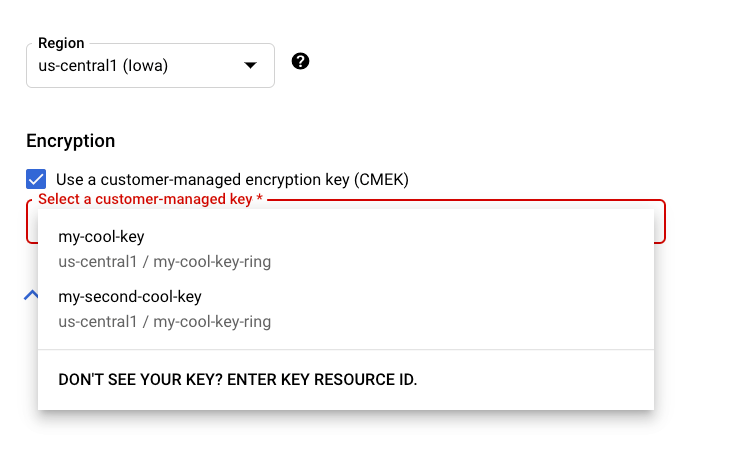
REST 和 CMD 行
建立支援的資源時,請在要求中新增 encryptionSpec 物件,並將 encryptionSpec.kmsKeyName 欄位設為指向金鑰資源。
舉例來說,建立 dataset 資源時,您會在要求主體中指定金鑰:
 {
   "displayName": DATASET_NAME,
   "metadataSchemaUri": METADATA_URI,
   "encryptionSpec": {
     "kmsKeyName": "projects/PROJECT_ID/locations/LOCATION_ID/keyRings/KEY_RING_NAME/cryptoKeys/KEY_NAME"
   }
 }
Java
建立支援的資源時,請將 EncryptionSpec 設為指向金鑰資源。詳情請參閱 Java 專用 Agent Platform 用戶端程式庫說明文件。
Node.js
建立支援的資源時,請將 encryptionSpec 參數設為指向金鑰資源。詳情請參閱 Node.js 的 Agent Platform 用戶端程式庫說明文件。
Python
建立支援的資源時,請將 encryption_spec 參數設為指向金鑰資源。詳情請參閱 Agent Platform 的 Python 用戶端程式庫說明文件。
搭配使用 CMEK 與無資源 API
部分 Gemini Enterprise Agent Platform API 不含資源 (以要求為基礎):這類 API 會提供推論要求,但不會建立長期存在的頂層資源。為支援工作階段延續性和有狀態對話等功能,這些 API 可在有限時間內儲存靜態使用者資料,例如 Gemini Live API 最多可儲存 24 小時的工作階段恢復資料,Interactions API 最多可儲存 7 天的有狀態互動資料。由於建立資料時沒有可附加金鑰的永久資源,因此您可以使用服務設定檔,將 CMEK 套用至這類靜態資料。
供應設定檔是 Gemini Enterprise Agent Platform 資源,可將 Cloud KMS 金鑰連結至專案、位置和 API 範圍。如果要求的專案、位置和範圍有供應設定檔,Agent Platform 會自動使用您的金鑰加密該範圍的永久資料。推論要求格式不會改變。
供應設定檔的優點
- 符合法規遵循需求:滿足稽核標準,讓客戶控管加密金鑰和資料生命週期。
- 完全掌控資料:隨時停用或撤銷金鑰存取權,切斷加密資料的存取權。
- 公開透明,不需變更程式碼:現有的推論要求格式不變,只要有服務設定檔,就會自動套用加密。
- 精細控管:為每個 API 範圍套用不同的金鑰,在金鑰遭入侵時限制影響範圍,並遵循最小權限原則。
透明加密功能的運作方式
- 您向區域 Agent Platform 端點支援的無資源 API 傳送要求。
- Agent Platform 會解析專案、位置和範圍的服務設定檔。
- 該範圍的永久資料會自動以您的金鑰加密,要求不會變更。
- 如果該專案、位置和範圍沒有任何服務設定檔,Agent Platform 預設會使用 Google 代管的加密金鑰。
服務設定檔限制
- 支援的 API:Gemini Live API (範圍
GEMINI_LIVE) 和 Interactions API (範圍INTERACTIONS_API)。 - 支援的地區:
us和eu多區域。由於 Cloud KMS 和儲存空間 CMEK 在全域區域有限制,因此不支援全域區域。 - 加密金鑰和範圍建立後即無法變更。只能更新顯示名稱和說明。如要變更金鑰或範圍,請刪除供應設定檔,並使用不同的
servingProfileId建立新的設定檔 (請參閱「停用 CMEK 並還原為預設加密」)。
事前準備
- 在專案中啟用 Cloud KMS API 和 Agent Platform API。
- 在支援的多區域 (
us或eu) 建立或找出 Cloud KMS 金鑰,請勿使用全域區域。請參閱「建立金鑰環和金鑰」。 - 將金鑰的
roles/cloudkms.cryptoKeyEncrypterDecrypter角色授予 Gemini Enterprise Agent Platform 服務代理。請參閱「授予 Agent Platform 權限」。 - 確認您具備管理供應設定檔的 IAM 權限 (
aiplatform.servingProfiles.create、get、list、update和delete)。
以下各節的範例會使用這些值:
- LOCATION:多區域,
us或eu。 - PROJECT:您的專案 ID 或編號。
- API_VERSION:
v1或v1beta1。 - SERVING_PROFILE_ID:1 至 63 個半形字元,只能使用小寫英文字母、數字和連字號,開頭須為英文字母,結尾須為英文字母或數字。這個值會成為資源名稱的最後一個部分。
scope:供應設定檔適用的無資源 API。支援的值為GEMINI_LIVE和INTERACTIONS_API。- Cloud KMS 金鑰是在
cmekConfig.encryptionSpec.kmsKeyName中設定,且必須與projects/*/locations/*/keyRings/*/cryptoKeys/*相符。
REST 要求會傳送至區域端點 https://aiplatform.LOCATION.rep.googleapis.com,並使用 OAuth 2.0 不記名權杖進行驗證:
-H "Authorization: Bearer $(gcloud auth print-access-token)"
-H "Content-Type: application/json"
建立供應設定檔
建立供應設定檔後,系統會為範圍內的永久資料啟用 CMEK 保護機制。displayName、scope (GEMINI_LIVE 或 INTERACTIONS_API) 和 cmekConfig.encryptionSpec.kmsKeyName 為必填欄位。
curl -X POST \
  -H "Authorization: Bearer $(gcloud auth print-access-token)" \
  -H "Content-Type: application/json" \
  "https://aiplatform.LOCATION.rep.googleapis.com/API_VERSION/projects/PROJECT/locations/LOCATION/servingProfiles?servingProfileId=SERVING_PROFILE_ID" \
  -d '{
    "displayName": "My CMEK serving profile",
    "description": "CMEK for Gemini Live",
    "scope": "GEMINI_LIVE",
    "cmekConfig": {
      "encryptionSpec": {
        "kmsKeyName": "projects/PROJECT/locations/LOCATION/keyRings/RING/cryptoKeys/KEY"
      }
    }
  }'
Create 會傳回長時間執行的作業。在 GET https://aiplatform.LOCATION.rep.googleapis.com/API_VERSION/OPERATION_NAME 輪詢,直到回應包含 "done": true 為止。請等待作業完成,再取得、更新或刪除供應設定檔。
確認供應設定檔
建立作業完成後,請使用 get 或 list 確認供應設定檔:
# Get one serving profile.
curl -H "Authorization: Bearer $(gcloud auth print-access-token)" \
  "https://aiplatform.LOCATION.rep.googleapis.com/API_VERSION/projects/PROJECT/locations/LOCATION/servingProfiles/SERVING_PROFILE_ID"

# List serving profiles in a location.
curl -H "Authorization: Bearer $(gcloud auth print-access-token)" \
  "https://aiplatform.LOCATION.rep.googleapis.com/API_VERSION/projects/PROJECT/locations/LOCATION/servingProfiles?pageSize=50"
更新供應設定檔中繼資料
您只能更新 displayName 和 description 欄位,鍵和範圍不可變更。updateMask 參數為選用,如省略,系統會更新所有已填入的可變動欄位。這項呼叫會傳回更新後的供應設定檔。
curl -X PATCH \
  -H "Authorization: Bearer $(gcloud auth print-access-token)" \
  -H "Content-Type: application/json" \
  "https://aiplatform.LOCATION.rep.googleapis.com/API_VERSION/projects/PROJECT/locations/LOCATION/servingProfiles/SERVING_PROFILE_ID?updateMask=displayName,description" \
  -d '{"displayName": "Renamed profile", "description": "Updated description"}'
停用 CMEK 並還原為預設加密機制
刪除供應設定檔。系統會使用 Google 代管的加密機制,為範圍內的新資料加密。根據 API 的資料保留政策,已使用金鑰加密的資料會維持受保護狀態,直到達到存留時間或遭到抹除為止。
curl -X DELETE \
  -H "Authorization: Bearer $(gcloud auth print-access-token)" \
  "https://aiplatform.LOCATION.rep.googleapis.com/API_VERSION/projects/PROJECT/locations/LOCATION/servingProfiles/SERVING_PROFILE_ID"
刪除供應設定檔後,系統會保留其 servingProfileId 30 天,以便您還原原始金鑰和範圍。在這段期間,如要使用不同的金鑰或範圍建立供應設定檔,請使用不同的 servingProfileId。
還原已刪除的供應設定檔
刪除供應設定檔後,您可以在 30 天內還原。請確認原始 Cloud KMS 金鑰仍處於啟用狀態,且 Gemini Enterprise Agent Platform 服務代理仍具備存取權。然後使用相同的 servingProfileId、scope 和金鑰建立供應設定檔。Agent Platform 會繼續使用您的金鑰保護範圍的永久資料,包括在設定檔刪除前加密的資料。
金鑰撤銷
如果停用 Cloud KMS 金鑰,或移除 Gemini Enterprise Agent Platform 服務代理的存取權,會發生下列情況:
- Agent Platform 無法再加密或解密範圍的永久資料。
- 需要存取受保護資料的要求會失敗,並顯示
FAILED_PRECONDITION錯誤,指出金鑰無法使用。
如要恢復存取權,請重新啟用金鑰或還原 IAM 授權。
供應設定檔定價
使用供應設定檔不需額外付費。加密和解密作業則按照標準 Cloud KMS 金鑰作業費率計費。
疑難排解
- 無法建立或卡在建立供應設定檔的階段:請確認 Gemini Enterprise Agent Platform 服務代理具備金鑰的
roles/cloudkms.cryptoKeyEncrypterDecrypter角色,且金鑰已啟用並位於支援的多區域 (us或eu,而非全域)。 - 推論未使用 CMEK:確認相符的專案、位置和範圍 (
GEMINI_LIVE或INTERACTIONS_API) 有服務設定檔。 FAILED_PRECONDITION錯誤:這類錯誤通常表示金鑰已停用或存取權已撤銷。重新啟用金鑰或還原 IAM 授權。