

The Gemini Distillation Service (Distillation) allows users to train a smaller, more efficient "student" model that uses the outputs and reasoning patterns of a larger, more capable "teacher" model. While frontier models define the cutting edge of AI, they can be over-provisioned for specific enterprise use cases. Distillation bridges this gap, enabling production-grade efficiency (lower latency and cost) while allowing smaller models to achieve a deeper level of reasoning.
Unlike standard supervised fine-tuning (SFT) which only uses the final text output, distillation leverages:
- Teacher responses: The final textual output.
- Raw thoughts: The internal reasoning paths generated by the teacher model.
Supported models
The following models are supported for Distillation during early access:
- Teacher model:
gemini-3.1-pro - Student model:
gemini-2.5-flash
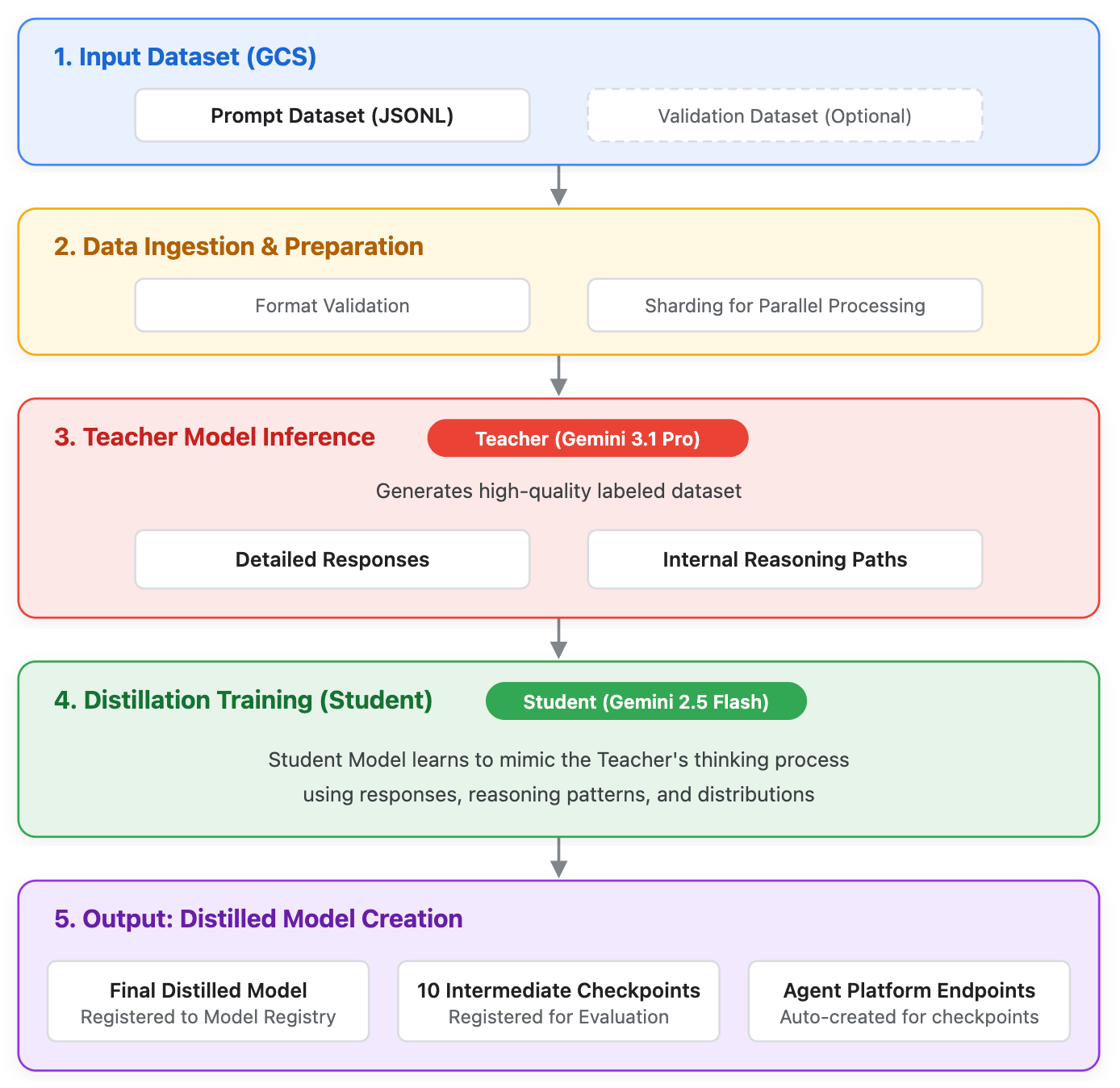
Suitable use cases
Distillation is recommended over standard prompting or supervised fine-tuning (SFT) in the following scenarios:
- High-volume, latency-sensitive applications: When your application requires the reasoning capabilities of a Pro-tier model but must meet strict latency SLAs or budget constraints that necessitate a Flash-tier model.
- Lack of ground-truth data (SFT is infeasible): When you have a large dataset of user prompts or queries, but lack the resources to manually label or generate high-quality ground-truth answers required for standard SFT.
- Complex reasoning tasks: Tasks involving multi-step logic, summarization of highly technical documents, or complex coding tasks where the base Flash model struggles, but the Pro model succeeds.
- Significant performance gaps: When the teacher model substantially outperforms the base student model on your specific task, providing a clear margin of knowledge to transfer during distillation.
Prerequisites and project setup
Before starting a distillation job, ensure your Google Cloud environment is properly configured:
- Request access to the allowlist: Ensure your Google Cloud project ID has been added to the allowlist for the Gemini Distillation Service early access. Contact your Google sales representative to get your project added to the allowlist.
- Enable the API: Enable the Agent Platform API in your Google Cloud project.
- Set IAM role permissions: You must have the
Agent Platform Administrator (
roles/aiplatform.admin) IAM role. - Set the region: Distillation jobs must be run in the
us-central1region.
Dataset preparation
A key feature of this service is the use of prompt-only datasets. Because the teacher model generates the target outputs during the distillation process, you don't need to provide the expected answers.
Dataset requirements
Datasets must be in JSON Lines (JSONL) format and stored in a Cloud Storage bucket. Each entry must adhere to the Gemini tuning dataset format in addition to the following:
- System instructions: You can include an optional
systemInstructionfield (with a 'system' role) to define system prompts. - Input: The contents field (with a 'user' role) is required for the primary input.
Multi-turn prompts: You can alternate between 'user' and 'model' roles, provided the final entry in the sequence is 'user'.
The following are two example dataset.jsonl files:
{
  "contents": [
    {
      "role": "user",
      "parts": [
        {
          "text": "You're the artist here. Choose as many strands of thread as you like, as long as you're using three or more. Go for color combinations that you think would make a pretty pattern. Get creative! If you only use one color of thread, you won't be able to create a pattern.\n\nProvide a summary of the article in two or three sentences:\n\n"
        }
      ]
    }
  ]
},
{
  "contents": [
    {
      "role": "user",
      "parts": [
        {
          "text": "You're the artist here. Choose as many strands of thread as you like, as long as you're using three or more. Go for color combinations that you think would make a pretty pattern. Get creative! If you only use one color of thread, you won't be able to create a pattern.\n\nProvide a summary of the article in two or three sentences:\n\n"
        }
      ]
    },
    {
      "role": "model",
      "parts": [
        {
          "text": "Choose several strands of embroidery thread in a variety of colors."
        }
      ]
    },
    {
      "role": "user",
      "parts": [
        {
          "text": "You will need one egg (raw or hard boiled but hard boiled is best) and one spoon for each person participating in the race. You might even like to use dyed Easter eggs as something special for Easter. It's best to have this race on grass or some other soft surface, to give dropped eggs a chance!"
        }
      ]
    }
  ]
}
Best practices
Use the following guidelines when creating your dataset:
- Size: A minimum of 1,000 examples is recommended for noticeable quality improvement.
- Diversity: Ensure your prompts cover the edge cases and varying lengths expected in your production traffic.
Configure the distillation request
A distillation job requires configuring both the teacher's generation behavior and the student's training hyperparameters.
Configure the teacher model's generation behavior
You must define how the teacher model responds to your dataset. The quality of
the student model is directly bound by the quality of the teacher's output. To
configure the teacher model's generation behavior, set the candidateCount:
candidateCount: The number of response variations to generate. (Example:4. Range[1, 5]). If it is not specified in the request, a default value of4will be used.
Set the distillation hyperparameters
The distillation hyperparameters control the training process of the student model. For more information on hyperparameters in Gemini Enterprise Agent Platform, see the "Create a tuning job" section of the supervised fine-tuning guide.
The following hyperparameters must be set when creating a distillation job:
epochCount: The number of times the student model will iterate over the dataset. (Example:20. Range[1, 100]). If not specified, a default value of4is used.learningRateMultiplier: Modifies the base learning rate of the student model. (Example:2.0. Range[0.25, 4]). If not specified, a default value of1is used.
Start the distillation job
During the early access period, you can submit and monitor distillation jobs using the REST version of the Agent Platform API. You can initiate a new distillation job or perform continuous tuning on an already distilled model checkpoint.
Create a new distillation job
Create a JSON file named request.json containing your job configuration. In
the following example, the teacher's generation configuration is nested within
the hyperParameters field:
{
    "description": "Distillation testing job.",
    "baseModel": "gemini-2.5-flash",
    "tunedModelDisplayName": "flash-distillation-run-1",
    "distillationSpec": {
        "promptDatasetUri": "gs://your-bucket/path/to/prompt_dataset.jsonl",
        "validationDatasetUri": "",
        "base_teacher_model": "gemini-3.1-pro-preview",
        "hyperParameters": {
            "epochCount": "20",
            "learningRateMultiplier": 2.0,
            "generation_config": {
              "candidateCount": 5
            }
        }
    }
}
Submit the job using curl:
curl -X POST \
  -H "Content-Type: application/json" \
  -H "Authorization: Bearer $(gcloud auth print-access-token)" \
  https://us-central1-aiplatform.googleapis.com/v1beta1/projects/PROJECT_ID/locations/us-central1/tuningJobs \
  -d @request.json
Perform continuous tuning
If you want to resume tuning from a previously distilled model checkpoint,
include the preTunedModel block in your request.json file. Continuous tuning
is only supported for previously distilled model checkpoints, with the same base
student model. Previously supervised fine-tuned model checkpoints (even with the
same base student model) aren't supported.
The following is an example of setting up continuous tuning for a previously distilled model checkpoint:
{
    "description": "Continuous distillation testing job.",
    "preTunedModel": {
      "tunedModelName": "projects/YOUR_PROJECT_ID/locations/us-central1/models/PRETUNED_MODEL_ID@1",
      "checkpointId": "1",
      "baseModel": "gemini-2.5-flash"
    },
    "tunedModelDisplayName": "flash-distillation-continuous",
    "distillationSpec": {
        "promptDatasetUri": "gs://your-bucket/path/to/prompt_dataset.jsonl",
        "validationDatasetUri": "",
        "base_teacher_model": "gemini-3.1-pro-preview",
        "hyperParameters": {
            "epochCount": "20",
            "learningRateMultiplier": 2.0,
            "generation_config": {
              "candidateCount": 5,
            }
        }
    }
}
Submit the payload using curl:
curl -X POST \
  -H "Content-Type: application/json" \
  -H "Authorization: Bearer $(gcloud auth print-access-token)" \
  https://us-central1-aiplatform.googleapis.com/v1beta1/projects/PROJECT_ID/locations/us-central1/tuningJobs \
  -d @request.json
Monitor the distillation job
The submission response will return a job name containing your
JOB_ID. You can check the status of your job
(state, errors, and final hyperparameters) by sending a GET request:
curl -X GET \
  -H "Authorization: Bearer $(gcloud auth print-access-token)" \
  -H "Content-Type: application/json; charset=utf-8" \
  https://us-central1-aiplatform.googleapis.com/v1beta1/projects/PROJECT_ID/locations/us-central1/tuningJobs/JOB_ID
You can also monitor the progress visually in the Google Cloud console by
navigating to Agent Platform > Tuning and choosing the
us-central1 region.
For this early access release, the Agent Platform Console UI has the following known limitations:
- Teacher sampling progress: There is no progress widget for the teacher model sampling process. While the status may display "Running Prepare for tuning," the job is proceeding normally in the background.
- Student tuning charts: During the student model tuning stage, the UI provides charts for the Loss curve and total training text tokens.
- Checkpoint table: The UI displays a table of intermediate checkpoints and links to the generated Agent Platform prediction endpoint for evaluation. The "Epoch" column in this table displays '0' due to a known issue.
Cancel the distillation job
To cancel an ongoing distillation job, do either of the following:
Use the Google Cloud console, changing the following URL:
https://console.cloud.google.com/agent-platform/tuning/managed?project=YOUR_PROJECT_ID&vertex_ai_region=us-central1Replace YOUR_PROJECT_ID with your project ID.
Use
curlto send a POST request to cancel the job:curl -X POST \ -H "Authorization: Bearer $(gcloud auth print-access-token)" \ -H "Content-Type: application/json; charset=utf-8" \ https://us-central1-aiplatform.googleapis.com/v1beta1/projects/YOUR_PROJECT_ID/locations/us-central1/tuningJobs/YOUR_JOB_ID:cancelReplace the following:
YOUR_PROJECT_IDwith your project ID.YOUR_JOB_IDwith your job ID.
Evaluating the Result
After the distillation job successfully completes, the new student model is automatically registered in Gemini Enterprise Agent Platform Model Registry, and one or more dedicated endpoints are created to serve predictions. To evaluate the result, you locate the endpoint, send a prediction request, and finally evaluate.
To evaluate the result, do the following:
Send the following GET request to see the tuning job's status.
curl -X GET \
  -H "Authorization: Bearer $(gcloud auth print-access-token)" \
  -H "Content-Type: application/json; charset=utf-8" \
  https://us-central1-aiplatform.googleapis.com/v1beta1/projects/YOUR_PROJECT_ID/locations/us-central1/tuningJobs/YOUR_JOB_ID
Replace the following:
YOUR_PROJECT_IDwith your project ID.YOUR_JOB_IDwith your job ID.
Completed jobs display an
endpointfield nested inside thetunedModelobject. Extract theENDPOINT_IDfrom the end of the returned path string (for example,projects/.../endpoints/YOUR_ENDPOINT_ID). Note the endpoint ID.Ensure that the tuning job completed successfully, because the endpoint isn't available while the tuning job is still running or failed. If the
endpointfield is missing, then debug the tuning job by viewing the job'sstateorerrorkeys.Create a JSON payload request named
generate_content_request.jsonthat contains your prompt:{ "contents": { "role": "user", "parts": [ { "text": "hi, say something" } ] } }Use the following POST example to send a prediction request:
curl -X POST \
  -H "Content-Type: application/json" \
  -H "Authorization: Bearer $(gcloud auth print-access-token)" \
  https://us-central1-aiplatform.googleapis.com/v1beta1/projects/YOUR_PROJECT_ID/locations/us-central1/endpoints/YOUR_ENDPOINT_ID:generateContent \
  -d @generate_content_request.json
Replace the following:
YOUR_PROJECT_ID: your project ID.YOUR_JOB_ID: your job ID.ENDPOINT_ID: your endpoint ID.
Do the following to evaluate the results:
Run a holdout test set, using prompts not included in the training data, against your newly distilled model.
Compare the outputs against the base
gemini-2.5-flashmodel to measure the quality improvements.Compare the outputs against the
gemini-3.1-promodel to determine how closely the student approximates the teacher's reasoning.
Limitations
The following table describes limitations for Distillation:
Distillation is subject to the following limitations:
- Model limitations:
- See the supported models
- Dataset restrictions:
- Volume limits:
- The maximum training set capacity is 50,000 examples.
- The source JSONL file size must not exceed 1 GB.
- Context window specifications:
- The service accommodates a maximum of 8,000 input tokens per entry. Distillation jobs are terminated if more than 10% of the provided entries exceed this established threshold.
- Teacher model sampling is limited to a maximum output of 24,000 tokens. In instances where the teacher model generates more than 24,000 tokens, the content is truncated at this limit, which may affect the performance of the student model.
- Modality: Limited to text-based data. There is no support for multimodal inputs including video, imagery, or function calls.
- Volume limits:
- Configuration and hyperparameter limitations
- Adhere to the following boundaries when defining the distillationSpec
and its associated hyperParameters:
- Encryption: CMEK is unavailable for distillation tasks involving Google's first-party models.
epochCount: Restricted to an integer value between 1 and 100.learningRateMultiplier: Values must be within the floating-point range of0.25-4.0.
- Adhere to the following boundaries when defining the distillationSpec
and its associated hyperParameters:
- One-step distillation: The teacher model sampling and student model tuning run in a single API call. If you have a large amount of data to sample, the same data has to be sampled again in the following tuning.
Getting access
If you are interested in experimenting with Gemini Distillation Service, contact our Tuning Service team at cloud-ai-tuning-service-support@google.com to request access and project allowlisting.
To ensure optimal performance and resource management, we recommend creating a dedicated Google Cloud project for your distillation tasks. When reaching out to our team, provide your Project ID or project number to expedite the allowlisting process.
Quota and Access Policies
The following quota and access policies are in effect:
Capacity: Projects recently added to our allowlist are provisioned with a default concurrent quota of 4. To prevent resource contention, we recommend using a separate project rather than one already running other Gemini tuning jobs.
Access period: Access is granted for an initial 30-day period.