


Gemini Robotics ER 2 puede planificar tareas y razonar sobre el espacio, lo que permite inferir qué acciones realizar y qué objetos mover para completar un objetivo. En esta página, se muestra un ejemplo de cómo controlar una operación de selección y colocación a través de una API de robot personalizada para organizar la tarea de colocar un elemento en un recipiente.
Para obtener el código ejecutable completo, consulta la guía de robótica.
Llama a una API de robot personalizada
En este ejemplo, se muestra la organización de tareas con una API de robot personalizada. Se presenta una API simulada diseñada para una operación de selección y colocación. La tarea consiste en recoger un bloque azul y colocarlo en un tazón naranja:
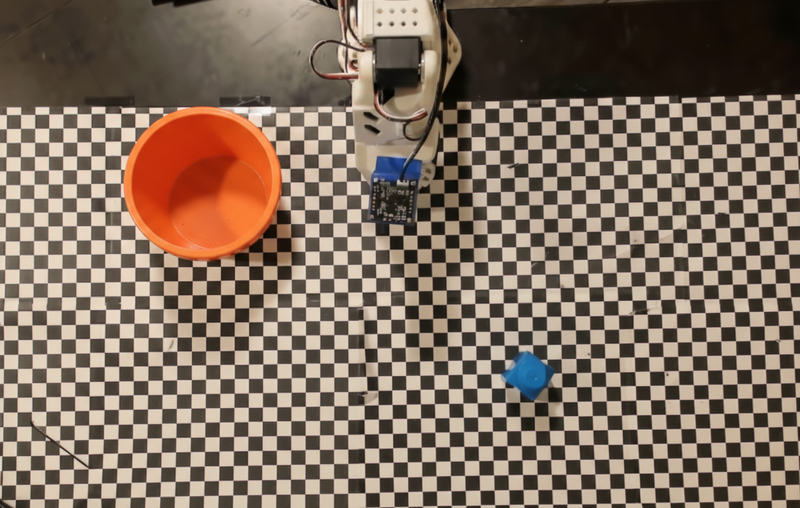
En este ejemplo, se usan las siguientes definiciones de herramientas y APIs de robots simulados. En lugar de devolver la secuencia de acciones como texto, el modelo llama a estas funciones a través de la interfaz de llamada a funciones del SDK de IA generativa de Google:
Python
from google import genai
from google.genai import types

client = genai.Client(
    enterprise=True,
    project="your-project-id",
    location="global",
)

def move(x, y, high):
    print(f"Mock Robot: Moving to coordinates: {x}, {y}, {'high above table' if high else 'down at table level'}")

def setGripperState(opened):
    print(f"Mock Robot: {'Opening gripper' if opened else 'Closing gripper'}")

robot_origin_y = 300
robot_origin_x = 500

move_declaration = types.FunctionDeclaration(
    name="move",
    description="Moves the arm to the given coordinates.",
    parameters=types.Schema(
        type=types.Type.OBJECT,
        properties={
            "x": types.Schema(type=types.Type.INTEGER, description="X coordinate relative to the origin"),
            "y": types.Schema(type=types.Type.INTEGER, description="Y coordinate relative to the origin"),
            "high": types.Schema(type=types.Type.BOOLEAN, description="Set to True to lift the robot arm above the scene. Set to False to place the gripper on the surface."),
        },
        required=["x", "y", "high"],
    ),
)

set_gripper_state_declaration = types.FunctionDeclaration(
    name="setGripperState",
    description="Opens or closes the robot's gripper.",
    parameters=types.Schema(
        type=types.Type.OBJECT,
        properties={
            "opened": types.Schema(type=types.Type.BOOLEAN, description="True opens the gripper, False closes the gripper."),
        },
        required=["opened"],
    ),
)

robot_tools = types.Tool(function_declarations=[move_declaration, set_gripper_state_declaration])
En el siguiente ejemplo, se envían la instrucción y la imagen al modelo junto con las definiciones de la herramienta. Luego, ejecuta un bucle de agente: después de cada respuesta del modelo, ejecuta
las llamadas a funciones solicitadas (move, setGripperState), envía los resultados de vuelta
al modelo y repite el proceso hasta que el modelo deje de llamar a funciones o se alcance el límite de
pasos.
Python
with open("robot-api-example.png", "rb") as f:
    img_bytes = f.read()

prompt = (
    "You are a robotic arm with six degrees-of-freedom. "
    f"The origin point for calculating the moves is at normalized point y={robot_origin_y}, x={robot_origin_x}. "
    "Use this as the new (0,0) for calculating moves, allowing x and y to be negative.\n\n"
    "Find the blue block and the orange bowl. Calculate their coordinates relative to the origin.\n"
    "Perform a pick and place operation where you pick up the blue block and place it into the orange bowl. "
    "Call the appropriate sequence of functions to complete this operation."
)

contents = [
    types.Content(role="user", parts=[
        types.Part.from_bytes(data=img_bytes, mime_type="image/png"),
        types.Part(text=prompt),
    ])
]

print("\n--- Executing Orchestrated Plan ---")

max_steps = 15  # Safety limit to prevent infinite loops
step_count = 0

# The agentic loop
while step_count < max_steps:
    step_count += 1

    response = client.models.generate_content(
        model="gemini-robotics-er-2-preview",
        contents=contents,
        config=types.GenerateContentConfig(
            tools=[robot_tools],
            thinking_config=types.ThinkingConfig(
                thinking_level=types.ThinkingLevel.LOW
            ),
        ),
    )

    # Add the model response to the conversation history
    contents.append(response.candidates[0].content)

    # Check for function calls
    function_calls = [
        part for part in response.candidates[0].content.parts if part.function_call
    ]

    if not function_calls:
        # The model is done calling functions
        print("Sequence complete.")
        print(f"Model Summary: {response.text}")
        break

    # Execute function calls and collect results
    function_response_parts = []
    for part in function_calls:
        fc = part.function_call
        if fc.name == "move":
            move(**fc.args)
        elif fc.name == "setGripperState":
            setGripperState(**fc.args)

        function_response_parts.append(
            types.Part.from_function_response(
                name=fc.name,
                response={"status": "success"},
            )
        )

    # Send the function results back to the model
    contents.append(types.Content(role="user", parts=function_response_parts))
A continuación, se muestra un posible resultado del modelo basado en la instrucción y la API de robot simulada. El resultado incluye los resultados de las llamadas a funciones del robot que el modelo secuenció:
--- Executing Orchestrated Plan ---
Mock Robot: Opening gripper
Mock Robot: Moving to coordinates: 160, 440, high above table
Mock Robot: Moving to coordinates: 160, 440, down at table level
Mock Robot: Closing gripper
Mock Robot: Moving to coordinates: 160, 440, high above table
Mock Robot: Moving to coordinates: -250, 60, high above table
Mock Robot: Moving to coordinates: -250, 60, down at table level
Mock Robot: Opening gripper
Mock Robot: Moving to coordinates: -250, 60, high above table
Sequence complete.
Model Summary: I have completed the task of picking up the blue block and placing it into the orange bowl.
¿Qué sigue?
Para obtener más información sobre Gemini Robotics ER 2, consulta los siguientes recursos:
- Comprensión de video: Realiza un seguimiento del progreso de las tareas a partir de un video.
- Razonamiento espacial: ejemplos de señalamiento, seguimiento y cuadro delimitador.
- Capacidades de agente: ejecución de código, lectura de instrumentos y anotación de imágenes.
- Descripción general de Gemini Robotics ER 2: Capacidades y guía de inicio rápido.
- Información del modelo Gemini Robotics ER 2: especificaciones técnicas, límites de tokens y capacidades compatibles.