
הערכה ושיפור של מודלים של AutoML לזיהוי אובייקטים בתמונות

בדף הזה מוסבר איך להעריך את המודלים של AutoML לזיהוי אובייקטים בתמונות, כדי שתוכלו לבצע איטרציה על המודל.

‫Gemini Enterprise Agent Platform מספקת מדדי הערכה של מודלים כדי לעזור לכם לקבוע את הביצועים של המודלים, כמו מדדי דיוק ורגישות.‫Agent Platform מחשבת את מדדי ההערכה באמצעות מערך הבדיקה.

איך משתמשים במדדים להערכת מודלים

מדדים להערכת מודלים מספקים מדידות כמותיות של הביצועים של המודל בקבוצת הנתונים לבדיקה. האופן שבו מפרשים את המדדים האלה ומשתמשים בהם תלוי בצורך העסקי ובבעיה שהמודל אומן לפתור. לדוגמה, יכול להיות שרמת הסבילות שלכם לתוצאות חיוביות שגויות נמוכה יותר מרמת הסבילות לתוצאות שליליות שגויות, או להפך. סוגי השאלות האלה משפיעים על המדדים שבהם תתמקדו.

מידע נוסף על שיפור הביצועים של המודל זמין במאמר שיפור המודל.

מדדי הערכה שמוחזרים על ידי Agent Platform

‫Agent Platform מחזירה כמה מדדי הערכה שונים, כמו דיוק, היזכרות וספי ודאות. המדדים שמוחזרים מ-Agent Platform תלויים ביעד של המודל. לדוגמה, Agent Platform מספק מדדי הערכה שונים למודל זיהוי אובייקטים בתמונה בהשוואה למודל סיווג אובייקטים בתמונה.

קובץ סכימה, שאפשר להוריד ממיקום ב-Cloud Storage, קובע אילו מדדי הערכה מספקת Agent Platform לכל יעד. בכרטיסים הבאים מופיעים קישורים לקובצי הסכימה ותיאור של מדדי ההערכה לכל יעד של מודל.

אפשר להציג ולהוריד קובצי סכימה ממיקום Cloud Storage הבא:
gs://google-cloud-aiplatform/schema/modelevaluation/

  • ערך סף של IoU: ערך סף של חיתוך חלקי איחוד שקובע אילו מסקנות יוחזרו. מודל מחזיר מסקנות שהערך שלהן הוא הערך הזה או גבוה ממנו. ככל שהסף גבוה יותר, כך ערכי תיבת התוחמת החזויה צריכים להיות קרובים יותר לערכי תיבת התוחמת בפועל.
  • דיוק ממוצע: נקרא גם דיוק ממוצע. הערך הזה נע בין אפס לאחד, כאשר ערך גבוה יותר מצביע על מודל באיכות גבוהה יותר.
  • סף ביטחון: ציון מהימנות שקובע אילו מסקנות יוחזרו. המודל מחזיר מסקנות שהערך שלהן הוא לפחות הערך הזה. סף סבירות גבוה יותר מגדיל את הדיוק אבל מקטין את ההיזכרות. פלטפורמת Agent מחזירה מדדי מהימנות בערכי סף שונים כדי להראות איך ערך הסף משפיע על הדיוק ועל ההחזרה.
  • החזרה: השבר של ההסקות עם הסיווג הזה שהמודל חזה בצורה נכונה. נקרא גם שיעור החיוביים האמיתיים.
  • דיוק: השבר של מסקנות הסיווג שהופקו על ידי המודל שהיו נכונות.
  • ציון F1: הממוצע ההרמוני של הדיוק וההחזרה. מדד F1 שימושי אם אתם מחפשים איזון בין דיוק לבין היזכרות, ויש התפלגות לא אחידה של מחלקות.
  • דיוק ממוצע של תיבת תוחמת: המדד היחיד להערכות של תיבות תוחמות: meanAveragePrecision בממוצע על פני כל boundingBoxMetrics.

קבלת מדדי הערכה

אתם יכולים לקבל קבוצה מצטברת של מדדי הערכה עבור המודל, ובחלק מהמקרים מדדי הערכה עבור סיווג או תווית מסוימים. מדדי ההערכה של מחלקה או תווית מסוימת נקראים גם פלח הערכה. בקטע הבא מוסבר איך לקבל מדדי הערכה מצטברים ופרוסות הערכה באמצעות מסוף Google Cloud או API.

מסוף Google Cloud

  1. במסוף Google Cloud , בקטע Agent Platform, עוברים לדף Models.

    כניסה לדף Models

  2. בתפריט הנפתח אזור, בוחרים את האזור שבו נמצא המודל.

  3. ברשימת המודלים, לוחצים על המודל הרצוי כדי לפתוח את הכרטיסייה Evaluate (הערכה) של המודל.

    בכרטיסייה הערכה אפשר לראות את מדדי ההערכה המצטברים של המודל, כמו דיוק ממוצע והחזרה.

    אם ליעד של המודל יש פלחים להערכה, במסוף תוצג רשימה של תוויות. אפשר ללחוץ על תווית כדי לראות את מדדי ההערכה של התווית הזו, כמו בדוגמה הבאה:
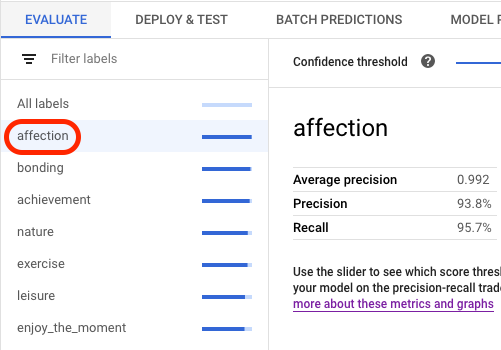
    בחירת התווית במסוף

API

בקשות API לקבלת מדדי הערכה זהות לכל סוג נתונים ולכל יעד, אבל הפלט שונה. בדוגמאות הבאות מוצגת אותה בקשה אבל תשובות שונות.

קבלת מדדים מצטברים של הערכת מודל

מדדי ההערכה המצטברים של המודל מספקים מידע על המודל כמכלול. כדי לראות מידע על פלח ספציפי, מציגים את פילוח ההערכה של המודל.

כדי לראות מדדים מצטברים להערכת מודלים, משתמשים בשיטה projects.locations.models.evaluations.get.

במקרה של מדד תיבת התוחמת, פלטפורמת הסוכן מחזירה מערך של ערכי מדדים בערכי סף שונים של IoU (בין 0 ל-1) וערכי סף של מהימנות (בין 0 ל-1). לדוגמה, אפשר להתמקד במדדי הערכה בסף IoU של 0.85 ובסף מהימנות של 0.8228. הצגת ערכי הסף השונים מאפשרת לראות איך הם משפיעים על מדדים אחרים, כמו דיוק ורגישות.

בוחרים כרטיסייה שמתאימה לשפה או לסביבה שלכם:

REST

לפני שמשתמשים בנתוני הבקשה, צריך להחליף את הנתונים הבאים:

  • LOCATION: האזור שבו המודל מאוחסן.
  • PROJECT: מזהה הפרויקט.
  • MODEL_ID: המזהה של משאב המודל.
  • PROJECT_NUMBER: מספר הפרויקט שנוצר באופן אוטומטי.
  • EVALUATION_ID: המזהה של הערכת המודל (מופיע בתגובה).

ה-method של ה-HTTP וכתובת ה-URL:

GET https://LOCATION-aiplatform.googleapis.com/v1/projects/PROJECT/locations/LOCATION/models/MODEL_ID/evaluations

כדי לשלוח את הבקשה אתם צריכים לבחור אחת מהאפשרויות הבאות:

curl

מריצים את הפקודה הבאה:

curl -X GET \
-H "Authorization: Bearer $(gcloud auth print-access-token)" \
"https://LOCATION-aiplatform.googleapis.com/v1/projects/PROJECT/locations/LOCATION/models/MODEL_ID/evaluations"

PowerShell

מריצים את הפקודה הבאה:

$cred = gcloud auth print-access-token
$headers = @{ "Authorization" = "Bearer $cred" }

Invoke-WebRequest `
-Method GET `
-Headers $headers `
-Uri "https://LOCATION-aiplatform.googleapis.com/v1/projects/PROJECT/locations/LOCATION/models/MODEL_ID/evaluations" | Select-Object -Expand Content

אתם אמורים לקבל תגובת JSON שדומה לזו:

Java

לפני שמנסים את הדוגמה הזו, צריך לפעול לפי Javaההוראות להגדרה במאמר מדריך למתחילים של Agent Platform באמצעות ספריות לקוח. מידע נוסף מופיע במאמרי העזרה של Agent Platform Java API.

כדי לבצע אימות ב-Agent Platform, צריך להגדיר את Application Default Credentials. מידע נוסף זמין במאמר הגדרת אימות לסביבת פיתוח מקומית.


import com.google.cloud.aiplatform.v1.ModelEvaluation;
import com.google.cloud.aiplatform.v1.ModelEvaluationName;
import com.google.cloud.aiplatform.v1.ModelServiceClient;
import com.google.cloud.aiplatform.v1.ModelServiceSettings;
import java.io.IOException;

public class GetModelEvaluationImageObjectDetectionSample {

  public static void main(String[] args) throws IOException {
    // TODO(developer): Replace these variables before running the sample.
    // To obtain evaluationId run the code block below after setting modelServiceSettings.
    //
    // try (ModelServiceClient modelServiceClient = ModelServiceClient.create(modelServiceSettings))
    // {
    //   String location = "us-central1";
    //   ModelName modelFullId = ModelName.of(project, location, modelId);
    //   ListModelEvaluationsRequest modelEvaluationsrequest =
    //   ListModelEvaluationsRequest.newBuilder().setParent(modelFullId.toString()).build();
    //   for (ModelEvaluation modelEvaluation :
    //     modelServiceClient.listModelEvaluations(modelEvaluationsrequest).iterateAll()) {
    //       System.out.format("Model Evaluation Name: %s%n", modelEvaluation.getName());
    //   }
    // }
    String project = "YOUR_PROJECT_ID";
    String modelId = "YOUR_MODEL_ID";
    String evaluationId = "YOUR_EVALUATION_ID";
    getModelEvaluationImageObjectDetectionSample(project, modelId, evaluationId);
  }

  static void getModelEvaluationImageObjectDetectionSample(
      String project, String modelId, String evaluationId) throws IOException {
    ModelServiceSettings modelServiceSettings =
        ModelServiceSettings.newBuilder()
            .setEndpoint("us-central1-aiplatform.googleapis.com:443")
            .build();

    // Initialize client that will be used to send requests. This client only needs to be created
    // once, and can be reused for multiple requests. After completing all of your requests, call
    // the "close" method on the client to safely clean up any remaining background resources.
    try (ModelServiceClient modelServiceClient = ModelServiceClient.create(modelServiceSettings)) {
      String location = "us-central1";
      ModelEvaluationName modelEvaluationName =
          ModelEvaluationName.of(project, location, modelId, evaluationId);

      ModelEvaluation modelEvaluation = modelServiceClient.getModelEvaluation(modelEvaluationName);

      System.out.println("Get Model Evaluation Image Object Detection Response");
      System.out.format("\tName: %s\n", modelEvaluation.getName());
      System.out.format("\tMetrics Schema Uri: %s\n", modelEvaluation.getMetricsSchemaUri());
      System.out.format("\tMetrics: %s\n", modelEvaluation.getMetrics());
      System.out.format("\tCreate Time: %s\n", modelEvaluation.getCreateTime());
      System.out.format("\tSlice Dimensions: %s\n", modelEvaluation.getSliceDimensionsList());
    }
  }
}

Node.js

לפני שמנסים את הדוגמה הזו, צריך לפעול לפי Node.jsההוראות להגדרה במאמר מדריך למתחילים של Agent Platform באמצעות ספריות לקוח. מידע נוסף מופיע במאמרי העזרה של Agent Platform Node.js API.

כדי לבצע אימות ב-Agent Platform, צריך להגדיר את Application Default Credentials. מידע נוסף זמין במאמר הגדרת אימות לסביבת פיתוח מקומית.

/**
 * TODO(developer): Uncomment these variables before running the sample
 * (not necessary if passing values as arguments). To obtain evaluationId,
 * instantiate the client and run the following the commands.
 */
// const parentName = `projects/${project}/locations/${location}/models/${modelId}`;
// const evalRequest = {
//   parent: parentName
// };
// const [evalResponse] = await modelServiceClient.listModelEvaluations(evalRequest);
// console.log(evalResponse);

// const modelId = 'YOUR_MODEL_ID';
// const evaluationId = 'YOUR_EVALUATION_ID';
// const project = 'YOUR_PROJECT_ID';
// const location = 'YOUR_PROJECT_LOCATION';

// Imports the Google Cloud Model Service Client library
const {ModelServiceClient} = require('@google-cloud/aiplatform');

// Specifies the location of the api endpoint
const clientOptions = {
  apiEndpoint: 'us-central1-aiplatform.googleapis.com',
};

// Instantiates a client
const modelServiceClient = new ModelServiceClient(clientOptions);

async function getModelEvaluationImageObjectDetection() {
  // Configure the name resources
  const name = `projects/${project}/locations/${location}/models/${modelId}/evaluations/${evaluationId}`;
  const request = {
    name,
  };

  // Create get model evaluation request
  const [response] = await modelServiceClient.getModelEvaluation(request);

  console.log('Get model evaluation image object detection response');
  console.log(`\tName : ${response.name}`);
  console.log(`\tMetrics schema uri : ${response.metricsSchemaUri}`);
  console.log(`\tCreate time : ${JSON.stringify(response.createTime)}`);
  console.log(`\tSlice dimensions : ${response.sliceDimensions}`);

  const modelExplanation = response.modelExplanation;
  console.log('\tModel explanation');
  if (modelExplanation === null) {
    console.log('\t\t{}');
  } else {
    const meanAttributions = modelExplanation.meanAttributions;
    if (meanAttributions === null) {
      console.log('\t\t\t []');
    } else {
      for (const meanAttribution of meanAttributions) {
        console.log('\t\tMean attribution');
        console.log(
          `\t\t\tBaseline output value : \
            ${meanAttribution.baselineOutputValue}`
        );
        console.log(
          `\t\t\tInstance output value : \
            ${meanAttribution.instanceOutputValue}`
        );
        console.log(
          `\t\t\tFeature attributions : \
            ${meanAttribution.featureAttributions}`
        );
        console.log(`\t\t\tOutput index : ${meanAttribution.outputIndex}`);
        console.log(
          `\t\t\tOutput display name : \
            ${meanAttribution.outputDisplayName}`
        );
        console.log(
          `\t\t\tApproximation error : \
            ${meanAttribution.approximationError}`
        );
      }
    }
  }
}
getModelEvaluationImageObjectDetection();

Python

במאמר התקנת Vertex AI SDK ל-Python מוסבר איך להתקין או לעדכן את Vertex AI SDK ל-Python. מידע נוסף מופיע ב מאמרי העזרה של Python API.

from google.cloud import aiplatform


def get_model_evaluation_image_object_detection_sample(
    project: str,
    model_id: str,
    evaluation_id: str,
    location: str = "us-central1",
    api_endpoint: str = "us-central1-aiplatform.googleapis.com",
):
    """
    To obtain evaluation_id run the following commands where LOCATION
    is the region where the model is stored, PROJECT is the project ID,
    and MODEL_ID is the ID of your model.

    model_client = aiplatform.gapic.ModelServiceClient(
        client_options={
            'api_endpoint':'LOCATION-aiplatform.googleapis.com'
            }
        )
    evaluations = model_client.list_model_evaluations(parent='projects/PROJECT/locations/LOCATION/models/MODEL_ID')
    print("evaluations:", evaluations)
    """
    # The AI Platform services require regional API endpoints.
    client_options = {"api_endpoint": api_endpoint}
    # Initialize client that will be used to create and send requests.
    # This client only needs to be created once, and can be reused for multiple requests.
    client = aiplatform.gapic.ModelServiceClient(client_options=client_options)
    name = client.model_evaluation_path(
        project=project, location=location, model=model_id, evaluation=evaluation_id
    )
    response = client.get_model_evaluation(name=name)
    print("response:", response)

הצגת כל פלחי ההערכה

השיטה projects.locations.models.evaluations.slices.list מציגה את כל פרוסות ההערכה של המודל. צריך את מזהה ההערכה של המודל. אפשר לקבל אותו כשמציגים את מדדי ההערכה המצטברים.

אפשר להשתמש בפרוסות של הערכת מודל כדי לקבוע את הביצועים של המודל לגבי תווית ספציפית. בשדה value מצוין לאיזו תווית מתייחסים המדדים.

במקרה של מדד תיבת התוחמת, פלטפורמת הסוכן מחזירה מערך של ערכי מדדים בערכי סף שונים של IoU (בין 0 ל-1) וערכי סף של מהימנות (בין 0 ל-1). לדוגמה, אפשר להתמקד במדדי הערכה בסף IoU של 0.85 ובסף מהימנות של 0.8228. הצגת ערכי הסף השונים מאפשרת לראות איך הם משפיעים על מדדים אחרים, כמו דיוק ורגישות.

REST

לפני שמשתמשים בנתוני הבקשה, צריך להחליף את הנתונים הבאים:

  • LOCATION: האזור שבו נמצא המודל. לדוגמה: us-central1.
  • PROJECT: .
  • MODEL_ID: מזהה המודל.
  • EVALUATION_ID: המזהה של הערכת המודל שמכילה את פרוסות ההערכה שרוצים להציג.

ה-method של ה-HTTP וכתובת ה-URL:

GET https://LOCATION-aiplatform.googleapis.com/v1/projects/PROJECT/locations/LOCATION/models/MODEL_ID/evaluations/EVALUATION_ID/slices

כדי לשלוח את הבקשה אתם צריכים לבחור אחת מהאפשרויות הבאות:

curl

מריצים את הפקודה הבאה:

curl -X GET \
-H "Authorization: Bearer $(gcloud auth print-access-token)" \
"https://LOCATION-aiplatform.googleapis.com/v1/projects/PROJECT/locations/LOCATION/models/MODEL_ID/evaluations/EVALUATION_ID/slices"

PowerShell

מריצים את הפקודה הבאה:

$cred = gcloud auth print-access-token
$headers = @{ "Authorization" = "Bearer $cred" }

Invoke-WebRequest `
-Method GET `
-Headers $headers `
-Uri "https://LOCATION-aiplatform.googleapis.com/v1/projects/PROJECT/locations/LOCATION/models/MODEL_ID/evaluations/EVALUATION_ID/slices" | Select-Object -Expand Content

אתם אמורים לקבל תגובת JSON שדומה לזו:

Java

לפני שמנסים את הדוגמה הזו, צריך לפעול לפי Javaההוראות להגדרה במאמר מדריך למתחילים של Agent Platform באמצעות ספריות לקוח. מידע נוסף מופיע במאמרי העזרה של Agent Platform Java API.

כדי לבצע אימות ב-Agent Platform, צריך להגדיר את Application Default Credentials. מידע נוסף זמין במאמר הגדרת אימות לסביבת פיתוח מקומית.


import com.google.cloud.aiplatform.v1.ModelEvaluationName;
import com.google.cloud.aiplatform.v1.ModelEvaluationSlice;
import com.google.cloud.aiplatform.v1.ModelEvaluationSlice.Slice;
import com.google.cloud.aiplatform.v1.ModelServiceClient;
import com.google.cloud.aiplatform.v1.ModelServiceSettings;
import java.io.IOException;

public class ListModelEvaluationSliceSample {

  public static void main(String[] args) throws IOException {
    // TODO(developer): Replace these variables before running the sample.
    // To obtain evaluationId run the code block below after setting modelServiceSettings.
    //
    // try (ModelServiceClient modelServiceClient = ModelServiceClient.create(modelServiceSettings))
    // {
    //   String location = "us-central1";
    //   ModelName modelFullId = ModelName.of(project, location, modelId);
    //   ListModelEvaluationsRequest modelEvaluationsrequest =
    //   ListModelEvaluationsRequest.newBuilder().setParent(modelFullId.toString()).build();
    //   for (ModelEvaluation modelEvaluation :
    //     modelServiceClient.listModelEvaluations(modelEvaluationsrequest).iterateAll()) {
    //       System.out.format("Model Evaluation Name: %s%n", modelEvaluation.getName());
    //   }
    // }
    String project = "YOUR_PROJECT_ID";
    String modelId = "YOUR_MODEL_ID";
    String evaluationId = "YOUR_EVALUATION_ID";
    listModelEvaluationSliceSample(project, modelId, evaluationId);
  }

  static void listModelEvaluationSliceSample(String project, String modelId, String evaluationId)
      throws IOException {
    ModelServiceSettings modelServiceSettings =
        ModelServiceSettings.newBuilder()
            .setEndpoint("us-central1-aiplatform.googleapis.com:443")
            .build();

    // Initialize client that will be used to send requests. This client only needs to be created
    // once, and can be reused for multiple requests. After completing all of your requests, call
    // the "close" method on the client to safely clean up any remaining background resources.
    try (ModelServiceClient modelServiceClient = ModelServiceClient.create(modelServiceSettings)) {
      String location = "us-central1";
      ModelEvaluationName modelEvaluationName =
          ModelEvaluationName.of(project, location, modelId, evaluationId);

      for (ModelEvaluationSlice modelEvaluationSlice :
          modelServiceClient.listModelEvaluationSlices(modelEvaluationName).iterateAll()) {
        System.out.format("Model Evaluation Slice Name: %s\n", modelEvaluationSlice.getName());
        System.out.format("Metrics Schema Uri: %s\n", modelEvaluationSlice.getMetricsSchemaUri());
        System.out.format("Metrics: %s\n", modelEvaluationSlice.getMetrics());
        System.out.format("Create Time: %s\n", modelEvaluationSlice.getCreateTime());

        Slice slice = modelEvaluationSlice.getSlice();
        System.out.format("Slice Dimensions: %s\n", slice.getDimension());
        System.out.format("Slice Value: %s\n\n", slice.getValue());
      }
    }
  }
}

Node.js

לפני שמנסים את הדוגמה הזו, צריך לפעול לפי Node.jsההוראות להגדרה במאמר מדריך למתחילים של Agent Platform באמצעות ספריות לקוח. מידע נוסף מופיע במאמרי העזרה של Agent Platform Node.js API.

כדי לבצע אימות ב-Agent Platform, צריך להגדיר את Application Default Credentials. מידע נוסף זמין במאמר הגדרת אימות לסביבת פיתוח מקומית.

/**
 * TODO(developer): Uncomment these variables before running the sample
 * (not necessary if passing values as arguments). To obtain evaluationId,
 * instantiate the client and run the following the commands.
 */
// const parentName = `projects/${project}/locations/${location}/models/${modelId}`;
// const evalRequest = {
//   parent: parentName
// };
// const [evalResponse] = await modelServiceClient.listModelEvaluations(evalRequest);
// console.log(evalResponse);

// const modelId = 'YOUR_MODEL_ID';
// const evaluationId = 'YOUR_EVALUATION_ID';
// const project = 'YOUR_PROJECT_ID';
// const location = 'YOUR_PROJECT_LOCATION';

// Imports the Google Cloud Model Service Client library
const {ModelServiceClient} = require('@google-cloud/aiplatform');

// Specifies the location of the api endpoint
const clientOptions = {
  apiEndpoint: 'us-central1-aiplatform.googleapis.com',
};

// Instantiates a client
const modelServiceClient = new ModelServiceClient(clientOptions);

async function listModelEvaluationSlices() {
  // Configure the parent resources
  const parent = `projects/${project}/locations/${location}/models/${modelId}/evaluations/${evaluationId}`;
  const request = {
    parent,
  };

  // Get and print out a list of all the evaluation slices for this resource
  const [response] =
    await modelServiceClient.listModelEvaluationSlices(request);
  console.log('List model evaluation response', response);
  console.log(response);
}
listModelEvaluationSlices();

Python

במאמר התקנת Vertex AI SDK ל-Python מוסבר איך להתקין או לעדכן את Vertex AI SDK ל-Python. מידע נוסף מופיע ב מאמרי העזרה של Python API.

from google.cloud import aiplatform


def list_model_evaluation_slices_sample(
    project: str,
    model_id: str,
    evaluation_id: str,
    location: str = "us-central1",
    api_endpoint: str = "us-central1-aiplatform.googleapis.com",
):
    """
    To obtain evaluation_id run the following commands where LOCATION
    is the region where the model is stored, PROJECT is the project ID,
    and MODEL_ID is the ID of your model.

    model_client = aiplatform.gapic.ModelServiceClient(
        client_options={
            'api_endpoint':'LOCATION-aiplatform.googleapis.com'
            }
        )
    evaluations = model_client.list_model_evaluations(parent='projects/PROJECT/locations/LOCATION/models/MODEL_ID')
    print("evaluations:", evaluations)
    """
    # The AI Platform services require regional API endpoints.
    client_options = {"api_endpoint": api_endpoint}
    # Initialize client that will be used to create and send requests.
    # This client only needs to be created once, and can be reused for multiple requests.
    client = aiplatform.gapic.ModelServiceClient(client_options=client_options)
    parent = client.model_evaluation_path(
        project=project, location=location, model=model_id, evaluation=evaluation_id
    )
    response = client.list_model_evaluation_slices(parent=parent)
    for model_evaluation_slice in response:
        print("model_evaluation_slice:", model_evaluation_slice)

קבלת מדדים עבור פלח יחיד

כדי לראות את מדדי ההערכה של פרוסת נתונים אחת, משתמשים בשיטה projects.locations.models.evaluations.slices.get. צריך להזין את מזהה הפרוסה, שמופיע כשמציגים את כל פרוסות הנתונים. הדוגמה הבאה רלוונטית לכל סוגי הנתונים והיעדים.

REST

לפני שמשתמשים בנתוני הבקשה, צריך להחליף את הנתונים הבאים:

  • LOCATION: האזור שבו נמצא המודל. לדוגמה, us-central1.
  • PROJECT: .
  • MODEL_ID: מזהה המודל.
  • EVALUATION_ID: המזהה של הערכת המודל שמכילה את פרוסת ההערכה שרוצים לאחזר.
  • SLICE_ID: המזהה של פרוסת ההערכה שרוצים לקבל.
  • PROJECT_NUMBER: מספר הפרויקט שנוצר באופן אוטומטי.
  • EVALUATION_METRIC_SCHEMA_FILE_NAME: השם של קובץ סכימה שמגדיר את מדדי ההערכה שיוחזרו, כמו classification_metrics_1.0.0.

ה-method של ה-HTTP וכתובת ה-URL:

GET https://LOCATION-aiplatform.googleapis.com/v1/projects/PROJECT/locations/LOCATION/models/MODEL_ID/evaluations/EVALUATION_ID/slices/SLICE_ID

כדי לשלוח את הבקשה אתם צריכים לבחור אחת מהאפשרויות הבאות:

curl

מריצים את הפקודה הבאה:

curl -X GET \
-H "Authorization: Bearer $(gcloud auth print-access-token)" \
"https://LOCATION-aiplatform.googleapis.com/v1/projects/PROJECT/locations/LOCATION/models/MODEL_ID/evaluations/EVALUATION_ID/slices/SLICE_ID"

PowerShell

מריצים את הפקודה הבאה:

$cred = gcloud auth print-access-token
$headers = @{ "Authorization" = "Bearer $cred" }

Invoke-WebRequest `
-Method GET `
-Headers $headers `
-Uri "https://LOCATION-aiplatform.googleapis.com/v1/projects/PROJECT/locations/LOCATION/models/MODEL_ID/evaluations/EVALUATION_ID/slices/SLICE_ID" | Select-Object -Expand Content

אתם אמורים לקבל תגובת JSON שדומה לזו:

Java

לפני שמנסים את הדוגמה הזו, צריך לפעול לפי Javaההוראות להגדרה במאמר מדריך למתחילים של Agent Platform באמצעות ספריות לקוח. מידע נוסף מופיע במאמרי העזרה של Agent Platform Java API.

כדי לבצע אימות ב-Agent Platform, צריך להגדיר את Application Default Credentials. מידע נוסף זמין במאמר הגדרת אימות לסביבת פיתוח מקומית.


import com.google.cloud.aiplatform.v1.ModelEvaluationSlice;
import com.google.cloud.aiplatform.v1.ModelEvaluationSlice.Slice;
import com.google.cloud.aiplatform.v1.ModelEvaluationSliceName;
import com.google.cloud.aiplatform.v1.ModelServiceClient;
import com.google.cloud.aiplatform.v1.ModelServiceSettings;
import java.io.IOException;

public class GetModelEvaluationSliceSample {

  public static void main(String[] args) throws IOException {
    // TODO(developer): Replace these variables before running the sample.
    // To obtain evaluationId run the code block below after setting modelServiceSettings.
    //
    // try (ModelServiceClient modelServiceClient = ModelServiceClient.create(modelServiceSettings))
    // {
    //   String location = "us-central1";
    //   ModelName modelFullId = ModelName.of(project, location, modelId);
    //   ListModelEvaluationsRequest modelEvaluationsrequest =
    //   ListModelEvaluationsRequest.newBuilder().setParent(modelFullId.toString()).build();
    //   for (ModelEvaluation modelEvaluation :
    //     modelServiceClient.listModelEvaluations(modelEvaluationsrequest).iterateAll()) {
    //       System.out.format("Model Evaluation Name: %s%n", modelEvaluation.getName());
    //   }
    // }
    String project = "YOUR_PROJECT_ID";
    String modelId = "YOUR_MODEL_ID";
    String evaluationId = "YOUR_EVALUATION_ID";
    String sliceId = "YOUR_SLICE_ID";
    getModelEvaluationSliceSample(project, modelId, evaluationId, sliceId);
  }

  static void getModelEvaluationSliceSample(
      String project, String modelId, String evaluationId, String sliceId) throws IOException {
    ModelServiceSettings modelServiceSettings =
        ModelServiceSettings.newBuilder()
            .setEndpoint("us-central1-aiplatform.googleapis.com:443")
            .build();

    // Initialize client that will be used to send requests. This client only needs to be created
    // once, and can be reused for multiple requests. After completing all of your requests, call
    // the "close" method on the client to safely clean up any remaining background resources.
    try (ModelServiceClient modelServiceClient = ModelServiceClient.create(modelServiceSettings)) {
      String location = "us-central1";
      ModelEvaluationSliceName modelEvaluationSliceName =
          ModelEvaluationSliceName.of(project, location, modelId, evaluationId, sliceId);

      ModelEvaluationSlice modelEvaluationSlice =
          modelServiceClient.getModelEvaluationSlice(modelEvaluationSliceName);

      System.out.println("Get Model Evaluation Slice Response");
      System.out.format("Model Evaluation Slice Name: %s\n", modelEvaluationSlice.getName());
      System.out.format("Metrics Schema Uri: %s\n", modelEvaluationSlice.getMetricsSchemaUri());
      System.out.format("Metrics: %s\n", modelEvaluationSlice.getMetrics());
      System.out.format("Create Time: %s\n", modelEvaluationSlice.getCreateTime());

      Slice slice = modelEvaluationSlice.getSlice();
      System.out.format("Slice Dimensions: %s\n", slice.getDimension());
      System.out.format("Slice Value: %s\n", slice.getValue());
    }
  }
}

Node.js

לפני שמנסים את הדוגמה הזו, צריך לפעול לפי Node.jsההוראות להגדרה במאמר מדריך למתחילים של Agent Platform באמצעות ספריות לקוח. מידע נוסף מופיע במאמרי העזרה של Agent Platform Node.js API.

כדי לבצע אימות ב-Agent Platform, צריך להגדיר את Application Default Credentials. מידע נוסף זמין במאמר הגדרת אימות לסביבת פיתוח מקומית.

/**
 * TODO(developer): Uncomment these variables before running the sample
 * (not necessary if passing values as arguments). To obtain evaluationId,
 * instantiate the client and run the following the commands.
 */
// const parentName = `projects/${project}/locations/${location}/models/${modelId}`;
// const evalRequest = {
//   parent: parentName
// };
// const [evalResponse] = await modelServiceClient.listModelEvaluations(evalRequest);
// console.log(evalResponse);

// const modelId = 'YOUR_MODEL_ID';
// const evaluationId = 'YOUR_EVALUATION_ID';
// const sliceId = 'YOUR_SLICE_ID';
// const project = 'YOUR_PROJECT_ID';
// const location = 'YOUR_PROJECT_LOCATION';

// Imports the Google Cloud Model Service client library
const {ModelServiceClient} = require('@google-cloud/aiplatform');
// Specifies the location of the api endpoint
const clientOptions = {
  apiEndpoint: 'us-central1-aiplatform.googleapis.com',
};
// Specifies the location of the api endpoint
const modelServiceClient = new ModelServiceClient(clientOptions);

async function getModelEvaluationSlice() {
  // Configure the parent resource
  const name = `projects/${project}/locations/${location}/models/${modelId}/evaluations/${evaluationId}/slices/${sliceId}`;
  const request = {
    name,
  };

  // Get and print out a list of all the endpoints for this resource
  const [response] =
    await modelServiceClient.getModelEvaluationSlice(request);

  console.log('Get model evaluation slice');
  console.log(`\tName : ${response.name}`);
  console.log(`\tMetrics_Schema_Uri : ${response.metricsSchemaUri}`);
  console.log(`\tMetrics : ${JSON.stringify(response.metrics)}`);
  console.log(`\tCreate time : ${JSON.stringify(response.createTime)}`);

  console.log('Slice');
  const slice = response.slice;
  console.log(`\tDimension :${slice.dimension}`);
  console.log(`\tValue :${slice.value}`);
}
getModelEvaluationSlice();

Python

במאמר התקנת Vertex AI SDK ל-Python מוסבר איך להתקין או לעדכן את Vertex AI SDK ל-Python. מידע נוסף מופיע ב מאמרי העזרה של Python API.

from google.cloud import aiplatform


def get_model_evaluation_slice_sample(
    project: str,
    model_id: str,
    evaluation_id: str,
    slice_id: str,
    location: str = "us-central1",
    api_endpoint: str = "us-central1-aiplatform.googleapis.com",
):
    """
    To obtain evaluation_id run the following commands where LOCATION
    is the region where the model is stored, PROJECT is the project ID,
    and MODEL_ID is the ID of your model.

    model_client = aiplatform.gapic.ModelServiceClient(
        client_options={
            'api_endpoint':'LOCATION-aiplatform.googleapis.com'
            }
        )
    evaluations = model_client.list_model_evaluations(parent='projects/PROJECT/locations/LOCATION/models/MODEL_ID')
    print("evaluations:", evaluations)
    """
    # The AI Platform services require regional API endpoints.
    client_options = {"api_endpoint": api_endpoint}
    # Initialize client that will be used to create and send requests.
    # This client only needs to be created once, and can be reused for multiple requests.
    client = aiplatform.gapic.ModelServiceClient(client_options=client_options)
    name = client.model_evaluation_slice_path(
        project=project,
        location=location,
        model=model_id,
        evaluation=evaluation_id,
        slice=slice_id,
    )
    response = client.get_model_evaluation_slice(name=name)
    print("response:", response)

ביצוע איטרציות על המודל

מדדי הערכת המודל מספקים נקודת התחלה לניפוי באגים במודל, אם המודל לא עומד בציפיות שלכם. לדוגמה, ציוני דיוק וזיכרון נמוכים יכולים להצביע על כך שהמודל צריך נתוני אימון נוספים או שיש לו תוויות לא עקביות. דיוק ורגישות מושלמים יכולים להצביע על כך שקל מדי לחזות את נתוני הבדיקה, ושהם לא בהכרח יתאימו לשימוש כללי.

אפשר לחזור על תהליך האימון של נתוני האימון וליצור מודל חדש. אחרי שיוצרים מודל חדש, אפשר להשוות בין מדדי ההערכה של המודל הקיים לבין המודל החדש.

ההצעות הבאות יכולות לעזור לכם לשפר מודלים שמסווגים פריטים, כמו מודלים של זיהוי אובייקטים או מודלים של זיהוי:

  • כדאי להוסיף עוד דוגמאות או מגוון רחב יותר של דוגמאות לנתוני האימון. לדוגמה, במודל לזיהוי אובייקטים בתמונות, אפשר לכלול תמונות עם זווית רחבה יותר, תמונות ברזולוציה גבוהה או נמוכה יותר או תמונות מנקודות מבט שונות. הנחיות נוספות זמינות במאמר בנושא הכנת נתונים.
  • מומלץ להסיר סיווגים או תוויות שאין להם הרבה דוגמאות. דוגמאות לא מספיקות מונעות מהמודל ליצור תחזיות לגבי הסיווגים או התוויות האלה באופן עקבי ובביטחון.
  • מכונות לא יכולות לפרש את השם של הכיתות או התוויות, והן לא מבינות את ההבדלים הדקים ביניהן, כמו 'דלת' ו-'דלת עם ידית'. צריך לספק נתונים כדי לעזור למכונות לזהות ניואנסים כאלה.
  • כדי לצמצם את הבלבול במודל, כדאי להוסיף לנתונים עוד דוגמאות של חיוביים אמיתיים ושליליים אמיתיים, במיוחד דוגמאות שקרובות לגבול ההחלטה.
  • מציינים את חלוקת הנתונים הרצויה (אימון, אימות ובדיקה). פלטפורמת הסוכן מקצה פריטים לכל קבוצה באופן אקראי. לכן, יכול להיות שפריטים כמעט זהים יוקצו לקבוצות האימון והאימות, מה שעלול להוביל להתאמת יתר (overfitting) ואז לביצועים נמוכים בקבוצת הבדיקה. מידע נוסף על הגדרת חלוקת נתונים משלכם זמין במאמר מידע על חלוקת נתונים למודלים של AutoML.
  • אם מדדי ההערכה של המודל כוללים מטריצת בלבול, תוכלו לראות אם המודל מבלבל בין שתי תוויות, כלומר אם המודל מנבא תוויות מסוימות באופן משמעותי יותר מהתוויות האמיתיות. בודקים את הנתונים ומוודאים שהדוגמאות מסומנות בצורה נכונה.
  • אם זמן האימון היה קצר (מספר שעות הצומת המקסימלי היה נמוך), יכול להיות שתקבלו מודל באיכות גבוהה יותר אם תאפשרו לו להתאמן במשך תקופה ארוכה יותר (מספר שעות הצומת המקסימלי יהיה גבוה יותר).