


本頁內容適用於 Apigee 和 Apigee Hybrid。
查看
Apigee Edge 說明文件。

您可以使用 JavaScript 政策新增自訂 JavaScript 程式碼,在 API Proxy 流程的環境中執行。這項政策可讓您實作 Apigee 政策未涵蓋的自訂行為。
在自訂 JavaScript 程式碼中,您可以使用 Apigee JavaScript 物件模型的物件、方法和屬性。您可以在 Proxy 流程環境中取得、設定及移除變數、執行自訂邏輯、執行錯誤處理、從要求或回應中擷取資料,以及動態編輯後端目標網址。您也可以使用物件模型中提供的基本加密函式。
您可以透過 JavaScript 政策指定要執行的 JavaScript 來源檔,也可以使用 <Source> 元素,直接在政策的設定中加入 JavaScript 程式碼。無論採用哪種方式,當附加政策的步驟執行時,系統都會執行 JavaScript 程式碼。
如果是來源檔案選項,原始碼一律會儲存在 Proxy 組合的標準位置:apiproxy/resources/jsc。或者,您也可以在環境或機構層級的資源檔案中儲存原始碼。如需操作說明,請參閱「資源檔案」。您也可以使用 Apigee UI 代理伺服器編輯器上傳 JavaScript。
JavaScript 來源檔案的副檔名必須為 .js。Apigee 支援在 Rhino JavaScript 引擎 1.7.13 上執行的 JavaScript。
Apigee 不建議使用 JavaScript 政策執行下列操作:
- 記錄。MessageLogging 政策更適合搭配 Splunk、Sumo 和 Loggly 等第三方記錄平台使用。這項政策也會在回應傳回給用戶端後,於 PostClientFlow 中執行,進而提升 API Proxy 效能。
- 取代 Apigee 政策。JavaScript 政策不會取代 Apigee 政策的功能。如果 Apigee 政策提供您所需的功能,請使用該政策,不要實作自訂 JavaScript 解決方案。自訂 JavaScript 程式碼的效能和最佳化程度,可能不如 Apigee 政策。
- 執行系統呼叫。安全模式不允許 JavaScript 政策發出系統呼叫。舉例來說,禁止讀取或寫入內部檔案系統、存取目前的使用者資訊、程序清單,或 CPU/記憶體使用率。雖然部分通話可能仍可運作,但這類通話不受支援,且隨時可能遭到停用。為確保向前相容性,請避免在程式碼中進行這些呼叫。
這項政策是可擴充政策,使用這項政策可能會產生費用或影響用量,具體情況取決於您的 Apigee 授權。如要瞭解政策類型和使用方式的影響,請參閱「政策類型」。
範例
重寫目標網址
常見的用途包括從要求主體擷取資料、將資料儲存在流程變數中,然後在 Proxy 流程的其他位置使用該流程變數。舉例來說,假設使用者在 HTML 表單中輸入名稱並提交,如要擷取表單資料並動態新增至後端服務網址,請使用 JavaScript 政策。
- 在 Apigee 使用者介面中,於 Proxy 編輯器開啟您建立的 Proxy。
- 選取「開發」分頁標籤。
- 從「新增」選單中選取「新增指令碼」。
- 在對話方塊中選取 JavaScript,然後將指令碼命名為
js-example。 - 在程式碼編輯器中貼上下列程式碼,然後儲存 Proxy。JavaScript 程式碼可在 Proxy 流程中的任何位置使用
context物件。這個類別會取得流程專屬常數、呼叫實用的get/set方法,以及執行其他作業。這個物件是 Apigee JavaScript 物件模型的一部分。target.url流程變數是內建的讀取/寫入變數,可在目標要求流程中存取。當您使用 API 網址設定該變數時,Apigee 會呼叫該後端網址。這會重新編寫原始目標網址,也就是您建立 Proxy 時指定的網址 (例如http://www.example.com)。if (context.flow=="PROXY_REQ_FLOW") { var username = context.getVariable("request.formparam.user"); context.setVariable("info.username", username); } if (context.flow=="TARGET_REQ_FLOW") { context.setVariable("request.verb", "GET"); var name = context.getVariable("info.username"); var url = "http://mocktarget.apigee.net/" context.setVariable("target.url", url + "?user=" + name); }
- 在「新政策」選單中選取「JavaScript」JavaScript。
- 將政策命名為
target-rewrite。接受預設值,然後儲存政策。 - 在「Navigator」中選取「Proxy Endpoint Preflow」後,系統會將政策新增至該流程。
- 在「Navigator」中,選取「Target Endpoint PreFlow」。
- 在「Navigator」中,將 JavaScript 政策拖曳至流程編輯器中「目標端點」的「要求」側。
- 。
- 呼叫 API 時,請替換機構名稱和 Proxy 名稱:
curl -i -H 'Content-Type: application/x-www-form-urlencoded' -X POST -d 'user=Will' http://myorg-test.apigee.net/js-example
檢查本範例中使用的 JavaScript 政策 XML 定義。<ResourceURL> 元素會指定要執行的 JavaScript 來源檔。這個模式適用於任何 JavaScript 來源檔案:jsc://filename.js。如果 JavaScript 程式碼需要包含項目,請使用一或多個 <IncludeURL> 元素,詳情請參閱本文後續內容。
<?xml version="1.0" encoding="UTF-8" standalone="yes"?>
<Javascript async="false" continueOnError="false" enabled="true" timeLimit="200" name="target-rewrite">
    <DisplayName>target-rewrite</DisplayName>
    <Properties/>
    <ResourceURL>jsc://js-example.js</ResourceURL>
</Javascript>
從 JavaScript 擷取屬性值
您可以在設定中新增 <Property> 元素,然後在執行階段使用 JavaScript 擷取其值。
使用元素的 name 屬性,指定從 JavaScript 程式碼存取屬性的名稱。<Property> 元素的值 (開頭和結尾標記之間的值) 是 JavaScript 接收的字面值。
在 JavaScript 中,您可以存取 Properties 物件的屬性,藉此擷取政策屬性值,如下所示:
- 設定資源。屬性值為變數名稱
response.status.code。<Javascript async="false" continueOnError="false" enabled="true" timeLimit="200" name="JavascriptURLRewrite"> <DisplayName>JavascriptURLRewrite</DisplayName> <Properties> <Property name="source">response.status.code</Property> </Properties> <ResourceURL>jsc://JavascriptURLRewrite.js</ResourceURL> </Javascript>
- 使用 JavaScript 擷取屬性。接著,
getVariable函式會使用擷取的變數名稱,擷取變數的值。var responseCode = properties.source; // Returns "response.status.code" var value = context.getVariable(responseCode); // Get the value of response.status.code context.setVariable("response.header.x-target-response-code", value);
元素參考資料
元素參照說明 JavaScript 政策的元素和屬性。
<?xml version="1.0" encoding="UTF-8" standalone="yes"?>
<Javascript async="false"
        continueOnError="false" enabled="true" timeLimit="200"
        name="JavaScript-1">
    <DisplayName>JavaScript 1</DisplayName>
    <Properties>
        <Property name="propName">propertyValue</Property>
    </Properties>
    <SSLInfo>
        <Enabled>trueFalse</Enabled>
        <ClientAuthEnabled>trueFalse</ClientAuthEnabled>
        <KeyStore>ref://keystoreRef</KeyStore>
        <KeyAlias>keyAlias</KeyAlias>
        <TrustStore>ref://truststoreRef</TrustStore>
    </SSLInfo>
    <IncludeURL>jsc://a-javascript-library-file</IncludeURL>
    <ResourceURL>jsc://my-javascript-source-file</ResourceURL>
    <Source>insert_js_code_here</Source>
</Javascript>
<Javascript> 屬性
< languageVersion="VERSION_1_3" Javascript name="Javascript-1" enabled="true" continueOnError="false" async="false" timeLimit="200">
| 屬性 | 說明 | 預設 | 狀態 |
|---|---|---|---|
| languageVersion |
指定程式碼使用的 JavaScript 語言版本。值包括 |
VERSION_DEFAULT | 選用 |
| timeLimit |
指定指令碼可執行的最長時間 (以毫秒為單位)。舉例來說,如果超過 200 毫秒的限制,政策就會擲回以下錯誤:
|
不適用 | 必填 |
下表說明所有政策父項元素的共同屬性:
| 屬性 | 說明 | 預設 | 存在必要性 |
|---|---|---|---|
name |
政策的內部名稱。 您可以選擇使用 |
不適用 | 必填 |
continueOnError |
將其設為 將其設為 |
false | 選用 |
enabled |
設為 設為 |
是 | 選用 |
async |
此屬性已淘汰。 |
false | 已淘汰 |
<DisplayName> 元素
除了 name 屬性之外,您也可以在管理 UI 代理程式編輯器中使用不同的自然語言名稱標示政策。
<DisplayName>Policy Display Name</DisplayName>
| 預設 |
不適用 如果省略這個元素,系統會使用政策的 |
|---|---|
| 存在必要性 | 選用 |
| 類型 | 字串 |
<IncludeURL> 元素
指定要載入的 JavaScript 程式庫檔案,做為以 <ResourceURL> 或 <Source> 元素指定的主要 JavaScript 檔案的依附元件。政策會依政策中列出的順序評估指令碼。您的程式碼可以使用 JavaScript 物件模型的物件、方法和屬性。
使用額外的 <IncludeURL> 元素,加入多個 JavaScript 依附元件資源。
<IncludeURL>jsc://my-javascript-dependency.js</IncludeURL>
| 預設值: | 無 |
| 外觀狀態: | 選用 |
| 類型: | 字串 |
<Property> 元素
指定可在執行階段從 JavaScript 程式碼存取的屬性。
<Properties>
    <Property name="propName">propertyValue</Property>
</Properties>
| 預設值: | 無 |
| 外觀狀態: | 選用 |
| 類型: | 字串 |
屬性
| 屬性 | 說明 | 預設 | 狀態 |
|---|---|---|---|
| 名稱 |
指定資源名稱。 |
不適用 | 必填 |
範例
請參閱「範例」一節中的範例。
<ResourceURL> 元素
指定在 API 流程中執行的主要 JavaScript 檔案。您可以將這個檔案儲存在 API 代理範圍 (位於 API 代理套件的 /apiproxy/resources/jsc 下方,或 API 代理編輯器的「Navigator」窗格的「Scripts」部分)。或者,您也可以將其儲存在機構或環境範圍,以便在多個 API Proxy 中重複使用,詳情請參閱「管理資源」。您的程式碼可以使用 JavaScript 物件模型的物件、方法和屬性。
<ResourceURL>jsc://my-javascript.js</ResourceURL>
| 預設值: | 無 |
| 外觀狀態: | 必須提供 <ResourceURL> 或 <Source>。如果同時提供 <ResourceURL> 和 <Source>,政策會忽略 <ResourceURL>。 |
| 類型: | 字串 |
範例
請參閱「範例」一節中的範例。
<Source> 元素
您可以直接在政策的 XML 設定中插入 JavaScript。當政策在 API 流程中執行時,插入的 JavaScript 程式碼就會執行。
| 預設值: | 無 |
| 外觀狀態: | 必須提供 <ResourceURL> 或 <Source>。如果同時提供 <ResourceURL> 和 <Source>,政策會忽略 <ResourceURL>。 |
| 類型: | 字串 |
範例
<Javascript name='JS-ParseJsonHeaderFullString' timeLimit='200' >
  <Properties>
    <Property name='inboundHeaderName'>specialheader</Property>
    <Property name='outboundVariableName'>json_stringified</Property>
  </Properties>
  <Source>
var varname = 'request.header.' + properties.inboundHeaderName + '.values.string';
var h = context.getVariable(varname);
if (h) {
  h = JSON.parse(h);
  h.augmented = (new Date()).valueOf();
  var v = JSON.stringify(h, null, 2) + '\n';
  // further indent
  var r = new RegExp('^(\S*)','mg');
  v= v.replace(r,'    $1');
  context.setVariable(properties.outboundVariableName, v);
}
  </Source>
</Javascript>
<SSLInfo> 元素
指定用於為 JavaScript 政策建立的所有 HTTP 用戶端執行個體設定 TLS 的屬性。
    <SSLInfo>
        <Enabled>trueFalse</Enabled>
        <ClientAuthEnabled>trueFalse</ClientAuthEnabled>
        <KeyStore>ref://keystoreRef</KeyStore>
        <KeyAlias>keyAlias</KeyAlias>
        <TrustStore>ref://truststoreRef</TrustStore>
    </SSLInfo>
| 預設值: | 無 |
| 外觀狀態: | 選用 |
| 類型: | 字串 |
為 HTTP 用戶端設定 TLS 的程序,與為 TargetEndpoint/TargetServer 設定 TLS 的程序相同。詳情請參閱「設定 TLS 的選項」。
使用 JavaScript 處理錯誤
您可以使用 JavaScript 政策處理及傳回錯誤。如要討論這個主題,請參閱 Apigee 社群中的「 從 JavaScript 政策傳回錯誤的正確方式」。請注意,社群貼文和留言不一定代表 Apigee 建議的最佳做法。
偵錯 JavaScript 政策程式碼
使用 print() 函式,將偵錯資訊輸出至偵錯工具的交易輸出面板。如需詳細資料和範例,請參閱「使用 print() 陳述式偵錯 JavaScript」。
如要在「Debug」工具中查看列印陳述式,請按照下列步驟操作:
- 開啟偵錯工具,然後為含有 JavaScript 政策的 Proxy 啟動追蹤工作階段。
- 呼叫 Proxy。
- 在「偵錯工具」中,按一下 JavaScript 政策,然後按一下「屬性」分頁標籤,即可查看顯示列印陳述式輸出的「stepExecution-stdout」屬性。
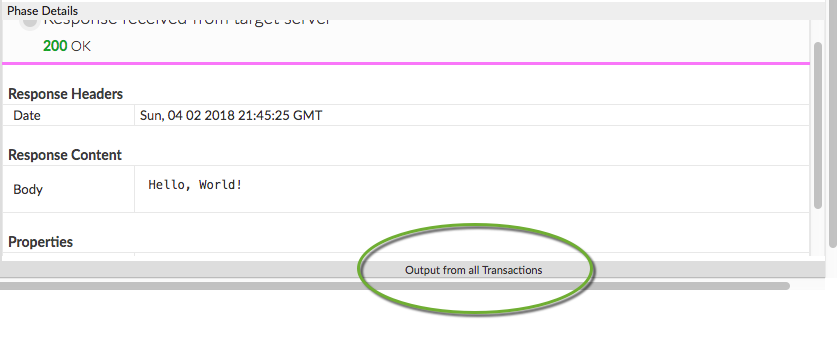
- 這個面板會顯示列印的報表。
流程變數
這項政策預設不會填入任何變數。不過,您可以在 JavaScript 程式碼中呼叫 context 物件的方法,設定及取得流程變數。例如:
context.setVariable("response.header.X-Apigee-Target", context.getVariable("target.name"))
context 物件是 Apigee JavaScript 物件模型的一部分。
錯誤參考資料
本節說明這項政策觸發錯誤時,Apigee 傳回的錯誤代碼和錯誤訊息,以及 Apigee 設定的錯誤變數。如果您要開發錯誤處理規則,就必須瞭解這項資訊。如需更多資訊,請參閱「關於政策錯誤的相關資訊」和「處理錯誤」。
執行階段錯誤
政策執行時可能會發生這些錯誤。
| 錯誤代碼 | HTTP 狀態 | 原因 | 修正 |
|---|---|---|---|
steps.javascript.ScriptExecutionFailed |
500 |
JavaScript 政策可能會擲回多種不同類型的 ScriptExecutionFailed 錯誤。常見的錯誤類型包括 RangeError、ReferenceError、SyntaxError、TypeError 和 URIError。 |
build |
steps.javascript.ScriptExecutionFailedLineNumber |
500 |
JavaScript 程式碼中發生錯誤。詳情請參閱錯誤字串。 |
不適用 |
steps.javascript.ScriptSecurityError |
500 |
執行 JavaScript 時發生安全性錯誤。請參閱錯誤字串瞭解詳細資訊。 |
不適用 |
部署錯誤
部署含有這項政策的 Proxy 時,可能會發生這些錯誤。
| 錯誤名稱 | 原因 | 修正 |
|---|---|---|
InvalidResourceUrlFormat |
如果 <ResourceURL> 中指定的資源網址格式或 JavaScript 政策的 <IncludeURL> 元素無效,API 代理程式就無法部署。 |
build |
InvalidResourceUrlReference |
如果 <ResourceURL> 或 <IncludeURL> 元素參照的 JavaScript 檔案不存在,API 代理程式就無法部署。參照的來源檔案必須位於 API 代理程式、環境或機構層級。 |
build |
WrongResourceType |
如果 JavaScript 政策的 <ResourceURL> 或 <IncludeURL> 元素參照 jsc (JavaScript 檔案) 以外的任何資源類型,就會在部署期間發生這個錯誤。 |
build |
NoResourceURLOrSource |
如果未宣告 <ResourceURL> 元素,或是未在該元素中定義資源網址,則 JavaScript 政策的部署作業可能會失敗,並顯示這項錯誤。<ResourceURL> 元素為必要元素。或者,您已宣告 <IncludeURL> 元素,但未在該元素中定義資源網址。<IncludeURL> 元素為選用元素,但如果已宣告,則必須在 <IncludeURL> 元素中指定資源網址。 |
build |
錯誤變數
當這項政策在執行階段觸發錯誤時,系統就會設定這些變數。詳情請參閱「關於政策錯誤的相關資訊」。
| 變數 | 地點 | 範例 |
|---|---|---|
fault.name="fault_name" |
fault_name 是錯誤名稱,如上方「執行階段錯誤」表格所列。錯誤名稱是錯誤代碼的最後一個部分。 | fault.name Matches "ScriptExecutionFailed" |
javascript.policy_name.failed |
policy_name 是擲回錯誤的政策的使用者指定名稱。 | javascript.JavaScript-1.failed = true |
錯誤回應範例
{
  "fault": {
    "faultstring": "Execution of SetResponse failed with error: Javascript runtime error: "ReferenceError: "status" is not defined. (setresponse.js:6)\"",
    "detail": {
      "errorcode": "steps.javascript.ScriptExecutionFailed"
    }
  }
}
錯誤規則範例
<FaultRule name="JavaScript Policy Faults">
    <Step>
        <Name>AM-CustomErrorResponse</Name>
        <Condition>(fault.name Matches "ScriptExecutionFailed") </Condition>
    </Step>
    <Condition>(javascript.JavaScript-1.failed = true) </Condition>
</FaultRule>
結構定義
每種政策類型都由 XML 架構 (.xsd) 定義。如需參考,請前往 GitHub 查看政策架構。
相關主題
Apigee 社群文章
您可以在 Apigee 社群中找到這些相關文章: