

本页面适用于 Apigee 和 Apigee Hybrid。
查看 Apigee Edge 文档。

内容
GraphQL 政策可以将 GraphQL 载荷解析为消息流变量,并且/或者针对架构验证 GraphQL 请求。
您可以使用 GraphQL 政策执行以下操作:
- 确保您的 API 仅处理符合您提供的架构的请求。
- 通过设置允许的片段数量上限来限制载荷。
- 将 GraphQL 与 API 产品相关联。
- 就像在 REST 中一样,利用 Oauth2、VerifyAPIKey 和配额政策功能。
GraphQL 支持以下类型的载荷:
- 符合
Content-Type : application/graphql的 graphQL 载荷的 POST - 符合
Content-Type: applcation/json的 graphQL 载荷的 POST - GraphQL 载荷的 GET,其中载荷是查询参数
如需了解详情,请参阅以下资源:
此政策为标准政策,可部署到任何环境类型。如需了解政策类型以及在每种环境类型中的可用性,请参阅政策类型。
如需查看使用此政策的示例,请参阅使用 GraphQL。
<GraphQL> 元素
定义 <GraphQL> 政策。
| 默认值 | 请参阅下面的默认政策标签页 |
| 是否必需? | 需要 |
| 类型 | TYPE |
| 父元素 | 不适用 |
| 子元素 | <Action><MaxDepth><MaxCount><MaxPayloadSizeInBytes><OperationType><Source><ResourceURL> |
语法
<GraphQL> 元素使用以下语法:
<GraphQL continueOnError="[false|true]" enabled="[true|false]" name="POLICY_NAME" > <Source>request</Source> <OperationType>[query|mutuation|all]</OperationType> <MaxDepth>MAX_DEPTH</MaxDepth> <MaxCount>MAX_NUMBER_OF_QUERIES</MaxCount> // [Start maxpayloadsize] <MaxPayloadSizeInBytes>MAX_PAYLOAD_SIZE_IN_BYTES</MaxPayloadSizeInBytes> <Action>parse</Action> <ResourceURL>PATH/TO/SCHEMA.xsd</ResourceURL> </GraphQL>
默认政策
以下示例显示了在 Apigee 界面中将 <GraphQL> 政策添加至流时的默认设置:
<?xml version="1.0" encoding="UTF-8" standalone="yes"?>
<GraphQL name="GraphQLParser">
  <Source>request</Source>
  <OperationType>query</OperationType>
  <MaxDepth>10</MaxDepth>
  <MaxCount>10</MaxCount>
  <MaxPayloadSizeInBytes></MaxPayloadSizeInBytes>
  <Action>parse</Action>
  <ResourceURL></ResourceURL>
</GraphQL>
This element has the following attributes that are common to all policies:
| Attribute | Default | Required? | Description |
|---|---|---|---|
name |
N/A | Required |
The internal name of the policy. The value of the Optionally, use the |
continueOnError |
false | Optional | Set to false to return an error when a policy fails. This is expected behavior for
most policies. Set to true to have flow execution continue even after a policy
fails. See also:
|
enabled |
true | Optional | Set to true to enforce the policy. Set to false to turn off the
policy. The policy will not be enforced even if it remains attached to a flow. |
async |
false | Deprecated | This attribute is deprecated. |
下表提供了 <GraphQL> 的子元素的简要说明:
| 子元素 | 是否必需? | 说明 |
|---|---|---|
| 常见操作 | ||
<Action> |
可选 | 指定对请求执行的操作:parse、verify 或 parse_verify(两者)。 |
<MaxCount> |
可选 | GraphQL 请求可以生成的查询或片段的最大数量。默认值为 10。 |
<MaxDepth> |
可选 | 查询树的最大深度。默认值为 4。 |
<MaxPayloadSizeInBytes> |
可选 | 载荷的大小上限(以千字节为单位)。 |
<OperationType> |
需要 | 指定可解析的请求类型:query、mutation 或 query_mutation(任一)。 |
<ResourceURL> |
可选 | 说明。GraphQL 架构文件的位置。 |
<Source> |
需要 | request |
后续各部分介绍了每个子元素。
子元素参考
本部分介绍 <GraphQL> 的子元素。
<Action>
Action 表示下列 GraphQL 操作之一:
parse:Apigee 会将 GraphQL 载荷解析为消息流变量。请参阅消息流变量表示法示例,了解Action设置为parse时设置的变量。这样可以在后端节省宝贵的 CPU 时间。 请注意,verify还会解析载荷。verify:Apigee 将验证 GraphQL 载荷是否符合上传到代理的架构。parse_verify:Apigee 将解析并验证 GraphQL 请求。
| 默认值 | parse |
| 是否必需? | 可选 |
| 类型 | 字符串 |
| 父元素 | <GraphQL> |
| 子元素 | 无 |
<Action> 元素使用以下语法:
语法
<GraphQL
    continueOnError="[false|true]"
    enabled="[true|false]"
    name="POLICY_NAME" >
  <Action>parse</Action>
</GraphQL>
<MaxCount>
载荷中可以存在的片段数上限。您可以利用此元素来防止客户的 GraphQL 后端服务器执行高度复杂的查询,从而强制客户端将逻辑拆分为较小的载荷。
| 默认值 | 10 |
| 是否必需? | 可选 |
| 类型 | 字符串 |
| 父元素 | <GraphQL> |
| 子元素 | 无 |
<MaxCount> 元素使用以下语法:
语法
<GraphQL
    continueOnError="[false|true]"
    enabled="[true|false]"
    name="POLICY_NAME" >
  <MaxCount>MAX_NUMBER_OF_QUERIES</MaxCount>
</GraphQL>
<MaxDepth>
查询的最大深度(以树状表示时)。借助 MaxDepth,您可以阻止载荷中的深度查询,这样 Apigee 就不需要创建非常大量的流变量来保存这些值。不过,无论 MaxDepth 的值为何,载荷都会按原样发送。默认值为 10。
| 默认值 | 10 |
| 是否必需? | 可选 |
| 类型 | 整数 |
| 父元素 | <GraphQL> |
| 子元素 | 无 |
<MaxDepth> 元素使用以下语法:
语法
<GraphQL
    continueOnError="[false|true]"
    enabled="[true|false]"
    name="POLICY_NAME" >
  <MaxDepth>MAX_DEPTH</MaxDepth>
</GraphQL>
<MaxPayloadSizeInBytes>
载荷的大小上限(以千字节为单位)。您可以使用此参数来限制载荷大小,以避免性能问题。
注意:如果政策中未提供 MaxPayloadSizeInByte,则不会实施大小限制。
| 默认值 | request |
| 是否必需? | 可选 |
| 类型 | 字符串 |
| 父元素 | <GraphQL> |
| 子元素 | 无 |
<MaxPayloadSizeInBytes> 元素使用以下语法:
语法
<GraphQL
    continueOnError="[false|true]"
    enabled="[true|false]"
    name="POLICY_NAME" >
  <MaxPayloadSizeInBytes>MAX_PAYLOAD_SIZE_IN_BYTES</MaxPayloadSizeInBytes>
</GraphQL>
<OperationType>
表示可解析的请求类型:
query:GraphQL 查询。mutation:GraphQL 变更query_mutation:GraphQL 查询或变更。
如果范围为 query,并且传递了变更请求,则请求将失败并返回 4xx 错误。
| 默认值 | query |
| 是否必需? | 可选 |
| 类型 | 字符串 |
| 父元素 | <GraphQL> |
| 子元素 | 无 |
<OperationType> 元素使用以下语法:
语法
<GraphQL
    continueOnError="[false|true]"
    enabled="[true|false]"
    name="POLICY_NAME" >
  <OperationType>[query|mutation|query_mutation]</OperationType>
</GraphQL>
<ResourceURL>
GraphQL 架构文件的路径,GraphQL 政策会根据该文件验证请求。 如需查看如何将 GraphQL 架构上传到 Apigee 的示例,请参阅示例。
如果您上传的架构文件的名称为 my-schema.graphql,则 <ResourceURL> 元素将为
<ResourceURL>graphql://my-schema.graphql</ResourceURL>
| 默认值 | 不适用 |
| 是否必需? | 可选 |
| 类型 | 字符串 |
| 父元素 | <GraphQL> |
| 子元素 | 无 |
ResourceURL 元素使用以下语法:
语法
<GraphQL
    continueOnError="[false|true]"
    enabled="[true|false]"
    name="POLICY_NAME" >
  <ResourceURL>PATH/TO/SCHEMA.graphql</ResourceURL>
</GraphQL>
<Source>
执行此政策所依赖的来源。
| 默认值 | request |
| 是否必需? | 可选 |
| 类型 | 字符串 |
| 父元素 | <GraphQL> |
| 子元素 | 无 |
<Source> 元素使用以下语法:
语法
<GraphQL
    continueOnError="[false|true]"
    enabled="[true|false]"
    name="POLICY_NAME" >
  <Source>request</Source>
</GraphQL>
GraphQL 解析器
graphQL 解析器支持 graphQL 查询的所有功能,并将其表示为消息流虚线表示法中的图形。查询可以包含操作定义以及标识为片段定义的片段。请参阅 GraphQL 规范。
剖析 GraphQL 请求
下图显示了 graphQL 请求的剖析。
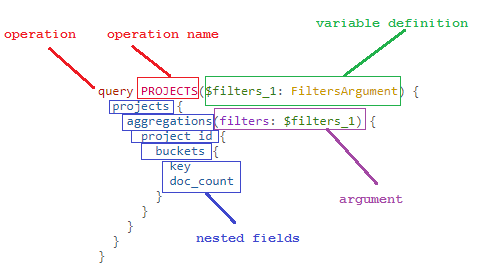
操作定义的消息流中的表示法
解析器实现将涵盖 graphQL 语法的所有方面,包括对查询和变更的支持。请参阅消息流变量。
消息流变量遵循以下惯例:
graphql.(root-index).(root definition)[(sub-indices).(child-definitions)…]
其中:
graphql:表示这是与 graphQL 相关的消息流变量的静态前缀root-Index:表示根级查询定义索引的基础索引(默认每个请求不超过 4 个)root-definition:根级 graphQL 请求消息正文、参数及其值sub-indices:子索引child-definitions:与特定字段及其值关联的叶级定义
操作定义的消息流变量中的表示法
| 消息中的字段 | 类型 | 说明 |
|---|---|---|
| name | 字符串 | graphQL 操作的名称。请注意,此名称与消息流中的名称无关。 |
| definition | 字符串 - 操作 | 表示此字段包含查询请求的主要消息正文 |
| operationType | 查询或变更 | 要执行的操作的类型。 |
| variableDefinition | 整数 | 它们与类型化语言中函数的参数定义类似。它会列出所有变量(以“$”作为前缀,后跟其类型)。 |
| directives | 整数 | @include 和 @skip 是当前提供的两个指令,可以根据动态传递的值进行过滤。 |
| selectionSet | 整数 | 与对象关联的所有特性的一个层级逻辑分组。 |
片段定义的消息流中的表示法
| 消息流变量名称 | 类型 | 说明 |
|---|---|---|
| name | 字符串 | 片段的名称。 |
| definition | 字符串 - 片段 | 表示请求正文是主请求的一个片段。 |
| typeCondition | 字符串 | 片段被调用时所处的条件。 |
| variableDefinition | 整数 | 作为参数传递给片段的变量定义。 |
消息流变量表示法示例
以下示例展示了示例请求载荷的消息流变量表示法。
示例查询 1
此示例展示了使用以输入形式传递的参数进行的查询,该查询将查询员工的三个特性。
{
 employee(id: 123) {
   id
   firstName
   lastName
 }
}
该表显示了相应的消息流变量表示法。
| 消息流变量 | 值 |
|---|---|
graphql.operation.operationType |
QUERY |
graphql.fragment.count |
1 |
graphql.operation.selectionSet.count |
1 |
graphql.operation.variableDefinitions.count |
0 |
graphql.operation.selectionSet.1.name |
employee |
graphql.operation.selectionSet.1.argument.count |
1 |
graphql.operation.selectionSet.1.argument.1.name |
id |
graphql.operation.selectionSet.1.argument.1.value |
IntValue{value=123} |
graphql.operation.selectionSet.1.directive.count |
0 |
graphql.operation.selectionSet.1.selectionSet.count |
3 |
graphql.operation.selectionSet.1.selectionSet.1.name |
id |
graphql.operation.selectionSet.1.selectionSet.2.name |
firstName |
graphql.operation.selectionSet.1.selectionSet.3.name |
lastName |
示例查询 2
本示例展示了使用以输入形式传递的参数进行的查询,该查询将查询好友姓名。
query Characters($episode: Episode, $withFriends: Boolean!) {
   friends @include(if: $withFriends) {
     friendsName
    }
}
下表显示了相应的消息流变量表示法。
| 消息流变量 | 值 |
|---|---|
graphql.operation.operationType |
QUERY |
graphql.operation.selectionSet.count |
1 |
graphql.operation.name |
Characters |
graphql.fragment.count |
0 |
graphql.operation.selectionSet.1.name |
friends |
graphql.operation.variableDefinitions.count |
2 |
graphql.operation.variableDefinitions.1.name |
episode |
graphql.operation.variableDefinitions.1.type |
TypeName{name='Episode'} |
graphql.operation.variableDefinitions.2.name |
withFriends |
graphql.operation.variableDefinitions.2.type |
NonNullType{type=TypeName{name='Boolean'}} |
graphql.operation.selectionSet.1.argument.count |
0 |
graphql.operation.selectionSet.1.selectionSet.count |
1 |
graphql.operation.selectionSet.1.selectionSet.1.name |
friendsName |
graphql.operation.selectionSet.1.directive.count |
1 |
graphql.operation.selectionSet.1.directive.1.argument.1.name |
if |
graphql.operation.selectionSet.1.directive.1.argument.1.value |
VariableReference{name='withFriends'} |
示例查询 3
此示例具有使用别名的变量定义。
query getUsers {
  admins: users(role: ADMIN) {
    lastName
  }
  accountants: users(role: ACCOUNTANT) {
    firstName
  }
}
下表显示了相应的消息流变量表示法。
| 消息流变量 | 值 |
|---|---|
graphql.operation.operationType |
QUERY |
graphql.operation.selectionSet.count |
2 |
graphql.operation.selectionSet.1.name |
users |
graphql.operation.selectionSet.1.alias |
admins |
graphql.operation.variableDefinitions.count |
0 |
graphql.operation.selectionSet.1.argument.count |
1 |
graphql.operation.selectionSet.1.argument.1.name |
role |
graphql.operation.selectionSet.1.argument.1.value |
EnumValue{name='ADMIN'} |
graphql.operation.selectionSet.1.argument.2.name |
null |
graphql.operation.selectionSet.1.argument.2.value |
null |
graphql.operation.selectionSet.1.selectionSet.count |
1 |
graphql.operation.selectionSet.1.selectionSet.count |
1 |
graphql.operation.selectionSet.1.selectionSet.1.name |
lastName |
graphql.operation.selectionSet.1.selectionSet.1.alias |
null |
graphql.operation.selectionSet.1.selectionSet.2.name |
null |
graphql.operation.selectionSet.1.selectionSet.2.alias |
null |
graphql.operation.selectionSet.1.directive.count |
0 |
graphql.operation.selectionSet.1.directive.1.argument.1.name |
null |
graphql.operation.selectionSet.1.directive.1.argument.1.value |
null |
graphql.operation.selectionSet.2.name |
users |
graphql.operation.selectionSet.2.alias |
accountants |
graphql.operation.selectionSet.2.argument.count |
1 |
graphql.operation.selectionSet.2.argument.1.name |
role |
graphql.operation.selectionSet.2.argument.1.value |
EnumValue{name='ACCOUNTANT'} |
graphql.operation.selectionSet.2.selectionSet.count |
1 |
graphql.operation.selectionSet.2.selectionSet.1.name |
firstName |
graphql.operation.selectionSet.2.directive.count |
0 |
graphql.operation.selectionSet.2.selectionSet.1.alias |
null |
graphql.operation.selectionSet.2.selectionSet.2.name |
null |
graphql.operation.selectionSet.2.selectionSet.2.alias |
null |
graphql.operation.selectionSet.2.directive.count |
0 |