


默认情况下,Gemini Enterprise Agent Platform 会对静态客户内容进行加密。Agent Platform 会为您处理加密,您无需执行任何其他操作。此选项称为“Google 默认加密”。
如果您想要控制加密密钥,则可以将 Cloud KMS 中客户管理的加密密钥 (CMEK) 与集成 CMEK 的服务(包括 Agent Platform)搭配使用。使用 Cloud KMS 密钥时,您可以控制其保护级别、位置、轮替时间表、使用和访问权限以及加密边界。 使用 Cloud KMS 还可让您跟踪密钥使用情况、查看审核日志以及控制密钥生命周期。 这样您就可以在 Cloud KMS 中控制和管理用于保护数据的对称密钥加密密钥 (KEK),而不是由 Google 拥有和管理这些密钥。
使用 CMEK 设置资源后,访问 Agent Platform 资源的体验与使用 Google 默认加密功能类似。如需详细了解加密选项,请参阅客户管理的加密密钥 (CMEK)。
本指南介绍了将 CMEK 用于 Gemini Enterprise Agent Platform 资源的一些好处,并逐步介绍了如何将训练作业配置为使用 CMEK。
如需详细了解如何将 CMEK 用于 Colab Enterprise,请参阅 Colab Enterprise CMEK 页面。如需详细了解如何为 Gemini Enterprise Agent Platform Workbench 实例使用 CMEK,请参阅 Agent Platform Workbench 实例 CMEK 页面。
Gemini Enterprise Agent Platform 资源的 CMEK
以下部分介绍了有关 Gemini Enterprise Agent Platform 资源的 CMEK 的基本信息,您必须先了解这些信息,然后才能为作业配置 CMEK。
CMEK 的优势
一般来说,如果您需要完全控制用于加密数据的密钥,则 CMEK 最有用。借助 CMEK,您可以在 Cloud Key Management Service 中管理密钥。例如,您可以轮替或停用密钥,也可以使用 Cloud KMS API 设置轮替时间表。如需大致了解 CMEK(包括其启用时间和原因),请参阅 Cloud KMS 文档。
运行 AutoML 或自定义 训练作业时,您的代码会在由 Gemini Enterprise Agent Platform 管理的一个或多个虚拟机 (VM) 实例上运行。当您为 Gemini Enterprise Agent Platform 资源启用 CMEK 时,系统会使用您指定的密钥(而不是由 Google 管理的密钥)来加密这些虚拟机的启动磁盘中的数据。CMEK 密钥会加密以下类型的数据:
- 虚拟机上代码的副本。
- 由代码加载的所有数据。
- 由代码保存到本地磁盘的所有临时数据。
- AutoML 训练的模型。
- 上传到媒体数据集中的媒体文件(数据)。
一般来说,CMEK 密钥不会加密与您的操作关联的元数据,例如作业的名称和区域,或数据集的显示名。与操作关联的元数据始终使用 Google 的默认加密机制进行加密。
对于数据集,当用户将数据导入到数据集中时,数据项和注释均采用 CMEK 加密。数据集显示名称不采用 CMEK 加密。
对于模型,存储系统中存储的模型(例如磁盘)均经过 CMEK 加密。所有模型评估结果都采用 CMEK 加密。
对于端点,端点下的模型部署使用的所有模型文件都经过 CMEK 加密。这不包括任何内存数据。
对于批量预测,用于执行批量预测作业的任何临时文件(例如,模型文件、日志、虚拟机磁盘)均采用 CMEK 加密。批量预测结果存储在用户提供的目标位置中。因此,Agent Platform 会遵循目标位置加密配置的默认值。否则,结果也将使用 CMEK 加密。
对于数据标签,任何输入文件(图片、文本、表格)、临时讨论(例如问题、反馈)和输出(标签结果)都经过 CMEK 加密。注解规范显示名称不经过 CMEK 加密。
对于智能体,CMEK 会加密用于智能体开发的所有源文件。此外,智能体的容器映像和已部署的实例也经过 CMEK 加密。
外部密钥
您可以使用 Cloud External Key Manager (Cloud EKM) 创建您管理的外部密钥来加密 Google Cloud中的数据。
当您使用 Cloud EKM 密钥时,Google 无法控制外部管理的密钥的可用性。如果您请求访问使用外部管理的密钥加密的资源,但该密钥不可用,则 Gemini Enterprise Agent Platform 将拒绝该请求。密钥可用后,最多可能有 10 分钟的延迟您才能访问该资源。
如需了解使用外部密钥的更多注意事项,请参阅 Cloud EKM。
将 CMEK 与其他 Google Cloud 产品搭配使用
为 Gemini Enterprise Agent Platform 资源配置 CMEK 时,不会自动为与 Gemini Enterprise Agent Platform 一起使用的其他 Google Cloud 产品配置 CMEK。如需使用 CMEK 加密其他Google Cloud 产品中的数据,需要进行额外配置。例如:
Cloud Storage:执行自定义训练时,Agent Platform 通常会从 Cloud Storage 加载数据。当您使用 Python 训练应用和用于训练的预构建容器时,Gemini Enterprise Agent Platform 还会从 Cloud Storage 存储桶加载您的代码。此外,一些训练作业会将经过训练的模型工件(例如 TensorFlow SaveModel 目录)导出到输出内容中的 Cloud Storage 存储桶。
如需确保 Cloud Storage 中的数据使用 CMEK 进行加密,请参阅有关使用客户管理的加密密钥的 Cloud Storage 指南。您可以将加密密钥设置为用于 Gemini Enterprise Agent Platform 的 Cloud Storage 存储桶的默认密钥,也可以使用它来加密特定对象。
Artifact Registry:使用自定义容器进行训练时,您可以将 Agent Platform 配置为从 Artifact Registry 加载容器映像。
如需确保容器映像使用 CMEK 进行加密,请参阅 CMEK 的 Artifact Registry 指南。
Cloud Logging:运行训练作业时,Gemini Enterprise Agent Platform 训练会将日志保存到 Logging。如需使用 CMEK 加密这些日志,请参阅为 Cloud Logging 配置 CMEK。
当前 CMEK 支持的资源
CMEK 涵盖的当前 Gemini Enterprise Agent Platform 资源如下。CMEK 对预览版功能的支持也处于预览版状态。
| 资源 | 已加密材料 | 文档链接 |
|---|---|---|
| 数据集 |
|
|
| 模型 |
|
|
| 端点 |
|
|
| CustomJob |
|
|
| HyperparameterTuningJob |
|
|
| TrainingPipeline |
|
|
| BatchPredictionJob(不包括 AutoML image batchPrediction) |
|
|
| ModelDeploymentMonitoringJob |
|
|
| PipelineJob |
|
|
| MetadataStore |
|
|
| TensorBoard |
|
|
| 特征存储区 |
|
|
| 索引 |
|
|
| 索引端点 |
|
|
| Colab Enterprise 运行时 |
|
|
| Colab Enterprise 笔记本 |
|
|
| Agent Runtime |
|
|
| Agent Platform 沙盒 |
|
|
ServingProfile
|
|
CMEK 对生成式 AI 调整流水线的支持
以下模型的调优流水线中提供 CMEK 支持:
BERTT5image-generation (GPU)
限制
以下各项不提供 CMEK 支持:
- AutoML 图片模型批量预测 (
BatchPredictionJob) - TPU 调整
- Agent Platform Memory Bank 或 Agent Platform 会话已配置为使用全球端点。 Cloud KMS 要求加密密钥位于固定的地理数据驻留边界内。由于全球区域没有物理地理边界,因此无法加密本地化的区域级或多区域资源。
- 适用于无资源 API 的服务配置文件 CMEK 仅限于
us和eu多区域中的 Gemini Live API 和 Interactions API。不支持全球区域。
为您的资源配置 CMEK
以下部分介绍了如何在 Cloud KMS 中创建密钥环和密钥、为 Agent Platform 加密者和解密者授予对密钥的权限,以及创建使用 CMEK 的资源。
准备工作
本指南假设您使用两个单独的 Google Cloud 项目为 Agent Platform 数据配置 CMEK:
- 一个项目用于管理加密密钥(称为“Cloud KMS 项目”)。
- 一个项目用于访问 Agent Platform 数据或 Cloud Storage 中的输出,以及与您的用例所需的任何其他 Google Cloud产品(称为“AI Platform 项目”)进行互动。
此推荐设置支持职责分离。
或者,您也可以在整个指南中使用单个 Google Cloud 项目。为此,请对引用 Cloud KMS 项目的以下所有任务和引用 AI Platform 项目的任务使用同一项目。
设置 Cloud KMS 项目
- 登录您的 Google Cloud 账号。如果您是 Google Cloud新手,请 创建一个账号来评估我们的产品在实际场景中的表现。新客户还可获享 $300 赠金,用于运行、测试和部署工作负载。
-
In the Google Cloud console, on the project selector page, select or create a Google Cloud project.
Roles required to select or create a project
- Select a project: Selecting a project doesn't require a specific IAM role—you can select any project that you've been granted a role on.
-
Create a project: To create a project, you need the Project Creator role
(
roles/resourcemanager.projectCreator), which contains theresourcemanager.projects.createpermission. Learn how to grant roles.
-
Verify that billing is enabled for your Google Cloud project.
Enable the Cloud KMS API, if it is not already enabled.
Roles required to enable APIs
To enable APIs, you need the
serviceusage.services.enablepermission. If you created the project, then you likely already have this permission through the Owner role (roles/owner). Otherwise, you can get this permission through the Service Usage Admin role (roles/serviceusage.serviceUsageAdmin). Learn how to grant roles.-
In the Google Cloud console, on the project selector page, select or create a Google Cloud project.
Roles required to select or create a project
- Select a project: Selecting a project doesn't require a specific IAM role—you can select any project that you've been granted a role on.
-
Create a project: To create a project, you need the Project Creator role
(
roles/resourcemanager.projectCreator), which contains theresourcemanager.projects.createpermission. Learn how to grant roles.
-
Verify that billing is enabled for your Google Cloud project.
Enable the Cloud KMS API, if it is not already enabled.
Roles required to enable APIs
To enable APIs, you need the
serviceusage.services.enablepermission. If you created the project, then you likely already have this permission through the Owner role (roles/owner). Otherwise, you can get this permission through the Service Usage Admin role (roles/serviceusage.serviceUsageAdmin). Learn how to grant roles.
设置 AI Platform 项目
- 登录您的 Google Cloud 账号。如果您是 Google Cloud新手,请 创建一个账号来评估我们的产品在实际场景中的表现。新客户还可获享 $300 赠金,用于运行、测试和部署工作负载。
-
In the Google Cloud console, on the project selector page, select or create a Google Cloud project.
Roles required to select or create a project
- Select a project: Selecting a project doesn't require a specific IAM role—you can select any project that you've been granted a role on.
-
Create a project: To create a project, you need the Project Creator role
(
roles/resourcemanager.projectCreator), which contains theresourcemanager.projects.createpermission. Learn how to grant roles.
-
Verify that billing is enabled for your Google Cloud project.
Enable the Agent Platform API, if it is not already enabled.
Roles required to enable APIs
To enable APIs, you need the
serviceusage.services.enablepermission. If you created the project, then you likely already have this permission through the Owner role (roles/owner). Otherwise, you can get this permission through the Service Usage Admin role (roles/serviceusage.serviceUsageAdmin). Learn how to grant roles.-
In the Google Cloud console, on the project selector page, select or create a Google Cloud project.
Roles required to select or create a project
- Select a project: Selecting a project doesn't require a specific IAM role—you can select any project that you've been granted a role on.
-
Create a project: To create a project, you need the Project Creator role
(
roles/resourcemanager.projectCreator), which contains theresourcemanager.projects.createpermission. Learn how to grant roles.
-
Verify that billing is enabled for your Google Cloud project.
Enable the Agent Platform API, if it is not already enabled.
Roles required to enable APIs
To enable APIs, you need the
serviceusage.services.enablepermission. If you created the project, then you likely already have this permission through the Owner role (roles/owner). Otherwise, you can get this permission through the Service Usage Admin role (roles/serviceusage.serviceUsageAdmin). Learn how to grant roles.
设置 Google Cloud CLI
gcloud CLI 对于本指南中的某些步骤是必需的,对于其他步骤则是可选的。安装 Google Cloud CLI。 安装完成后,运行以下命令来初始化 Google Cloud CLI:
gcloud init如果您使用的是外部身份提供方 (IdP),则必须先使用联合身份登录 gcloud CLI。
创建密钥环和密钥
按照有关创建对称密钥的 Cloud KMS 指南,创建密钥环和密钥。创建密钥环时,请指定支持 Agent Platform 操作的区域作为密钥环的位置。仅当资源和密钥使用同一区域时,Agent Platform 训练才支持 CMEK。您不得为密钥环指定双区域位置、多区域位置或全球位置。
请务必在 Cloud KMS 项目中创建密钥环和密钥。
授予 Agent Platform 权限
如需为资源使用 CMEK,您必须向 Agent Platform 授予使用您的密钥加密和解密数据的权限。Agent Platform 使用 Google 代管式服务代理通过您的资源运行操作。此服务账号由具有以下格式的电子邮件地址标识:
service-PROJECT_NUMBER@gcp-sa-aiplatform.iam.gserviceaccount.com
如需查找 AI Platform 项目的适当服务账号,请前往 Google Cloud 控制台中的 IAM 页面,找到与此邮箱格式匹配的成员,并使用 AI Platform 项目的项目编号替换 AI_PLATFORM_PROJECT_NUMBER 变量。该服务账号的名称也将为 Agent Platform Service Agent。
记下此服务账号的电子邮件地址并在以下步骤中使用该地址,以授予该服务账号使用您的密钥加密和解密数据的权限。您可以使用 Google Cloud 控制台或使用 Google Cloud CLI 授予权限:
Google Cloud 控制台
在 Google Cloud 控制台中,点击“安全”,然后选择密钥管理。您将会进入加密密钥页面,然后选择您的 Cloud KMS 项目。
点击您在本指南的上一部分中创建的密钥环的名称,以转到密钥环详细信息页面。
选中您在本指南的上一部分中创建的密钥所对应的复选框。如果标有密钥名称的信息面板尚未打开,请点击显示信息面板。
在信息面板中,点击添加成员以打开将成员添加到“KEY_NAME”对话框。在此对话框中,执行以下操作:
- 在新成员框中,输入您在上一部分中记下的服务账号电子邮件地址:
service-AI_PLATFORM_PROJECT_NUMBER@gcp-sa-aiplatform.iam.gserviceaccount.com 在选择角色下拉列表中,点击 Cloud KMS,然后选择 Cloud KMS CryptoKey Encrypter/Decrypter 角色。
点击保存。
- 在新成员框中,输入您在上一部分中记下的服务账号电子邮件地址:
gcloud
运行以下命令:
gcloud kms keys add-iam-policy-binding KEY_NAME \
  --keyring=KEY_RING_NAME \
  --location=REGION \
  --project=KMS_PROJECT_ID \
  --member=serviceAccount:service-AI_PLATFORM_PROJECT_NUMBER@gcp-sa-aiplatform.iam.gserviceaccount.com \
  --role=roles/cloudkms.cryptoKeyEncrypterDecrypter
在此命令中,替换以下占位符:
使用 Cloud KMS 密钥创建资源
在创建新的 CMEK 支持的资源时,您可以将密钥指定为创建参数之一。
控制台
在 Google Cloud 控制台的 Agent Platform 部分中创建新的支持 CMEK 的资源时,您可以在常规或高级选项部分中选择您的密钥:
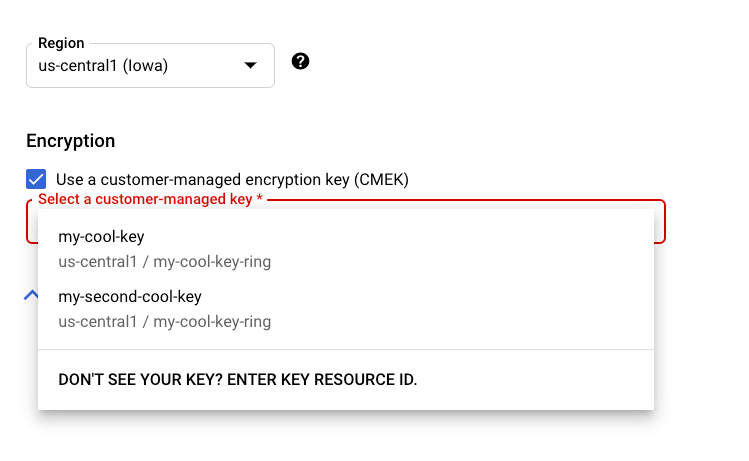
REST 和命令行
创建支持的资源时,请在请求中添加 encryptionSpec 对象,并将 encryptionSpec.kmsKeyName 字段设置为指向您的密钥资源。
例如,创建 dataset 资源时,您需要在请求正文中指定密钥:
 {
   "displayName": DATASET_NAME,
   "metadataSchemaUri": METADATA_URI,
   "encryptionSpec": {
     "kmsKeyName": "projects/PROJECT_ID/locations/LOCATION_ID/keyRings/KEY_RING_NAME/cryptoKeys/KEY_NAME"
   }
 }
Java
创建受支持的资源时,请将 EncryptionSpec 设置为指向密钥资源。如需了解详情,请参阅 Java 版 Agent Platform 客户端库文档。
Node.js
创建受支持的资源时,请将 encryptionSpec 参数设置为指向密钥资源。如需了解详情,请参阅 Node.js 版 Agent Platform 客户端库文档。
Python
创建受支持的资源时,请将 encryption_spec 参数设置为指向密钥资源。如需了解详情,请参阅 Python 版 Agent Platform 客户端库文档。
将 CMEK 与无资源 API 搭配使用
某些 Gemini Enterprise Agent Platform API 是无资源(基于请求)的:它们无需创建长期存在的顶级资源即可处理推理请求。为了支持会话连续性和有状态对话等功能,这些 API 可能会在有限时间内存储静态用户数据,例如 Gemini Live API 最多会存储 24 小时的会话恢复数据,而 Interactions API 最多会存储 7 天的有状态互动数据。由于在创建数据时没有可附加密钥的永久性资源,因此您可以使用服务配置文件将 CMEK 应用于这些静态数据。
服务配置文件是一种 Gemini Enterprise Agent Platform 资源,用于将 Cloud KMS 密钥与项目、位置和 API 范围相关联。如果请求的项目、位置和范围存在服务配置文件,Agent Platform 会自动使用您的密钥加密该范围的永久性数据。推理请求格式不会发生变化。
服务配置文件的优势
- 满足合规要求:满足要求客户控制加密密钥和数据生命周期的审核标准。
- 完全控制您的数据:随时停用或撤销密钥访问权限,以切断对已加密数据的访问。
- 透明,无需更改代码:您现有的推理请求格式保持不变,只要存在服务配置文件,系统就会自动应用加密。
- 精细控制:为每个 API 范围应用不同的密钥,以在密钥遭到入侵时限制影响,并遵循最小权限原则。
透明加密的工作原理
- 您向区域级 Agent Platform 端点处的受支持无资源 API 发送请求。
- Agent Platform 会解析项目、位置和范围的服务配置。
- 该范围内的持久性数据会自动使用您的密钥进行加密,而无需更改请求。
- 如果该项目、位置和范围不存在服务配置文件,Agent Platform 默认使用 Google 管理的加密。
投放配置文件限制
- 支持的 API:Gemini Live API(范围
GEMINI_LIVE)和 Interactions API(范围INTERACTIONS_API)。 - 支持的区域:
us和eu多区域。由于全球区域中的 Cloud KMS 和存储 CMEK 限制,因此不支持全球区域。 - 加密密钥和范围一经创建便无法更改。只能更新显示名和说明。如需更改密钥或范围,请删除服务配置,然后使用其他
servingProfileId创建新的服务配置(请参阅停用 CMEK 并还原为默认加密)。
准备工作
- 在项目中启用 Cloud KMS API 和 Agent Platform API。
- 在受支持的多区域(
us或eu)中创建或确定 Cloud KMS 密钥;请勿使用全球区域。请参阅创建密钥环和密钥。 - 为 Gemini Enterprise Agent Platform 服务代理授予密钥的
roles/cloudkms.cryptoKeyEncrypterDecrypter角色。请参阅授予 Agent Platform 权限。 - 确保您拥有管理服务配置文件的 IAM 权限(
aiplatform.servingProfiles.create、get、list、update和delete)。
以下部分中的示例使用这些值:
- LOCATION:多区域,
us或eu。 - PROJECT:您的项目 ID 或编号。
- API_VERSION:
v1或v1beta1。 - SERVING_PROFILE_ID:1-63 个字符,包括小写字母、数字和连字符;必须以字母开头,以字母或数字结尾。此值将成为资源名称的最后一个组成部分。
scope:服务配置适用的无资源 API。支持的值包括GEMINI_LIVE和INTERACTIONS_API。- Cloud KMS 密钥在
cmekConfig.encryptionSpec.kmsKeyName中设置,且必须与projects/*/locations/*/keyRings/*/cryptoKeys/*匹配。
REST 请求会发送到区域端点 https://aiplatform.LOCATION.rep.googleapis.com,并使用 OAuth 2.0 不记名令牌进行身份验证:
-H "Authorization: Bearer $(gcloud auth print-access-token)"
-H "Content-Type: application/json"
创建服务配置
创建服务配置文件会为范围的永久性数据启用 CMEK 保护。displayName、scope(GEMINI_LIVE 或 INTERACTIONS_API)和 cmekConfig.encryptionSpec.kmsKeyName 字段是必填字段。
curl -X POST \
  -H "Authorization: Bearer $(gcloud auth print-access-token)" \
  -H "Content-Type: application/json" \
  "https://aiplatform.LOCATION.rep.googleapis.com/API_VERSION/projects/PROJECT/locations/LOCATION/servingProfiles?servingProfileId=SERVING_PROFILE_ID" \
  -d '{
    "displayName": "My CMEK serving profile",
    "description": "CMEK for Gemini Live",
    "scope": "GEMINI_LIVE",
    "cmekConfig": {
      "encryptionSpec": {
        "kmsKeyName": "projects/PROJECT/locations/LOCATION/keyRings/RING/cryptoKeys/KEY"
      }
    }
  }'
Create 会返回一个长时间运行的操作。在 GET https://aiplatform.LOCATION.rep.googleapis.com/API_VERSION/OPERATION_NAME 轮询该操作,直到响应包含 "done": true。请等待操作完成,然后再获取、更新或删除服务配置。
确认服务配置
创建操作完成后,使用 get 或 list 确认服务配置:
# Get one serving profile.
curl -H "Authorization: Bearer $(gcloud auth print-access-token)" \
  "https://aiplatform.LOCATION.rep.googleapis.com/API_VERSION/projects/PROJECT/locations/LOCATION/servingProfiles/SERVING_PROFILE_ID"

# List serving profiles in a location.
curl -H "Authorization: Bearer $(gcloud auth print-access-token)" \
  "https://aiplatform.LOCATION.rep.googleapis.com/API_VERSION/projects/PROJECT/locations/LOCATION/servingProfiles?pageSize=50"
更新传送配置文件元数据
您只能更新 displayName 和 description 字段;键和范围不可变。updateMask 参数是可选的,如果您省略该参数,则系统会更新所有已填充的可变字段。此调用会返回更新后的服务配置。
curl -X PATCH \
  -H "Authorization: Bearer $(gcloud auth print-access-token)" \
  -H "Content-Type: application/json" \
  "https://aiplatform.LOCATION.rep.googleapis.com/API_VERSION/projects/PROJECT/locations/LOCATION/servingProfiles/SERVING_PROFILE_ID?updateMask=displayName,description" \
  -d '{"displayName": "Renamed profile", "description": "Updated description"}'
停用 CMEK 并还原为默认加密
删除服务配置。然后,系统会使用 Google 管理的加密方式对该范围的新数据进行加密。根据 API 的保留政策,已使用您的密钥加密的数据会一直受到保护,直到达到其 TTL 或被擦除。
curl -X DELETE \
  -H "Authorization: Bearer $(gcloud auth print-access-token)" \
  "https://aiplatform.LOCATION.rep.googleapis.com/API_VERSION/projects/PROJECT/locations/LOCATION/servingProfiles/SERVING_PROFILE_ID"
删除服务配置后,其 servingProfileId 会保留 30 天,以便您恢复原始键和范围。在此期间,如需使用其他键或范围创建服务配置文件,请使用其他 servingProfileId。
恢复已删除的服务配置
在删除服务配置后的 30 天内,您可以将其恢复。确认原始 Cloud KMS 密钥仍处于启用状态,并且 Gemini Enterprise Agent Platform 服务代理仍具有访问权限。然后,使用相同的 servingProfileId、scope 和密钥创建服务配置。Agent Platform 会继续使用您的密钥保护范围的永久性数据,包括在删除配置文件之前加密的数据。
密钥撤消
如果您停用 Cloud KMS 密钥或移除 Gemini Enterprise Agent Platform 服务代理的访问权限,则会发生以下情况:
- Agent Platform 无法再加密或解密范围的永久性数据。
- 需要访问受保护数据的请求会失败,并显示
FAILED_PRECONDITION错误,表示密钥不可用。
请重新启用密钥或恢复 IAM 授权,以恢复访问权限。
服务配置文件价格
提供配置文件不会产生额外费用。您需要支付标准 Cloud KMS 密钥操作费率,以进行加密和解密。
问题排查
- 服务配置文件的创建失败或卡住:确认 Gemini Enterprise Agent Platform 服务代理对密钥具有
roles/cloudkms.cryptoKeyEncrypterDecrypter角色,并且密钥已启用且位于受支持的多区域(us或eu,而非全球)。 - 推理未使用 CMEK:确认匹配的项目、位置和范围(
GEMINI_LIVE或INTERACTIONS_API)存在服务配置文件。 FAILED_PRECONDITION错误:这些错误通常表示密钥已被停用或访问权限已被撤消。重新启用密钥或恢复 IAM 授权。