


사고 서명은 모델의 내부 사고 과정을 암호화한 표현입니다. 사고 서명은 멀티턴 및 다단계 대화 중에 Gemini 추론 상태를 유지하므로 함수 호출을 사용할 때 유용할 수 있습니다. 응답에는 콘텐츠 부분 내에 thought_signature 필드가 포함될 수 있습니다 (콘텐츠 부분 예시: text, functionCall).
Gemini 3 모델은 함수 호출을 위한 모델 성능을 개선하므로 이전 Gemini 버전보다 사고 서명에 대한 유효성 검사를 더 엄격하게 적용합니다. 모델이 여러 차례의 대화에서 전체 컨텍스트를 유지하도록 하려면 MINIMAL 사고 수준을 사용하는 경우에도 후속 요청에서 이전 응답의 생각 서명을 반환해야 합니다. Gemini 3 모델을 사용할 때 필수 생각 서명이 반환되지 않으면 모델에서 400 오류가 반환됩니다.
Gemini 3 Pro Image에서는 이 검증을 강제하지 않지만, 모델이 여러 차례의 대화에서 전체 컨텍스트를 유지하도록 하려면 후속 요청에서 이전 응답의 생각 서명을 반환해야 합니다. 생각 서명이 반환되지 않으면 Gemini 3 Pro 이미지에서 400 오류를 반환하지 않습니다. Gemini 3 Pro Image를 사용한 멀티턴 이미지 편집과 관련된 코드 샘플은 생각 서명을 사용한 멀티턴 이미지 편집의 예시를 참고하세요.
공식 Google 생성형 AI SDK(Python, Node.js, Go 또는 Java)를 사용하고 표준 채팅 기록 기능을 사용하거나 전체 모델 응답을 기록에 추가하는 경우 사고 서명이 자동으로 처리됩니다.
왜 중요한가요?
사고 모델이 외부 도구를 호출하면 내부 추론 프로세스가 일시중지됩니다. 생각 서명은 '저장 상태'처럼 동작하여, 함수 결과를 제공하면 모델이 자신의 추론 흐름을 자연스럽게 이어갈 수 있도록 해줍니다. 생각 서명이 없으면 모델은 도구 실행 단계에서 자신의 구체적인 추론 단계를 "잊어버리게" 됩니다. 서명을 다시 전달하면 다음을 보장할 수 있습니다.
- 컨텍스트 연속성: 모델은 도구 호출을 정당화한 추론 단계를 유지하고 확인할 수 있습니다.
- 복잡한 추론: 한 도구의 출력이 다음 도구의 추론에 영향을 미치는 여러 단계의 작업을 지원합니다.
턴 및 단계
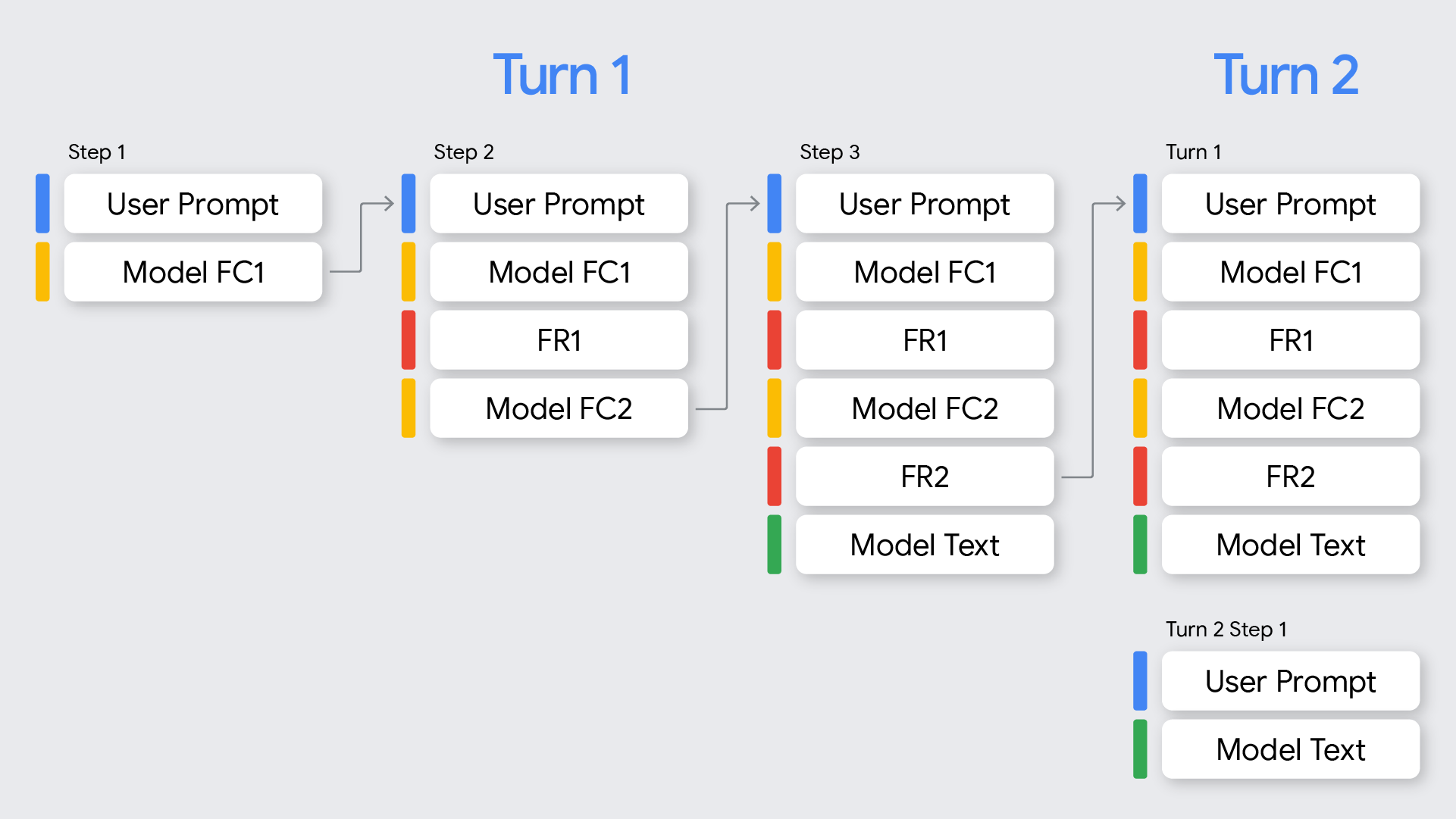
함수 호출과 관련하여 턴과 단계의 차이점을 이해하는 것이 중요합니다.
- 턴은 사용자의 프롬프트로 시작하여 모델이 해당 프롬프트에 대한 최종적인 비함수 호출 응답을 제공할 때 끝나는 완전한 대화 교환을 나타냅니다.
- 단계는 모델이 함수를 호출하고 추론 프로세스를 계속하기 위해 함수 응답이 필요한 단일 턴 내에서 발생합니다. 다이어그램에 표시된 것처럼 모델이 사용자의 요청을 처리하기 위해 여러 함수를 순차적으로 호출해야 하는 경우 단일 턴에 여러 단계가 포함될 수 있습니다.
사고 서명 사용 방법
사고 서명을 처리하는 가장 간단한 방법은 새 요청을 보낼 때 대화 기록에 있는 모든 이전 메시지의 모든 Part를 모델에서 반환된 그대로 포함하는 것입니다.
Google 생성형 AI SDK 중 하나를 사용하지 않거나 대화 기록을 수정하거나 자르려면 사고 서명이 유지되고 모델에 다시 전송되도록 해야 합니다.
Google 생성형 AI SDK 사용 시(권장)
SDK의 채팅 기록 기능을 사용하거나 이전 응답의 모델 content 객체를 다음 요청의 contents에 추가하는 경우 서명이 자동으로 처리됩니다.
다음 Python 예시는 자동 처리를 보여줍니다.
from google import genai
from google.genai.types import Content, FunctionDeclaration, GenerateContentConfig, Part, ThinkingConfig, Tool

client = genai.Client()

# 1. Define your tool
get_weather_declaration = FunctionDeclaration(
   name="get_weather",
   description="Gets the current weather temperature for a given location.",
   parameters={
       "type": "object",
       "properties": {"location": {"type": "string"}},
       "required": ["location"],
   },
)
get_weather_tool = Tool(function_declarations=[get_weather_declaration])

# 2. Send a message that triggers the tool
prompt = "What's the weather like in London?"
response = client.models.generate_content(
   model="gemini-2.5-flash",
   contents=prompt,
   config=GenerateContentConfig(
       tools=[get_weather_tool],
       thinking_config=ThinkingConfig(include_thoughts=True)
   ),
)

# 3. Handle the function call
function_call = response.function_calls[0]
location = function_call.args["location"]
print(f"Model wants to call: {function_call.name}")

# Execute your tool (for example, call an API)
# (This is a mock response for the example)
print(f"Calling external tool for: {location}")
function_response_data = {
   "location": location,
   "temperature": "30C",
}

# 4. Send the tool's result back
# Append this turn's messages to history for a final response.
# The `content` object automatically attaches the required thought_signature behind the scenes.
history = [
   Content(role="user", parts=[Part(text=prompt)]),
   response.candidates[0].content, # Signature preserved here
   Content(
     role="tool",
     parts=[
         Part.from_function_response(
             name=function_call.name,
             response=function_response_data,
         )
     ],
   )
]

response_2 = client.models.generate_content(
   model="gemini-2.5-flash",
   contents=history,
   config=GenerateContentConfig(
       tools=[get_weather_tool],
       thinking_config=ThinkingConfig(include_thoughts=True)
   ),
)

# 5. Get the final, natural-language answer
print(f"\nFinal model response: {response_2.text}")
REST 또는 수동 처리를 사용하는 경우
API와 직접 상호작용하는 경우 Gemini 3 Pro의 다음 규칙에 따라 서명 처리를 구현해야 합니다.
- 함수 호출:
- 모델 응답에 하나 이상의
functionCall부분이 포함된 경우 올바른 처리를 위해thought_signature가 필요합니다. - 단일 응답에서 병렬 함수 호출의 경우 첫 번째
functionCall부분에만thought_signature가 포함됩니다. - 턴의 여러 단계에 걸쳐 순차적 함수 호출이 있는 경우 각
functionCall부분에thought_signature가 포함됩니다. - 규칙: 다음 요청을 구성할 때 모델에서 반환된 대로
functionCall과thought_signature를part에 정확히 포함해야 합니다. 순차적(다단계) 함수 호출의 경우 현재 턴의 모든 단계에서 검증이 실행되며, 현재 턴의 단계에서 첫 번째functionCall부분에 필요한thought_signature를 누락하면400오류가 발생합니다. 턴은functionResponse가 아닌 가장 최근 사용자 메시지로 시작됩니다. - 모델이 병렬 함수 호출(예:
FC1+signature,FC2)을 반환하는 경우 응답은 모든 함수 호출을 포함한 다음 모든 함수 응답(FC1+signature,FC2,FR1,FR2)을 포함해야 합니다. 응답(FC1+signature,FR1,FC2,FR2)을 인터리브 처리하면400오류가 발생합니다. - API에서 생성되지 않아 연결된 사고 서명이 없는
functionCall부분을 제공해야 하는 경우가 드물게 있습니다(예: 사고 서명이 포함되지 않은 모델에서 기록을 전송하는 경우).thought_signature를skip_thought_signature_validator로 설정할 수 있지만 모델 성능에 부정적인 영향을 미치므로 최후의 수단으로 사용해야 합니다.
- 모델 응답에 하나 이상의
- 함수 호출이 없는 경우:
- 모델 대답에
functionCall이 포함되지 않은 경우 대답의 마지막part(예: 마지막text부분)에thought_signature가 포함될 수 있습니다. - 규칙: 최상의 성능을 위해 다음 요청에 이 서명을 포함하는 것이 권장되지만 이를 생략해도 오류가 발생하지는 않습니다. 스트리밍할 때 이 서명이 텍스트 콘텐츠가 비어 있는 부분에 반환될 수 있으므로 모델에서
finish_reason이 반환될 때까지 모든 부분을 파싱해야 합니다.
- 모델 대답에
모델의 컨텍스트가 유지되도록 다음 규칙을 따르세요.
- 항상 원래
Part내에서thought_signature를 모델에 다시 전송하세요. - 서명이 포함된
Part를 서명이 포함되지 않은Part와 병합하지 마세요. 이렇게 하면 사고의 위치 컨텍스트가 깨집니다. - 서명이 포함된 두 개의
Part를 결합하지 마세요. 서명 문자열은 병합할 수 없습니다.
순차적 함수 호출 예시
다음 예시는 사용자가 'AA100 항공편 상태를 확인하고 지연되면 택시를 예약해 줘'라고 요청하는 여러 작업이 필요한 다단계 함수 호출 예시를 보여줍니다.
REST
다음 예시에서는 REST API를 사용하여 순차적 함수 호출 워크플로의 여러 단계에서 사고 서명을 처리하는 방법을 보여줍니다.
턴 1, 1단계(사용자 요청)
{
  "contents": [
    {
      "role": "user",
      "parts": [
        {
          "text": "Check flight status for AA100 and book a taxi 2 hours before if delayed."
        }
      ]
    }
  ],
  "tools": [
    {
      "functionDeclarations": [
        {
          "name": "check_flight",
          "description": "Gets the current status of a flight",
          "parameters": {
            "type": "object",
            "properties": {
              "flight": {
                "type": "string",
                "description": "The flight number to check"
              }
            },
            "required": [
              "flight"
            ]
          }
        },
        {
          "name": "book_taxi",
          "description": "Book a taxi",
          "parameters": {
            "type": "object",
            "properties": {
              "time": {
                "type": "string",
                "description": "time to book the taxi"
              }
            },
            "required": [
              "time"
            ]
          }
        }
      ]
    }
  ]
}
턴 1, 1단계(모델 응답)
{
"content": {
        "role": "model",
        "parts": [
          {
            "functionCall": {
              "name": "check_flight",
              "args": {
                "flight": "AA100"
              }
            },
            "thoughtSignature": "<SIGNATURE_A>"
          }
        ]
  }
}
턴 1, 2단계(사용자 응답 - 도구 출력 전송)
이 사용자 턴에는 새로운 텍스트 없이 functionResponse만 포함되어 있으므로 아직 턴 1입니다. <SIGNATURE_A>를 보존해야 합니다.
{
      "role": "user",
      "parts": [
        {
          "text": "Check flight status for AA100 and book a taxi 2 hours before if delayed."
        }
      ]
    },
    {
        "role": "model",
        "parts": [
          {
            "functionCall": {
              "name": "check_flight",
              "args": {
                "flight": "AA100"
              }
            },
            "thoughtSignature": "<SIGNATURE_A>"
          }
        ]
      },
      {
        "role": "user",
        "parts": [
          {
            "functionResponse": {
              "name": "check_flight",
              "response": {
                "status": "delayed",
                "departure_time": "12 PM"
                }
              }
            }
        ]
}
턴 1, 2단계(모델 응답)
이제 모델은 이전 도구 출력을 기반으로 택시를 예약하기로 결정합니다.
{
      "content": {
        "role": "model",
        "parts": [
          {
            "functionCall": {
              "name": "book_taxi",
              "args": {
                "time": "10 AM"
              }
            },
            "thoughtSignature": "<SIGNATURE_B>"
          }
        ]
      }
}
턴 1, 3단계(사용자 응답 - 도구 출력 전송)
택시 예약 확인을 전송하려면 이 루프의 모든 함수 호출에 대한 서명(<SIGNATURE_A> 및 <SIGNATURE_B>)을 반드시 포함해야 합니다.
{
      "role": "user",
      "parts": [
        {
          "text": "Check flight status for AA100 and book a taxi 2 hours before if delayed."
        }
      ]
    },
    {
        "role": "model",
        "parts": [
          {
            "functionCall": {
              "name": "check_flight",
              "args": {
                "flight": "AA100"
              }
            },
            "thoughtSignature": "<SIGNATURE_A>"
          }
        ]
      },
      {
        "role": "user",
        "parts": [
          {
            "functionResponse": {
              "name": "check_flight",
              "response": {
                "status": "delayed",
                "departure_time": "12 PM"
              }
              }
            }
        ]
      },
      {
        "role": "model",
        "parts": [
          {
            "functionCall": {
              "name": "book_taxi",
              "args": {
                "time": "10 AM"
              }
            },
            "thoughtSignature": "<SIGNATURE_B>"
          }
        ]
      },
      {
        "role": "user",
        "parts": [
          {
            "functionResponse": {
              "name": "book_taxi",
              "response": {
                "booking_status": "success"
              }
              }
            }
        ]
    }
}
채팅 자동 완성
다음 예시에서는 Chat Completions API를 사용하여 순차적 함수 호출 워크플로의 여러 단계에서 사고 서명을 처리하는 방법을 보여줍니다.
턴 1, 1단계(사용자 요청)
{
  "model": "google/gemini-3.1-pro-preview",
  "messages": [
    {
      "role": "user",
      "content": "Check flight status for AA100 and book a taxi 2 hours before if delayed."
    }
  ],
  "tools": [
    {
      "type": "function",
      "function": {
        "name": "check_flight",
        "description": "Gets the current status of a flight",
        "parameters": {
          "type": "object",
          "properties": {
            "flight": {
              "type": "string",
              "description": "The flight number to check."
            }
          },
          "required": [
            "flight"
          ]
        }
      }
    },
    {
      "type": "function",
      "function": {
        "name": "book_taxi",
        "description": "Book a taxi",
        "parameters": {
          "type": "object",
          "properties": {
            "time": {
              "type": "string",
              "description": "time to book the taxi"
            }
          },
          "required": [
            "time"
          ]
        }
      }
    }
  ]
}
턴 1, 1단계(모델 응답)
{
      "role": "model",
        "tool_calls": [
          {
            "extra_content": {
              "google": {
                "thought_signature": "<SIGNATURE_A>"
              }
            },
            "function": {
              "arguments": "{\"flight\":\"AA100\"}",
              "name": "check_flight"
            },
            "id": "function-call-1",
            "type": "function"
          }
        ]
    }
턴 1, 2단계(사용자 응답 - 도구 출력 전송)
이 사용자 턴에는 새로운 텍스트 없이 functionResponse만 포함되어 있으므로 아직 턴 1입니다. <SIGNATURE_A>를 보존해야 합니다.
"messages": [
    {
      "role": "user",
      "content": "Check flight status for AA100 and book a taxi 2 hours before if delayed."
    },
    {
      "role": "model",
        "tool_calls": [
          {
            "extra_content": {
              "google": {
                "thought_signature": "<SIGNATURE_A>"
              }
            },
            "function": {
              "arguments": "{\"flight\":\"AA100\"}",
              "name": "check_flight"
            },
            "id": "function-call-1",
            "type": "function"
          }
        ]
    },
    {
      "role": "tool",
      "name": "check_flight",
      "tool_call_id": "function-call-1",
      "content": "{\"status\":\"delayed\",\"departure_time\":\"12 PM\"}"
    }
  ]
턴 1, 2단계(모델 응답)
이제 모델은 이전 도구 출력을 기반으로 택시를 예약하기로 결정합니다.
{
"role": "model",
"tool_calls": [
{
"extra_content": {
"google": {
"thought_signature": "<SIGNATURE_B>"
}
            },
            "function": {
              "arguments": "{\"time\":\"10 AM\"}",
              "name": "book_taxi"
            },
            "id": "function-call-2",
            "type": "function"
          }
       ]
}
턴 1, 3단계(사용자 응답 - 도구 출력 전송)
택시 예약 확인을 전송하려면 이 루프의 모든 함수 호출에 대한 서명(<SIGNATURE_A> 및 <SIGNATURE_B>)을 반드시 포함해야 합니다.
"messages": [
    {
      "role": "user",
      "content": "Check flight status for AA100 and book a taxi 2 hours before if delayed."
    },
    {
      "role": "model",
        "tool_calls": [
          {
            "extra_content": {
              "google": {
                "thought_signature": "<SIGNATURE_A>"
              }
            },
            "function": {
              "arguments": "{\"flight\":\"AA100\"}",
              "name": "check_flight"
            },
            "id": "function-call-1d6a1a61-6f4f-4029-80ce-61586bd86da5",
            "type": "function"
          }
        ]
    },
    {
      "role": "tool",
      "name": "check_flight",
      "tool_call_id": "function-call-1d6a1a61-6f4f-4029-80ce-61586bd86da5",
      "content": "{\"status\":\"delayed\",\"departure_time\":\"12 PM\"}"
    },
    {
      "role": "model",
        "tool_calls": [
          {
            "extra_content": {
              "google": {
                "thought_signature": "<SIGNATURE_B>"
              }
            },
            "function": {
              "arguments": "{\"time\":\"10 AM\"}",
              "name": "book_taxi"
            },
            "id": "function-call-65b325ba-9b40-4003-9535-8c7137b35634",
            "type": "function"
          }
        ]
    },
    {
      "role": "tool",
      "name": "book_taxi",
      "tool_call_id": "function-call-65b325ba-9b40-4003-9535-8c7137b35634",
      "content": "{\"booking_status\":\"success\"}"
    }
  ]
병렬 함수 호출 예시
다음 예시는 사용자가 '파리와 런던의 날씨를 확인해 줘'라고 요청하는 병렬 함수 호출 예시를 보여줍니다.
REST
다음 예시에서는 REST API를 사용하여 병렬 함수 호출 워크플로에서 사고 서명을 처리하는 방법을 보여줍니다.
턴 1, 1단계(사용자 요청)
{
  "contents": [
    {
      "role": "user",
      "parts": [
        {
          "text": "Check the weather in Paris and London."
        }
      ]
    }
  ],
  "tools": [
    {
      "functionDeclarations": [
        {
          "name": "get_current_temperature",
          "description": "Gets the current temperature for a given location.",
          "parameters": {
            "type": "object",
            "properties": {
              "location": {
                "type": "string",
                "description": "The city name, e.g. San Francisco"
              }
            },
            "required": [
              "location"
            ]
          }
        }
      ]
    }
  ]
}
턴 1, 1단계(모델 응답)
{
  "content": {
    "parts": [
      {
        "functionCall": {
          "name": "get_current_temperature",
          "args": {
            "location": "Paris"
          }
        },
        "thoughtSignature": "<SIGNATURE_A>"
      },
      {
        "functionCall": {
          "name": "get_current_temperature",
          "args": {
            "location": "London"
          }
        }
      }
    ]
  }
}
턴 1, 2단계(사용자 응답 - 도구 출력 전송)
첫 번째 파트에 있는 <SIGNATURE_A>는 받은 그대로 유지해야 합니다.
[
  {
    "role": "user",
    "parts": [
      {
        "text": "Check the weather in Paris and London."
      }
    ]
  },
  {
    "role": "model",
    "parts": [
      {
        "functionCall": {
          "name": "get_current_temperature",
          "args": {
            "city": "Paris"
          }
        },
        "thought_signature": "<SIGNATURE_A>"
      },
      {
        "functionCall": {
          "name": "get_current_temperature",
          "args": {
            "city": "London"
          }
        }
      }
    ]
  },
  {
    "role": "user",
    "parts": [
      {
        "functionResponse": {
          "name": "get_current_temperature",
          "response": {
            "temp": "15C"
          }
        }
      },
      {
        "functionResponse": {
          "name": "get_current_temperature",
          "response": {
            "temp": "12C"
          }
        }
      }
    ]
  }
]
채팅 자동 완성
다음 예시에서는 Chat Completions API를 사용하여 병렬 함수 호출 워크플로에서 사고 서명을 처리하는 방법을 보여줍니다.
턴 1, 1단계(사용자 요청)
{
  "contents": [
    {
      "role": "user",
      "parts": [
        {
          "text": "Check the weather in Paris and London."
        }
      ]
    }
  ],
  "tools": [
    {
      "functionDeclarations": [
        {
          "name": "get_current_temperature",
          "description": "Gets the current temperature for a given location.",
          "parameters": {
            "type": "object",
            "properties": {
              "location": {
                "type": "string",
                "description": "The city name, e.g. San Francisco"
              }
            },
            "required": [
              "location"
            ]
          }
        }
      ]
    }
  ]
}
턴 1, 1단계(모델 응답)
{
"role": "assistant",
        "tool_calls": [
          {
            "extra_content": {
              "google": {
                "thought_signature": "<SIGNATURE_A>"
              }
            },
            "function": {
              "arguments": "{\"location\":\"Paris\"}",
              "name": "get_current_temperature"
            },
            "id": "function-call-f3b9ecb3-d55f-4076-98c8-b13e9d1c0e01",
            "type": "function"
          },
          {
            "function": {
              "arguments": "{\"location\":\"London\"}",
              "name": "get_current_temperature"
            },
            "id": "function-call-335673ad-913e-42d1-bbf5-387c8ab80f44",
            "type": "function"
          }
        ]
}
턴 1, 2단계(사용자 응답 - 도구 출력 전송)
첫 번째 파트에 있는 <SIGNATURE_A>는 받은 그대로 유지해야 합니다.
"messages": [
    {
      "role": "user",
      "content": "Check the weather in Paris and London."
    },
    {
      "role": "assistant",
        "tool_calls": [
          {
            "extra_content": {
              "google": {
                "thought_signature": "<SIGNATURE_A>"
              }
            },
            "function": {
              "arguments": "{\"location\":\"Paris\"}",
              "name": "get_current_temperature"
            },
            "id": "function-call-f3b9ecb3-d55f-4076-98c8-b13e9d1c0e01",
            "type": "function"
          },
          {
            "function": {
              "arguments": "{\"location\":\"London\"}",
              "name": "get_current_temperature"
            },
            "id": "function-call-335673ad-913e-42d1-bbf5-387c8ab80f44",
            "type": "function"
          }
        ]
    },
    {
      "role":"tool",
      "name": "get_current_temperature",
      "tool_call_id": "function-call-f3b9ecb3-d55f-4076-98c8-b13e9d1c0e01",
      "content": "{\"temp\":\"15C\"}"
    },
    {
      "role":"tool",
      "name": "get_current_temperature",
      "tool_call_id": "function-call-335673ad-913e-42d1-bbf5-387c8ab80f44",
      "content": "{\"temp\":\"12C\"}"
    }
  ]
functionCall이 없는 Part에서의 서명
함수 호출이 없더라도 Gemini는 대답의 최종 Part에서 thought_signature를 반환할 수도 있습니다.
- 동작: 모델에서 반환하는 최종 콘텐츠
Part(text,inlineData등)에thought_signature이 포함될 수 있습니다. - 요구사항: 이 서명을 반환하는 것 모델이 특히 복잡한 지침을 따르거나 시뮬레이션된 에이전트형 워크플로에서 고품질 추론을 유지하도록 보장하기 위해 권장됩니다.
- 검증: API는
functionCall이 없는 부분의 서명에 대한 검증을 엄격하게 적용하지 않습니다. 이를 생략하더라도 차단 오류는 발생하지는 않지만, 성능이 저하될 수 있습니다.
텍스트 부분에 서명이 포함된 모델 응답의 예:
다음 예시에서는 thought_signature가 functionCall이 없는 Part에 포함된 모델 응답과 후속 요청에서 이를 처리하는 방법을 보여줍니다.
턴 1, 1단계(모델 응답)
{
  "role": "model",
  "parts": [
    {
      "text": "I need to calculate the risk. Let me think step-by-step...",
      "thought_signature": "<SIGNATURE_C>" // OPTIONAL (Recommended)
    }
  ]
}
턴 2, 1단계(사용자)
[
  { "role": "user", "parts": [{ "text": "What is the risk?" }] },
  {
    "role": "model",
    "parts": [
      {
        "text": "I need to calculate the risk. Let me think step-by-step...",
        // If you omit <SIGNATURE_C> here, no error will occur.
      }
    ]
  },
  { "role": "user", "parts": [{ "text": "Summarize it." }] }
]
사고 서명을 사용한 멀티턴 이미지 편집의 예시
다음 샘플은 Gemini 3 Pro Image를 사용하여 멀티턴 이미지 생성 및 편집 중에 생각 서명을 가져오고 전달하는 방법을 보여줍니다.
턴 1: 대답을 가져오고 사고 서명이 포함된 데이터 저장
chat = client.chats.create(
   model="gemini-3-pro-image-preview",
   config=types.GenerateContentConfig(
       response_modalities=['TEXT', 'IMAGE']
   )
)
message = "Create an image of a clear perfume bottle sitting on a vanity."
response = chat.send_message(message)
data = b''
for part in response.candidates[0].content.parts:
   if part.text:
       display(Markdown(part.text))
   if part.inline_data:
       data = part.inline_data.data
       display(Image(data=data, width=500))
턴 2: 사고 서명이 포함된 데이터 전달
response = chat.send_message(
   message=[
       types.Part.from_bytes(
           data=data,
           mime_type="image/png",
       ),
       "Make the perfume bottle purple and add a vase of hydrangeas next to the bottle.",
   ],
)
for part in response.candidates[0].content.parts:
   if part.text:
       display(Markdown(part.text))
   if part.inline_data:
       display(Image(data=part.inline_data.data, width=500))
다음 단계
사고
Gemini의 사고 능력은 모델이 상황에 더 적절한 대답을 제공하고 모델의 추론 과정을 대답의 일부로 기록하는 데 도움이 됩니다. 지원되는 모델, 모델 출력을 제어하는 방법 등 사고에 포함된 기능에 대해 알아봅니다.
그라운딩 개요
그라운딩은 모델 출력을 확인 가능한 정보 소스에 연결하는 기능입니다. Agent Platform을 사용할 때 그라운딩에 사용할 수 있는 다양한 데이터 소스 (예: Google 검색, Google 지도, Agent Platform 검색)에 대해 알아봅니다.