

本页面适用于 Apigee 和 Apigee Hybrid。
查看 Apigee Edge 文档。

借助 JavaScript 政策,您可以添加在 API 代理流上下文中执行的自定义 JavaScript 代码。此政策可让您实现 Apigee 政策未涵盖的自定义行为。
在自定义 JavaScript 代码中,您可以使用 Apigee JavaScript 对象模型的对象、方法和属性。您可以在代理流上下文中获取、设置和移除变量,执行自定义逻辑,执行故障处理,从请求或响应中提取数据,以及动态修改后端目标网址。您还可以使用对象模型中提供的基本加密函数。
JavaScript 政策让您可以指定要执行的 JavaScript 源文件,或者您可以使用 <Source> 元素直接在政策的配置中添加 JavaScript 代码。无论采用哪种方式,JavaScript 代码在执行政策关联的步骤时都会执行。
对于源文件选项,源代码始终存储在代理软件包中的标准位置:apiproxy/resources/jsc。或者,您也可以将源代码存储在环境或组织级层的资源文件中。如需了解相关说明,请参阅资源文件。您还可以使用 Apigee 界面代理编辑器上传 JavaScript。
Apigee 不建议将 JavaScript 政策用于以下用途:
- 日志记录。MessageLogging 政策更适合与 Splunk、Sumo 和 Loggly 等第三方日志记录平台搭配使用。此政策还会在响应返回到客户端后在 PostClientFlow 中执行,从而提高 API 代理性能。
- 替换 Apigee 政策。JavaScript 政策不会取代 Apigee 政策的功能。如果 Apigee 政策中提供了您所需的功能,请使用该政策,而不是实现自定义 JavaScript 解决方案。自定义 JavaScript 代码的性能和优化可能不如 Apigee 政策。
JavaScript 源文件必须具有 .js 扩展名。
Apigee 支持在 Rhino JavaScript 引擎 1.7.13 上运行的 JavaScript。
此政策是一项可扩展政策,使用此政策可能会影响费用或使用情况,具体取决于您的 Apigee 许可。如需了解政策类型和使用情况影响,请参阅政策类型。
示例
重写目标网址
一个常见的用例涉及从请求正文中提取数据,将其存储在流变量中,然后在代理流的其他位置使用该流变量。例如,假设用户在 HTML 表单中输入自己的姓名并提交。如需提取表单数据并将其动态添加到后端服务网址,请使用 JavaScript 政策。
- 在 Apigee 界面中,打开您在代理编辑器中创建的代理。
- 选择开发标签页。
- 从“新建”菜单中,选择新建脚本。
- 在对话框中,选择 JavaScript 并将脚本命名为
js-example。 - 将以下代码粘贴到代码编辑器中,并保存代理。在代理流中的任何位置,您都可以在 JavaScript 代码中使用
context对象。它用于获取流特定常量、调用有用的get/set方法以及执行其他操作。此对象是 Apigee JavaScript 对象模型的一部分。target.url流变量是内置的读/写变量,可通过目标请求流访问。当您使用 API 网址设置该变量时,Apigee 会调用该后端网址。这会重写原始目标网址,也就是您在创建代理时指定的网址(例如http://www.example.com)。if (context.flow=="PROXY_REQ_FLOW") { var username = context.getVariable("request.formparam.user"); context.setVariable("info.username", username); } if (context.flow=="TARGET_REQ_FLOW") { context.setVariable("request.verb", "GET"); var name = context.getVariable("info.username"); var url = "http://mocktarget.apigee.net/" context.setVariable("target.url", url + "?user=" + name); }
- 从“新建政策”菜单中,选择 JavaScript。
- 将政策命名为
target-rewrite。接受默认值并保存政策。 - 在导航器中选择代理端点 Preflow 后,该政策会添加到相应流程中。
- 在导航器中,选择目标端点 PreFlow。
- 在导航工具中,将 JavaScript 政策拖动到流编辑器中目标端点的请求端。
- 保存。
- 调用 API 时,请替换您的组织名称和代理名称:
curl -i -H 'Content-Type: application/x-www-form-urlencoded' -X POST -d 'user=Will' http://myorg-test.apigee.net/js-example
检查此示例中使用的 JavaScript 政策的 XML 定义。<ResourceURL> 元素用于指定要执行的 JavaScript 源文件。此模式适用于任何 JavaScript 源文件:jsc://filename.js。如果 JavaScript 代码要求包含,请使用一个或多个 <IncludeURL> 元素,如本文档的后面部分所述。
<?xml version="1.0" encoding="UTF-8" standalone="yes"?>
<Javascript async="false" continueOnError="false" enabled="true" timeLimit="200" name="target-rewrite">
    <DisplayName>target-rewrite</DisplayName>
    <Properties/>
    <ResourceURL>jsc://js-example.js</ResourceURL>
</Javascript>
从 JavaScript 检索属性值
您可以在配置中添加 <Property> 元素,然后在运行时使用 JavaScript 检索其值。
使用元素的 name 属性来指定用于从 JavaScript 代码访问属性的名称。<Property> 元素的值(起始标记和结束标记之间的值)是 JavaScript 接收的字面量值。
在 JavaScript 中,您可以 Properties 对象属性形式访问来检索政策属性值,如下所示:
- 配置属性。属性值为变量名称
response.status.code。<Javascript async="false" continueOnError="false" enabled="true" timeLimit="200" name="JavascriptURLRewrite"> <DisplayName>JavascriptURLRewrite</DisplayName> <Properties> <Property name="source">response.status.code</Property> </Properties> <ResourceURL>jsc://JavascriptURLRewrite.js</ResourceURL> </Javascript>
- 使用 JavaScript 检索该属性。然后,
getVariable函数会使用检索到的变量名称检索此变量的值。var responseCode = properties.source; // Returns "response.status.code" var value = context.getVariable(responseCode); // Get the value of response.status.code context.setVariable("response.header.x-target-response-code", value);
处理错误
如需了解可在 JavaScript 标注中使用的错误处理方法的示例并展开讨论,请参阅 根据 JavaScript 政策返回错误的正确方式。Apigee 社区中的建议仅供参考,不一定代表 Google 推荐的最佳实践。
元素参考
元素参考描述了 JavaScript 政策的元素和属性。
<?xml version="1.0" encoding="UTF-8" standalone="yes"?>
<Javascript async="false"
        continueOnError="false" enabled="true" timeLimit="200"
        name="JavaScript-1">
    <DisplayName>JavaScript 1</DisplayName>
    <Properties>
        <Property name="propName">propertyValue</Property>
    </Properties>
    <SSLInfo>
        <Enabled>trueFalse</Enabled>
        <ClientAuthEnabled>trueFalse</ClientAuthEnabled>
        <KeyStore>ref://keystoreRef</KeyStore>
        <KeyAlias>keyAlias</KeyAlias>
        <TrustStore>ref://truststoreRef</TrustStore>
    </SSLInfo>
    <IncludeURL>jsc://a-javascript-library-file</IncludeURL>
    <ResourceURL>jsc://my-javascript-source-file</ResourceURL>
    <Source>insert_js_code_here</Source>
</Javascript>
<JavaScript> 属性
< languageVersion="VERSION_1_3" Javascript name="Javascript-1" enabled="true" continueOnError="false" async="false" timeLimit="200">
| 属性 | 说明 | 默认值 | 状态 |
|---|---|---|---|
| languageVersion |
指定代码所用的 JavaScript 语言版本。值包括 |
VERSION_DEFAULT | 可选 |
| timeLimit |
指定脚本可执行的最长时间(以毫秒为单位)。例如,如果超出 200 毫秒的限制,则政策会引发以下错误: |
不适用 | 需要 |
下表介绍了所有政策父元素通用的特性:
| 属性 | 说明 | 默认值 | 状态 |
|---|---|---|---|
name |
政策的内部名称。 (可选)使用 |
不适用 | 需要 |
continueOnError |
设置为 设置为 |
false | 可选 |
enabled |
设置为 设为 |
true | 可选 |
async |
此特性已弃用。 |
false | 已弃用 |
<DisplayName> 元素
用于在 name 属性之外在管理界面代理编辑器中给政策添加不同的自然语言名称标签。
<DisplayName>Policy Display Name</DisplayName>
| 默认 |
不适用 如果省略此元素,则会使用政策的 |
|---|---|
| 状态 | 可选 |
| 类型 | 字符串 |
<IncludeURL> 元素
指定要作为使用 <ResourceURL> 或 <Source> 元素指定的主要 JavaScript 文件的依赖项加载的 JavaScript 库文件。政策会按脚本在政策中的列出顺序评估脚本。您的代码可以使用 JavaScript 对象模型的对象、方法和属性。
使用附加 <IncludeURL> 元素添加多个 JavaScript 依赖项资源。
<IncludeURL>jsc://my-javascript-dependency.js</IncludeURL>
| 默认: | 无 |
| 状态: | 可选 |
| 类型: | 字符串 |
<Property> 元素
指定可在运行时从 JavaScript 代码访问的属性。
<Properties>
    <Property name="propName">propertyValue</Property>
</Properties>
| 默认: | 无 |
| 状态: | 可选 |
| 类型: | 字符串 |
属性
| 属性 | 说明 | 默认值 | 状态 |
|---|---|---|---|
| name |
指定属性的名称。 |
不适用 | 必需 |
示例
请参阅示例部分中的示例。
<ResourceURL> 元素
指定在 API 流中执行的主要 JavaScript 文件。您可以在 API 代理范围(API 代理软件包的 /apiproxy/resources/jsc 下方或 API 代理编辑器的导航工具窗格的脚本部分中)存储此文件。或者,您也可以将其存储在组织或环境范围内,以便在多个 API 代理中重复使用,如管理资源中所述。您的代码可以使用 JavaScript 对象模型的对象、方法和属性。
<ResourceURL>jsc://my-javascript.js</ResourceURL>
| 默认: | 无 |
| 状态: | 必须提供 <ResourceURL> 或 <Source>。如果 <ResourceURL> 和 <Source> 同时存在,该政策会忽略 <ResourceURL>。 |
| 类型: | 字符串 |
示例
请参阅示例部分中的示例。
<Source> 元素
您可以将 JavaScript 直接插入到政策的 XML 配置中。插入的 JavaScript 代码在 API 流中执行时执行。
| 默认: | 无 |
| 状态: | 必须提供 <ResourceURL> 或 <Source>。如果 <ResourceURL> 和 <Source> 同时存在,该政策会忽略 <ResourceURL>。 |
| 类型: | 字符串 |
示例
<Javascript name='JS-ParseJsonHeaderFullString' timeLimit='200' >
  <Properties>
    <Property name='inboundHeaderName'>specialheader</Property>
    <Property name='outboundVariableName'>json_stringified</Property>
  </Properties>
  <Source>
var varname = 'request.header.' + properties.inboundHeaderName + '.values.string';
var h = context.getVariable(varname);
if (h) {
  h = JSON.parse(h);
  h.augmented = (new Date()).valueOf();
  var v = JSON.stringify(h, null, 2) + '\n';
  // further indent
  var r = new RegExp('^(\S*)','mg');
  v= v.replace(r,'    $1');
  context.setVariable(properties.outboundVariableName, v);
}
  </Source>
</Javascript>
<SSLInfo> 元素
指定用于为 JavaScript 政策创建的所有 HTTP 客户端实例配置 TLS 的属性。
    <SSLInfo>
        <Enabled>trueFalse</Enabled>
        <ClientAuthEnabled>trueFalse</ClientAuthEnabled>
        <KeyStore>ref://keystoreRef</KeyStore>
        <KeyAlias>keyAlias</KeyAlias>
        <TrustStore>ref://truststoreRef</TrustStore>
    </SSLInfo>
| 默认: | 无 |
| 状态: | 可选 |
| 类型: | 字符串 |
为 HTTP 客户端配置 TLS 的过程与为 TargetEndpoint/TargetServer 配置 TLS 的过程相同。如需了解详情,请参阅用于配置 TLS 的选项。
使用说明
调试 JavaScript 政策代码
使用 print() 函数将调试信息输出到调试工具中的事务输出面板。如需了解详情和示例,请参阅使用 print() 语句调试 JavaScript。
如需在调试工具中查看 print 语句,请执行以下操作:
- 打开调试工具并为包含 JavaScript 政策的代理启动跟踪会话。
- 调用代理。
- 在调试工具中,点击从所有事务输出以打开输出面板。
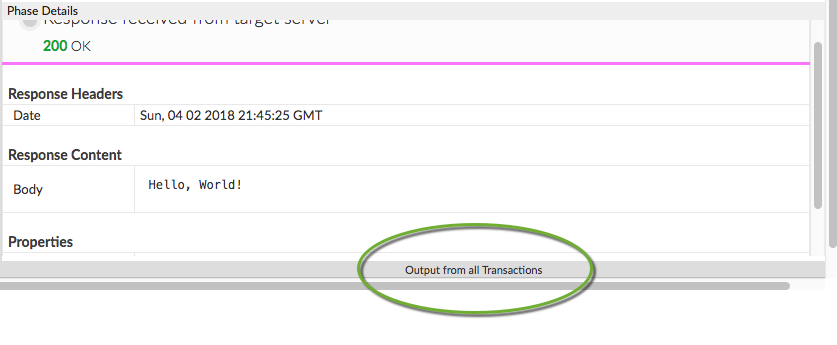
- 您的 print 语句将显示在此面板中。
流变量
此政策默认不会填充任何变量。不过,您可以通过在 context 对象上调用方法,在 JavaScript 代码中设置和获取流变量。例如:
context.setVariable("response.header.X-Apigee-Target", context.getVariable("target.name"))
context对象是 Apigee JavaScript 对象模型的一部分。
错误参考信息
本部分介绍当此政策触发错误时返回的故障代码和错误消息,以及由 Apigee 设置的故障变量。在开发故障规则以处理故障时,请务必了解此信息。如需了解详情,请参阅您需要了解的有关政策错误的信息和处理故障。
运行时错误
政策执行时可能会发生这些错误。
| 故障代码 | HTTP 状态 | 原因 | 修复 |
|---|---|---|---|
steps.javascript.ScriptExecutionFailed |
500 |
JavaScript 政策可能会抛出许多不同类型的 ScriptExecutionFailed 错误。 常见的错误类型包括:RangeError、ReferenceError、SyntaxError、TypeError 和 URIError。 |
build |
steps.javascript.ScriptExecutionFailedLineNumber |
500 |
JavaScript 代码中出现错误。请参阅故障字符串了解详情。 |
不适用 |
steps.javascript.ScriptSecurityError |
500 |
JavaScript 执行时出现安全错误。请参阅故障字符串了解详情。 |
不适用 |
部署错误
在您部署包含此政策的代理时,可能会发生这些错误。
| 错误名称 | 原因 | 修复 |
|---|---|---|
InvalidResourceUrlFormat |
如果 JavaScript 政策的 <ResourceURL> 或 <IncludeURL> 元素中指定的资源网址格式无效,则 API 代理的部署将失败。 |
build |
InvalidResourceUrlReference |
如果 <ResourceURL> 或 <IncludeURL> 元素引用了不存在的 JavaScript 文件,则 API 代理的部署将失败。引用的源文件必须存在于 API 代理、环境或组织级别。 |
build |
WrongResourceType |
如果 JavaScript 政策的 <ResourceURL> 或 <IncludeURL> 元素引用除 jsc(JavaScript 文件)以外的任何资源类型,则会在部署期间出现此错误。 |
build |
NoResourceURLOrSource |
如果未声明 <ResourceURL> 元素或此元素内未定义资源网址,则 JavaScript 政策的部署可能会失败,并显示此错误。<ResourceURL> 元素是必需元素。或者,声明了 <IncludeURL> 元素,但未在此元素中定义资源网址。<IncludeURL> 元素是可选的,但如果声明,则必须在 <IncludeURL> 元素中指定资源网址。 |
build |
故障变量
当此政策在运行时触发错误时,将设置这些变量。如需了解详情,请参阅您需要了解的有关政策错误的信息。
| 变量 | 其中 | 示例 |
|---|---|---|
fault.name="fault_name" |
fault_name 是故障名称,如上面的运行时错误表中所列。故障名称是故障代码的最后一部分。 | fault.name Matches "ScriptExecutionFailed" |
javascript.policy_name.failed |
policy_name 是抛出故障的政策的用户指定名称。 | javascript.JavaScript-1.failed = true |
错误响应示例
{
  "fault": {
    "faultstring": "Execution of SetResponse failed with error: Javascript runtime error: "ReferenceError: "status" is not defined. (setresponse.js:6)\"",
    "detail": {
      "errorcode": "steps.javascript.ScriptExecutionFailed"
    }
  }
}
故障规则示例
<FaultRule name="JavaScript Policy Faults">
    <Step>
        <Name>AM-CustomErrorResponse</Name>
        <Condition>(fault.name Matches "ScriptExecutionFailed") </Condition>
    </Step>
    <Condition>(javascript.JavaScript-1.failed = true) </Condition>
</FaultRule>
架构
每种政策类型均由 XML 架构 (.xsd) 定义。GitHub 提供了政策架构作为参考。
相关主题
Apigee 社区文章
您可以在 Apigee 社区中找到以下相关文章: