


本教學課程將說明如何搭配 BigQuery ML 的內建 TimesFM 模型,使用 AI.DETECT_ANOMALIES 函式偵測時間序列資料中的異常狀況。
本教學課程會使用公開資料表中的資料。bigquery-public-data.san_francisco_bikeshare.bikeshare_trips
目標
本教學課程會逐步說明如何搭配內建的 TimesFM 模型使用 AI.DETECT_ANOMALIES 函式,偵測共享單車行程中的異常狀況。第一節說明如何偵測異常情況,以及如何呈現單一時間序列的結果。第二節說明如何偵測多個時間序列的異常情況。
費用
本教學課程使用的 Google Cloud計費元件包括:
- BigQuery
- BigQuery ML
如要進一步瞭解 BigQuery 費用,請參閱 BigQuery 定價頁面。
如要進一步瞭解 BigQuery ML 費用,請參閱 BigQuery ML 定價。
事前準備
- 登入 Google Cloud 帳戶。如果您是 Google Cloud新手,歡迎 建立帳戶,親自評估產品在實際工作環境中的成效。新客戶還能獲得價值 $300 美元的免費抵免額,可用於執行、測試及部署工作負載。
-
In the Google Cloud console, on the project selector page, select or create a Google Cloud project.
Roles required to select or create a project
- Select a project: Selecting a project doesn't require a specific IAM role—you can select any project that you've been granted a role on.
-
Create a project: To create a project, you need the Project Creator role
(
roles/resourcemanager.projectCreator), which contains theresourcemanager.projects.createpermission. Learn how to grant roles.
-
Verify that billing is enabled for your Google Cloud project.
-
In the Google Cloud console, on the project selector page, select or create a Google Cloud project.
Roles required to select or create a project
- Select a project: Selecting a project doesn't require a specific IAM role—you can select any project that you've been granted a role on.
-
Create a project: To create a project, you need the Project Creator role
(
roles/resourcemanager.projectCreator), which contains theresourcemanager.projects.createpermission. Learn how to grant roles.
-
Verify that billing is enabled for your Google Cloud project.
- 新專案會自動啟用 BigQuery。如要在現有專案中啟用 BigQuery,請按照下列步驟操作:
如果尚未啟用 BigQuery API,請啟用。
啟用 API 時所需的角色
如要啟用 API,您必須具備
serviceusage.services.enable權限。如果您建立了專案,可能已透過「擁有者」角色 (roles/owner) 取得這項權限。否則,您可以透過「服務使用情形管理員」角色 (roles/serviceusage.serviceUsageAdmin) 取得這項權限。瞭解如何授予角色。
偵測單一共享單車行程時間序列中的異常狀況
使用 AI.DETECT_ANOMALIES 函式偵測時間序列資料中的異常狀況。
以下查詢會根據上個月的歷來資料,偵測 2017 年 8 月每小時的共享單車行程數異常狀況。anomaly_prob_threshold 引數表示識別異常狀況的門檻。
如要使用 TimesFM 模型偵測異常狀況,請按照下列步驟操作:
前往 Google Cloud 控制台的「BigQuery」頁面。
在查詢編輯器中貼上以下查詢,然後點選「執行」,查詢需要 1 到 2 分鐘才能完成:
WITH
  bike_share_trips AS (
    SELECT
      TIMESTAMP_TRUNC(start_date, HOUR) AS trip_hour, COUNT(*) AS num_trips
    FROM `bigquery-public-data.san_francisco_bikeshare.bikeshare_trips`
    GROUP BY TIMESTAMP_TRUNC(start_date, HOUR)
  )
SELECT *
FROM
  AI.DETECT_ANOMALIES(
    (
      SELECT *
      FROM bike_share_trips
      WHERE trip_hour >= TIMESTAMP('2017-07-01') AND trip_hour < TIMESTAMP('2017-08-01')
    ),
    (
      SELECT *
      FROM bike_share_trips
      WHERE trip_hour >= TIMESTAMP('2017-08-01') AND trip_hour < TIMESTAMP('2017-09-01')
    ),
    anomaly_prob_threshold => 0.95,
    timestamp_col => 'trip_hour',
    data_col => 'num_trips');
結果類似下方:
+-------------------------+------------------+------------+--------------------+---------------------+---------------------+---------------------------+
| time_series_timestamp   | time_series_data | is_anomaly | lower_bound        | upper_bound         | anomaly_probability | ai_detect_anomalies_status|
+-------------------------+------------------+------------+--------------------+---------------------+---------------------+---------------------------+
| 2017-08-01 00:00:00 UTC | 13.0             | false      | -1.97939332204...  | 27.604928623830...  | 0.38048622012138... |                           |
+-------------------------+------------------+------------+--------------------+---------------------+---------------------+---------------------------+
| 2017-08-01 01:00:00 UTC | 6.0              | false      | -9.42939322810...  | 20.154928628380...  | 0.38048622012138... |                           |
+-------------------------+------------------+------------+--------------------+---------------------+---------------------+---------------------------+
| ...                     | ...              | ...        | ...                | ...                 | ...                 | ...                       |
+-------------------------+------------------+------------+--------------------+---------------------+---------------------+---------------------------+
查詢執行完畢後,按一下「圖表」分頁標籤。產生的圖表如下所示:
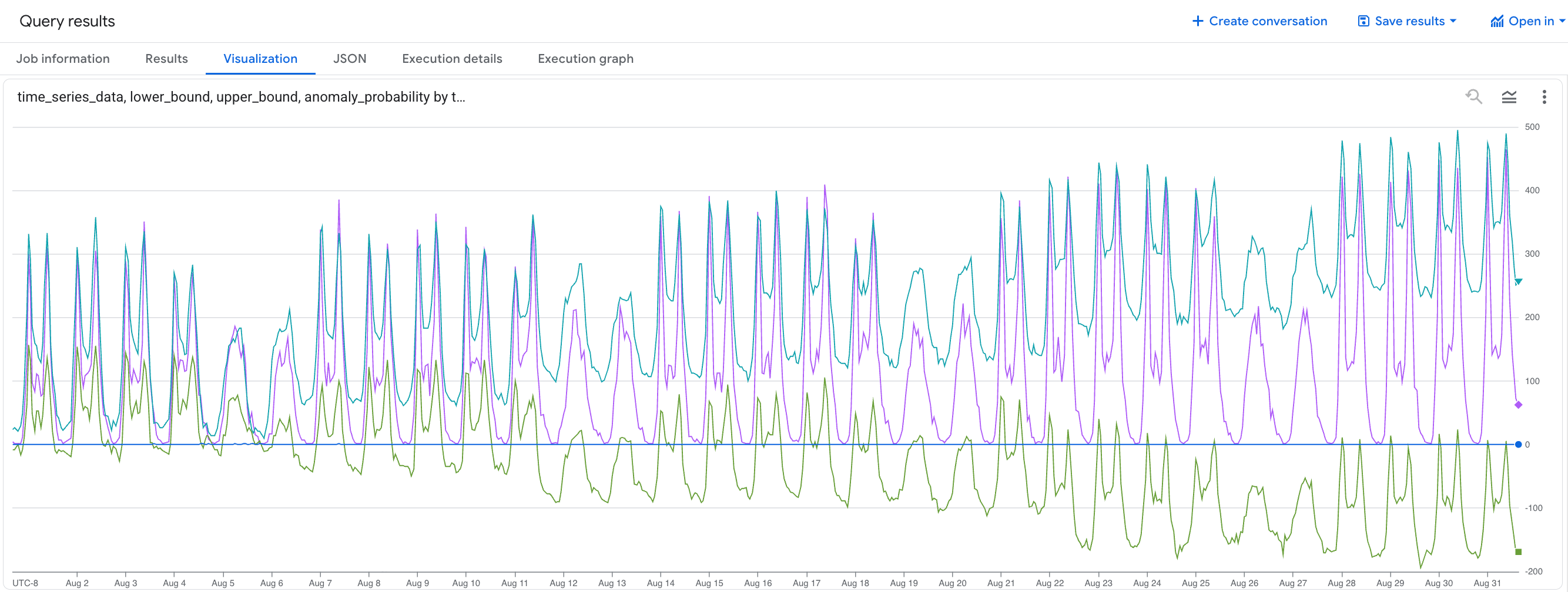
如果
time_series_data值超出lower_bound和upper_bound範圍,即為異常。
偵測多個共享單車行程時間序列中的異常狀況
以下查詢會根據上個月的歷來資料,偵測 2017 年 8 月每種訂閱者類型每小時的共享單車行程數量異常情形。
如要使用 TimesFM 模型偵測異常狀況,請按照下列步驟操作:
前往 Google Cloud 控制台的「BigQuery」頁面。
在查詢編輯器中貼入下列查詢,然後點選「執行」:
WITH
  bike_share_trips AS (
    SELECT
      TIMESTAMP_TRUNC(start_date, HOUR) AS trip_hour, COUNT(*) AS num_trips, subscriber_type
    FROM `bigquery-public-data.san_francisco_bikeshare.bikeshare_trips`
    GROUP BY TIMESTAMP_TRUNC(start_date, HOUR), subscriber_type
  )
SELECT *
FROM
  AI.DETECT_ANOMALIES(
    (
      SELECT *
      FROM bike_share_trips
      WHERE trip_hour >= TIMESTAMP('2017-07-01') AND trip_hour < TIMESTAMP('2017-08-01')
    ),
    (
      SELECT *
      FROM bike_share_trips
      WHERE trip_hour >= TIMESTAMP('2017-08-01') AND trip_hour < TIMESTAMP('2017-09-01')
    ),
    anomaly_prob_threshold => 0.95,
    timestamp_col => 'trip_hour',
    data_col => 'num_trips',
    id_cols => ['subscriber_type']);
結果類似下方:
+-----------------+-------------------------+------------------+------------+--------------------+---------------------+---------------------+---------------------------+
| subscriber_type | time_series_timestamp   | time_series_data | is_anomaly | lower_bound        | upper_bound         | anomaly_probability | ai_detect_anomalies_status|
+-----------------+-------------------------+------------------+------------+--------------------+---------------------+---------------------+---------------------------+
| Customer        | 2017-08-01 00:00:00 UTC | 13.0             | false      | -1.97939332204...  | 27.604928623830...  | 0.38048622012138... |                           |
+-----------------+-------------------------+------------------+------------+--------------------+---------------------+---------------------+---------------------------+
| Customer        | 2017-08-01 01:00:00 UTC | 3.0              | false      | -5.12345678901...  | 10.123456789012...  | 0.12345678901234... |                           |
+-----------------+-------------------------+------------------+------------+--------------------+---------------------+---------------------+---------------------------+
| ...             | ...                     | ...              | ...        | ...                | ...                 | ...                 | ...                       |
+-----------------+-------------------------+------------------+------------+--------------------+---------------------+---------------------+---------------------------+
| Subscriber      | 2017-08-01 00:00:00 UTC | 13.0             | false      | -1.97939332204...  | 27.604928623830...  | 0.38048622012138... |                           |
+-----------------+-------------------------+------------------+------------+--------------------+---------------------+---------------------+---------------------------+
| Subscriber      | 2017-08-01 01:00:00 UTC | 3.0              | false      | -5.12345678901...  | 10.123456789012...  | 0.12345678901234... |                           |
+-----------------+-------------------------+------------------+------------+--------------------+---------------------+---------------------+---------------------------+
| ...             | ...                     | ...              | ...        | ...                | ...                 | ...                 | ...                       |
+-----------------+-------------------------+------------------+------------+--------------------+---------------------+---------------------+---------------------------+
清除所用資源
為避免因為本教學課程所用資源,導致系統向 Google Cloud 帳戶收取費用,請刪除含有相關資源的專案,或者保留專案但刪除個別資源。
刪除專案
如要刪除專案,請進行以下操作:
- 前往 Google Cloud 控制台的「Manage resources」(管理資源) 頁面。
- 在專案清單中選取要刪除的專案,然後點選「Delete」(刪除)。
- 在對話方塊中輸入專案 ID,然後按一下 [Shut down] (關閉) 以刪除專案。
後續步驟
- 如需 BigQuery ML 的總覽,請參閱「BigQuery 中的 AI 和 ML 簡介」。