הסתרת נתונים בעמודה

במאמר הזה מוסבר איך להטמיע הסתרת נתונים כדי להסתיר באופן סלקטיבי מידע אישי רגיש. הטמעה של הסתרת נתונים מאפשרת לכם לספק רמות שונות של הרשאות גישה לקבוצות שונות של משתמשים. למידע כללי, קראו את המאמר מבוא להסתרת נתונים.

כדי להטמיע הסתרת מידע, מוסיפים מדיניות נתונים לעמודה. כדי להוסיף לעמודה מדיניות הסתרת נתונים, צריך לבצע את השלבים הבאים :

  1. יוצרים טקסונומיה עם תג מדיניות אחד לפחות.
  2. אופציונלי: מקצים את התפקיד "קורא ברמת פירוט גבוהה ב-Data Catalog" לחשבון משתמש אחד או יותר באחד או יותר מתגי המדיניות שיצרתם.
  3. אפשר ליצור עד שלוש כללי מדיניות נתונים לתג המדיניות, כדי למפות כללי הסתרה וחשבונות משתמשים (שמייצגים משתמשים או קבוצות) לתג הזה.
  4. הגדרת תג המדיניות בעמודה. כך מדיניות הנתונים שמשויכת לתג המדיניות ממופה לעמודה שנבחרה.
  5. מקצים את התפקיד "קורא נתונים מוסתרים ב-BigQuery" למשתמשים שצריכים גישה לנתונים מוסתרים. מומלץ להקצות את התפקיד "קורא נתונים מוסתרים ב-BigQuery" ברמת מדיניות הנתונים. אם מקצים את התפקיד ברמת הפרויקט או ברמה גבוהה יותר, המשתמשים מקבלים הרשאות לכל מדיניות הנתונים בפרויקט, מה שעלול לגרום לבעיות בגלל הרשאות עודפות.

כדי לעבוד עם מדיניות נתונים, אתם יכולים להשתמש במסוף Google Cloud או ב-BigQuery Data Policy API.

אחרי שתסיימו את השלבים האלה, משתמשים שיריצו שאילתות על העמודה יקבלו נתונים לא מוסתרים, נתונים מוסתרים או שגיאת גישה שנדחתה, בהתאם לקבוצות שאליהן הם שייכים ולתפקידים שהוקצו להם. למידע נוסף, קראו את המאמר איך התפקידים "צפייה בנתונים מוסתרים" ו"צפייה בנתונים ברזולוציה גבוהה" פועלים יחד.

אפשר גם להחיל מדיניות נתונים ישירות על עמודה. מידע נוסף זמין במאמר הסתרת נתונים באמצעות מדיניות נתונים ישירות בעמודה.

הסתרת נתונים באמצעות תגי מדיניות

שימוש בתגי מדיניות כדי להסתיר באופן סלקטיבי מידע אישי רגיש.

לפני שמתחילים

  1. נכנסים לחשבון Google Cloud . אנחנו ממליצים למשתמשים חדשים ב- Google Cloud ליצור חשבון כדי שיוכלו להעריך את הביצועים של המוצרים שלנו בתרחישים מהעולם האמיתי. לקוחות חדשים מקבלים בחינם גם קרדיט בשווי 300$ להרצה, לבדיקה ולפריסה של עומסי העבודה.
  2. In the Google Cloud console, on the project selector page, select or create a Google Cloud project.

    Roles required to select or create a project

    • Select a project: Selecting a project doesn't require a specific IAM role—you can select any project that you've been granted a role on.
    • Create a project: To create a project, you need the Project Creator role (roles/resourcemanager.projectCreator), which contains the resourcemanager.projects.create permission. Learn how to grant roles.

    Go to project selector

  3. Verify that billing is enabled for your Google Cloud project.

  4. Enable the Data Catalog and BigQuery Data Policy APIs, if any are not already enabled.

    Roles required to enable APIs

    To enable APIs, you need the serviceusage.services.enable permission. If you created the project, then you likely already have this permission through the Owner role (roles/owner). Otherwise, you can get this permission through the Service Usage Admin role (roles/serviceusage.serviceUsageAdmin). Learn how to grant roles.

    Enable the APIs

  5. In the Google Cloud console, on the project selector page, select or create a Google Cloud project.

    Roles required to select or create a project

    • Select a project: Selecting a project doesn't require a specific IAM role—you can select any project that you've been granted a role on.
    • Create a project: To create a project, you need the Project Creator role (roles/resourcemanager.projectCreator), which contains the resourcemanager.projects.create permission. Learn how to grant roles.

    Go to project selector

  6. Verify that billing is enabled for your Google Cloud project.

  7. Enable the Data Catalog and BigQuery Data Policy APIs, if any are not already enabled.

    Roles required to enable APIs

    To enable APIs, you need the serviceusage.services.enable permission. If you created the project, then you likely already have this permission through the Owner role (roles/owner). Otherwise, you can get this permission through the Service Usage Admin role (roles/serviceusage.serviceUsageAdmin). Learn how to grant roles.

    Enable the APIs

  8. ‫BigQuery מופעל באופן אוטומטי בפרויקטים חדשים, אבל יכול להיות שתצטרכו להפעיל אותו בפרויקט קיים.

    מפעילים את BigQuery API, אם הוא עדיין לא מופעל.

    התפקידים שנדרשים כדי להפעיל ממשקי API

    כדי להפעיל ממשקי API, צריך את ההרשאה serviceusage.services.enable. אם יצרתם את הפרויקט, סביר להניח שכבר יש לכם את ההרשאה הזו דרך התפקיד "בעלים" (roles/owner). אחרת, תוכלו לקבל את ההרשאה הזו דרך התפקיד "אדמין בממשק 'שימוש בשירות'" (roles/serviceusage.serviceUsageAdmin). איך מקצים תפקידים

    להפעלת ה-API

  9. אם אתם יוצרים מדיניות נתונים שמפנה לשגרת הסתרה בהתאמה אישית, צרו את ה-UDF המשויך להסתרה כדי שיהיה זמין בשלבים הבאים.

יצירת טקסונומיות

למשתמש או לחשבון השירות שיוצרים טקסונומיה צריך להקצות את התפקיד "אדמין של תגי מדיניות ב-Data Catalog".

המסוף

  1. נכנסים לדף Policy tag taxonomies במסוף Google Cloud .

    כניסה לדף Policy tag taxonomies

  2. לוחצים על Create taxonomy.
  3. בדף New taxonomy:

    1. בשדה Taxonomy name, מזינים את שם הטקסונומיה שרוצים ליצור.
    2. בשדה Description, מזינים תיאור.
    3. אם צריך, משנים את הפרויקט שמופיע בקטע Project.
    4. אם צריך, משנים את המיקום שמופיע בקטע מיקום.
    5. בקטע Policy Tags, מזינים שם ותיאור לתג המדיניות.
    6. כדי להוסיף תג מדיניות צאצא לתג מדיניות, לוחצים על Add subtag.
    7. כדי להוסיף תג מדיניות חדש באותה רמה של תג מדיניות אחר, לוחצים על ‎+ Add policy tag.
    8. ממשיכים להוסיף תגי מדיניות ותגי מדיניות צאצאים לפי הצורך בטקסונומיה.
    9. כשמסיימים ליצור את תגי המדיניות להיררכיה, לוחצים על Create.

API

כדי להשתמש בטקסונומיות קיימות, צריך להפעיל את taxonomies.import במקום שני השלבים הראשונים בתהליך הבא.

  1. מפעילים את taxonomies.create כדי ליצור טקסונומיה.
  2. מפעילים את taxonomies.policyTags.create כדי ליצור תג מדיניות.

עבודה עם תגי מדיניות

במאמר עבודה עם תגי מדיניות מוסבר איך לעבוד עם תגי מדיניות, למשל איך להציג או לעדכן אותם. שיטות מומלצות לשימוש בתגי מדיניות ב-BigQuery

יצירת מדיניות נתונים

לחשבון המשתמש או לחשבון השירות שיוצר את מדיניות הנתונים צריכות להיות ההרשאות bigquery.dataPolicies.create,‏ bigquery.dataPolicies.setIamPolicy ו-datacatalog.taxonomies.get.

ההרשאות bigquery.dataPolicies.create ו-bigquery.dataPolicies.setIamPolicy כלולות בתפקידים "אדמין של מדיניות הנתונים ב-BigQuery", "אדמין של BigQuery" ו"הבעלים של נתוני BigQuery". ההרשאה datacatalog.taxonomies.get כלולה בתפקידים "אדמין ב-Data Catalog" ו"צפייה ב-Data Catalog".

אם אתם יוצרים מדיניות נתונים שמפנה לשגרת מיסוך בהתאמה אישית, אתם צריכים גם הרשאות לשגרה.

אם אתם משתמשים בהסתרה בהתאמה אישית, תנו למשתמשים את התפקיד "אדמין ב-BigQuery" או "הבעלים של נתוני BigQuery" כדי לוודא שיש להם את ההרשאות הנדרשות גם לשגרות וגם למדיניות הנתונים.

אפשר ליצור עד תשע מדיניות נתונים לתג מדיניות. אחת מהמדיניות האלה שמורה להגדרות של בקרת גישה ברמת העמודה.

המסוף

  1. נכנסים לדף Policy tag taxonomies במסוף Google Cloud .

    מעבר לטקסונומיות של תגי מדיניות

  2. לוחצים על שם הטקסונומיה כדי לפתוח אותה.
  3. בוחרים תג מדיניות.
  4. לוחצים על ניהול מדיניות הנתונים.
  5. ב-Data Policy Name, מקלידים שם למדיניות הנתונים. השם של מדיניות הנתונים חייב להיות ייחודי בפרויקט שבו נמצאת מדיניות הנתונים.
  6. בשדה Masking Rule, בוחרים כלל מיסוך מוגדר מראש או שגרת מיסוך בהתאמה אישית. אם אתם בוחרים שגרת הסתרה בהתאמה אישית, ודאו שיש לכם את ההרשאות bigquery.routines.get ו-bigquery.routines.list ברמת הפרויקט.
  7. בשדה Principal, מקלידים את השם של משתמש אחד או יותר, או קבוצה אחת או יותר, שרוצים לתת להם גישה מוסתרת לעמודה. חשוב לזכור שכל המשתמשים והקבוצות שתזינו כאן יקבלו את התפקיד "קורא נתונים מוסתרים ב-BigQuery".
  8. לוחצים על שליחה.

API

  1. מבצעים קריאה ל-method‏ create. מעבירים משאב מסוג DataPolicy שעומד בדרישות הבאות:

    • השדה dataPolicyType מוגדר ל-DATA_MASKING_POLICY.
    • השדה dataMaskingPolicy מזהה את הכלל או השגרה של הסתרת המידע שבהם צריך להשתמש.
    • השדה dataPolicyId מספק שם למדיניות הנתונים, שהוא ייחודי לפרויקט שבו נמצאת מדיניות הנתונים.
  2. מפעילים את השיטה setIamPolicy ומעבירים Policy. ב-Policy צריך לזהות את חשבונות המשתמשים שקיבלו גישה לנתונים המוסתרים, ולציין את roles/bigquerydatapolicy.maskedReader בשדה role.

Node.js

לפני שמנסים את הדוגמה הזו, צריך לפעול לפי הוראות ההגדרה של Node.js במדריך למתחילים של BigQuery באמצעות ספריות לקוח. למידע נוסף, קראו את מאמרי העזרה של BigQuery Node.js API.

כדי לבצע אימות ב-BigQuery, צריך להגדיר את Application Default Credentials. מידע נוסף זמין במאמר הגדרת אימות לספריות לקוח.

const datapolicy = require('@google-cloud/bigquery-datapolicies');
const {DataPolicyServiceClient} = datapolicy.v2;
const protos = datapolicy.protos.google.cloud.bigquery.datapolicies.v2;
const {status} = require('@grpc/grpc-js');

const dataPolicyServiceClient = new DataPolicyServiceClient();

/**
 * Creates a data policy to apply a data masking rule to a specific BigQuery table column.
 * This is a primary mechanism for implementing column-level security in BigQuery.
 *
 * @param {string} projectId The Google Cloud project ID (for example, 'example-project-id')
 * @param {string} location The Google Cloud location. Example: 'us'
 * @param {string} dataPolicyId The user-assigned ID of the data policy. Example: 'example-data-policy-id'
 */
async function createDataPolicy(projectId, location, dataPolicyId) {
  const parent = `projects/${projectId}/locations/${location}`;

  const dataPolicy = {
    dataPolicyType: protos.DataPolicy.DataPolicyType.DATA_MASKING_POLICY,
    dataMaskingPolicy: {
      predefinedExpression:
        protos.DataMaskingPolicy.PredefinedExpression.SHA256,
    },
  };

  const request = {
    parent,
    dataPolicyId,
    dataPolicy,
  };

  try {
    const [response] = await dataPolicyServiceClient.createDataPolicy(request);
    console.log(`Successfully created data policy: ${response.name}`);
    console.log(`Data policy ID: ${response.dataPolicyId}`);
    console.log(`Data policy type: ${response.dataPolicyType}`);
    if (response.dataMaskingPolicy) {
      console.log(
        `Data masking expression: ${response.dataMaskingPolicy.predefinedExpression}`,
      );
    }
  } catch (err) {
    if (err.code === status.ALREADY_EXISTS) {
      console.log(
        `Data policy '${dataPolicyId}' already exists in location '${location}' of project '${projectId}'.`,
      );
      console.log(
        'Consider updating the existing data policy or using a different dataPolicyId.',
      );
    } else {
      console.error('Error creating data policy:', err.message);
    }
  }
}

Python

לפני שמנסים את הדוגמה הזו, צריך לפעול לפי הוראות ההגדרה של Python במדריך למתחילים של BigQuery באמצעות ספריות לקוח. למידע נוסף, קראו את מאמרי העזרה של BigQuery Python API.

כדי לבצע אימות ב-BigQuery, צריך להגדיר את Application Default Credentials. מידע נוסף זמין במאמר הגדרת אימות לספריות לקוח.

from google.api_core import exceptions
from google.cloud import bigquery_datapolicies_v2

client = bigquery_datapolicies_v2.DataPolicyServiceClient()


def create_data_policy(project_id: str, location: str, data_policy_id: str) -> None:
    """Creates a data policy to apply a data masking rule to a specific BigQuery table column.
    This is a primary mechanism for implementing column-level security in BigQuery.

    Args:
        project_id (str): The Google Cloud project ID.
        location (str): The geographic location of the data policy (for example, "us-central1").
        data_policy_id (str): The ID for the new data policy.
    """

    parent = f"projects/{project_id}/locations/{location}"

    # Define the data masking policy.
    # Here, we specify a SHA-256 predefined expression for data masking.
    data_masking_policy = bigquery_datapolicies_v2.DataMaskingPolicy(
        predefined_expression=bigquery_datapolicies_v2.DataMaskingPolicy.PredefinedExpression.SHA256
    )

    # Create the DataPolicy object.
    # We set the type to DATA_MASKING_POLICY and assign the defined masking policy.
    data_policy = bigquery_datapolicies_v2.DataPolicy(
        data_policy_type=bigquery_datapolicies_v2.DataPolicy.DataPolicyType.DATA_MASKING_POLICY,
        data_masking_policy=data_masking_policy,
    )

    request = bigquery_datapolicies_v2.CreateDataPolicyRequest(
        parent=parent,
        data_policy_id=data_policy_id,
        data_policy=data_policy,
    )

    try:
        response = client.create_data_policy(request=request)
        print(f"Successfully created data policy: {response.name}")
        print(f"Data Policy ID: {response.data_policy_id}")
        print(f"Data Policy Type: {response.data_policy_type.name}")
        print(
            "Data Masking Predefined Expression:"
            f" {response.data_masking_policy.predefined_expression.name}"
        )
    except exceptions.AlreadyExists as e:
        print(
            f"Error: Data policy '{data_policy_id}' already exists in project"
            f" '{project_id}' in location '{location}'. Use a unique ID or"
            " update the existing policy if needed."
        )

    except exceptions.NotFound as e:
        print(
            f"Error: The specified project '{project_id}' or location '{location}'"
            " was not found or is inaccessible. Make sure the project ID and"
            " location are correct and you have the necessary permissions."
        )
    except Exception as e:
        print(f"An unexpected error occurred: {e}")

Java

לפני שמנסים את הדוגמה הזו, צריך לפעול לפי הוראות ההגדרה של Java במדריך למתחילים של BigQuery באמצעות ספריות לקוח. למידע נוסף, קראו את מאמרי העזרה של BigQuery Java API.

כדי לבצע אימות ב-BigQuery, צריך להגדיר את Application Default Credentials. מידע נוסף זמין במאמר הגדרת אימות לספריות לקוח.

import com.google.api.gax.rpc.AlreadyExistsException;
import com.google.api.gax.rpc.ApiException;
import com.google.api.gax.rpc.NotFoundException;
import com.google.cloud.bigquery.datapolicies.v2.CreateDataPolicyRequest;
import com.google.cloud.bigquery.datapolicies.v2.DataMaskingPolicy;
import com.google.cloud.bigquery.datapolicies.v2.DataMaskingPolicy.PredefinedExpression;
import com.google.cloud.bigquery.datapolicies.v2.DataPolicy;
import com.google.cloud.bigquery.datapolicies.v2.DataPolicy.DataPolicyType;
import com.google.cloud.bigquery.datapolicies.v2.DataPolicyServiceClient;
import com.google.cloud.bigquery.datapolicies.v2.LocationName;
import java.io.IOException;

public class CreateDataPolicy {

  /**
   * Creates a data policy to apply a data masking rule to a specific BigQuery table column.
   *
   * @param projectId The Google Cloud project ID (for example, "example-project-id").
   * @param location The geographic location of the data policy (for example, "us-central1").
   * @param dataPolicyId The user-assigned ID for the new data policy (for example,
   *     "example_data_policy").
   */
  public static void createDataPolicy(String projectId, String location, String dataPolicyId) {
    LocationName parent = LocationName.of(projectId, location);

    DataMaskingPolicy dataMaskingPolicy =
        DataMaskingPolicy.newBuilder()
            .setPredefinedExpression(PredefinedExpression.SHA256)
            .build();

    DataPolicy dataPolicy =
        DataPolicy.newBuilder()
            .setDataPolicyType(DataPolicyType.DATA_MASKING_POLICY)
            .setDataMaskingPolicy(dataMaskingPolicy)
            .build();

    CreateDataPolicyRequest request =
        CreateDataPolicyRequest.newBuilder()
            .setParent(parent.toString())
            .setDataPolicyId(dataPolicyId)
            .setDataPolicy(dataPolicy)
            .build();

    try (DataPolicyServiceClient client = DataPolicyServiceClient.create()) {
      DataPolicy response = client.createDataPolicy(request);

      System.out.printf("Successfully created data policy: %s%n", response.getName());
      System.out.printf("Data Policy ID: %s%n", response.getDataPolicyId());
      System.out.printf("Data Policy Type: %s%n", response.getDataPolicyType());
      if (response.hasDataMaskingPolicy()) {
        System.out.printf(
            "Data Masking Predefined Expression: %s%n",
            response.getDataMaskingPolicy().getPredefinedExpression());
      }
    } catch (AlreadyExistsException err) {
      System.err.printf(
          "error: data policy '%s' already exists in location '%s' for project '%s': %s%n",
          dataPolicyId, location, projectId, err.getMessage());
    } catch (NotFoundException err) {
      System.err.printf(
          "error: project '%s' or location '%s' was not found: %s%n",
          projectId, location, err.getMessage());
    } catch (ApiException | IOException err) {
      System.err.printf(
          "error: failed to create data policy '%s' in location '%s' for project '%s': %s%n",
          dataPolicyId, location, projectId, err.getMessage());
    }
  }

הגדרת תגי מדיניות בעמודות

כדי להגדיר מדיניות נתונים בעמודה, צריך לצרף לעמודה את תג המדיניות שמשויך למדיניות הנתונים.

המשתמש או חשבון השירות שמגדירים תג מדיניות צריכים את ההרשאות datacatalog.taxonomies.get ו-bigquery.tables.setCategory. datacatalog.taxonomies.get נכללת בתפקידים "אדמין של תגי מדיניות ב-Data Catalog" ו"צפייה בפרויקט". ההרשאה bigquery.tables.setCategory נכללת בתפקידים BigQuery Admin (roles/bigquery.admin) ו-BigQuery Data Owner (roles/bigquery.dataOwner).

כדי לראות טקסונומיות ותגי מדיניות בכל הפרויקטים בארגון במסוףGoogle Cloud , המשתמשים צריכים את ההרשאה resourcemanager.organizations.get, שנכללת בתפקיד Organization Viewer. ההרשאה הזו לא נדרשת כשמשתמשים ב-API או בכלי שורת הפקודה bq.

המסוף

מגדירים את תג המדיניות על ידי שינוי הסכימה באמצעות מסוףGoogle Cloud .

  1. פותחים את הדף BigQuery במסוף Google Cloud .

    כניסה לדף BigQuery

  2. ב-BigQuery Explorer, מאתרים ובוחרים את הטבלה שרוצים לעדכן. סכימת הטבלה של אותה טבלה נפתחת.

  3. לוחצים על Edit Schema.

  4. במסך Current schema, בוחרים את עמודת היעד ולוחצים על Add policy tag.

  5. במסך Add a policy tag, מאתרים ובוחרים את תג המדיניות שרוצים להחיל על העמודה.

  6. לוחצים על בחירה. המסך אמור להיראות כמו בדוגמה הבאה:
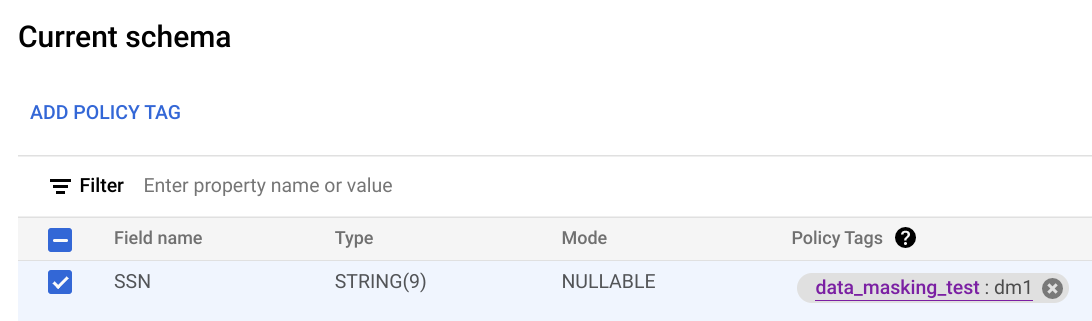
    עריכת הסכימה.

  7. לוחצים על Save.

BQ

  1. כותבים את הסכימה בקובץ מקומי.

    bq show --schema --format=prettyjson \
       project-id:dataset.table > schema.json

    כאשר:

    • ‫project-id הוא מזהה הפרויקט.
    • ‫dataset הוא השם של קבוצת הנתונים שמכילה את הטבלה שמעדכנים.
    • ‫table הוא שם הטבלה שמעדכנים.
  2. משנים את schema.json כדי להגדיר תג מדיניות בעמודה. בשדה names של policyTags, משתמשים בשם המשאב של תג המדיניות.

    [
     ...
     {
       "name": "ssn",
       "type": "STRING",
       "mode": "REQUIRED",
       "policyTags": {
         "names": ["projects/project-id/locations/location/taxonomies/taxonomy-id/policyTags/policytag-id"]
       }
     },
     ...
    ]
  3. מעדכנים את הסכימה.

    bq update \
       project-id:dataset.table schema.json

API

בטבלאות קיימות, מפעילים את tables.patch, ובטבלאות חדשות מפעילים את tables.insert. כדי להגדיר תג מדיניות בסכימה, משתמשים במאפיין schema של האובייקט Table שמעבירים. כדי לראות איך מגדירים תג מדיניות, עיינו בסכימה לדוגמה של שורת הפקודה.

כשעובדים עם טבלה קיימת, עדיף להשתמש ב-method‏ tables.patch, כי ה-method‏ tables.update מחליפה את כל משאב הטבלה.

אכיפה של בקרת גישה

כשיוצרים מדיניות נתונים לתג מדיניות, בקרת הגישה נאכפת באופן אוטומטי. כל העמודות שתג המדיניות הזה הוחל עליהן מחזירות נתונים מוסתרים בתגובה לשאילתות ממשתמשים עם התפקיד "קורא נתונים מוסתרים".

כדי להפסיק את האכיפה של בקרת הגישה, קודם צריך למחוק את כל כללי מדיניות הנתונים שמשויכים לתגי המדיניות בטקסונומיה. מידע נוסף על אכיפה של בקרת גישה

קבלת מדיניות נתונים

כדי לקבל מידע על מדיניות נתונים:

Node.js

לפני שמנסים את הדוגמה הזו, צריך לפעול לפי הוראות ההגדרה של Node.js במדריך למתחילים של BigQuery באמצעות ספריות לקוח. למידע נוסף, קראו את מאמרי העזרה של BigQuery Node.js API.

כדי לבצע אימות ב-BigQuery, צריך להגדיר את Application Default Credentials. מידע נוסף זמין במאמר הגדרת אימות לספריות לקוח.

const {DataPolicyServiceClient} =
  require('@google-cloud/bigquery-datapolicies').v2;
const {status} = require('@grpc/grpc-js');

const client = new DataPolicyServiceClient();

/**
 * Gets a specific data policy from the BigQuery Data Policy API by its name.
 *
 * This sample demonstrates how to fetch the details of an existing data policy.
 * Data policies are used to define rules for data masking or row-level security
 * on BigQuery tables.
 *
 * @param {string} projectId The Google Cloud project ID (for example, 'example-project-id')
 * @param {string} [location='us'] The Google Cloud location of the data policy (For example, 'us', 'europe-west2').
 * @param {string} [dataPolicyId='example-data-policy'] The ID of the data policy to retrieve.
 */
async function getDataPolicy(
  projectId,
  location = 'us',
  dataPolicyId = 'example-data-policy',
) {
  const name = client.dataPolicyPath(projectId, location, dataPolicyId);

  const request = {
    name,
  };

  try {
    const [dataPolicy] = await client.getDataPolicy(request);
    console.log('Successfully retrieved data policy:');
    console.log(`  Name: ${dataPolicy.name}`);
    console.log(`  Type: ${dataPolicy.dataPolicyType}`);
    if (dataPolicy.dataMaskingPolicy) {
      console.log(
        `  Data Masking Policy: ${dataPolicy.dataMaskingPolicy.predefinedExpression || dataPolicy.dataMaskingPolicy.routine}`,
      );
    }
    if (dataPolicy.grantees && dataPolicy.grantees.length > 0) {
      console.log(`  Grantees: ${dataPolicy.grantees.join(', ')}`);
    }
  } catch (err) {
    if (err.code === status.NOT_FOUND) {
      console.error(
        `Error: Data policy '${dataPolicyId}' not found in location '${location}' for project '${projectId}'.`,
      );
      console.error(
        'Make sure the data policy ID, project ID, and location are correct.',
      );
    } else {
      console.error('Error retrieving data policy:', err.message);
    }
  }
}

Python

לפני שמנסים את הדוגמה הזו, צריך לפעול לפי הוראות ההגדרה של Python במדריך למתחילים של BigQuery באמצעות ספריות לקוח. למידע נוסף, קראו את מאמרי העזרה של BigQuery Python API.

כדי לבצע אימות ב-BigQuery, צריך להגדיר את Application Default Credentials. מידע נוסף זמין במאמר הגדרת אימות לספריות לקוח.

from google.api_core import exceptions
from google.cloud import bigquery_datapolicies_v2

client = bigquery_datapolicies_v2.DataPolicyServiceClient()


def get_data_policy(
    project_id: str,
    location: str,
    data_policy_id: str,
) -> None:
    """Gets a specific data policy from the BigQuery Data Policy API by its name.


    Args:
        project_id: The Google Cloud project ID.
        location: The geographic location of the data policy (for example, "us", "eu").
        data_policy_id: The user-assigned ID of the data policy.
    """
    client = bigquery_datapolicies_v2.DataPolicyServiceClient()

    data_policy_name = client.data_policy_path(
        project=project_id,
        location=location,
        data_policy=data_policy_id,
    )

    try:
        response = client.get_data_policy(name=data_policy_name)

        print(f"Successfully retrieved data policy: {response.name}")
        print(f"  Data Policy ID: {response.data_policy_id}")
        print(f"  Data Policy Type: {response.data_policy_type.name}")
        if response.policy_tag:
            print(f"  Policy Tag: {response.policy_tag}")
        if response.grantees:
            print(f"  Grantees: {', '.join(response.grantees)}")
        if response.data_masking_policy:
            masking_policy = response.data_masking_policy
            if masking_policy.predefined_expression:
                print(
                    f"  Data Masking Predefined Expression: {masking_policy.predefined_expression.name}"
                )
            elif masking_policy.routine:
                print(f"  Data Masking Routine: {masking_policy.routine}")

    except exceptions.NotFound:
        print(f"Error: Data policy '{data_policy_name}' not found.")
        print("Make sure the data policy ID, project ID, and location are correct.")
    except Exception as e:
        print(f"An unexpected error occurred: {e}")

Java

לפני שמנסים את הדוגמה הזו, צריך לפעול לפי הוראות ההגדרה של Java במדריך למתחילים של BigQuery באמצעות ספריות לקוח. למידע נוסף, קראו את מאמרי העזרה של BigQuery Java API.

כדי לבצע אימות ב-BigQuery, צריך להגדיר את Application Default Credentials. מידע נוסף זמין במאמר הגדרת אימות לספריות לקוח.

import com.google.api.gax.rpc.ApiException;
import com.google.api.gax.rpc.NotFoundException;
import com.google.cloud.bigquery.datapolicies.v2.DataMaskingPolicy;
import com.google.cloud.bigquery.datapolicies.v2.DataMaskingPolicy.PredefinedExpression;
import com.google.cloud.bigquery.datapolicies.v2.DataPolicy;
import com.google.cloud.bigquery.datapolicies.v2.DataPolicyName;
import com.google.cloud.bigquery.datapolicies.v2.DataPolicyServiceClient;
import java.io.IOException;

public class GetDataPolicy {

  /**
   * Gets a specific data policy from the BigQuery Data Policy API by its name.
   *
   * @param projectId The Google Cloud project ID (for example, "example-project-id").
   * @param location The geographic location of the data policy (for example, "us-central1").
   * @param dataPolicyId The user-assigned ID of the data policy (for example,
   *     "example_data_policy").
   */
  public static void getDataPolicy(String projectId, String location, String dataPolicyId) {
    DataPolicyName dataPolicyName = DataPolicyName.of(projectId, location, dataPolicyId);

    try (DataPolicyServiceClient client = DataPolicyServiceClient.create()) {
      DataPolicy response = client.getDataPolicy(dataPolicyName);

      System.out.printf("Successfully retrieved data policy: %s%n", response.getName());
      System.out.printf("  Data Policy ID: %s%n", response.getDataPolicyId());
      System.out.printf("  Data Policy Type: %s%n", response.getDataPolicyType());
      if (!response.getPolicyTag().isEmpty()) {
        System.out.printf("  Policy Tag: %s%n", response.getPolicyTag());
      }
      if (!response.getGranteesList().isEmpty()) {
        System.out.printf("  Grantees: %s%n", String.join(", ", response.getGranteesList()));
      }
      if (response.hasDataMaskingPolicy()) {
        DataMaskingPolicy maskingPolicy = response.getDataMaskingPolicy();
        if (maskingPolicy.getPredefinedExpression()
            != PredefinedExpression.PREDEFINED_EXPRESSION_UNSPECIFIED) {
          System.out.printf(
              "  Data Masking Predefined Expression: %s%n",
              maskingPolicy.getPredefinedExpression());
        } else if (!maskingPolicy.getRoutine().isEmpty()) {
          System.out.printf("  Data Masking Routine: %s%n", maskingPolicy.getRoutine());
        }
      }
    } catch (NotFoundException err) {
      System.err.printf(
          "error: data policy '%s' not found: %s%n", dataPolicyName, err.getMessage());
    } catch (ApiException | IOException err) {
      System.err.printf(
          "error: failed to get data policy '%s': %s%n", dataPolicyName, err.getMessage());
    }
  }

בדיקת הרשאות IAM במדיניות נתונים

כדי לקבל את מדיניות ה-IAM של מדיניות נתונים:

API

מפעילים את ה-method‏ testIamPermissions.

Node.js

לפני שמנסים את הדוגמה הזו, צריך לפעול לפי הוראות ההגדרה של Node.js במדריך למתחילים של BigQuery באמצעות ספריות לקוח. למידע נוסף, קראו את מאמרי העזרה של BigQuery Node.js API.

כדי לבצע אימות ב-BigQuery, צריך להגדיר את Application Default Credentials. מידע נוסף זמין במאמר הגדרת אימות לספריות לקוח.

const {DataPolicyServiceClient} =
  require('@google-cloud/bigquery-datapolicies').v2;
const {status} = require('@grpc/grpc-js');

const client = new DataPolicyServiceClient();

/**
 * Get the IAM policy for a specified data policy resource from the BigQuery Data Policy API.
 * This is useful for auditing which members have which roles on the policy.
 *
 *
 * @param {string} projectId Google Cloud Project ID (For example, 'example-project-id')
 * @param {string} location Google Cloud Location (For example, 'us-central1')
 * @param {string} dataPolicyId The ID of the data policy (For example, 'example-data-policy-id')
 */
async function getIamPolicy(projectId, location, dataPolicyId) {
  const resourceName = client.dataPolicyPath(projectId, location, dataPolicyId);

  const request = {
    resource: resourceName,
  };

  try {
    const [policy] = await client.getIamPolicy(request);
    console.log(
      'Successfully retrieved IAM policy for data policy %s:',
      resourceName,
    );
    console.log(JSON.stringify(policy, null, 2));
  } catch (err) {
    if (err.code === status.NOT_FOUND) {
      console.error(
        `Error: Data Policy '${dataPolicyId}' not found in location '${location}' of project '${projectId}'. ` +
          'Make sure the data policy exists and the resource name is correct.',
      );
    } else {
      console.error(
        `Error getting IAM policy for data policy '${dataPolicyId}':`,
        err,
      );
    }
  }
}

Python

לפני שמנסים את הדוגמה הזו, צריך לפעול לפי הוראות ההגדרה של Python במדריך למתחילים של BigQuery באמצעות ספריות לקוח. למידע נוסף, קראו את מאמרי העזרה של BigQuery Python API.

כדי לבצע אימות ב-BigQuery, צריך להגדיר את Application Default Credentials. מידע נוסף זמין במאמר הגדרת אימות לספריות לקוח.

from google.api_core import exceptions
from google.cloud import bigquery_datapolicies_v2
from google.iam.v1 import iam_policy_pb2

client = bigquery_datapolicies_v2.DataPolicyServiceClient()


def get_data_policy_iam_policy(
    project_id: str,
    location: str,
    data_policy_id: str,
) -> None:
    """Get the IAM policy for a specified data policy resource from the BigQuery Data Policy API.
    This is useful for auditing which members have which roles on the policy.

    Args:
        project_id: The Google Cloud project ID.
        location: The geographic location of the data policy (for example, "us").
        data_policy_id: The ID of the data policy.
    """

    resource_name = client.data_policy_path(
        project=project_id,
        location=location,
        data_policy=data_policy_id,
    )

    request = iam_policy_pb2.GetIamPolicyRequest(resource=resource_name)

    try:
        policy = client.get_iam_policy(request=request)

        print(f"Successfully retrieved IAM policy for data policy: {resource_name}")
        print("Policy Version:", policy.version)
        if policy.bindings:
            print("Policy Bindings:")
            for binding in policy.bindings:
                print(f"  Role: {binding.role}")
                print(f"  Members: {', '.join(binding.members)}")
                if binding.condition.expression:
                    print(f"  Condition: {binding.condition.expression}")
        else:
            print("No bindings found in the policy.")

    except exceptions.NotFound:
        print(f"Error: Data policy '{resource_name}' not found.")
        print("Make sure the project ID, location, and data policy ID are correct.")
    except exceptions.GoogleAPIError as e:
        print(f"An API error occurred: {e}")
    except Exception as e:
        print(f"An unexpected error occurred: {e}")

Java

לפני שמנסים את הדוגמה הזו, צריך לפעול לפי הוראות ההגדרה של Java במדריך למתחילים של BigQuery באמצעות ספריות לקוח. למידע נוסף, קראו את מאמרי העזרה של BigQuery Java API.

כדי לבצע אימות ב-BigQuery, צריך להגדיר את Application Default Credentials. מידע נוסף זמין במאמר הגדרת אימות לספריות לקוח.

import com.google.api.gax.rpc.ApiException;
import com.google.api.gax.rpc.NotFoundException;
import com.google.cloud.bigquery.datapolicies.v2.DataPolicyName;
import com.google.cloud.bigquery.datapolicies.v2.DataPolicyServiceClient;
import com.google.iam.v1.Binding;
import com.google.iam.v1.GetIamPolicyRequest;
import com.google.iam.v1.Policy;
import java.io.IOException;

public class GetIamPolicy {

  /**
   * Gets the IAM policy for a specified data policy resource from the BigQuery Data Policy API.
   *
   * @param projectId The Google Cloud project ID (for example, "example-project-id").
   * @param location The geographic location of the data policy (for example, "us-central1").
   * @param dataPolicyId The ID of the data policy (for example, "example_data_policy").
   */
  public static void getIamPolicy(String projectId, String location, String dataPolicyId) {
    DataPolicyName resourceName = DataPolicyName.of(projectId, location, dataPolicyId);

    GetIamPolicyRequest request =
        GetIamPolicyRequest.newBuilder().setResource(resourceName.toString()).build();

    try (DataPolicyServiceClient client = DataPolicyServiceClient.create()) {
      Policy policy = client.getIamPolicy(request);

      System.out.printf("Successfully retrieved IAM policy for data policy: %s%n", resourceName);
      System.out.printf("Policy Version: %d%n", policy.getVersion());
      if (policy.getBindingsCount() > 0) {
        System.out.println("Policy Bindings:");
        for (Binding binding : policy.getBindingsList()) {
          System.out.printf("  Role: %s%n", binding.getRole());
          System.out.printf("  Members: %s%n", String.join(", ", binding.getMembersList()));
          if (binding.hasCondition() && !binding.getCondition().getExpression().isEmpty()) {
            System.out.printf("  Condition: %s%n", binding.getCondition().getExpression());
          }
        }
      } else {
        System.out.println("No bindings found in the policy.");
      }
    } catch (NotFoundException err) {
      System.err.printf("error: data policy '%s' not found: %s%n", resourceName, err.getMessage());
    } catch (ApiException | IOException err) {
      System.err.printf(
          "error: failed to get IAM policy for data policy '%s': %s%n",
          resourceName, err.getMessage());
    }
  }

הצגת רשימה של כללי מדיניות הנתונים

כדי להציג רשימה של כללי מדיניות הנתונים:

Node.js

לפני שמנסים את הדוגמה הזו, צריך לפעול לפי הוראות ההגדרה של Node.js במדריך למתחילים של BigQuery באמצעות ספריות לקוח. למידע נוסף, קראו את מאמרי העזרה של BigQuery Node.js API.

כדי לבצע אימות ב-BigQuery, צריך להגדיר את Application Default Credentials. מידע נוסף זמין במאמר הגדרת אימות לספריות לקוח.

const {DataPolicyServiceClient} =
  require('@google-cloud/bigquery-datapolicies').v2;
const {status} = require('@grpc/grpc-js');

const client = new DataPolicyServiceClient();

/**
 * Lists all data policies in a given project and location.
 *
 * Data policies define rules for data masking, row-level security, or column-level security.
 *
 * @param {string} projectId The Google Cloud project ID. (for example, 'example-project-id')
 * @param {string} location The Google Cloud location of the data policies. (For example, 'us')
 */
async function listDataPolicies(projectId, location) {
  const parent = `projects/${projectId}/locations/${location}`;

  const request = {
    parent,
  };

  try {
    console.log(
      `Listing data policies for project: ${projectId} in location: ${location}`,
    );
    const [dataPolicies] = await client.listDataPolicies(request);

    if (dataPolicies.length === 0) {
      console.log(
        `No data policies found in location ${location} for project ${projectId}.`,
      );
      return;
    }

    console.log('Data Policies:');
    for (const dataPolicy of dataPolicies) {
      console.log(`  Data Policy Name: ${dataPolicy.name}`);
      console.log(`    ID: ${dataPolicy.dataPolicyId}`);
      console.log(`    Type: ${dataPolicy.dataPolicyType}`);
      if (dataPolicy.policyTag) {
        console.log(`    Policy Tag: ${dataPolicy.policyTag}`);
      }
      if (dataPolicy.grantees && dataPolicy.grantees.length > 0) {
        console.log(`    Grantees: ${dataPolicy.grantees.join(', ')}`);
      }
      if (dataPolicy.dataMaskingPolicy) {
        if (dataPolicy.dataMaskingPolicy.predefinedExpression) {
          console.log(
            `    Data Masking Predefined Expression: ${dataPolicy.dataMaskingPolicy.predefinedExpression}`,
          );
        } else if (dataPolicy.dataMaskingPolicy.routine) {
          console.log(
            `    Data Masking Routine: ${dataPolicy.dataMaskingPolicy.routine}`,
          );
        }
      }
    }

    console.log(`Successfully listed ${dataPolicies.length} data policies.`);
  } catch (err) {
    if (err.code === status.NOT_FOUND) {
      console.error(
        `Error: The project or location '${location}' for project '${projectId}' was not found. ` +
          'Make sure the project ID and location are correct and that the BigQuery Data Policy API is enabled.',
      );
    } else if (err.code === status.PERMISSION_DENIED) {
      console.error(
        `Error: Permission denied when listing data policies for project '${projectId}' in location '${location}'. ` +
          'Make sure the authenticated account has the necessary permissions (For example, bigquery.datapolicies.list).',
      );
    } else {
      console.error(`Error listing data policies: ${err.message}`);
    }
  }
}

Python

לפני שמנסים את הדוגמה הזו, צריך לפעול לפי הוראות ההגדרה של Python במדריך למתחילים של BigQuery באמצעות ספריות לקוח. למידע נוסף, קראו את מאמרי העזרה של BigQuery Python API.

כדי לבצע אימות ב-BigQuery, צריך להגדיר את Application Default Credentials. מידע נוסף זמין במאמר הגדרת אימות לספריות לקוח.

import google.api_core.exceptions
from google.cloud import bigquery_datapolicies_v2

client = bigquery_datapolicies_v2.DataPolicyServiceClient()


def list_data_policies(project_id: str, location: str) -> None:
    """Lists all data policies in a specified project.

    Args:
        project_id: The Google Cloud project ID.
        location: The geographic location of the data policies (for example, "us", "us-central1").
    """

    parent = f"projects/{project_id}/locations/{location}"

    try:
        request = bigquery_datapolicies_v2.ListDataPoliciesRequest(parent=parent)

        print(
            f"Listing data policies for project '{project_id}' in location '{location}':"
        )
        page_result = client.list_data_policies(request=request)

        found_policies = False
        for data_policy in page_result:
            found_policies = True
            print(f"  Data Policy Name: {data_policy.name}")
            print(f"  Data Policy ID: {data_policy.data_policy_id}")
            print(f"  Data Policy Type: {data_policy.data_policy_type.name}")
            if data_policy.policy_tag:
                print(f"  Policy Tag: {data_policy.policy_tag}")
            if data_policy.grantees:
                print(f"  Grantees: {', '.join(data_policy.grantees)}")
            print("-" * 20)

        if not found_policies:
            print("No data policies found.")

    except google.api_core.exceptions.NotFound as e:
        print(f"Error: The specified project or location was not found or accessible.")
        print(f"Details: {e}")
        print(
            "Make sure the project ID and location are correct and you have the necessary permissions."
        )
    except Exception as e:
        print(f"An unexpected error occurred: {e}")

Java

לפני שמנסים את הדוגמה הזו, צריך לפעול לפי הוראות ההגדרה של Java במדריך למתחילים של BigQuery באמצעות ספריות לקוח. למידע נוסף, קראו את מאמרי העזרה של BigQuery Java API.

כדי לבצע אימות ב-BigQuery, צריך להגדיר את Application Default Credentials. מידע נוסף זמין במאמר הגדרת אימות לספריות לקוח.

import com.google.api.gax.rpc.ApiException;
import com.google.api.gax.rpc.NotFoundException;
import com.google.cloud.bigquery.datapolicies.v2.DataPolicy;
import com.google.cloud.bigquery.datapolicies.v2.DataPolicyServiceClient;
import com.google.cloud.bigquery.datapolicies.v2.DataPolicyServiceClient.ListDataPoliciesPagedResponse;
import com.google.cloud.bigquery.datapolicies.v2.ListDataPoliciesRequest;
import com.google.cloud.bigquery.datapolicies.v2.LocationName;
import java.io.IOException;

public class ListDataPolicies {

  /**
   * Lists all data policies in a specified project and location.
   *
   * @param projectId The Google Cloud project ID (for example, "example-project-id").
   * @param location The geographic location of the data policies (for example, "us-central1").
   */
  public static void listDataPolicies(String projectId, String location) {
    LocationName parent = LocationName.of(projectId, location);

    ListDataPoliciesRequest request =
        ListDataPoliciesRequest.newBuilder().setParent(parent.toString()).build();

    try (DataPolicyServiceClient client = DataPolicyServiceClient.create()) {
      System.out.printf(
          "Listing data policies for project '%s' in location '%s':%n", projectId, location);
      ListDataPoliciesPagedResponse pageResult = client.listDataPolicies(request);

      boolean foundPolicies = false;
      for (DataPolicy dataPolicy : pageResult.iterateAll()) {
        foundPolicies = true;
        System.out.printf("  Data Policy Name: %s%n", dataPolicy.getName());
        System.out.printf("  Data Policy ID: %s%n", dataPolicy.getDataPolicyId());
        System.out.printf("  Data Policy Type: %s%n", dataPolicy.getDataPolicyType());
        if (!dataPolicy.getPolicyTag().isEmpty()) {
          System.out.printf("  Policy Tag: %s%n", dataPolicy.getPolicyTag());
        }
        if (!dataPolicy.getGranteesList().isEmpty()) {
          System.out.printf("  Grantees: %s%n", String.join(", ", dataPolicy.getGranteesList()));
        }
        System.out.println("--------------------");
      }

      if (!foundPolicies) {
        System.out.println("No data policies found.");
      }
    } catch (NotFoundException err) {
      System.err.printf(
          "error: project '%s' or location '%s' was not found: %s%n",
          projectId, location, err.getMessage());
    } catch (ApiException | IOException err) {
      System.err.printf(
          "error: failed to list data policies in location '%s' for project '%s': %s%n",
          location, projectId, err.getMessage());
    }
  }

עדכון מדיניות הנתונים

למשתמש או לחשבון השירות שמעדכנים את מדיניות הנתונים צריכה להיות ההרשאה bigquery.dataPolicies.update. אם אתם מעדכנים את תג המדיניות שמשויך למדיניות הנתונים, אתם צריכים גם את ההרשאה datacatalog.taxonomies.get.

אם אתם מעדכנים את חשבונות המשתמשים שמשויכים למדיניות הנתונים, אתם צריכים את ההרשאה bigquery.dataPolicies.setIamPolicy.

ההרשאות bigquery.dataPolicies.update ו-bigquery.dataPolicies.setIamPolicy כלולות בתפקידים "אדמין של מדיניות הנתונים ב-BigQuery", "אדמין של BigQuery" ו"הבעלים של נתוני BigQuery". ההרשאה datacatalog.taxonomies.get כלולה בתפקידים "אדמין ב-Data Catalog" ו"צפייה ב-Data Catalog".

המסוף

  1. נכנסים לדף Policy tag taxonomies במסוף Google Cloud .

    מעבר לטקסונומיות של תגי מדיניות

  2. לוחצים על שם הטקסונומיה כדי לפתוח אותה.
  3. בוחרים תג מדיניות.
  4. לוחצים על ניהול מדיניות הנתונים.
  5. אם רוצים, משנים את כלל ההסתרה.
  6. אופציונלי: מוסיפים או מסירים חשבונות משתמשים.
  7. לוחצים על שליחה.

API

כדי לשנות את הכלל של הסתרת המידע, צריך לבצע קריאה ל-method‏ patch ולהעביר משאב DataPolicy עם שדה dataMaskingPolicy מעודכן.

כדי לשנות את חשבונות המשתמשים שמשויכים למדיניות נתונים, מפעילים את ה-method‏ setIamPolicy ומעבירים את Policy שמעדכנת את חשבונות המשתמשים שקיבלו גישה לנתונים מוסתרים.

Node.js

לפני שמנסים את הדוגמה הזו, צריך לפעול לפי הוראות ההגדרה של Node.js במדריך למתחילים של BigQuery באמצעות ספריות לקוח. למידע נוסף, קראו את מאמרי העזרה של BigQuery Node.js API.

כדי לבצע אימות ב-BigQuery, צריך להגדיר את Application Default Credentials. מידע נוסף זמין במאמר הגדרת אימות לספריות לקוח.

const datapolicy = require('@google-cloud/bigquery-datapolicies');
const {DataPolicyServiceClient} = datapolicy.v2;
const protos = datapolicy.protos.google.cloud.bigquery.datapolicies.v2;
const {status} = require('@grpc/grpc-js');

const client = new DataPolicyServiceClient();

/**
 * Updates the data masking configuration of an existing data policy.
 * This example demonstrates how to use a FieldMask to selectively update the
 * `data_masking_policy` (for example, changing the masking expression from
 * ALWAYS_NULL to SHA256) without affecting other fields or recreating the policy.
 *
 * @param {string} projectId The Google Cloud project ID (For example, 'example-project-id').
 * @param {string} location The location of the data policy (For example, 'us').
 * @param {string} dataPolicyId The ID of the data policy to update (For example, 'example-data-policy-id').
 */
async function updateDataPolicy(projectId, location, dataPolicyId) {
  const resourceName = client.dataPolicyPath(projectId, location, dataPolicyId);

  const getRequest = {
    name: resourceName,
  };

  try {
    // To prevent race conditions, use the policy's etag in the update.
    const [currentDataPolicy] = await client.getDataPolicy(getRequest);
    const currentETag = currentDataPolicy.etag;

    // This example transitions a masking rule from ALWAYS_NULL to SHA256.
    const dataPolicy = {
      name: resourceName,
      etag: currentETag,
      dataMaskingPolicy: {
        predefinedExpression:
          protos.DataMaskingPolicy.PredefinedExpression.SHA256,
      },
    };

    // Use a field mask to selectively update only the data masking policy.
    const updateMask = {
      paths: ['data_masking_policy'],
    };

    const request = {
      dataPolicy,
      updateMask,
    };

    const [response] = await client.updateDataPolicy(request);
    console.log(`Successfully updated data policy: ${response.name}`);
    console.log(
      `New masking expression: ${response.dataMaskingPolicy.predefinedExpression}`,
    );
  } catch (err) {
    if (err.code === status.NOT_FOUND) {
      console.error(
        `Error: Data policy '${resourceName}' not found. ` +
          'Make sure the data policy exists and the project, location, and data policy ID are correct.',
      );
    } else {
      console.error('Error updating data policy:', err.message, err);
    }
  }
}

Python

לפני שמנסים את הדוגמה הזו, צריך לפעול לפי הוראות ההגדרה של Python במדריך למתחילים של BigQuery באמצעות ספריות לקוח. למידע נוסף, קראו את מאמרי העזרה של BigQuery Python API.

כדי לבצע אימות ב-BigQuery, צריך להגדיר את Application Default Credentials. מידע נוסף זמין במאמר הגדרת אימות לספריות לקוח.

from google.api_core import exceptions
from google.cloud import bigquery_datapolicies_v2
from google.protobuf import field_mask_pb2

client = bigquery_datapolicies_v2.DataPolicyServiceClient()


def update_data_policy(project_id: str, location: str, data_policy_id: str) -> None:
    """Updates the data masking configuration of an existing data policy.

    This example demonstrates how to use a FieldMask to selectively update the
    `data_masking_policy` (for example, changing the masking expression from
    ALWAYS_NULL to SHA256) without affecting other fields or recreating the policy.

    Args:
        project_id: The Google Cloud project ID.
        location: The geographic location (for example, "us") of the data policy.
        data_policy_id: The ID of the data policy to update.
    """

    data_policy_name = client.data_policy_path(
        project=project_id,
        location=location,
        data_policy=data_policy_id,
    )

    # To prevent race conditions, use the policy's etag in the update.
    existing_policy = client.get_data_policy(name=data_policy_name)

    # This example transitions a masking rule from ALWAYS_NULL to SHA256.
    updated_data_policy = bigquery_datapolicies_v2.DataPolicy(
        name=data_policy_name,
        data_masking_policy=bigquery_datapolicies_v2.DataMaskingPolicy(
            predefined_expression=bigquery_datapolicies_v2.DataMaskingPolicy.PredefinedExpression.SHA256
        ),
        etag=existing_policy.etag,
    )

    # Use a field mask to selectively update only the data masking policy.
    update_mask = field_mask_pb2.FieldMask(paths=["data_masking_policy"])
    request = bigquery_datapolicies_v2.UpdateDataPolicyRequest(
        data_policy=updated_data_policy,
        update_mask=update_mask,
    )

    try:
        response = client.update_data_policy(request=request)
        print(f"Successfully updated data policy: {response.name}")
        print(f"New data policy type: {response.data_policy_type.name}")
        if response.data_masking_policy:
            print(
                f"New masking expression: {response.data_masking_policy.predefined_expression.name}"
            )
    except exceptions.NotFound:
        print(f"Error: Data policy '{data_policy_name}' not found.")
        print("Make sure the data policy ID and location are correct.")
    except Exception as e:
        print(f"An unexpected error occurred: {e}")

Java

לפני שמנסים את הדוגמה הזו, צריך לפעול לפי הוראות ההגדרה של Java במדריך למתחילים של BigQuery באמצעות ספריות לקוח. למידע נוסף, קראו את מאמרי העזרה של BigQuery Java API.

כדי לבצע אימות ב-BigQuery, צריך להגדיר את Application Default Credentials. מידע נוסף זמין במאמר הגדרת אימות לספריות לקוח.

import com.google.api.gax.rpc.ApiException;
import com.google.api.gax.rpc.NotFoundException;
import com.google.cloud.bigquery.datapolicies.v2.DataMaskingPolicy;
import com.google.cloud.bigquery.datapolicies.v2.DataMaskingPolicy.PredefinedExpression;
import com.google.cloud.bigquery.datapolicies.v2.DataPolicy;
import com.google.cloud.bigquery.datapolicies.v2.DataPolicyName;
import com.google.cloud.bigquery.datapolicies.v2.DataPolicyServiceClient;
import com.google.cloud.bigquery.datapolicies.v2.UpdateDataPolicyRequest;
import com.google.protobuf.FieldMask;
import java.io.IOException;

public class UpdateDataPolicy {

  /**
   * Updates the data masking configuration of an existing data policy.
   *
   * @param projectId The Google Cloud project ID (for example, "example-project-id").
   * @param location The geographic location of the data policy (for example, "us-central1").
   * @param dataPolicyId The ID of the data policy to update (for example, "example_data_policy").
   */
  public static void updateDataPolicy(String projectId, String location, String dataPolicyId) {
    DataPolicyName dataPolicyName = DataPolicyName.of(projectId, location, dataPolicyId);

    try (DataPolicyServiceClient client = DataPolicyServiceClient.create()) {
      // Retrieve the existing policy so its etag can be used to prevent race conditions.
      DataPolicy existingPolicy = client.getDataPolicy(dataPolicyName);

      DataPolicy updatedDataPolicy =
          DataPolicy.newBuilder()
              .setName(dataPolicyName.toString())
              .setDataMaskingPolicy(
                  DataMaskingPolicy.newBuilder()
                      .setPredefinedExpression(PredefinedExpression.SHA256)
                      .build())
              .setEtag(existingPolicy.getEtag())
              .build();

      FieldMask updateMask = FieldMask.newBuilder().addPaths("data_masking_policy").build();

      UpdateDataPolicyRequest request =
          UpdateDataPolicyRequest.newBuilder()
              .setDataPolicy(updatedDataPolicy)
              .setUpdateMask(updateMask)
              .build();

      DataPolicy response = client.updateDataPolicy(request);

      System.out.printf("Successfully updated data policy: %s%n", response.getName());
      System.out.printf("New data policy type: %s%n", response.getDataPolicyType());
      if (response.hasDataMaskingPolicy()) {
        System.out.printf(
            "New masking expression: %s%n",
            response.getDataMaskingPolicy().getPredefinedExpression());
      }
    } catch (NotFoundException err) {
      System.err.printf(
          "error: data policy '%s' not found: %s%n", dataPolicyName, err.getMessage());
    } catch (ApiException | IOException err) {
      System.err.printf(
          "error: failed to update data policy '%s': %s%n", dataPolicyName, err.getMessage());
    }
  }

מחיקת מדיניות נתונים

לחשבון המשתמש או לחשבון השירות שיוצר את מדיניות הנתונים צריכה להיות ההרשאה bigquery.dataPolicies.delete. ההרשאה הזו כלולה בתפקידים "אדמין של מדיניות נתונים ב-BigQuery", "אדמין של BigQuery" ו"הבעלים של נתוני BigQuery".

המסוף

  1. נכנסים לדף Policy tag taxonomies במסוף Google Cloud .

    מעבר לטקסונומיות של תגי מדיניות

  2. לוחצים על שם הטקסונומיה כדי לפתוח אותה.
  3. בוחרים תג מדיניות.
  4. לוחצים על ניהול מדיניות הנתונים.
  5. לוחצים על לצד מדיניות הנתונים שרוצים למחוק.
  6. לוחצים על שליחה.
  7. לוחצים על אישור.

API

כדי למחוק מדיניות נתונים, צריך להפעיל את ה-method‏ delete.

Node.js

לפני שמנסים את הדוגמה הזו, צריך לפעול לפי הוראות ההגדרה של Node.js במדריך למתחילים של BigQuery באמצעות ספריות לקוח. למידע נוסף, קראו את מאמרי העזרה של BigQuery Node.js API.

כדי לבצע אימות ב-BigQuery, צריך להגדיר את Application Default Credentials. מידע נוסף זמין במאמר הגדרת אימות לספריות לקוח.

const {DataPolicyServiceClient} =
  require('@google-cloud/bigquery-datapolicies').v2;
const {status} = require('@grpc/grpc-js');

const client = new DataPolicyServiceClient();

/**
 * Deletes a data policy from the BigQuery Data Policy API, which is identified by its project ID, location, and data policy ID.
 *
 * @param {string} projectId The Google Cloud project ID.
 * @param {string} location The Google Cloud location (For example, 'us').
 * @param {string} dataPolicyId The ID of the data policy to delete (For example, 'example-data-policy').
 */
async function deleteDataPolicy(projectId, location, dataPolicyId) {
  const name = client.dataPolicyPath(projectId, location, dataPolicyId);

  const request = {
    name,
  };

  try {
    await client.deleteDataPolicy(request);
    console.log(`Successfully deleted data policy: ${name}`);
  } catch (err) {
    if (err.code === status.NOT_FOUND) {
      console.error(
        `Data policy ${name} not found. Make sure the data policy ID and location are correct.`,
      );
    } else {
      console.error(`Error deleting data policy ${name}:`, err.message);
    }
  }
}

Python

לפני שמנסים את הדוגמה הזו, צריך לפעול לפי הוראות ההגדרה של Python במדריך למתחילים של BigQuery באמצעות ספריות לקוח. למידע נוסף, קראו את מאמרי העזרה של BigQuery Python API.

כדי לבצע אימות ב-BigQuery, צריך להגדיר את Application Default Credentials. מידע נוסף זמין במאמר הגדרת אימות לספריות לקוח.

from google.api_core import exceptions as core_exceptions
from google.cloud import bigquery_datapolicies_v2

client = bigquery_datapolicies_v2.DataPolicyServiceClient()


def delete_data_policy(project_id: str, location: str, data_policy_id: str) -> None:
    """Deletes a data policy from the BigQuery Data Policy APIs.

    Args:
        project_id: The Google Cloud project ID.
        location: The location of the data policy (for example, "us").
        data_policy_id: The ID of the data policy to delete.
    """

    name = client.data_policy_path(
        project=project_id, location=location, data_policy=data_policy_id
    )

    try:
        client.delete_data_policy(name=name)
        print(f"Successfully deleted data policy: {name}")
    except core_exceptions.NotFound:
        print(f"Data policy '{name}' not found. It may have already been deleted.")
    except Exception as e:
        print(f"Error deleting data policy '{name}': {e}")

Java

לפני שמנסים את הדוגמה הזו, צריך לפעול לפי הוראות ההגדרה של Java במדריך למתחילים של BigQuery באמצעות ספריות לקוח. למידע נוסף, קראו את מאמרי העזרה של BigQuery Java API.

כדי לבצע אימות ב-BigQuery, צריך להגדיר את Application Default Credentials. מידע נוסף זמין במאמר הגדרת אימות לספריות לקוח.

import com.google.api.gax.rpc.ApiException;
import com.google.api.gax.rpc.NotFoundException;
import com.google.cloud.bigquery.datapolicies.v2.DataPolicyName;
import com.google.cloud.bigquery.datapolicies.v2.DataPolicyServiceClient;
import java.io.IOException;

public class DeleteDataPolicy {

  /**
   * Deletes a data policy from the BigQuery Data Policy API.
   *
   * @param projectId The Google Cloud project ID (for example, "example-project-id").
   * @param location The geographic location of the data policy (for example, "us-central1").
   * @param dataPolicyId The ID of the data policy to delete (for example, "example_data_policy").
   */
  public static void deleteDataPolicy(String projectId, String location, String dataPolicyId) {
    DataPolicyName name = DataPolicyName.of(projectId, location, dataPolicyId);

    try (DataPolicyServiceClient client = DataPolicyServiceClient.create()) {
      client.deleteDataPolicy(name);
      System.out.printf("Successfully deleted data policy: %s%n", name);
    } catch (NotFoundException err) {
      System.err.printf(
          "error: data policy '%s' not found: %s%n", name, err.getMessage());
    } catch (ApiException | IOException err) {
      System.err.printf(
          "error: failed to delete data policy '%s': %s%n", name, err.getMessage());
    }
  }

הסתרת נתונים באמצעות החלת מדיניות נתונים על עמודה

במקום ליצור תגי מדיניות, אתם יכולים ליצור כללי מדיניות נתונים ולהחיל אותם ישירות על עמודה.

אפשר גם להטמיע הסתרת נתונים באמצעות תגי משילות מידע (data governance). מידע נוסף מופיע במאמר שליטה בגישה באמצעות תגי משילות מידע.

עבודה עם מדיניות נתונים

אפשר ליצור, לעדכן ולמחוק מדיניות נתונים באמצעות BigQuery Data Policy API. כדי להחיל מדיניות נתונים ישירות על עמודה, אי אפשר להשתמש בדף Policy tag taxonomies במסוף Google Cloud .

כדי לעבוד עם מדיניות נתונים, משתמשים במשאב v2.projects.locations.datapolicies.

יצירת מדיניות נתונים

לחשבון המשתמש או לחשבון השירות שיוצר את מדיניות הנתונים צריכה להיות ההרשאה bigquery.dataPolicies.create.

ההרשאה bigquery.dataPolicies.create כלולה בתפקידים "אדמין של מדיניות נתונים ב-BigQuery", "אדמין ב-BigQuery" ו"בעלי נתונים ב-BigQuery". ההרשאה datacatalog.taxonomies.get כלולה בתפקידים "אדמין ב-Data Catalog" ו"צפייה ב-Data Catalog".

אם אתם יוצרים מדיניות נתונים שמפנה לשגרת מיסוך בהתאמה אישית, אתם צריכים גם הרשאות לשגרה.

אם אתם משתמשים בהסתרת מידע בהתאמה אישית, תנו למשתמשים את התפקיד "בעלי נתונים ב-BigQuery" כדי לוודא שיש להם את ההרשאות הנדרשות גם לשגרות וגם למדיניות הנתונים.

API

כדי ליצור מדיניות נתונים, צריך להפעיל את ה-method‏ create. מעבירים משאב מסוג DataPolicy שעומד בדרישות הבאות:

  • השדה dataPolicyType מוגדר ל-DATA_MASKING_POLICY או ל-RAW_DATA_ACCESS_POLICY.
  • השדה dataMaskingPolicy מזהה את הכלל או השגרה של הסתרת המידע שבהם צריך להשתמש.
  • השדה dataPolicyId מספק שם למדיניות הנתונים, שהוא ייחודי לפרויקט שבו נמצאת מדיניות הנתונים.

SQL

כדי ליצור מדיניות נתונים עם גישה מוסתרת, משתמשים בהצהרה CREATE DATA_POLICY ומגדירים את הערך של data_policy_type ל-DATA_MASKING_POLICY:

    CREATE[ OR REPLACE] DATA_POLICY [IF NOT EXISTS] `myproject.region-us.data_policy_name`
    OPTIONS (
      data_policy_type="DATA_MASKING_POLICY",
      masking_expression="ALWAYS_NULL"
    );

כדי ליצור מדיניות נתונים עם גישה לנתונים גולמיים, משתמשים בהצהרה CREATE DATA_POLICY ומגדירים את הערך של data_policy_type ל-RAW_DATA_ACCESS_POLICY:

    CREATE[ OR REPLACE] DATA_POLICY [IF NOT EXISTS] `myproject.region-us.data_policy_name`
    OPTIONS (data_policy_type="RAW_DATA_ACCESS_POLICY");

אם לא מציינים את הערך של data_policy_type, ערך ברירת המחדל הוא RAW_DATA_ACCESS_POLICY.

    CREATE[ OR REPLACE] DATA_POLICY [IF NOT EXISTS] myproject.region-us.data_policy_name;

  • השדה data_policy_type מוגדר ל-DATA_MASKING_POLICY או ל-RAW_DATA_ACCESS_POLICY. אי אפשר לעדכן את השדה הזה אחרי שיוצרים את מדיניות הנתונים.
  • השדה masking_expression מזהה את הכלל או השגרה של הסתרת המידע שבהם צריך להשתמש.

עדכון מדיניות הנתונים

למשתמש או לחשבון השירות שמעדכנים את מדיניות הנתונים צריכה להיות ההרשאה bigquery.dataPolicies.update.

ההרשאה bigquery.dataPolicies.update כלולה בתפקידים "אדמין של מדיניות נתונים ב-BigQuery", "אדמין ב-BigQuery" ו"בעלי נתונים ב-BigQuery".

API

כדי לשנות את הכלל של הסתרת המידע, צריך לבצע קריאה ל-method‏ patch ולהעביר משאב DataPolicy עם שדה dataMaskingPolicy מעודכן.

SQL

משתמשים בהצהרה ALTER DATA_POLICY כדי לעדכן את הכללים של הסתרת המידע. לדוגמה:

    ALTER DATA_POLICY `myproject.region-us.data_policy_name`
    SET OPTIONS (
      data_policy_type="DATA_MASKING_POLICY",
      masking_expression="SHA256"
    );

אתם יכולים גם להעניק גישה לבקרת גישה פרטנית למדיניות הנתונים.

ההרשאות שצריך לתת כדי להעניק גישה למדיניות הנתונים באמצעות בקרת גישה מפורטת (FGAC) שונות מההרשאות שצריך לתת כדי לנהל את מדיניות הנתונים. כדי לשלוט בהרשאות של בקרת גישה פרטנית, צריך לעדכן את השדה grantees של מדיניות הנתונים. כדי לשלוט בגישה למדיניות הנתונים, מגדירים את התפקידים ב-IAM באמצעות השיטה setIamPolicy.

כדי להגדיר מקבלי מענקים במדיניות נתונים, משתמשים ב-method‏ v2 patch . כדי לנהל את ההרשאות של מדיניות הנתונים, משתמשים ב-method‏ v1 setIamPolicy.

API

כדי להעניק גישה לבקרת גישה מפורטת (FGAC) למדיניות הנתונים, צריך להפעיל את ה-method‏ patch ולהעביר משאב DataPolicy עם שדה grantees מעודכן.

SQL

כדי להעניק בקרת גישה פרטנית למדיניות הנתונים, משתמשים בהצהרה GRANT FINE_GRAINED_READ כדי להוסיף את grantees. לדוגמה:

    GRANT FINE_GRAINED_READ ON DATA_POLICY `myproject.region-us.data_policy_name`
    TO "principal://goog/subject/user1@example.com","principal://goog/subject/user2@example.com"

כדי לבטל את בקרת הגישה הפרטנית ממדיניות הנתונים, משתמשים בהצהרה REVOKE FINE_GRAINED_READ כדי להסיר את grantees. לדוגמה:

    REVOKE FINE_GRAINED_READ ON DATA_POLICY `myproject.region-us.data_policy_name`
    FROM "principal://goog/subject/user1@example.com","principal://goog/subject/user2@example.com"

מחיקת מדיניות נתונים

לחשבון המשתמש או לחשבון השירות שיוצר את מדיניות הנתונים צריכה להיות ההרשאה bigquery.dataPolicies.delete. ההרשאה הזו כלולה בתפקידים "אדמין של מדיניות נתונים ב-BigQuery", "אדמין של BigQuery" ו"בעלים של נתונים ב-BigQuery".

API

כדי למחוק מדיניות נתונים, צריך להפעיל את ה-method‏ delete.

SQL

כדי למחוק מדיניות נתונים, משתמשים בהצהרה DROP DATA_POLICY:

    DROP DATA_POLICY `myproject.region-us.data_policy_name`;

הקצאת מדיניות נתונים ישירות לעמודה

אתם יכולים להקצות מדיניות נתונים ישירות לעמודה בלי להשתמש בתגי מדיניות.

לפני שמתחילים

כדי לקבל את ההרשאות שנדרשות להקצאת מדיניות נתונים ישירות לעמודה, צריך לבקש מהאדמין להקצות לכם את תפקיד ה-IAM אדמין של מדיניות הנתונים ב-BigQuery ‏ (roles/bigquerydatapolicy.admin) בטבלה. כדי לקרוא הסבר על מתן תפקידים, ראו איך מנהלים את הגישה ברמת הפרויקט, התיקייה והארגון.

התפקיד המוגדר מראש הזה כולל את ההרשאות שנדרשות כדי להקצות מדיניות נתונים ישירות לעמודה. כדי לראות בדיוק אילו הרשאות נדרשות, אפשר להרחיב את הקטע ההרשאות הנדרשות:

ההרשאות הנדרשות

כדי להקצות מדיניות נתונים ישירות לעמודה, נדרשות ההרשאות הבאות:

  • bigquery.tables.update
  • bigquery.tables.setColumnDataPolicy
  • bigquery.dataPolicies.attach

יכול להיות שתקבלו את ההרשאות האלה באמצעות תפקידים בהתאמה אישית או תפקידים מוגדרים מראש אחרים.

הקצאת מדיניות נתונים

כדי להקצות מדיניות נתונים ישירות לעמודה, מבצעים אחת מהפעולות הבאות:

SQL

כדי לצרף מדיניות נתונים לעמודה, משתמשים בהצהרות ה-DDL‏ CREATE TABLE,‏ ALTER TABLE ADD COLUMN או ALTER COLUMN SET OPTIONS.

בדוגמה הבאה משתמשים בהצהרה CREATE TABLE ומגדירים מדיניות נתונים בעמודה:

    CREATE TABLE myproject.table1 (
    name INT64 OPTIONS (data_policies=["{'name':'myproject.region-us.data_policy_name1'}",
                                      "{'name':'myproject.region-us.data_policy_name2'}"])
    );

בדוגמה הבאה משתמשים ב-ALTER COLUMN SET OPTIONS כדי להוסיף מדיניות נתונים לעמודה קיימת בטבלה:

ALTER TABLE myproject.table1
ALTER COLUMN column_name SET OPTIONS (
  data_policies += ["{'name':'myproject.region-us.data_policy_name1'}",
                    "{'name':'myproject.region-us.data_policy_name2'}"]);

API

כדי להקצות מדיניות נתונים לעמודה, מפעילים את ה-method patch בטבלה ומעדכנים את סכימת הטבלה במדיניות הנתונים הרלוונטית.

ביטול ההקצאה של מדיניות נתונים

כדי לבטל את ההקצאה של מדיניות נתונים ישירות בעמודה, מבצעים אחת מהפעולות הבאות:

SQL

כדי להסיר מדיניות נתונים מעמודה, משתמשים בהצהרת ה-DDL‏ ALTER COLUMN SET OPTIONS.

בדוגמה הבאה נעשה שימוש ב-ALTER COLUMN SET OPTIONS כדי להסיר את כל כללי מדיניות הנתונים מעמודה קיימת בטבלה:

ALTER TABLE myproject.table1
ALTER COLUMN column_name SET OPTIONS (
  data_policies = []);

בדוגמה הבאה משתמשים ב-ALTER COLUMN SET OPTIONS כדי להחליף את מדיניות הנתונים מעמודה קיימת בטבלה:

ALTER TABLE myproject.table1
ALTER COLUMN column_name SET OPTIONS (
  data_policies = ["{'name':'myproject.region-us.new_data_policy_name'}"]);

API

כדי לבטל את ההקצאה של מדיניות נתונים לעמודה, מפעילים את השיטה patch בטבלה ומעדכנים את סכימת הטבלה עם מדיניות נתונים ריקה או מעודכנת.

מגבלות

הקצאה של מדיניות נתונים ישירות לעמודה כפופה למגבלות הבאות:

  • צריך להשתמש במשאב v2.projects.locations.datapolicies.
  • אי אפשר להחיל גם תגי מדיניות וגם כללי מדיניות נתונים על אותה עמודה.
  • אפשר לצרף לעמודה עד שמונה כללי מדיניות נתונים.
  • טבלה יכולה להפנות ל-1,000 כללי מדיניות נתונים ייחודיים לכל היותר דרך העמודות שלה.
  • שאילתה יכולה להפנות ל-2,000 כללי מדיניות נתונים לכל היותר.
  • אפשר למחוק מדיניות נתונים רק אם אין עמודה בטבלה שמפנה אליה.
  • אם למשתמש יש רק את התפקיד maskedAccess, הקריאה ל-API של tabledata.list תיכשל.
  • פעולות העתקה של טבלאות נכשלות בטבלאות שמוגנות על ידי מדיניות נתונים ברמת העמודה, אם למשתמש אין גישה לנתונים גולמיים.
  • בפעולות העתקה של טבלאות בין אזורים אין תמיכה בטבלאות שמוגנות על ידי כללי מדיניות נתונים ברמת העמודה.
  • כללי מדיניות הנתונים של עמודות לא זמינים באזורים של BigQuery Omni.
  • השאילתה ב-SQL מדור קודם נכשלת אם בטבלת היעד יש מדיניות נתונים ברמת העמודה.
  • משימות טעינה לא תומכות בסכימות שצוינו על ידי המשתמש עם מדיניות נתונים של עמודות.
  • אם אתם מחליפים טבלת יעד, המערכת מסירה מהטבלה את כל תגי המדיניות הקיימים, אלא אם אתם משתמשים בדגל --destination_schema כדי לציין סכימה עם מדיניות נתונים ברמת העמודה.
  • כברירת מחדל, הסתרת מידע לא תומכת בעמודות מחולקות למחיצות או באשכולות. זו מגבלה כללית של הסתרת נתונים, והיא לא ספציפית למדיניות נתונים ברמת העמודה. הסתרת מידע בעמודות מחולקות למחיצות או באשכולות יכולה להגדיל משמעותית את עלויות השאילתות.
  • אי אפשר להקצות מדיניות נתונים ישירות לעמודה בטבלאות אובייקטים, בטבלאות חיצוניות שאינן של BigLake, בטבלאות חיצוניות של Apache Iceberg וב-Delta Lake.
  • אפשר להעניק גישה פרטנית רק ברמת מדיניות הנתונים. מידע נוסף זמין במאמר עדכון מדיניות הנתונים.
  • אי אפשר לבטל את ההקצאה של מדיניות הנתונים האחרונה שנותרה בעמודה באמצעות BigQuery Data Policy API. כדי לבטל את ההקצאה של מדיניות הנתונים האחרונה שנותרה בעמודה, אפשר להשתמש בהצהרת ה-DDL‏ ALTER COLUMN SET OPTIONS.