


使用資料工程代理建構及修改資料管道
本文說明如何在 BigQuery 和 Dataform 中使用資料工程代理,建立及修改資料管道。
資料工程代理可讓您建構、修改及管理資料管道,以便在 BigQuery 中載入及處理資料。您可以使用資料工程代理,透過自然語言提示從各種資料來源生成資料管道,或調整現有資料管道,以符合資料工程需求。
代理程式會直接在 Dataform 存放區中生成及整理資料管道程式碼。代理程式會在 Dataform 工作區中運作,因此代理程式會自動取得 Dataform 管道。
如要查看更多可搭配資料工程代理程式使用的提示範例,請參閱「提示範例」。
您也可以使用 Data Engineering Agent API (採用 A2A 通訊協定) 與代理互動。
限制
資料工程師代理程式有下列限制:
- 資料工程代理不支援下列檔案類型的自然語言指令:
- 筆記本
- 資料準備
- 資料工程代理程式無法執行管道,您必須查看並執行或排定管道。
- Data Engineering Agent 無法搜尋透過指令或直接提示提供的任何網頁連結或網址。
- 在代理程式指令檔案中匯入檔案時,
@匯入語法僅支援以./、/或字母開頭的路徑。 - 資料預覽功能僅支援
hasOutput旗標設為true的資料表、宣告或查詢。 - Data Engineering Agent 須遵守一般 AI 技術限制。
- 透過 Lakehouse 執行階段目錄 (舊稱 BigLake metastore) 管理的 Apache Iceberg 外部資料表建立管道時,所有Lakehouse 執行階段目錄限制都適用。最值得注意的是,代理程式無法在 Iceberg 資料表上產生寫入突變 (例如
INSERT、UPDATE、DELETE或MERGE) 或 DDL 陳述式 (例如CREATE TABLE或DROP TABLE)。詳情請參閱「Apache Iceberg REST 目錄端點概念」。
事前準備
使用 Data Engineering Agent 前,請先完成本節中的步驟。
啟用 Gemini in BigQuery
確認已為Google Cloud 專案啟用 Gemini in BigQuery。詳情請參閱「設定 Gemini in BigQuery」。
啟用必用的 API。
主控台
在 Google Cloud 控制台中,為搭配 Conversational Analytics API 使用的 Google Cloud專案啟用下列 API。
gcloud
如要啟用 Gemini Data Analytics API、Gemini for API 和 BigQuery API,請使用 Google Cloud CLI 執行下列 gcloud
services enable 指令: Google Cloud
gcloud services enable geminidataanalytics.googleapis.com --project=PROJECT_ID gcloud services enable cloudaicompanion.googleapis.com --project=PROJECT_ID gcloud services enable bigquery.googleapis.com --project=PROJECT_ID
將 PROJECT_ID 替換為 Google Cloud 專案 ID。
必要的角色
如要取得使用 Data Engineering Agent 所需的權限,請要求管理員授予您專案的下列 IAM 角色:
- Dataform 程式碼編輯器 (
roles/dataform.codeEditor) - BigQuery 工作使用者 (
roles/bigquery.jobUser) - Gemini Data Analytics 無狀態對話使用者 (
roles/geminidataanalytics.dataAgentStatelessUser)
如要進一步瞭解如何授予角色,請參閱「管理專案、資料夾和組織的存取權」。
這個預先定義的角色具備 geminidataanalytics.locations.useDataEngineeringAgent 權限,可使用 Data Engineering Agent。
如要瞭解查詢 Apache Iceberg 資料表所需的角色,請參閱「Lakehouse Apache Iceberg 支援的必要角色」。
Knowledge Catalog 整合功能事前準備
如要取得將 Data Engineering Agent 與 Knowledge Catalog 整合所需的權限,請要求管理員授予您專案的 Dataplex Catalog 編輯者 (roles/dataplex.catalogEditor) IAM 角色。如要進一步瞭解如何授予角色,請參閱「管理專案、資料夾和組織的存取權」。
這個預先定義的角色具備 geminidataanalytics.locations.useDataEngineeringAgent 權限,可將資料工程代理與 Knowledge Catalog 整合。
您也必須啟用 Knowledge Catalog API。
使用 Cloud Key Management Service 金鑰加密資料
您可以在資料集或專案層級,使用 BigQuery 中預設的客戶管理 Cloud Key Management Service 金鑰加密資料。詳情請參閱「設定資料集預設金鑰」和「設定專案預設金鑰」。
您可以設定預設的 Dataform Cloud Key Management Service 金鑰,在專案層級加密管道程式碼。
設定 VPC Service Controls perimeter
如果您使用 VPC Service Controls,必須設定範圍來保護 Dataform、BigQuery 和 Conversational Analytics API。詳情請參閱 Dataform、BigQuery 和 Conversational Analytics API。
使用資料工程代理生成資料管道
如要在 BigQuery 中使用 Data Engineering Agent,請選取下列任一選項:
BigQuery 管道
如要在 BigQuery 管道介面中使用資料工程代理,請按照下列步驟操作:
前往「BigQuery」頁面
在查詢編輯器中,依序點選「arrow_drop_down」arrow_drop_down「建立新項目」 >「管線」。
選取執行憑證的選項,然後按一下「開始使用」。這些憑證不會由代理程式使用,但執行產生的資料管道時必須提供。
按一下「Try out the agent experience for data pipeline」(試用資料管道的代理體驗)。
在「Ask agent」(詢問代理) 欄位中,輸入自然語言提示來生成資料管道,例如:
Create dimension tables for a taxi trips star schema from new_york_taxi_trips.tlc_green_trips_2022. Generate surrogate keys and all the descriptive attributes.輸入提示後,按一下「傳送」。
資料工程代理程式會根據提示生成資料管道。
資料工程代理程式會產生資料管道的建議草稿。您可以點選管道節點,查看生成的 SQLX 查詢。 如要套用代理程式建議的資料管道,請按一下「套用」。

Dataform
如要在 Dataform 中使用資料工程代理程式,請按照下列步驟操作:
前往「Dataform」。
選取存放區。
選取或建立開發工作區。
在工作區中,按一下「Ask Agent」(詢問代理程式)。
在隨即顯示的「詢問代理」提示中,輸入自然語言提示,生成資料管道,例如:
Create dimension tables for a taxi trips star schema from new_york_taxi_trips.tlc_green_trips_2022. Generate surrogate keys and all the descriptive attributes.輸入提示後,按一下「傳送」。
傳送提示後,資料工程代理會根據提示生成資料管道,並修改 Dataform SQLX 檔案。代理程式會直接將這些變更套用至工作區檔案。
編輯資料管道
如要編輯資料管道,請點選「詢問代理程式」,然後輸入提示,建議變更資料管道。

檢查資料工程師代理程式建議的變更,然後按一下「套用」套用變更。
您也可以手動編輯 SQLX 查詢,方法是選取管道節點,然後按一下「開啟」。
查看資料管道
您可以點選資料工程代理生成的資料管道中的管道節點,查看管道。
- 「設定」分頁會顯示與節點相關聯的產生 SQLX 查詢。
- 「資料預覽」分頁會顯示檔案的輸入和輸出資料表。您可以點選「執行工作」,執行工作 (含或不含依附元件),預覽透過這個節點進行的資料轉換。
排解資料管道錯誤
如果在產生資料管道時發生任何錯誤,請確認您已完成執行資料工程代理程式的所有必要條件。詳情請參閱「事前準備」。
執行 Gemini Cloud Assist 調查
如要進一步排解管道問題,可以使用 Data Engineering Agent 執行根本原因分析,並取得排解問題的建議。
這項功能會使用 Gemini Cloud Assist 調查 (預先發布版),且僅適用於簽訂Premium 支援服務合約的使用者。如要進一步瞭解如何啟用 Gemini Cloud Assist 調查功能,請參閱「排解 Gemini Cloud Assist 調查功能的問題」。
您可以按照下列步驟,使用資料工程代理程式排解資料管道錯誤:
- 在管道或開發工作區中,按一下「執行」分頁標籤。
在執行清單中找出失敗的資料管道執行作業。您可以在「狀態」欄中找出失敗的執行作業。
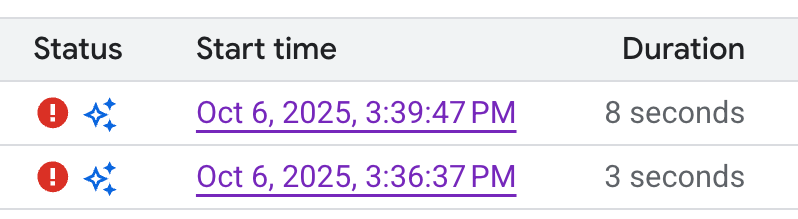
將游標懸停在圖示上,然後按一下「調查」。資料工程代理程式會對資料管道執行錯誤進行根本原因分析 (RCA)。
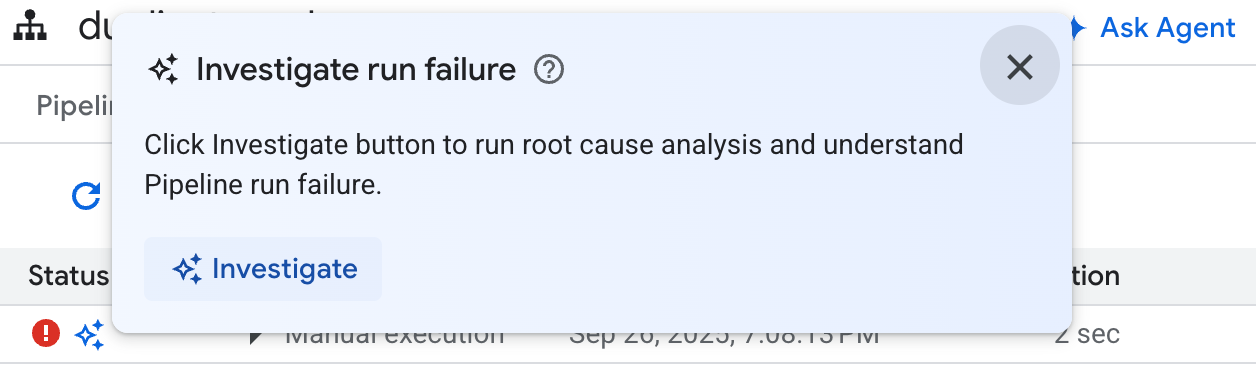
分析完成後,資料工程師代理程式會在「Observations and Hypothesis」(觀察結果和假設)部分生成報告,內容包括:
- 從資料管道執行記錄中擷取的觀察結果和資料點。
- 可能導致失敗的原因。
- 一組可行的步驟或建議,用於解決已識別的問題。
您可以根據資料工程代理程式的疑難排解報告,手動實作建議。您也可以按照下列步驟,指示資料工程代理程式為您套用修正:
- 複製疑難排解報告中的建議。
- 返回資料工程代理:
- 如果您使用 BigQuery 管道,請前往管道頁面,然後按一下「詢問代理程式」。
- 如果您使用 Dataform,請按一下「詢問專員」。
- 將建議貼到提示中,然後指示資料工程代理程式直接修正資料管道。
- 按一下 [傳送]。
建立代理指令
代理程式指令是自然語言指令,可供資料工程代理程式儲存持續性指令,讓代理程式遵循一組自訂的預先定義規則。如要確保貴機構的代理程式結果一致 (例如命名慣例),或強制執行樣式指南,請使用代理程式指令。
您可以建立 GEMINI.MD 內容檔案,做為資料工程代理程式的代理程式指令檔。您可以建立代理程式指令檔,在本地工作區中使用,也可以透過外部存放區,在多個資料管道中使用相同的指令檔。
如要建立代理程式指令,請按照下列步驟操作:
- 在「詢問代理」下方,點按「管道操作說明」。
- 在「Instructions for pipeline」(管道操作說明) 窗格中,按一下「Create instructions file」(建立操作說明檔案)。
在隨即顯示的
GEMINI.MD檔案中,以自然語言輸入指令。以下範例顯示含有多項規則的代理程式指令檔:
  1. All event-specific tables MUST be prefixed with `cs_event_`.
  2. The primary key for any player activity table is a composite key of `player_id` and `event_timestamp_micros`.
  3. Filter out any player actions where `mana_spent` is greater than `max_mana_pool`. This is considered a data anomaly.
按一下 [儲存]。
如要瞭解如何以最佳方式建構代理程式指令檔,請參閱「代理程式指令檔最佳做法」。
從外部存放區載入代理程式指令
如要在多個資料管道中重複使用一組代理程式指令,請連結外部存放區:
- 在「詢問代理」下方,點按「管道操作說明」。
- 在「外部存放區」下方,選取「使用外部存放區中的指示」。
- 在提供的欄位中,指定含有代理程式指令的存放區,這些指令將與資料管道搭配使用。
- 按一下 [儲存]。
提示範例
以下各節提供範例提示,您可以使用這些提示搭配資料工程代理程式,開發資料管道。
將現有資料匯總到新資料表
收到這項提示後,資料工程代理會使用結構定義和樣本,依據鍵推斷資料分組。代理通常會設定新的資料表設定,並提供資料表和資料欄說明。
  Create a daily sales report from the
  bigquery-public-data.thelook_ecommerce.order_items table into a
  reporting.daily_sales_aggregation table.
建立新的衍生資料欄,並在新資料表中新增資料品質檢查
這個提示說明如何新增資料表和資料欄,並同時為資料表指定品質檢查:
  Create a new table named staging.products from
  bigquery-public-data.thelook_ecommerce.products and add a calculated column
  named gross_profit, which is the retail_price minus the cost.


  Also, add the following assertions: ID must not be null and must be unique.
  The retail_price must be greater than or equal to the cost. The department
  column can only contain 'Men' or 'Women'.
在模型定義中建立 UDF
資料工程師代理程式也可以設定 DDL,建立使用者定義函式 (UDF)。雖然代理程式不會實際建立 UDF,但您可以執行資料管道來建立 UDF。這些 UDF 可用於資料管道中的模型定義。
  Create a user-defined function (UDF) named get_age_group that takes an integer
  age as input and returns a string representing the age group ('Gen Z',
  'Millennial', 'Gen X', 'Baby Boomer').


  Use this UDF on the age column from the
  bigquery-public-data.thelook_ecommerce.users table to create a new view called
  reporting.user_age_demographics that includes user_id, age, and the calculated
  age_group.
最佳做法
為提升使用資料工程代理程式和 Dataform 時的成效,建議您採取下列做法:
針對常見要求使用代理程式指令。如果您經常套用特定技巧,或經常對代理程式進行相同修正,請使用代理程式指令集中儲存常見指令和要求。
善用代理計畫。代理計畫有助於分解複雜的管道工作。代理程式計畫也會顯示代理程式的假設和意圖,因此建議您檢查這些計畫,確保代理程式獲得正確的脈絡資訊。
查看企劃書後,您可以向資料工程代理程式提供意見和變更,藉此編輯企劃書。例如:
In the plan, ensure that all of the intermediate tables are views.
在某些情況下,請專員產生不需要您明確核准的計畫會很有幫助。要求代理規劃行動,可促使資料工程代理分解行動,通常能獲得更佳結果。您可以強制代理程式生成計畫並自動執行。例如:
Create a plan for a pipeline that finds the
top N pick up and drop off locations in NYC. You have my explicit pre-approval
to go ahead and execute this plan.
清楚撰寫提示。清楚陳述要求,避免含糊不清。盡可能在提示中提供來源和目的地資料來源,如下列範例所示:
  Extract data from the sales.customers table in the us_west_1 region, and load
  it into the reporting.dim_customers table in BigQuery. Match the schema of the
  destination table.
提出明確且範圍明確的要求。一次問一個問題,並簡潔地撰寫提示。如果提示包含多個問題,請列出問題的每個不同部分,以提高清晰度,如下例所示:
  1. Create a new table named staging.events_cleaned. Use raw.events as the
     source. This new table should filter out any records where the user_agent
     matches the pattern '%bot%'. All original columns should be included.

  2. Next, create a table named analytics.user_sessions. Use
     staging.events_cleaned as the source. This table should calculate the
     duration for each session by grouping by session_id and finding the
     difference between the MAX(event_timestamp) and MIN(event_timestamp).
提供明確的指示,並強調重要詞彙。你可以在提示中強調重要字詞或概念,並將特定需求標示為重要,如下例所示:
  When creating the staging.customers table, it is *VERY IMPORTANT* that you
  transform the email column from the source table bronze.raw_customers.
  Coalesce any NULL values in the email column to an empty string ''.
指定運算順序。如果是依序執行的工作,請將提示結構化為清單,並將列出的項目分成專注的小步驟,如下例所示:
  Create a pipeline with the following steps:
  1. Extract data from the ecomm.orders table.
  2. Join the extracted data with the marts.customers table on customer_id.
  3. Load the final result into the reporting.customer_orders table.
反覆修正測試。請嘗試不同的詞組和做法,找出最佳結果。如果代理程式產生無效的 SQL 或其他錯誤,請使用範例或公開文件引導代理程式。
  The previous query was incorrect because it removed the timestamp. Please
  correct the SQL. Use the TIMESTAMP_TRUNC function to truncate the
  event_timestamp to the nearest hour, instead of casting it as a DATE. For
  example: TIMESTAMP_TRUNC(event_timestamp, HOUR).