אימות של אפליקציות שהותקנו באמצעות חשבונות משתמשים

במדריך הזה מוסבר איך לבצע אימות באמצעות חשבונות משתמשים כדי לגשת ל-BigQuery API כשהאפליקציה מותקנת במחשבים של משתמשים.

כדי לוודא שהאפליקציה ניגשת רק לטבלאות BigQuery שזמינות למשתמש הקצה, צריך לבצע אימות באמצעות פרטי כניסה של משתמש. אפשר להריץ שאילתות באמצעות פרטי כניסה של משתמש רק בפרויקט של משתמש הקצה, ולא בפרויקט של האפליקציה. Google Cloud כתוצאה מכך, המשתמש מחויב על השאילתות במקום האפליקציה.

לפני שמתחילים

  1. יוצרים פרויקט Google Cloud שמייצג את האפליקציה המותקנת.
  2. מתקינים את ספריות הלקוח של BigQuery.
  3. מתקינים ספריות אימות.

    Java

    אם משתמשים ב-Maven, צריך לכלול את יחסי התלות הבאים בקובץ ה-pom.

    <dependency>
      <groupId>com.google.oauth-client</groupId>
      <artifactId>google-oauth-client-java6</artifactId>
      <version>1.31.0</version>
    </dependency>
    <dependency>
      <groupId>com.google.oauth-client</groupId>
      <artifactId>google-oauth-client-jetty</artifactId>
      <version>1.31.0</version>
    </dependency>

    Python

    התקנה של oauthlib integration for Google Auth.

    pip install --upgrade google-auth-oauthlib

    Node.js

    התקנה של oauthlib integration for Google Auth.

    npm install google-auth-library
    npm install readline-promise

הגדרת פרטי הכניסה של הלקוח

משתמשים בלחצן הבא כדי לבחור פרויקט וליצור את פרטי הכניסה הנדרשים.

קבלת פרטי כניסה

יצירת פרטי כניסה באופן ידני

  1. נכנסים לדף Credentials במסוף Google Cloud .
  2. ממלאים את שדות החובה במסך ההסכמה של OAuth.
  3. בדף פרטי כניסה, לוחצים על הלחצן יצירת פרטי כניסה.

    בוחרים באפשרות מזהה לקוח OAuth.

  4. בוחרים באפשרות מחשב בתור סוג האפליקציה ולוחצים על יצירה.
  5. מורידים את פרטי הכניסה בלחיצה על הלחצן Download JSON.
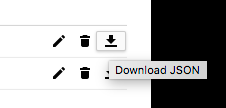
    מורידים את קובץ ה-JSON.

    שומרים את הקובץ של פרטי הכניסה ב-client_secrets.json. חשוב להפיץ את הקובץ הזה באפליקציה שלכם.

אימות של ממשק API והתקשרות אליו

  1. משתמשים בפרטי הכניסה של הלקוח כדי לבצע תהליך OAuth 2.0.

    Java

    import com.google.api.client.auth.oauth2.Credential;
    import com.google.api.client.extensions.java6.auth.oauth2.AuthorizationCodeInstalledApp;
    import com.google.api.client.extensions.jetty.auth.oauth2.LocalServerReceiver;
    import com.google.api.client.googleapis.auth.oauth2.GoogleAuthorizationCodeFlow;
    import com.google.api.client.googleapis.auth.oauth2.GoogleClientSecrets;
    import com.google.api.client.googleapis.javanet.GoogleNetHttpTransport;
    import com.google.api.client.json.JsonFactory;
    import com.google.api.client.json.jackson2.JacksonFactory;
    import com.google.api.client.util.store.FileDataStoreFactory;
    import com.google.api.gax.paging.Page;
    import com.google.auth.oauth2.GoogleCredentials;
    import com.google.auth.oauth2.UserCredentials;
    import com.google.cloud.bigquery.BigQuery;
    import com.google.cloud.bigquery.BigQueryException;
    import com.google.cloud.bigquery.BigQueryOptions;
    import com.google.cloud.bigquery.Dataset;
    import com.google.common.collect.ImmutableList;
    import java.io.File;
    import java.io.IOException;
    import java.io.InputStream;
    import java.io.InputStreamReader;
    import java.nio.file.Files;
    import java.nio.file.Path;
    import java.nio.file.Paths;
    import java.security.GeneralSecurityException;
    import java.util.List;
    
    // Sample to authenticate by using a user credential
    public class AuthUserFlow {
    
      private static final File DATA_STORE_DIR =
          new File(AuthUserFlow.class.getResource("/").getPath(), "credentials");
      private static final JsonFactory JSON_FACTORY = JacksonFactory.getDefaultInstance();
      // i.e redirect_uri http://localhost:61984/Callback
      private static final int LOCAL_RECEIVER_PORT = 61984;
    
      public static void runAuthUserFlow() {
        // TODO(developer): Replace these variables before running the sample.
        /**
         * Download your OAuth2 configuration from the Google Developers Console API Credentials page.
         * https://console.cloud.google.com/apis/credentials
         */
        Path credentialsPath = Paths.get("path/to/your/client_secret.json");
        List<String> scopes = ImmutableList.of("https://www.googleapis.com/auth/bigquery");
        authUserFlow(credentialsPath, scopes);
      }
    
      public static void authUserFlow(Path credentialsPath, List<String> selectedScopes) {
        // Reading credentials file
        try (InputStream inputStream = Files.newInputStream(credentialsPath)) {
    
          // Load client_secret.json file
          GoogleClientSecrets clientSecrets =
              GoogleClientSecrets.load(JSON_FACTORY, new InputStreamReader(inputStream));
          String clientId = clientSecrets.getDetails().getClientId();
          String clientSecret = clientSecrets.getDetails().getClientSecret();
    
          // Generate the url that will be used for the consent dialog.
          GoogleAuthorizationCodeFlow flow =
              new GoogleAuthorizationCodeFlow.Builder(
                      GoogleNetHttpTransport.newTrustedTransport(),
                      JSON_FACTORY,
                      clientSecrets,
                      selectedScopes)
                  .setDataStoreFactory(new FileDataStoreFactory(DATA_STORE_DIR))
                  .setAccessType("offline")
                  .setApprovalPrompt("auto")
                  .build();
    
          // Exchange an authorization code for  refresh token
          LocalServerReceiver receiver =
              new LocalServerReceiver.Builder().setPort(LOCAL_RECEIVER_PORT).build();
          Credential credential = new AuthorizationCodeInstalledApp(flow, receiver).authorize("user");
    
          // OAuth2 Credentials representing a user's identity and consent
          GoogleCredentials credentials =
              UserCredentials.newBuilder()
                  .setClientId(clientId)
                  .setClientSecret(clientSecret)
                  .setRefreshToken(credential.getRefreshToken())
                  .build();
    
          // Initialize client that will be used to send requests. This client only needs to be created
          // once, and can be reused for multiple requests.
          BigQuery bigquery =
              BigQueryOptions.newBuilder().setCredentials(credentials).build().getService();
    
          Page<Dataset> datasets = bigquery.listDatasets(BigQuery.DatasetListOption.pageSize(100));
          if (datasets == null) {
            System.out.println("Dataset does not contain any models");
            return;
          }
          datasets
              .iterateAll()
              .forEach(
                  dataset -> System.out.printf("Success! Dataset ID: %s ", dataset.getDatasetId()));
    
        } catch (BigQueryException | IOException | GeneralSecurityException ex) {
          System.out.println("Project does not contain any datasets \n" + ex.toString());
        }
      }
    }

    Python

    from google_auth_oauthlib import flow
    
    # A local server is used as the callback URL in the auth flow.
    appflow = flow.InstalledAppFlow.from_client_secrets_file(
        "client_secrets.json", scopes=["https://www.googleapis.com/auth/bigquery"]
    )
    
    # This launches a local server to be used as the callback URL in the desktop
    # app auth flow. If you are accessing the application remotely, such as over
    # SSH or a remote Jupyter notebook, this flow will not work. Use the
    # `gcloud auth application-default login --no-browser` command or workload
    # identity federation to get authentication tokens, instead.
    #
    appflow.run_local_server()
    
    credentials = appflow.credentials

    Node.js

    const {OAuth2Client} = require('google-auth-library');
    const readline = require('readline-promise').default;
    
    function startRl() {
      const rl = readline.createInterface({
        input: process.stdin,
        output: process.stdout,
      });
    
      return rl;
    }
    
    /**
     * Download your OAuth2 configuration from the Google
     * Developers Console API Credentials page.
     * https://console.cloud.google.com/apis/credentials
     */
    const keys = require('./oauth2.keys.json');
    
    /**
     * Create a new OAuth2Client, and go through the OAuth2 content
     * workflow. Return the full client to the callback.
     */
    async function getRedirectUrl() {
      const rl = main.startRl();
      // Create an oAuth client to authorize the API call.  Secrets are kept in a `keys.json` file,
      // which should be downloaded from the Google Developers Console.
      const oAuth2Client = new OAuth2Client(
        keys.installed.client_id,
        keys.installed.client_secret,
        keys.installed.redirect_uris[0]
      );
    
      // Generate the url that will be used for the consent dialog.
      const authorizeUrl = oAuth2Client.generateAuthUrl({
        access_type: 'offline',
        scope: 'https://www.googleapis.com/auth/bigquery',
        prompt: 'consent',
      });
    
      console.info(
        `Please visit this URL to authorize this application: ${authorizeUrl}`
      );
    
      const code = await rl.questionAsync('Enter the authorization code: ');
      const tokens = await main.exchangeCode(code);
      rl.close();
    
      return tokens;
    }
    
    // Exchange an authorization code for an access token
    async function exchangeCode(code) {
      const oAuth2Client = new OAuth2Client(
        keys.installed.client_id,
        keys.installed.client_secret,
        keys.installed.redirect_uris[0]
      );
    
      const r = await oAuth2Client.getToken(code);
      console.info(r.tokens);
      return r.tokens;
    }
    
    async function authFlow(projectId = 'project_id') {
      /**
       * TODO(developer):
       * Save Project ID as environment variable PROJECT_ID="project_id"
       * Uncomment the following line before running the sample.
       */
      // projectId = process.env.PROJECT_ID;
    
      const tokens = await main.getRedirectUrl();
    
      const credentials = {
        type: 'authorized_user',
        client_id: keys.installed.client_id,
        client_secret: keys.installed.client_secret,
        refresh_token: tokens.refresh_token,
      };
    
      return {
        projectId,
        credentials,
      };
    }
  2. משתמשים בפרטי הכניסה המאומתים כדי להתחבר לממשק BigQuery API.

    Java

    import com.google.api.client.auth.oauth2.Credential;
    import com.google.api.client.extensions.java6.auth.oauth2.AuthorizationCodeInstalledApp;
    import com.google.api.client.extensions.jetty.auth.oauth2.LocalServerReceiver;
    import com.google.api.client.googleapis.auth.oauth2.GoogleAuthorizationCodeFlow;
    import com.google.api.client.googleapis.auth.oauth2.GoogleClientSecrets;
    import com.google.api.client.googleapis.javanet.GoogleNetHttpTransport;
    import com.google.api.client.json.JsonFactory;
    import com.google.api.client.json.jackson2.JacksonFactory;
    import com.google.api.client.util.store.FileDataStoreFactory;
    import com.google.auth.oauth2.GoogleCredentials;
    import com.google.auth.oauth2.UserCredentials;
    import com.google.cloud.bigquery.BigQuery;
    import com.google.cloud.bigquery.BigQueryException;
    import com.google.cloud.bigquery.BigQueryOptions;
    import com.google.cloud.bigquery.QueryJobConfiguration;
    import com.google.cloud.bigquery.TableResult;
    import com.google.common.collect.ImmutableList;
    import java.io.File;
    import java.io.IOException;
    import java.io.InputStream;
    import java.io.InputStreamReader;
    import java.nio.file.Files;
    import java.nio.file.Path;
    import java.nio.file.Paths;
    import java.security.GeneralSecurityException;
    import java.util.List;
    
    // Sample to query by using a user credential
    public class AuthUserQuery {
    
      private static final File DATA_STORE_DIR =
          new File(AuthUserQuery.class.getResource("/").getPath(), "credentials");
      private static final JsonFactory JSON_FACTORY = JacksonFactory.getDefaultInstance();
      // i.e redirect_uri http://localhost:61984/Callback
      private static final int LOCAL_RECEIVER_PORT = 61984;
    
      public static void runAuthUserQuery() {
        // TODO(developer): Replace these variables before running the sample.
        /**
         * Download your OAuth2 configuration from the Google Developers Console API Credentials page.
         * https://console.cloud.google.com/apis/credentials
         */
        Path credentialsPath = Paths.get("path/to/your/client_secret.json");
        List<String> scopes = ImmutableList.of("https://www.googleapis.com/auth/bigquery");
        String query =
            "SELECT name, SUM(number) as total"
                + "  FROM `bigquery-public-data.usa_names.usa_1910_current`"
                + "  WHERE name = 'William'"
                + "  GROUP BY name;";
        authUserQuery(credentialsPath, scopes, query);
      }
    
      public static void authUserQuery(
          Path credentialsPath, List<String> selectedScopes, String query) {
        // Reading credentials file
        try (InputStream inputStream = Files.newInputStream(credentialsPath)) {
    
          // Load client_secret.json file
          GoogleClientSecrets clientSecrets =
              GoogleClientSecrets.load(JSON_FACTORY, new InputStreamReader(inputStream));
          String clientId = clientSecrets.getDetails().getClientId();
          String clientSecret = clientSecrets.getDetails().getClientSecret();
    
          // Generate the url that will be used for the consent dialog.
          GoogleAuthorizationCodeFlow flow =
              new GoogleAuthorizationCodeFlow.Builder(
                      GoogleNetHttpTransport.newTrustedTransport(),
                      JSON_FACTORY,
                      clientSecrets,
                      selectedScopes)
                  .setDataStoreFactory(new FileDataStoreFactory(DATA_STORE_DIR))
                  .setAccessType("offline")
                  .setApprovalPrompt("auto")
                  .build();
    
          // Exchange an authorization code for  refresh token
          LocalServerReceiver receiver =
              new LocalServerReceiver.Builder().setPort(LOCAL_RECEIVER_PORT).build();
          Credential credential = new AuthorizationCodeInstalledApp(flow, receiver).authorize("user");
    
          // OAuth2 Credentials representing a user's identity and consent
          GoogleCredentials credentials =
              UserCredentials.newBuilder()
                  .setClientId(clientId)
                  .setClientSecret(clientSecret)
                  .setRefreshToken(credential.getRefreshToken())
                  .build();
    
          // Initialize client that will be used to send requests. This client only needs to be created
          // once, and can be reused for multiple requests.
          BigQuery bigquery =
              BigQueryOptions.newBuilder().setCredentials(credentials).build().getService();
    
          QueryJobConfiguration queryConfig = QueryJobConfiguration.newBuilder(query).build();
    
          TableResult results = bigquery.query(queryConfig);
    
          results
              .iterateAll()
              .forEach(row -> row.forEach(val -> System.out.printf("%s,", val.toString())));
    
          System.out.println("Query performed successfully.");
    
        } catch (BigQueryException | IOException | GeneralSecurityException | InterruptedException ex) {
          System.out.println("Query not performed \n" + ex.toString());
        }
      }
    }

    Python

    from google.cloud import bigquery
    
    # TODO: Uncomment the line below to set the `project` variable.
    # project = 'user-project-id'
    #
    # The `project` variable defines the project to be billed for query
    # processing. The user must have the bigquery.jobs.create permission on
    # this project to run a query. See:
    # https://cloud.google.com/bigquery/docs/access-control#permissions
    
    client = bigquery.Client(project=project, credentials=credentials)
    
    query_string = """SELECT name, SUM(number) as total
    FROM `bigquery-public-data.usa_names.usa_1910_current`
    WHERE name = 'William'
    GROUP BY name;
    """
    results = client.query_and_wait(query_string)
    
    # Print the results.
    for row in results:  # Wait for the job to complete.
        print("{}: {}".format(row["name"], row["total"]))

    Node.js

    async function query() {
      const {BigQuery} = require('@google-cloud/bigquery');
    
      const credentials = await main.authFlow();
      const bigquery = new BigQuery(credentials);
    
      // Queries the U.S. given names dataset for the state of Texas.
      const query = `SELECT name, SUM(number) as total
      FROM \`bigquery-public-data.usa_names.usa_1910_current\`
      WHERE name = 'William'
      GROUP BY name;`;
    
      // For all options, see https://cloud.google.com/bigquery/docs/reference/rest/v2/jobs/query
      const options = {
        query: query,
      };
    
      // Run the query as a job
      const [job] = await bigquery.createQueryJob(options);
      console.log(`Job ${job.id} started.`);
    
      // Wait for the query to finish
      const [rows] = await job.getQueryResults();
    
      // Print the results
      console.log('Rows:');
      rows.forEach(row => console.log(row));
    
      return rows;
    }
    
    const main = {
      query,
      authFlow,
      exchangeCode,
      getRedirectUrl,
      startRl,
    };
    module.exports = {
      main,
    };
    
    if (module === require.main) {
      query().catch(console.error);
    }

כשמריצים את הקוד לדוגמה, הוא משיק דפדפן שמבקש גישה לפרויקט שמשויך לסודות הלקוח. אפשר להשתמש בפרטי הכניסה שמתקבלים כדי להיכנס למשאבי BigQuery של המשתמש, כי הדוגמה ביקשה את היקף ההרשאות של BigQuery.

המאמרים הבאים

  1. מידע נוסף על דרכים אחרות לאימות האפליקציה כדי לגשת אל BigQuery API
  2. אימות באמצעות פרטי כניסה של משתמשי קצה לכל ממשקי Cloud API