

Validate your data warehouse migration
The BigQuery Migration Service validation service lets you verify that tables migrated from your source data warehouse match your target tables in BigQuery. You can compare schemas and table data to identify discrepancies during your migration.
The validation service client connects to your source database and extracts source schema and row data to a Cloud Storage bucket that you control. Once extracted, the validation service compares the extracted schema and data in the Cloud Storage bucket to your migrated BigQuery tables.
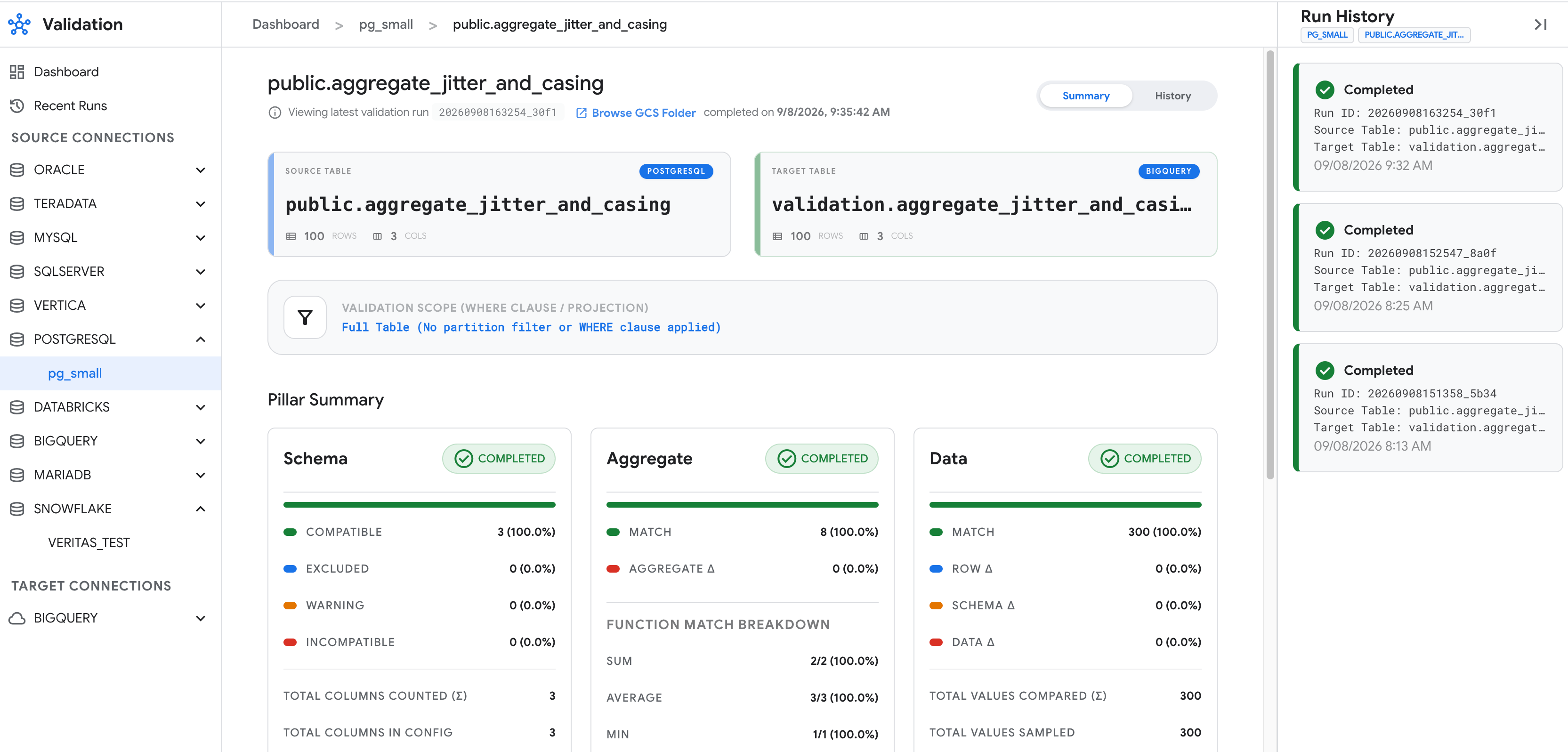
A validation workflow compares your source tables and target BigQuery tables across three validation pillars:
- Schema validation (
--schema): compares column names, data types, and type compatibility between your source table and target BigQuery table. - Aggregate validation (
--aggregate): computes and compares table-level and column-level aggregate metrics—such as row counts,SUM,AVG,MIN,MAX, boolean distributions, and string lengths—across the entire table. - Data validation (
--data): performs row-by-row comparison using either an exhaustive full-table scan (BRUTE_FORCE) or randomized key-based sampling (SAMPLE) to detect missing rows and cell-level value drift.
Supported locations
The validation service is available in select locations. For more information, see BigQuery Migration Service locations.
Data handling and security considerations
The validation service extracts and stages different data depending on the validation pillar that you run:
- Schema validation (
--schema): uploads only column names, data types, and table statistics to thesource_query_result.jsonfile, without extracting cell values. - Aggregate validation (
--aggregate): uploads computed aggregate metrics to thesource_aggregates.parquetfile, including actualMINandMAXcell values from included columns. - Data validation (
--data): extracts raw, unmasked cell values from sampled rows, or from all rows when using theBRUTE_FORCEstrategy. It uploads these values in Apache Parquet or CSV format to your Cloud Storage staging bucket and loads them into thevalidation_resultsdataset in BigQuery.
To protect your data and secure your validation environment, configure the following settings:
- Exclude sensitive columns: add sensitive columns to the
columnSettings.excludefield to omit them from source extraction queries, target comparisons, and validation reports. - Minimize local data storage: set the
googleCloudStorage.gcsPathfield in thesettings.yamlfile to stream sampled rows directly to Cloud Storage without writing them to local disk. On shared hosts, delete the local--output-dirworking directory after each run to remove local metadata, aggregate, and log files. - Encrypt staged data and results: configure customer-managed encryption
keys (CMEK) with Cloud Key Management Service on your Cloud Storage staging bucket
and your BigQuery results dataset (
validation_resultsby default, or the dataset specified in theresults.datasetfield) before running validation. - Restrict configuration access: store validation configuration files in a
version-controlled repository that requires code review, or in a
Cloud Storage bucket where only trusted users have the
storage.objects.createpermission. - Enforce least-privilege access: grant the workflow creator the
roles/bigquery.dataViewerrole only on the target datasets or tables being validated, not on the project. Use a read-only source database user as described in Configure source database privileges.
Before you begin
In the Google Cloud console, on the project selector page, select or create a Google Cloud project that contains your target BigQuery datasets.
Verify that billing is enabled for your Google Cloud project.
Enable the BigQuery, BigQuery Migration Service, Cloud Storage, and (if storing database passwords in Secret Manager) Secret Manager APIs.
Create or select a Cloud Storage bucket in the same location as your target BigQuery dataset to stage extracted metadata and data samples. For more information, see Create a bucket.
Required roles and permissions
A validation run has three parts, and each can be performed by a different principal:
- Data collection: the validation client reads your source database and uploads metadata, aggregates, and sampled rows to your Cloud Storage staging bucket. It doesn't call BigQuery.
- Validation: a BigQuery Migration Service validation workflow compares the staged
data with your target tables. The workflow runs with the credentials of the
principal that created it, whether that principal is the validation client,
gcloud, or the Google Cloud console. - Viewing results: reading the results dataset and the Cloud Storage reports.
generate-config doesn't require any Google Cloud permissions.
Data collection
To get the permissions that you need to collect source data, ask your administrator to grant you the following IAM roles:
- Storage Object Creator (
roles/storage.objectCreator) on the staging bucket - Storage Object Viewer (
roles/storage.objectViewer) on the staging bucket -
Read configuration files from Cloud Storage:
Storage Object Viewer (
roles/storage.objectViewer) on the configuration bucket -
Read database passwords from Secret Manager:
Secret Manager Secret Accessor (
roles/secretmanager.secretAccessor) on the secret
For more information about granting roles, see Manage access to projects, folders, and organizations.
These predefined roles contain the permissions required to collect source data. To see the exact permissions that are required, expand the Required permissions section:
Required permissions
The following permissions are required to collect source data:
-
storage.objects.createon the staging bucket -
storage.objects.geton the staging bucket -
Read configuration files from Cloud Storage:
-
storage.objects.geton the configuration bucket -
storage.objects.liston the configuration bucket
-
-
Read database passwords from Secret Manager:
secretmanager.versions.accesson the secret
You might also be able to get these permissions with custom roles or other predefined roles.
With --extract-only, data collection doesn't need any BigQuery
or BigQuery Migration Service permissions. Without it, the client also creates the
validation workflows and needs the validation roles.
Validation
To get the permissions that you need to create and run validation workflows, ask your administrator to grant you the following IAM roles:
- MigrationWorkflow Editor (
roles/bigquerymigration.editor) on the project - BigQuery Job User (
roles/bigquery.jobUser) on the project - BigQuery Data Viewer (
roles/bigquery.dataViewer) on each target dataset - BigQuery Data Editor (
roles/bigquery.dataEditor) on the results dataset - Storage Object User (
roles/storage.objectUser) on the staging bucket -
If the results dataset doesn't exist:
BigQuery User (
roles/bigquery.user) on the project
These predefined roles contain the permissions required to create and run validation workflows. To see the exact permissions that are required, expand the Required permissions section:
Required permissions
The following permissions are required to create and run validation workflows:
-
bigquerymigration.workflows.createon the project -
bigquerymigration.workflows.geton the project -
bigquery.jobs.createon the project -
bigquery.tables.geton each target dataset -
bigquery.tables.getDataon each target dataset -
bigquery.datasets.geton the results dataset -
bigquery.tables.geton the results dataset -
bigquery.tables.createon the results dataset -
bigquery.tables.updateon the results dataset -
bigquery.tables.updateDataon the results dataset -
bigquery.tables.getDataon the results dataset -
storage.objects.geton the staging bucket -
storage.objects.createon the staging bucket -
storage.objects.deleteon the staging bucket -
If the results dataset doesn't exist:
bigquery.datasets.createon the project
roles/bigquerymigration.editor contains many permissions that validation
doesn't use. For least privilege, grant a
custom role with only
bigquerymigration.workflows.create and bigquerymigration.workflows.get.
Validation only reads your target tables and writes only to the results dataset. We recommend that you create the results dataset in advance so that no principal needs permission to create datasets in your project.
Viewing results
To get the permissions that you need to view validation results, ask your administrator to grant you the following IAM roles:
- BigQuery Job User (
roles/bigquery.jobUser) on the project that contains the results dataset - BigQuery Data Viewer (
roles/bigquery.dataViewer) on the results dataset -
Read reports in Cloud Storage:
Storage Object Viewer (
roles/storage.objectViewer) on the staging bucket -
List and view validation workflows in the Google Cloud console:
MigrationWorkflow Viewer (
roles/bigquerymigration.viewer) on the project
These predefined roles contain the permissions required to view validation results. To see the exact permissions that are required, expand the Required permissions section:
Required permissions
The following permissions are required to view validation results:
-
bigquery.jobs.createon the project -
bigquery.tables.geton the results dataset -
bigquery.tables.getDataon the results dataset -
Read reports in Cloud Storage:
-
storage.objects.geton the staging bucket -
storage.objects.liston the staging bucket
-
-
List and view validation workflows in the Google Cloud console:
-
bigquerymigration.workflows.liston the project -
bigquerymigration.workflows.geton the project
-
Configure source database privileges
You must configure read-only access to the source database user with the following privileges:
SELECTprivilege on every source table being validated.- Read access to the system catalog views used for schema and primary-key
discovery (such as
information_schematables,ALL_CONSTRAINTSandALL_TAB_COLUMNSon Oracle, orSVV_COLUMNSandpg_attributeon Amazon Redshift).
Don't grant this user write, DDL, or administrative privileges. The validation client runs SQL from your validation configuration as this user. For more information, see Data handling and security considerations.
Limitations
The validation service is subject to the following limitations:
- BigQuery is the only supported target database. Validating between two non-BigQuery databases or using BigQuery as a validation source is unsupported.
- Your target BigQuery dataset, the results dataset
(
validation_resultsby default, or the custom dataset configured underresultsinsettings.yaml), your Cloud Storage staging bucket, and the validation workflow location (BQMS_VALIDATION_LOCATION) must be in the same location. When the validation service creates the results dataset, it defaults the dataset location to the region used by your Cloud Storage staging bucket and target BigQuery dataset, orresults.locationif explicitly set. - Data type support varies by source. Columns with unsupported types are excluded from validation. For details, see Supported data warehouses.
- Per-run comparison tables created in
BigQuery expire automatically based on
resultTtlHoursinsettings.yaml, which defaults to168.0hours, or seven days. Don't configure a dataset-level default table expiration on thevalidation_resultsdataset, because doing so also expires long-lived audit tables such asrun_history,run_metrics, andcolumn_history. - BigQuery table names are
case-sensitive. When
generate-configcreates configurations from adwh-migration-dumpertool tool metadata archive without a translationtables.yamlmapping, target table names preserve the source identifier casing. For example, uppercase table names from Oracle or Snowflake. Verify thattargetTable.namematches the exact case of your table in BigQuery.
Supported data warehouses
The validation service supports the following source databases. Each section includes what JDBC driver is bundled with the installation, whether or not you can generate table configurations automatically from a dwh-migration-dumper tool tool metadata archive, the partitioning types supported for large tables from this database, and the supported data types for validation.
- Teradata
- Snowflake
- Amazon Redshift
- Databricks
- Apache Hive
- SQL Server
- MariaDB
- MySQL
- Oracle
- PostgreSQL
Parameterized variants of the supported data
types, such as VARCHAR(255) or DECIMAL(10,2), are also supported.
The validation service loads any JAR files in the drivers/ directory before
the automatically downloaded drivers, so you can also use drivers/ to override
a bundled driver version.
If you automatically generate a validation configuration file, columns with
unsupported data types are automatically added to columnSettings.exclude. For
manual configurations, you must explicitly exclude them in columnSettings.exclude.
For most supported source databases, the validation tool automatically downloads
the required JDBC driver from Maven Central on first use, verifies its SHA-256
checksum, and caches it locally in ~/.cache/google-cloud-bqms/drivers/ (or
$XDG_CACHE_HOME/google-cloud-bqms/drivers/). For data warehouses that use proprietary drivers, such as Teradata, or when running in an offline or air-gapped environment, do the following:
- Place the required driver JAR file in
./drivers/,<sdk_root>/platform/bqms/drivers/, or the directory specified by theBQMS_DRIVER_DIRenvironment variable. Any driver JAR placed in these local directories takes precedence over automatic Maven Central downloads. - To disable automatic network downloads completely in air-gapped environments, set
BQMS_AUTO_DOWNLOAD_DRIVERS=false, or setBQMS_MAVEN_MIRRORto point to an internal Maven repository mirror.
To learn about each data source supported by the validation service, select one of the following options:
Teradata
Validations for Teradata migrations are supported as follows:
dialectvalue:teradata- JDBC driver: User-supplied. Download the Teradata JDBC
driver JAR, such as
terajdbc4.jarorterajdbc.jar, from Teradata and copy it into thedrivers/directory or the directory specified byBQMS_DRIVER_DIR. - Automatic configuration generation: Supported from a
dwh-migration-dumpertool metadata archive (--connector teradata). - Partitioned extraction:
INTEGER_RANGE,PHYSICAL
| Category | Data types |
|---|---|
| Numeric | BYTEINT, SMALLINT, INTEGER, INT, BIGINT, DECIMAL, DEC, NUMERIC, NUMBER, FLOAT, REAL, DOUBLE PRECISION |
| String | CHAR, CHARACTER, VARCHAR, CHARACTER VARYING, LONG VARCHAR |
| Date and time | DATE, TIME, TIME WITH TIME ZONE, TIMESTAMP, TIMESTAMP WITH TIME ZONE |
When validating migrations from Teradata, consider the following:
- When a table has no explicit primary key, comparison keys are discovered
from unique primary indexes (
UPI) or unique secondary indexes (USI). Non-unique primary indexes (NUPI) are not used as comparison keys. - Fixed-precision
NUMBER(P,S)is supported; unconstrainedNUMBER(without precision) isn't supported. UnconstrainedNUMBER,CLOB,BLOB,BYTE,VARBYTE,INTERVAL,PERIOD,JSON, andXMLcolumns are excluded automatically bygenerate-config(or must be listed incolumnSettings.excludefor manual configurations). - Fixed-width
CHARcolumns are trimmed automatically. BothLATINandUNICODEcharacter sets andCASESPECIFIC/NOT CASESPECIFICattributes are supported. TIME WITH TIME ZONEandTIMESTAMP WITH TIME ZONEvalues are normalized to UTC (AT 0) before comparison.
Snowflake
Validations for Snowflake migrations are supported as follows:
dialectvalue:snowflake- JDBC driver: Automatically downloaded on first use
(
net.snowflake:snowflake-jdbc), or user-supplied in thedrivers/directory for offline environments. - Automatic configuration generation: Supported from a
dwh-migration-dumpertool metadata archive (--connector snowflake). - Partitioned extraction:
INTEGER_RANGE,DATE_RANGE
The validation service supports the following data types for Snowflake migrations:
| Category | Data types |
|---|---|
| Numeric | NUMBER, DECIMAL, NUMERIC, FLOAT, REAL, DOUBLE |
| String | CHAR, VARCHAR, STRING, TEXT |
| Date and time | DATE, TIME, TIMESTAMP_NTZ, TIMESTAMP_LTZ, TIMESTAMP_TZ |
| Boolean | BOOLEAN |
When validating migrations from Snowflake, consider the following:
- Fixed-width
CHARcolumns are trimmed automatically. - If you replicated data with BigQuery Data Transfer Service, set
tolerances.timestamp: 0.001to absorb sub-millisecond rounding.
Amazon Redshift
Validations for Amazon Redshift migrations are supported as follows:
dialectvalue:redshift- JDBC driver: Automatically downloaded on first use
(
com.amazon.redshift:redshift-jdbc42), or user-supplied in thedrivers/directory for offline environments. - Automatic configuration generation: Supported from a
dwh-migration-dumpertool metadata archive (--connector redshift). - Partitioned extraction:
INTEGER_RANGE,PHYSICAL
The validation service supports the following data types for Amazon Redshift migrations:
| Category | Data types |
|---|---|
| Numeric | SMALLINT, INTEGER, BIGINT, DECIMAL, NUMERIC, REAL, DOUBLE PRECISION |
| String | CHAR, VARCHAR, TEXT |
| Date and time | DATE, TIME, TIMETZ, TIMESTAMP, TIMESTAMPTZ |
| Boolean | BOOLEAN |
| Semi-structured | SUPER |
When validating migrations from Amazon Redshift, consider the following:
- Schema inspection uses
SVV_COLUMNS, so late-binding views are supported. - When a table has no primary key, comparison keys fall back automatically to a single-column
DISTKEYorSORTKEY. GEOMETRYcolumns are not supported.
Databricks
Validations for Databricks migrations are supported as follows:
dialectvalue:databricks- JDBC driver: Automatically downloaded on first use
(
com.databricks:databricks-jdbc), or user-supplied in thedrivers/directory for offline environments. - Automatic configuration generation: Not supported. Create a manual table configuration file.
- Partitioned extraction:
INTEGER_RANGE
The validation service supports the following data types for Databricks migrations:
| Category | Data types |
|---|---|
| Numeric | BYTE, TINYINT, SHORT, SMALLINT, INT, INTEGER, LONG, BIGINT, FLOAT, DOUBLE, DECIMAL, NUMERIC |
| String | CHAR, VARCHAR, STRING |
| Date and time | DATE, TIMESTAMP |
| Boolean | BOOLEAN |
| Binary | BINARY |
| Complex | ARRAY, MAP, STRUCT |
When validating migrations from Databricks, consider the following:
- Authenticate with a personal access token: set
user: tokenand supply the token throughpasswordSecret. - Schema inspection is query-based (
SELECT * ... WHERE 1=0), so Unity Catalog and Hive metastore workspaces are both supported.
Apache Hive
Validations for Apache Hive migrations are supported as follows:
dialectvalue:hive- JDBC driver: Automatically downloaded on first use
(
org.apache.hive:hive-jdbcstandalone JAR), or user-supplied in thedrivers/directory for offline environments. - Automatic configuration generation: Supported from a
dwh-migration-dumpertool metadata archive (--connector hiveql). - Partitioned extraction:
INTEGER_RANGE
The validation service supports the following data types for Hive migrations:
| Category | Data types |
|---|---|
| Numeric | TINYINT, SMALLINT, INT, INTEGER, BIGINT, FLOAT, DOUBLE, DECIMAL, NUMERIC |
| String | CHAR, VARCHAR, STRING |
| Date and time | DATE, TIMESTAMP |
| Boolean | BOOLEAN |
| Binary | BINARY |
| Complex | ARRAY, MAP, STRUCT |
When validating migrations from Hive, consider the following:
- Schema inspection is query-based (
SELECT * ... WHERE 1=0). - Hive tables rarely define primary keys. Tables without comparison keys automatically use full-row hash aggregation for the data pillar.
SQL Server
Validations for SQL Server migrations are supported as follows:
dialectvalue:sqlserver- JDBC driver: Automatically downloaded on first use
(
com.microsoft.sqlserver:mssql-jdbc), or user-supplied in thedrivers/directory for offline environments. - Automatic configuration generation: Supported from a
dwh-migration-dumpertool metadata archive (--connector sqlserver). - Partitioned extraction:
INTEGER_RANGE
The validation service supports the following data types for SQL Server migrations:
| Category | Data types |
|---|---|
| Numeric | INT, BIGINT, DECIMAL, NUMERIC, FLOAT, REAL |
| String | CHAR, VARCHAR, TEXT |
| Date and time | DATE, DATETIME, TIMESTAMP |
| Boolean | BIT |
When validating migrations from SQL Server, consider the following:
- The default JDBC URL sets
encrypt=true;trustServerCertificate=true;. Override it with theurlconnection key if you require strict TLS certificate validation.
MariaDB
Validations for MariaDB migrations are supported as follows:
dialectvalue:mariadb- JDBC driver: Automatically downloaded on first use
(
org.mariadb.jdbc:mariadb-java-client), or user-supplied in thedrivers/directory for offline environments. - Automatic configuration generation: Create a manual table configuration file.
- Partitioned extraction:
INTEGER_RANGE
The validation service supports the following data types for MariaDB migrations:
| Category | Data types |
|---|---|
| Numeric | TINYINT, SMALLINT, MEDIUMINT, INT, INTEGER, BIGINT, FLOAT, DOUBLE, DECIMAL, NUMERIC |
| String | CHAR, VARCHAR, TINYTEXT, TEXT, MEDIUMTEXT, LONGTEXT, ENUM, SET |
| Date and time | DATE, TIME, DATETIME, TIMESTAMP, YEAR |
| Binary and large objects | BINARY, VARBINARY, TINYBLOB, BLOB, MEDIUMBLOB, LONGBLOB |
MySQL
Validations for MySQL migrations are supported as follows:
dialectvalue:mysql- JDBC driver: Automatically downloaded on first use
(
com.mysql:mysql-connector-j), or user-supplied in thedrivers/directory for offline environments. - Automatic configuration generation: Create a manual table configuration file.
- Partitioned extraction:
INTEGER_RANGE
The validation service supports the following data types for MySQL migrations:
| Category | Data types |
|---|---|
| Numeric | INT, BIGINT, DECIMAL, FLOAT, DOUBLE |
| String | CHAR, VARCHAR, TEXT |
| Date and time | DATE, TIME, DATETIME, TIMESTAMP |
| Boolean | BOOLEAN |
Oracle
Validations for Oracle migrations are supported as follows:
dialectvalue:oracle- JDBC driver: Automatically downloaded on first use
(
com.oracle.database.jdbc:ojdbc11), or user-supplied in thedrivers/directory for offline environments. - Automatic configuration generation: Supported from a
dwh-migration-dumpertool metadata archive (--connector oracle). - Partitioned extraction:
INTEGER_RANGE,PHYSICAL
The validation service supports the following data types for Oracle migrations:
| Category | Data types |
|---|---|
| Numeric | NUMBER, NUMERIC, INTEGER, FLOAT, DOUBLE |
| String | CHAR, NCHAR, VARCHAR, VARCHAR2, NVARCHAR2 |
| Date and time | DATE, TIMESTAMP, TIMESTAMP WITH TIME ZONE |
| Binary and large objects | RAW, BINARY, BLOB, CLOB, NCLOB |
When validating migrations from Oracle, consider the following:
DATEcolumns include a time component in Oracle. The validation tool extracts OracleDATEcolumns at day precision (YYYY-MM-DD), so time-of-day differences are truncated.
PostgreSQL
Validations for PostgreSQL migrations are supported as follows:
dialectvalue:postgresql- JDBC driver: Automatically downloaded on first use
(
org.postgresql:postgresql), or user-supplied in thedrivers/directory for offline environments. - Automatic configuration generation: Supported from a
dwh-migration-dumpertool metadata archive (--connector postgres). - Partitioned extraction:
INTEGER_RANGE,DATE_RANGE,PHYSICAL
The validation service supports the following data types for PostgreSQL migrations:
| Category | Data types |
|---|---|
| Numeric | SMALLINT, INTEGER, BIGINT, NUMERIC, DOUBLE PRECISION |
| String | CHAR, CHARACTER, VARCHAR, CHARACTER VARYING, TEXT |
| Date and time | DATE, TIME, TIMESTAMP, TIMESTAMP WITHOUT TIME ZONE, TIMESTAMP WITH TIME ZONE, TIMESTAMPTZ |
| Boolean | BOOLEAN |
| Other | UUID |
When validating migrations from PostgreSQL, consider the following:
BIGINTvalues greater than 253 can show minor precision differences onAVG();SUMandCOUNTremain exact.
Set up validation configuration directory and files
The validation service reads from a modular configuration directory named
validation_config/ that contains the following
files:
- Database connections file: defines your
sourcedata warehouse connection profile and yourtargetBigQuery connection profile. - Staging and result settings file: defines your Cloud Storage
staging path (
googleCloudStorage), BigQuery result dataset configuration (results), per-run comparison table expiration (resultTtlHours), and optional global defaults (tolerances,aggregate,labels). - Table validation configuration file: contains per-table mappings
(
sourceTableandtargetTable), comparison keys (comparisonKeys), validation strategy (strategy), partitioned extraction settings (partitioning), and column settings (columnSettings).
This following sections describe the steps to set up your validation configuration directory and the steps to create the configuration files needed for a migration validation.
Create a validation configuration directory
Create a validation configuration directory named validation_config/ to store
your validation configuration files. You can store this directory on the machine
that runs the validation service, or store it in a Cloud Storage bucket so
that a team can share one configuration across runs.
Create a database connections file
In the validation configuration directory, create a file named connections.yaml
and configure it with the information to connect to a source database and a
target BigQuery database.
Each data warehouse source has specific features and requirements to consider when creating the database connections file. For more information about each data source, see Supported data warehouses.
When you specify passwordSecret on a connection profile, the validation service
fetches the secret version from Secret Manager on the client machine
using your local Application Default Credentials (ADC) and passes the resolved
password directly to the local JDBC driver. Your source database doesn't need
network access or IAM access to Google Cloud, so
passwordSecret works for on-premises databases and databases hosted in other
clouds, such as Amazon Redshift or Snowflake. Alternatively, you can omit
passwordSecret and set the BQMS_VALIDATION_SOURCE_PASSWORD environment
variable on the machine running the validation service.
To create a database connections file for a data warehouse, select one of the following options:
Teradata
For Teradata migration validations, configure your database connections file with the following information:
connections:
source:
  dialect: teradata
  host: SOURCE_HOST
  port: 1025
  database: SOURCE_DATABASE
  user: SOURCE_USER
  passwordSecret: projects/SECRET_PROJECT_ID/secrets/SECRET_ID/versions/latest
target:
  dialect: bigquery
  projectId: TARGET_PROJECT_ID
  dataset: TARGET_DATASET
Replace the following:
SOURCE_HOST: the hostname or IP address of your Teradata system.SOURCE_DATABASE: the required Teradata database name.SOURCE_USER: the Teradata username.SECRET_PROJECT_IDandSECRET_ID: the project ID and secret ID in Secret Manager containing the password, or setBQMS_VALIDATION_SOURCE_PASSWORD.TARGET_PROJECT_ID: the target Google Cloud project ID.TARGET_DATASET: the target BigQuery dataset name.
Snowflake
For Snowflake migration validations, configure your database connections file with the following information:
connections:
source:
  dialect: snowflake
  account: SNOWFLAKE_ACCOUNT
  warehouse: SNOWFLAKE_WAREHOUSE
  database: SOURCE_DATABASE
  schema: SOURCE_SCHEMA
  role: SNOWFLAKE_ROLE
  user: SOURCE_USER
  passwordSecret: projects/SECRET_PROJECT_ID/secrets/SECRET_ID/versions/latest
target:
  dialect: bigquery
  projectId: TARGET_PROJECT_ID
  dataset: TARGET_DATASET
Replace the following:
SNOWFLAKE_ACCOUNT: your Snowflake account identifier (for example,myorg-myaccount).SNOWFLAKE_WAREHOUSE: the virtual warehouse used to execute extraction queries.SOURCE_DATABASE: the required Snowflake database name.SOURCE_SCHEMA: the required Snowflake schema name.SNOWFLAKE_ROLE: optional Snowflake role.SOURCE_USER: the Snowflake username.SECRET_PROJECT_IDandSECRET_ID: the project ID and secret ID in Secret Manager containing the password, or setBQMS_VALIDATION_SOURCE_PASSWORD.TARGET_PROJECT_ID: the target Google Cloud project ID.TARGET_DATASET: the target BigQuery dataset name.
Amazon Redshift
For Amazon Redshift migration validations, configure your database connections file with the following information:
connections:
source:
  dialect: redshift
  host: SOURCE_HOST
  port: 5439
  database: SOURCE_DATABASE
  schema: SOURCE_SCHEMA
  user: SOURCE_USER
  passwordSecret: projects/SECRET_PROJECT_ID/secrets/SECRET_ID/versions/latest
target:
  dialect: bigquery
  projectId: TARGET_PROJECT_ID
  dataset: TARGET_DATASET
Replace the following:
SOURCE_HOST: your Amazon Redshift cluster endpoint hostname.SOURCE_DATABASE: the required Amazon Redshift database name.SOURCE_SCHEMA: the default schema name (defaults topublicif omitted).SOURCE_USER: the database username.SECRET_PROJECT_IDandSECRET_ID: the project ID and secret ID in Secret Manager containing the password, or setBQMS_VALIDATION_SOURCE_PASSWORD.TARGET_PROJECT_ID: the target Google Cloud project ID.TARGET_DATASET: the target BigQuery dataset name.
Databricks
For Databricks migration validations, configure your database connections file with the following information:
connections:
source:
  dialect: databricks
  host: DATABRICKS_HOST
  port: 443
  httpPath: HTTP_PATH
  catalog: CATALOG_NAME
  schema: SCHEMA_NAME
  user: token
  passwordSecret: projects/SECRET_PROJECT_ID/secrets/SECRET_ID/versions/latest
target:
  dialect: bigquery
  projectId: TARGET_PROJECT_ID
  dataset: TARGET_DATASET
Replace the following:
DATABRICKS_HOST: the server hostname of your Databricks SQL warehouse or cluster.HTTP_PATH: the HTTP path of your Databricks SQL warehouse (for example,sql/protocolv1/o/1234567890/0123-456789-abcdef).CATALOG_NAME: the required Unity Catalog name (orhive_metastore).SCHEMA_NAME: the required schema name.SECRET_PROJECT_IDandSECRET_ID: the project ID and secret ID in Secret Manager containing your Databricks personal access token (PAT), or omitpasswordSecretand setBQMS_VALIDATION_SOURCE_PASSWORD. Usinguser: tokenwithpasswordSecretensures that your token is never written to staging metadata files.TARGET_PROJECT_ID: the target Google Cloud project ID.TARGET_DATASET: the target BigQuery dataset name.
Apache Hive
For Apache Hive migration validations, configure your database connections file with the following information:
connections:
source:
  dialect: hive
  host: SOURCE_HOST
  port: 10000
  database: SOURCE_DATABASE
  user: SOURCE_USER
  passwordSecret: projects/SECRET_PROJECT_ID/secrets/SECRET_ID/versions/latest
target:
  dialect: bigquery
  projectId: TARGET_PROJECT_ID
  dataset: TARGET_DATASET
Replace the following:
SOURCE_HOST: the HiveServer2 hostname or IP address.SOURCE_DATABASE: the required Hive database name (for example,default).SOURCE_USER: the Hive username.SECRET_PROJECT_IDandSECRET_ID: the project ID and secret ID in Secret Manager containing the password, or setBQMS_VALIDATION_SOURCE_PASSWORD.TARGET_PROJECT_ID: the target Google Cloud project ID.TARGET_DATASET: the target BigQuery dataset name.
SQL Server
For SQL Server migration validations, configure your database connections file with the following information:
connections:
source:
  dialect: sqlserver
  host: SOURCE_HOST
  port: 1433
  database: SOURCE_DATABASE
  schema: SOURCE_SCHEMA
  user: SOURCE_USER
  passwordSecret: projects/SECRET_PROJECT_ID/secrets/SECRET_ID/versions/latest
target:
  dialect: bigquery
  projectId: TARGET_PROJECT_ID
  dataset: TARGET_DATASET
Replace the following:
SOURCE_HOST: the hostname or IP address of your SQL Server instance (optionally specifyinstanceNamefor named instances).SOURCE_DATABASE: the required database name.SOURCE_SCHEMA: the default schema name (defaults todboif omitted).SOURCE_USER: the database username.SECRET_PROJECT_IDandSECRET_ID: the project ID and secret ID in Secret Manager containing the password, or setBQMS_VALIDATION_SOURCE_PASSWORD.TARGET_PROJECT_ID: the target Google Cloud project ID.TARGET_DATASET: the target BigQuery dataset name.
MariaDB
For MariaDB migration validations, configure your database connections file with the following information:
connections:
source:
  dialect: mariadb
  host: SOURCE_HOST
  port: 3306
  database: SOURCE_DATABASE
  user: SOURCE_USER
  passwordSecret: projects/SECRET_PROJECT_ID/secrets/SECRET_ID/versions/latest
target:
  dialect: bigquery
  projectId: TARGET_PROJECT_ID
  dataset: TARGET_DATASET
Replace the following:
SOURCE_HOST: the hostname or IP address of your MariaDB server.SOURCE_DATABASE: the required MariaDB database name.SOURCE_USER: the MariaDB username.SECRET_PROJECT_IDandSECRET_ID: the project ID and secret ID in Secret Manager containing the password, or setBQMS_VALIDATION_SOURCE_PASSWORD.TARGET_PROJECT_ID: the target Google Cloud project ID.TARGET_DATASET: the target BigQuery dataset name.
MySQL
For MySQL migration validations, configure your database connections file with the following information:
connections:
source:
  dialect: mysql
  host: SOURCE_HOST
  port: 3306
  database: SOURCE_DATABASE
  user: SOURCE_USER
  passwordSecret: projects/SECRET_PROJECT_ID/secrets/SECRET_ID/versions/latest
target:
  dialect: bigquery
  projectId: TARGET_PROJECT_ID
  dataset: TARGET_DATASET
Replace the following:
SOURCE_HOST: the hostname or IP address of your MySQL server.SOURCE_DATABASE: the required MySQL database name.SOURCE_USER: the MySQL username.SECRET_PROJECT_IDandSECRET_ID: the project ID and secret ID in Secret Manager containing the password, or setBQMS_VALIDATION_SOURCE_PASSWORD.TARGET_PROJECT_ID: the target Google Cloud project ID.TARGET_DATASET: the target BigQuery dataset name.
Oracle
For Oracle migration validations, configure your database connections file with the following information:
connections:
source:
  dialect: oracle
  host: SOURCE_HOST
  port: 1521
  database: SERVICE_NAME
  schema: SOURCE_SCHEMA
  user: SOURCE_USER
  passwordSecret: projects/SECRET_PROJECT_ID/secrets/SECRET_ID/versions/latest
target:
  dialect: bigquery
  projectId: TARGET_PROJECT_ID
  dataset: TARGET_DATASET
Replace the following:
SOURCE_HOST: the hostname or IP address of your Oracle server.SERVICE_NAME: the Oracle service name (used to constructjdbc:oracle:thin:@//HOST:PORT/SERVICE_NAME). For custom TNS or SID connections, specifyurlwith the full JDBC URL instead.SOURCE_SCHEMA: optional default schema name.SOURCE_USER: the required Oracle username.SECRET_PROJECT_IDandSECRET_ID: the project ID and secret ID in Secret Manager containing the database password, or setBQMS_VALIDATION_SOURCE_PASSWORD.TARGET_PROJECT_ID: the target Google Cloud project ID.TARGET_DATASET: the target BigQuery dataset name.
PostgreSQL
For PostgreSQL migration validations, configure your database connections file with the following information:
connections:
source:
  dialect: postgresql
  host: SOURCE_HOST
  port: 5432
  database: SOURCE_DATABASE
  schema: SOURCE_SCHEMA
  user: SOURCE_USER
  passwordSecret: projects/SECRET_PROJECT_ID/secrets/SECRET_ID/versions/latest
target:
  dialect: bigquery
  projectId: TARGET_PROJECT_ID
  dataset: TARGET_DATASET
Replace the following:
SOURCE_HOST: the hostname or IP address of your PostgreSQL server.SOURCE_DATABASE: the required PostgreSQL database name.SOURCE_SCHEMA: the default schema name (defaults topublicif omitted).SOURCE_USER: the database username.SECRET_PROJECT_IDandSECRET_ID: the project ID and secret ID in Secret Manager containing the database password. Alternatively, omitpasswordSecretand set theBQMS_VALIDATION_SOURCE_PASSWORDenvironment variable.TARGET_PROJECT_ID: the Google Cloud project ID that contains your migrated BigQuery tables and where thevalidation_resultsdataset will be created.TARGET_DATASET: the target BigQuery dataset name.
Create a settings file
Create a staging and result settings file named settings.yaml in the validation
configuration directory to configure your Cloud Storage staging path,
your BigQuery results dataset, per-run table expiration, and
optional global defaults.
Configure the staging and result settings file with the following:
googleCloudStorage:
  gcsPath: gs://BUCKET_NAME/PATH_PREFIX
  format: FORMAT

results:
  projectId: RESULTS_PROJECT_ID
  dataset: RESULTS_DATASET
  location: RESULTS_LOCATION

resultTtlHours: RESULT_TTL_HOURS
results: RESULTS_CONFIG
Replace the following:
BUCKET_NAME: the name of your Cloud Storage staging bucket.PATH_PREFIX: the Cloud Storage URI prefix in the bucket that is used to stage extracted schema metadata, aggregate metrics, sampled rows, and summary reports.FORMAT: the file format for staged data samples. Supported values areparquet(default) andcsv.RESULTS_PROJECT_ID: the Google Cloud project ID where validation results and run history tables are written. If omitted, defaults totarget.projectIdfromconnections.yaml.RESULTS_DATASET: the BigQuery dataset name where validation results and run history tables (run_history,run_metrics, andcolumn_history) are written. If omitted, defaults tovalidation_results. If the dataset doesn't exist, the validation service creates it automatically.RESULTS_LOCATION: the BigQuery location for the results dataset. If omitted, an automatically created results dataset defaults to the region of your Cloud Storage staging bucket and target BigQuery dataset.RESULT_TTL_HOURS: time to live in hours for per-run comparison and mismatch tables created in the results dataset. Defaults to168.0hours (7 days). Long-lived observability tables (run_history,run_metrics, andcolumn_history) are not affected byresultTtlHours.RESULTS_CONFIG: configures the destination BigQuery dataset for comparison results and audit history. Supported values areprojectId,dataset, andlocation. When omitted, the validation service writes toTARGET_PROJECT_ID.validation_results` and automatically creates the dataset in the same region as your target dataset and Cloud Storage staging bucket if it doesn't already exist.
You can also specify global table defaults by specifying tolerances,
aggregate, or labels at the top level of settings.yaml or
validation-config.yaml. These defaults apply to all tables unless overridden
in an individual table configuration.
Generate table validation configurations
After configuring you connections and settings files, define the table
validation configurations. The generate-config command writes one YAML file per
table at
validation_config/databases/DATABASE/SCHEMA/TABLE.yaml
with a top-level table: key, or you can create a manual
validation_config/tables.yaml file.
Select one of the following options for information about generating table validation configurations for your source database:
Teradata
For Teradata migration validations, do the following to
generate a dwh-migration-dumper tool metadata archive of your source schemas:
- Install the
dwh-migration-dumpertool. - Run
dwh-migration-dumperfor your source database to produce adwh-migration-dumpertool metadata archive.
With the metadata archive, run generate-config to generate per-table
configuration files. You can use the --update flag to preserve your existing
connections.yaml and settings.yaml files that you created in
validation_config/. For example:
gcloud bq migration validate generate-config \
  --metadata PATH_TO_METADATA_ZIP \
  --target-dataset TARGET_DATASET \
  --update
If you also have a tables.yaml schema mapping file from the
batch SQL translator, include the flag
--tables-yaml, either alone or together with --metadata to supplement
translated table mappings with source partition metadata and data-type
exclusions from the metadata archive. For example:
gcloud bq migration validate generate-config \
--metadata PATH_TO_METADATA_ZIP \
--tables-yaml PATH_TO_TABLES_YAML \
--target-dataset TARGET_DATASET \
--update
The generate-config command supports the following flags:
--metadata PATH_TO_METADATA_ZIP: the path to adwh-migration-dumpertool metadata archive (ZIP file) or a directory containing metadata archives.--tables-yaml PATH_TO_TABLES_YAML: the path to one or more translationtables.yamlfiles or directories (comma-separated).--target-dataset TARGET_DATASET: the target BigQuery dataset name to prefix onto generatedtargetTable.nameentries.-o, --output-dir DIRECTORY: the output directory for modular configuration files. The default value isvalidation_config.--schemas SCHEMA_LIST: comma-separated list of source schemas or databases to include (case-sensitive; supports*wildcards).--tables TABLE_LIST: comma-separated list of table names (TABLE,SCHEMA.TABLE, orDB.SCHEMA.TABLE) to include (case-sensitive; supports*wildcards).--filter-file PATH: path to a newline-delimited file of table names to include (lines starting with#are ignored).--update: merges discovered tables into an existingvalidation_config/directory while preserving your existingconnections.yaml,settings.yaml, and custom per-table overrides.--force: allows writing newly discovered table files into a non-empty output directory while keeping existing table configuration files.--clean: deletes all existing files in the output directory before writing newly discovered files.
Snowflake
For Snowflake migration validations, do the following to generate a
dwh-migration-dumper tool metadata archive of your source schemas:
- Install the
dwh-migration-dumpertool. - Run
dwh-migration-dumperfor your source database to produce adwh-migration-dumpertool metadata archive.
With the metadata archive, run generate-config to generate per-table
configuration files. You can use the --update flag to preserve your existing
connections.yaml and settings.yaml files that you created in
validation_config/. For example:
gcloud bq migration validate generate-config \
  --metadata PATH_TO_METADATA_ZIP \
  --target-dataset TARGET_DATASET \
  --update
If you also have a tables.yaml schema mapping file from the
batch SQL translator, include the flag
--tables-yaml, either alone or together with --metadata to supplement
translated table mappings with source clustering keys (for partitioning tables
without a primary key), physical partition metadata, and data-type exclusions
from the metadata archive. For example:
gcloud bq migration validate generate-config \
--metadata PATH_TO_METADATA_ZIP \
--tables-yaml PATH_TO_TABLES_YAML \
--target-dataset TARGET_DATASET \
--update
The generate-config command supports the following flags:
--metadata PATH_TO_METADATA_ZIP: the path to adwh-migration-dumpertool metadata archive (ZIP file) or a directory containing metadata archives.--tables-yaml PATH_TO_TABLES_YAML: the path to one or more translationtables.yamlfiles or directories (comma-separated).--target-dataset TARGET_DATASET: the target BigQuery dataset name to prefix onto generatedtargetTable.nameentries.-o, --output-dir DIRECTORY: the output directory for modular configuration files. The default value isvalidation_config.--schemas SCHEMA_LIST: comma-separated list of source schemas or databases to include (case-sensitive; supports*wildcards).--tables TABLE_LIST: comma-separated list of table names (TABLE,SCHEMA.TABLE, orDB.SCHEMA.TABLE) to include (case-sensitive; supports*wildcards).--filter-file PATH: path to a newline-delimited file of table names to include (lines starting with#are ignored).--update: merges discovered tables into an existingvalidation_config/directory while preserving your existingconnections.yaml,settings.yaml, and custom per-table overrides.--force: allows writing newly discovered table files into a non-empty output directory while keeping existing table configuration files.--clean: deletes all existing files in the output directory before writing newly discovered files.
Amazon Redshift
For Amazon Redshift migration validations, do the following to generate a metadata ZIP archive of your source schemas:
- Install the
dwh-migration-dumpertool. - Run
dwh-migration-dumperfor your source database to produce adwh-migration-dumpertool metadata archive.
With the metadata archive, run generate-config to generate per-table
configuration files. You can use the --update flag to preserve your existing
connections.yaml and settings.yaml files that you created in
validation_config/. For example:
gcloud bq migration validate generate-config \
  --metadata PATH_TO_METADATA_ZIP \
  --target-dataset TARGET_DATASET \
  --update
If you also have a tables.yaml schema mapping file from the
batch SQL translator, include the flag
--tables-yaml, either alone or together with --metadata to supplement
translated table mappings with source partition metadata and data-type
exclusions from the metadata archive. For example:
gcloud bq migration validate generate-config \
--metadata PATH_TO_METADATA_ZIP \
--tables-yaml PATH_TO_TABLES_YAML \
--target-dataset TARGET_DATASET \
--update
The generate-config command supports the following flags:
--metadata PATH_TO_METADATA_ZIP: the path to adwh-migration-dumpertool metadata archive (ZIP file) or a directory containing metadata archives.--tables-yaml PATH_TO_TABLES_YAML: the path to one or more translationtables.yamlfiles or directories (comma-separated).--target-dataset TARGET_DATASET: the target BigQuery dataset name to prefix onto generatedtargetTable.nameentries.-o, --output-dir DIRECTORY: the output directory for modular configuration files. The default value isvalidation_config.--schemas SCHEMA_LIST: comma-separated list of source schemas or databases to include (case-sensitive; supports*wildcards).--tables TABLE_LIST: comma-separated list of table names (TABLE,SCHEMA.TABLE, orDB.SCHEMA.TABLE) to include (case-sensitive; supports*wildcards).--filter-file PATH: path to a newline-delimited file of table names to include (lines starting with#are ignored).--update: merges discovered tables into an existingvalidation_config/directory while preserving your existingconnections.yaml,settings.yaml, and custom per-table overrides.--force: allows writing newly discovered table files into a non-empty output directory while keeping existing table configuration files.--clean: deletes all existing files in the output directory before writing newly discovered files.
Databricks
Automatic configuration generation isn't supported for Databricks. Create a
tables.yaml file manually in the validation_config/ directory with the
following configurations:
tables:
- sourceTable: name: SOURCE_SCHEMA.SOURCE_TABLE comparisonKeys: - PRIMARY_KEY_COLUMN targetTable: name: TARGET_DATASET.TARGET_TABLE
Apache Hive
For Apache Hive migration validations, do the following to generate a metadata ZIP archive of your source schemas:
- Install the
dwh-migration-dumpertool. - Run
dwh-migration-dumperfor your source database to produce adwh-migration-dumpertool metadata archive.
With the metadata archive, run generate-config to generate per-table
configuration files. You can use the --update flag to preserve your existing
connections.yaml and settings.yaml files that you created in
validation_config/. For example:
gcloud bq migration validate generate-config \
  --metadata PATH_TO_METADATA_ZIP \
  --target-dataset TARGET_DATASET \
  --update
If you also have a tables.yaml schema mapping file from the
batch SQL translator, include the flag
--tables-yaml, either alone or together with --metadata to supplement
translated table mappings with source partition metadata and data-type
exclusions from the metadata archive. For example:
gcloud bq migration validate generate-config \
--metadata PATH_TO_METADATA_ZIP \
--tables-yaml PATH_TO_TABLES_YAML \
--target-dataset TARGET_DATASET \
--update
The generate-config command supports the following flags:
--metadata PATH_TO_METADATA_ZIP: the path to adwh-migration-dumpertool metadata archive (ZIP file) or a directory containing metadata archives.--tables-yaml PATH_TO_TABLES_YAML: the path to one or more translationtables.yamlfiles or directories (comma-separated).--target-dataset TARGET_DATASET: the target BigQuery dataset name to prefix onto generatedtargetTable.nameentries.-o, --output-dir DIRECTORY: the output directory for modular configuration files. The default value isvalidation_config.--schemas SCHEMA_LIST: comma-separated list of source schemas or databases to include (case-sensitive; supports*wildcards).--tables TABLE_LIST: comma-separated list of table names (TABLE,SCHEMA.TABLE, orDB.SCHEMA.TABLE) to include (case-sensitive; supports*wildcards).--filter-file PATH: path to a newline-delimited file of table names to include (lines starting with#are ignored).--update: merges discovered tables into an existingvalidation_config/directory while preserving your existingconnections.yaml,settings.yaml, and custom per-table overrides.--force: allows writing newly discovered table files into a non-empty output directory while keeping existing table configuration files.--clean: deletes all existing files in the output directory before writing newly discovered files.
SQL Server
For SQL Server migration validations, do the following to
generate a dwh-migration-dumper tool metadata archive of your source schemas:
- Install the
dwh-migration-dumpertool. - Run
dwh-migration-dumperfor your source database to produce adwh-migration-dumpertool metadata archive.
With the metadata archive, run generate-config to generate per-table
configuration files. You can use the --update flag to preserve your existing
connections.yaml and settings.yaml files that you created in
validation_config/. For example:
gcloud bq migration validate generate-config \
  --metadata PATH_TO_METADATA_ZIP \
  --target-dataset TARGET_DATASET \
  --update
If you also have a tables.yaml schema mapping file from the
batch SQL translator, include the flag
--tables-yaml, either alone or together with --metadata to supplement
translated table mappings with source partition metadata and data-type
exclusions from the metadata archive. For example:
gcloud bq migration validate generate-config \
--metadata PATH_TO_METADATA_ZIP \
--tables-yaml PATH_TO_TABLES_YAML \
--target-dataset TARGET_DATASET \
--update
The generate-config command supports the following flags:
--metadata PATH_TO_METADATA_ZIP: the path to adwh-migration-dumpertool metadata archive (ZIP file) or a directory containing metadata archives.--tables-yaml PATH_TO_TABLES_YAML: the path to one or more translationtables.yamlfiles or directories (comma-separated).--target-dataset TARGET_DATASET: the target BigQuery dataset name to prefix onto generatedtargetTable.nameentries.-o, --output-dir DIRECTORY: the output directory for modular configuration files. The default value isvalidation_config.--schemas SCHEMA_LIST: comma-separated list of source schemas or databases to include (case-sensitive; supports*wildcards).--tables TABLE_LIST: comma-separated list of table names (TABLE,SCHEMA.TABLE, orDB.SCHEMA.TABLE) to include (case-sensitive; supports*wildcards).--filter-file PATH: path to a newline-delimited file of table names to include (lines starting with#are ignored).--update: merges discovered tables into an existingvalidation_config/directory while preserving your existingconnections.yaml,settings.yaml, and custom per-table overrides.--force: allows writing newly discovered table files into a non-empty output directory while keeping existing table configuration files.--clean: deletes all existing files in the output directory before writing newly discovered files.
MariaDB
Automatic configuration generation isn't supported for MariaDB. Create a
tables.yaml file manually in the validation_config/ directory with the
following configurations:
tables:
- sourceTable: name: SOURCE_SCHEMA.SOURCE_TABLE comparisonKeys: - PRIMARY_KEY_COLUMN targetTable: name: TARGET_DATASET.TARGET_TABLE
MySQL
Automatic configuration generation isn't supported for MySQL. Create
a tables.yaml file manually in the validation_config/ directory with the
following configurations:
tables:
- sourceTable: name: SOURCE_SCHEMA.SOURCE_TABLE comparisonKeys: - PRIMARY_KEY_COLUMN targetTable: name: TARGET_DATASET.TARGET_TABLE
Oracle
For Oracle migration validations, do the following to generate a
dwh-migration-dumper tool metadata archive of your source schemas:
- Install the
dwh-migration-dumpertool. - Run
dwh-migration-dumperfor your source database to produce adwh-migration-dumpertool metadata archive.
With the metadata archive, run generate-config to generate per-table
configuration files. You can use the --update flag to preserve your existing
connections.yaml and settings.yaml files that you created in
validation_config/. For example:
gcloud bq migration validate generate-config \
  --metadata PATH_TO_METADATA_ZIP \
  --target-dataset TARGET_DATASET \
  --update
If you also have a tables.yaml schema mapping file from the
batch SQL translator, include the flag
--tables-yaml, either alone or together with --metadata to supplement
translated table mappings with source partition metadata and data-type
exclusions from the metadata archive. For example:
gcloud bq migration validate generate-config \
--metadata PATH_TO_METADATA_ZIP \
--tables-yaml PATH_TO_TABLES_YAML \
--target-dataset TARGET_DATASET \
--update
The generate-config command supports the following flags:
--metadata PATH_TO_METADATA_ZIP: the path to adwh-migration-dumpertool metadata archive (ZIP file) or a directory containing metadata archives.--tables-yaml PATH_TO_TABLES_YAML: the path to one or more translationtables.yamlfiles or directories (comma-separated).--target-dataset TARGET_DATASET: the target BigQuery dataset name to prefix onto generatedtargetTable.nameentries.-o, --output-dir DIRECTORY: the output directory for modular configuration files. The default value isvalidation_config.--schemas SCHEMA_LIST: comma-separated list of source schemas or databases to include (case-sensitive; supports*wildcards).--tables TABLE_LIST: comma-separated list of table names (TABLE,SCHEMA.TABLE, orDB.SCHEMA.TABLE) to include (case-sensitive; supports*wildcards).--filter-file PATH: path to a newline-delimited file of table names to include (lines starting with#are ignored).--update: merges discovered tables into an existingvalidation_config/directory while preserving your existingconnections.yaml,settings.yaml, and custom per-table overrides.--force: allows writing newly discovered table files into a non-empty output directory while keeping existing table configuration files.--clean: deletes all existing files in the output directory before writing newly discovered files.
PostgreSQL
For PostgreSQL migration validations, do the following to generate a
dwh-migration-dumper tool metadata archive of your source schemas:
- Install the
dwh-migration-dumpertool. - Run
dwh-migration-dumperfor your source database to produce adwh-migration-dumpertool metadata archive.
With the metadata archive, run generate-config to generate per-table
configuration files. You can use the --update flag to preserve your existing
connections.yaml and settings.yaml files that you created in
validation_config/. For example:
gcloud bq migration validate generate-config \
  --metadata PATH_TO_METADATA_ZIP \
  --target-dataset TARGET_DATASET \
  --update
If you also have a tables.yaml schema mapping file from the
batch SQL translator, include the flag
--tables-yaml, either alone or together with --metadata to supplement
translated table mappings with source partition metadata and data-type
exclusions from the metadata archive. For example:
gcloud bq migration validate generate-config \
--metadata PATH_TO_METADATA_ZIP \
--tables-yaml PATH_TO_TABLES_YAML \
--target-dataset TARGET_DATASET \
--update
The generate-config command supports the following flags:
--metadata PATH_TO_METADATA_ZIP: the path to adwh-migration-dumpertool metadata archive (ZIP file) or a directory containing metadata archives.--tables-yaml PATH_TO_TABLES_YAML: the path to one or more translationtables.yamlfiles or directories (comma-separated).--target-dataset TARGET_DATASET: the target BigQuery dataset name to prefix onto generatedtargetTable.nameentries.-o, --output-dir DIRECTORY: the output directory for modular configuration files. The default value isvalidation_config.--schemas SCHEMA_LIST: comma-separated list of source schemas or databases to include (case-sensitive; supports*wildcards).--tables TABLE_LIST: comma-separated list of table names (TABLE,SCHEMA.TABLE, orDB.SCHEMA.TABLE) to include (case-sensitive; supports*wildcards).--filter-file PATH: path to a newline-delimited file of table names to include (lines starting with#are ignored).--update: merges discovered tables into an existingvalidation_config/directory while preserving your existingconnections.yaml,settings.yaml, and custom per-table overrides.--force: allows writing newly discovered table files into a non-empty output directory while keeping existing table configuration files.--clean: deletes all existing files in the output directory before writing newly discovered files.
Customize table settings
Each table file generated by generate-config contains a table: section that
you can customize before running the validation. The following table lists all
optional keys supported under each table entry.
| Optional YAML key | Default value | Description |
|---|---|---|
runSchema, runAggregate, runData |
true |
Per-table booleans to enable or disable individual validation pillars when no pillar command line flags are passed. |
maxColumnsPerTile |
100 |
Maximum number of columns grouped into a single comparison tile on wide tables. |
strategy |
SMART |
Data validation execution strategy: SMART (BRUTE_FORCE under 100,000 rows, otherwise SAMPLE), SAMPLE, or BRUTE_FORCE. |
sampleSize |
70000 |
Number of rows to extract (per slice when partitioned) when the resolved strategy is SAMPLE. The default of 70,000 rows provides a greater than 99.9% probability of detecting at least one mismatched row when the defect rate is 0.01% (1 in 10,000 rows) or higher. |
whereClause |
None | SQL predicate (without the WHERE keyword) applied to both source extraction and target comparison queries. Can also be set separately on sourceTable.whereClause and targetTable.whereClause. |
skipRandomization |
false |
When true, reads up to sampleSize rows in natural table order instead of sorting by a random function, reducing query cost on large tables. |
maxConcurrency |
1 |
Maximum number of parallel slice extraction threads for a partitioned table. |
maxSlices |
0 (unlimited) |
Maximum number of partition slices allowed for a partitioned table. If the computed slice count exceeds maxSlices (when greater than 0), partition planning fails with an error. |
disablePartitioning |
false |
When true, disables partitioned slicing for the table even when a partitioning block is configured or the row count exceeds 1000000. |
labels |
Empty map | Key-value string labels attached to the validation run metrics in validation_results. |
The following sections describe the ways you can use these YAML keys to customize your validation runs.
Select a validation strategy
Use the strategy key on a table entry to select a validation
strategy that controls how the --data pillar extracts and
compares rows. The following values are supported:
SMART(default): counts rows in the source table first. If the table has fewer than 100,000 rows, it runsBRUTE_FORCE; if the table has 100,000 rows or more, it runsSAMPLE.SAMPLE: extracts a randomized sample of rows based on the value ofsampleSize(default is70,000) and joins them against the target table usingcomparisonKeys. A sample of 70,000 rows gives a greater than 99.9% confidence of catching at least one defective row when at least 0.01% of rows (1 in 10,000) contain a mismatch.BRUTE_FORCE: extracts and compares every row in a single unpartitioned query pass. Partitioning settings are ignored whenBRUTE_FORCEis used.
Configure comparison keys
A comparison key is the column or columns that are used to uniquely identify and join rows between the source and target systems. The comparison key describes the attributes that provide sufficient uniqueness for a stable join.
When running row-level data comparison, you can configure comparison keys in the following ways:
- Automatic discovery: omit
comparisonKeysfrom thesourceTablesection to have the validation tool automatically detect primary keys in your source database during pre-flight (falling back toNOT NULLunique constraints on Oracle and Snowflake, unique indexes on Teradata, or a single-columnDISTKEYorSORTKEYon Amazon Redshift). Manual composite or custom keys: manually specify composite or custom comparison keys by listing the source key column names in
comparisonKeysundersourceTable. Case differences between source and target key column names are matched automatically; if a comparison key column was renamed in BigQuery, map it undercolumnSettings.columns.SOURCE_COLUMN.targetColumn. The following example configures a composite comparison key:table: sourceTable: name: sales_db.public.order_items comparisonKeys: - order_id - line_number targetTable: name: migrated_sales.order_items
Hash comparison for tables without a unique key: if a table has no primary key, under
sourceTable, setuseAllColumnsAsKey: true. This is also selected automatically when pre-flight metadata inspection finds no primary keys.
Configure partitioned extraction for large tables
When a table's strategy resolves to SAMPLE and either a
partitioning block is present in the table configuration (which
generate-config writes by default) or the table's row count
exceeds 1,000,000, the validation tool splits the table into
slices so that sampling queries scan bounded ranges instead of sorting the
entire table at once. When partitioned, up to sampleSize rows
are extracted per slice. To restrict validation to a subset of rows, use
whereClause instead.
To configure partitioned extraction, use the partitioning
block in your table: section. For example:
table:
  sourceTable:
    name: sales_db.public.orders
    comparisonKeys:
      - order_id
  targetTable:
    name: migrated_sales.orders
  strategy: SAMPLE
  maxConcurrency: 4
  maxSlices: 100
  partitioning:
    type: INTEGER_RANGE
    column: order_id
    partitionSize: 1000000
The partitioning block supports the following fields:
type:INTEGER_RANGE: slices the table into numeric key-value intervals (COLUMN BETWEEN START AND END). This is the default value.DATE_RANGE: slices the table into date or timestamp intervals. Supported for PostgreSQL and Snowflake.PHYSICAL: uses database partitions for Oracle and Amazon Redshift tables when physical partition metadata is present.
column: specifies an indexed numeric, date, or timestamp column on your source table used to compute slice boundaries. Rows withNULLvalues in the partitioning column are excluded from range-based slices (INTEGER_RANGEandDATE_RANGE).partitionSize: for theINTEGER_RANGEtype, this value specifies the numeric key-value range width per slice, where the default value is1000000. For theDATE_RANGEtype, this value specifies the number of days per slice, where the default value is30.maxSlices: specifies the maximum total number of slices allowed for the table (set undertable:). If a table requires more slices thanmaxSlices, partition planning fails with an error requiring a largerpartitionSizeormaxSlices.maxConcurrency: specifies the number of parallel worker threads used to extract slices, where the default value is1. Set undertable:.
Customize aggregate checks
Aggregate analysis is enabled by default and complements row-level sampling with macro-level aggregate checks. This configuration is useful for validating large tables where random sampling might miss subtle data skew.
Without custom column configurations, the validation tool automatically applies standard aggregate checks based on column types:
- Exact numeric (
INTEGER,NUMERIC,BIGNUMERIC):COUNT,SUM,AVG,MIN,MAX - Floating-point (
FLOAT,DOUBLE,REAL):COUNT,MIN,MAX - Boolean (
BOOLEAN):COUNT,COUNT_TRUE,COUNT_FALSE,COUNT_NULL - String (
STRING,VARCHAR,CHAR,TEXT):COUNT,SUM_LENGTH - Date, time, and timestamp:
COUNT,MIN,MAX
You can customize or disable aggregate checks using the
columnSettings section. The following example shows how to
configure aggregate tolerances and override specific column checks:
table:
  sourceTable:
    name: sales_db.public.orders
  targetTable:
    name: migrated_sales.orders
  # Set aggregate: false here to disable aggregate checks for the entire table
  columnSettings:
    aggregate:
      tolerance: 0.01
    columns:
      amount:
        aggregate:
          functions:
            - COUNT
            - SUM
            - AVG
          tolerance: 0.05
      internal_notes:
        aggregate: false
The following aggregate configuration rules apply:
- Column keys under
columnSettings.columnsmust match the source column name case-sensitively. - Aggregate
toleranceis an absolute difference threshold (ABS(target - source) <= tolerance). If no aggregatetoleranceis set (at either the column level orcolumnSettings.aggregate.tolerance) and the column has a row-leveltolerances.numericsetting,AVG,MIN, andMAXinherittolerances.numericdirectly whileSUMmultiplies the inherited row-level tolerance byCOUNT. - You can only override
functionsper column undercolumnSettings.columns.SOURCE_COLUMN.aggregate.functions.
Exclude columns, map column names, and apply SQL comparison expressions
You can use columnSettings to exclude columns, set numeric
or temporal tolerances, map renamed target columns, or apply SQL
transformations before comparison. Each key under
columnSettings.columns is the source column name. Use the
targetColumn property inside that entry when the column has a
different name in BigQuery. For example:
table:
  sourceTable:
    name: sales_db.public.customers
    comparisonKeys:
      - customer_id
  targetTable:
    name: migrated_sales.customers
  columnSettings:
    exclude:
      - etl_loaded_at
      - "temp_*"
    tolerances:
      numeric: 0.0001
      timestamp: 0.001
      date: 1
    columns:
      SOURCE_COLUMN_1:
        targetColumn: customer_full_name
        transform: TRIM
      SOURCE_COLUMN_2:
        transformExpression: "ROUND(SOURCE_COLUMN_2, 4)"
columnSettings supports the following fields:
exclude: specify a list of case-insensitive column names or glob patterns (*) to exclude from all validation pillars.tolerances:numeric: tolerance for numeric columns (ABS(target - source) <= tolerancefor key-based comparison, or rounded toceil(-log10(tolerance))decimal places whenuseAllColumnsAsKey: true).timestamp: tolerance in seconds for timestamp columns. For example,0.001for 1 millisecond.date: tolerance in days for date columns.
columns: map of per-column settings keyed by the source column name (SOURCE_COLUMN):targetColumn: maps the source column to a differently named target column in BigQuery.transform: built-in transformation applied before comparison:TRIM,UPPER,LOWER: supported across all dialects.EMPTY_TO_NULL,NULL_TO_EMPTY,CAST_TO_STRING: supported on source queries for PostgreSQL, Amazon Redshift, Oracle, and Teradata sources.
transformExpression: custom SQL expression that references the literal source column name. For example,"ROUND(SOURCE_COLUMN, 4)". Because the expression is evaluated on both the source query and the BigQuery comparison query, use SQL functions that are valid in both your source dialect and GoogleSQL.
Value normalization
During row-level comparison (--data), the validation service
normalizes values so that representation differences between source engines
and BigQuery don't cause mismatches. The validation service
normalizes values in the following ways:
- Exact numeric types (
INTEGER,NUMERIC,DECIMAL,BIGNUMERIC): in key-based comparison, values are compared at full scale (up to 9 decimal places forNUMERIC, or up to 38 decimal places forBIGNUMERIC), and whentolerances.numericis set, values match whenABS(target - source) <= tolerance. In full-row hash comparison (useAllColumnsAsKey: true), values are rounded to 9 decimal places by default, or toceil(-log10(tolerance))decimal places when a numeric tolerance is set. - Floating-point types (
FLOAT,DOUBLE,REAL): normalized to 6 decimal places (1e-6) by default. - Timestamps: normalized to UTC at microsecond precision.
- Fixed-width character types (
CHAR,NCHAR,CHARACTER): leading and trailing spaces are trimmed automatically to align with BigQuerySTRINGsemantics.
Run the validation service
Once you have set up your validation configuration, run the validate command
to start the migration validation tool. You can pass a local path or a
Cloud Storage gs:// URI pointing to the
validation_config/ directory.
The following example runs the validation service on validation configuration files that are stored locally:
gcloud bq migration validate PATH_TO_VALIDATION_CONFIG
Replace PATH_TO_VALIDATION_CONFIG with the path to
your modular validation_config/ directory.
If your validation configuration is stored in Cloud Storage, pass the gs://
URI of the configuration directory:
gcloud bq migration validate gs://BUCKET_NAME/validation_config
Replace BUCKET_NAME with the name of your Cloud Storage
bucket.
By default, the validation service runs the validation service across all three validation pillars:
--schema: validates schema only--aggregate: validates aggregate only--data: validates row-level data only
You can run the validation service on a specific validation pillar by using the
pillar flags. The following example runs schema and aggregate validation on two
specific tables with a custom WHERE filter:
gcloud bq migration validate PATH_TO_VALIDATION_CONFIG \
  --schema \
  --aggregate \
  --tables orders,customers \
  --where "order_date >= '2026-01-01'"
The validate command supports the following optional flags:
--tableor--tables: comma-separated list of table names to validate. The--tablesmatching is case sensitive and must match the case used insourceTable.nameortargetTable.name.--where SQL_PREDICATE: overrideswhereClausefor both source and target tables during this run.--source-where SQL_PREDICATE: overrideswhereClausefor the source table only.--target-where SQL_PREDICATE: overrideswhereClausefor the target table only.--gcs-path: overridesgoogleCloudStorage.gcsPath. For example,--gcs-path gs://my-bucket/validation.--max-concurrency,--concurrency, or--threads: overridesmaxConcurrencyfor parallel slice extraction.--no-partitionor--disable-partitioning: disables partitioned slice extraction for all tables in the run.--labels KEY=VALUE[,KEY=VALUE...]: attaches custom key-value labels to the run results.--output-dir: local directory for temporary run metadata and state files. The default value is/tmp/validation_outputs.-v,--verbose,-d, or--debug: enables verbose or debug logging.
Asynchronous workflow handoff
validate performs source extraction synchronously and then triggers an
asynchronous BigQuery Migration Service workflow for each table.
If your target dataset is in a location other than
us, for example,eu, set theBQMS_VALIDATION_LOCATIONenvironment variable before runningvalidate:export BQMS_VALIDATION_LOCATION=LOCATION
For each table, verify that the output includes a
Workflow:line containing the created workflow resource name. For example:Run ID: 20261012T180000Z_a1b2c3d4 GCS Path: gs://my-bucket/validation/validationOutputs/sales_db/public/orders/20261012T180000Z_a1b2c3d4 Workflow: projects/my-project/locations/us/workflows/12345678-abcd-ef01-2345-6789abcdef01 Results: my-project.validation_results (populated after target validation)
Exit code
0indicates that source extraction and upload succeeded, not that target comparison has completed or that data matched. If workflow creation fails, for example, because of a missing permission, then the CLI logs a warning that triggering the validation workflow failed, prints a manualgcloudfallback command, and omits theWorkflow:line even though the process exits with0.
View validation results
After the validation run completes, view the validation results in the
Google Cloud console by querying the results dataset validation_results, by
querying for the BigQuery dataset configured under results in
settings.yaml, or by reading the summary reports in
Cloud Storage. Select one of the following options:
Google Cloud console
Go to the Migration services page in the Google Cloud console.
Under Validate Migration, click View recent.
Click Select a project and select the project where the
validation_resultsdataset is stored.
GoogleSQL
Query TARGET_PROJECT_ID.validation_results.run_history to check
the status of recent validation runs:
SELECT
run_id,
source_table,
target_table,
status,
started_at,
finished_at,
gcs_uri,
error_message
FROM `TARGET_PROJECT_ID.validation_results.run_history`
ORDER BY started_at DESC
LIMIT 20;
Replace TARGET_PROJECT_ID with the ID of the project
where the validation_results dataset is stored.
For detailed per-column metrics and historical trends, query with the following:
<var>TARGET_PROJECT_ID</var>.validation_results.run_metrics: per-run, per-column mismatch counts, aggregate comparisons, and pass or fail status<var>TARGET_PROJECT_ID</var>.validation_results.column_history: longitudinal column audit history across runs<var>TARGET_PROJECT_ID</var>.validation_results.run_<var>RUN_ID</var>_mismatches_details: sampled rows and columns where source and target values differed
Cloud Storage reports
Each completed run writes the following report artifacts to the run's
gcs_uri directory
(gs://<var>BUCKET</var>/<var>PREFIX</var>/validationOutputs/<var>SOURCE_TABLE_PATH</var>/<var>RUN_ID</var>/):
validation_summary.txt: executive summary of schema, aggregate, and row comparison resultscolumn_details.txt: per-column breakdown of mismatches and aggregate diffsresults.json: structured JSON report of all validation findingsqueries.sql: exact SQL queries executed during the validation run
To print the summary report for a run, run the following command:
gcloud storage cat gs://BUCKET/PREFIX/validationOutputs/SOURCE_TABLE_PATH/RUN_ID/validation_summary.txt
Interpret validation results
Each validation run in validation_results.run_history reports one of the
following execution status, or status, values:
| Status | Description | Recommended action |
|---|---|---|
IN_PROGRESS |
The validation workflow is still running in BigQuery. | Wait for finished_at to populate, and then query run_history again. |
COMPLETED |
The validation pipeline completed with zero row-level data or aggregate mismatches. The schema type compatibility details are recorded separately in validation_summary.txt and column_history. |
No action required. The table passed validation. |
HEALED |
The validation pipeline completed with no missing rows, and all detected value differences were microscopic floating-point representation jitter (< 1e-4 for cell-level comparisons and < 1e-6 for aggregates) automatically reconciled by the validator. |
Treated as a passed run. You can optionally configure an explicit numeric tolerance if you want to suppress jitter upstream. |
COMPLETED_WITH_MISMATCHES |
The validation pipeline executed completely and found missing rows, missing target columns, aggregate differences, or cell-level data differences between the source and target tables. This indicates a completed validation run, not a system crash. | Inspect column_details.txt, run_metrics, and run_RUN_ID_mismatches_details to review the mismatched columns and rows. For more information, see Column-level mismatch types. |
ERROR |
The validation pipeline failed to complete because of a system or configuration error. For example, because of a missing target table, permission error, or invalid SQL in a custom whereClause or transformExpression. |
Check the error_message column in run_history. For more information about resolving common errors, see Troubleshooting. |
Column-level mismatch types
When a run finishes with COMPLETED_WITH_MISMATCHES, per-run mismatch tables
classify each column comparison with one of the following outcomes:
EXACT_MATCH: the compared cell values for the column matched within configured tolerancesDATA_DRIFT: rows matched oncomparisonKeys, but cell values differed beyond the configured toleranceSCHEMA: the column exists in the source table but is missing from the target tableROW: source rows were missing from the target table, or target rows were missing from the source table, when joined oncomparisonKeys
Troubleshoot common errors
The following table lists common command line and workflow errors and how to resolve them:
| Error message or issue | Cause | Resolution |
|---|---|---|
Failed to load or parse YAML |
A table, partitioning, columnSettings, or googleCloudStorage block contains an unrecognized key or invalid enum value, such as SAMPLING instead of SAMPLE. |
Verify YAML indentation and field names against the table setting options. |
Connection name '...' is invalid. Must be alphanumeric. |
A profile name under connections: contains underscores or hyphens. For example, my_source. |
Rename the connection profiles to alphanumeric names such as source and target. |
googleCloudStorage cannot be null |
googleCloudStorage.gcsPath is missing from validation_config/settings.yaml and --gcs-path was not passed. |
Set googleCloudStorage.gcsPath: gs://BUCKET/PREFIX with no trailing slash in validation_config/settings.yaml. |
Target discovery directory 'validation_config/' is non-empty |
generate-config was executed without --update, --force, or --clean when validation_config/ already contained YAML files. |
Pass --update to merge discovered tables while keeping your existing connections.yaml and settings.yaml. |
tables is required when running validate |
A legacy validation-config.yaml file without a tables: list exists in the working directory and takes precedence over validation_config/, or no table YAML files exist under validation_config/. |
Delete any stray validation-config.yaml file in your working directory so that validate loads validation_config/. |
| Preflight error on a single low-cardinality comparison key | A table with more than 1,000 filtered rows is configured with a single low-cardinality comparison key, which would cause a many-to-many join explosion. | Specify all columns that form a unique composite key in comparisonKeys, or set useAllColumnsAsKey: true under sourceTable. |
Failed to initialize MemoryUtil or InaccessibleObjectException: Unable to make field long java.nio.Buffer.address accessible |
The JVM is Java 17 or later and was started without --add-opens=java.base/java.nio=ALL-UNNAMED, usually because the command line was launched through a custom wrapper or directly with java -jar. |
Set JDK_JAVA_OPTIONS="--add-opens=java.base/java.nio=ALL-UNNAMED" in the environment, or use the command gcloud bq migration validate. |
WARNING: Failed to trigger validation workflow |
Source extraction succeeded, but calling CreateMigrationWorkflow failed because of missing IAM permissions, an unenabled API, or an unsupported location. |
Verify that bigquerymigration.googleapis.com is enabled, your account has roles/bigquerymigration.editor, and BQMS_VALIDATION_LOCATION matches your dataset location. |
Clean up validation artifacts
To manage storage costs after you review your validation results, do the following:
- In Cloud Storage, delete old run directories under the
gcsPathprefix in your staging bucket, or configure an Object Lifecycle Management rule on the bucket. - In BigQuery, per-run comparison tables in your results dataset
(
validation_resultsby default) expire automatically afterresultTtlHours(168.0hours, or 7 days, by default). AdjustresultTtlHoursinsettings.yamlto shorten or lengthen retention, or drop per-run tables manually while leaving the shared history tables and views (run_history,run_metrics, andcolumn_history) intact. - When working with local files, remove the local working directory written by
the validation tool under
--output-dir. The default directory is/tmp/validation_outputs.
Pricing
The validation service uses the following resources in your project:
- BigQuery compute and storage: target aggregate queries,
row-comparison joins, and storage for tables in the
validation_resultsdataset are billed to your Google Cloud project, orbillingProjectIdif configured on thetargetconnection, according to standard BigQuery pricing. - Cloud Storage storage and network: staged Parquet or CSV sample files and result reports in your bucket are billed according to standard Cloud Storage pricing.
- Source database load: extraction queries run directly against your source
database. To minimize load on large source tables, use
strategy: SAMPLE, filter withwhereClause, or setskipRandomization: truewhen random sort overhead is undesirable.
What's next
- Learn how to generate metadata for translation and assessment
using the
dwh-migration-dumpertool. - Translate SQL queries in batch to convert your source SQL scripts and DDL into GoogleSQL.
- Plan a migration with migration lineage to visualize data dependencies in your source data warehouse.