


הסתרת נתונים בעמודה
במאמר הזה מוסבר איך להטמיע הסתרת נתונים כדי להסתיר באופן סלקטיבי מידע אישי רגיש. הטמעת מיסוך נתונים מאפשרת לכם לספק רמות שונות של נראות לקבוצות שונות של משתמשים. מידע כללי זמין במאמר מבוא לאנונימיזציה של נתונים.
כדי להטמיע הסתרת נתונים, מוסיפים מדיניות נתונים לעמודה. כדי להוסיף מדיניות להסתרת נתונים לעמודה, צריך לבצע את השלבים הבאים :
- יוצרים טקסונומיה עם תג מדיניות אחד לפחות.
- אופציונלי: אפשר להעניק את התפקיד Data Catalog Fine-Grained Reader (קריאה מפורטת של קטלוג הנתונים) לחשבון משתמש אחד או יותר בתגי מדיניות אחדים או יותר שיצרתם.
- אפשר ליצור עד שלוש מדיניות נתונים לכל תג מדיניות, כדי למפות כללי מיסוך וגורמים (שמייצגים משתמשים או קבוצות) לתג הזה.
- מגדירים את תג המדיניות בעמודה. כך ממופים כללי המדיניות שמשויכים לתג המדיניות לעמודה שנבחרה.
- מקצים למשתמשים שצריכה להיות להם גישה לנתונים מוסווים את התפקיד 'קורא נתונים מוסווים' ב-BigQuery. מומלץ להקצות את התפקיד BigQuery Masked Reader ברמת מדיניות הנתונים. הקצאת התפקיד ברמת הפרויקט או ברמה גבוהה יותר מעניקה למשתמשים הרשאות לכל מדיניות הנתונים בפרויקט, מה שעלול לגרום לבעיות שנובעות מהרשאות עודפות.
אפשר להשתמש במסוף Google Cloud או ב-BigQuery Data Policy API כדי לעבוד עם מדיניות נתונים.
אחרי שתשלימו את השלבים האלה, משתמשים שמריצים שאילתות על העמודה יקבלו נתונים לא מוסתרים, נתונים מוסתרים או שגיאת דחיית גישה, בהתאם לקבוצות שהם שייכים אליהן ולתפקידים שהוקצו להם. מידע נוסף זמין במאמר בנושא איך פועלים התפקידים Masked Reader ו-Fine-Grained Reader.
אפשר גם להחיל מדיניות נתונים ישירות על עמודה. מידע נוסף זמין במאמר הסתרת נתונים באמצעות מדיניות נתונים ישירות בעמודה.
אנונימיזציה של נתונים באמצעות תגי מדיניות
אפשר להשתמש בתגי מדיניות כדי להסתיר באופן סלקטיבי נתונים רגישים.
לפני שמתחילים
- נכנסים לחשבון Google Cloud . אם אתם משתמשים חדשים ב- Google Cloud, צרו חשבון כדי שתוכלו להעריך את הביצועים של המוצרים שלנו בתרחישים מהעולם האמיתי. לקוחות חדשים מקבלים בחינם גם קרדיט בשווי 300$ להרצה, לבדיקה ולפריסה של עומסי העבודה.
-
In the Google Cloud console, on the project selector page, select or create a Google Cloud project.
Roles required to select or create a project
- Select a project: Selecting a project doesn't require a specific IAM role—you can select any project that you've been granted a role on.
-
Create a project: To create a project, you need the Project Creator role
(
roles/resourcemanager.projectCreator), which contains theresourcemanager.projects.createpermission. Learn how to grant roles.
-
Verify that billing is enabled for your Google Cloud project.
Enable the Data Catalog and BigQuery Data Policy APIs, if any are not already enabled.
Roles required to enable APIs
To enable APIs, you need the
serviceusage.services.enablepermission. If you created the project, then you likely already have this permission through the Owner role (roles/owner). Otherwise, you can get this permission through the Service Usage Admin role (roles/serviceusage.serviceUsageAdmin). Learn how to grant roles.-
In the Google Cloud console, on the project selector page, select or create a Google Cloud project.
Roles required to select or create a project
- Select a project: Selecting a project doesn't require a specific IAM role—you can select any project that you've been granted a role on.
-
Create a project: To create a project, you need the Project Creator role
(
roles/resourcemanager.projectCreator), which contains theresourcemanager.projects.createpermission. Learn how to grant roles.
-
Verify that billing is enabled for your Google Cloud project.
Enable the Data Catalog and BigQuery Data Policy APIs, if any are not already enabled.
Roles required to enable APIs
To enable APIs, you need the
serviceusage.services.enablepermission. If you created the project, then you likely already have this permission through the Owner role (roles/owner). Otherwise, you can get this permission through the Service Usage Admin role (roles/serviceusage.serviceUsageAdmin). Learn how to grant roles.- BigQuery מופעל באופן אוטומטי בפרויקטים חדשים, אבל יכול להיות שתצטרכו להפעיל אותו בפרויקט קיים.
אם BigQuery API לא מופעל, מפעילים אותו.
תפקידים שנדרשים להפעלת ממשקי API
כדי להפעיל ממשקי API, נדרשת ההרשאה
serviceusage.services.enable. אם יצרתם את הפרויקט, סביר להניח שכבר יש לכם את ההרשאה הזו דרך התפקיד 'בעלים' (roles/owner). אחרת, תוכלו לקבל את ההרשאה הזו דרך התפקיד 'אדמין בממשק Service Usage' (roles/serviceusage.serviceUsageAdmin). איך מקצים תפקידים - אם אתם יוצרים מדיניות נתונים שמפנה אל שגרת מיסוך מותאמת אישית, אתם צריכים ליצור את פונקציית המיסוך המותאמת אישית המשויכת כדי שהיא תהיה זמינה בשלבים הבאים.
יצירת טקסונומיות
למשתמש או לחשבון השירות שיוצרים טקסונומיה צריך להקצות את התפקיד Data Catalog Policy Tag Admin.
המסוף
- פותחים את הדף Policy tag taxonomies במסוףGoogle Cloud .
- לוחצים על יצירת טקסונומיה.
בדף New taxonomy:
- בשדה שם הטקסונומיה, מזינים את השם של הטקסונומיה שרוצים ליצור.
- בקטע תיאור, מזינים תיאור.
- אם צריך, משנים את הפרויקט שמופיע בקטע פרויקט.
- אם צריך, משנים את המיקום שמופיע בקטע מיקום.
- בקטע תגי מדיניות, מזינים שם ותיאור לתג המדיניות.
- כדי להוסיף תג מדיניות צאצא לתג מדיניות, לוחצים על הוספת תג משנה.
- כדי להוסיף תג מדיניות חדש באותה רמה של תג מדיניות אחר, לוחצים על + הוספה של תג מדיניות.
- ממשיכים להוסיף תגי מדיניות ותגי מדיניות לילדים לפי הצורך לטקסונומיה.
- כשמסיימים ליצור תגי מדיניות עבור ההיררכיה, לוחצים על יצירה.
API
כדי להשתמש בטקסונומיות קיימות, קוראים ל-taxonomies.import במקום שני השלבים הראשונים של התהליך הבא.
- מבקשים להפעיל את
taxonomies.createכדי ליצור טקסונומיה. - קוראים ל-Call
taxonomies.policyTags.createכדי ליצור תג מדיניות.
עבודה עם תגי מדיניות
מידע נוסף על עבודה עם תגי מדיניות, כולל איך להציג או לעדכן אותם, זמין במאמר בנושא עבודה עם תגי מדיניות. שיטות מומלצות לשימוש בתגי מדיניות ב-BigQuery
יצירת מדיניות בנושא נתונים
למשתמש או לחשבון השירות שיוצרים מדיניות נתונים צריכות להיות ההרשאות bigquery.dataPolicies.create, bigquery.dataPolicies.setIamPolicy ו-datacatalog.taxonomies.get.
ההרשאות bigquery.dataPolicies.create ו-bigquery.dataPolicies.setIamPolicy כלולות בתפקידים BigQuery Data Policy Admin (אדמין של מדיניות נתונים ב-BigQuery), אדמין של BigQuery והבעלים של נתוני BigQuery.
ההרשאה datacatalog.taxonomies.get כלולה בתפקידים 'אדמין של Data Catalog' ו'משתמש עם הרשאת צפייה ב-Data Catalog'.
אם אתם יוצרים מדיניות נתונים שמפנה אל שגרת מיסוך בהתאמה אישית, אתם צריכים גם הרשאות לשגרה.
במקרה של מיסוך בהתאמה אישית, צריך להעניק למשתמשים את התפקידים BigQuery Admin או BigQuery Data Owner כדי לוודא שיש להם את ההרשאות הנדרשות גם לשגרות וגם למדיניות נתונים.
אפשר ליצור עד תשעה כללי מדיניות לנתונים עבור תג מדיניות. אחת מהמדיניות האלה שמורה להגדרות של בקרת גישה ברמת העמודה.
המסוף
- פותחים את הדף Policy tag taxonomies במסוףGoogle Cloud .
- לוחצים על שם הטקסונומיה כדי לפתוח אותה.
- בוחרים תג מדיניות.
- לוחצים על ניהול מדיניות בנושא נתונים.
- בשדה שם מדיניות הנתונים, מקלידים שם למדיניות הנתונים. שם מדיניות הנתונים חייב להיות ייחודי בפרויקט שבו נמצאת מדיניות הנתונים.
- בקטע כלל מיסוך, בוחרים כלל מיסוך מוגדר מראש או שגרת מיסוך בהתאמה אישית. אם בוחרים בשגרה מותאמת אישית להסתרת נתונים, צריך לוודא שיש לכם את ההרשאות
bigquery.routines.getו-bigquery.routines.listברמת הפרויקט. - בקטע Principal, מקלידים את השם של משתמש אחד או יותר או של קבוצות שרוצים להעניק להם גישה מוסתרת לעמודה. שימו לב שכל המשתמשים והקבוצות שמזינים כאן מקבלים את התפקיד BigQuery Masked Reader (משתמש עם גישה לנתונים מוסווים ב-BigQuery).
- לוחצים על שליחה.
API
מבצעים קריאה ל-method
create. צריך להעביר משאבDataPolicyשעומד בדרישות הבאות:- השדה
dataPolicyTypeמוגדר ל-DATA_MASKING_POLICY. - השדה
dataMaskingPolicyמזהה את כלל או שגרת מיסוך הנתונים שבהם צריך להשתמש. - השדה
dataPolicyIdמספק שם למדיניות הנתונים שהוא ייחודי בפרויקט שבו מדיניות הנתונים נמצאת.
- השדה
מבצעים קריאה ל-method
setIamPolicyומעבירים אתPolicy. ב-Policyצריך לציין את חשבונות המשתמשים שקיבלו גישה לנתונים מוסווים, ולצייןroles/bigquerydatapolicy.maskedReaderבשדהrole.
Node.js
לפני שמנסים את הדוגמה הזו, צריך לפעול לפי Node.jsהוראות ההגדרה שבמדריך למתחילים של BigQuery באמצעות ספריות לקוח. מידע נוסף מופיע במאמרי העזרה של BigQuery Node.js API.
כדי לבצע אימות ב-BigQuery, צריך להגדיר את Application Default Credentials. מידע נוסף זמין במאמר הגדרת אימות לספריות לקוח.
Python
לפני שמנסים את הדוגמה הזו, צריך לפעול לפי Pythonהוראות ההגדרה שבמדריך למתחילים של BigQuery באמצעות ספריות לקוח. מידע נוסף מופיע במאמרי העזרה של BigQuery Python API.
כדי לבצע אימות ב-BigQuery, צריך להגדיר את Application Default Credentials. מידע נוסף זמין במאמר הגדרת אימות לספריות לקוח.
הגדרת תגי מדיניות בעמודות
כדי להגדיר מדיניות נתונים בעמודה, צריך לצרף לעמודה את תג המדיניות שמשויך למדיניות הנתונים.
למשתמש או לחשבון השירות שמגדירים תג מדיניות צריכות להיות ההרשאות datacatalog.taxonomies.get ו-bigquery.tables.setCategory.
datacatalog.taxonomies.get כלולה בתפקידים 'אדמין של תגי מדיניות ב-Data Catalog' ו'צפייה בפרויקט'.
bigquery.tables.setCategory נכלל בתפקידים BigQuery Admin (roles/bigquery.admin) ו-BigQuery Data Owner (roles/bigquery.dataOwner).
כדי לראות טקסונומיות ותגי מדיניות בכל הפרויקטים בארגון במסוףGoogle Cloud , המשתמשים צריכים את ההרשאה resourcemanager.organizations.get, שנכללת בתפקיד 'צפייה בארגון'. לא נדרשת הרשאה כזו כשמשתמשים ב-API או בכלי bq לשורת הפקודה.
המסוף
כדי להגדיר את תג המדיניות, צריך לשנות סכימה באמצעות מסוףGoogle Cloud .
פותחים את הדף BigQuery במסוף Google Cloud .
ב-BigQuery Explorer, מאתרים את הטבלה שרוצים לעדכן ובוחרים אותה. תיפתח סכימת הטבלה של הטבלה הזו.
לוחצים על עריכת הסכימה.
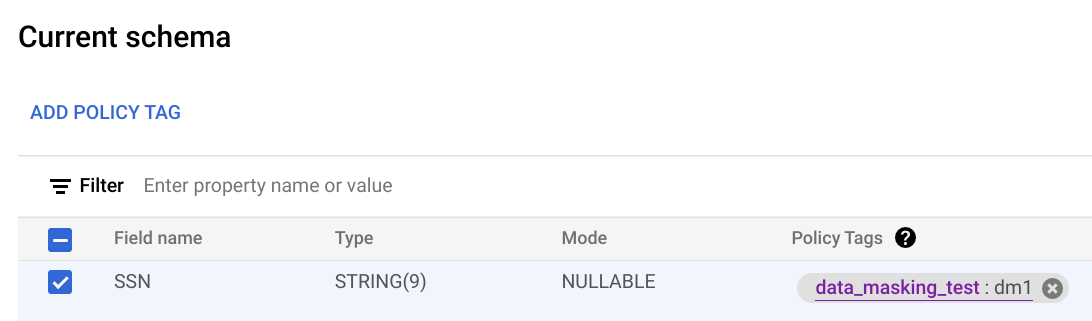
במסך הסכימה הנוכחית, בוחרים את עמודת היעד ולוחצים על הוספת תג מדיניות.
במסך הוספת תג מדיניות, מאתרים את תג המדיניות שרוצים להחיל על העמודה ובוחרים בו.
לוחצים על בחירה. המסך שלכם אמור להיראות כמו בדוגמה הבאה:
לוחצים על Save.
BQ
כותבים את הסכימה לקובץ מקומי.
bq show --schema --format=prettyjson \
   project-id:dataset.table > schema.json
where:
- project-id הוא מזהה הפרויקט.
- dataset הוא שם מערך הנתונים שמכיל את הטבלה שאתם מעדכנים.
- table הוא השם של הטבלה שאתם מעדכנים.
משנים את schema.json כדי להגדיר תג מדיניות בעמודה. כדי להגדיר את הערך של השדה
namesשלpolicyTags, משתמשים בשם המשאב של תג המדיניות.[ ... { "name": "ssn", "type": "STRING", "mode": "REQUIRED", "policyTags": { "names": ["projects/project-id/locations/location/taxonomies/taxonomy-id/policyTags/policytag-id"] } }, ... ]
מעדכנים את הסכימה.
bq update \
   project-id:dataset.table schema.json
API
אם יש לכם טבלאות קיימות, התקשרו למספר tables.patch. אם אתם רוצים ליצור טבלאות חדשות, התקשרו למספר tables.insert. משתמשים במאפיין schema של האובייקט Table שמעבירים כדי להגדיר תג מדיניות בהגדרת הסכימה. כדי לראות איך מגדירים תג מדיניות, אפשר לעיין בסכימה של דוגמה לשורת פקודה.
כשעובדים עם טבלה קיימת, עדיף להשתמש בשיטה tables.patch, כי השיטה tables.update מחליפה את כל משאב הטבלה.
אכיפת בקרת גישה
כשיוצרים מדיניות נתונים לתג מדיניות, בקרת הגישה נאכפת באופן אוטומטי. כל העמודות שהוחל עליהן תג המדיניות הזה מחזירות נתונים מוסווים בתגובה לשאילתות ממשתמשים שיש להם את התפקיד 'משתמש עם הרשאת קריאה מוסווית'.
כדי להפסיק את האכיפה של בקרת הגישה, צריך קודם למחוק את כל כללי המדיניות לנתונים שמשויכים לתגי המדיניות בטקסונומיה. מידע נוסף זמין במאמר בנושא החלת בקרת גישה.
קבלת מדיניות נתונים
כדי לקבל מידע על מדיניות בנושא נתונים:
Node.js
לפני שמנסים את הדוגמה הזו, צריך לפעול לפי Node.jsהוראות ההגדרה שבמדריך למתחילים של BigQuery באמצעות ספריות לקוח. מידע נוסף מופיע במאמרי העזרה של BigQuery Node.js API.
כדי לבצע אימות ב-BigQuery, צריך להגדיר את Application Default Credentials. מידע נוסף זמין במאמר הגדרת אימות לספריות לקוח.
Python
לפני שמנסים את הדוגמה הזו, צריך לפעול לפי Pythonהוראות ההגדרה שבמדריך למתחילים של BigQuery באמצעות ספריות לקוח. מידע נוסף מופיע במאמרי העזרה של BigQuery Python API.
כדי לבצע אימות ב-BigQuery, צריך להגדיר את Application Default Credentials. מידע נוסף זמין במאמר הגדרת אימות לספריות לקוח.
בדיקת הרשאות IAM במדיניות נתונים
כדי לקבל את מדיניות IAM למדיניות נתונים:
API
מבצעים קריאה ל-testIamPermissions.
Node.js
לפני שמנסים את הדוגמה הזו, צריך לפעול לפי Node.jsהוראות ההגדרה שבמדריך למתחילים של BigQuery באמצעות ספריות לקוח. מידע נוסף מופיע במאמרי העזרה של BigQuery Node.js API.
כדי לבצע אימות ב-BigQuery, צריך להגדיר את Application Default Credentials. מידע נוסף זמין במאמר הגדרת אימות לספריות לקוח.
Python
לפני שמנסים את הדוגמה הזו, צריך לפעול לפי Pythonהוראות ההגדרה שבמדריך למתחילים של BigQuery באמצעות ספריות לקוח. מידע נוסף מופיע במאמרי העזרה של BigQuery Python API.
כדי לבצע אימות ב-BigQuery, צריך להגדיר את Application Default Credentials. מידע נוסף זמין במאמר הגדרת אימות לספריות לקוח.
הצגת רשימה של כללי מדיניות בנושא נתונים
כדי להציג את כללי המדיניות בנושא מידע:
Node.js
לפני שמנסים את הדוגמה הזו, צריך לפעול לפי Node.jsהוראות ההגדרה שבמדריך למתחילים של BigQuery באמצעות ספריות לקוח. מידע נוסף מופיע במאמרי העזרה של BigQuery Node.js API.
כדי לבצע אימות ב-BigQuery, צריך להגדיר את Application Default Credentials. מידע נוסף זמין במאמר הגדרת אימות לספריות לקוח.
Python
לפני שמנסים את הדוגמה הזו, צריך לפעול לפי Pythonהוראות ההגדרה שבמדריך למתחילים של BigQuery באמצעות ספריות לקוח. מידע נוסף מופיע במאמרי העזרה של BigQuery Python API.
כדי לבצע אימות ב-BigQuery, צריך להגדיר את Application Default Credentials. מידע נוסף זמין במאמר הגדרת אימות לספריות לקוח.
עדכון מדיניות בנושא נתונים
למשתמש או לחשבון השירות שמעדכנים את מדיניות הנתונים צריכה להיות ההרשאה bigquery.dataPolicies.update.
אם אתם מעדכנים את תג המדיניות שמדיניות הנתונים משויכת אליו, אתם צריכים גם את ההרשאה datacatalog.taxonomies.get.
אם מעדכנים את חשבונות המשתמש שמשויכים למדיניות הגישה לנתונים, נדרשת הרשאה bigquery.dataPolicies.setIamPolicy.
ההרשאות bigquery.dataPolicies.update ו-bigquery.dataPolicies.setIamPolicy כלולות בתפקידים BigQuery Data Policy Admin (אדמין של מדיניות נתונים ב-BigQuery), אדמין של BigQuery והבעלים של נתוני BigQuery.
ההרשאה datacatalog.taxonomies.get כלולה בתפקידים 'אדמין של Data Catalog' ו'משתמש עם הרשאת צפייה ב-Data Catalog'.
המסוף
- פותחים את הדף Policy tag taxonomies במסוףGoogle Cloud .
- לוחצים על שם הטקסונומיה כדי לפתוח אותה.
- בוחרים תג מדיניות.
- לוחצים על ניהול מדיניות בנושא נתונים.
- אפשר גם לשנות את כלל המיסוך.
- אופציונלי: מוסיפים או מסירים חשבונות משתמשים.
- לוחצים על שליחה.
API
כדי לשנות את כלל מיסוך הנתונים, צריך לבצע קריאה ל-method patch ולהעביר משאב DataPolicy עם שדה dataMaskingPolicy מעודכן.
כדי לשנות את החשבונות הראשיים שמשויכים למדיניות גישה לנתונים, קוראים לשיטה setIamPolicy ומעבירים Policy שמעדכן את החשבונות הראשיים שקיבלו גישה לנתונים מוסווים.
Node.js
לפני שמנסים את הדוגמה הזו, צריך לפעול לפי Node.jsהוראות ההגדרה שבמדריך למתחילים של BigQuery באמצעות ספריות לקוח. מידע נוסף מופיע במאמרי העזרה של BigQuery Node.js API.
כדי לבצע אימות ב-BigQuery, צריך להגדיר את Application Default Credentials. מידע נוסף זמין במאמר הגדרת אימות לספריות לקוח.
Python
לפני שמנסים את הדוגמה הזו, צריך לפעול לפי Pythonהוראות ההגדרה שבמדריך למתחילים של BigQuery באמצעות ספריות לקוח. מידע נוסף מופיע במאמרי העזרה של BigQuery Python API.
כדי לבצע אימות ב-BigQuery, צריך להגדיר את Application Default Credentials. מידע נוסף זמין במאמר הגדרת אימות לספריות לקוח.
מחיקת מדיניות בנושא נתונים
למשתמש או לחשבון השירות שיוצרים מדיניות נתונים צריכה להיות ההרשאה bigquery.dataPolicies.delete. ההרשאה הזו כלולה בתפקידים BigQuery Data Policy Admin (אדמין של מדיניות נתונים ב-BigQuery), BigQuery Admin (אדמין של BigQuery) ו-BigQuery Data Owner (הבעלים של נתוני BigQuery).
המסוף
- פותחים את הדף Policy tag taxonomies במסוףGoogle Cloud .
- לוחצים על שם הטקסונומיה כדי לפתוח אותה.
- בוחרים תג מדיניות.
- לוחצים על ניהול מדיניות בנושא נתונים.
- לוחצים על לצד מדיניות הנתונים שרוצים למחוק.
- לוחצים על שליחה.
- לוחצים על אישור.
API
כדי למחוק מדיניות נתונים, צריך לבצע קריאה ל-method delete.
Node.js
לפני שמנסים את הדוגמה הזו, צריך לפעול לפי Node.jsהוראות ההגדרה שבמדריך למתחילים של BigQuery באמצעות ספריות לקוח. מידע נוסף מופיע במאמרי העזרה של BigQuery Node.js API.
כדי לבצע אימות ב-BigQuery, צריך להגדיר את Application Default Credentials. מידע נוסף זמין במאמר הגדרת אימות לספריות לקוח.
Python
לפני שמנסים את הדוגמה הזו, צריך לפעול לפי Pythonהוראות ההגדרה שבמדריך למתחילים של BigQuery באמצעות ספריות לקוח. מידע נוסף מופיע במאמרי העזרה של BigQuery Python API.
כדי לבצע אימות ב-BigQuery, צריך להגדיר את Application Default Credentials. מידע נוסף זמין במאמר הגדרת אימות לספריות לקוח.
מיסוך נתונים על ידי החלת מדיניות נתונים על עמודה
במקום ליצור תגי מדיניות, אפשר ליצור מדיניות נתונים ולהחיל אותה ישירות על עמודה.
אפשר גם להטמיע מיסוך נתונים באמצעות תגי משילות מידע. מידע נוסף זמין במאמר שליטה בגישה באמצעות תגים של משילות מידע (data governance).
עבודה עם מדיניות בנושא נתונים
אפשר ליצור, לעדכן ולמחוק מדיניות נתונים באמצעות BigQuery Data Policy API. כדי להחיל מדיניות נתונים ישירות על עמודה, אי אפשר להשתמש בדף תג מדיניות taxonomies במסוף Google Cloud .
כדי לעבוד עם מדיניות נתונים, משתמשים במשאב v2.projects.locations.datapolicies.
יצירת מדיניות בנושא נתונים
למשתמש או לחשבון השירות שיוצרים מדיניות נתונים צריכה להיות ההרשאה bigquery.dataPolicies.create.
ההרשאה bigquery.dataPolicies.create כלולה בתפקידים BigQuery Data Policy Admin (אדמין של מדיניות נתונים ב-BigQuery), BigQuery Admin (אדמין של BigQuery) ו-BigQuery Data Owner (הבעלים של נתוני BigQuery).
ההרשאה datacatalog.taxonomies.get כלולה בתפקידים 'אדמין של Data Catalog' ו'משתמש עם הרשאת צפייה ב-Data Catalog'.
אם אתם יוצרים מדיניות נתונים שמפנה אל שגרת מיסוך בהתאמה אישית, אתם צריכים גם הרשאות לשגרה.
אם אתם משתמשים בהסתרת נתונים בהתאמה אישית, צריך להעניק למשתמשים את התפקיד BigQuery Data Owner (הבעלים של נתוני BigQuery) כדי לוודא שיש להם את ההרשאות הנדרשות לשימוש בשגרות ובמדיניות נתונים.
API
כדי ליצור מדיניות בנושא נתונים, צריך להפעיל את method create. צריך להעביר משאב DataPolicy שעומד בדרישות הבאות:
- השדה
dataPolicyTypeמוגדר ל-DATA_MASKING_POLICYאו ל-RAW_DATA_ACCESS_POLICY. - השדה
dataMaskingPolicyמזהה את כלל או שגרת מיסוך הנתונים שבהם צריך להשתמש. - השדה
dataPolicyIdמספק שם למדיניות הנתונים שהוא ייחודי בפרויקט שבו נמצאת מדיניות הנתונים.
SQL
כדי ליצור מדיניות גישה לנתונים עם גישה מוסתרת, משתמשים בהצהרה CREATE DATA_POLICY ומגדירים את הערך של data_policy_type ל-DATA_MASKING_POLICY:
    CREATE[ OR REPLACE] DATA_POLICY [IF NOT EXISTS] `myproject.region-us.data_policy_name`
    OPTIONS (
      data_policy_type="DATA_MASKING_POLICY",
      masking_expression="ALWAYS_NULL"
    );
כדי ליצור מדיניות גישה לנתונים עם גישה לנתונים גולמיים, משתמשים בהצהרה CREATE DATA_POLICY ומגדירים את הערך של data_policy_type ל-RAW_DATA_ACCESS_POLICY:
    CREATE[ OR REPLACE] DATA_POLICY [IF NOT EXISTS] `myproject.region-us.data_policy_name`
    OPTIONS (data_policy_type="RAW_DATA_ACCESS_POLICY");
אם לא מציינים את הערך של data_policy_type, ערך ברירת המחדל הוא RAW_DATA_ACCESS_POLICY.
CREATE[ OR REPLACE] DATA_POLICY [IF NOT EXISTS] myproject.region-us.data_policy_name;- השדה
data_policy_typeמוגדר ל-DATA_MASKING_POLICYאו ל-RAW_DATA_ACCESS_POLICY. אי אפשר לעדכן את השדה הזה אחרי שיוצרים את מדיניות הנתונים. - השדה
masking_expressionמזהה את כלל או שגרת מיסוך הנתונים שבהם צריך להשתמש.
עדכון מדיניות בנושא נתונים
למשתמש או לחשבון השירות שמעדכנים את מדיניות הנתונים צריכה להיות ההרשאה bigquery.dataPolicies.update.
ההרשאה bigquery.dataPolicies.update כלולה בתפקידים BigQuery Data Policy Admin (אדמין של מדיניות נתונים ב-BigQuery), BigQuery Admin (אדמין של BigQuery) ו-BigQuery Data Owner (הבעלים של נתוני BigQuery).
API
כדי לשנות את כלל מיסוך הנתונים, צריך לבצע קריאה ל-method patch ולהעביר משאב DataPolicy עם שדה dataMaskingPolicy מעודכן.
SQL
משתמשים בהצהרה ALTER DATA_POLICY כדי לעדכן את כללי מיסוך הנתונים. לדוגמה:
    ALTER DATA_POLICY `myproject.region-us.data_policy_name`
    SET OPTIONS (
      data_policy_type="DATA_MASKING_POLICY",
      masking_expression="SHA256"
    );
אפשר גם להעניק גישה פרטנית לבקרת גישה למדיניות נתונים.
ההרשאות שצריך להעניק כדי לקבל גישה פרטנית לבקרת גישה למדיניות נתונים ולנהל את מדיניות הנתונים הן שונות. כדי לשלוט בהרשאות של בקרת גישה פרטנית, צריך לעדכן את השדה grantees במדיניות הנתונים. כדי לשלוט בגישה למדיניות בנושא נתונים, צריך להגדיר את תפקידי ה-IAM באמצעות השיטה setIamPolicy.
כדי להגדיר מקבלי הרשאות במדיניות נתונים, משתמשים ב-method v2 patch
. כדי לנהל את ההרשאות של מדיניות הנתונים, משתמשים ב-method v1
setIamPolicy.
API
כדי להעניק הרשאת גישה פרטנית לכללי מדיניות בנושא נתונים, צריך לבצע קריאה ל-method patch ולהעביר משאב DataPolicy עם שדה grantees מעודכן.
SQL
כדי להעניק בקרת גישה פרטנית לנתונים באמצעות כללי מדיניות, משתמשים בהצהרת GRANT FINE_GRAINED_READ כדי להוסיף את grantees.
לדוגמה:
    GRANT FINE_GRAINED_READ ON DATA_POLICY `myproject.region-us.data_policy_name`
    TO "principal://goog/subject/user1@example.com","principal://goog/subject/user2@example.com"
כדי לבטל את הגישה לבקרת גישה פרטנית ממדיניות גישה לנתונים, משתמשים בהצהרה REVOKE FINE_GRAINED_READ כדי להסיר את grantees.
לדוגמה:
    REVOKE FINE_GRAINED_READ ON DATA_POLICY `myproject.region-us.data_policy_name`
    FROM "principal://goog/subject/user1@example.com","principal://goog/subject/user2@example.com"
מחיקת מדיניות בנושא נתונים
למשתמש או לחשבון השירות שיוצרים מדיניות נתונים צריכה להיות ההרשאה bigquery.dataPolicies.delete. ההרשאה הזו כלולה בתפקידים BigQuery Data Policy Admin (אדמין של מדיניות נתונים ב-BigQuery), BigQuery Admin (אדמין של BigQuery) ו-BigQuery Data Owner (הבעלים של נתוני BigQuery).
API
כדי למחוק מדיניות נתונים, צריך לבצע קריאה ל-method delete.
SQL
כדי למחוק מדיניות בנושא נתונים, משתמשים בהצהרת DROP DATA_POLICY:
DROP DATA_POLICY `myproject.region-us.data_policy_name`;
הקצאת מדיניות נתונים ישירות בעמודה
אתם יכולים להקצות מדיניות נתונים ישירות לעמודה בלי להשתמש בתגי מדיניות.
לפני שמתחילים
כדי לקבל את ההרשאות שנדרשות להקצאת מדיניות נתונים ישירות לעמודה, צריך לבקש מהאדמין להקצות לכם את תפקיד ה-IAM BigQuery Data Policy Admin (אדמין של מדיניות נתונים ב-BigQuery) (roles/bigquerydatapolicy.admin) בטבלה.
כדי לקרוא הסבר על מתן תפקידים, ראו איך מנהלים את הגישה ברמת הפרויקט, התיקייה והארגון.
התפקיד המוגדר מראש הזה כולל את ההרשאות שנדרשות להקצאת מדיניות נתונים ישירות בעמודה. כדי לראות בדיוק אילו הרשאות נדרשות, אפשר להרחיב את הקטע ההרשאות הנדרשות:
ההרשאות הנדרשות
כדי להקצות מדיניות נתונים ישירות לעמודה, נדרשות ההרשאות הבאות:
-
bigquery.tables.update -
bigquery.tables.setColumnDataPolicy -
bigquery.dataPolicies.attach
יכול להיות שתקבלו את ההרשאות האלה באמצעות תפקידים בהתאמה אישית או תפקידים מוגדרים מראש אחרים.
הקצאת מדיניות בנושא נתונים
כדי להקצות מדיניות נתונים ישירות לעמודה, מבצעים אחת מהפעולות הבאות:
SQL
כדי לצרף מדיניות נתונים לעמודה, משתמשים בהצהרות DDL CREATE
TABLE,
ALTER TABLE ADD
COLUMN,
או ALTER COLUMN SET
OPTIONS.
בדוגמה הבאה משתמשים בהצהרה CREATE TABLE ומגדירים מדיניות נתונים בעמודה:
CREATE TABLE myproject.table1 ( name INT64 OPTIONS (data_policies=["{'name':'myproject.region-us.data_policy_name1'}", "{'name':'myproject.region-us.data_policy_name2'}"]) );
בדוגמה הבאה נעשה שימוש ב-ALTER COLUMN SET OPTIONS כדי להוסיף מדיניות נתונים לעמודה קיימת בטבלה:
ALTER TABLE myproject.table1 ALTER COLUMN column_name SET OPTIONS ( data_policies += ["{'name':'myproject.region-us.data_policy_name1'}", "{'name':'myproject.region-us.data_policy_name2'}"]);
API
כדי להקצות מדיניות נתונים לעמודה, מפעילים את השיטה patch בטבלה ומעדכנים את סכימת הטבלה עם מדיניות הנתונים הרלוונטית.
ביטול ההקצאה של מדיניות בנושא נתונים
כדי לבטל הקצאה של מדיניות נתונים ישירות בעמודה, אפשר לבצע אחת מהפעולות הבאות:
SQL
כדי לנתק מדיניות נתונים מעמודה, משתמשים בהצהרת DDL ALTER COLUMN SET
OPTIONS.
בדוגמה הבאה נעשה שימוש ב-ALTER COLUMN SET OPTIONS כדי להסיר את כל מדיניות הנתונים מעמודה קיימת בטבלה:
ALTER TABLE myproject.table1 ALTER COLUMN column_name SET OPTIONS ( data_policies = []);
בדוגמה הבאה נעשה שימוש ב-ALTER COLUMN SET OPTIONS כדי להחליף מדיניות נתונים מעמודה קיימת בטבלה:
ALTER TABLE myproject.table1 ALTER COLUMN column_name SET OPTIONS ( data_policies = ["{'name':'myproject.region-us.new_data_policy_name'}"]);
API
כדי לבטל את ההקצאה של מדיניות נתונים לעמודה, מפעילים את השיטה patch בטבלה ומעדכנים את סכימת הטבלה עם מדיניות נתונים ריקה או מעודכנת.
מגבלות
הקצאת מדיניות נתונים ישירות לעמודה כפופה למגבלות הבאות:
- חובה להשתמש במשאב
v2.projects.locations.datapolicies. - אי אפשר להחיל על אותה עמודה גם תגי מדיניות וגם מדיניות בנושא נתונים.
- אפשר לצרף עד שמונה כללי מדיניות בנושא נתונים לעמודה.
- טבלה יכולה להפנות לעד 1,000 מדיניות ייחודית של נתונים דרך העמודות שלה.
- שאילתה יכולה להפנות לעד 2,000 מדיניות נתונים.
- אפשר למחוק מדיניות נתונים רק אם אף עמודה בטבלה לא מפנה אליה.
- אם למשתמש יש רק את התפקיד
maskedAccess, הקריאה ל-APItabledata.listתיכשל. - פעולות העתקה של טבלאות נכשלות בטבלאות שמוגנות על ידי מדיניות נתונים של עמודות, אם למשתמש אין גישה לנתונים הגולמיים.
- פעולות העתקה של טבלאות בין אזורים לא תומכות בטבלאות שמוגנות על ידי מדיניות נתונים של עמודות.
- מדיניות נתוני עמודות לא זמינה באזורי BigQuery Omni.
- ה-SQL מדור קודם נכשל אם בטבלת היעד יש מדיניות לגבי נתוני עמודות.
- משימות טעינה לא תומכות בסכימות שצוינו על ידי המשתמש עם מדיניות נתונים של עמודות.
- אם מחליפים טבלת יעד, המערכת מסירה מהטבלה את כל תגי המדיניות הקיימים, אלא אם משתמשים בדגל
--destination_schemaכדי לציין סכימה עם מדיניות נתוני עמודות. - כברירת מחדל, הסתרת נתונים לא תומכת בעמודות עם חלוקה למחיצות או עם אשכולות. זוהי מגבלה כללית של אנונימיזציה של נתונים, ולא מגבלה ספציפית למדיניות של עמודות נתונים. הסתרת נתונים בעמודות מחולקות או מקובצות יכולה להגדיל באופן משמעותי את עלויות השאילתות.
- אי אפשר להקצות מדיניות נתונים ישירות לעמודה בטבלאות אובייקטים, בטבלאות חיצוניות שאינן BigLake, בטבלאות חיצוניות של Apache Iceberg וב-Delta Lake.
- אפשר להעניק גישה פרטנית רק ברמת מדיניות הנתונים. מידע נוסף זמין במאמר בנושא עדכון מדיניות בנושא נתונים.
- אי אפשר לבטל את ההקצאה של מדיניות הנתונים האחרונה שנותרה בעמודה באמצעות BigQuery Data Policy API. אפשר לבטל את ההקצאה של מדיניות הנתונים האחרונה שנותרה בעמודה באמצעות הצהרת ה-DDL
ALTER COLUMN SET
OPTIONS
.