

Introduction to BI Engine
BigQuery BI Engine is a fast, in-memory analysis service that accelerates many SQL queries in BigQuery by intelligently caching the data that you use most frequently. This caching lets you improve query performance without manual tuning or data tiering. You can cluster tables and partition tables to further optimize BI Engine performance for large tables.
For example, if your dashboard only displays data from the last quarter, you can partition your tables by time so that only the latest partitions are loaded into memory. You could then use materialized views to join and flatten your data, and then mark the resulting view and base table as a preferred table to ensure that BI Engine acceleration is only applied to the data you need.
BI Engine provides the following advantages:
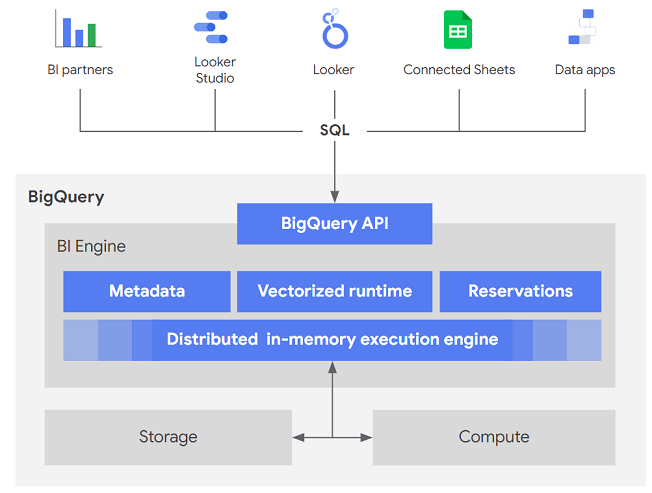
- BigQuery API compatibility: BI Engine directly integrates with the BigQuery API. Any BI solution or custom application that works with the BigQuery API through standard mechanisms such as the REST API or JDBC and ODBC drivers can use BI Engine without modification.
- Vectorized runtime: using vectorized processing in an execution engine makes more efficient use of modern CPU architecture by operating on batches of data at a time. BI Engine also uses advanced data encodings, specifically dictionary run-length encoding, to further compress data stored in the in-memory layer.
- Seamless integration: BI Engine works with BigQuery features and metadata, including authorized views, column-level security, and data masking.
- Reservation allocations: BI Engine reservations separately manage memory allocation for each project and region. BI Engine only caches the queried parts of columns and partitions. You can specify which tables use BI Engine acceleration with preferred tables.
In most organizations, BI Engine is enabled by a billing administrator who reserves capacity for BI Engine acceleration with an appropriate edition. For more information, see Reserve BI Engine capacity.
BI Engine architecture
BI Engine integrates with BI tools—such as Looker, Data Studio, Tableau, and Power BI—as well as custom applications through the BigQuery API to accelerate data exploration and analysis:
BI Engine use cases
BI Engine can significantly accelerate many SQL queries, including queries used for BI dashboards. Acceleration is most effective if you identify the tables that are essential to your queries, and then designate them as preferred tables. To use BI Engine, create a reservation in a region and specify its size. You can let BigQuery determine which tables to cache based on the project's usage patterns, or you can specify tables to prevent other traffic from interfering with their acceleration.
BI Engine is useful in the following use cases:
- You use BI tools to analyze your data: BI Engine accelerates BigQuery queries whether they run in the BigQuery console, a BI tool such as Data Studio or Tableau, a client library, an API, or an ODBC or JDBC connector. This can significantly improve the performance of dashboards connected to BigQuery through a built-in connection (API) or connectors.
- You have frequently queried tables: BI Engine lets you designate preferred tables to accelerate. This is helpful if you have a subset of tables that are queried more frequently or are used for high-visibility dashboards.
BI Engine might not fit your needs in the following cases:
- You use wildcards in your queries: queries referencing wildcard tables aren't supported by BI Engine and don't benefit from acceleration.
- You require BigQuery features unsupported by BI Engine: while BI Engine supports most SQL functions and operators, unsupported features include external tables, row-level security, and non-SQL user-defined functions.
Considerations for BI Engine
Consider the following when deciding how to configure BI Engine:
Ensure acceleration for specific queries
To ensure that a set of queries is accelerated, create a separate project with a dedicated BI Engine reservation. First, estimate the compute capacity required for your queries, then designate those tables as preferred tables for BI Engine.
Minimize joins
BI Engine works best for pre-joined or pre-aggregated data, and for queries with a small number of joins. This behavior is particularly true when one side of the join is large and the other sides are much smaller, such as when you query a large fact table joined with smaller dimension tables. You can combine BI Engine with materialized views, which perform joins to produce a single large, flat table. This approach avoids performing the same joins for each query. Stale materialized views are recommended for optimal query performance.
Understand the impact of BI Engine
To understand your use of BI Engine, see
Monitor BI Engine with Cloud Monitoring,
or query the
INFORMATION_SCHEMA.BI_CAPACITIES
and
INFORMATION_SCHEMA.BI_CAPACITY_CHANGES
views. Be sure to disable the Use cached results option in
BigQuery to get the most accurate comparison. For more
information, see Use cached query results.
Preferred tables
BI Engine preferred tables let you limit BI Engine acceleration to a specified set of tables. Queries to all other tables use regular BigQuery slots. For example, with preferred tables you can accelerate only the tables and dashboards that you identify as important to your business.
If there isn't enough memory in the project to hold all of the preferred tables, BI Engine offloads partitions and columns that haven't been accessed recently. This process frees memory for new queries that need acceleration.
Preferred tables limitations
BI Engine preferred tables have the following limitations:
- You can't add logical views to the preferred tables reservation list. BI Engine preferred tables only support tables.
- Queries to materialized views are only accelerated if both the materialized views and their base tables are in the preferred tables list.
- Specifying partitions or columns for acceleration isn't supported.
JSONtype columns aren't supported and aren't accelerated by BI Engine.- Queries that access multiple tables are only accelerated if all tables are
preferred tables. For example, all tables in a query with a
JOINmust be in the preferred tables list to be accelerated. If even one table isn't in the preferred list, the query can't use BI Engine. - Public datasets aren't supported in the Google Cloud console. To add a public table as a preferred table, use the API or DDL.
Query optimization and acceleration
BigQuery, and by extension BI Engine, divides a query plan into multiple subqueries. A subquery consists of operations such as scanning, filtering, computing, or aggregating data, and serves as the unit of execution.
While all supported BigQuery SQL queries execute correctly with BI Engine, BI Engine selectively optimizes specific stages:
- Leaf-level subqueries: BI Engine is most optimized for
leaf-level subqueries that scan data from storage and perform operations
such as filtering, computation, aggregation, sorting (
ORDER BY), and supported joins. - Fallback execution: query stages or subqueries that can't be accelerated by BI Engine automatically fall back to standard BigQuery execution slots without failing the query.
Because of this selective optimization, simpler business intelligence or dashboard-type queries benefit the most from BI Engine because the majority of their execution time is spent processing raw data in leaf-level subqueries.
Limitations
To use BI Engine, your organization must reserve BI Engine capacity with a supported edition. For more information, see Understand BigQuery editions.
In addition, BI Engine has limitations that the following sections describe.
Joins
BI Engine accelerates certain types of join queries. Acceleration
happens on leaf-level subqueries with INNER and LEFT OUTER joins, where a
large fact table is joined with up to four smaller dimension tables. Small
dimension tables have the following restrictions:
- Fewer than 5 million rows
- Size limits:
- Unpartitioned tables: 5 GiB or less
- Partitioned tables: referenced partitions 1 GiB or less
Window functions
Window functions, also known as analytic functions, have the following limitations when accelerated by BI Engine:
- Input stages without window functions are accelerated by
BI Engine. In this case, the
INFORMATION_SCHEMA.JOBSview reportsbi_engine_statistics.acceleration_modeasFULL_INPUT. - Input stages of queries with window functions are accelerated by
BI Engine if they comply with the
BI Engine window functions limitations.
In that case, the input stages or the full query is executed in
BI Engine, and the
INFORMATION_SCHEMA.JOBSview reportsbi_engine_statistics.acceleration_modeasFULL_INPUTorFULL_QUERY.
For more information about the BiEngineStatistics field, see the
Job reference.
BI Engine window functions limitations
Queries with window functions only run in BI Engine if all of the following conditions are true:
- The query scans exactly one table.
- The table isn't partitioned.
- The table has fewer than 5 million rows.
- The query has no
JOINoperators. - The scanned table size multiplied by the number of window function operators doesn't exceed 300 MiB.
Two window functions with identical OVER clauses and the same direct inputs
can share the same window function operator. For example:
SELECT ROW_NUMBER() OVER (ORDER BY x), SUM(x) OVER (ORDER BY x) FROM my_tablehas only one window function operator.SELECT ROW_NUMBER() OVER (ORDER BY x), SUM(x) OVER (PARTITION BY y ORDER BY x) FROM my_tablehas two window function operators because the two functions have differentOVERclauses.SELECT ROW_NUMBER() OVER (ORDER BY x) FROM (SELECT SUM(x) OVER (ORDER BY x) AS x FROM my_table)has two window function operators because the two functions have different direct inputs although theirOVERclauses appear the same.
Supported window functions
The following window functions are supported:
ANY_VALUEAVGBIT_ANDBIT_ORBIT_XORCORRCOUNTCOUNTIFCOVAR_POPCOVAR_SAMPCUME_DISTDENSE_RANKFIRST_VALUELAGLAST_VALUELEADLOGICAL_ANDLOGICAL_ORMAXMINNTH_VALUENTILEPERCENT_RANKPERCENTILE_CONTPERCENTILE_DISCRANKROW_NUMBERST_CLUSTERDBSCANSTDDEV_POPSTDDEV_SAMPSTDDEVSTRING_AGGSUMVAR_POPVAR_SAMPVARIANCE
If window functions aren't supported, you might see the following error message:
Analytic function is incompatible with other operators or its inputs are too large
Unsupported BI Engine limitations
BI Engine acceleration isn't available for the following features:
- JavaScript UDFs and remote functions.
- External tables, including BigLake tables.
- Querying
JSONdata (error message:JSON native type is not supported.). - Querying
RANGEdata (error message:RANGE native type is not supported.). - Writing results to a permanent BigQuery table.
- Tables containing upserts that use BigQuery change data capture ingestion.
- Transactions.
- Queries that return more than 1 GiB of data (for latency-sensitive applications, a response size of less than 1 MiB is recommended).
- Row-level security.
- Queries that use search and vector search functions (such as the
SEARCHfunction orVECTOR_SEARCHfunction) or are optimized by search indexes or vector indexes. - Recursive queries using
RECURSIVE. - BigQuery ML queries.
Workaround for unsupported features
If your query uses unsupported SQL features, you can use the following workaround:
- Write a query in BigQuery.
- Save the results of the query to a table.
- Schedule your query to update the table on a regular basis. An hourly or daily refresh rate works best. Refreshing every minute might invalidate the cache too frequently.
- Reference this table in your performance-critical queries.
Quotas and limits
For quotas and limits that apply to BI Engine, see BigQuery quotas and limits.
Pricing
You incur costs for the reservation that you create for BI Engine capacity. For information about BI Engine pricing, see BigQuery pricing.
What's next
- Learn how to create a reservation in Reserve BI Engine capacity.
- Learn how to designate preferred tables in Preferred tables.
- Learn how to monitor utilization in Monitor BI Engine with Cloud Monitoring.
- Learn how to use BI Engine with Data Studio and Tableau.