

Configure VPC Service Controls rules for BigQuery sharing
Ingress and egress rules let publishers and subscribers in BigQuery sharing (formerly Analytics Hub) access data across projects that are protected by VPC Service Controls perimeters. You configure these rules between a caller project—which is the network or client Google Cloud project that initiates a request, such as a SQL query or a Google Cloud CLI command—and the projects that host your data exchanges, listings, and datasets.
Before configuring these rules, you should be familiar with VPC Service Controls perimeters, shared datasets, data exchanges, listings, and linked datasets.
Limitations
BigQuery sharing doesn't support
method-based rules. You must
specify method: '*' to allow all methods in your ingress and egress rules:
- ingressTo:
    operations:
      - methodSelectors:
          - method: '*'
        serviceName: analyticshub.googleapis.com
    resources:
      - projects/PROJECT_NUMBER
If service perimeters also protect BigQuery resources, you must allow ingress and egress rules for the BigQuery service. Allowing ingress and egress rules isn't required when you create a data exchange. The ingress and egress rules for BigQuery are similar to those for BigQuery sharing:
- ingressTo:
    operations:
      - methodSelectors:
          - method: '*'
        serviceName: bigquery.googleapis.com
    resources:
      - projects/PROJECT_NUMBER
Replace PROJECT_NUMBER with the project number of the
target project that's protected by the service perimeter.
Create a data exchange
In the following diagram, the caller project and the project that contains the data exchange are in different service perimeters:
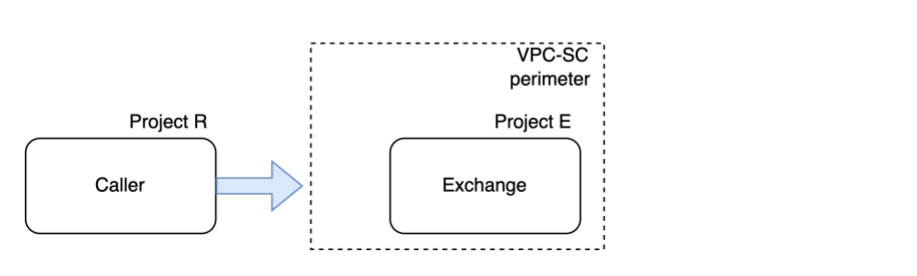
Figure 1. VPC Service Controls rules for creating a data exchange.
Figure 1 shows the following components:
- Caller: a BigQuery sharing administrator.
- Project R: the caller project.
- Project E: the project that hosts the data exchange and listings.
As a BigQuery sharing administrator, when you create a data exchange in a different project from the caller project, you must add the following ingress and egress rules:
| Project | Rule |
|---|---|
| Project R | Egress rule for project E |
| Project E (data exchange) | Ingress rule for project R |
Create a listing
In the following diagram, the projects that contain the data exchange and the shared dataset are in different service perimeters:
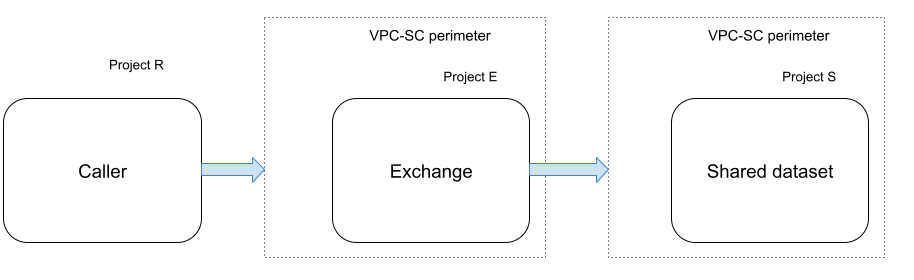
Figure 2. VPC Service Controls rules for creating a listing.
Figure 2 shows the following components:
- Caller: a BigQuery sharing administrator or publisher.
- Project R: the caller project.
- Project E: the project that hosts the data exchange and listings.
- Project S: the project that hosts the shared dataset.
As a BigQuery sharing publisher, when you create a listing in a data exchange that's in a different project from the shared dataset, you must add the following ingress and egress rules:
| Project | Rule |
|---|---|
| Project R |
Egress rule for project E Egress rule for project S |
| Project E (data exchange) |
Egress rule for project S Ingress rule for project R |
| Project S (shared dataset) |
Egress rule for project E Ingress rule for project R |
Subscribe to a listing
In the following diagram, the projects that contain the listing and the linked dataset for that listing are in different service perimeters:
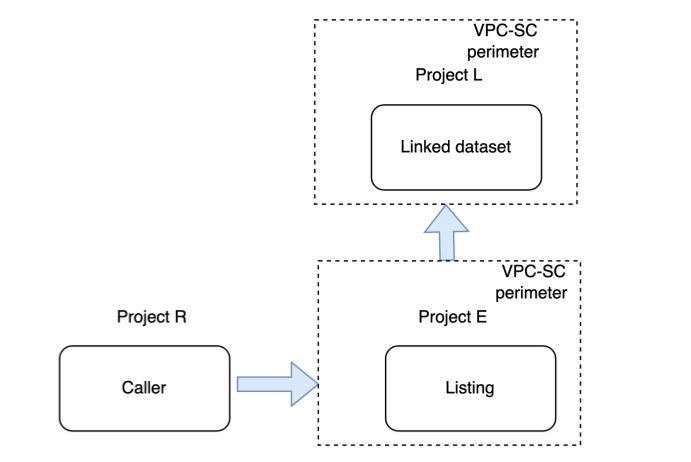
Figure 3. VPC Service Controls rules for subscribing to a listing.
Figure 3 shows the following components:
- Caller: a BigQuery sharing subscriber.
- Project R: the caller project.
- Project E: the project that hosts the data exchange and listings.
- Project L: the project that hosts the linked dataset.
As a BigQuery sharing subscriber, when you subscribe to a listing in a data exchange that's in a different project from your project, you must add the following ingress and egress rules:
| Project | Rule |
|---|---|
| Project R |
Egress rule for project E Egress rule for project L |
| Project E (listing) |
Egress rule for project L Ingress rule for project R |
| Project L (linked dataset) |
Egress rule for project E Ingress rule for project R |
Update a listing
When you update a listing—for example, to modify its restricted export policy—BigQuery sharing uses a background worker to propagate these changes to the associated linked datasets. If a VPC Service Controls perimeter with IP-based restrictions protects your Google Cloud project, the perimeter might block the background worker originating from Google infrastructure and prevent the linked dataset from synchronizing.
To let the background worker update the linked dataset, configure your ingress or egress rules so that the calling user or service account running the API call bypasses the IP-based restrictions.
To modify the ingress policy on the subscriber project's perimeter, add an
ingress rule that lets the calling principal access the
bigquery.googleapis.com service from any source IP address (*):
- ingressFrom:
    sources:
      - accessLevel: "*"
    identities:
      - "user:CALLING_USER_EMAIL"
      - "serviceAccount:AUTOMATION_SA_EMAIL"
  ingressTo:
    resources:
      - "projects/SUBSCRIBER_PROJECT_NUMBER"
    operations:
      - serviceName: "bigquery.googleapis.com"
        methodSelectors:
          - method: "*"
Alternatively, to modify the egress policy on the publisher's perimeter, add
the calling identity to the identities list in the egress rule for the
subscriber project:
- egressFrom:
    identities:
      - "user:CALLING_USER_EMAIL"
      - "serviceAccount:AUTOMATION_SA_EMAIL"
  egressTo:
    resources:
      - "projects/SUBSCRIBER_PROJECT_NUMBER"
    operations:
      - serviceName: "bigquery.googleapis.com"
        methodSelectors:
          - method: "*"
Replace the following:
CALLING_USER_EMAIL: the email address of the user who runs the API call to update the listing. Include this identity if a human user makes the update.AUTOMATION_SA_EMAIL: the email address of the service account that runs the API call to update the listing. Include this identity if an automated process or script makes the update.SUBSCRIBER_PROJECT_NUMBER: the project number of the subscriber project that contains the linked dataset.
Query tables in a linked dataset
In the following diagram, the caller project and the project that contains the linked dataset are in different service perimeters:
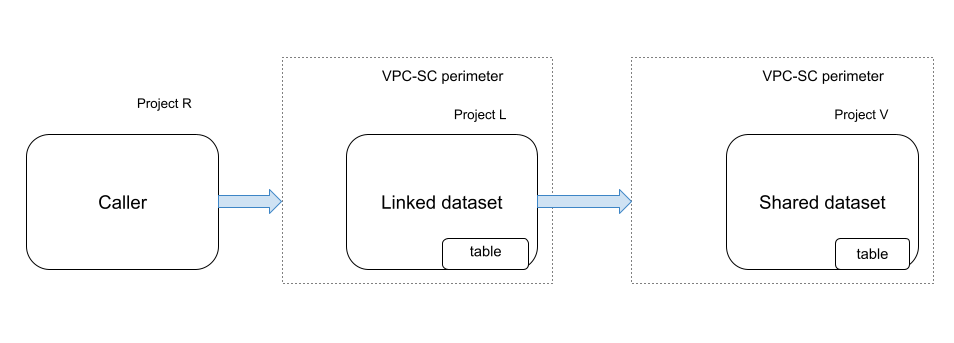
Figure 4. VPC Service Controls rules for querying a linked dataset.
Figure 4 shows the following components:
- Caller: a BigQuery sharing subscriber or any BigQuery job user of the linked dataset.
- Project R: the caller project.
- Project L: the project that hosts the linked dataset.
- Project V: the project that hosts the shared dataset containing the table.
As a BigQuery sharing subscriber, when you query a table in a linked dataset, you must add the following ingress and egress rules:
| Project | Rule |
|---|---|
| Project R | Egress rule for project L |
| Project L (linked dataset) | Ingress rule for project R |
Query views in a linked dataset
This section describes the required VPC Service Controls rules for querying a view in a linked dataset. The rules vary depending on whether the view and its underlying base tables are in the same project or in different projects.
The view and base tables are in different projects
In the following diagram, the projects that contain the linked dataset and the base tables associated with the view are in different service perimeters. The view (Project S) and the base table associated with the view (Project V) are in different projects:
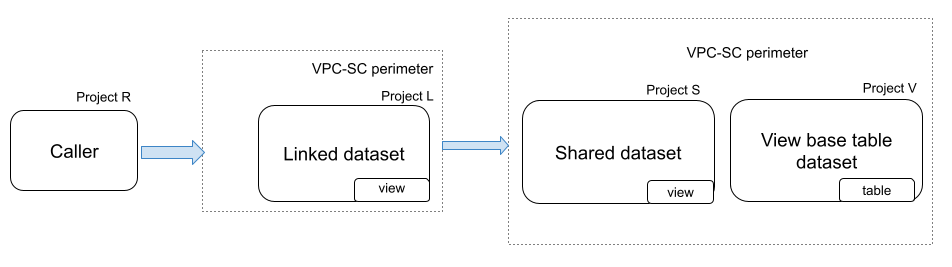
Figure 5. VPC Service Controls rules for querying a view when the view and base tables are in different projects.
Figure 5 shows the following components:
- Caller: a BigQuery sharing subscriber or any BigQuery job user of the linked dataset.
- Project R: the caller project.
- Project L: the project that hosts the linked dataset.
- Project S: the project that hosts the shared dataset.
- Project V: the project that hosts the dataset containing the base tables associated with the view.
As a BigQuery sharing subscriber, when you query a view in a linked dataset, you must add the following ingress and egress rules:
| Project | Rule |
|---|---|
| Project R |
Egress rule for project L Egress rule for project V |
| Project L (linked dataset) |
Ingress rule for project R Egress rule for project V |
| Project V |
Egress rule for project L Ingress rule for project R |
The view and base tables are in the same project
In the following diagram, the view (Project V) and the base table associated with the view (Project V) are in the same project:
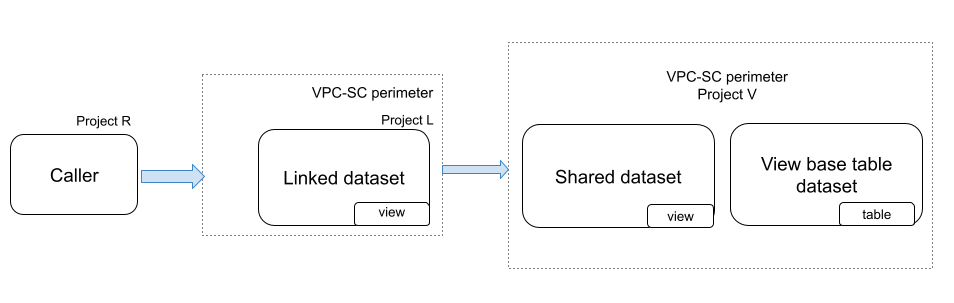
Figure 6. VPC Service Controls rules for querying a view when the view and base tables are in the same project.
Figure 6 shows the following components:
- Caller: a BigQuery sharing subscriber or any BigQuery job user of the linked dataset.
- Project R: the caller project.
- Project L: the project that hosts the linked dataset.
- Project V: the project that hosts both the view and the base tables associated with the view.
As a BigQuery sharing subscriber, when you query a view in a linked dataset, you must add the following ingress and egress rules:
| Project | Rule |
|---|---|
| Project R | Egress rule for project L |
| Project L (linked dataset) | Ingress rule for project R |
Query authorized views in a linked dataset
In the following diagram, the authorized view and the base table associated with the authorized view (Project V) are in the same project:
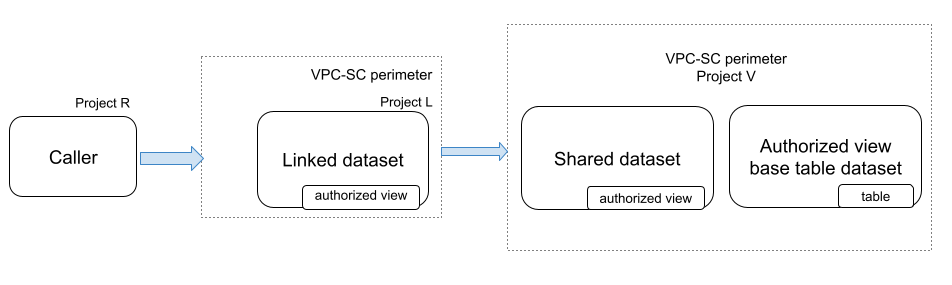
Figure 7. VPC Service Controls rules for querying an authorized view in a linked dataset.
Figure 7 shows the following components:
- Caller: a BigQuery sharing subscriber or any BigQuery job user of the linked dataset.
- Project R: the caller project.
- Project L: the project that hosts the linked dataset.
- Project V: the project that hosts both the authorized view and the base tables associated with the view.
As a BigQuery sharing subscriber, when you query an authorized view in a linked dataset, you must add the following ingress and egress rules:
| Project | Rule |
|---|---|
| Project R | Egress rule for project L |
| Project L (linked dataset) | Ingress rule for project R |
What's next
- Learn about troubleshooting VPC Service Controls problems.
- Learn about ingress and egress rules.
- Learn about configuring ingress and egress policies.
- Learn about creating a listing.
- Learn about subscribing to a listing.
- Learn about Sharing audit logging.