

Introduction to BigQuery sharing
BigQuery sharing (formerly Analytics Hub) is a data exchange platform that lets you securely share, discover, and access data across organizational boundaries without replicating data.
You can use BigQuery sharing to discover curated third-party and Google datasets, and combine them with your internal data to augment analytics and machine learning initiatives.
BigQuery sharing Identity and Access Management (IAM) roles let you perform the following BigQuery sharing tasks:
Analytics Hub Publisher (
roles/analyticshub.publisher): share data with your partner network or within your own organization in real time. Listings let you share data without replicating data, and you can monetize listings on Google Cloud Marketplace or through your own channels. You can build a catalog of analytics-ready data sources with granular permissions that let you deliver data to authorized subscribers. You can also manage subscriptions and view the usage metrics for your listings.Analytics Hub Subscriber (
roles/analyticshub.subscriber): discover data, combine shared data with your existing data, and use the built-in features of BigQuery. When you subscribe to a listing, a linked dataset or linked Pub/Sub subscription is created in your Google Cloud project. To manage your subscriptions, use the Subscription resource, which stores information about the subscriber and represents the connection between publisher and subscriber.Analytics Hub Viewer (
roles/analyticshub.viewer): browse the data exchanges and listings that you have access to view in BigQuery sharing. If you don't have subscription permissions to listings, then you can request permission from the publisher to access the shared data. You can discover Cloud Marketplace-integrated commercial listings on both BigQuery sharing and Cloud Marketplace.Analytics Hub Admin (
roles/analyticshub.admin): create data exchanges that let publishers share data, and grant permissions to data publishers and subscribers to access these data exchanges.
For more information, see Configure Analytics Hub roles.
Architecture
BigQuery sharing is built on a publish and subscribe model of Google Cloud data resources, which lets you share data in place without replication. BigQuery sharing supports the following resources:
- BigQuery datasets
- Pub/Sub topics
Publisher workflow
In the publisher workflow, you create shared resources in your project, organize them into listings within a data exchange, and grant access to subscribers:
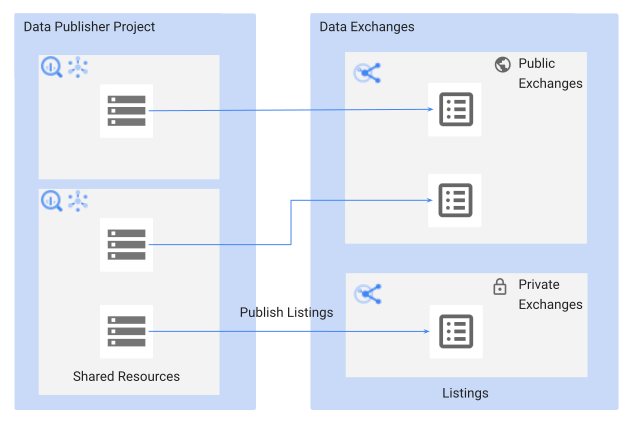
The following sections describe the components in the publisher workflow.
Shared datasets
A shared dataset is a BigQuery dataset that serves as the unit of data sharing in BigQuery sharing. The separation of compute and storage in the BigQuery architecture lets data publishers share datasets with multiple subscribers without replicating data. As a publisher, you create or use an existing BigQuery dataset in your project with the following supported objects:
Shared datasets support column-level security and row-level security.
Shared topics
A shared topic is a Pub/Sub topic, which is the unit of streaming data sharing in BigQuery. As a publisher, you create or use an existing Pub/Sub topic in your project and distribute it to your subscribers.
Data exchanges
A data exchange is a container that lets publishers share data listings and lets subscribers browse and request access directly. It contains listings that reference shared resources. Publishers and administrators can grant access to subscribers at the exchange and listing level, which avoids explicitly granting access on the underlying shared resources. When you create a data exchange, you can assign a primary contact email address so that subscribers can contact the data exchange owner.
A data exchange can be one of the following types:
- Private data exchange: by default, a data exchange is private. Only users or groups that have access to that exchange can view or subscribe to its listings.
- Public data exchange: a public data exchange lets all
Google Cloud users (
allAuthenticatedUsers) discover and subscribe to its listings. For more information, see Make a data exchange public.
The Analytics Hub Admin role lets you create multiple data exchanges and manage team members who perform BigQuery sharing tasks.
Listings
A listing is a reference to a shared resource that a publisher lists in a data exchange. As a publisher, you can create a listing and specify the resource description, sample queries, sample message data, documentation links, and relevant instructions for subscribers. When you create a listing, you can assign a primary contact email address, provider details, and publisher details. For more information, see Manage listings.
A listing can be one of the following types, based on the IAM policy set for the listing and its parent data exchange:
- Private listing: by default, a listing is private and shared directly with specific users or groups. For example, a private listing can reference internal metrics datasets that you share with specific teams within your organization.
- Public listing: shared with all
Google Cloud users (
allAuthenticatedUsers). Listings in a public data exchange are public listings. These listings can reference free public resources or commercial resources. If the listing is for a commercial resource, subscribers can request access directly from the data provider or purchase Cloud Marketplace-integrated commercial listings.
Data egress options
For BigQuery shared datasets, data egress options let publishers restrict subscribers from exporting data out of linked datasets.
Publishers can enable data egress restrictions on a listing, query results, or both. When data egress is restricted, the following restrictions apply:
- Copy, clone, export, and snapshot APIs are unavailable.
- Copy, clone, export, and snapshot options are unavailable in the Google Cloud console.
- BigQuery Data Transfer Service is unavailable on the restricted dataset.
CREATE TABLE AS SELECTstatements and writing to a destination table are unavailable.CREATE VIEW AS SELECTstatements and writing to a destination view are unavailable.
When you create a listing, you can set the appropriate data egress options.
Subscriber workflow
In the subscriber workflow, you browse data exchanges to discover listings, subscribe to listings, and query the linked resources in your project:
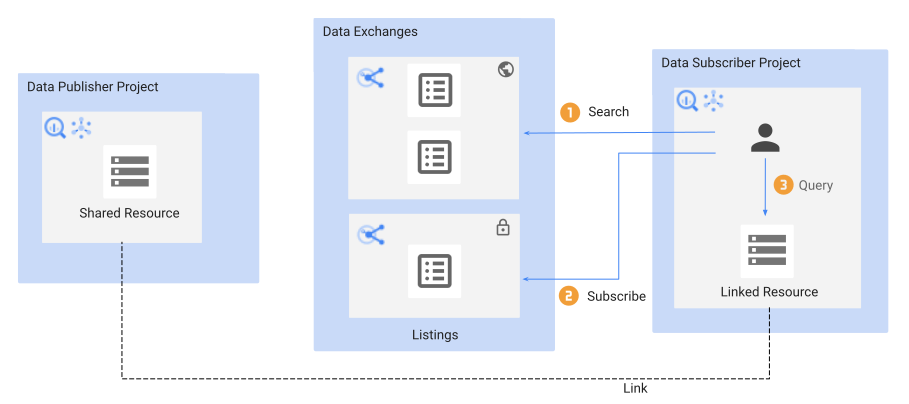
The following sections describe the components in the subscriber workflow.
Linked datasets
A linked dataset is a read-only BigQuery dataset that serves as a pointer or reference to a shared dataset. Subscribing to a listing creates a linked dataset in your project without replicating data. Subscribers can query standard tables and views in real time, but they can't add or update objects in the dataset.
Linked datasets are authorized to access tables and views in a shared dataset without requiring additional IAM authorization on the underlying source dataset. In addition to standard tables and views, linked datasets support the following authorized resources:
For more information about linked datasets, see View and subscribe to listings and data exchanges.
Linked Pub/Sub subscriptions
Subscribing to a listing with a shared topic creates a linked Pub/Sub subscription in the subscriber project without duplicating the shared topic or message data. Subscribers of the linked Pub/Sub subscription can access messages published to the shared topic without additional IAM authorization on the source topic. Publishers can manage subscriptions directly in Pub/Sub or through BigQuery sharing subscription management.
For more information about linked Pub/Sub subscriptions, see Stream sharing with Pub/Sub.
Example use cases
This section provides examples of how to use BigQuery sharing for partner collaboration and data monetization.
Partner collaboration
Suppose you're a retailer and your organization maintains real-time demand
forecasting data in a Google Cloud project named Forecasting.
You want to share this demand forecasting data with hundreds of vendors in
your supply-chain network. The following sections describe how to share data
across roles.
Administrators
As the owner of the Forecasting project, you enable the Analytics Hub API and
grant the Analytics Hub Admin role (roles/analyticshub.admin) to a team member
who administers the data exchange. Principals with this role are
BigQuery sharing administrators.
A BigQuery sharing administrator can perform the following tasks:
- Create, update, delete, and share the data exchange in your organization's
Forecastingproject. - Manage other BigQuery sharing administrators with the Analytics Hub Admin role.
- Manage BigQuery sharing publishers by granting the
Analytics Hub Publisher role
(
roles/analyticshub.publisher) to employees. If employees only need to update, delete, and share listings without creating them, grant the Analytics Hub Listing Admin role (roles/analyticshub.listingAdmin). - Manage BigQuery sharing subscribers by granting the
Analytics Hub Subscriber role
(
roles/analyticshub.subscriber) to a Google group consisting of all vendors. If vendors only need to view available exchanges and listings without subscribing, grant the Analytics Hub Viewer role (roles/analyticshub.viewer).
For more information, see BigQuery sharing IAM roles and Manage data exchanges.
Publishers
In this scenario, data publishers package supply-chain datasets into separate
listings to serve vendor needs. Publishers create the following listings in the
Forecasting project:
- Listing A: Demand Forecast Dataset 1
- Listing B: Demand Forecast Dataset 2
- Listing C: Demand Forecast Dataset 3
Publishers can track usage metrics for their shared datasets, including the following details:
- Jobs that run against the shared dataset.
- Consumption details by subscriber projects and organizations.
- Total rows and bytes processed.
For more information, see Manage listings.
Subscribers
Subscribers browse listings that they have access to in data exchanges. Vendors subscribe to these listings to add datasets to their projects as linked datasets. Vendors can then run queries on these linked datasets and retrieve forecasting results in real time.
For more information, see View and subscribe to listings and data exchanges.
Data monetization
Suppose you're a financial data provider with curated historical equity pricing
datasets in a Google Cloud project named MarketDataSource. You want to
monetize this data by offering it to external financial institutions and
traders. The following sections describe how to monetize data through
BigQuery sharing.
Administrators
As the owner of the MarketDataSource project, you enable the Analytics Hub API
and Cloud Marketplace API, and then grant the Analytics Hub Admin role
(roles/analyticshub.admin) to the team managing the commercial exchange.
Principals with this role are BigQuery sharing administrators.
A BigQuery sharing administrator can perform the following tasks:
- Create a public data exchange and integrate it with Cloud Marketplace.
- Manage BigQuery sharing publishers by granting the Analytics Hub
Publisher role (
roles/analyticshub.publisher) to data engineers responsible for creating commercial listings. If employees only need to update, delete, and share listings without creating them, grant the Analytics Hub Listing Admin role (roles/analyticshub.listingAdmin). - Manage commercial terms and pricing models in Cloud Marketplace.
For more information, see Manage data exchanges and Cloud Marketplace-integrated commercial listings.
Publishers
In this scenario, publishers package financial data products into tiered listings based on subscription models. Publishers create the following listings:
- Listing A: Global Equity Prices (Monthly Subscription)
- Listing B: Real-time Market Signals (Annual Subscription)
- Listing C: Historical Economic Indicators (Free Trial)
Publishers can track usage metrics for their shared datasets, including the following details:
- Jobs that run against the shared dataset.
- Consumption details by subscriber projects and organizations.
- Total rows and bytes processed.
For more information, see Manage listings.
Subscribers
Subscribers browse listings in BigQuery sharing or directly in Cloud Marketplace. After purchasing a subscription, subscribers create a linked dataset in their Google Cloud project and query historical data alongside proprietary trading models without manual data ingestion or file replication.
For more information, see View and subscribe to listings and data exchanges.
Pricing
There's no additional cost for managing data exchanges or listings in BigQuery sharing.
The following table summarizes the pricing models for supported resources:
| Resource | Publisher costs | Subscriber costs | More information |
|---|---|---|---|
| BigQuery datasets | Data storage | Queries run against the shared data (on-demand or capacity pricing) | BigQuery pricing |
| Pub/Sub topics | Data written (publish throughput) and network egress (if applicable) | Data read (subscribe throughput) and network egress (if applicable) | Pub/Sub pricing |
Supported regions
BigQuery sharing is supported in the following regions and multi-regions:
Regions
The following table lists the regions in the Americas where sharing is available.| Region description | Region name | Details |
|---|---|---|
| Columbus, Ohio | us-east5 |
|
| Dallas | us-south1 |
 Low CO2 Low CO2
|
| Iowa | us-central1 |
Low CO2
|
| Las Vegas | us-west4 |
|
| Los Angeles | us-west2 |
|
| Mexico | northamerica-south1 |
|
| Montréal | northamerica-northeast1 |
Low CO2
|
| Northern Virginia | us-east4 |
|
| Oklahoma | us-central2 |
Low CO2
|
| Oregon | us-west1 |
Low CO2 |
| Salt Lake City | us-west3 |
|
| São Paulo | southamerica-east1 |
Low CO2
|
| Santiago | southamerica-west1 |
|
| South Carolina | us-east1 |
|
| Toronto | northamerica-northeast2 |
|
| Region description | Region name | Details |
|---|---|---|
| Delhi | asia-south2 |
|
| Hong Kong | asia-east2 |
|
| Jakarta | asia-southeast2 |
|
| Melbourne | australia-southeast2 |
|
| Mumbai | asia-south1 |
|
| Osaka | asia-northeast2 |
|
| Seoul | asia-northeast3 |
|
| Singapore | asia-southeast1 |
|
| Sydney | australia-southeast1 |
|
| Taiwan | asia-east1 |
|
| Tokyo | asia-northeast1 |
| Region description | Region name | Details |
|---|---|---|
| Belgium | europe-west1 |
Low CO2
|
| Berlin | europe-west10 |
|
| Finland | europe-north1 |
Low CO2
|
| Frankfurt | europe-west3 |
|
| London | europe-west2 |
Low CO2
|
| Madrid | europe-southwest1 |
Low CO2
|
| Milan | europe-west8 |
|
| Netherlands | europe-west4 |
Low CO2
|
| Paris | europe-west9 |
Low CO2
|
| Turin | europe-west12 |
|
| Warsaw | europe-central2 |
|
| Zürich | europe-west6 |
Low CO2
|
| Region description | Region name | Details |
|---|---|---|
| Dammam | me-central2 |
|
| Doha | me-central1 |
|
| Tel Aviv | me-west1 |
| Region description | Region name | Details |
|---|---|---|
| Johannesburg | africa-south1 |
Multi-regions
The following table lists the multi-regions where sharing is available.| Multi-region description | Multi-region name |
|---|---|
| Data centers within member states of the European Union1 | EU |
| Data centers in the United States | US |
1 Data located in the EU multi-region is not
stored in the europe-west2 (London) or europe-west6 (Zürich) data
centers.
Omni regions
The following table lists the Omni where sharing is available.| Omni region description | Omni region name | |
|---|---|---|
| AWS | ||
| AWS - US East (N. Virginia) | aws-us-east-1 |
|
| AWS - US West (Oregon) | aws-us-west-2 |
|
| AWS - Asia Pacific (Seoul) | aws-ap-northeast-2 |
|
| AWS - Asia Pacific (Sydney) | aws-ap-southeast-2 |
|
| AWS - Europe (Ireland) | aws-eu-west-1 |
|
| AWS - Europe (Frankfurt) | aws-eu-central-1 |
|
| Azure | ||
| Azure - East US 2 | azure-eastus2 |
|
Quotas
For information about BigQuery sharing resource quotas and limits, see Quotas and limits.
Compliance
BigQuery sharing, as part of BigQuery, complies with the following compliance programs:
Limitations
The following sections describe the operational and interoperability limitations for BigQuery sharing.
General resource limitations
The following general resource limitations apply to BigQuery sharing:
- A shared dataset can have a maximum of 1,000 linked datasets.
- A shared topic can have a maximum of 10,000 Pub/Sub subscriptions. This limit includes linked Pub/Sub subscriptions and subscriptions created directly in Pub/Sub.
- A dataset with unsupported resources can't be selected as a shared dataset. For supported objects, see Shared datasets.
- You can't set IAM roles or IAM policies on individual tables within a linked dataset. Apply them at the linked dataset level instead.
- You can't attach IAM tags to tables within a linked dataset. Apply them at the linked dataset level instead.
- Linked datasets created before July 25, 2023, aren't backfilled by the Subscription resource. Only subscriptions created after July 25, 2023, work with the API methods.
Publisher limitations
If you're a publisher, the following BigQuery interoperability limitations apply:
- You must grant subscribers explicit permissions to read the source dataset to query views within linked datasets. As a best practice, create authorized views to grant subscribers access to view data without granting access to underlying source data.
- The query plan reveals the shared view query and routine query definitions, including project IDs and other datasets involved in authorized views. Don't include sensitive information, such as encryption keys, in the shared view or routine query.
- Shared datasets are indexed in Data Catalog (deprecated) and Knowledge Catalog. Schema updates on a shared dataset become available to subscribers immediately. However, when there are more than 100 subscribers or tables in a shared dataset, updates might require up to 18 hours to index. Due to the indexing delay, subscribers can't search for updated resources in the Google Cloud console immediately.
- Shared topics are indexed in Data Catalog (deprecated) and Knowledge Catalog, but you can't filter specifically for their resource type.
- If you configure row-level security or data masking policies on listed tables, subscribers must use an Enterprise or Enterprise Plus edition to run query jobs on the linked dataset. For information about editions, see Introduction to BigQuery editions.
Subscriber limitations
If you're a subscriber, the following BigQuery interoperability limitations apply:
- Materialized views that refer to tables in the linked dataset aren't supported.
- Taking snapshots of linked dataset tables isn't supported.
- Queries with linked datasets and
JOINstatements that exceed 1 TB (physical storage) might fail. If you encounter this issue, contact support. - You can't use
region qualifiers
with
INFORMATION_SCHEMAviews to view metadata for your linked dataset.
Multi-region listing limitations
The following limitations apply to listings spanning multiple regions:
- Listings for multiple regions are supported only for shared datasets and linked dataset replicas. Listings for multiple regions aren't supported for shared Pub/Sub topics or subscriptions.
- Listings for multiple regions aren't supported in data clean rooms.
- Listings for multiple regions aren't supported in BigQuery Omni regions.
Usage metrics limitations
The following limitations apply to usage metrics:
- You can't get usage metrics for listings subscribed before July 20, 2023.
- External table usage metrics for the
num_rows_processedandtotal_bytes_processedfields might contain inaccurate data. Consumption usage metrics are supported only for usage with BigQuery jobs. The following resources don't support consumption metrics:
Usage metrics for views are populated only for queries after April 22, 2024.
Usage metrics aren't captured for linked Pub/Sub subscriptions in BigQuery. You can view usage directly in Pub/Sub.
SQL stored procedures aren't available in the BigQuery sharing usage metrics dashboard. You can view details in the
INFORMATION_SCHEMA.ROUTINESview, but not in theINFORMATION_SCHEMA.SHARED_DATASET_USAGEview. For more information, see UseINFORMATION_SCHEMAviews.
VPC Service Controls and Salesforce Data 360 limitations
The following limitations apply to VPC Service Controls and Salesforce Data 360:
- Don't publish shared data or host data exchanges in projects inside VPC Service Controls perimeters unless you configure appropriate ingress and egress rules for publisher projects, exchange projects, and subscriber projects. For more information, see Sharing VPC Service Controls rules.
- Data 360 data is shared as views. As a subscriber, you can't access the underlying tables that the views reference.
What's next
- Learn how to view and subscribe to listings and data exchanges.
- Learn how to grant BigQuery sharing roles.
- Learn how to manage data exchanges and manage listings.