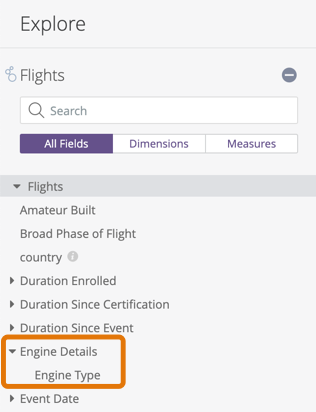
本頁面是指欄位中的
group_label參數。如
group_label(適用於探索) 參數說明文件頁面所述,group_label也可做為探索的一部分。
用量
view: view_name {
  dimension: field_name {
    group_label: "desired label name"
  }
}
|
階層
group_label |
可能的欄位類型
維度、維度群組、篩選器、指標
接受
一個字串
|
定義
您可以使用 group_label 參數,在欄位挑選器中,將特定檢視畫面中的欄位合併為自訂群組。例如:
view: accounts {
  dimension: shipping_city {
    sql: ${TABLE}.shipping_city ;;
    group_label: "Shipping Info"
  }
  dimension: shipping_state {
    sql: ${TABLE}.shipping_state ;;
    group_label: "Shipping Info"
  }
  dimension: shipping_street {
    sql: ${TABLE}.shipping_street ;;
    group_label: "Shipping Info"
  }
}
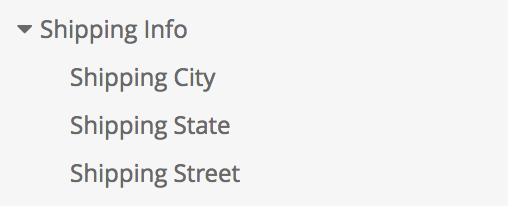
在這種情況下,欄位不會以未分組的形式顯示,而是會合併為可展開的「運送資訊」部分。
您也可以使用 group_item_label 參數,指定欄位在群組標籤下的欄位挑選器中顯示的方式。詳情請參閱 group_item_label 參數說明文件頁面。
group_label 也會以實用的方式與維度群組互動,因為維度群組會自動將欄位一起放在欄位挑選器中。使用 group_label,即可在維度群組中新增其他欄位。例如:
view: accounts {
  dimension_group: created {
    type: time
    timeframes: [date, week, month]
    sql: ${TABLE}.created_date ;;
  }
  dimension: special_date_calculation {
    sql: QUARTER(${TABLE}.created_date)
    group_label: "Created Date" ;;
  }
}
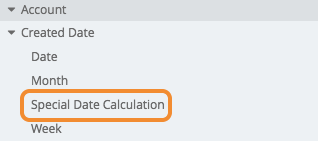
在欄位挑選器中,「Special Date Calculation」欄位會顯示在「Created Date」維度群組中。
如要在欄位挑選器中建立群組,至少須有一個欄位含有群組標籤。此外,您無法在同一個群組標籤下,將維度和指標分組在一起,因為在任何檢視畫面中,所有維度一律會與所有指標分開顯示。
舉例來說,下列程式碼會在名為 Engine Details 的群組標籤內建立名為 Engine Type 的欄位:
dimension: engine_type {
    group_label: "Engine Details"
    type: string
    sql: ${TABLE}.engine_type ;;
  }