If you were previously a user of Dialogflow CX, you may want to reuse your existing flows while you gradually build new agents using CX Agent Studio.
You can create a flow-based agent which will hand off the conversation to the flow until it reaches END_SESSION. At that point, the conversation is returned back to your CX Agent Studio agent that initiated the flow-based agent.
CX Agent Studio agent applications send user input to flows using the
DetectIntent API method.
For voice input,
CX Agent Studio agent applications handle TTS and STT for these interactions.
Using the console, you can define how data is sent back and forth between your agent application and the flows.
Configure permissions
In order for your agent application to have permissions to call your Dialogflow CX flow, you need to provide the Customer Engagement Suite Service Agent with the Dialogflow API Client role.
Create a flow-based agent
To create a flow-based agent from the agent builder:
- Click the plus button at the bottom of the agent that should initiate the flow-based agent.
- Click Import flow-based agent. The configuration panel opens.
- Select the project for your flow.
- Select the agent for your flow.
- Provide a display name.
- Provide a description for the parent CX Agent Studio agent that describes when to transfer control to the flow.
- Provide the flow starting resource.
- Provide the environment that should be used for the flow. This will default to draft.
- Provide input variable mapping. Variables you supply here are sent to the flow as session parameters.
- Output variable mapping. Flow session parameters you supply here are sent to your agent application as variables.
- Click Import.
Migration best practices
When making use of your existing flows, keep the following best practices in mind.
Playbooks
While CX Agent Studio agents offer functionality similar to playbooks, it is important to understand that CX Agent Studio agents are not a drop-in replacement. Dialogflow CX agents may have tight coupling between playbooks and flows which makes direct replacement difficult.
Isolated versus integrated agent types
When transitioning from Dialogflow CX agents with complex relationships between flows and playbooks to CX Agent Studio agents, you should first consider isolating the agent types.
You could create new CX Agent Studio agents for all new use cases and continue maintaining your Dialogflow CX agents for old use cases. You can achieve this by using a routing layer to determine which type of agent should be invoked.
Keep in mind that CX Agent Studio steering agents cannot perform transfer between Dialogflow CX agents until END_SESSION is reached and control is handed back to the CX Agent Studio steering agent.
If this approach is not feasible, and you must make use of your existing flows, you can use CX Agent Studio flow-based agents as described in this guide. It is important to use CX Agent Studio agents as the steering agents to manage routing between CX Agent Studio agents and flows.
Keep in mind that this process may be a substantial one-time effort.
Flows for highly deterministic business logic
Flows are ideal for managing highly deterministic business logic, particularly when such logic cannot be handled by CX Agent Studio callbacks.
Good examples of using a flow:
- Perform sequential data collections and validations
- Perform authentication flow based on session parameters
Bad examples of using a flow:
- Responding with a canned response to the user, as this can be readily achieved using a CX Agent Studio agent callback.
- Performing intent classification and detection, as you should use LLMs for such purposes.
Flows as blackboxes
One issue with flows is that they depend on session parameters, which are implicit global parameters. By default, all parameters gathered within a flow are automatically propagated to the session scope, thereby becoming accessible to subsequent flows. This methodology introduces a problem where modifications to parameter collection logic in an upstream flow can inadvertently disrupt downstream flows.
This behavior must be considered carefully when using CX Agent Studio flow-based agents. CX Agent Studio agents must treat flows as encapsulated black boxes, with all requisite information conveyed through explicit input parameters. Upon initiation of a flow, the flow should use these passed-in parameters as session parameters to execute its designated actions. Conversely, upon exiting the flow, it is important that the flow populates the predefined output parameters from the session parameters before ceding control to the CX Agent Studio agent.
Examples
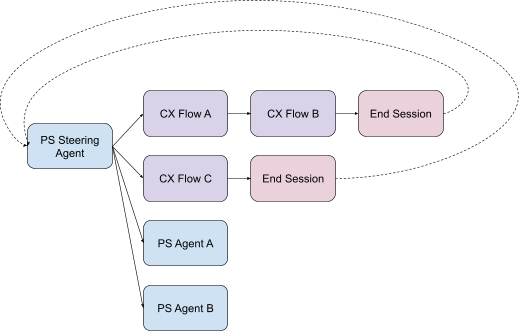
The following diagram illustrates a recommended configuration, where the CX Agent Studio agent functions as the routing layer, while flows execute self-contained logic prior to relinquishing control.
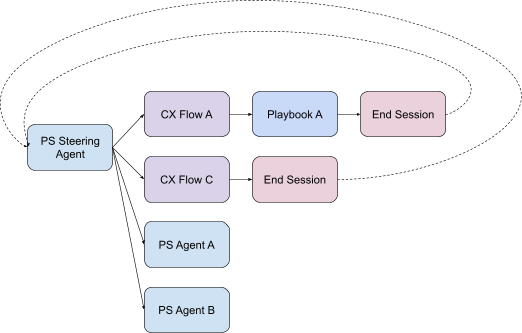
The following diagram illustrates an acceptable configuration (note the incorporation of playbook), as long as playbook <-> flow interactions remain encapsulated as a blackbox from the routing CX Agent Studio agent.
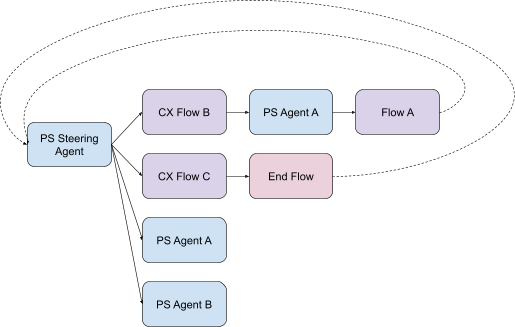
The following diagram illustrates an unacceptable configuration due to the convoluted, back-and-forth transitions between CX Flow B and PS Agent A, which compromises the encapsulation of the interface.